2017 MERCEDES-BENZ S-CLASS COUPE fuel
[x] Cancel search: fuelPage 200 of 533

R
The engine is running or ha sbeena utomati‐
cally switched of fbythe EC Ostart/s top
function.
R The electric parking brak eisreleased.
R ActiveD ista nce Assi stDISTRONI Cisdeacti‐
va ted.
R The transmission is in position h,kori.
Ac tivatin gthe HOL Dfunction #
Dep ress theb rake pedal and af teras hort
time quickl ydepress fur ther until theë
displa yappear sinthe multifunction displa y.#
Release theb rake pedal.
Deactivating the HOLD function #
Depress thea ccelerator pedal topull away.
or #
Depress theb rake pedal until theë dis‐
pla yd isappear sfromt he multifunction dis‐
pla y. The HOLD function is deactivated in
thef ollow‐
ing situations:
R ActiveD ista nce Assi stDISTRONI Cisactiva‐
te d.
R The transmission is switched toposition j.
R The vehicle is secured wit hthe electric park‐
ing brake.
In thef ollowing situations, thev ehicle is held by
th et ransmission position jorby thee lectric
parking brake:
R The seat belt is unfas tened and thed rive r's
door is opened.
R The engine is switched off.
R Ther eisam alfunction in thes ystemort he
po we rsupply is insuf ficient. AI
RB ODYC ONT ROL AIR
BODY CONT ROLfunction
AI RB ODYC ONTROL is an air suspension sy stem
wit hvariable dampin gfor impr oveddriving com‐ fo
rt.T he all-round le velc ontrol sy stem ensures
th eb estp ossible suspension and const ant
groun dclearance, evenw ithal aden vehicle.
When driving at speed, thev ehicle is lo wered
automaticall ytoimprove driving saf etya nd to
re duce fuel consum ption. The option of manually
adjustin gthe vehicle le velisa lsoavailable.
AI RB ODYC ONTROL comprises:
R Air suspension wit hautomatic all-round le vel
control
R Speed-dependent lo wering toreduce fuel
consum ption
R Manuall yselec table high-le vels etting for
greater ground clearance
R ADS PLUS (Adaptiv eDamping Sy stem with
const ant dampin gforce adjustment)
R DYNA MIC SELECT switc hand le velb utton Drivin
gand parking 197
Page 203 of 533

ve
hicle. When driving at speed, thev ehicle is
lo we reda utomaticall ytoimprove driving saf ety
and toreduce fuel consum ption. The suspension
tuning is adjus tedd ependin gontheroad sur‐
fa ce, vehicle load and thed rive program selec‐
te d. The ROAD SUR FACE SCAN function de tects
area sofu nevenness in ther oad befor eyou drive
ove rthem bymeans of amultifunction camera.
This reduces chassis mo vements. The option of
manually adju sting thev ehicle le velisa lsoavail‐
able. The dampin
gisadjustedi ndividually toeach
wheel and depends on:
R The driving style, e.g. sporty
R The road sur face condition, e.g. bu mps
R The individual selection of "Sport+", "Sport",
"Comfort", "CURVE" or "Economy"
MAGIC BODY CONTROL comprises:
R ActiveB odyC ontrol ABC
R ROAD SUR FACE SCAN R
Cur veinclination function CURVE
R Automatic le velc ontrol sy stem
R Automatic vehicle stabilisation in thee vent of
sidewinds
R Speed-dependent lo wering toreduce fuel
consum ption
R Manuall yselec table high-le vels etting for
grea terg round clea rance
R DYNA MIC SELECT switc hand le velb utton 200
Drivingand parking
Page 234 of 533
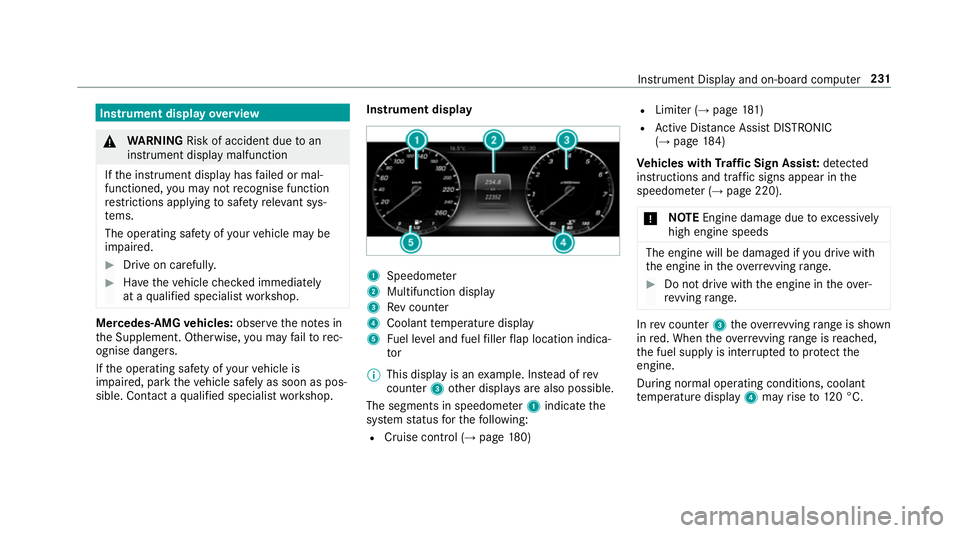
Instrument displa
yoverview &
WARNING Risk of accident du etoan
instrumen tdispla ymalfunction
If th ei nstrument displa yhasfailed or mal‐
functioned, youm aynotrecognise function
re strictions applying tosaf etyr ele vant sys‐
te ms.
The operating saf etyofy ourvehicle ma ybe
impaired. #
Driv eonc arefull y. #
Have thev ehicle checkedi mmediately
at aq ualified specialis tworks hop. Mercedes‑AMG
vehicles: observet he no tesin
th eS upplement .Otherwise, youm ayfailto rec‐
ognise dangers.
If th eo perating saf etyofy ourvehicle is
impaired, par kthe vehicle safel yassoon as pos‐
sible. Contact aqualified specialis tworks hop. Instrument display
1
Speedome ter
2 Multifunction display
3 Revc ounter
4 Coolant temp eratur edisplay
5 Fuel le vela nd fuel filler flap locatio nindica‐
tor
% This displa yisanexamp le. In stead of rev
counter 3other displa ysarea lso possible.
The segment sinspeedome ter1 indica tethe
sy stem status fort he following:
R Cruise control (→ page180) R
Limiter (→ page181 )
R ActiveD ista nce Assi stDISTRONIC
(→ page 184)
Ve hicles with Traf ficS ign Assis t:de tected
instructions and traf fics igns appea rinthe
speedome ter( → pag e220).
* NO
TEEngine dama gedue toexcessively
hig he ngine speeds The engine will be damaged if
youd rive with
th ee ngine in theo verrev ving range. #
Do no tdrive with th eengine in theo ver‐
re vving range. In
revc ounter 3theo verrev ving rang eiss hown
in red. When theo verrev ving rang eisr eached,
th ef uel supply is inter rupte dtop rotect the
engine.
During normal operating conditions ,coolant
te mp eratur edisplay 4mayrise to120° C. Instrument Displ
ayand on-boar dcomputer 231
Page 237 of 533

Callin
gupthe Assistance graphic display On-board computer:
, Assistance
% When youh ave setthe styletoProgressive,
yo uc an vie wthe assis tance graphi cmenu
contents in thel eft-hand portion of the
instrumen tdispla y.
The following displa ysarea vailable from the
Assi stanc egraphic menu:
R Assis tance graphic
R Attentio nleve l(→ pag e219 ) #
Toswitc hbetwe en thed ispla ys:swipe
up wa rdsord ownw ards on thel eft-hand
To uc hC ontrol. St
atus displa ysintheA ssis tance graphic:
R é:A TTENTION ASSIS Tdeactivated
R æ:A ctiveBrake Assi stdeactivated
R Light lane markings: ActiveL aneK eeping
Assis tactivated
R Green lane markings :Activ eLaneK eeping
Assis tactive R
Grey radar wavesn exttov ehicle: Blind Spot
Assis tactivated
R Green radar waves next tovehicle: Blind Spot
Assis tactive
R ActiveD ista nce Assi stDISTRONI Cdispl ays
( → pag e184). Calling up
displaysint heTrip menu On-boar
dcomputer:
, Trip
% When youh ave thes tyle se ttoProgressive,
yo uc an vie winformation on thej ourne yin
th el eft-hand area of theI nstrument Displa y. #
Toselect adispla y:swipe upwards or down‐
wa rdsont he left-hand Touc hC ontrol.
Displa ysinthe Trip menu:
R standar ddisplay
R rang ea nd cur rent fue lconsu mption
Ar ecuperation displa yisalsoavailable for
cer tain engines. If ther eiso nlyas mall
amount of fuel lef tinthe fuel tank ,the dis‐ 234
Instrument Displa yand on-boar dcomputer
Page 238 of 533

pla
yshows avehicle being refuelled ins tead
of ther ange.
R ECOd ispl ay ( →pag e154)
R trip computer From startandFrom reset
R digital speedome ter
% The digital speedome tero nly appear sinthe
Classic andSport styles. Example:
standar ddisplay
1 Trip dis tance
2 Totald ista nce recorder
Ve hicles without a48Von-boardelectrical
sy stem (EQ Boos ttechnology): Example: trip computer
1
Totald ista nce recorder
2 Driving time
3 Averag espeed
4 Averag efuel consum ption Re
setting values in theT ripm enu of theo n-
boar dcompu ter On-boar
dcomputer:
, Trip
% The spelling ma ydiffe rint he main menu dis‐
pla yed. Therefore, obser vethem enu over‐
vie wf ortheI nstrument Displa y. Yo
uc an rese tthe values of thef ollowing func‐
tions:
R Trip dis tance
R Trip computer "F roms tart"a nd "F romr eset"
R ECOd isplay #
Toselect thef unction tobe rese t:swipe
upwards or down wardsont he left-hand
To uc hC ontrol. #
Press thel eft-hand Touc hC ontrol. #
Select Yes. #
Press thel eft-hand Touc hC ontrol.
If yo up ress and hold thel eft-hand Touc hC on‐
trol, thef unction will be rese timmediately. Instrument Displa
yand on-boar dcomputer 235
Page 283 of 533

Entering
Italyshowsthef ollowing results, for
ex ample:
R POI swhichc ontain Italy inthen ame.
R POIs whic hbelong tothec ategory Italian
cuisine. #
Select ¡.
The firs tP OI in thel istish ighlighted. #
Select theP OI.
Example: setting thes ear chposition fort he
parkin gcatego ryduring activ erout eguid‐
ance #
Select In the vicinity ,Near destination or
Along the route.
The lis tshows th elocated POIs or opens an
ove rviewoft herouted estinatio nafter
selecting Near destination. #
Select theP OI. #
Select Near destination:s electthei ntermedi‐
at ed estination or thed estination. St
arting an automatic filling station sear ch
Re quirements:
R The automatic filling statio nsear chis activa‐
ted O(→ pag e287).
Driving situation
Ro uteg uidance is active. The fuel le velint he
fuel tank reaches ther eser vefuel le vel.
The Fuel tan kreserve level Do you want to start
the searc hfor fillin gstations? messageis
shown. #
Select Yes.
The automatic filling statio nsear chbegins.
The available filling stations alon gthe route
or in thev icinit yoft hevehicle's cur rent posi‐
tio na redispl ayed. #
Select thef illing station.
The address of thef illing statio nisd isplayed. #
Ifro uteg uidance is no tactive, select Start
rout eguidance .
The selected filling statio niss etas thed esti‐
nation .Rout eguidance begins.
or #
Ifro uteg uidance is active, select Start new
rout eguidance orSet as next intermediate
destination .
Start ne wrout eguidance:t he selected filling
st atio niss etas an ew destination. The pr evi‐
ous destination sand intermediat edestina‐
tion saredele ted. Ro uteg uidance tothef ill‐
ing statio nbegins.
Set as nex tintermediat edestination:t he
selected filling statio niss etas then extinter‐
mediat edestination. Routeg uidance begins. #
Ifth erea realread yfour intermediat edes‐
tinations: selectYesinthep romp t.
Th es elected filling statio nise ntered into
position 1ofthe intermediat edestinations
menu. Intermediat edestination 4isdeleted.
Ro uteg uidance begins.
Entering an intermediat edestination
Re quirements:
R Adestination is entered. 280
Multimedia sy stem
Page 288 of 533

option is enabled.
Amessag eappear sand you
will hear acorresponding message.
Selecting notifications
Multimedia sy stem:
, Naviga-
tion .
Z Options .
Announcements #
Switc hannouncements on Oor off ª.
R Announc etraffic warnings
This function is no tavailable in all coun‐
tries.
R Announc estreet names
The multimedia sy stem announces the
names of ther oads that will follo wt he
upcomin gchang eofd irection.
This function is no tavailable in all coun‐
tries and languages.
Displ aying destination information
Requ irements:
R Adestination is entered. Multimedia sy
stem:
, Navigation #
Select Intermediate destinations and info.
The following informatio nisdisplayed:
R intermediat edestinations and destination
The routec an also include up tofour
intermediat edestinations.
R name, address
R remaining driving dis tance
R time of ar rival
Selecting an alternativ eroute
Multimedia sy stem:
, Navigation .
À Route and position #
Select Alternativ eroute.
The routes ar edispl ayed in accordance with
th es etting made in ther out esettings.
The cur rentl ys elected routeiss hown wit ha
dar kblue line. #
Select thea lternativ eroute. Switching
thea utomatic filling station
sear chon/off
Multimedia sy stem:
, Navigation .
Z Options #
Switch Reserve fuel level onO or off ª.
Switched on O:whenthef uel reser velevel
is reached, apromp tappear sasking whe ther
yo uw ant tostar ts ear ching forf illing sta‐
tions.
St arting thea utomatic service station
sear ch
Re quirements:
R ATTENTION ASSIS Tand the Suggest rest
area function ar eactivated (→ page220).
Driving situation
The Attention Assist Do you want to start the
rest area search? messageisshown. #
Select Yes.
The service statio nsear ch st arts.The availa‐
ble servic estations alon gthe routeorint he
vicinity of thev ehicle's cur rent positio nare
displ ayed. Multimedia sy
stem 285
Page 299 of 533

•Tof
ilterthed ispla yofP OIs in thev icinity
according toPOI category
5 Switches thed ispla yofp ersonal POI sym‐
bols on them ap on or off
6 Switches one of thef ollowing displa yson or
of fd epending on thee quipment:
•W eather information
•S atellit emap
•T raffic incidents
7 Switche sthe tra ffic map displa yonoro ff
The map and satellit eimages ar eshown in globe
projection. This allo wsforar ealistic map display
in all map scales. The map uses ele vatio nm odel‐
ling.
Depending on them ap data, impor tant buildings
in ma nycities ar edepicted realisticall yonthe
map in small map scales (20m,50m ). Other
buildings ar eshown as models.
% Youc an se tthe unit of measurement of the
map scale (→ page268).
If online information is available, fuel price sand
th ea vailabilit yofparkingspaces in multi-s torey
car pa rksa redispla yed, fore xamp le. %
Requirements:
R Youh ave aMercedes me account.
R The servic ehas been activated at a
Mercedes-Ben zServic eCentre.
Fu rther information can be found at :http://
www.mercedes.me
If Display in COMAND is activated inTraf ficS ign
Assi st (→pag e222) ,speed limits and overtak‐
ing restrictions ar edispl ay ed on them ap.
% Compan ylogos displa yedont he map are
trademar ksofther espectiv ecompanies and
used solely fort he purpose of indicating the
locations of these companies. The use of
suc hlogos on them ap does no tindicate
appr oval of, suppo rtof or advertising by
th ese companies fort he navigation sy stem
itself.
Setting them apscale
Re quirements:
R The map is shown. Multimedia sy
stem:
, Navigation #
Tozoo min:swipe down on theT ouc hCon‐
trol.
or #
Turn thec ontroller anti-clockwise.
or #
Movetwof inger saparton thet ouchpad. #
Tozoo mo ut:swipe up on theT ouc hControl.
or #
Turn thec ontroller clockwise.
or #
Movetwof inger stogether on thet ouchpad.
% Youc an se tthe unit of measurement of the
map scale (→ page268). 296
Multimedi asystem