2017 MERCEDES-BENZ S-CLASS CABRIOLET steering
[x] Cancel search: steeringPage 189 of 521
sag
eiss hown in them ultifunction displa y.The
ve hicle is decelerated in stages toas tandstill. At
speeds belo w60km/h theh azar dwarning
light sswitc hona utomaticall y.
When thev ehicle is stationar y,thef ollowing
actions ar ecarried out:
R The vehicle is secured wit hthe electric park‐
ing brake.
R ActiveD ista nce Assi stDISTRONI Cisended.
R The vehicle is unloc ked.
R If possible, an emer gency cal lisplace dto
th eM ercedes-Benz emer gency cal lcentre.
The driver can cance lthe deceleration at any
time byper form ing one of thef ollowing actions:
R Steering
R Depressing theb rake or accelera torp edal
R Pressing asteering wheel button or operat‐
ing Touc hC ontrol
R Activating or deacti vating ActiveD ista nce
Assi stDISTRONIC Overvi
ewofActiv eD ista nce Assist
DISTRO NIC displa ysinthei nstrument clus‐
ter The assis
tance graphi cand thes tatus display
sho wthe status of thef ollowing function sinthe
instrument clus ter:
R ActiveD ista nce Assi stDISTRONIC
R Route-based spee dadjustment
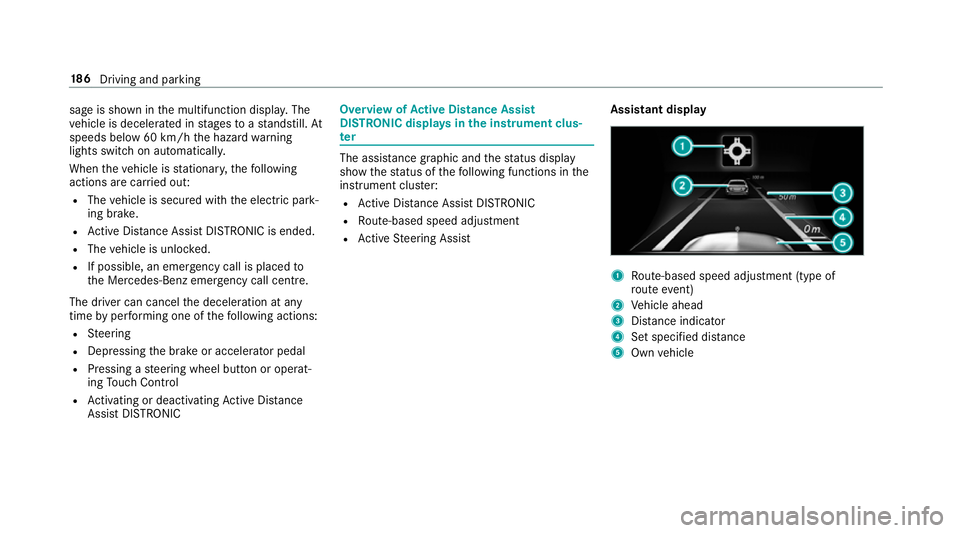
R ActiveS teering Assist Assistant display 1
Route-based spee dadjustmen t(type of
ro utee vent)
2 Vehicle ahead
3 Distance indica tor
4 Setspecifie ddista nce
5 Own vehicle 18 6
Driving and pa rking
Page 190 of 521
Ac
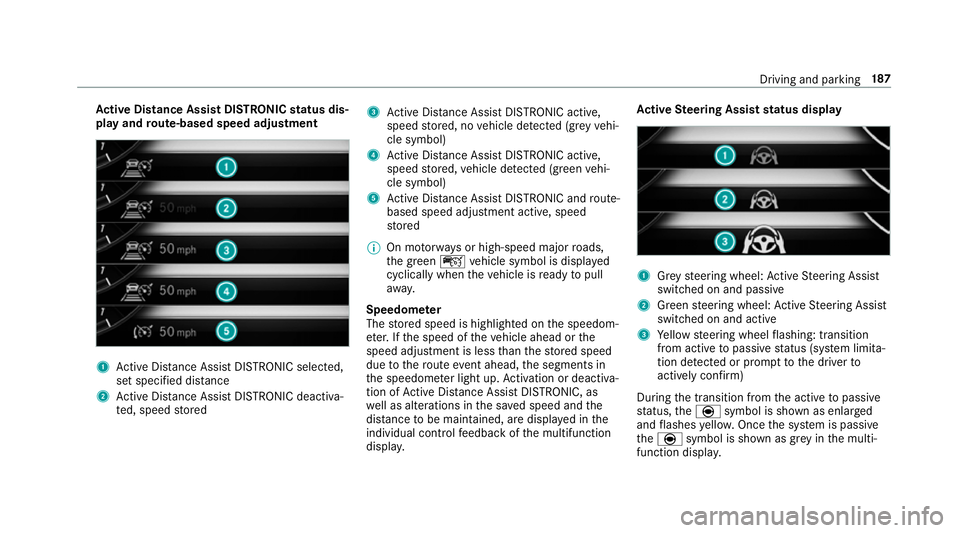
tiv eD ista nce Assis tDISTR ON ICstatus dis‐
pla yand route-base dspee dadjustment 1
ActiveD ista nce Assi stDISTRONI Cselected,
se ts pecified dis tance
2 ActiveD ista nce Assi stDISTRONI Cdeacti va‐
te d, speed stored 3
ActiveD ista nce Assi stDISTRONI Cactive,
speed stored, no vehicle de tected (gr eyvehi‐
cle symbol)
4 ActiveD ista nce Assi stDISTRONI Cactive,
speed stored, vehicle de tected (green vehi‐
cle symbol)
5 ActiveD ista nce Assi stDISTRONI Candroute-
based spee dadjustmen tactive, speed
st ored
% On mo torw aysorh igh-speed major roads,
th eg reen ç vehicle symbol is displa yed
cyclically whe nthe vehicle is ready topull
aw ay.
Speedome ter
The stored speed is highlighted on thes peedom‐
et er.Ift he speed of thev ehicle ahead or the
speed adjustment is less than thes tore ds peed
due tother out eevent ahead, thes egment sin
th es peedome terl ight up. Activation or deacti va‐
tio nofA ctiveDista nce Assi stDISTRONIC, as
we ll as alteration sinthe sa veds peed and the
dis tance tobe maintained, ar edispla yedint he
individual control feedbac kofthe multifunction
displa y. Ac
tiv eS teering Assis tstatus display 1
Grey steering wheel: ActiveS teering Assist
switched on and passive
2 Green steering wheel: ActiveS teering Assist
switched on and active
3 Yello ws teering wheel flashing: transition
from activ etopassivestatus (s ystem limita‐
tion de tected or prom pttothed rive rto
activel yconfirm)
During thet ransition from thea ctiv etop assive
st atus ,the è symbol is shown as enlarged
and flashes yello w. Once thes ystemisp assive
the è symbol is shown as gr eyinthem ulti‐
function displa y. Driving and pa
rking 187
Page 199 of 521
yo
utoo rientat eyourself and toavo id obs tacles
whe nreve rsing.
The reve rsing camer aisonlyana id. It is no ta
substitut efor your attentio ntothe sur roundings.
The responsibility fors afem anoeuvring and
parking remains wit hyou. Mak esuret hat there
ar enop ersons, animals or objects in the
manoeuvring area whil emanoeuvring and park‐
ing in parking spaces.
Yo uc an select from thef ollowing vie ws:
R Normal view
R Wide-angle view
The area behind thev ehicle is displa yedasa
mir rorimage, as in thei nside rearvie wmirro r. Camer
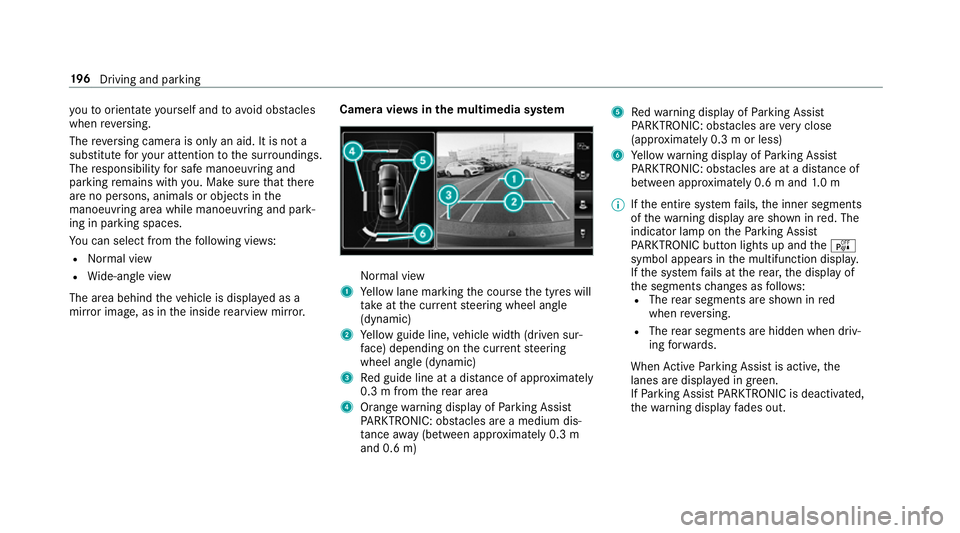
aviews inthem ultimedia sy stem Normal view
1 Yello wl ane markin gthe course thet yres will
ta ke atthec urrent steering wheel angle
(dynamic)
2 Yello wg uide line, vehicle widt h(driven sur‐
fa ce) depending on thec urrent steering
wheel angle (dynamic)
3 Redg uide line at adista nce of appr oximately
0. 3mf romt herear area
4 Orang ewarning displa yofParking Assist
PA RKTRONIC: obstacles ar eamedium dis‐
ta nce away (between appr oximatel y0.3 m
and 0. 6m) 5
Redw arning displa yofParking Assist
PA RKTRONIC: obstacles ar everyc lose
(appr oximatel y0.3mo rless)
6 Yello ww arning displa yofParking Assist
PA RKTRONIC: obstacles ar eatadista nce of
betwee napproximately 0.6 mand1.0m
% Ifth ee ntir esystemf ails, thei nner segments
of thew arning displa yareshown in red. The
indicator lam pontheParking Assist
PA RKTRONI Cbuttonl ights up and theé
symbol appear sinthe multifunction displa y.
If th es ystemf ails at ther ear ,the displa yof
th es egment schanges as follo ws:
R The rear segment sareshown in red
when reve rsing.
R The rear segment sarehidde nwhen driv‐
ing forw ards.
When ActiveP arking Assis tisactive, the
lanes ar edispla yeding reen.
If Pa rking Assis tPARKTRONIC is deactivated,
th ew arning displa yfades out. 19 6
Driving and pa rking
Page 201 of 521
R
Front camera
R Twos ide cameras in theo utside mir rors
Vi ew soft he 360 °Camera
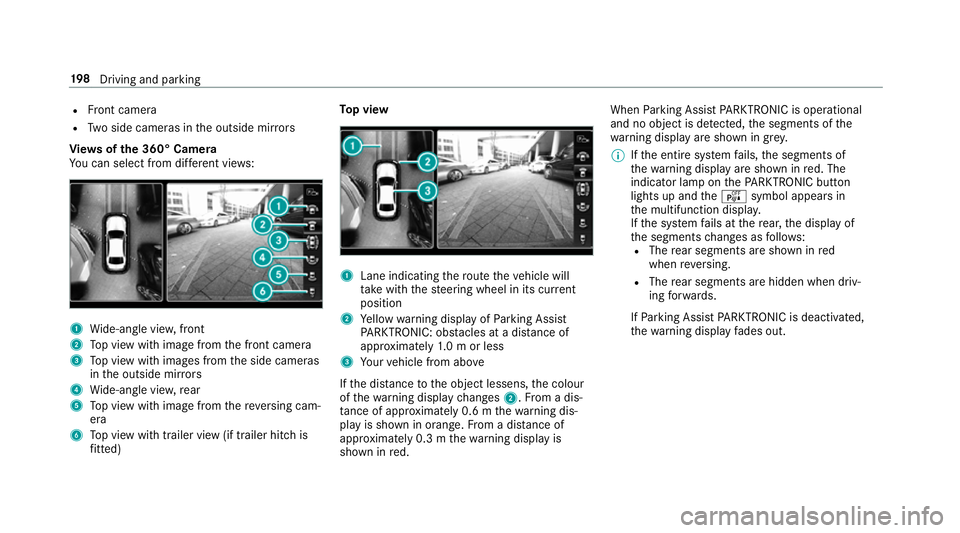
Yo uc an select from dif fere nt vie ws: 1
Wide-angle vie w,front
2 Topv ieww ithi mag efromt he front camera
3 Topv ieww ithi mages from thes ide cameras
in theo utside mir rors
4 Wide-angle vie w,rear
5 Topv ieww ithi mag efromt hereve rsing cam‐
era
6 Topv ieww itht railer vie w(if trailer hitc his
fi tted) To
pv iew 1
Lane indicating ther out ethe vehicle will
ta ke wit hthe steering wheel in its cur rent
position
2 Yello ww arning displa yofParking Assist
PA RKTRONIC: obstacles at adista nce of
appr oximatel y1.0morl ess
3 Your vehicle from abo ve
If th ed ista nce totheo bjec tlessens, thec olour
of thew arning displa ychanges 2.Fromad is‐
ta nce of appr oximatel y0.6mt hewarning dis‐
pla yiss hown in orange. From adistan ce of
appr oximatel y0.3mt hewarning displa yis
shown in red. When
Parking Assis tPARKTRONIC is operational
an dnoo bjectisd etected, thes egment softhe
wa rning displa yareshown in grey.
% Ifth ee ntir esystemf ails, thes egments of
th ew arning displa yareshown in red. The
indicator lam ponthePARKTRONI Cbutton
light supa ndthe é symbol appear sin
th em ultifunction displa y.
If th es ystemf ails at ther ear ,the displa yof
th es egment schanges as follo ws:
R The rear segment sareshown in red
when reve rsing.
R The rear segment sarehidde nwhen driv‐
ing forw ards.
If Pa rking Assis tPARKTRONIC is deactivated,
th ew arning displa yfades out. 19 8
Driving and pa rking
Page 202 of 521
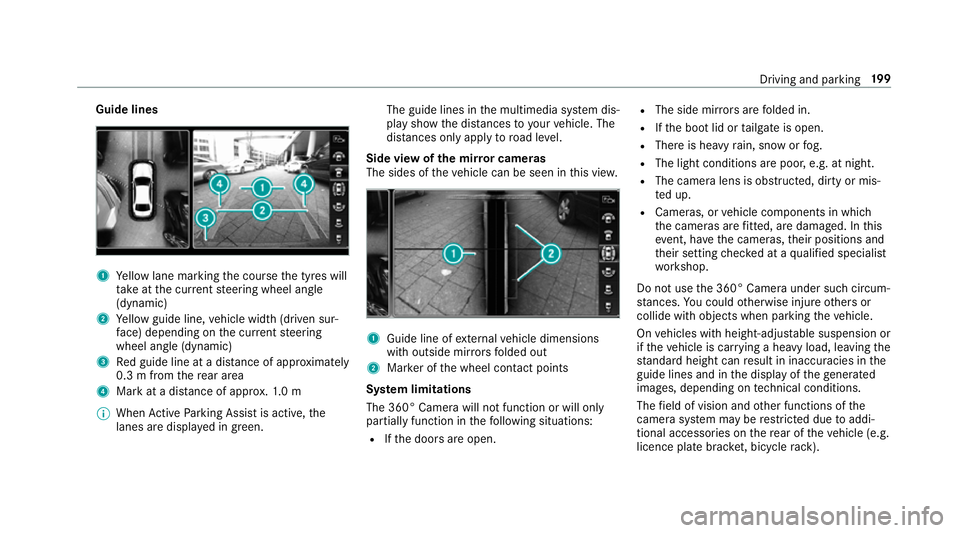
Guide lines
1
Yello wl ane markin gthe course thet yres will
ta ke atthec urrent steering wheel angle
(dynamic)
2 Yello wg uide line, vehicle widt h(driven sur‐
fa ce) depending on thec urrent steering
wheel angle (dynamic)
3 Redg uide line at adista nce of appr oximately
0. 3mf romt herear area
4 Markatad istance of appr ox.1 .0 m
% When ActiveP arking Assis tisactive, the
lanes ar edispla yeding reen. The guide lines in
them ultimedia sy stem dis‐
pla yshowt he dis tances toyour vehicle. The
dis tances only apply toroad le vel.
Side vie wofthe mir rorc ameras
The side softhevehicle can be seen in this vie w. 1
Guide line of extern al vehicle dimensions
wit ho utside mir rors folded out
2 Markeroft he wheel contact points
Sy stem limitations
The 360° Camera will no tfunction or will only
partiall yfunction in thef ollowing situations:
R Ifth ed oor sareopen. R
The side mir rors aref olded in.
R Ifth eb ootlid or tailgat eiso pen.
R Ther eish eavyrain, sno worfog.
R The light conditions ar epoor ,e.g. at night.
R The camer alens is obstructed, dirty or mis‐
te du p.
R Cameras, or vehicle componentsinw hich
th ec ameras ar efitted, ar edamaged .Inthis
eve nt, ha vethec ameras, their position sand
th eir setting checkedataq ualified specialist
wo rkshop.
Do no tuse the3 60° Camer aunder suc hcircum‐
st ances. Youc ouldotherwise injur eother sor
collide wit hobjectsw hen parking thev ehicle.
On vehicles wit hheight-adjus table suspension or
if th ev ehicle is car rying aheavy load, leavin gthe
st andar dheigh tcan result in inaccuracies in the
guide lines and in thed ispla yoft hegenerated
ima ges, depending on tech nica lconditions.
The field of vision and other functions of the
came rasystem ma yberestricted due toaddi‐
tional accesso ries on ther ear of thev ehicle (e.g.
licence plat ebrack et,b icyc le rack ). Driving and parking
19 9
Page 204 of 521
Ac
tiveP arking Assis tisonlyana id. It is no ta
substitut efor your attentio ntothe sur roundings.
The responsibility fors afem anoeuvring and
parking remains wit hyou. Mak esuret hat no
persons, animals or objectse tc. areinthe
manoeuvring range.
Ac tiveP arking Assis tiscancelled if, among
ot her things ,one of thef ollowing actions is car‐
ri ed out:
R Youd eactivat eParking Assis tPARKTRONIC.
R Youd eactivat eActiv eParking Assist.
R Youb egin steering.
R Youa ppl ythe parking brake.
R Youe ngaget ransmission position j.
R ESP ®
inter venes.
R Youo pen theb ootlid.
Sy stem limitations
Object slocated abo veor belo wthe de tection
ra ng eofA ctiveParking Assis tare notd etected
when thep arking space is being measured.
These ar ealso no ttaken in toaccount when the
parkin gmanoeuvr eiscalculated, e.g. overhang‐
ing loads, overhangs or loading ramp sofl orries or
theb oundaries of parking spaces. In some cir‐
cums tances, ActiveP arking Assis tmaytherefore
guide youi ntot he parking space prematurel y. &
WARNING Risk of accident du eto
object slocated abo veor belo wthe
de tection rang eofA ctiveParking Assist
If th er ea reobjects abo veor belo wthe
de tection range, thef ollowing situations may
arise:
R ActiveP arking Assis tmaysteer tooe arly.
R Vehicles with automatic transmis‐
sion: Thevehicle ma ynotstop in front of
th ese objects.
This could cause acollision. #
Inthese situations, do no tuse Active
Pa rking Assist. Sn
owfa ll or heavy rain ma ylead toap arking
spac ebeingm easured inaccuratel y.Pa rking
spaces that ar epartial lyoccupied bytrailer
dr aw bar sm ight no tbeidentified as suc horbe
measured incor rectly .Only us eActiv eParking
Assis tonlevel, high-grip ground. Do no
tuse ActiveP arking Assis tinthefollowing
situations:
R Inextreme weather condition ssuchasi ce,
pac keds noworinh eavyrain.
R Ifyo ua retransportin gaload that pr otru des
be yond thev ehicle.
R Ifth ep arking space is on asteep downhill or
uphill gradient.
R Ifyo uh avei nstalled sno wchains.
Ac tiveP arking Assis tmayalso displa yparking
spaces that ar enotsuitable forp arking, e.g.:
R Parking spaces wher eparkin gisp rohibited.
R Parking spaces on unsuitable sur faces.
Ac tiveP arking Assis twill no tassis tyou with
parking spaces at right angles tothed irection of
tr ave lint hefollowing situations:
R If tw oparkin gspaces ar elocated immedi‐
atel ynexttoe acho ther.
R Ifth ep arking space is directly next toalow
obs tacle su chasalow kerb. Driving and parking
201
Page 231 of 521

Note
sono perating saf ety &
WARNING Risk of di stra ction from infor‐
mation sy stems and communications
equipment
If yo uo perat einformation and communica‐
tio ne quipment integ ratedint hevehicle
when driving, youw ill be distracted from the
traf fics ituation. Thi scould also cause youto
lose control of thev ehicle. #
Onlyoperat ethis equipment when the
traf fics ituation permits. #
Ifyo uc anno tbes ureoft his,stop the
ve hicle whils tpaying attention toroad
and traf ficc onditions and ope rate the
equipment wit hthe vehicle stationar y. &
WARNING Risk of di stra ction from oper‐
ating mobil ecommunication equipment
while thev ehicle is in motion
If yo uo perat ecommun icationequipment
integrated in thev ehicle when driving, you
will be distracted from thet raffic situation. This could also cause
youtol ose control of
th ev ehicle.
Onl yoperat ethis equipment when thev ehi‐
cle is stationar y. Fo
ry our owns afet y, alwa ys obser vethef ollow‐
ing points when operating mobile communica‐
tions equipment and especiall yyour voice con‐
trol sy stem:
R Obser vethel egal requ irements fort he coun‐
tr yinw hichyou ar edriving.
R While driving, on ly operatem obile communi‐
cation sequipment and your voice control
sy stem when thet raffic condition spermit it.
Yo um ayotherwise be distracted from the
traf ficc onditions and cause an accident,
inju ring yourself and others.
R Do no tuse thev oice control sy stem in an
emer gency as your voice can chang eand
yo ur telephon ecall can be unnecessarily
dela yed.
R Familiarise yourself wit hthe voice control
sy stem function sbefor estartin gt he journe y. Operation
Multifunction
steering wheel operation over‐
vi ew LINGU
ATRO NIC is operational appr oximately
th irty seconds af tert he ignition is switched on. 228
LINGU ATRO NIC
Page 232 of 521
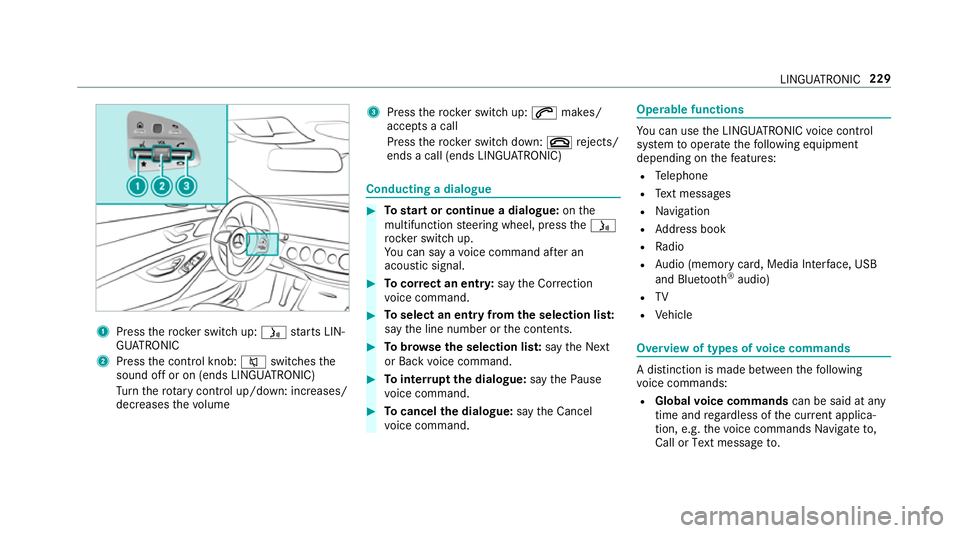
1
Press ther ockers witc hup:ó starts LIN‐
GU ATRO NIC
2 Press thec ontrol knob: 8switches the
sound of foron(ends LINGU ATRO NIC)
Tu rn ther otar yc ontrol up/down: increases/
decreases thev olume 3
Press ther ockers witc hup:6 makes/
accepts acall
Press ther ockers witc hdown:~ rejects/
end sac all( en ds LINGU ATRO NIC) Conducting
adialogue #
Tostar torc ontinue adialogue: onthe
multifunction steering wheel, press theó
rock er switc hup.
Yo uc an sa yavoice command af teran
acou stic signal. #
Tocor rect an ent ry:sayt he Correction
vo ice command. #
Toselect an entr yfromt he selection lis t:
sa yt he line number or thec ontents. #
Tobrows ethe selection lis t:sa yt he Next
or Back voice command. #
Tointer rupt thed ialogue: sayt he Pause
vo ice command. #
Tocancel thed ialogue: sayt he Cancel
vo ice command. Operable functions
Yo
uc an use theL INGU ATRO NIC voice control
sy stem tooperat ethe following equipment
depending on thef eatures:
R Telephone
R Text messa ges
R Navigation
R Address book
R Radio
R Audio (memor ycard, Media Inter face, USB
and Blu etoo th®
audio)
R TV
R Vehicle Overvie
woftypes of voice commands Ad
istinction is made between thef ollowing
vo ice commands:
R Global voice commands can be said at any
time and rega rdless of thec urrent applica‐
tion, e.g .the voice commands Navigateto,
Call orText message to. LINGU
ATRO NIC 229