Page 239 of 521
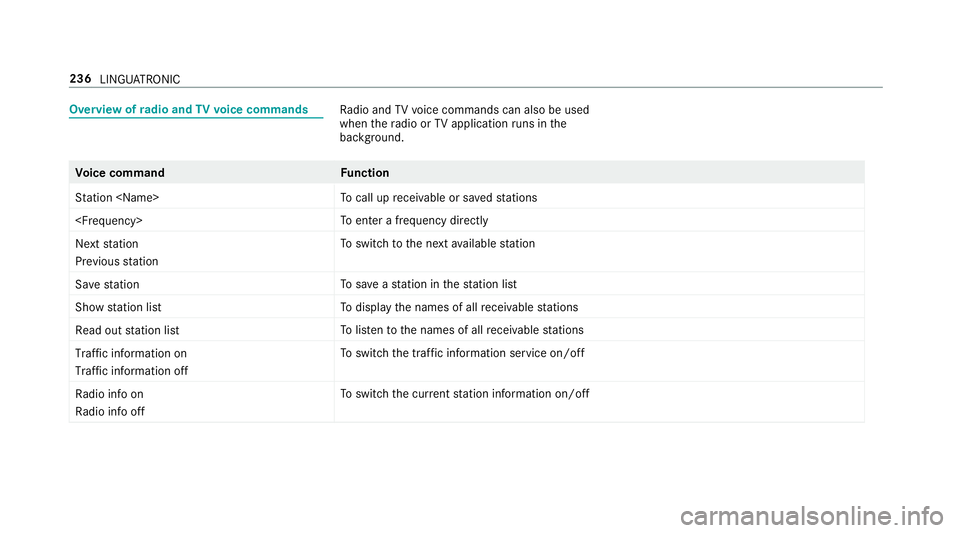
Overvie
wofradio and TVvoice commands Ra
dio and TVvoice command scan also be used
when ther adio or TVapplicatio nruns in the
bac kground. Vo
ice command Function
Station To
cal lupr eceivable or sa veds tations
To
enter afrequ ency directly
Next station
Previouss tation To
switc htot he next available station
Sav estation To
save as tatio nint hestatio nlist
Show statio nlist To
displa ythe names of all recei vable stations
Read out statio nlist To
listentot he names of all recei vable stations
Traffic informatio non
Traffic informatio noff To
switc hthe traf fici nformation service on/off
Radi oinfo on
Radi oinfo off To
switc hthe cur rent statio ninformation on/off 236
LINGU ATRO NIC
Page 247 of 521
#
Tocall up thec ontrol menu of thel ast
activ eaudio source: swipe up withtwo fin‐
ge rs.
Setting thes ensitivit yfor th etouchpad
Multimedia sy stem:
, System .
w Input #
Select Touchpad sensitivity .#
Select Fast,Medium orSlow . #
Tosetthe pressur esensitivit y:switch
Touchpad tap onO or off ª.
If th ef unction is switched on O,atap on
th et ouchpad is enough toselect amenu
item.
Handwriting recognition: swit ching ther ead-
alou dfunction on/off
Multimedi asystem:
, System .
õ Audio .
System feed-
back #
Switch Read out handwritin grecognition on
O or off ª. Ac
tivating/deactivatin ghaptic feedba ckfor
operation on thet ouchpad
Multimedia sy stem:
, System .
w Input
The function supports youw hen making entries
on thet ouchpad and when selecting menus. #
Switch Haptic operating feedback on or off.
When thef unction is activated, atactile feed‐
bac kint heform ofav ibration is ef fected
whe nthe touchpad is operated.
Selecting astatio nand trac kusingthe
to uchpad #
Press theD button on thet ouchpad.
or #
Swipe upwards using tw ofinger sont he
to uchpad.
The cont rolm enua ppear sfor thea udio
source that wa slasts elected. #
Use one finger toswipe up or down.
Ra dio: thep reviou sort he next statio niss et.
Media source: thep reviou sort he next music
tra ck is selec ted. #
Tohide thec ontrol menu: swipe down on
th et ouchpad using tw ofingers. Main functions
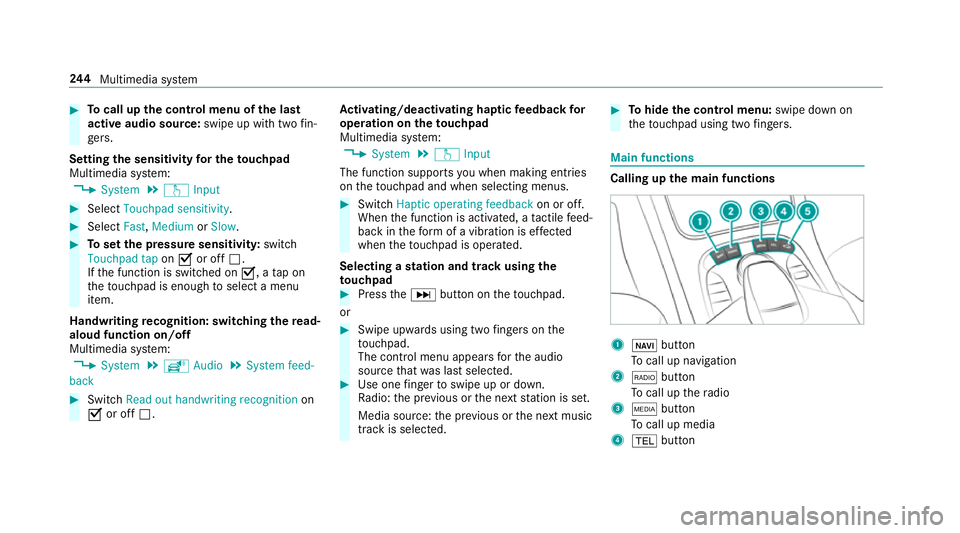
Calling up th
emain functions 1
ß button
To cal lupn avigation
2 $ button
To cal lupt heradio
3 Õ button
To cal lupm edia
4 % button 244
Multimedia sy stem
Page 250 of 521
On
them ultimedia sy stem #
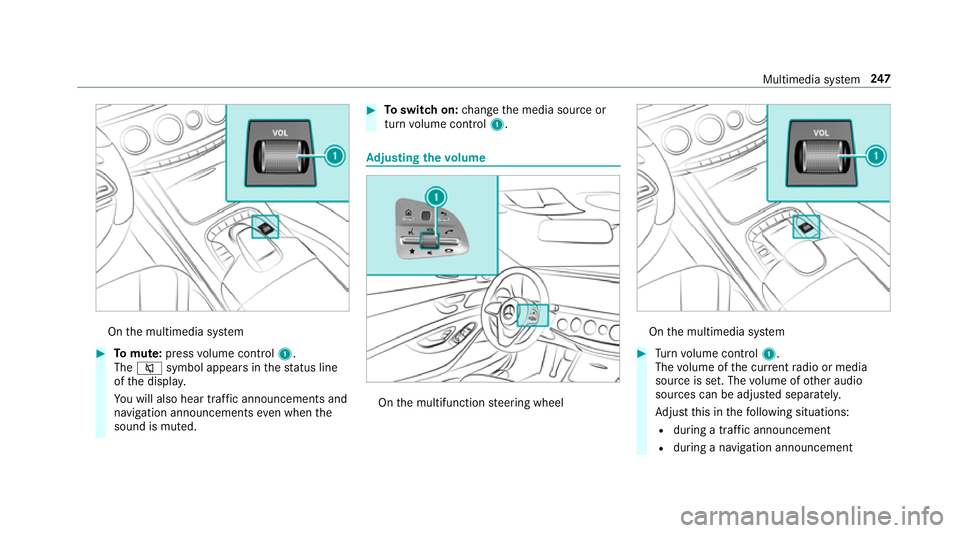
Tomute: pressvolume control 1.
The 8 symbol appear sinthestatus line
of thed ispla y.
Yo uw ill also hear traf fica nnouncements and
navigation announcements even when the
sound is muted. #
Toswitc hon:chang ethe media source or
tur nv olume control 1. Ad
justin gthe volume On
them ultifunction steering wheel On
them ultimedia sy stem #
Turn volume control 1.
The volume of thec urrent radio or media
source is set. The volume of other audio
sources can be adjus teds eparatel y.
Ad jus tthis in thef ollowing situations:
R during atraf fica nnouncement
R during anavigation announcement Multimedia sy
stem 247
Page 283 of 521

th
er emaining time forf reeu sage is 2.5
ye ars.
In fo rm atio nont hevehicle's position is regularly
sent toDaimle rAG. Th edataisi mmediatel yren‐
dered anonymous byDaimle rAGandforw arded
to thet raffic dat aprovide r.Usin gthis data, traf‐
fi cr eports releva nt tothev ehicle's position are
sent tothev ehicle. The vehicle acts as asensor
fo rt he flow of traf fica nd helps toimpr ovethe
qu alit yoft he tra ffic reports.
If yo udon otwish totransmi tyour vehicle posi‐
tion, youc an ha vethis service deactivated at a
Mercedes-Benz Service Cent re.
Useful information on FM RDS-TMC:
R AFMR DS-TMC radio statio nbroadcasts traf‐
fi cr eports alongside ther adio prog ramme.
R FM RDS-TMC is no tavailable in all countries.
Displ aying subscription information
Requ irements:
R The vehicle is equipped wit hLiveT raffic
Information. Multimedia sy
stem:
, Navigation .
Z Options
The subscription expir yd ateisa utomaticall ydis‐
pla yed:
R one mont hbefor ethe expir yd ate
R one week befor ethe expir yd ate
R onthee xpirydate #
Todispl aymanuall y:select Live Traffic Sub-
scription Info.
Depending on thes tatus ,one ofthef ollowing
messages appears:
R thep eriod of validity fort he subscription
is displa yed.
R thes ubscription has expired.
Re gis tering on Mercedes me
Liv eT raffic In form ation mus tberegis tere d. Re g‐
istration is car ried out at aMercedes-Benz
Service Centre.
Requ irement: youh ave auser accoun tonthe
Mercedes me website. #
Creat eauser accoun tatMercedes me at:
http://www.mercedes.me. Avalid email
address is requ ired fort his. #
Regis tert he vehicle using thev ehicle identifi‐
cation number (VIN). #
Have thev ehicle linked totheM ercedes me
user account at aMercedes-Benz Service
Centre. The vehicle registration documents
and aformofi dentification ar erequired for
th is. #
Accep tthe general and specific term sofu se.
Extending asubscription
Re quirement: youh ave auser accoun tonthe
Mercedes me website. #
Call up theM ercedes me user account. #
Switc htothe Mercedes me connect online
st or ev iathel inked vehicle. #
Extend theL iveT raffic In form ation service. #
Select thee xtension pe riod. #
Addthe product tothes hopping bask et. 280
Multimedia sy stem
Page 320 of 521
Creating
abookmark #
Select Add new bookmark. #
EnteraU RL and aname. #
Select ¡.
Editin gabookmark #
Highlight abookmar k. #
Select ¥. #
Select Edit. #
Enter aURLand aname. #
Select ¡.
Deleting abookmark #
Highlight abookmar k. #
Select ¥. #
Select Delete. #
Select Yes.
Closin gthe br owser
Multimedia sy stem:
, Connect .
z Browser #
Select åClose browser . Interne
tradio Calling up the Interne
tradio
Re quirements:
R Ther eisana ccount on http://
www.me rcedes.me.
R The Interne tradio service is activated.
R The dat avolume is available.
Dependin gonthe countr y,dat avolume may
need tobe pur chased.
R AfastInterne tconnection ford atat ransmis‐
sion free of inter fere nce.
The service sarecountr y-dependent.
Fo rm orei nformation, consult aMercedes-
Benz Service Centre.
Multimedi asystem:
, Radio .
Þ Radio source #
Select TuneIn radio.
The Interne tradio displ ayappears. The last
st atio nsetstarts playing.
% The connectio nqualit ydepends on thel ocal
mobile phone reception. In
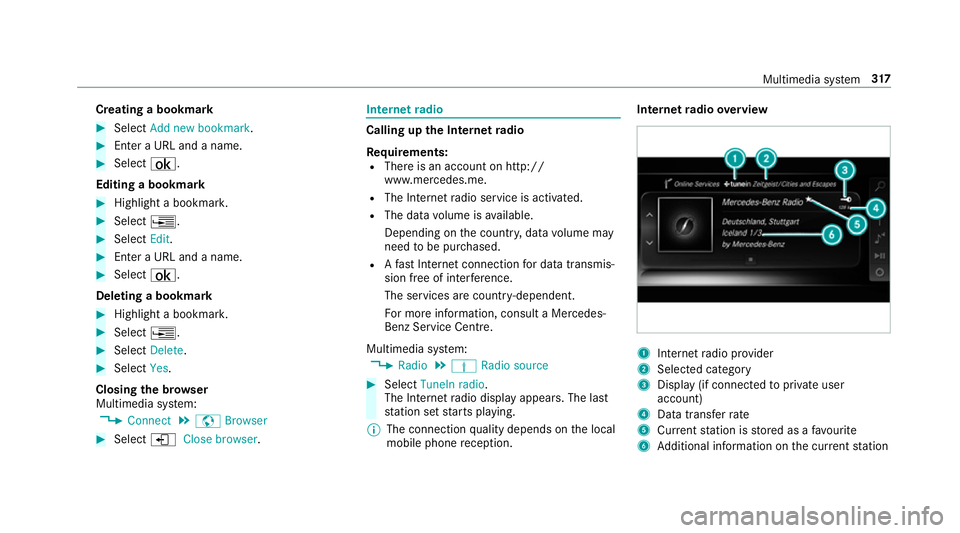
tern etradio overview 1
Inte rn et radio pr ovider
2 Selec tedc ategory
3 Displa y(if connec tedtop riva te user
account)
4 Datatransfer rate
5 Current statio niss tore dasaf avourite
6 Additional information on thec urrent station Multimedia sy
stem 317
Page 321 of 521
Selecting and connecting
toInterne tradio
st ations
Multimedi asystem:
, Radio .
Þ Radio source .
TuneIn
radio .
è Search #
Select acategor y. #
Select astation.
The connectio nisestablished automati cally.
or #
Select Enter address or POI. #
Enter astatio nn ameusingthe entr yfield.
% Arelativel ylarge volume of dat acan be
transmitte dwhen using Interne tradio.
Saving/deleting Interne tradio station sas
fa vo urites
Multimedi asystem:
, Radio .
Þ Radio source .
TuneIn
radio #
Select astation. #
Press and hold thet ouchpad or contro ller
until an audible signal sounds.
The ß symbol appear sbythestation
name. #
Select ßFavourites.
The lis tofsavedfavo uritestations appears.
or #
Crea tean accoun tfor theo nline pr ovider
(TuneIn radio) and then log in on them ulti‐
media sy stem.
Yo ur favo urites ar eimp ortedtot he multime‐
dia sy stem.
Deleting favo urites #
Select ßFavourites. #
Select astation. #
Press and hold thet ouchpad or contro ller
until an audible signal sounds.
The ß symbol bythes tatio nn amed isap‐
pears. Setting
theI nterne tradio options
Multimedia sy stem:
, Radio .
Þ Radio source .
TuneIn
Radio .
Z Options
The following option sareavailable:
R Select Stream:s electthe stre am qualit y.
R Login to TuneIn Account :log in to your
Tu neIn user account.
R Log Ou tofAccount :log outofy ourTuneIn
user account. #
Select an option. Media
Au
dio mode In
fo rm ation on thea udio mode &
WARNING Risk of di stra ction whe nhan‐
dling da tastorag emedia
If yo uh andle adatas torage medium while
driving, your attentio nisdivertedf romt he 318
Multimedia sy stem
Page 333 of 521
Ac
tivatin gBluetooth ®
audio
Multimedi asystem:
, Media .
à Media sources #
Select áBluetoot haudio.
The multimedia sy stem activates thec onnec‐
te dB luetooth ®
audio equipment.
Selecting amusic pla yer
Multimedia sy stem:
, Media .
à Media sour-
ces .
á Bluetoot haudio #
Select aBluetooth ®
audio device.
If multiple music pla yers arep resen tont he
Blue tooth ®
audio equipment alista ppears. #
Select amusic pla yer.
Playbac kstarts.
Sear ching forat rack
Multimedia sy stem:
, Media .
à Media sour-
ces .
á Bluetoot haudio #
Select ª. #
Select acategor y.
At rack list appears. #
Select atrac k.
% The function is onl yavailable when the
mobil ephone and them usic pla yers elected
on them obile phone suppor tthis function.
Switching Blue tooth ®
audio equipment via
NFC
Requ irements:
R Obser vethen otes on using NFC
(→ pag e294).
R The Blue tooth®
audio overviewisd isplayed
( → pag e330). #
Lightl ypress theN FC area on them obile
phone (see them anufacturer's operating
instructions).
If th em obile phone has already been author‐
ised on them ultimedia sy stem as Blue tooth®
audio equipment ,itisnowconnec ted.
If th em obile phone is authorised on them ul‐
timedia sy stem as Blue tooth ®
audio equip‐ men
tfor thef irst time ,itisc onnected af ter
confirming thei nstruction sfor them obile
phone (see them anufacturer's operating
instructions).
Disconnecting Blue tooth ®
audio equipment
Multimedi asystem:
, Telephone .
á Media sources #
Select aBluetooth ®
audio device. #
Select ¥Deauthorise. #
Select Yes. Ra
dio Switchin
gontheradio Multimedia sy
stem:
, Radio #
Alternatively: press the$ button.
The radio displa yappears. Youw ill hear the
las tstatio np laye dont he las tfrequ ency
band selected. 330
Multimedia sy stem
Page 334 of 521
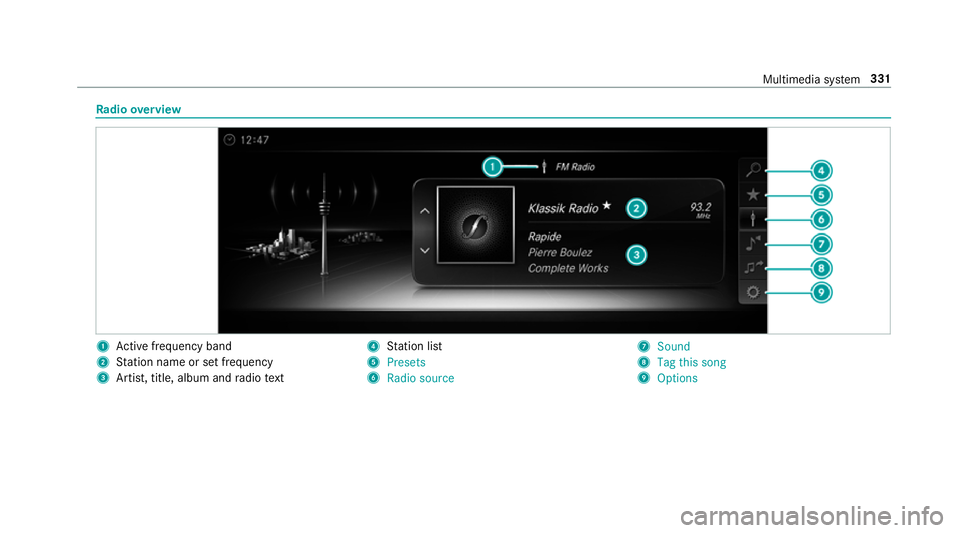
Ra
dio overview 1
Activef reque ncy band
2 Statio nnameors etfrequency
3 Artist, title, album and radio text 4
Statio nlist
5 Presets
6 Radio source 7
Sound
8 Tag this song
9 Options Multimedia sy
stem 331