2017 MERCEDES-BENZ GLS anti-theft alarm
[x] Cancel search: anti-theft alarmPage 7 of 390
Setting the center air vents ........... 134
Setting the side air vents ............... 135
Air-conditioning system
see Climate control
AIRMATIC package
ADS (Adaptive Damping System) ... 186
Function/notes ............................. 186
Alarm
ATA (Anti-Theft Alarm system) ......... 72
Switching off (ATA) .......................... 72
Switching the function on/off
(ATA) ................................................ 72
Alarm system
see ATA (Anti-Theft Alarm system)
AMG
Adaptive sport suspension sys-
tem ................................................ 189
AMG menu (on-board computer) ..... 241
Anti-lock braking system
see ABS (Anti-lock Braking System)
Anti-Theft Alarm system
see ATA (Anti-Theft Alarm system)
Approach/departure angle .............. 171
Ashtray ............................................... 305
Assistance display (on-board com-
puter) .................................................. 237
Assistance menu (on-board com-
puter) .................................................. 236
ASSYST PLUS
Displaying a service message ........ 323
Hiding a service message .............. 323
Resetting the service interval dis-
play ................................................ 323
Service message ............................ 323
Special service requirements ......... 323
ATA (Anti-Theft Alarm system)
Activating/deactivating ................... 72
Function ........................................... 72
Switching off the alarm .................... 72
ATTENTION ASSIST
Activating/deactivating ................. 237
Display message ............................ 261
Function/notes ............................. 205
Audio 20
Switching on/off ........................... 288
Audio menu (on-board computer) .... 234 Audio system
see separate operating instructions
Authorized Mercedes-Benz Center
see Qualified specialist workshop
Authorized workshop
see Qualified specialist workshop
AUTO lights
Display message ............................ 256
see Lights
Automatic car wash (care) ............... 324
Automati c engine start (ECO start/
s top function) .................................... 143
Automatic engine switch-off (ECO
start/stop function) .......................... 142
Automatic headlamp mode .............. 112
Automatic transmission
Accelerator pedal position ............. 149
Changing gear ............................... 149
DIRECT SELECT lever ..................... 146
Display message ............................ 270
Drive program ................................ 149
Drive program display .................... 148
Driving tips .................................... 149
DYNAMIC SELECT controller ......... 145
Emergency running mode .............. 153
Engaging drive position .................. 148
Engaging neutral ............................ 147
Engaging park position automati-
cally ............................................... 147
Engaging reverse gear ................... 147
Engaging the park position ............ 146
Kickdown ....................................... 149
Manual shifting .............................. 150
Oil temperature (on-board com-
puter, Mercedes-AMG vehicles) ..... 241
Overview ........................................ 146
Problem (malfunction) ................... 153
Pulling away ................................... 141
Starting the engine ........................ 140
Steering wheel paddle shifters ...... 150
Trailer towing ................................. 149
Transmission position display ........ 148
Transmission positions .................. 148
Automatic transmission emer-
gency mode ....................................... 153
AUX jacks
CD/DVD drive ............................... 293 Index 5
Page 19 of 390
Function/notes ............................. 193
Important safety notes .................. 193
Parking .......................................... 195
PASSENGER AIR BAG
Display message ............................ 254
Indicator lamps ................................ 42
Problem (malfunction) ................... 254
Pets in the vehicle ............................... 62
Phone book
see also Digital Operator's Man-
ual .................................................. 287
Plastic trim (cleaning instruc-
tions) .................................................. 329
Power locks ......................................... 81
Power washers .................................. 325
Power windows
see Side windows
PRE-SAFE ®
(anticipatory occupant
protection)
Display message ............................ 251
Operation ......................................... 55
PRE-SAFE ®
PLUS (anticipatory
occupant protection PLUS)
Display message ............................ 251
Operation ......................................... 56
Protection against theft
ATA (Anti-Theft Alarm system) ......... 72
Immobilizer ...................................... 72
Protection of the environment
General notes .................................. 25
Pulling away
Automatic transmission ................. 141
General notes ................................ 141
Hill start assist ............................... 141
Trailer ............................................ 141
Q
QR code
Mercedes-Benz Guide App ................. 1
Rescue card ..................................... 30
Qualified specialist workshop ........... 29
R
RACETIMER (on-board computer) .... 241
Radiator cover ................................... 320 Radio
Selecting a station ......................... 234
see separate operating instructions
Radio mode
see also Digital Operator's Man-
ual .................................................. 287
Radio-wave reception/transmis-
sion in the vehicle
Declaration of conformity ................ 28
Reading lamp ..................................... 116
Rear bench seat
Folding forwards/back .................. 298
Rear compartment
Exit/entry position (3rd row of
seats) ............................................. 100
Setting the air vents ...................... 135
Setting the temperature ................ 131
Rear fog lamp
Display message ............................ 256
Switching on/off ........................... 113
Rear Seat Entertainment System
AUX jacks ...................................... 293
AUX jacks CD/DVD drive .............. 293
Rear seats
Adjusting ......................................... 98
Display message ............................ 272
Rear view camera
Cleaning instructions ..................... 328
Display in the multimedia system .. 198
Function/notes ............................. 197
Switching on/off ........................... 198
Rear window defroster
Problem (malfunction) ................... 133
Switching on/off ........................... 133
Rear window wiper
Replacing the wiper blade .............. 121
Switching on/off ........................... 120
Rear-view mirror
Anti-glare (manual) ........................ 107
Dipping (automatic) ....................... 109
Refrigerant (air-conditioning sys-
tem)
Important safety notes .................. 383
Refueling
Fuel gauge ....................................... 34
Important safety notes .................. 153
Refueling process .......................... 154
see Fuel Index 17
Page 74 of 390
Up to a speed of approximately 44 mph
(70 km/h) the Active Brake Assist with cross-
traffic function assists you with braking in haz-
ardous situations with: R
stationary obstacles in the path of the vehicle,
e.g. stopped or parked vehicles R
stationary pedestrians in the path of the vehi-
cle R
obstacles crossing your path that move in the
detection range of the sensors and are detec-
ted X
Keep the brake pedal depressed until the
emergency braking situation is over.
ABS prevents the wheels from locking.
You can prevent the intervention of Active Brake
Assist with cross-traffic function at any time by: R
depressing the accelerator pedal further R
activating kickdown R
releasing the brake pedal
The braking application of Active Brake Assist
with cross-traffic function is ended automati-
cally if: R
you maneuver to avoid the obstacle R
there is no longer a risk of collision R
there is no longer an obstacle detected in
front of your vehicle
STEER CONTROL
General information STEER CONTROL helps you by transmitting a
noticeable steering force to the steering wheel
in the direction required for vehicle stabilization.
This steering assistance is provided in particular
if: R
both right wheels or both left wheels are on a
wet or slippery road surface when you brake R
the vehicle starts to skid
Important safety notes
i Observe the "Important safety notes" sec-
tion ( Y
page 63). No steering assistance is provided from STEER
CONTROL, if: R
ESP ®
is deactivated R
ESP ®
is malfunctioning R
the steering is malfunctioning
If ESP ®
is malfunctioning, you will be assisted
further by the electrical power steering.
Protection against theft
Immobilizer X
To activate with the SmartKey: remove the
SmartKey from the ignition lock. X
To activate with KEYLESS-GO: switch the
ignition off and open the driver's door. X
To deactivate: switch on the ignition.
The immobilizer prevents your vehicle from
being started without the correct SmartKey.
When leaving the vehicle, always take the
SmartKey with you and lock the vehicle. Anyone
can start the engine if a valid SmartKey has been
left inside the vehicle.
i The immobilizer is always deactivated when
you start the engine.
In the event that the engine cannot be started
(yet the vehicle's battery is charged), the sys-
tem is not operational. Contact an authorized
Mercedes-Benz Center or call
1-800-FOR-MERCedes (in the USA) or
1-800-387-0100 (in Canada).
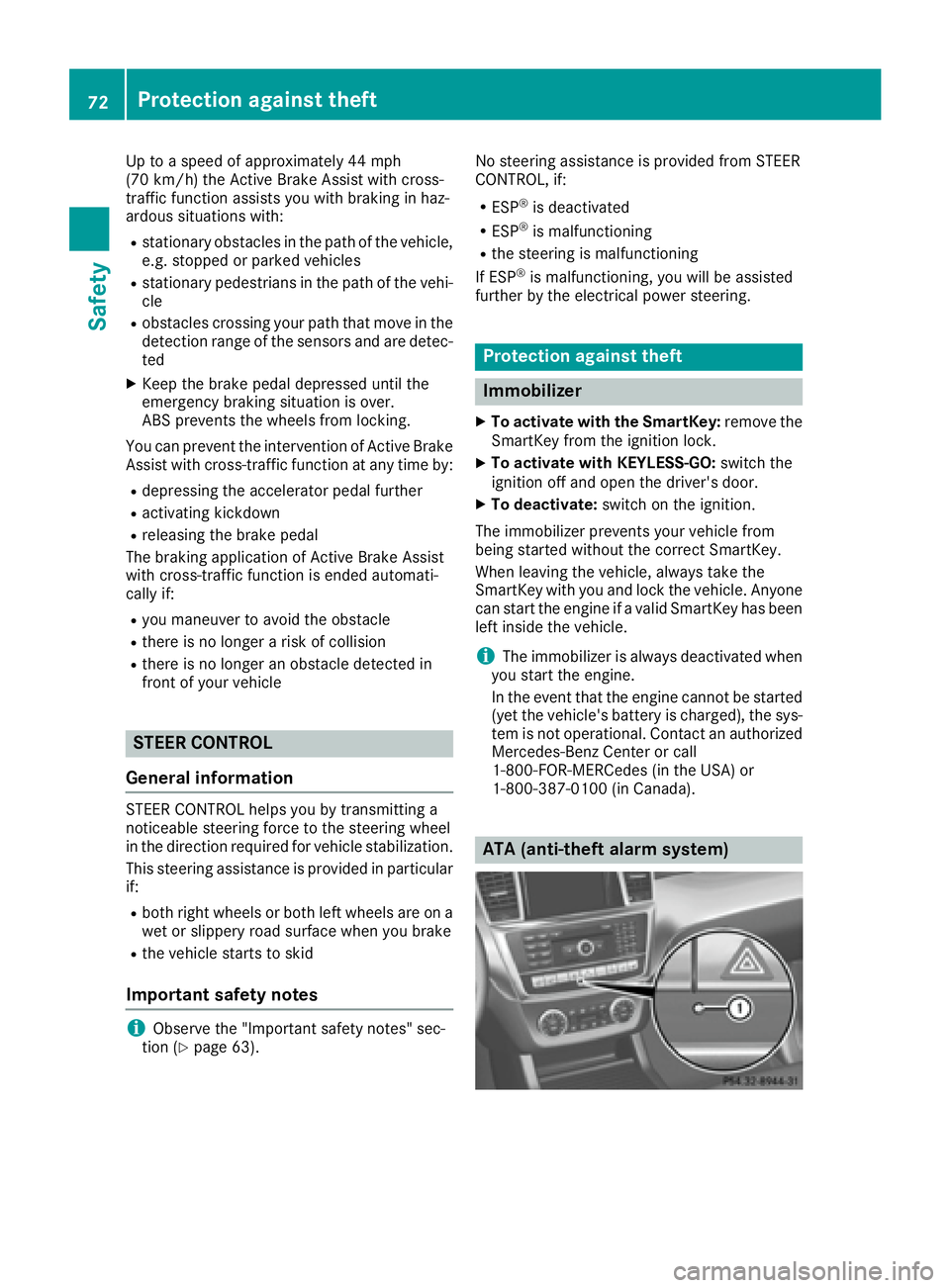
ATA (anti-theft alarm system)72
Protection against theft
Safety
Page 142 of 390
ignite if in contact with the exhaust system or
parts of the engine that heat up. There is a risk
of fire.
Carry out regular checks to make sure that
there are no flammable foreign materials in
the engine compartment or in the exhaust
system.
General notes Vehicles with a gasoline engine: the catalytic
converter is preheated for up to 30 seconds
after a cold start. The sound of the engine may
change during this time.
Automatic transmission X
Shift the transmission to position P
( Y
page 146).
The transmission position display in the mul-
tifunction display shows P ( Y
page 148).
i You can start the engine in transmission
position P and N .
Starting procedure with the SmartKey X
To start a diesel engine : turn the SmartKey
to position 2 in the ignition lock ( Y
page 138).
The \( preglow indicator lamp in the instru-
ment cluster lights up. X
Turn the SmartKey to position 3 in the ignition
lock and release it as soon as the engine is
running ( Y
page 138).
i Vehicles with a diesel engine: you can
start the engine without preglow if the engine
is warm.
Using KEYLESS-GO to start the engine The Start/Stop button can be used to start the
vehicle without inserting the SmartKey into the
ignition lock. The Start/Stop button must be
inserted in the ignition lock and the SmartKey
must be in the vehicle. This mode for starting the
engine operates independently of the ECO
start/stop automatic engine start function. X
Depress the brake pedal and keep it
depressed. X
Press the Start/Stop button once
( Y
page 138).
Vehicles with a gasoline engine: the engine
starts.
Vehicles with a diesel engine: preglow is
activated and the engine starts.
Starting procedure via smartphone Observe the important safety notes on starting
the engine ( Y
page 139).
You can also start your engine via your smart-
phone from outside the vehicle. In this case, the
previously selected climate control setting is
activated. In this way you can cool or heat the
interior of the vehicle before starting the jour-
ney.
Only start the engine via your smartphone if it is
safe to start and run the engine where your vehi-
cle is parked.
Observe the legal stipulations in the area where
your vehicle is parked. Engine start via smart-
phone may be limited to certain countries or
regions.
You can execute a maximum of two consecutive
starting attempts via your smartphone. If you
insert the SmartKey into the ignition lock, you
can carry out two more starting attempts.
Once you have started the engine, you can
switch the engine off via your smartphone at any
time.
You can only start the engine via your smart-
phone if: R
the SmartKey is in the ignition lock R
park position P is selected R
the accelerator pedal is not depressed R
the anti-theft alarm system is not activated R
the panic alarm is not activated R
the hazard warning lamps are switched off R
the hood is closed. R
the doors are closed and locked R
the windows and sliding sunroof are closed
Also make sure that: R
the fuel tank is sufficiently filled R
the starter battery is sufficiently charged140
Driving
Driving and parking
Page 315 of 390
If you have sent more than one destination
address, each individual destination must be
confirmed separately.
Destination addresses are loaded in the same
order as the order in which they were sent.
If you own multiple Mercedes-Benz vehicles with
mbrace and activated mbrace accounts:
If multiple vehicles are registered under the
same e-mail address, the destination will be
sent to all the vehicles.
Vehicle remote opening You can use the vehicle remote opening if you
have unintentionally locked your vehicle and a
replacement SmartKey is not available.
The vehicle can be opened by the Mercedes-
Benz Customer Assistance Center.
The vehicle can be immediately opened
remotely within four days of the ignition being
turned off. After this time, the remote unlocking
may be delayed by 15 to 60 minutes. After
30 days, the vehicle can no longer be opened
remotely.
The vehicle remote unlocking feature is availa-
ble if the relevant mobile phone network is avail-
able and a data connection is possible. X
Contact the following service hotlines:
Mercedes-Benz Customer Assistance Center
at 1-800-FOR-MERCedes (1-800-367-6372)
or 1-866-990-9007
You will be asked for your password. X
Return to your vehicle at the time agreed upon
with the Mercedes-Benz Customer Assis-
tance Center.
Alternatively, the vehicle can be opened via: R
the Internet, under the "Owners Online" sec-
tion R
the telephone application (e. g. for iPhone ®
,
Android)
To do this, you will need your identification num-
ber and password.
Vehicle remote closing
The vehicle remote-closing feature can be used
when you have forgotten to lock the vehicle and
you are no longer nearby.
The vehicle can then be locked by the Mercedes-
Benz Customer Assistance Center. The vehicle can be immediately remotely locked
within four days of the ignition being turned off.
After this time, remote closing may be delayed
by 15 to 60 minutes. After 30 days the vehicle
can no longer be locked remotely.
The vehicle remote closing feature is available if
the relevant mobile phone network is available
and a data connection is possible. X
Contact the following service hotlines:
Mercedes-Benz Customer Assistance Center
at 1-800-FOR-MERCedes (1-800-367-6372)
or 1-866-990-9007
You will be asked for your password.
The next time you are inside the vehicle and you
switch on the ignition, the Doors Locked
Remotely message appears in the multifunction
display.
Alternatively, the vehicle can be locked via: R
the Internet, under the "Owners Online" sec-
tion R
the telephone application (e. g. for iPhone ®
,
Android)
To do this, you will need your identification num-
ber and password.
Stolen vehicle recovery service If your vehicle has been stolen: X
Notify the police.
The police will issue a numbered incident
report. X
This number will be forwarded to the
Mercedes-Benz Customer Assistance Center
together with your PIN.
The Mercedes-Benz Customer Assistance
Center then tries to locate the system. The
Mercedes-Benz Customer Assistance Center
contacts you and the local law enforcement
agency if the vehicle is located.
However, only the law enforcement agency is
informed of the location of the vehicle.
If the anti-theft alarm system is activated for
longer than 30 seconds, the Mercedes-Benz
Customer Assistance Center is automatically
notified.
Vehicle Health Check
With the Vehicle Health Check, the Customer
Assistance Center can provide improved sup-
port for problems with your vehicle. During an Features 313
Stowage and features Z