2017 MERCEDES-BENZ GLE trailer
[x] Cancel search: trailerPage 168 of 390
Drivin g downhil lR
Drive slowly. R
Do no t drive at an angle down steep inclines.
Steer into th e lin e of fal l and drive wit h th e
fron t wheels aligned straight . Otherwise , th e
vehicle could slip sideways , ti p and rollover.R
Shift to a lowe r gear usin g th e left-han d pad-
dle shifter befor e tacklin g steep downhill gra-
dients .R
Activat e DSR. If this is no t sufficient, brake
gently. Whe n doin g so, mak e sur e that th e
vehicle is facin g in th e direction of th e lin e of
fall .R
Chec k that th e brake s are working normally
after a lon g downhill stretch .
i The special off-road AB S setting enable s a
precise, brief and repeated locking of th e
fron t wheels. Thi s causes them to dig into
loose earth . Be awar e that th e fron t wheels
easily skid across th e groun d surfac e if com-
pletely brake d and therefore los e their ability
to steer .
Drivin g systems
Intelligent Drive Mercedes-Ben z Intelligen t Drive stand s fo r inno -
vative driver assistanc e and safet y systems
whic h enhance comfor t and suppor t th e driver in
critical situations. Wit h these intelligen t co-ordi -
nated systems Mercedes-Ben z has set a mile-
ston e on th e pat h toward s autonomous driving.
Mercedes-Ben z Intelligen t Drive embraces all
elements of active and passive safet y in on e well
though t out syste m – fo r th e safet y of th e vehi-
cl e occupant s and that of other road users.
Further information on drivin g safet y systems
( Y
page 62).
Cruis e contro l
General notes
Cruise contro l maintain s a constant road speed
fo r you. It brake s automatically in order to avoid
exceedin g th e set speed. You mus t selec t a
lowe r gear in goo d time on lon g and steep down -
hill gradients, especially if th e vehicle is lade n or
towin g a trailer . By doin g so, you will mak e use of
th e braking effect of th e engine. Thi s relieves th e load on th e brake system and prevents th e
brake s from overheatin g and wearin g to o
quickly.
Use cruise contro l only if road and traffic con-
dition s mak e it appropriat e to maintain a steady
speed fo r a prolonged period. You can stor e any
road speed abov e 20 mph (30 km/ h) .
i Cruise control should not be activated when
driving off-road.
Important safety notes If you fail to adapt your driving style, cruise con-
trol can neither reduce the risk of an accident
nor override the laws of physics. Cruise control
cannot take into account the road, traff ic and
weather conditions. Cruise control is only an
aid. You are responsible for the distance to the
vehicle in front, for vehicle spee d, for braking in
good time and for staying in your lane.
Do not use cruise control: R
in road and traffic conditions whic h do not
allow you to maintain a constant spee d, e.g. in
heavy traffic or on winding roads R
on slippery road surfaces. Braking or accel-
erating could cause the drive wheels to lose
traction and the vehicle could then skid R
when there is poor visibility, e.g. due to fog,
heavy rain or snow
If there is a change of drivers, advise the new
driv er of the speed store d.
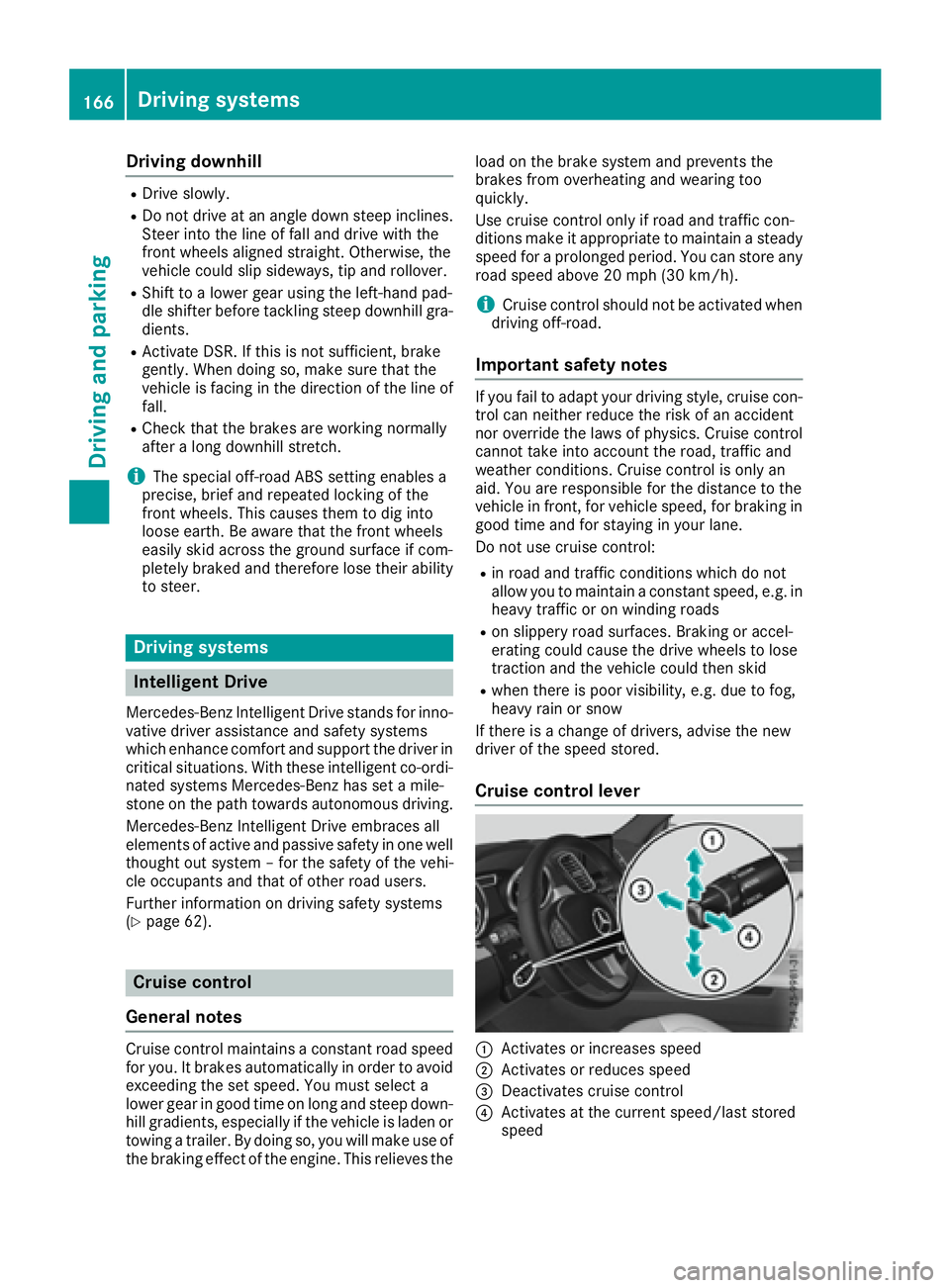
Cruise control lever
C
Activates or increases speed
D
Activates or reduces speed
Page 170 of 390
R
you activat e th e Offroad Plus progra m (vehi-
cle s wit h th e Off-Road Engineerin g package)R
you shift th e transmission to position N while
drivin g
If cruise control is deactivated, you will hear a
warnin g tone . You will see th e Cruise Con ‐
tro l Off message in th e multifunction display
for approximately fiv e seconds.
i Whe n you switch off th e engine, th e last
speed store d is cleared .
Distance Pilot DISTRONIC
Gene ra l notesDistanc e Pilo t DISTRONI C regulates th e speed
and automatically help s you maintai n th e dis-
tance to th e vehicl e detecte d in front. Vehicles
are detecte d wit h th e aid of th e rada r sensor
system. Distanc e Pilo t DISTRONI C brakes auto-
matically so that th e set speed is no t exceeded .
You mus t select a lower gear in goo d time on
lon g and steep downhill gradients , especially if
th e vehicl e is laden or towin g a trailer . By doin g
so, you will mak e use of th e brakin g effec t of th e
engine. This relieves th e load on th e brak e sys-
te m and prevents th e brakes from overheating
and wearin g to o quickly.
If Distanc e Pilo t DISTRONI C detects that there is
a ris k of a collision , you will be warned visually
and acoustically. Without your intervention , Dis-
tance Pilo t DISTRONI C canno t preven t a colli-
sion . An intermittent warnin g tone will then
soun d and th e distanc e warnin g lamp will ligh t
up in th e instrumen t cluster. Brake immediately
in order to increase th e distanc e to th e vehicl e in
fron t or tak e evasive action provided it is saf e to
do so.
Fo r Distanc e Pilo t DISTRONI C to assist you
when driving, th e rada r sensor system mus t be
operational.
Dis tanc e P
ilo t DISTRONI C operate s in th e range
between 0 mph (0 km/h) and 12 0 mph
(20 0 km/h).
Do no t use Distanc e Pilo t DISTRONI C while driv-
in g on roads wit h steep gradients .
Since Distanc e Pilo t DISTRONI C transmit s rada r
waves, it can resemble th e rada r detectors of
th e responsibl e authorities. You can refer to th e
relevan t chapter in th e Operator' s Manual if
question s are asked about this. i US A only:
This device has been approve d by th e FCC as
a "Vehicular Radar System". The rada r sensor
is intended for use in an automotive rada r
system only. Removing, tamperin g with, or
altering th e device will voi d any warranties,
and is no t permitte d by th e FCC. Do no t tam -
per with, alter, or use in any non-approve d
way.
An y unauthorize d modification to this device
could voi d th e user’s authorit y to operate th e
equipment.
i Canada only: This device complies wit h
RSS-210 of Industry Canada. Operation is
subjec t to th e followin g tw o conditions:
1. This device may no t caus e harmful inter-
ference , and
2. This device mus t accept any interferenc e
received, includin g interferenc e that may
caus e undesired operation of th e device .
Removal, tampering, or altering of th e d evice
w
ill voi d any warranties, and is no t permitted.
Do no t tamper with, alter, or use in any non-
approve d way.
An y unauthorize d modification to this device
could voi d th e user's authorit y to operate th e
equipment.
Imp or tant safety notes
G WARNIN G
Distanc e Pilo t DISTRONI C does no t reac t to :R
people or animals R
stationary objects on th e road, e.g. stoppe d
or parked vehicles R
oncomin g vehicles and crossin g traffic
As a result , Distanc e Pilo t DISTRONI C may
neither giv e warnings no r interven e in suc h
situations. There is a ris k of an accident.
Always pay careful attention to th e traffic sit -
uation and be read y to brake.
G WARNIN G
Distanc e Pilo t DISTRONI C canno t always
clearly identify other roa d user s and complex
traffic situations.168
Driving systems
Driving and parking
Page 177 of 390
with the curb or other road boundaries. Be par-
ticularly aware of other road users, e.g. cyclists,
that are directly next to your vehicle.
Obstacles such as traffic pylons on the lane or
projecting out into the lane are not detected.
An inappropriate steering intervention, e.g. after
intentionally driving over a lane marking, can be
corrected at any time if you steer slightly in the
opposite direction.
DISTRONIC PLUS with Steering Pilot cannot
continuously keep your vehicle in lane. In some
cases, the steering intervention is not sufficient
to bring the vehicle back to the lane. In such
cases, you must steer the vehicle yourself to
ensure that it does not leave the lane.
The support provided by the system can be
impaired if: R
there is poor visibility, e.g. due to insufficient
illumination of the road, or due to snow, rain,
fog or spray R
there is glare, e.g. from oncoming traffic, the
sun or reflections (e.g. when the road surface
is wet) R
the windshield is dirty, fogged up, damaged or
covered, for instance by a sticker, in the vicin-
ity of the camera R
there are no, several or unclear lane markings
for a lane, e.g. in areas with road construction
work R
the lane markings are worn away, dark or cov-
ered up, e.g. by dirt or snow R
the distance to the vehicle in front is too small
and the lane markings thus cannot be detec-
ted R
the lane markings change quickly, e.g. lanes
branch off, cross on e another or mergeR
the road is narrow and winding R
there are strong shadows cast on the road
The system is switched to passive and no longer
assists you by performing steering interventions
if: R
you actively change lane R
you switch on the turn signal R
take your hands off the steering wheel or do
not steer for a prolonged period of time
i After you have finished changing lanes,
Steering Pilot is automatically active once
more. Steering Pilot cannot provide assistance: R
on very sharp corners R
when towing a trailer R
when a loss of tire pressure or a defective tire
has been detected and displayed
Observe the important safety notes on Distance
Pilot DISTRONIC ( Y
page 168).
The steering interventions are carried out with a
limited steering moment. The system requires
the driver to keep his hands on the steering
wheel and to steer himself.
If you do not steer yourself or if you take your
hands off the steering wheel for a prolonged
period of time, the system will first alert you with
a visual warning. A steering wheel symbol
appears in the multifunction display. If you have
still not started to steer and have not taken hold
of the steering wheel after five seconds at the
latest, a warning tone also sounds to remind you
to take control of the vehicle. Steering Pilot is
then switched to passive. Distance Pilot
DISTRONIC remains active.
Activating Steering Pilot X
Activate Distance Pilot DISTRONIC with
Steering Pilot using the on-board computer
( Y
page 231).
The Steering Pilot On message appears in
the multifunction display. Steering Pilot is
activated.
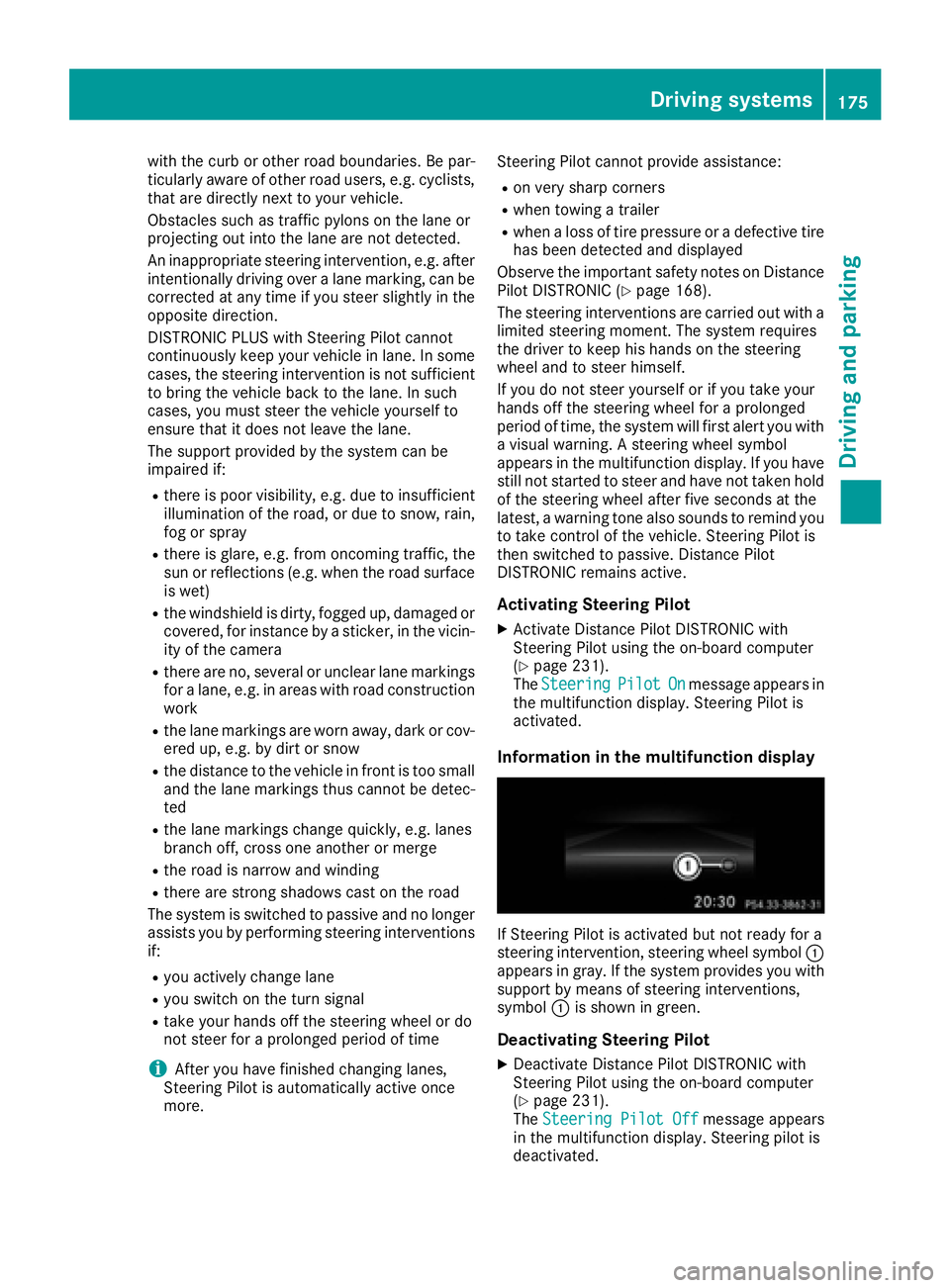
Information in the multifunction display
If Steering Pilot is activated but not ready for a
steering intervention, steering wheel symbol C
appears in gray. If the system provides you with
support by means of steering interventions,
symbol C is shown in green.
Deactivating Steering Pilot X
Deactivate Distance Pilot DISTRONIC with
Steering Pilot using the on-board computer
( Y
page 231).
The Steering Pilot Off message appears
in the multifunction display. Steering pilot is
deactivated.Driving systems 175
Driving and parking Z
Page 182 of 390
When the HOLD function is activated, the trans-
mission is shifted automatically to position P if:R
the driver's door is open and the driver's seat
belt is unfastened. R
the engine is switched off, unless it is auto-
matically switched off by the ECO start/stop
function.
The electric parking brake secures the vehicle
automatically if the HOLD function is activated
when the vehicle is stationary and: R
a system malfunction occurs. R
the power supply is not sufficient.
On steep uphill or downhill inclines or if there is
a malfunction, the transmission may also be
automatically shifted into position P .
AIRMATIC package
General notes AIRMATIC is an air suspension system with var-
iable damping for improved driving comfort.
Level control ensures the best possible suspen-
sion and constant ground clearance, even with a
laden vehicle. When you drive fast, the vehicle is
lowered automatically to improve driving safety
and to reduce fuel consumption. There is also
the option to manually adjust the vehicle level.
All vehicles (except Mercedes-AMG vehi-
cles): AIRMATIC consists of:R
level settings R
level control and R
ADS (Adaptive Damping System)
Mercedes-AMG vehicles: AIRMATIC consists
of: R
level settings R
level control and R
ADS PLUS (Adaptive Damping System)
All vehicles (except Mercedes-AMG vehi-
cles): your vehicle may also be equipped with
the ACTIVE CURVE SYSTEM ( Y
page 182).
Mercedes-AMG vehicles: your vehicle is equip-
ped with the ACTIVE CURVE SYSTEM.
( Y
page 182).
Observe the notes on driving with a trailer
( Y
page 216).
The vehicle level can be set using the DYNAMIC
SELECT controller ( Y
page 139) or the level but- ton ( Y
page 182). The setting always corre-
sponds to the last selected function.
Important safety notes
G WARNING
When the vehicle is being lowered, people
could become trapped if their limbs are
between the vehicle body and the wheels or
underneath the vehicle. There is a risk of
injury.
Make sure no one is underneath the vehicle or
in the immediate vicinity of the wheel arches
when the vehicle is being lowered.
If you unlock the vehicle or open a door, the
vehicle begins to compensate for load discrep-
ancies while still parked. However, for signifi-
cant level changes, such as after the vehicle has
been stationary for a long period, the engine
must be on. For safety reasons, the vehicle is
only lowered when the doors are closed. Low-
ering is interrupted if a door is opened, and it
continues once the door has been closed.
ADS and ADS PLUS (Adaptive Damping
System)
General notes The Adaptive Damping System automatically
controls the calibration of the dampers. The
damping characteristics adapt to the current
operating and driving situation.
The damping is tuned individually to each wheel
and depends on: R
your driving style, e.g. sporty R
the road surface conditions R
the drive program selected R
the vehicle level setting180
Driving systems
Driving and parking
Page 185 of 390
If you unlock the vehicle or open a door, the
vehicle begins to compensate for load discrep-
ancies while still parked. However, for signifi-
cant level changes, such as after the vehicle has
been stationary for a long period, the engine
must be on. For safety reasons, the vehicle is
only lowered when the doors are closed. Low-
ering is interrupted if a door is opened, and it
continues once the door has been closed.
Vehicles with no trailer coupled: below a
speed of 40 mph (64 km/h), you can choose
between the normal and raised vehicle level.
Select the normal vehicle level for normal road
surfaces and the raised vehicle level for driving
with snow chains or on particularly poor road
surfaces. Your selection remains stored even if
you remove the SmartKey from the ignition lock.
If you try to select raised level at a speed above
40 mph (64 km/h), the Drive More Slowly
message appears in the multifunction display.
Vehicles with a trailer coupled: below a speed
of 19 mph (30 km/h), you can choose between
the normal and raised vehicle level.
Setting the raised vehicle level
X
Start the engine.
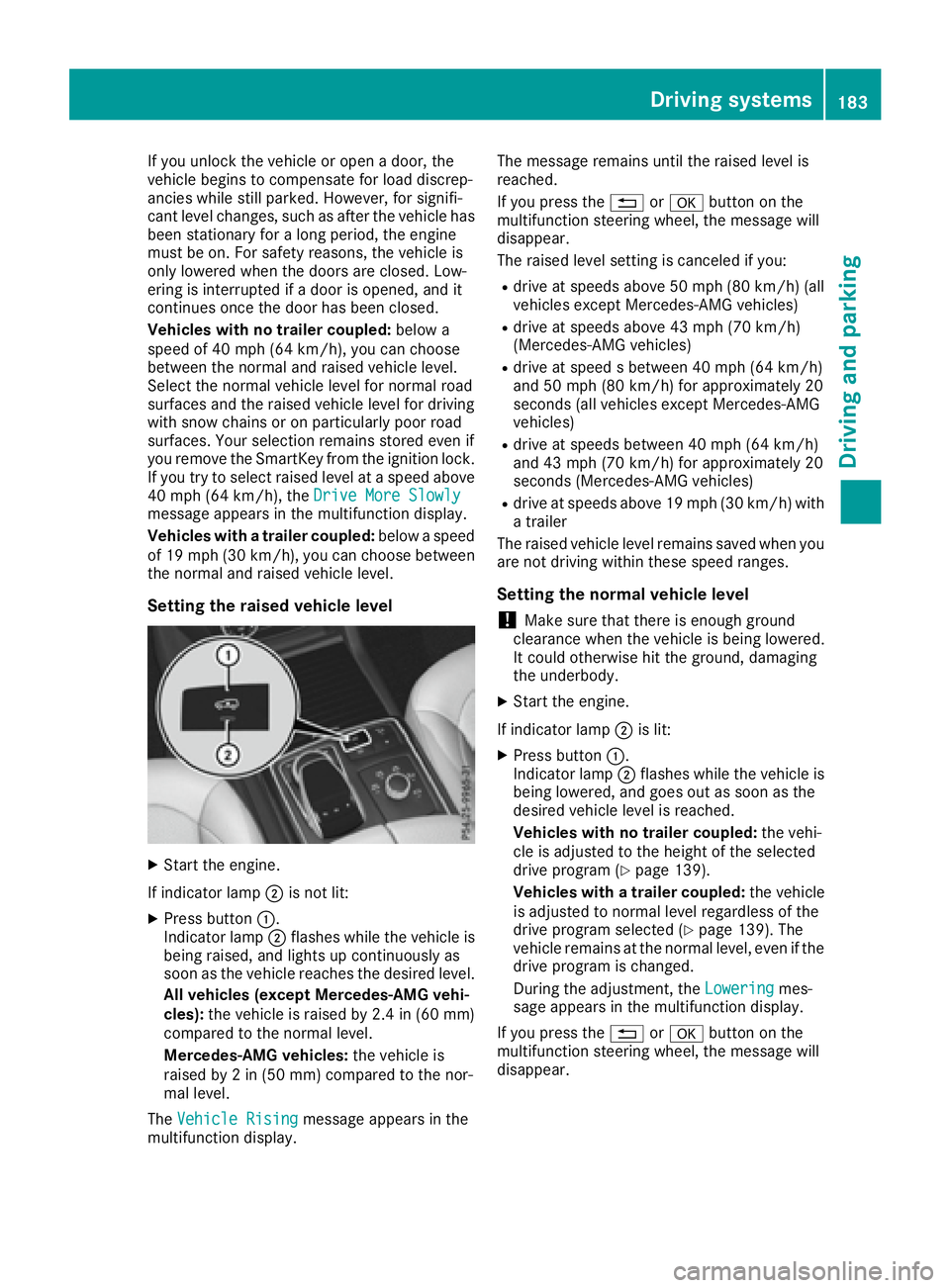
If indicator lamp D is not lit:X
Press button C .
Indicator lamp D flashes while the vehicle is
being raised, and lights up continuously as
soon as the vehicle reaches the desired level.
All vehicles (except Mercedes-AMG vehi-
cles): the vehicle is raised by 2.4 in (60 mm)
compared to the normal level.
Mercedes-AMG vehicles: the vehicle is
raised by 2 in (50 mm) compared to the nor-
mal level.
The Vehicle Rising
message appears in the
multifunction display. The message remains until the raised level is
reached.
If you press the 8 or v button on the
multifunction steering wheel, the message will
disappear.
The raised level setting is canceled if you: R
drive at speeds above 50 mph (80 km/h) (all
vehicles except Mercedes-AMG vehicles) R
drive at speeds above 43 mph (70 km/h)
(Mercedes-AMG vehicles) R
drive at speed s between 40 mph (64 km/h)
and 50 mph (80 km/h) for approximately 20
seconds (all vehicles except Mercedes-AMG
vehicles) R
drive at speeds between 40 mph (64 km/h)
and 43 mph (70 km/h) for approximately 20
seconds (Mercedes-AMG vehicles) R
drive at speeds above 19 mph (30 km/h) with
a trailer
The raised vehicle level remains saved when you
are not driving within these speed ranges.
Setting the normal vehicle level
! Make sure that there is enough ground
clearance when the vehicle is being lowered.
It could otherwise hit the ground, damaging
the underbody. X
Start the engine.
If indicator lamp D is lit: X
Press button C .
Indicator lamp D flashes while the vehicle is
being lowered, and goes out as soon as the
desired vehicle level is reached.
Vehicles with no trailer coupled: the vehi-
cle is adjusted to the height of the selected
drive program ( Y
page 139).
Vehicles with a trailer coupled: the vehicle
is adjusted to normal level regardless of the
drive program selected ( Y
page 139). The
vehicle remains at the normal level, even if the
drive program is changed.
During the adjustment, the Lowering mes-
sage appears in the multifunction display.
If you press the 8 or v button on the
multifunction steering wheel, the message will
disappear.Driving systems 183
Driving and parking Z
Page 187 of 390
the immediate vicinity of the vehicle. You
could damage the vehicle or the objects.
The sensors may not detect snow and other
objects that absorb ultrasonic waves.
Ultrasonic sources such as an automatic car
wash, the compressed-air brakes on a truck
or a pneumatic drill could cause PARKTRONIC
to malfunction.
PARKTRONIC may not function correctly on
uneven terrain.
! Fold in the ball coupling if the trailer tow
hitch is not required. PARKTRONIC measures
the minimum detection range to an obstacle
from the bumper, not the ball coupling.
Parking Assist PARKTRONIC is deactivated for
the rear area when you establish an electrical
connection between your vehicle and a trailer.
Parking Assist PARKTRONIC is activated auto-
matically when you: R
switch on the ignition R
shift the transmission to position D , R or NR
release the electric parking brake
Parking Assist PARKTRONIC is deactivated at
speeds above 11 mph (18 km/h). It is reactiva-
ted at lower speeds.
Range of the sensors
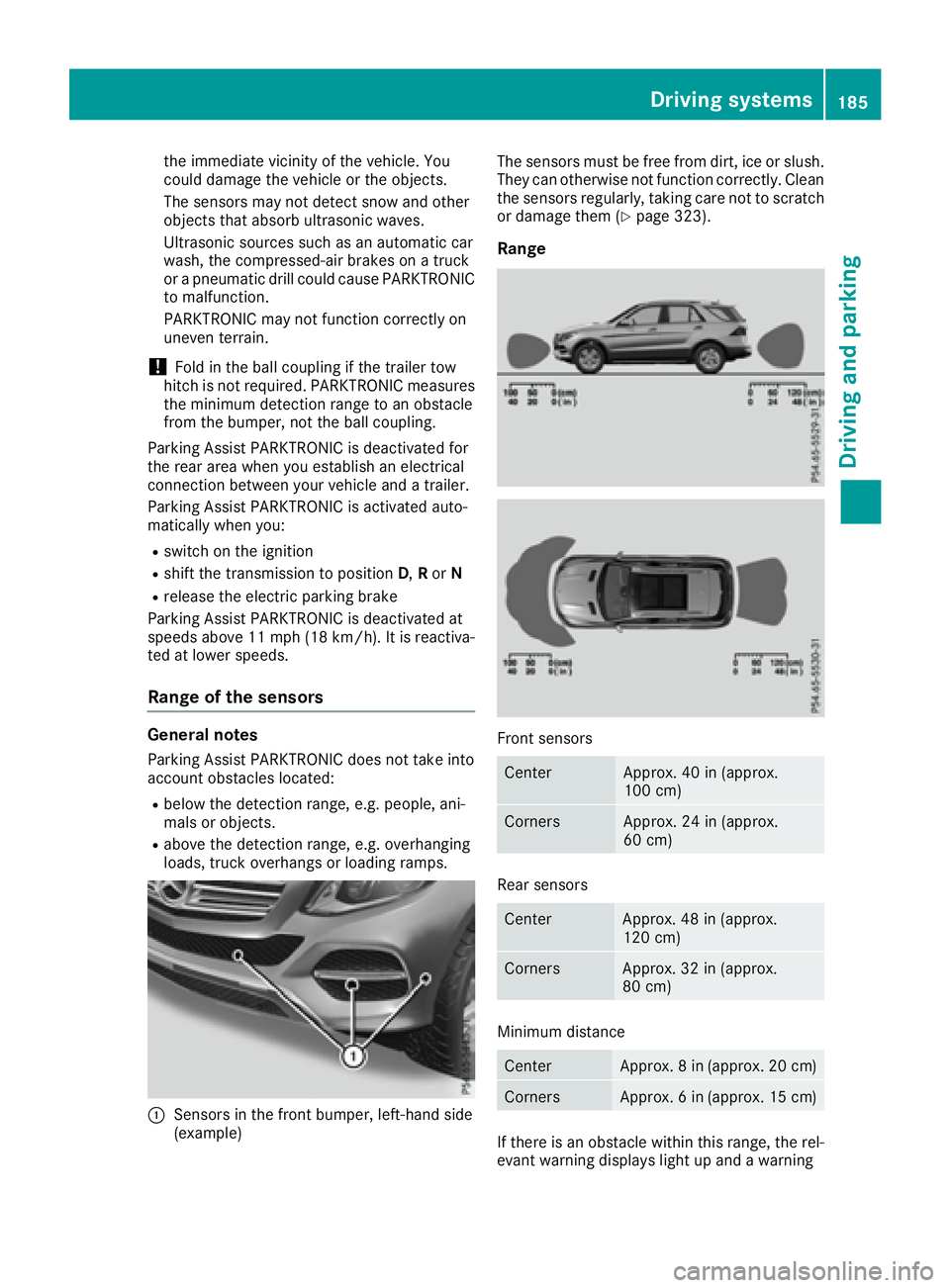
General notes Parking Assist PARKTRONIC does not take into
account obstacles located: R
below the detection range, e.g. people, ani-
mals or objects. R
above the detection range, e.g. overhanging
loads, truck overhangs or loading ramps.
C
Sensors in the front bumper, left-hand side
(example) The sensors must be free from dirt, ice or slush.
They can otherwise not function correctly. Clean
the sensors regularly, taking care not to scratch
or damage them ( Y
page 323).
Range
Front sensors
Center Approx. 40 in (approx.
100 cm)
Corners Approx. 24 in (approx.
60 cm)
Rear sensors
Center Approx. 48 in (approx.
120 cm)
Corners Approx. 32 in (approx.
80 cm)
Minimum distance
Center Approx. 8 in (approx. 20 cm)
Corners Approx. 6 in (approx. 15 cm)
If there is an obstacle within this range, the rel-
evant warning displays light up and a warningDriving system s 185
Dr ivi ng an d parking Z
Page 190 of 390
Parking tips: R
On narrow roads, drive as close to the parking
space as possible. R
Parking spaces that are littered or overgrown
might be identified or measured incorrectly. R
Parking spaces that are partially occupied by
trailer drawbars might not be identified as
such or be measured incorrectly. R
Snowfall or heavy rain may lead to a parking
space being measured inaccurately. R
Pay attention to the warning messages of
Parking Pilot PARKTRONIC during the parking
procedure ( Y
page 184)R
You can intervene in the steering procedure
to correct it at any time. Parking Pilot will then
be canceled. R
When transporting a load that protrudes from
your vehicle, you must not use Parking Pilot R
Never use Parking Pilot when snow chains are
installed. R
Make sure that the tire pressures are always
correct. This has a direct influence on the
parking characteristics of the vehicle.
Use Parking Pilot for parking spaces that are: R
parallel or at right angles to the direction of
travel R
that are on straight roads, not bends R
that are on the same level as the road, e.g. not
on the pavement
Detecting parking spaces Objects located above the detection range of
Parking Pilot will not be detected when the park-
ing space is measured. These are not taken into
account when the parking procedure is calcula-
ted, e.g. overhanging loads, tail sections or load-
ing ramps of trucks. Parking Pilot may therefore
guide you into the parking space too early.
G WARNING
If there are objects above the detection range: R
Active Park Assist may steer too early R
the vehicle may not stop in front of these
objects
You may cause a collision as a result. There is
a risk of an accident. If objects are located above the detection
range, stop and deactivate Active Parking
Assist.
For further information on the detection range
( Y
page 185).
Parking Pilot does not assist you parking in
spaces at a right angle to the direction of travel
if: R
two parking spaces are located directly next
to one another R
the parking space is directly next to a low
obstacle such as a low curb R
you park forwards
Parking Pilot does not assist you parking in
spaces parallel with or at a right angle to the
direction of travel if: R
the parking space is on a curb R
the system reads the parking space as being
blocked, for example by foliage or grass pav-
ing blocks R
the area is too small for the vehicle to maneu-
ver into R
the parking space is bordered by an obstacle,
e.g. a tree, a post or a trailer
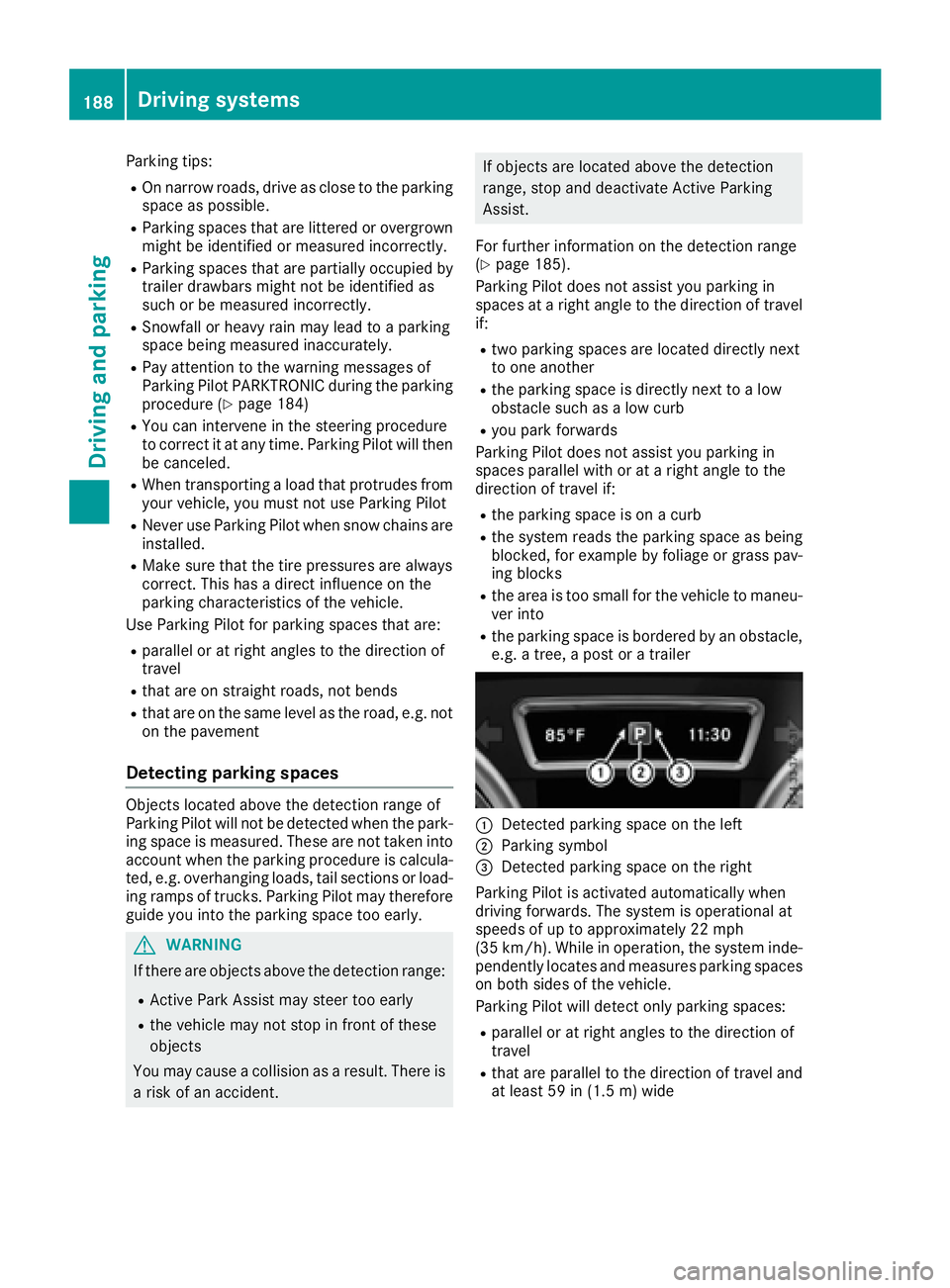
C
Detected parking space on the left D
Parking symbol
Page 194 of 390
The flap closes again when: R
you have finished the maneuvering process R
you switch off the engine R
you open the cargo compartment
Observe the notes on cleaning ( Y
page 323).
For technical reasons, the flap may remain
open briefly after the rear view camera has
been deactivated.
Activating/deactivating the rear view
camera X
To activate: make sure that the SmartKey is
in position 2 in the ignition lock.X
Make sure that the Activation by R gear
function is selected in the multimedia system;
see the Digital Operator's Manual. X
Engage reverse gear.
The rear view camera flap opens. The multi-
media system shows the area behind the vehi-
cle with guide lines.
The image from the rear view camera is avail-
able throughout the maneuvering process.
To deactivate: the rear view camera deacti-
vates if you shift the transmission to P or after
driving forwards a short distance.
Displays in the multimedia system The rear view camera may show a distorted view
of obstacles, show them incorrectly or not at all.
The rear view camera does not show objects in
the following positions: R
very close to the rear bumper R
under the rear bumper R
in the area immediately above the tailgate
handle
! Objects not at ground level may appear to
be further away than they actually are, e.g.: R
the bumper of a parked vehicle R
the drawbar of a trailer R
the ball coupling of a trailer tow hitch R
the rear section of an HGV R
a slanted post
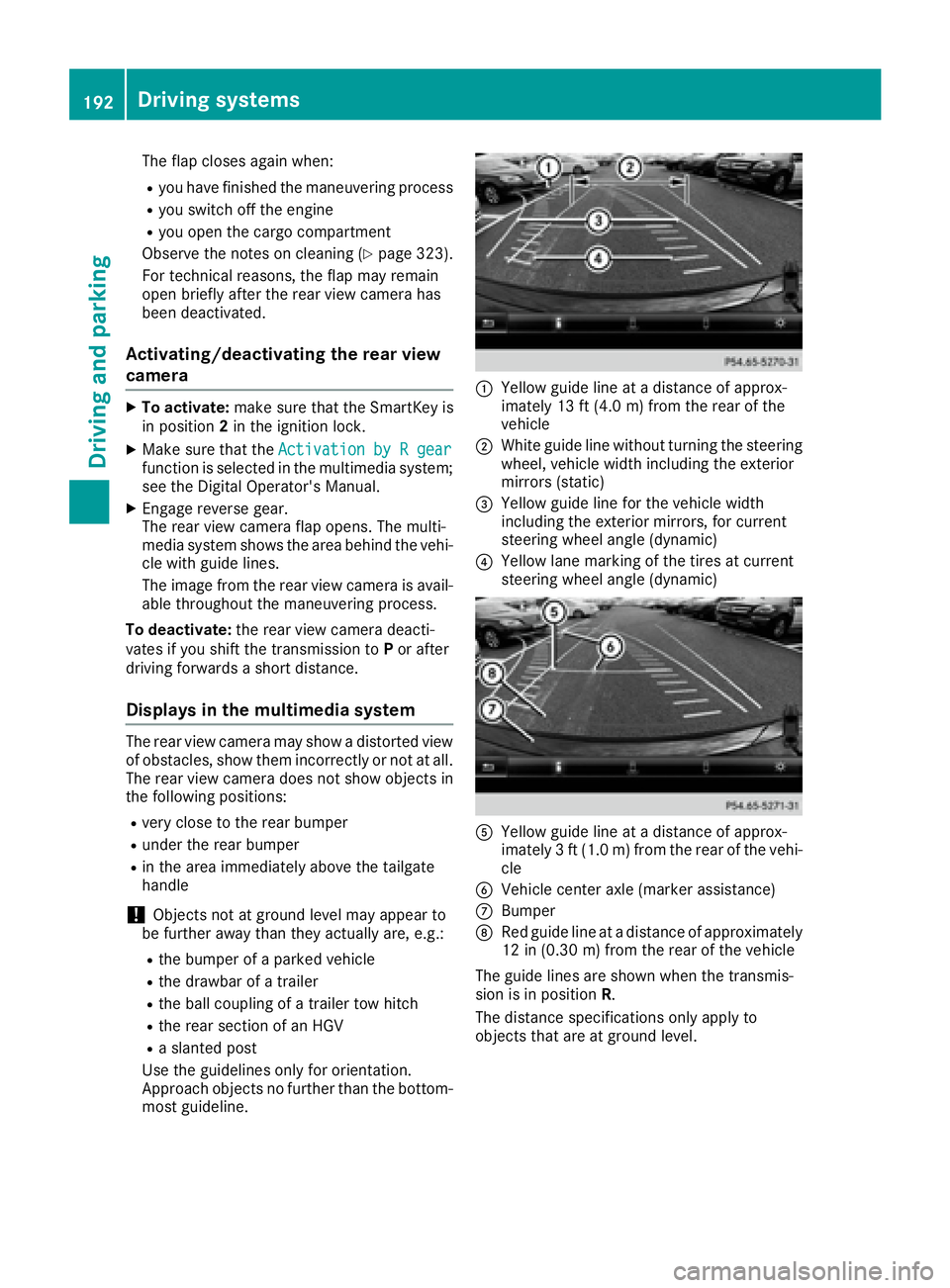
Use the guidelines only for orientation.
Approach objects no further than the bottom-
most guideline. C
Yellow guide line at a distance of approx-
imately 13 ft (4.0 m) from the rear of the
vehicle D
White guide line without turning the steering
wheel, vehicle width including the exterior
mirrors (static)