2017 MERCEDES-BENZ GLE COUPE 127
[x] Cancel search: 127Page 7 of 366

Setting ........................................... 122
Setting the center air vents ........... 122
Setting the side air vents ............... 123
Air-conditioning system
see Climate control
AIRMATIC package
ADS PLUS (Adaptive Damping
System) ......................................... 170
Function/notes ............................. 169
Alarm
ATA (Anti-Theft Alarm system) ......... 70
Switching off (ATA) .......................... 70
Switching the function on/off
(ATA) ................................................ 70
AMG
Adaptive sport suspension sys-
tem ................................................ 173
AMG menu (on-board computer) ..... 218
Approach/departure angle .............. 156
Ashtray ............................................... 279
Assistance display (on-board com-
puter) .................................................. 214
Assistance menu (on-board com-
puter) .................................................. 213
ASSYST PLUS
Displaying a service message ........ 298
Hiding a service message .............. 298
Resetting the service interval dis-
play ................................................ 298
Service message ............................ 298
Special service requirements ......... 298
ATA (Anti-Theft Alarm system)
Activating/deactivating ................... 70
Function ........................................... 70
Switching off the alarm .................... 70
ATTENTION ASSIST
Activating/deactivating ................. 214
Display message ............................ 238
Function/notes ............................. 189
Audio 20
Switching on/off ........................... 264
Audio menu (on-board computer) .... 211
Audio system
see separate operating instructions
Authorized Mercedes-Benz Center
see Qualified specialist workshop AUTO lights
Display message ............................ 233
see Lights
Automatic car wash (care) ............... 299
Automatic engine start (ECO start/
stop function) .................................... 130
Automatic engine switch-off (ECO
start/stop function) .......................... 129
Automatic headlamp mode .............. 104
Automatic transmission
Accelerator pedal position ............. 135
Cha
nging gear ............................... 135
DIRECT SELECT lever ..................... 132
Display message ............................ 246
Drive program ................................ 135
Drive program display .................... 134
Driving tips .................................... 135
DYNAMIC SELECT controller ......... 132
Emergency running mode .............. 139
Engaging drive position .................. 134
Engaging neutral ............................ 133
Engaging park position automati-
cally ............................................... 133
Engaging reverse gear ................... 133
Engaging the park position ............ 132
Kickdown ....................................... 135
Manual shifting .............................. 136
Oil temperature (on-board com-
puter, Mercedes-AMG vehicles) ..... 218
Overview ........................................ 132
Problem (malfunction) ................... 139
Pulling away ................................... 128
Starting the engine ........................ 127
Steering wheel paddle shifters ...... 136
Trailer towing ................................. 135
Transmission position display ........ 134
Transmission positions .................. 134
Automatic transmission emer-
gency mode ....................................... 139
AUX jacks
CD/DVD drive ............................... 269
Axle load, permissible (trailer tow-
ing) ...................................................... 361
B
Back button ....................................... 264
Bag hook ............................................ 275
Index5
Page 12 of 366
Wet road surface ........................... 151
DSR (Downhill Speed Regulation)
Display message ............................2 39
Function/notes .............................1 68
DVD video
Operating (on-board computer) ..... 212
see also Digital Operator's Man-
ual ..................................................2 63
DYNAMIC SELECT controller
Automatic transmission ................. 132
E
EASY-ENTRY featureActivating/deactivating ................. 217
Function/notes ................................ 98
EASY-EXIT feature
Crash-responsive .............................9 9
Function/notes ................................ 98
Switching on/off ........................... 217
EBD (electronic brake force distri-
bution)
Display message ............................ 224
Function/notes ................................ 66
ECO display
Function/notes ............................. 149
On-board computer ....................... 209
ECO start/stop function
Automatic engine start .................. 130
Automatic engine switch-off .......... 129
Deactivating/activating ................. 130
General information ....................... 129
Important safety notes .................. 129
Introduction ................................... 129
Emergency
Automatic measures after an acci-
dent ................................................. 54
Emergency release
Driver's door .................................... 78
Vehicle ............................................. 78
Emergency spare wheel
General notes ................................ 346
Important safety notes .................. 346
Removing ....................................... 347
Storage location ............................ 347
Stowing .......................................... 347
Emergency Tensioning Devices
Activation ......................................... 51 Emergency unlocking
Tailgate ............................................ 82
Emissions control
Service and warranty information .... 25
Engine
Check Engine warning lamp ........... 259
Display message ............................ 234
ECO start/stop function ................ 129
Engine number ............................... 352
Irregular running ............................ 131
Jump-starting ................................. 313
Starting (important safety notes) ... 126
Starting problems .......................... 131
Starting the engine with the
SmartKey ....................................... 127
Starting via smartphone ................ 127
Starting with KEYLESS-GO ............. 127
Switching off .................................. 146
Tow-starting (vehicle) ..................... 318
Engine electronics
Problem (malfunction) ................... 131
Engine oil
Adding ........................................... 296
Additives ........................................ 356
Checki ng the o
il level ..................... 295
Checking the oil level using the
dipstick .......................................... 296
Display message ............................ 236
Filling capacity ............................... 356
Notes about oil grades ................... 355
Notes on oil level/consumption .... 295
Temperature (on-board computer,
Mercedes-AMG vehicles) ............... 218
Engine switch-off
see ECO start/stop function
Entering an address
see also Digital Operator's Man-
ual .................................................. 263
ESP
®(Electronic Stability Pro-
gram)
AMG menu (on-board computer) ... 218
Characteristics ................................. 65
Deactivating/activating ................... 65
Display message ............................ 222
Function/notes ................................ 64
General notes .................................. 64
Important safety information ........... 64
Trailer stabilization ........................... 66
10Index
Page 14 of 366

H
Hazard warning lamps...................... 106
Head restraints
Adjusting .........................................9 3
Adjusting (electrically) ..................... 94
Adjusting (rear) ................................ 94
Installing/removing (rear) ................ 94
Luxury .............................................. 94
Headlamps
Fogging up .....................................1 08
see Automatic headlamp mode
Heating
see Climate control
High beam flasher .............................1 05
High-beam headlamps
Adaptive Highbeam Assist ............. 107
Display message ............................ 233
Switching on/off ........................... 105
Highway mode ................................... 107
Hill start assist .................................. 128
HOLD function
Deactivating ................................... 167
Display message ............................ 239
Function/notes .............................1 67
Home address
see also Digital Operator's Man-
ual ..................................................2 63
Hood
Closing ...........................................2 95
Display message ............................ 248
Important safety notes .................. 294
Opening ......................................... 294
Horn ...................................................... 32
Hydroplaning ..................................... 152
I
Ignition lock
see Key positions
Immobilizer .......................................... 70
Indicator lamps
see Warning and indicator lamps
Insect protection on the radiator .... 295
Instrument cluster
Overview .......................................... 33
Warning and indicator lamps ........... 33
Instrument cluster lighting .............. 206Intelligent Light System
Activating/deactivating ................. 216
Overview ........................................ 106
Interior lighting
Automatic control .......................... 109
Emergency lighting ........................ 109
General notes ................................ 108
Manual control ............................... 108
Overview ........................................ 108
Reading lamp ................................. 108
iPod
®
see also Digital Operator's Man-
ual .................................................. 263
J
Jack Storage location ............................ 306
Using ............................................. 342
Jump starting (engine) ...................... 313
K
Key positions
SmartKey ....................................... 125
Start/Stop button .......................... 125
KEYLESS-GO
Activating ......................................... 72
Convenience closing feature ............ 85
Deactivation ..................................... 72
Display message ............................ 249
Locking ............................................ 72
Start function ................................... 73
Starting the engine ........................ 127
Unlocking ......................................... 72
Kickdown
Driving tips .................................... 135
Manual gearshifting ....................... 138
Knee bag .............................................. 45
L
Lamps
see Warning and indicator lamps
Lane Keeping Assist
Activating/deactivating ................. 215
Display message ............................ 240
Function/information .................... 193
see Active Lane Keeping Assist
12Index
Page 20 of 366
Overview .......................................... 91
Seat heating problem ......................96
Seat ventilation problem .................. 96
Storing settings (memory func-
tion) ............................................... 102
Switching seat heating on/off ......... 95
Switching seat ventilation on/off .... 96
Section
Sliding sunroof ................................. 86
Selector lever
Cleaning ......................................... 304
Sensors (cleaning instructions) ....... 303
Service message
see ASSYST PLUS
Service products
Brake fluid ..................................... 356
Coolant (engine) ............................ 356
DEF special additives ..................... 355
Engine oil ....................................... 355
Fuel ................................................ 353
Important safety notes .................. 352
Refrigerant (air-conditioning sys-
tem) ............................................... 357
Washer fluid ................................... 357
Setting the air distribution ............... 119
Setting the airflow ............................ 119
Setting the date/time format
see also Digital Operator's Man-
ual .................................................. 263
Setting the language
see also Digital Operator's Man-
ual .................................................. 263
Setting the time
see also Digital Operator's Man-
ual .................................................. 263
Settings
Factory (on-board computer) ......... 217
On-board computer ....................... 215
SETUP (on-board computer) ............. 218
Side impact air bag ............................. 46
Side marker lamp (display mes-
sage) ................................................... 233
Side windows
Cleaning ......................................... 302
Convenience closing feature ............ 84
Convenience opening feature .......... 84
Important safety information ........... 83 Opening/closing .............................. 83
Overview .......................................... 83
Problem (malfunction) ..................... 85
Resetting ......................................... 85
Reversing feature ............................. 83
SIRIUS services
see also Digital Operator's Man-
ual .................................................. 263
Sliding sunro
of
see Panorama roof with power
tilt/sliding panel
SmartKey
Changing the battery ....................... 74
Changing the programming ............. 73
Checking the battery ....................... 74
Convenience closing feature ............ 85
Convenience opening feature .......... 84
Display message ............................ 249
Door central locking/unlocking ....... 71
Important safety notes .................... 71
KEYLESS-GO start function .............. 73
Loss ................................................. 75
Mechanical key ................................ 73
Overview .......................................... 71
Positions (ignition lock) ................. 125
Problem (malfunction) ..................... 75
Starting the engine ........................ 127
Smartphone
Starting the engine ........................ 127
SMS
see also Digital Operator's Man-
ual .................................................. 263
Snow chains
Information .................................... 323
Sockets
Center console .............................. 281
General notes ................................ 280
Luggage compartment ................... 281
Rear compartment ......................... 281
Sound
Switching on/off ........................... 264
Special seat belt retractor .................. 55
Specialist workshop ............................ 28
Speed, controlling
see Cruise control
Speedometer
Digital ............................................ 210
In the Instrument cluster ................. 33
18Index
Page 21 of 366

Segments ...................................... 206
Selecting the display unit ............... 215
Standing lamps
Display message ............................ 233
Switching on/off ........................... 105
Start/Stop button
Removing ....................................... 126
Starting the engine ........................ 127
Start/stop function
see ECO start/stop function
Starting (engine) ................................ 126
STEER CONTROL .................................. 69
Steering
Display message ............................ 248
Steering Pilot
Activating/deactivating ................. 214
Display message ............................ 243
Steering wheel
Adjusting (electrically) ..................... 97
Adjusting (manually) ........................ 97
Button overview ............................... 34
Buttons (on-board computer) ......... 207
Cleaning ......................................... 304
Important safety notes .................... 97
Steering wheel heating .................... 98
Storing settings (memory func-
tion) ............................................... 102
Steering wheel heating
Problem (malfunction) ..................... 98
Switching on/off .............................. 98
Steering wheel paddle shifters ........ 136
Stopwatch (RACETIMER) ................... 218
Stowage areas ................................... 270
Stowage compartments
Armrest (under) ............................. 271
Center console .............................. 272
Center console (rear) ..................... 272
Cup holders ................................... 277
Eyeglasses compartment ............... 272
Glove box ....................................... 271
Important safety information ......... 270
Stowage net ................................... 272
Stowage net ....................................... 272
Summer tires
In winter ........................................ 323
Sun visor ............................................ 279 Suspension setting
AMG adaptive sport suspension
system ........................................... 173
Suspension settings
SETUP (on-board computer) .......... 218
SUV
(Sport Utility Vehicle) ....................... 27
Switching air-recirculation mode
on/off ................................................. 121
Switching on media mode
Via the device list .......................... 268
T
Tachometer ........................................ 206
Tailgate
Display message ............................ 247
Emergency unlocking ....................... 82
Important safety notes .................... 78
Limiting the opening angle ............... 82
Opening dimensions ...................... 358
Opening/closing (automatically
from inside) ...................................... 81
Opening/closing (automatically
from outside) ................................... 80
Opening/closing (from outside) ....... 79
Tank content
Fuel gauge ....................................... 33
Technical data
Capacities ...................................... 352
Information .................................... 350
Tires/wheels ................................. 345
Trailer loads ................................... 361
Vehicle data ................................... 358
Telephone
Accepting a call (multifunction
steering wheel) .............................. 213
Authorizing a mobile phone (con-
necting) ......................................... 267
Connecting a mobile phone (gen-
eral information) ............................ 266
Display message ............................ 248
Menu (on-board computer) ............ 212
Number from the phone book ........ 213
Redialing ........................................ 213
Rejecting/ending a call ................. 213
see also Digital Operator's Man-
ual .................................................. 263
Index19
Page 35 of 366
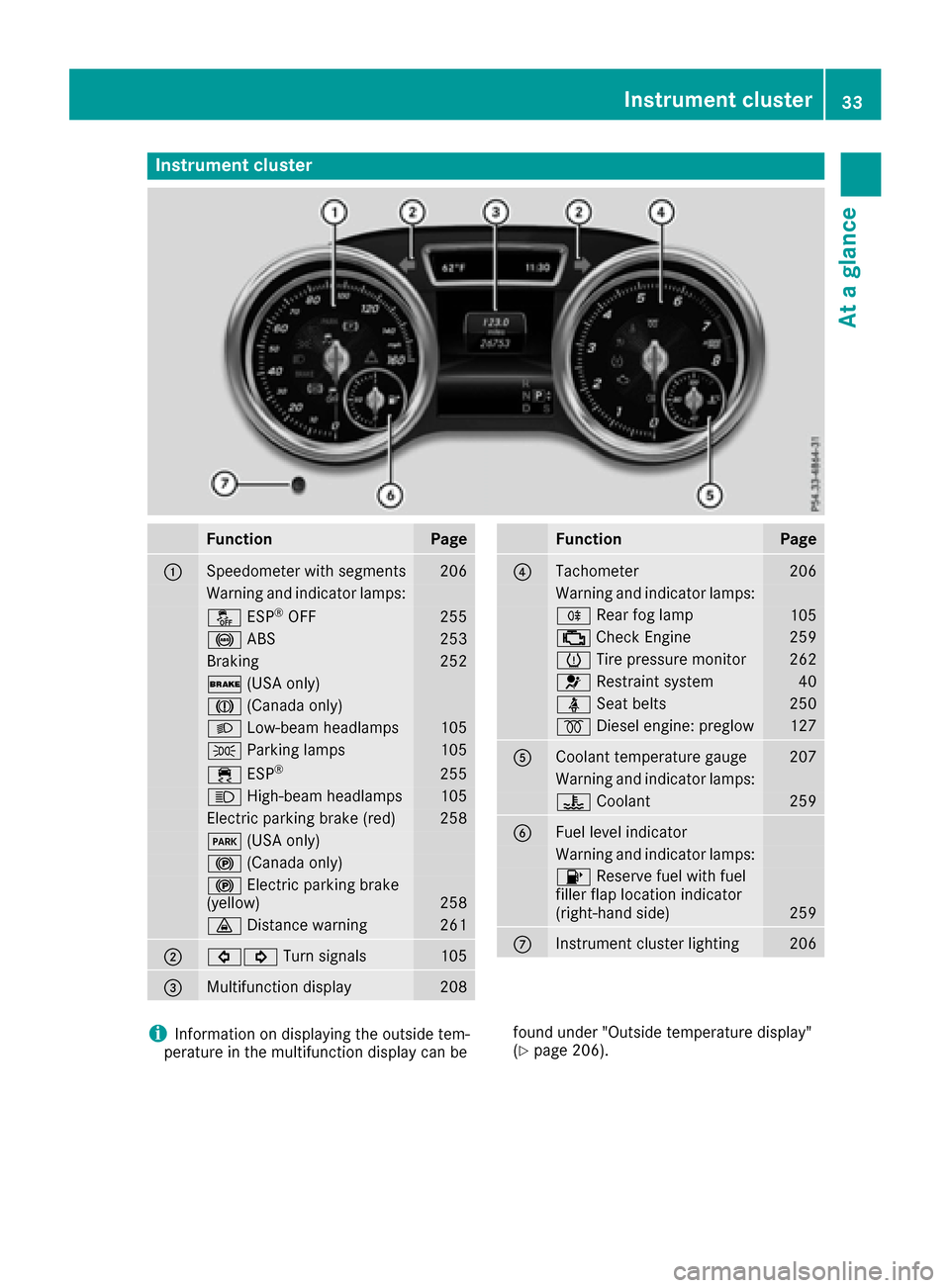
Instrument cluster
FunctionPage
:Speedometer wit hsegments20 6
Warning and indicator lamps:
å ESP®OF F255
! ABS253
Braking252
$ (USAonly)
J (Canada only)
LLow-beam headlamps105
T Parking lamp s105
÷ ESP®25 5
K High-beam headlamps105
Electric parking brak e(red)25 8
F (USAonly)
! (Canada only)
!Electric parking brak e
(yellow)25 8
· Distanc ewarning26 1
;#! Turn signals105
=Multifunction display208
FunctionPag e
?Tachometer206
Warning and indicator lamps:
R Rear fog lamp105
; CheckEngin e259
h Tirepressur emonitor26 2
6 Restrain tsystem40
ü Seat belt s250
% Diesel engine: preglow127
ACoolan ttemperature gauge20 7
Warning and indicator lamps:
? Coolan t259
BFue llevel indicator
Warning and indicator lamps:
8 Reserve fuel wit hfuel
filler flap location indicator
(right-hand side )
259
CInstrumen tcluste rlighting20 6
iInformation on displayin gth eoutside tem-
peratur ein th emultifunction display can be foun
dunder "Outside temperature display"
(Ypage 206).
Instrument cluster33
At a glance
Page 74 of 366
If activated in the multimedia system, the loca-
tor lighting also lights up in the dark (see sepa-
rate operating instructions).
XTo open the tailgate automatically from
outside the vehicle:press and hold theF
button until the tailgate opens.
Vehicles with KEYLESS-GO:
XTo close the tailgate automatically from
outside the vehicle: if the SmartKey is loca-
ted in the immediate vicinity of the vehicle,
press the Fbutton on the SmartKey.
When the tailgate closes you can then release
the button.
KEYLESS-GO
General notes
Bear in mind that the engine can be started by
any of the vehicle occupants if there is a KEY-
LESS-GO key in the vehicle (
Ypage 127).
Locking/unlocking centrally
You can start, lock or unlock the vehicle using
KEYLESS-GO. To do this, you only need carry the
SmartKey with you. You can combine the func-
tions of KEYLESS-GO with those of a conven-
tional SmartKey. Unlock the vehicle by using
KEYLESS-GO, for instance, and lock it using the
& button on the SmartKey.
The driver's door and the door at which the han-
dle is used, must both be closed. The SmartKey
must be outside the vehicle. When locking or
unlocking with KEYLESS-GO, the distance
between the SmartKey and the corresponding
door handle must not be greater than 3 ft (1 m).
KEYLESS-GO checks whether a valid SmartKey
is in the vehicle by periodically establishing a
radio connection between the vehicle and the
SmartKey. This happens:
Rwhen starting the engine
Rwhile driving
Rwhen the external door handles are touched
Rduring convenience closing
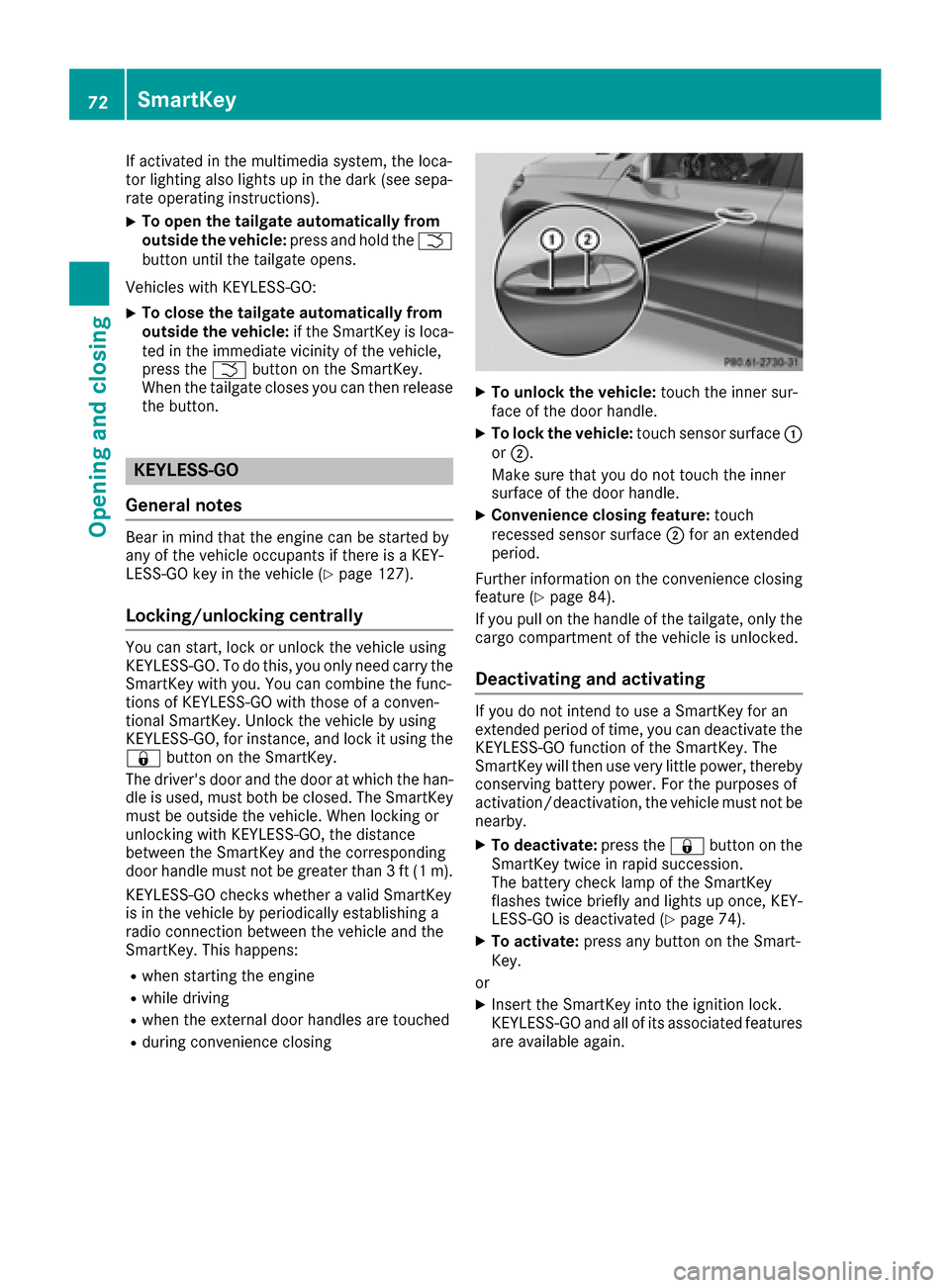
XTo unlock the vehicle: touch the inner sur-
face of the door handle.
XTo lock the vehicle: touch sensor surface :
or ;.
Make sure that you do not touch the inner
surface of the door handle.
XConvenience closing feature: touch
recessed sensor surface ;for an extended
period.
Further information on the convenience closing
feature (
Ypage 84).
If you pull on the handle of the tailgate, only the cargo compartment of the vehicle is unlocked.
Deactivating and activating
If you do not intend to use a SmartKey for an
extended period of time, you can deactivate the
KEYLESS-GO function of the SmartKey. The
SmartKey will then use very little power, thereby
conserving battery power. For the purposes of
activation/deactivation, the vehicle must not be
nearby.
XTo deactivate: press the&button on the
SmartKey twice in rapid succession.
The battery check lamp of the SmartKey
flashes twice briefly and lights up once, KEY-
LESS-GO is deactivated (
Ypage 74).
XTo activate: press any button on the Smart-
Key.
or
XInsert the SmartKey into the ignition lock.
KEYLESS-GO and all of its associated features
are available again.
72SmartKey
Opening and closing
Page 75 of 366
KEYLESS-GOstart function
Gene ral notes
Bear in min dthat th eengin ecan be started by
any of th evehicl eoccupant sif there is aSmart -
Key in th evehicl e (
Ypage 127).
Changing the settings ofthe locking
system
You can chang eth esetting sof th elocking sys-
tem. This mean sthat only th edriver's door and
th efuel filler flap are unlocke dwhen th evehicl e
is unlocked. This is useful if you frequentl ytravel
alone.
XTo change th esetting: press and hold down
th e% and& buttons simultaneousl y
for about six seconds until th ebattery indica-
to rlamp flashes twice (
Ypage 74).
If th esetting of th elocking system is changed
within th esignal range of th evehicle, pressing
th e& or% button:
Rlocks or
Runlocks th evehicl e
The SmartKey no wfunction sas follows :
XTo unlock: press the% buttononce .
XTo unlock centrally: press the% button
twice .
XTo lock centrally: press the& button.
The KEYLESS-GO function is changed as fol -
lows :
XTo unlock th edriver's door :touch th einner
surfac eof th edoor handle on th edriver's
door .
XTo unlock centrally: touch theinner surfac e
of th edoor handle on th efront-passenger
door or th erear door .
XTo lock centrally: touch theouter sensor
surfac eon on eof th edoor handles
(
Ypage 72) .
XTo restor eth efactory settings: press and
hold down th e% and& buttons simul-
taneously for approximately six seconds until
th ebattery chec klamp flashes twice
(
Ypage 74) .
Mechanical key
Gene ral notes
If th evehicl ecan no longer be locke dor
unlocke dwit hth eSmartKey or wit hKEYLESS -
GO, use th emechanical key.
If you use th emechanical ke yto unloc kand
open th edriver's door ,th eanti-thef talarm sys-
te m will be triggered .Switc hoff th ealarm
(
Ypage 70) .
If you unloc kth evehicl eusin gth emechanical
key, th efuel filler flap will no tbe unlocke dauto -
matically.
XTo unlock th efuel filler flap: insert the
SmartKey int oth eignition lock.
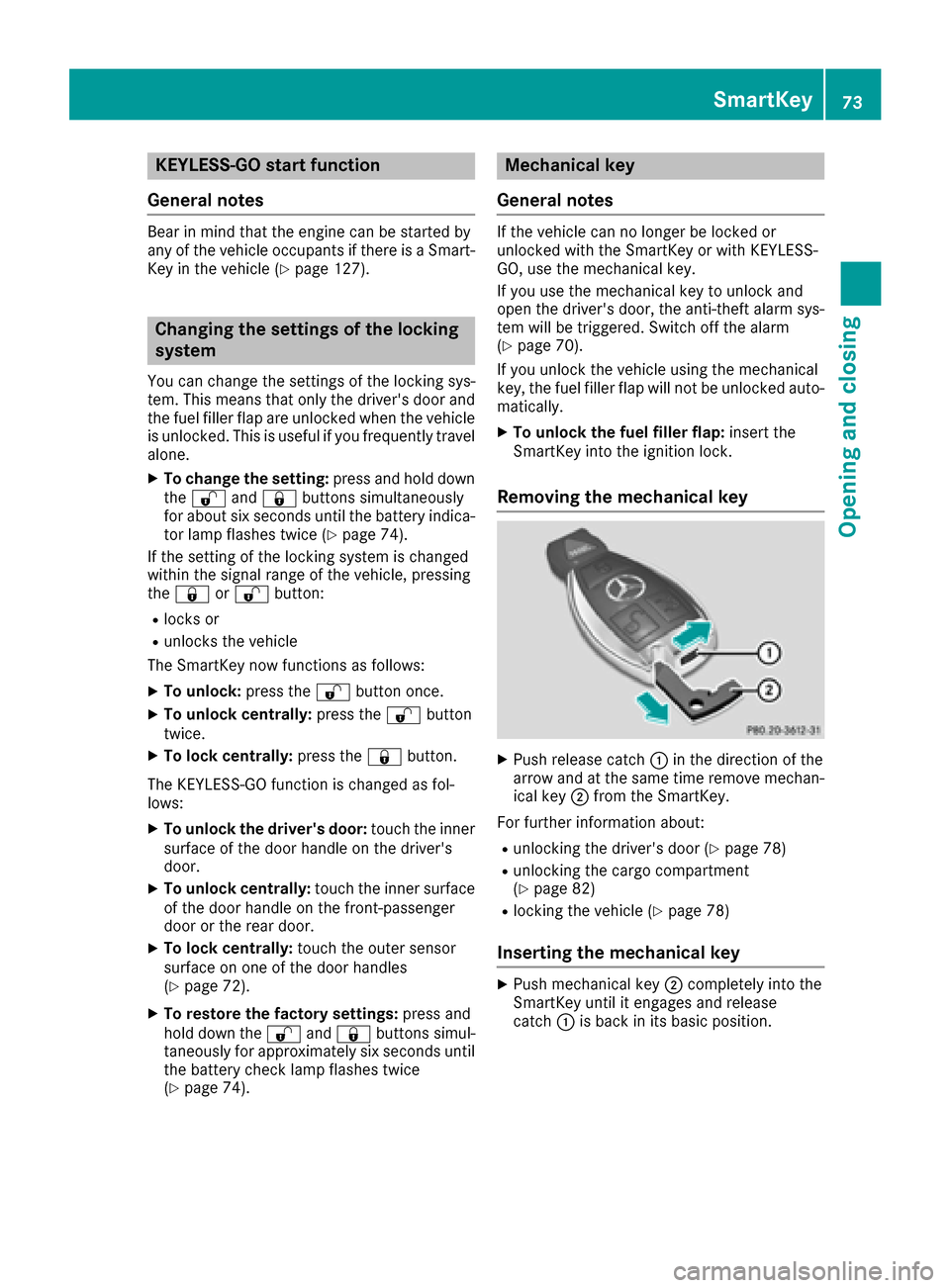
Removing the mechanical key
XPush release catch :in th edirection of th e
arrow and at th esam etime remove mechan -
ical ke y; from th eSmartKey.
Fo rfurther information about :
Runlocking thedriver's door (Ypage 78)
Runlocking thecargo compartmen t
(Ypage 82)
Rlocking th evehicl e (Ypage 78)
Inserting the mechanical key
XPush mechanical ke y; completely int oth e
SmartKey until it engage sand release
catch :is bac kin it sbasic position .
SmartKey73
Opening and closing
Z