2017 MERCEDES-BENZ GLC-Class USB
[x] Cancel search: USBPage 123 of 178

Conditions for a Bluetooth®connection
RThe mobile phone supports at least one of the
Bluetooth®profiles DUN (Dial-UpNetwork-
ing) or PAN (Personal AreaNetwork).
The Bluetooth
®profiles DUN and PAN enable
the Internet connection of the mobile phone
to be made available to the system.
Conditions for a USB connection
RThe mobile phone supports at least one of the
USB classes:
-RNDIS (R emoteNetwork DriverInterface
Specification)
-CDC/NCM (N etworkControl Model)
-CDC/ECM ( EthernetControlModel)
-CDC/ACM ( AccessControl Model)
The USB classes enable the mobile phone
Internet connection to be made available to
the system.
The terms of use are shown when the system is
used for the first time and then once a year
thereafter. Only read and accept the terms of
use when the vehicle is stationary.
The driver is not permitted to call up websites
while driving and use of the Mercedes-Benz
Apps is restricted.
iThe availability of individual Mercedes-Benz
Apps may vary depending on the country.
Setting up an Internet connection
(Canada)
Procedure and general information
In order to set up a mobile phone for Internet
access, your mobile phone must be connected
to the multimedia system via Bluetooth
®
(Ypage 92) or USB (Ypage 145).
If you are using Internet access for the first time,
you must enable the connected mobile phone
for Internet access (
Ypage 121). If the con-
nected mobile phone supports the Bluetooth®
PAN profile or the USB classes RNDIS,
CDC/NCM or CDC/ECM, you do not need to
make additional settings. The Internet connec-
tion is established. If the connected mobile
phone does not support the named Bluetooth
®
profile or the named USB classes, predefined
(Ypage 122) or manual access data
(Ypage 122) must be set. While initializing the mobile phone for the Inter-
net connection, access data which is already on
the mobile phone may be overwritten. You
should therefore check the settings on the
mobile phone (see the manufacturer's operating
instructions).
Enabling the mobile phone for Inter-
net access
XCall up Internet functions (Ypage 124).
XTo switch to the menu bar: slide
6the con-
troller.
XTo select Settings: turn and press the con-
troller.
XTo select Configure Internet Settings:
turn and press the controller.
A message is displayed telling you that the
settings for the Internet functions depend on
your mobile phone network provider and your
mobile phone.
If a mobile phone has already been enabled,
the device list is displayed.
XTo select Start Search: turn and press the
controller.
Mobile phones are displayed that:
Rare connected to the multimedia system
Rfulfill the conditions for the Internet func-
tions
Rhave not yet been set up for the Internet
function
XTo select a mobile phone from the device list: turn the controller and press to confirm.
If the mobile phone supports the Bluetooth
®
PAN profile or the USB classes RNDIS, CDC/
NCM or CDC/ECM, Internet access is set up.
You can use the Internet functions.
If the connected mobile phone does not sup-
port the named Bluetooth
®profile or the
named USB classes, predefined (Ypage 122)
Setting up an Internet connection (Canada)121
Online and Internet functions
Z
Page 143 of 178
Your multimediasyste mequipment
These operatin ginstruction sdescribe all th e
standar dan doptional equipment of your multi-
media system, as available at th etime of going
to press. Country-specifi cdifference sare pos -
sible. Bear in min dthat your vehicle may no t
feature all function sdescribed here. Thi salso
applies to safety-relevan tsystems an dfunc-
tions.
Read th einformation on qualifie dspecialis t
workshop sin th evehicle Operator's Manual.
Activating medi amode
General notes
There are severa lways to activat emedia sour-
ce susin gth emultimedia system.
The relevant section sof th eOperator's Manual
describe th esimples tway to activat e amedia
source. Thi ssection describes all option sfo r
activatin gmedia sources. If you wish to play
external media sources, th edefault display
mus talready be turned on .
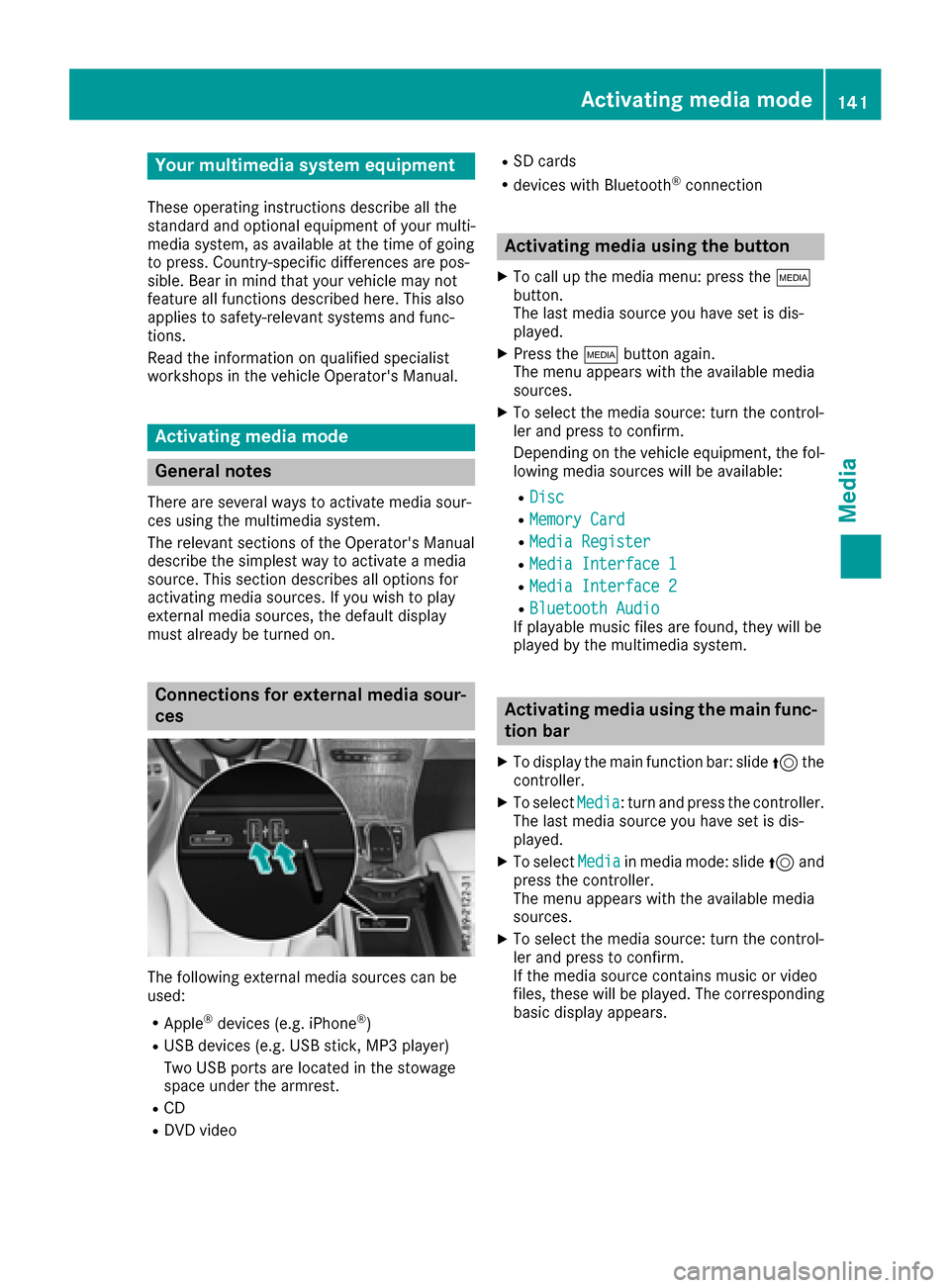
Connections for externa lmedi asour-
ces
The followin gexternal media sources can be
used :
RApple®devices (e.g. iPhon e®)
RUSBdevices (e.g. US Bstick, MP3 player)
Two US Bports are located in th estowag e
spac eunder th earmrest.
RCD
RDV Dvideo
RSD cards
Rdevices wit hBluetoot h®connection
Activating medi ausing th ebutton
XTo cal lup th emedia menu: press th eÕ
button.
The last media sourc eyou hav eset is dis -
played.
XPress th eÕ buttonagain .
The men uappears wit hth eavailable media
sources.
XTo selec tth emedia source: turn th econtrol-
ler an dpress to confirm .
Dependin gon th evehicle equipment ,th efol-
lowing media sources will be available :
RDisc
RMemory Card
RMediaRegister
RMedi aInterfac e 1
RMediaInterfac e 2
RBluetoothAudi oIf playable music files are found ,they will be
playe dby th emultimedia system.
Activating medi ausing th emain func-
tion ba r
XTo display th emain function bar :slid e5 the
controller .
XTo selectMedi a:turn an dpress th econtroller .
The last media sourc eyou hav eset is dis -
played.
XTo selec tMedi ain media mode: slid e5 and
press th econtroller .
The men uappears wit hth eavailable media
sources.
XTo selec tth emedia source: turn th econtrol-
ler an dpress to confirm .
If th emedia sourc econtain smusic or video
files, these will be played. The correspondin g
basi cdisplay appears .
Activating media mode141
Media
Page 144 of 178
Activating media using the device list
XIn media mode, slide6 thecontroller .
The media men ubar is shown.
XTo select Devices:tur nand press th econ-
troller .
The available media source swill be shown.
The #dot indicates th ecurren tsetting .
XSelectth emedia source .
If th emedia source contain smusic or video
files, these will be played .The corresponding
basic men uwill be shown.
Switching onautomatically
Afte rinserting aCD/DVD, th erespective media
mod eis automatically switched on by th emul-
timedia system.
If playable music file sare found, they will be
played by th emultimedia system.
If amedia function is already switched on in th e
multimedia system, this will be interrupted and
th ebasic display of th eCD/DV Dmod ewill
appear .If another function ,suc has navigation ,
is bein goperated, th ebasic display will no t
change. Only th emusic from th elast inserted
CD/DV Dwill be played .
Audio/video mode
Import ant safety notes
GWARNIN G
The CD/DV Ddrive is aclas s 1laser product.
If you open th ehousing of th eCD/DV Ddrive,
there is aris kof exposure to invisible laser
radiation .This laser radiation could damag e
your retina .There is aris kof injury.
Never open th ehousing .Always hav emain -
tenance and repair wor kcarrie dout at aquali-
fie dspecialis tworkshop .
GWARNING
Handlin gdisc swhile drivin gmay distrac tyou
from traffic conditions. You could also lose
control of th evehicle. There is aris kof an
accident.
Handle disc sonly when th evehicl eis station -
ary.
Bear in min dthat at aspee dof only 30 mph
(approximately 50 km/h), th evehicl ecover s a
distanc eof 44 ft (approximately 14 m)per sec-
ond.
Notes on audio/video mode
Permissible data carriers
RCD audio, CD-R and CD-RW
RDVD-R, DVD-V and DVD-RW
RSD card
RUSB storage device
Permissible file systems
RISO 9660/Joliet standard for CDs
RUDF for video DVDs
RFAT16, FAT32, exFAT and NTFS for SD card
and USB storage media
Multisession CDs
For multisession CDs, the content of the first
session determines how the multimedia system
processes the CD. The multimedia system plays
only one session and gives priority to the audio
CD session.
File structure of a data carrier
When you create a disc with compressed music
files, the tracks can be organized in folders. A
folder may also contain subfolders. The disc
may contain no more than eight directory levels.
Files beyond the eighth level will not be recog-
nized by the system.
iThe multimedia system supports data carri-
ers with up to 50,000 files.
In the case of a data carrier with more than
64 GB of stored data, only files in folders with the following names are supported: Music,
Pictures, Video.
Track and file names
When you create a disc with compressed musicfiles, you can assign names to the tracks and
folders.
142Audio/video mode
Media
Page 145 of 178

If MP3 or WMA files are stored in the root direc-
tory itself, the root directory will also be treatedas a folder.
You should observe the following when assign-
ing track names:
Rtrack names must have at least one character
Rtrack names must have an extension of a sup-
ported audio or video format, e.g. mp3, aac orm4v.
Rthere must be a dot between the track name
and the extension
Example of a correct track name:
"Track1.mp3".
Permissible formats
The multimedia system supports the following
audio and video formats:
Audio for-
matsMP3, WMA, CDA, AAC for-
mats (.aac, .mp4, .m4a
and .m4b)
Video for-
matsDVD-V, MPEG, WMV, M4V,
AVI up to 720p
Copy-protected iTunes®music files with
the .m4p file extension are not supported.
Permissible bit and sampling rates
The multimedia system supports MP3 and WMA
files of the following type:
FormatBit rates [kbit/
s]Sampling
rates [kHz]
MP332-320
(fixed and varia-
ble bit rates)8-48
WMA5-384
(fixed bit rates)8-48
The multimedia system does not support WMA
files of the following type:
RDRM (Digital Rights Management) encrypted
files
RFiles with variable bit rates
RWMA Pro
R5.1 surround sound
iOnly use tracks with a bit rate of at least
128 kbit/s and a sampling rate of at least
44.1 kHz. Lower rates can cause a noticeable
deterioration in quality. This is especially the
case if you have activated a surround sound
function.
Selecting an active partition (USB mass
storage devices only)
You can select this function for USB storage
devices when the storage device is partitioned.
Up to 9 partitions (primary or logical, FAT, FAT32
and NTFS) are supported.
Selecting an active partition
XSelect a USB storage device (Ypage 141).
XSlide 6the controller.
The media menu bar is shown.
XTo select Options: turn and press the con-
troller.
XSelect Select Active Partition.
Notes on copyright
Audio or video files that you create or reproduce
yourself for playback are generally subject to
copyright protection.
In many countries, reproductions, even for pri-
vate use, are not permitted without the prior
consent of the copyright holder.
Make sure that you know about the applicable
copyright regulations and that you comply with
these.
Notes on CDs/DVDs
!Do not affix stickers or labels to the discs.
They could peel off and damage the drive.
The drive is designed to receive EN 60908 standard discs. Therefore, you can
only use discs with a maximum thickness of
1.3 mm.
If you insert thicker discs, e.g. those that con-
tain data on both sides (DVD on one side and
audio data on the other), they cannot be ejec-
ted and can damage the drive.
Do not use discs with an 8 cm diameter, even
when using an adapter. Only use round discs
with a 12 cm diameter.
Discs with copy protection are not compatible
with the audio CD standard and therefore may
not be able to be played.
Audio/video mode143
Media
Z
Page 147 of 178

Inserting an SD card
XInsertth eSD car dint oth eSD car dslot until
th eSD car dengages. The side wit hth econ-
tacts must fac edown .
If Memory
Car dhas been selected as amedia
source ,th emedium is played and th efile sare
loade din th ebackground. If there are no sup-
porte daudio or vide ofiles, you will see ames -
sage to this effect.
XSelec tth emedia source (Ypage 141).
Removing an SD card
XPress theSD card.
The SD car dis ejected.
XRemove th eSD card.
Connecting USB devices
Ther eare two US Bports in th estowage spac e
under th earmres t (Ypage 141).
XConnect th eUS Bdevice to th eUS Bport.
If th ecorresponding media display is visible,
th emedium is played and th efile sare loade d
in th ebackground. If there are no supported
audio or vide ofiles, you will see amessage to
this effect.
iMP3 player smust support Medi aTransfer
Protoco l(MTP).
Activating media mode
Afte rinserting aCD or DVD, th emedia mod eis
automatically switched on by th emultimedia
system.
If playable musi cfile sare found, they will be
played by th emultimedia system.
If amedia function is already switched on in th e
multimedia system, this will be interrupted and
th ebasic display of th eCD or DV Dmod ewill
appear .If another function ,suc has navigation ,
is bein goperated, th ebasic display will no t
change. Only th emusi cfrom th elast inserted
CD or DV Dwill be played.
Dependin gon th evehicl eequipment, th ebasic
display must already be turne don when usin g
wit hUS Bdevice sor SD cards.
XInser tth eCDs/DVD s (Ypage 144)
or
XInser tan SD card: (Ypage 145)
or
XConnect aUS Bdevice : (Ypage 145)
The multimedia system loads th emedium
inserted and playbac kstart sautomatically.
Further option sfor switching on :
RUsing themain function bar (Ypage 141)
RUsing thedevice list (Ypage 142)
RUsing theÕ button (Ypage 141)
Selecting the playback option
Playing similar tracks
XIn media mode, slide 6thecontroller .
XTo select Options:tur nand press th econ-
troller .
XTo select PlayMor eLik eThi s:tur nand
press th econtroller .
The multimedia system automatically creates
and plays atrack list wit hsimilar tracks. If
there are no comparable track son th edat a
carrier, you will see amessage to this effect.
XSelec tth erequire dtrack .
Selecting Play mode
XIn media mode, slide 6thecontroller .
XTo select Options:tur nand press th econ-
troller .
XTo select PlaybackMode:tur nand press th e
controller .
XSelectNormal Track Sequence.
The curren ttrack list is played in th eorder it is
store don th edat amedium.
XSelec tRandom Track Lis t.
The curren ttrack list is played in random
order.
XSelec tRandom Medium.
All track son th edat amedium are played in
random order.
Entering a track number directly
XIn media mode, slide 6thecontroller .
XTo select Options:tur nand press th econ-
troller .
Audio/video mode145
Media
Z
Page 148 of 178

XTo selectTrackNumber:: turn and press the
controller.
A menu appears.
XEnter the desired track number.
Skip to time
XIn media mode, slide 6the controller.
XTo select Options: turn and press the con-
troller.
XTo select Skip to Time: turn and press the
controller.
A menu appears.
XTo set the time: turn the controller.
Selecting an active partition
XIn media mode, slide 6the controller.
XTo select Options: turn and press the con-
troller.
XTo select Select Active Partition: turn
and press the controller.
With the Select
ActivePartitionoption,
you can select a partition in the USB data car-
rier.
Showing track information
XIn media mode, slide 6the controller.
XTo select Options: turn and press the con-
troller.
XTo select Show Track Information: turn
and press the controller.
Ticking or removing the tick from the box in
front of Show Track Information
displays
or hides the information on the track, artist
and album in the main display field.
Saving files to Media Register
iWith the SaveFilestoMediaRegisteroption, you can transfer supported audio,
image or video files to the multimedia system
hard drive.
XIn media mode, slide 6the controller.
XTo select Options: turn and press the con-
troller.
XTo select the Save Files to Media Reg‐isteroption: turn and press the controller.
A menu appears (Ypage 149).
Managing Media Register
XIn media mode, slide 6the controller.
XTo select Options: turn and press the con-
troller.
XDelete or rename individual files in the Media
Register (Ypage 151).
XDelete all files in the Media Register
(Ypage 151).
XCall up information on the preset
(Ypage 152).
Pausing/continuing playback
XTo pause playback: in audio or video mode,
slide 6the controller.
The media menu bar is shown.
XTo select Ëin the media menu bar: turn
and press the controller.
Playback is interrupted. The display changes
to Ì.
XTo continue playback: in audio or video
mode, slide 6the controller.
The media menu bar is shown.
XTo select Ìin the media menu bar: turn
and press the controller.
Playback is continued from the point of inter- ruption. The symbol changes to Ë.
Selecting a track
Selecting using the current track list
XTo display the current track list: press the
controller in the basic display.
The category list appears.
XSelect the current track list.
XTo select a track: turn the controller and press
to confirm.
Selecting by skipping to a track
XTo skip forwards or backwards to a track: turn
or briefly slide 9or8 the controller in
the media basic display.
146Audio/video mode
Media
Page 149 of 178

Searching for a track
XIn media mode, slide6the controller.
The media menu bar is shown.
XTo select Search: turn and press the control-
ler.
The category list is shown.
XSelect a category, e.g. Genres.
Sub-categories appear with the selection of
the main category (depends on the multime-
dia system default settings and the music
tracks available).
XSelect a sub-category, for example Rock.
If the sub-category Rock
contains music
tracks, these will be displayed.
Gracenote®Media Database
General notes
This function is available in audio CD mode.
There is a version of
Gracenote®music recognition technology,
Emeryville, California, USA on the multimedia
system hard disk. You will recognize this by the
logo in the bottom right-hand corner of certain
audio displays.
If the audio CD does not contain any CD text
information, the multimedia system can use the
Gracenote
®Media Database to identify
unknown audio tracks when in CD audio mode.
Carrying out an Internet update of met-
adata
The Updating Metadata Via Internetoption allows any missing metadata for an audio
CD (e.g. cover, track, album, artist) to be uploa-
ded retrospectively to the internal Gracenote
®
database.
An Internet connection is required for this
(
Ypage 124). Selecting Internet update of metadata
XIn media mode, slide
6the controller.
The media menu bar is shown.
XTo select Options: turn and press the con-
troller.
XSelect Updating Metadata Via Internetin the selection list.
A connection with the Gracenote®data server
is established. The missing data is loaded,
saved and displayed in the main display field.
If there is no data found or there is no Internet
connection, a corresponding error message
will appear.
Switching the Gracenote®data display
on/off
XSwitch on audio CD mode (Ypage 145).
XTo select Gracenote Media Database: turn
and press the controller.
XTo switch the display off: select None.
In the basic display, Track 1is shown instead
of the Gracenote®data, for example.
XTo switch on the display: press the controller.
Media search
General notes
The multimedia system plays back files from the following data media:
RDisc (audio CD or DVD)
RMemory card
RMedia Register
RUSB storage device
RApple®devices (folder, year and photos are
not available)
The categories are displayed according to the
data available.
Starting the media search
XIn media mode, slide 6the controller.
The media menu bar is shown.
XTo select Search: turn and press the control-
ler.
The category list appears.
Media search147
Media
Z
Page 151 of 178

Searching for a track via a keyword
XTo selectKeywordSearchin the category list
(Ypage 148): turn and press the controller.
The input field appears.
XTo select the required characters: turn and
press the controller for each one (Ypage 30).
Entering just part of the name of a track or
artist is enough. The search result then dis-
plays the entire text.
XSelect ¬.
The search results are displayed.
The numbers behind the results, for example
Tracks
(5/0), mean: 5 results that contain
the exact keyword searched for and 0 results
that are similar.
XSelect one of the results.
Keywords that have already been searched
for are displayed in the "Search history" with-
out having to enter them completely. They
can be accepted directly and displayed in the
search result.
XSelect an entry.
Albums and covers (if available) are shown.
The multimedia system searches in all media
sources.
XSelect an album.
The tracks are listed.
XSelect a track.
The basic display appears and playback
starts.
Media Register
General notes
You can store music files, photos or video files in the Media Register. The memory has a capacity
of 10.8 GB.
iKeep your original music files, photos and
video files in a secure location. An error in the multimedia system may result in the loss of
files stored in the Media Register. Mercedes-
Benz is not liable for any loss of data.
Switching on the Media Register
XIn media mode press the Õbutton.
A menu appears with the available media
sources.
XTo select Media Register: turn and press
the controller.
Playback begins at the point last listened to.
If there are no files, you will see a message to
this effect.
Further options for switching on:
Rusing the main function bar: (Ypage 141)
Rusing the device list: (Ypage 142)
Rusing the Õbutton: (Ypage 141)
Media Register basic display
:Main function bar
;Display for the active data medium
=Media menu bar
?Track display on the disc
ATrack number and number of tracks in the
track list
BNumerical time display
CGraphic time display
DCover view (if available)
Copying files to the Media Register
General notes
You can copy photos, music files and videos
from the following data mediums:
RDisc (CD and DVD)
RSD card
RUSB storage device
RMP3
Media Register149
Media
Z