2017 MERCEDES-BENZ GLA SUV sensor
[x] Cancel search: sensorPage 256 of 369
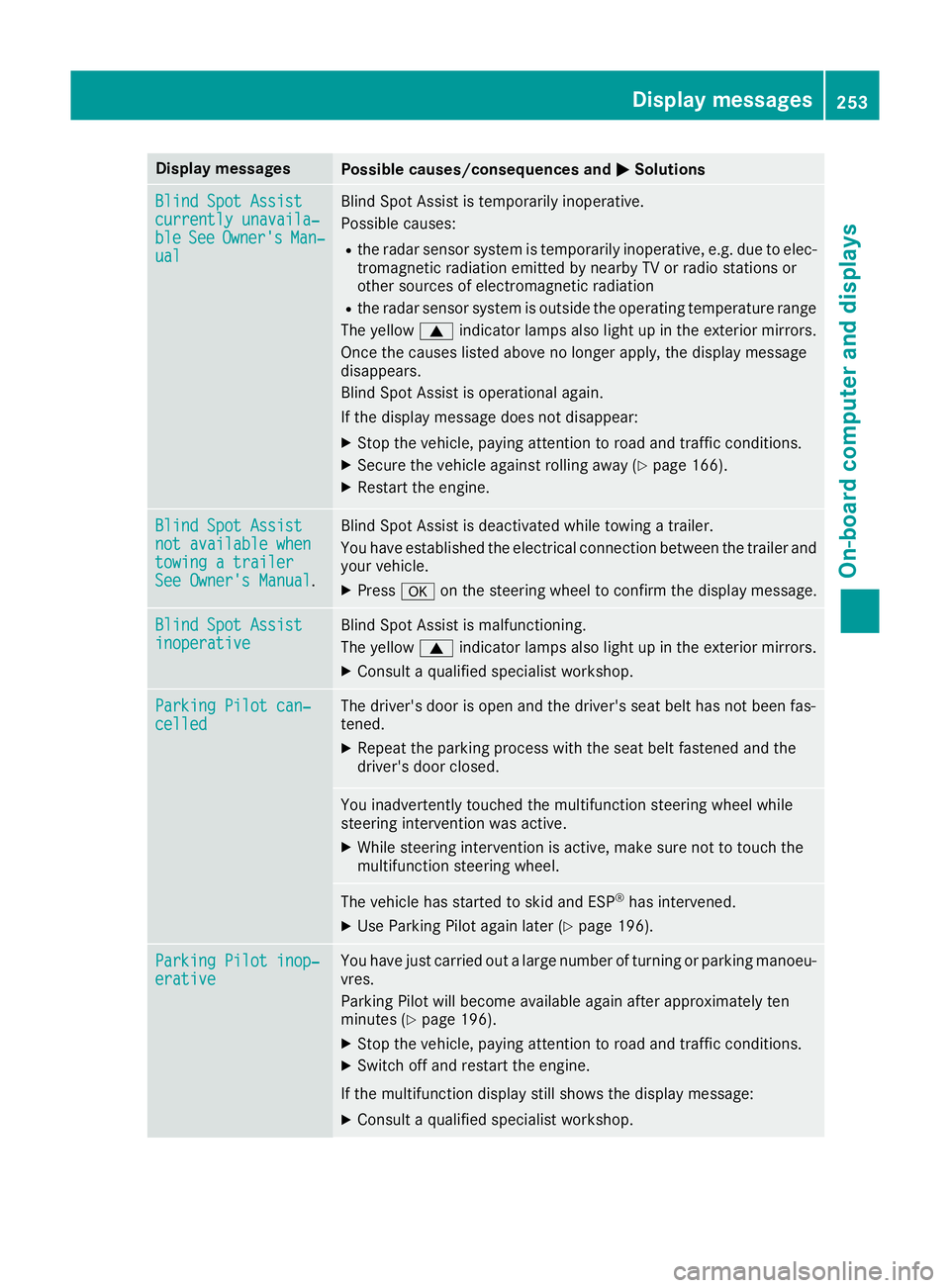
Display messages
Possible causes/consequences and
M
MSolutions Blind Spot Assist
Blind Spot Assist
currently unavaila‐ currently unavaila‐
ble ble
See
SeeOwner's
Owner's Man‐
Man‐
ual
ual Blind Spot Assist is temporarily inoperative.
Possible causes:
R the radar sensor system is temporarily inoperative, e.g. due to elec-
tromagnetic radiation emitted by nearby TV or radio stations or
other sources of electromagnetic radiation
R the radar sensor system is outside the operating temperature range
The yellow 9indicator lamps also light up in the exterior mirrors.
Once the causes listed above no longer apply, the display message
disappears.
Blind Spot Assist is operational again.
If the display message does not disappear:
X Stop the vehicle, paying attention to road and traffic conditions.
X Secure the vehicle against rolling away (Y page 166).
X Restart the engine. Blind Spot Assist Blind Spot Assist
not available when not available when
towing a trailer towing a trailer
See Owner's Manual See Owner's Manual
. Blind Spot Assist is deactivated while towing a trailer.
You have established the electrical connection between the trailer and
your vehicle.
X Press aon the steering wheel to confirm the display message. Blind Spot Assist
Blind Spot Assist
inoperative inoperative Blind Spot Assist is malfunctioning.
The yellow
9indicator lamps also light up in the exterior mirrors.
X Consult a qualified specialist workshop. Parking Pilot can‐ Parking Pilot can‐
celled celled The driver's door is open and the driver's seat belt has not been fas-
tened.
X Repeat the parking process with the seat belt fastened and the
driver's door closed. You inadvertently touched the multifunction steering wheel while
steering intervention was active.
X While steering intervention is active, make sure not to touch the
multifunction steering wheel. The vehicle has started to skid and ESP
®
has intervened.
X Use Parking Pilot again later (Y page 196).Parking Pilot inop‐ Parking Pilot inop‐
erative erative You have just carried out a large number of turning or parking manoeu-
vres.
Parking Pilot will become available again after approximately ten
minutes (Y page 196).
X Stop the vehicle, paying attention to road and traffic conditions.
X Switch off and restart the engine.
If the multifunction display still shows the display message:
X Consult a qualified specialist workshop. Display
messages
253On-board computer and displays Z
Page 257 of 369
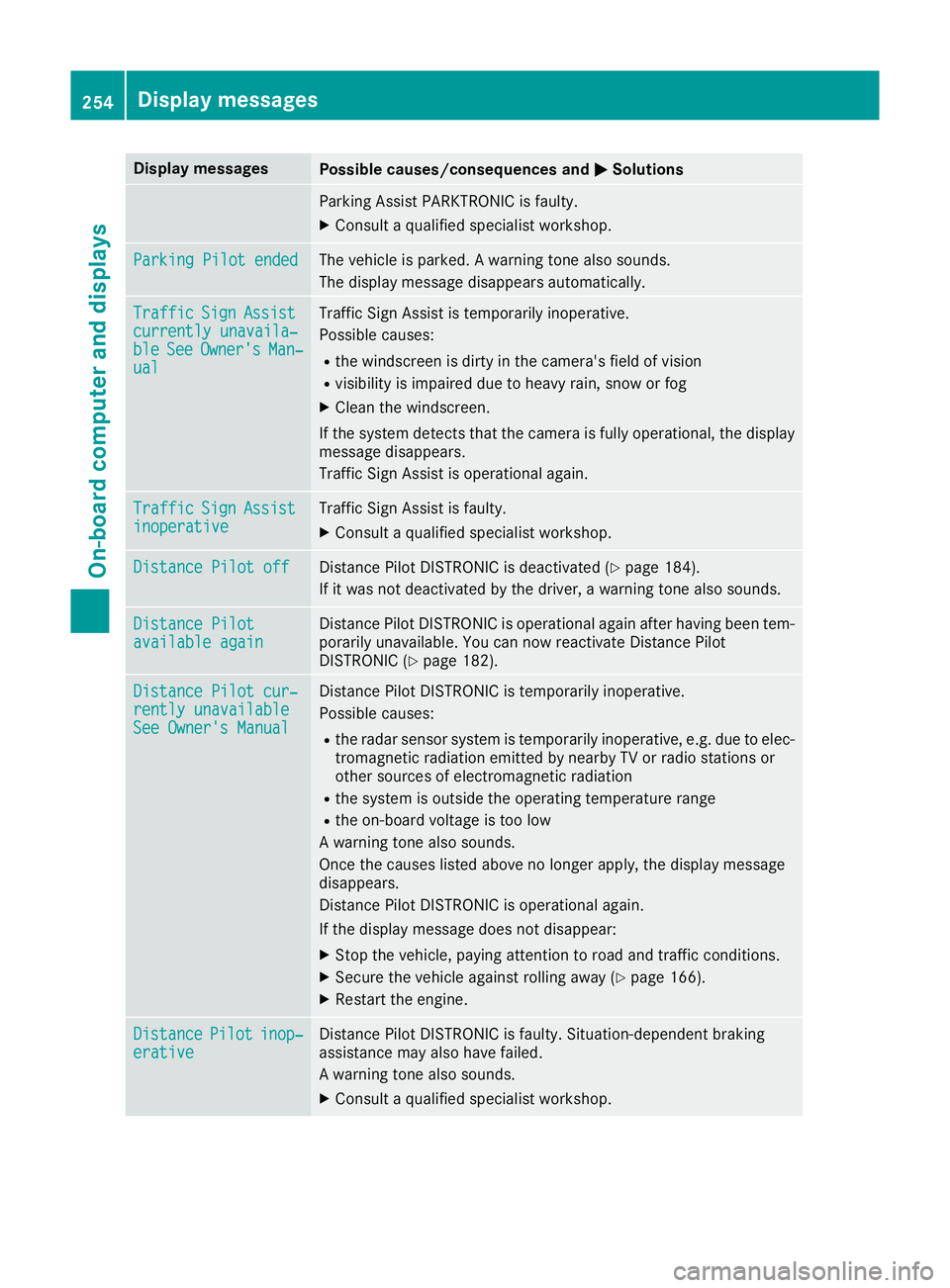
Display messages
Possible causes/consequences and
M
MSolutions Parking Assist PARKTRONIC is faulty.
X Consult a qualified specialist workshop. Parking Pilot ended
Parking Pilot ended The vehicle is parked. A warning tone also sounds.
The display message disappears automatically. Traffic
Traffic
Sign
Sign Assist
Assist
currently unavaila‐
currently unavaila‐
ble ble See
SeeOwner's
Owner's Man‐
Man‐
ual
ual Traffic Sign Assist is temporarily inoperative.
Possible causes:
R the windscreen is dirty in the camera's field of vision
R visibility is impaired due to heavy rain, snow or fog
X Clean the windscreen.
If the system detects that the camera is fully operational, the display message disappears.
Traffic Sign Assist is operational again. Traffic Traffic
Sign
Sign Assist
Assist
inoperative
inoperative Traffic Sign Assist is faulty.
X Consult a qualified specialist workshop. Distance Pilot off
Distance Pilot off Distance Pilot DISTRONIC is deactivated (Y
page 184).
If it was not deactivated by the driver, a warning tone also sounds. Distance Pilot
Distance Pilot
available again available again Distance Pilot DISTRONIC is operational again after having been tem-
porarily unavailable. You can now reactivate Distance Pilot
DISTRONIC (Y page 182). Distance Pilot cur‐
Distance Pilot cur‐
rently unavailable rently unavailable
See Owner's Manual See Owner's Manual Distance Pilot DISTRONIC is temporarily inoperative.
Possible causes:
R the radar sensor system is temporarily inoperative, e.g. due to elec-
tromagnetic radiation emitted by nearby TV or radio stations or
other sources of electromagnetic radiation
R the system is outside the operating temperature range
R the on-board voltage is too low
A warning tone also sounds.
Once the causes listed above no longer apply, the display message
disappears.
Distance Pilot DISTRONIC is operational again.
If the display message does not disappear:
X Stop the vehicle, paying attention to road and traffic conditions.
X Secure the vehicle against rolling away (Y page 166).
X Restart the engine. Distance Distance
Pilot
Pilotinop‐
inop‐
erative
erative Distance Pilot DISTRONIC is faulty. Situation-dependent braking
assistance may also have failed.
A warning tone also sounds.
X Consult a qualified specialist workshop. 254
Display
messagesOn-board computer and displays
Page 260 of 369

Display messages
Possible causes/consequences and
M
MSolutions Check tyre(s)
Check tyre(s) The tyre pressure in one or more tyres has dropped significantly. The
wheel position appears in the multifunction display.
A warning tone also sounds.
G WARNING
Underinflated tyres pose the following risks:
R the tyres may burst, especially as the load and vehicle speed
increase
R the tyres may wear excessively and/or unevenly, which may greatly
impair tyre traction
R the driving characteristics, as well as steering and braking, may be
greatly impaired
There is a risk of an accident.
X Stop the vehicle without making any sudden steering or braking
manoeuvres. Pay attention to the traffic conditions as you do so.
X Secure the vehicle against rolling away (Y page 166).
X Check the tyres and, if necessary, follow the instructions for a flat
tyre (Y page 317).
X Check the tyre pressure (Y page 340).
X If necessary, correct the tyre pressure. Warning tyre defect Warning tyre defect The tyre pressure in one or more tyres has dropped suddenly. The
wheel position appears in the multifunction display.
G WARNING
If you drive with a flat tyre, there is a risk of the following hazards: R a flat tyre impairs the ability to steer or brake the vehicle
R you could lose control of the vehicle
R continued driving with a flat tyre will cause excessive heat build-up
and possibly a fire
There is a risk of an accident.
X Stop the vehicle without making any sudden steering or braking
manoeuvres. Pay attention to the traffic conditions as you do so.
X Secure the vehicle against rolling away (Y page 166).
X Check the tyres and, if necessary, follow the instructions for a flat
tyre (Y page 317). Tyre Tyre
press.
press. monitor
monitor
currently unavaila‐
currently unavaila‐
ble ble No signals can be received from the tyre pressure sensors due to
strong RF interference. The tyre pressure monitor is temporarily mal-
functioning.
X Drive on.
The tyre pressure monitor starts automatically as soon as the cause
has been rectified. Display
messages
257On-board computer and displays Z
Page 261 of 369
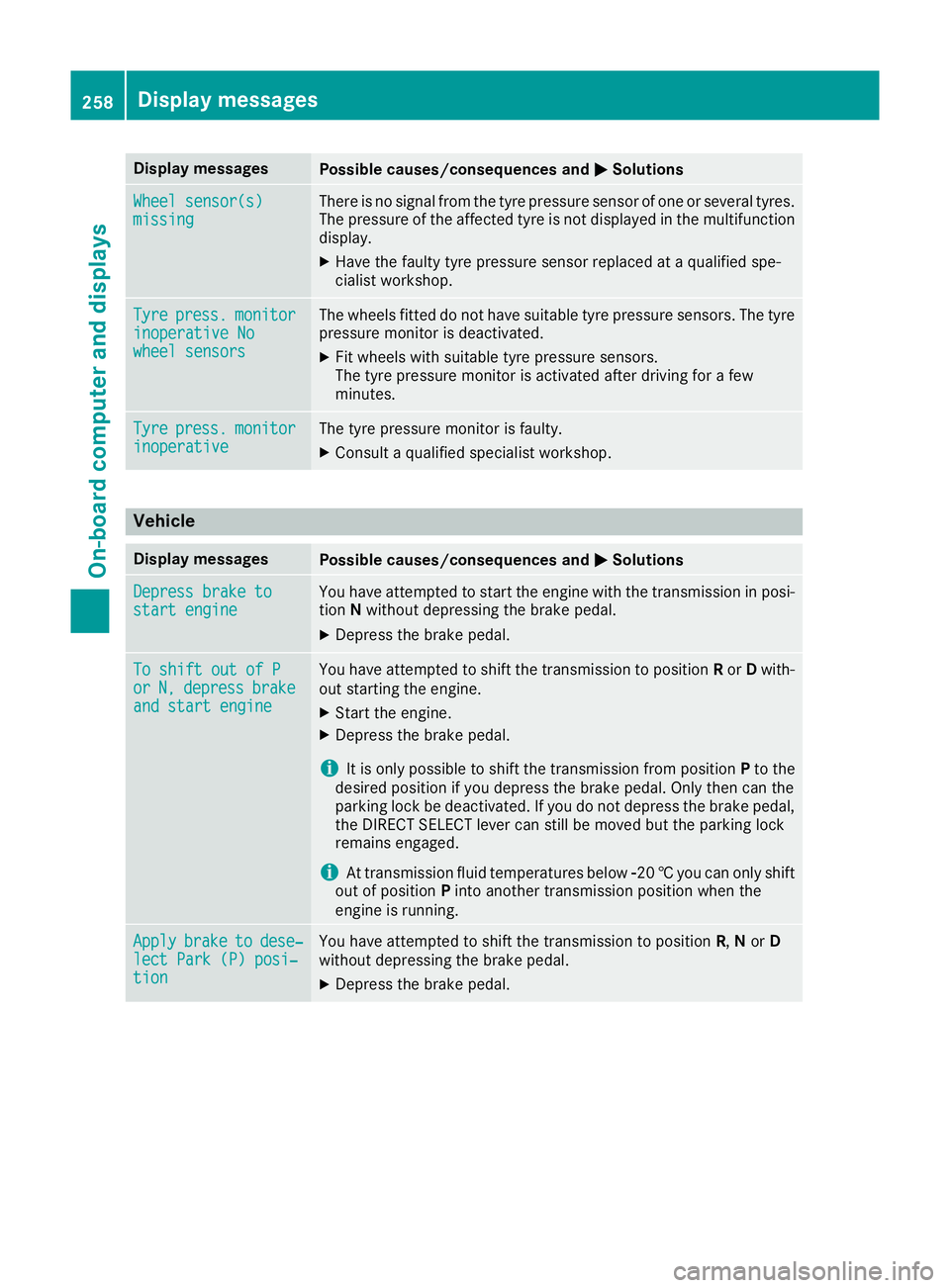
Display messages
Possible causes/consequences and
M
MSolutions Wheel sensor(s)
Wheel sensor(s)
missing missing There is no signal from the tyre pressure sensor of one or several tyres.
The pressure of the affected tyre is not displayed in the multifunction
display.
X Have the faulty tyre pressure sensor replaced at a qualified spe-
cialist workshop. Tyre Tyre
press.
press. monitor
monitor
inoperative No
inoperative No
wheel sensors wheel sensors The wheels fitted do not have suitable tyre pressure sensors. The tyre
pressure monitor is deactivated.
X Fit wheels with suitable tyre pressure sensors.
The tyre pressure monitor is activated after driving for a few
minutes. Tyre Tyre
press.
press. monitor
monitor
inoperative
inoperative The tyre pressure monitor is faulty.
X Consult a qualified specialist workshop. Vehicle
Display messages
Possible causes/consequences and
M
MSolutions Depress brake to
Depress brake to
start engine start engine You have attempted to start the engine with the transmission in posi-
tion Nwithout depressing the brake pedal.
X Depress the brake pedal. To shift out of P
To shift out of P
or or
N,
N,depress
depress brake
brake
and start engine
and start engine You have attempted to shift the transmission to position
Ror Dwith-
out starting the engine.
X Start the engine.
X Depress the brake pedal.
i It is only possible to shift the transmission from position
Pto the
desired position if you depress the brake pedal. Only then can the
parking lock be deactivated. If you do not depress the brake pedal,
the DIRECT SELECT lever can still be moved but the parking lock
remains engaged.
i At transmission fluid temperatures below
Ò20†you can only shift
out of position Pinto another transmission position when the
engine is running. Apply
Apply
brake
braketo
todese‐
dese‐
lect Park (P) posi‐
lect Park (P) posi‐
tion tion You have attempted to shift the transmission to position
R,Nor D
without depressing the brake pedal.
X Depress the brake pedal. 258
Display messagesOn-board computer and displays
Page 276 of 369
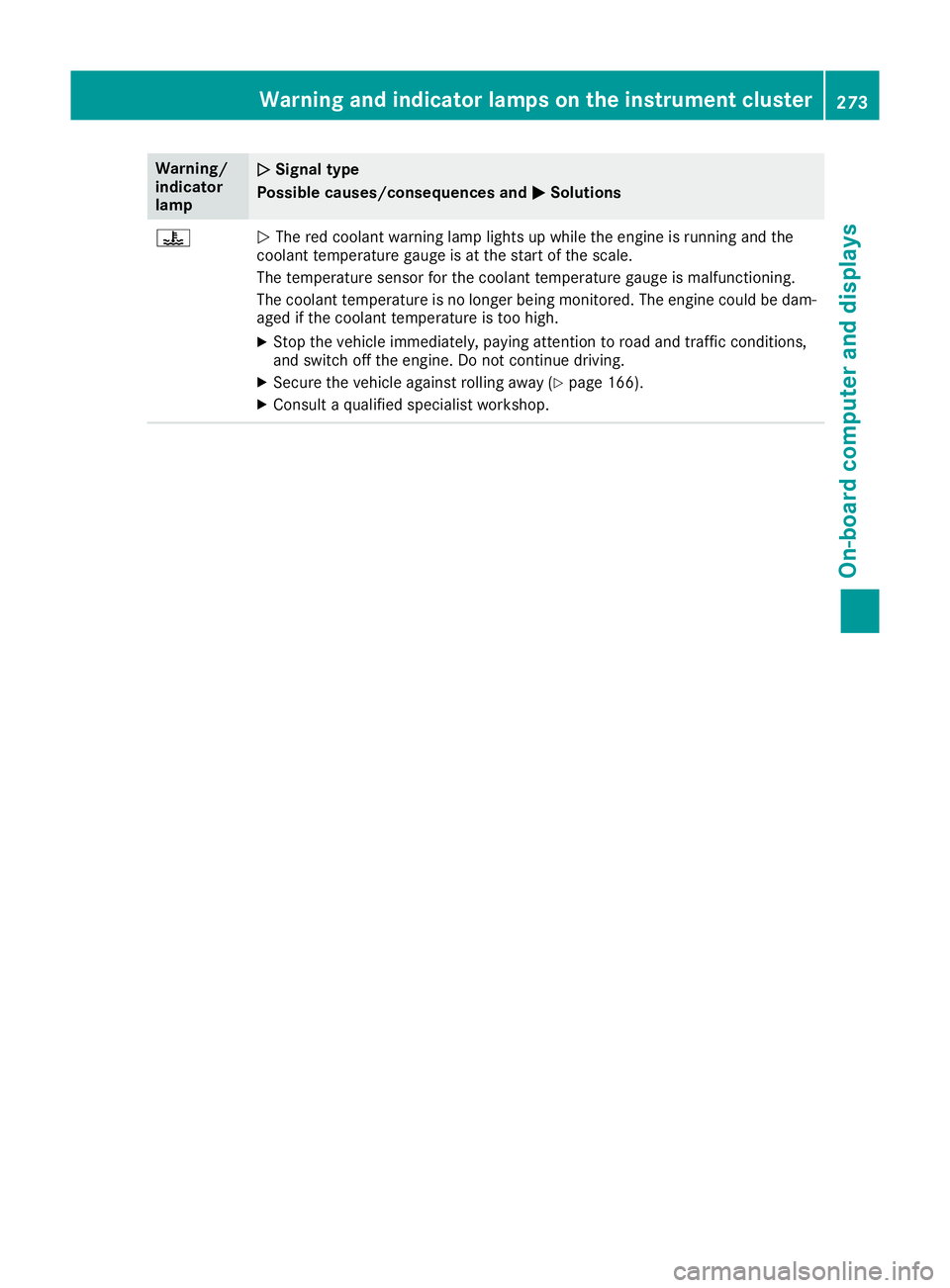
Warning/
indicator
lamp
N N
Signal type
Possible causes/consequences and M
MSolutions ?
N
The red coolant warning lamp lights up while the engine is running and the
coolant temperature gauge is at the start of the scale.
The temperature sensor for the coolant temperature gauge is malfunctioning.
The coolant temperature is no longer being monitored. The engine could be dam-
aged if the coolant temperature is too high.
X Stop the vehicle immediately, paying attention to road and traffic conditions,
and switch off the engine. Do not continue driving.
X Secure the vehicle against rolling away (Y page 166).
X Consult a qualified specialist workshop. Warning and indicator lamps on the instrument cluster
273On-board computer and displays Z
Page 314 of 369
X
Fold the wiper arms away from the wind-
screen.
X Clean the wiper blades carefully using a damp
cloth.
X Fold the windscreen wipers back again before
switching on the ignition.
Cleaning the exterior lighting !
Only use cleaning agents or cleaning cloths
that are suitable for plastic lenses. Unsuitable
cleaning agents or cleaning cloths could
scratch or damage the plastic lenses of the
exterior lighting.
X Clean the plastic lenses of the exterior light-
ing using a wet sponge and a mild cleaning
agent, e.g. Mercedes-Benz car shampoo or
cleaning cloths.
Cleaning the mirror turn signal !
Only use cleaning agents or cleaning cloths
that are suitable for plastic lenses. Unsuitable
cleaning agents or cleaning cloths could
scratch or damage the plastic lenses of the
mirror turn signals.
X Clean the plastic lenses of the mirror turn sig-
nals in the exterior mirror housing using a wet sponge and mild cleaning agent, e.g.
Mercedes-Benz car shampoo or cleaning
cloths.
Cleaning the sensors !
If you clean the sensors with a high-pressure
cleaner, make sure that you keep a distance
of at least 30 cm between the vehicle and the high-pressure cleaner nozzle. Information
about the correct distance is available from
the equipment manufacturer. X
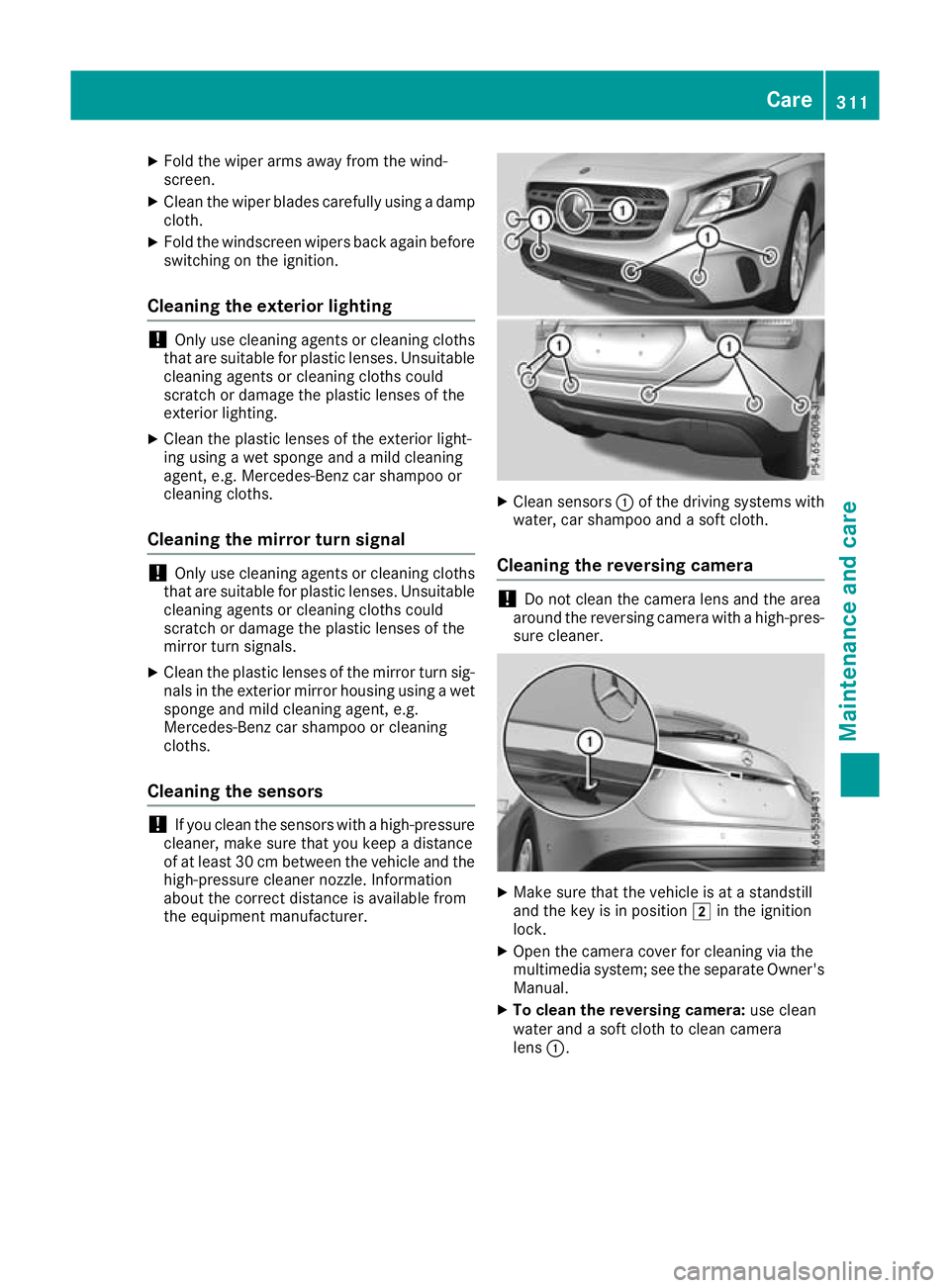
Clean sensors :of the driving systems with
water, car shampoo and a soft cloth.
Cleaning the reversing camera !
Do not clean the camera lens and the area
around the reversing camera with a high-pres-
sure cleaner. X
Make sure that the vehicle is at a standstill
and the key is in position 2in the ignition
lock.
X Open the camera cover for cleaning via the
multimedia system; see the separate Owner's
Manual.
X To clean the reversing camera: use clean
water and a soft cloth to clean camera
lens :. Care
311Maintenance and care Z
Page 343 of 369
Tyre pressure monitor
General notes If a tyre pressure monitor is fitted, the vehicle's
wheels have sensors fitted that monitor the tyre
pressures in all four tyres. The tyre pressure
monitor warns you if the pressure drops in one
or more of the tyres. The tyre pressure monitor
functions only if the corresponding sensors are
fitted to all wheels.
Information on tyre pressures is shown on the
multifunction display. After a few minutes of
driving, the current tyre pressure of each tyre is
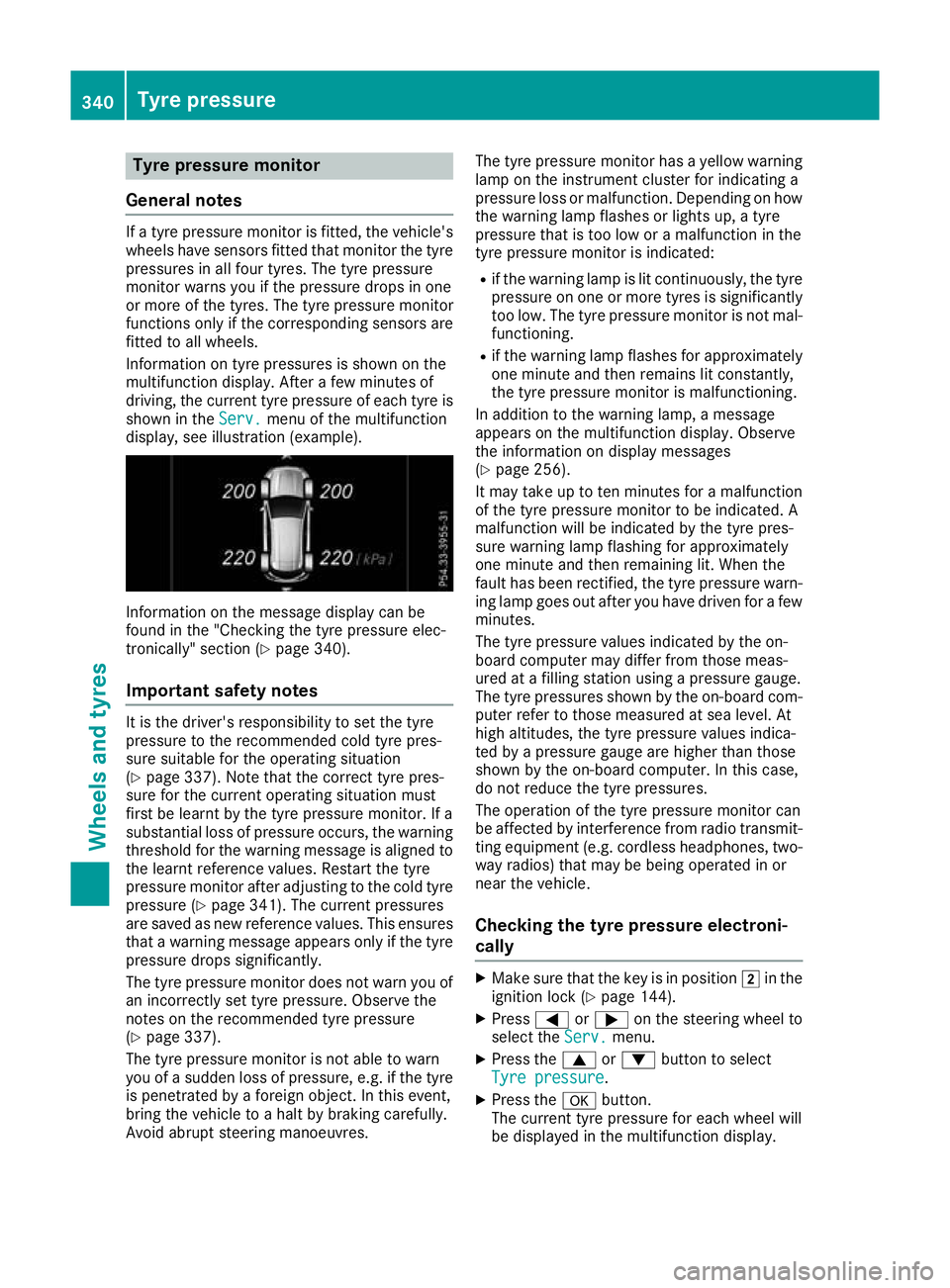
shown in the Serv.
Serv. menu of the multifunction
display, see illustration (example). Information on the message display can be
found in the "Checking the tyre pressure elec-
tronically" section (Y page 340).
Important safety notes It is the driver's responsibility to set the tyre
pressure to the recommended cold tyre pres-
sure suitable for the operating situation
(Y page 337). Note that the correct tyre pres-
sure for the current operating situation must
first be learnt by the tyre pressure monitor. If a
substantial loss of pressure occurs, the warning threshold for the warning message is aligned to
the learnt reference values. Restart the tyre
pressure monitor after adjusting to the cold tyre pressure (Y page 341). The current pressures
are saved as new reference values. This ensures that a warning message appears only if the tyre
pressure drops significantly.
The tyre pressure monitor does not warn you of
an incorrectly set tyre pressure. Observe the
notes on the recommended tyre pressure
(Y page 337).
The tyre pressure monitor is not able to warn
you of a sudden loss of pressure, e.g. if the tyre is penetrated by a foreign object. In this event,
bring the vehicle to a halt by braking carefully.
Avoid abrupt steering manoeuvres. The tyre pressure monitor has a yellow warning
lamp on the instrument cluster for indicating a
pressure loss or malfunction. Depending on how
the warning lamp flashes or lights up, a tyre
pressure that is too low or a malfunction in the
tyre pressure monitor is indicated:
R if the warning lamp is lit continuously, the tyre
pressure on one or more tyres is significantly too low. The tyre pressure monitor is not mal-
functioning.
R if the warning lamp flashes for approximately
one minute and then remains lit constantly,
the tyre pressure monitor is malfunctioning.
In addition to the warning lamp, a message
appears on the multifunction display. Observe
the information on display messages
(Y page 256).
It may take up to ten minutes for a malfunction
of the tyre pressure monitor to be indicated. A
malfunction will be indicated by the tyre pres-
sure warning lamp flashing for approximately
one minute and then remaining lit. When the
fault has been rectified, the tyre pressure warn- ing lamp goes out after you have driven for a few minutes.
The tyre pressure values indicated by the on-
board computer may differ from those meas-
ured at a filling station using a pressure gauge.
The tyre pressures shown by the on-board com-
puter refer to those measured at sea level. At
high altitudes, the tyre pressure values indica-
ted by a pressure gauge are higher than those
shown by the on-board computer. In this case,
do not reduce the tyre pressures.
The operation of the tyre pressure monitor can
be affected by interference from radio transmit- ting equipment (e.g. cordless headphones, two-way radios) that may be being operated in or
near the vehicle.
Checking the tyre pressure electroni-
cally X
Make sure that the key is in position 2in the
ignition lock (Y page 144).
X Press =or; on the steering wheel to
select the Serv. Serv.menu.
X Press the 9or: button to select
Tyre pressure
Tyre pressure.
X Press the abutton.
The current tyre pressure for each wheel will
be displayed in the multifunction display. 340
Tyre pressureWheels and tyres
Page 344 of 369
If the vehicle was parked for longer than
20 minutes, the Tyre pressures will be
Tyre pressures will be
displayed
displayed after
aftera
afew
few minutes
minutes of
ofdriv‐
driv‐
ing
ing message is shown.
After a teach-in period, the tyre pressure moni-
tor automatically detects new wheels or new
sensors. As long as a clear allocation of the tyre pressure values to the individual wheels is not
possible, the Tyre
Tyre pressure pressure monitor
monitoractive
active
message is shown instead of the tyre pressure
display. The tyre pressures are already being
monitored.
After an emergency spare wheel has been fitted, the system may still display the tyre pressure of
the removed wheel for a few minutes. If this
occurs, note that the value displayed for the
position where the spare wheel is fitted is not
the same as the current tyre pressure of the
emergency spare wheel.
Warning messages of the tyre pressure monitor If the tyre pressure monitor detects a pressure
loss in one or more tyres, a warning message is
shown in the multifunction display. The yellow
tyre pressure warning lamp then lights up:
R If the Please correct tyre pressure
Please correct tyre pressure
message appears in the multifunction display,
the tyre pressure in at least one tyre is too
low. The tyre pressure must be corrected
when the opportunity arises.
R If the Tyre Tyre pressure
pressure Check
Checktyre(s)
tyre(s) mes-
sage appears in the multifunction display, the
tyre pressure in one or more tyres has drop-
ped significantly. The tyres must be checked.
R If the Tyre pressure Caution Tyre mal‐
Tyre pressure Caution Tyre mal‐
function function message appears in the multifunc-
tion display, the tyre pressure in one or more
tyres has dropped suddenly. The tyres must
be checked.
Observe the instructions and safety notes in the display messages in the "Tyres" section
(Y page 256).
If the position of the wheels on the vehicle is
changed, the tyre pressures may be displayed in
the wrong positions for a short time. After a few minutes of driving, this is rectified and the tyre
pressures are displayed in the correct positions. Restarting the tyre pressure monitor When you restart the tyre pressure monitor, all
existing warning messages are deleted and the
warning lamps go out. The monitor uses the cur-
rently set tyre pressures as the reference values
for monitoring. In most cases, the tyre pressure monitor will automatically detect the new refer- ence values after you have changed the tyre
pressure. However, you can also set reference
values manually as described here. The tyre
pressure monitor then monitors the new tyre
pressure values.
X Use the table on the inside of the fuel filler flap
to ensure that the tyre pressure is set cor-
rectly in all four tyres for the current operating
conditions.
Also observe the notes in the section on tyre
pressures (Y page 337).
X Make sure that the key is in position 2in the
ignition lock (Y page 144).
X Press =or; on the steering wheel to
select the Serv.
Serv. menu.
X Press the 9or: button to select
Tyre pressure Tyre pressure.
X Press the abutton.
The multifunction display shows the current
tyre pressure for each tyre or the Tyre Tyrepres‐
pres‐
sures
sures will
willbe
bedisplayed
displayed after
aftera
afew
few
minutes of driving
minutes of driving message.
X Press the :button.
The multifunction display shows the Use Use
current pressures as new reference current pressures as new reference
values values message.
If you wish to confirm the restart:
X Press the abutton.
The Tyre
Tyre press:
press: monitor
monitor restarted
restarted mes-
sage appears in the multifunction display.
After you have been driving for a few minutes,
the system checks whether the current tyre
pressures are within the specified range. The
new tyre pressures are then accepted as ref- erence values and monitored.
If you wish to cancel the restart: X Press the %button.
The tyre pressure values stored at the last
restart will continue to be monitored. Tyre pressure
341Wheels and tyres Z