2017 MERCEDES-BENZ GLA-Class ECU
[x] Cancel search: ECUPage 195 of 390

detected vehicle turns a corner and reveals
an obstacle or stationary vehicle, DISTRONIC
PLUS will not brake for these.
Crossing vehicles
DISTRONIC PLUS may detect vehicles that
are crossing your lane by mistake. Activating
DISTRONIC PLUS at traffic lights with cross-
ing traffic, for example, could cause your vehi-
cle to pull away unintentionally.
HOLD function
General notes
The HOLD function can assist the driver in the
following situations:
Rwhen pulling away, especially on steep
slopes
Rwhen maneuvering on steep slopes
Rwhen waiting in traffic
The vehicle is kept stationary without the
driver having to depress the brake pedal.
The braking effect is canceled and the HOLD
function deactivated when you depress the
accelerator pedal to pull away.
Important safety notes
GWARNING
When leaving the vehicle, it can still roll away despite being braked by the HOLD function if:
Rthere is a malfunction in the system or in
the voltage supply.
Rthe HOLD function has been deactivated by
pressing the accelerator pedal or the brake
pedal, e.g. by a vehicle occupant.
Rthe electrical system in the engine com-
partment, the battery or the fuses have
been tampered with.
Rthe battery is disconnected
There is a risk of an accident.
If you wish to exit the vehicle, always turn off the HOLD function and secure the vehicle
against rolling away.
!If DISTRONIC PLUS or the HOLD function
is activated, the vehicle brakes automati-
cally in certain situations.
To prevent damage to the vehicle, deacti-
vate DISTRONIC PLUS and the HOLD func-
tion in the following or other similar situa-
tions:
Rwhen towing the vehicle
Rin the car wash
Deactivating the HOLD function
(
Ypage 194).
Activation conditions
You can activate the HOLD function if:
Rthe vehicle is stationary
Rthe engine is running or if it has been auto-
matically switched off by the ECO start/
stop function
Rthe driver's door is closed or your seat belt
is fastened
Rthe electric parking brake is released
RDISTRONIC PLUS is deactivated
Rthe transmission is in position D,Ror Non
vehicles with automatic transmission
Driving systems193
Driving and parking
Z
Page 196 of 390

Activating the HOLD function
XMakesur ethat th eactivation condition s
are met .
XDepress th ebrak epedal .
XQuickl ydepress th ebrak epedal further
until :appear sin th emultifunction dis-
play.
The HOLD function is activated. You can
release th ebrak epedal .
iIf depressing th ebrak epedal th efirst
time does no tactivat eth eHOLD function ,
wait briefly and then tr yagain .
Deactivating the HOLD function
The HOLD function is deactivated automati-
callyif:
Ryou accelerate . Onvehicles wit hautomatic
transmission :only when th etransmission
is in position Dor R.
Rth etransmission is in position Pon vehicles
wit hautomatic transmission .
Ryou depress thebrak epedal again wit h a
certain amoun tof pressur euntil :disap -
pear sfrom th emultifunction display.
Ryou activat eDISTRONI CPLUS.
Ryou secure th evehicl eusin gth eelectric
parking brake.
iAfte r atime, th eelectric parking brak e
secures th evehicl eand relieves th eservic e
brake. When th
e HOLD function is activated, th e
transmission is shifte dautomatically to posi-
tion Pif:
Rthedriver' sseat belt is no tfastene dand th e
driver' sdoor is open .
Rtheengin eis switched off ,unless it is auto -
matically switched off by th eECO start/
stop function .
The electric parking brak esecures th evehicl e
automatically if th e HOLD function is activa-
te dwhen th evehicl eis stationary and :
Rasystem malfunction occur s.
Rthepower suppl yis no tsufficient.
Start-off assist (except Mercedes-
AMG vehicles)
Import ant safety notes
GWARNIN G
If you use start-off assist ,individual wheels
may start to spin and th evehicl emay skid. If
ES P
®is deactivated, there is agreate rdanger
of skiddin gand having an accident. Mak esur e
that no person sor obstacles are in th evicinity
of th evehicle.
Start-off assistenables optimum acceleration
from a standstill. Fo rthis, asuitably high-grip
road surfac eis required, alon gwit hth etires
and vehicl ebein gin proper operating condi-
tion .
Do no tactivat e start-off assiston public
road s.
Observ eth esafet ynote son driving safety
systems (
Ypage 65).
Be sure to read th e safetynote sand informa-
tion on ES P
®(Ypage 69).
Activating start-off assist
XDeactivat eES P®(Ypage 227).
XTurn th e steering whee lto th e straight -
ahead position .
194Driving systems
Driving and parking
Page 207 of 390

Active Parking Assist is switched on automat-
ically when driving forwards. The system is
operational at speeds of up to approximately
22 mph (35 km/h). While in operation, the
system independently locates and measures
parking spaces on both sides of the vehicle.
Active Parking Assist will only detect parking
spaces:
Rthat are parallel or at right-angles to the
direction of travel
Rthat are parallel to the direction of travel
and at least 59 in (1.5m) wide
Rthat are parallel to the direction of travel
and at least 39.5 in (1.0 m) longer than your
vehicle
Rthat are at right angles to the direction of
travel and at least 39.5 in (1.0 m) wider
than your vehicle
iNote that Active Parking Assist cannot
measure the length of a parking space if it
is at right angles to the direction of travel.
You will need to judge whether your vehicle
will fit into the parking space.
When driving at speeds below 19 mph
(30 km/h), you will see parking symbol ;as
a status indicator in the instrument cluster.
When a parking space has been detected, an
arrow towards the right or the left also
appears. By default, Active Parking Assist
onl y d
isplays parking spaces on the front-
passenger side. Parking spaces on the driv-
er's side are displayed as soon as the turn
signal on the driver's side is activated. When
parking on the driver's side, this must remain
activated until you confirm the use of Active
Parking Assist by pressing the abutton on
the multifunction steering wheel. The system
automatically determines whether the park-
ing space is parallel or at right-angles to the
direction of travel.
A parking space is displayed while you are
driving past it, and until you are approx-
imately 50 ft (15 m) away from it.
Parking
GWARNING
If you leave the vehicle when it is only being
braked by Active Parking Assist it could roll
away if:
Rthere is a malfunction in the system or in
the voltage supply.
Rthe electrical system in the engine com-
partment, the battery or the fuses have
been tampered with.
Rthe battery is disconnected.
Rthe accelerator pedal has been depressed,
e.g. by a vehicle occupant.
There is a risk of an accident.
Before leaving the vehicle, always secure it
against rolling away.
iWhen PARKTRONIC detects obstacles,
Active Parking Assist brakes automatically
during the parking process. You are respon-
sible for braking in good time.
XStop the vehicle when the parking space
symbol shows the desired parking space in
the instrument cluster.
XShift the transmission to position R.
The Start Park Assist?
Yes: OKNo:
% message appears in the multifunction
display.
XTo cancel the procedure: press the%
button on the multifunction steering wheel or pull away.
or
XTo park using Active Parking Assist:
press the abutton on the multifunction
steering wheel.
The Park Assist Active Accelerate
and BrakeObserve Surroundingsmes-
sage appears in the multifunction display.
XLet go of the multifunction steering wheel.
XBack up the vehicle, being ready to brake at
all times. When backing up, drive at a speed
below approximately 6 mph (10 km/h).
Driving system s205
Driving an d parking
Z
Page 224 of 390

trip odometer:and odometer ;
appears.
Trip computer "From Start" or "From
Reset"
:Distance
;Driving time
=Average speed
?Average fuel consumption
XPress the =or; button on the steer-
ing wheel to select the Trip
menu.
XPress the9or: button to select
From Start
or From Reset.
The values in the From Start
submenu are
calculated from the start of a journey whilst
the values in the From Reset
submenu are
calculated from the last time the submenu
was reset (
Ypage 223).
In the following cases, the trip computer is
automatically reset From Start
:
Rthe ignition has been switched off for more
than four hours.
R999 hours have been exceeded.
R9,999 miles have been exceeded.
When 9,999 hours or 99,999 mile shave been
exceeded, the trip computer is automatically
reset From Reset
.
ECO display
The ECO display is not available in Mercedes-
AMG vehicles.
XPress the =or; button on the steer-
ing wheel to select the Trip
menu.
XPress the9or: button to select
ECO DISPLAY
.
If the ignition remains switched off for longer
than four hours, the ECO display will be auto-
matically reset.
For further information on the ECO display,
see (
Ypage 176).
Displaying the range and current fuel
consumption
Mercedes-AMG vehicles: the menu only
shows range :.
XPress the=or; button on the steer-
ing wheel to select the Trip
menu.
XPress9or: to select the display
with approximate range :and current fuel
consumption ;.
Approximate range :that can be covered
is calculated according to your current driv-
ing style and the amount of fuel in the tank.
If there is only a small amount of fuel left in
the fuel tank, a vehicle being refueled C
appears instead of approximate range :.
Recuperation display =shows you if
energy has been recuperated from the
kinetic energy in overrun mode and saved
in the battery. Recuperation display =
depends on the engine installed and is
therefore not available in all vehicles.
222Menus and submenus
On-board computer and displays
Page 242 of 390

Display messagesPossible causes/consequences andMSolutions
The redF(USAonly) or !(Canada only) indicato rlamp
flashes and th eyello w! warnin glamp lights up.
The electric parkin gbrak eis malfunctioning.
To release:
XSwitc hof fth eignition and tur nit bac kon .
XReleas eth eelectric parkin gbrak emanually.
To apply:
XSwitc hof fth eignition and tur nit bac kon .
XApply th eelectric parkin gbrak emanually.
If th ered F (USAonly) or !(Canada only) indicato rlamp
continues to flash:
XDo no tdrive on .
XSecureth evehicl eagainst rollin gaway (Ypage 364).
XShift th etransmissio nto position P.
XTurnth efron twheels toward sth ecurb.
XConsult aqualified specialist workshop .
The yellow! warnin glamp lights up. The red F(USAonly)
or ! (Canada only) indicato rlamp flashes fo rabout te nsec -
onds after th eelectric parkin gbrak ehas been applied or released.
It then goe sout or remain slit .
The electric parkin gbrak eis malfunctioning.
XSwitc hof fth eignition and tur nit bac kon .
XApply th eelectric parkin gbrake.
If it is no tpossibl eto engage th eelectric parkin gbrake:
XShift th etransmissio nto position P.
XVisitaqualified specialist workshop .
If it is no tpossibl eto release th eelectric parkin gbrak emanually:
XReleas eth eelectric parkin gbrak eautomatically (Ypage 173).
If th eelectric parkin gbrak estill canno tbe released:
XConsult aqualified specialist workshop .
240Display messages
On-board computer and displays
Page 244 of 390
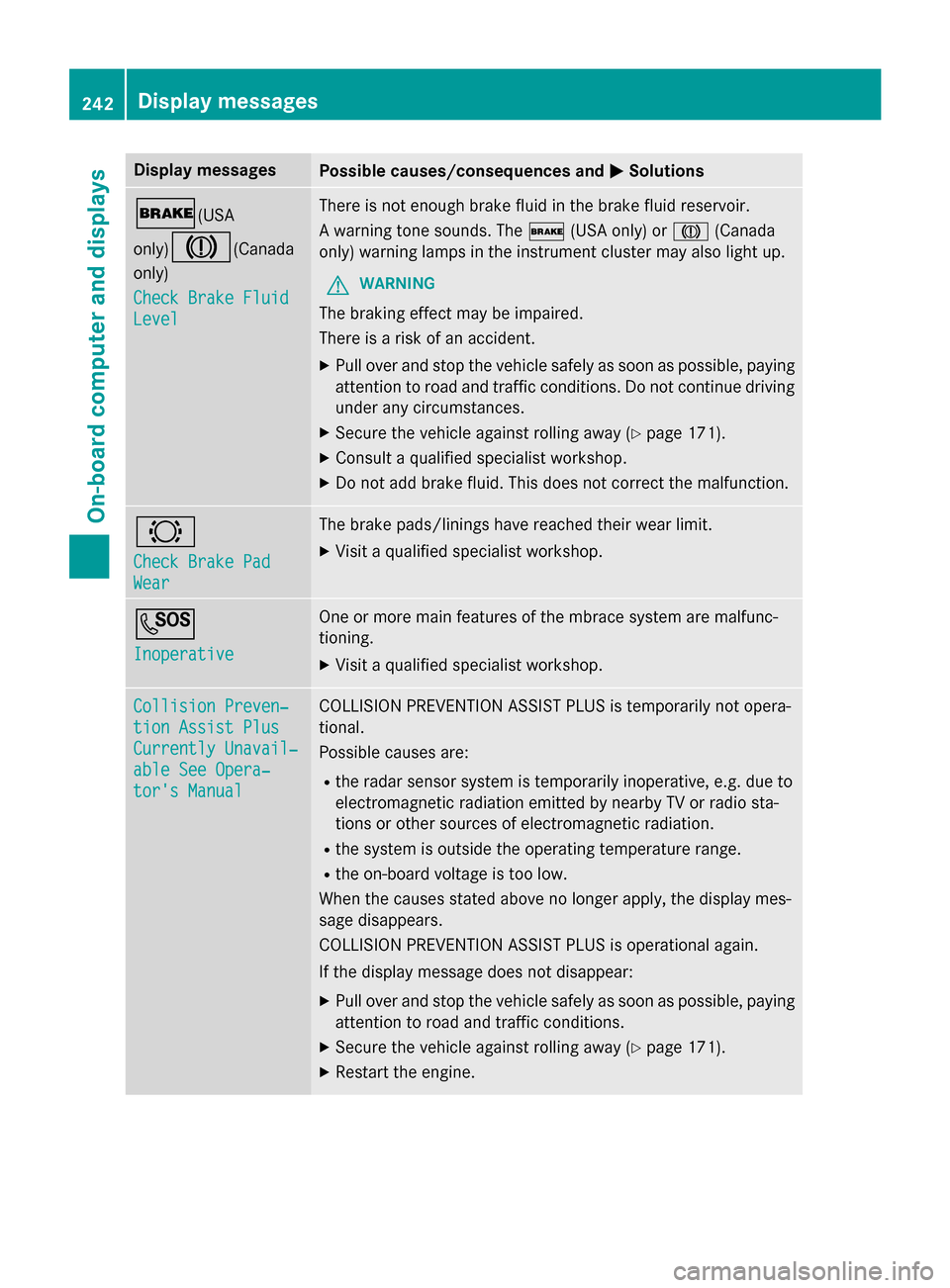
Display messagesPossible causes/consequences andMSolutions
$(USA
only)
J(Canada
only)
Check Brake Fluid
Level
There is no tenough brak eflui din th ebrak eflui dreservoir .
A warnin gtone sounds. The $(USAonly) or J(Canada
only) warnin glamp sin th einstrumen tcluster may also ligh tup.
GWARNIN G
The brakin geffec tmay be impaired.
There is aris kof an accident.
XPull ove rand stop th evehicl esafely as soo nas possible, payin g
attention to roa dand traffic conditions. Do no tcontinue drivin g
under any circumstances.
XSecur eth evehicl eagainst rollin gaway (Ypage 171).
XConsult aqualified specialist workshop .
XDo notadd brak efluid. This does no tcorrec tth emalfunction .
#
Check Brake Pad
Wear
The brak epads/lining shav ereached their wear limit.
XVisit aqualified specialist workshop .
G
Inoperative
Oneor mor emain features of th embrace system are malfunc -
tioning.
XVisit aqualified specialist workshop .
Collision Preven‐
tionAssist Plu s
Currently Unavail‐
ableSee Opera‐
tor's Manual
COLLISION PREVENTION ASSIST PLU Sis temporarily no topera-
tional.
Possibl ecauses are:
Rth erada rsensor system is temporarily inoperative, e.g. due to
electromagnetic radiation emitted by nearby TV or radi osta-
tion sor other source sof electromagnetic radiation .
Rthesystem is outside th eoperating temperature range.
Rth eon-boar dvoltag eis to olow.
Whe nth ecauses state dabov eno longer apply, th edisplay mes -
sage disappears.
COLLISION PREVENTION ASSIST PLU Sis operational again .
If th edisplay message does no tdisappear :
XPull overand stop th evehicl esafely as soo nas possible, payin g
attention to roa dand traffic conditions.
XSecur eth evehicl eagainst rollin gaway (Ypage 171).
XRestart th eengine.
242Display messages
On-board computer and displays
Page 245 of 390

Display messagesPossible causes/consequences andMSolutions
Collision Preven‐
tionAssist Plu s
Inoperative
COLLISION PREVENTION ASSIST PLU Sis temporarily inoperative
due to amalfunction .Adaptive Brake Assis tmay also hav efailed.
XVisit aqualified specialist workshop immediately.
Radar Sensor s
Dirty See Opera‐
tor's Manual
At leaston eof th efollowing drivin gsystems or drivin gsafet ysys-
tems is temporarily restricted or inoperative:
RCOLLISION PREVENTION ASSIST PLU S
RDISTRONIC PLUS
Possibl ecauses are:
Rth esensor sin th eradiato rtrim and/o rin th ebumpers are dirty
Rth efunction of th edrivin gsystem and/o rdrivin gsafet ysystem
is impaire ddue to heav yrain or snow.
A warnin gtone also sounds.
Whe nth ecauses state dabov eno longer apply, th edisplay mes -
sage disappears. Al ldrivin gsystems and drivin gsafet ysystems
are operative again .
If th edisplay message does no tdisappear :
XPull overand stop th evehicl esafely as soo nas possible, payin g
attention to roa dand traffic conditions.
XSecur eth evehicl eagainst rollin gaway (Ypage 171).
XSwitchof fth eengine.
XClean th esensor sin th efollowing location s (Ypage 317):
Rin theradiato rtrim
Rin th efron tbumper
Rin th erear bumper, particularl yin th emiddle of th erear
bumper
XRestart th eengine.
The display message disappears.
6
SRS Malfunction
Servic eRequired
The restrain tsystem is faulty. The 6warnin glamp also lights
up in th einstrumen tcluster.
GWARNIN G
The air bags or Emergency Tensioning Devices may either be trig-
gered unintentionally or, in th eevent of an accident, may no tbe
triggered .
There is an increase dris kof injury.
XVisit aqualified specialist workshop immediately.
Fo rfurther information about th erestrain tsystem, see
(
Ypage 42) .
Display messages243
On-board computer and displays
Z
Page 246 of 390
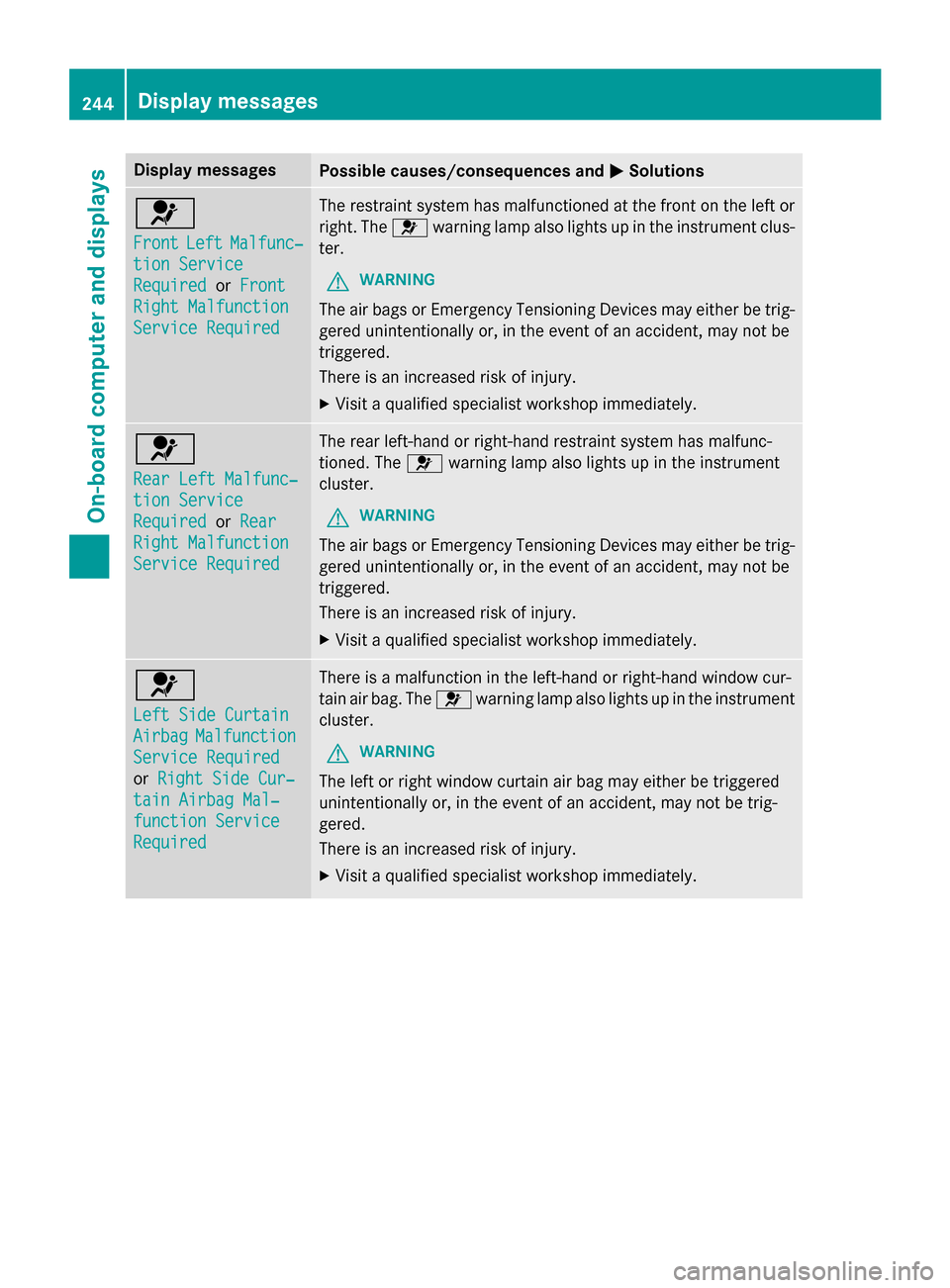
Display messagesPossible causes/consequences andMSolutions
6
FrontLeftMalfunc‐
tionServic e
RequiredorFront
Right Malfunction
Servic eRequired
The restrain tsystem has malfunctioned at th efron ton th elef tor
right .The 6 warnin glamp also lights up in th einstrumen tclus-
ter.
GWARNIN G
The air bags or Emergency Tensioning Devices may either be trig-
gered unintentionally or, in th eevent of an accident, may no tbe
triggered .
There is an increase dris kof injury.
XVisit aqualified specialist workshop immediately.
6
Rea rLef tMalfunc‐
tio nServic e
RequiredorRea r
Right Malfunction
Servic eRequired
The rear left-han dor right-hand restrain tsystem has malfunc -
tioned. The 6warnin glamp also lights up in th einstrumen t
cluster.
GWARNIN G
The air bags or Emergency Tensioning Devices may either be trig-
gered unintentionally or, in th eevent of an accident, may no tbe
triggered .
There is an increase dris kof injury.
XVisit aqualified specialist workshop immediately.
6
Lef tSid eCurtai n
AirbagMalfunction
ServiceRequired
or Right Sid eCur ‐
tainAirbag Mal ‐
function Servic e
Required
There isamalfunction in th eleft-han dor right-hand window cur -
tai nair bag. The 6warnin glamp also lights up in th einstrumen t
cluster.
GWARNIN G
The leftor right window curtai nair bag may either be triggered
unintentionally or, in th eevent of an accident, may no tbe trig-
gered.
There is an increase dris kof injury.
XVisit aqualified specialist workshop immediately.
244Display messages
On-board computer and displays