Page 161 of 286
8RMute
?RSwitches on the Voice Control Sys-
tem (see the separate operating
instructions)
Back button
%Press briefly:
RBack
RSwitches off the Voice Control
System
RHides display messages/calls up
the lastTripmenu function used
RExitsthe telephone book/redial
memory
%Press and hold:
RCallsupt he standard display in the
Tripmenu
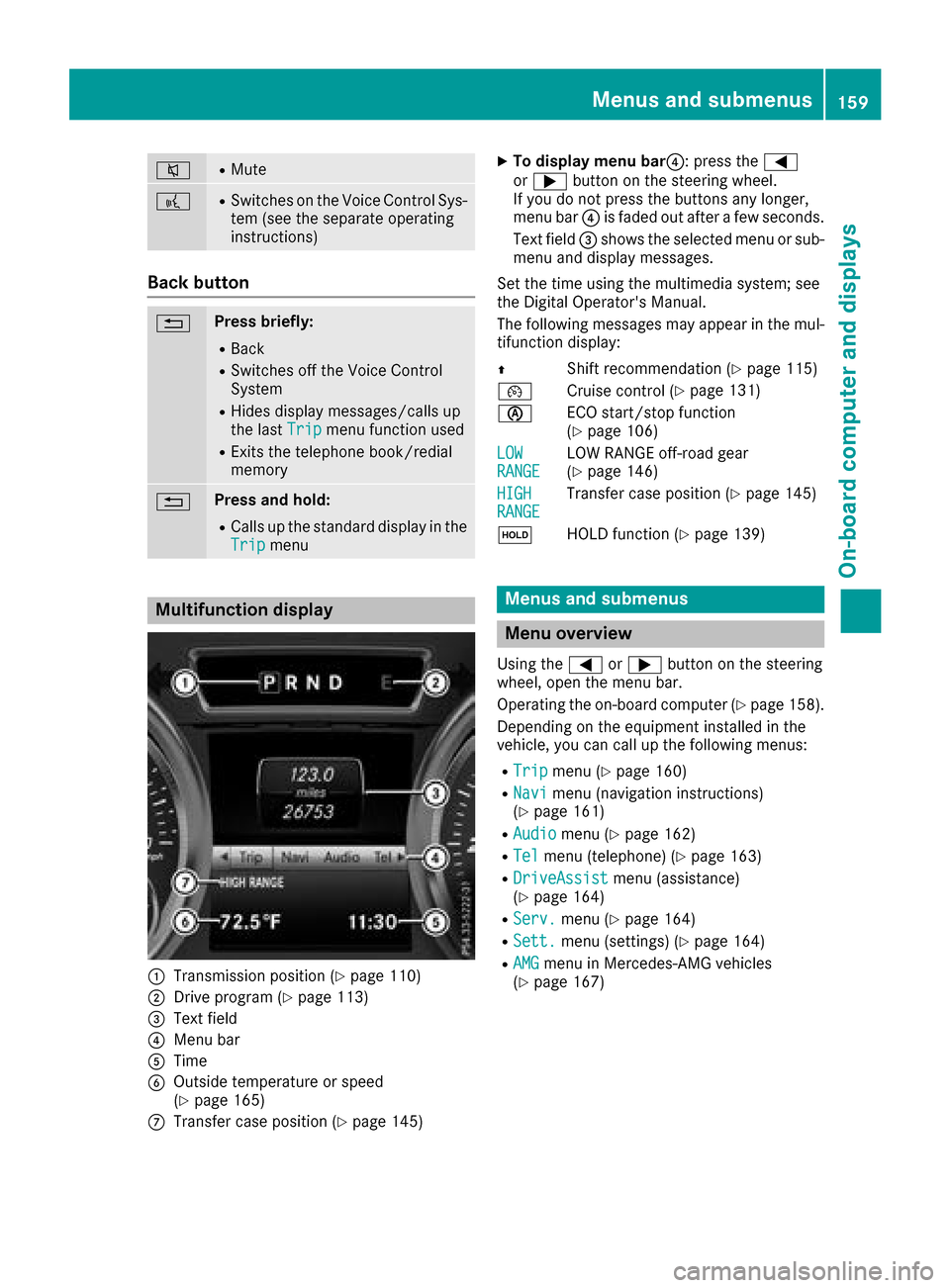
Multifunction display
:Transmission position (Ypage 110)
;Drive program (Ypage 113)
=Text field
?Menu bar
ATime
BOutside temperature or speed
(Ypage 165)
CTransfer case position (Ypage 145)
XTo display menu bar ?:press the =
or ; button on the steering wheel.
If you do not press the buttons any longer,
menu bar ?is faded out after afew seconds.
Text field =shows the selected menu or sub-
menu and display messages.
Set the time using the multimedia system; see
the Digital Operator's Manual.
The following messages may appear in the mul-
tifunction display:
Z Shift recommendation (
Ypage 115)
¯ Cruise control (
Ypage 131)
è ECO start/stop function
(
Ypage 106)
LOW
RANGELOW RANGE off-road gear
(Ypage 146)
HIGH
RANGETransfer case position (Ypage 145)
ë HOLD function (
Ypage 139)
Menus and submenus
Menu overview
Using the =or; button on the steering
wheel, open the menu bar.
Operating the on-board computer (
Ypage 158).
Depending on the equipment installed in the
vehicle, you can call up the following menus:
RTripmenu (Ypage 160)
RNavimenu (navigation instructions)
(Ypage 161)
RAudiomenu (Ypage 162)
RTelmenu (telephone) (Ypage 163)
RDriveAssistmenu (assistance)
(Ypage 164)
RServ.menu (Ypage 164)
RSett.menu (settings) (Ypage 164)
RAMGmenu in Mercedes-AMG vehicles
(Ypage 167)
Menus and submenus159
On-board computer and displays
Z
Page 166 of 286

XPress the9or: button to select the
desired name.
or
XTo startr apid scrolling: press and hold9
or : for longer than one second.
Rapid scrolling stops when you release the
button or reach the end of the list.
XIf only one telephone number is stored for
an ame: press the 6ora button to
start dialing.
or
XIf thereism ore thanone number for a
particular name:press the 6ora
button to display the numbers.
XPress the 9or: button to select the
number you want to dial.
XPress the 6ora button to start dialing.
or
XTo exit the phone book: press the~or
% button.
Redialing
The on-board computer saves the last names or
numbers dialed in the redial memory.
XPress the =or; button on the steering
wheel to select the Telmenu.
XPress the6button to switch to the redial
memory.
XPress the 9or: button to select the
desired name or number.
XPress the 6ora button to start dialing.
or
XTo exit the redial memory: press the~
or % button.
Assistance menu
Introduction
In the DriveAssistmenu, you have the follow-
ing options:
RDisplaying the assistanc egraphic
(Ypage 164)
RActivating/deactivatin gBlind Spot Assist
(Ypage 164)
Showing the distance display
XPress the =or; button on the steering
wheel to select the DriveAssistmenu.
XPress9or: to select AssistanceGraphic.
XPressa.
The DISTRONIC PLUS distanc edisplay
appears in the multifunction display.
Activating/deactivating Blind Spot
Assist
XPress the =or; button on the steering
wheel to select the DriveAssistmenu.
XPress the9or: button to select
Blind Spot Assist.
XPress a.
The currents election appears.
XTo activate/deactivate: press theabut-
ton again.
For further information about Blind Spot Assist,
see (
Ypage 137).
Service menu
In the Serv.menu, you have the following
options:
RCalling up display messages (Ypage 170)
RChecking the tire pressure electronically
(Ypage 258)
RCalling up the service due date
(Ypage 231)
RChecking the engine oil level (Ypage 227)
Settings menu
Introduction
In the Sett.menu, you have the following
options:
RChanging the instrument cluster settings
(Ypage 165)
RChanging the light settings (Ypage 165)
RChanging the vehicle settings (Ypage 166)
RChanging the conveniences ettings
(Ypage 166)
RRestoring the factor ysettings (Ypage 167)
164Menus and submenus
On-board computer and displays
Page 170 of 286
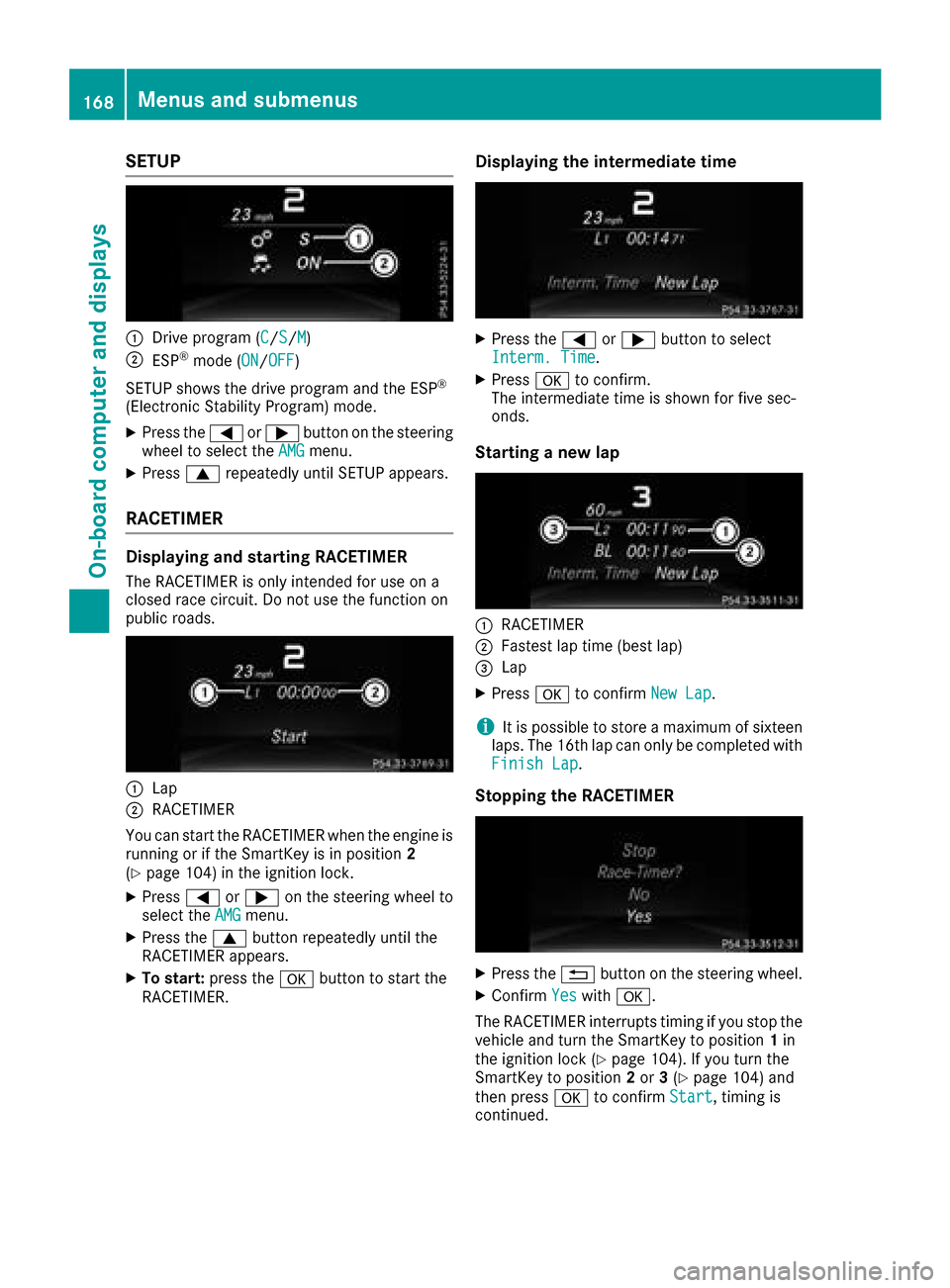
SETUP
:Drive program (C/S/M)
;ESP®mode (ON/OFF)
SETUP shows the drive program and the ESP
®
(Electronic Stability Program) mode.
XPress the =or; button on the steering
wheel to select the AMGmenu.
XPress9repeatedly until SETUP appears.
RACETIMER
Displaying and starting RACETIMER
The RACETIMER is only intended for use on a
closed race circuit. Do not use the function on
public roads.
:Lap
;RACETIMER
You can start the RACETIMER when the engine is
running or if the SmartKey is in position 2
(
Ypage 104) in the ignition lock.
XPress =or; on the steering wheel to
select the AMGmenu.
XPress the9button repeatedly until the
RACETIMER appears.
XTo start: press the abutton to start the
RACETIMER.
Displaying the intermediate time
XPress the =or; button to select
Interm. Time.
XPress ato confirm.
The intermediate time is shown for five sec-
onds.
Starting anew lap
:RACETIMER
;Fastest lap time (best lap)
=Lap
XPress ato confirm New Lap.
iIt is possible to store amaximum of sixteen
laps. The 16th lap can only be completed with
Finish Lap
.
Stopping the RACETIMER
XPress the %button on the steering wheel.
XConfirm Yeswitha.
The RACETIMER interrupts timing if you stop the
vehicle and turn the SmartKey to position 1in
the ignition lock (
Ypage 104). If you turn the
SmartKey to position 2or 3(Ypage 104) and
then press ato confirm Start
,timing is
continued.
168Menus and submenus
On-board computer and displays
Page 224 of 286
Alternatively,you can cal lthe following tele-
phone assistance services:
RUSA: Mercedes-Benz Customer Assistance
Center at 1-800-FOR-MERCedes
RCanada: Customer Service at
1-800-387-0100
RHomeLink®hotline 1-800-355-3515( free of
charge)
Mor einformatio nonHomeLink
®and/or com-
patible products is also availabl eonline at
http://www.homelink.com.
Notesont he declaratio nofconformity
(
Ypage 127).
USA: FCC ID: CB2HMIHL4
Canada: IC:2 79B-HMIHL4
USA only:
Thi sd evice complies with Part 15 of the FCC
Rules. Operatio niss ubject to the following two
conditions:
1. Thi sdevice mayn ot cause harmfuli nterfer-
ence ,and
2. thisd evice must accept any interference
received, including interference thatm aycause
undesired operation.
Any unauthorized modification to thisd evice
could voidt he user'sauthority to operate the
equipment.
Canad aonly:
Thi sd evice complies with RSS-210 of Industry
Canada. Operatio niss ubject to the following
two conditions:
1. Thi sdevice mayn ot cause harmfuli nterfer-
ence ,and
2. thisd evice must accept any interference
received, including interference thatm aycause
undesired operation.
Any unauthorized modification to thisd evice
could voidt he user'sauthority to operate the
equipment.
Important safety notes
GWARNING
Whe nyou operate or programt he garage door
with the integrated garage door opener, per-
sons in the range of movement of the garage
door can become trappe dorstruck by the
garage door. There is ariskofi njury.
Whenusing the integrated garage door
opener, always make sure thatn obodyis
withint he range of movement of the garage
door.
GWARNING
Combustion engine semitp oiso nousexhaust
gases such as carbo nmonoxide. Inhaling
thes eexhaus tgases lead stopoisoning. There
is ar iskoff atalinjury.T herefore neve rleave
the engine running in enclose dspaces with-
outs ufficient ventilation.
Programming
Programming
Pa ya ttentio ntothe "Important safety notes"
(Ypage 222).
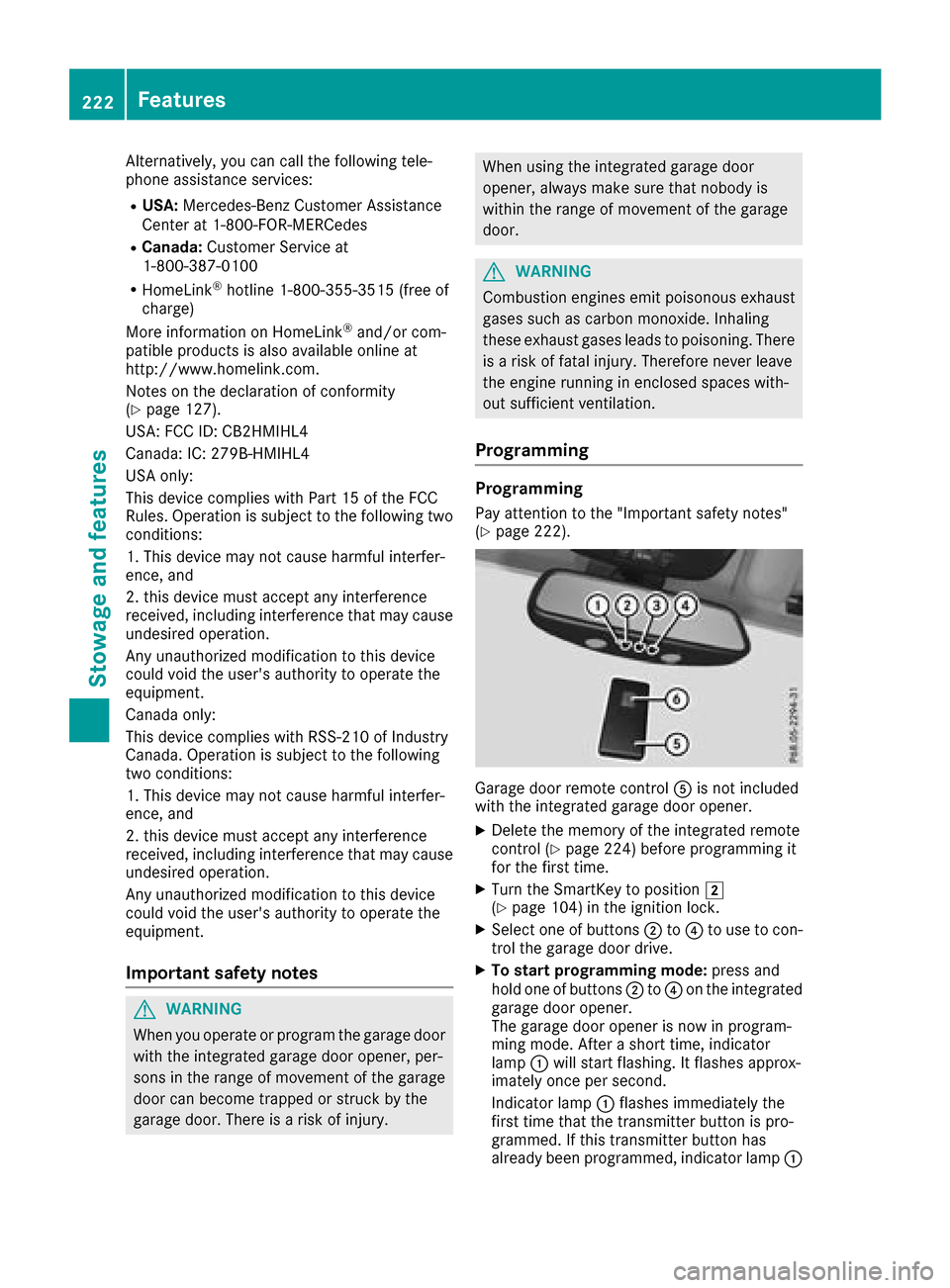
Garage door remote control Ais not included
with the integrated garage door opener.
XDelete the memory of the integrated remote
control(Ypage 224) before programming it
for the first time.
XTurn the SmartKeytop osition 2
(Ypage 104 )inthe ignition lock.
XSelect one of buttons ;to? to us etoc on-
trol the garage door drive.
XTo start programmin gmode: press and
hol done of buttons ;to? on the integrated
garage door opener.
The garage door opene risnow in program-
ming mode. After ashort time ,indicator
lamp :will start flashing. It flashesa pprox-
imatelyo nce persecond.
Indicato rlam p: flashesi mmediatelyt he
first time thatt he transmitterbutton is pro-
grammed. If thist ransmitterbutton has
already been programmed, indicator lamp :
222Features
Stowageand featur es