Page 33 of 50

Ifth e engine or transmission are not at operat‐
ing temp erature, the multifunction display sho ws
te mp erature 3or4 in blue. Avoid driving at
full engine output during this time.
Example: SETUP in Mercedes -AMG E 43
ve hicles
1Drive sy stem setting (Eco/Comfort/Sport/
Sport+)
2St eering setting (Comfort or Sport)
3ESP®status (On/O ffor SPORT handling
mode)
4ECO start/ stop function setting (Active/
Inactive/Off)
5Tr ansmission position
6Suspension tuning (Comfort/Spo rt/Sport+)
Example: SETUP in Mercedes-AMG E 63
ve hicles
1Drive sy stem setting (Comfort/Sport/Sport
+/RACE)
2Exhaust sy stem (Comfort or Sport)
3ESP®st atus (On/O ffor SPORT handling
mode)
4Tr ansmission position
5Suspension tuning (Comfort/Spo rt/Sport+)
Example: G-Me ter
While theve hicle is in motion, the G-Me ter
sho ws th efo rc es that are exerted on theve hicle
occupants bo thlaterally and in the direction of
tra vel. The maximum values appear in red in the
coordinate sy stem.
#To reset the G-M eter: press the left-hand
side of Touch Control.
#Select Yes.
#Pressthe left-hand Touch Control.
If yo upr ess and hold the left-hand side of Touch
Control, the function will be reset immediately.
Instrument Display and on-board computer 31
Page 34 of 50
Example: engine data
1Current po wer output
2Current torque
Dis playing and starting the RACETIMER in
th ePe rformance menu
On-board computer:
,Performance
The following functions are possible in the RACE‐
TIMER:
Rdisplaying and starting
Rstopping
Rst arting a new lap
Rdisplaying lap statistics
Rre setting
1Lap
2Lap time
The RACETIMER is intended only for use on a
designated race trac k.Do not use the function
on public roads.
#To select a display and star t:swipe up or
down on the left-hand side of Touch Control.
#Press the left-hand side of Touch Control.
#Select Start and press the left-hand side of
To uch Control.
#To sto p:select Stopand press the left-hand
side of Touch Control.
#To start a new lap: afte rth efirs tst ored lap,
press the left-hand side of Touch Control.
#Select New Lap.
A maximum of 32 laps may be stored.
Example: RACETIMER
1Lap
2Elapsed time
3Av erage speed
4Dis tance co vered
32
Instrument Display and on-board computer
Page 35 of 50
#Todispl aythe lap statistics: afte r at least
two stored laps, press the left-hand side of
To uch Control.
#Select Lap List .
The lap statistics are displa yed.
#Display thest atistics of the next lap byswip‐
ing up or down on the left-hand side of Touch
Control.
The fastest lap is indicated byflashing sym‐
bol 1.
#Torese t:stop the RACETIMER and press the
left-hand side of Touch Control.
#Select Resetandpress the left-hand side of
To uch Control.
All laps are dele ted.
Fu nction of the Head-up Display
The Head-up Display projects information from
th e navigation sy stem and the driver assis tance
sy stem abo vethe cockpit into the driver's field
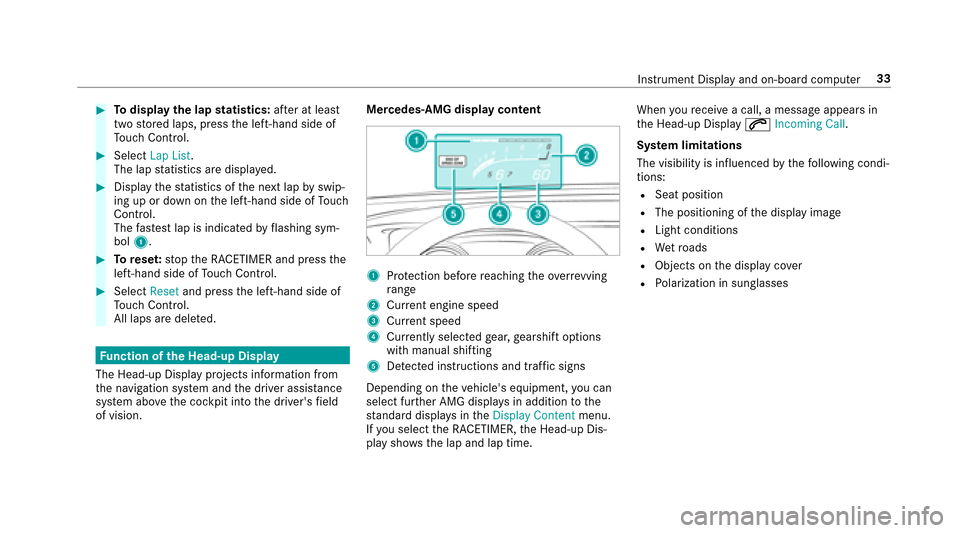
of vision. Mercedes-AMG display content
1Pr
otection before reaching theove rrev ving
ra nge
2Cu rrent engine speed
3Cur rent speed
4Cu rrent lyselected gear, gearshift options
with manual shifting
5De tected instructions and traf fic signs
Depending on theve hicle's equipment, you can
select fur ther AMG displa ysin addition tothe
st andard displa ysintheDisplay Content menu.
If yo u select the RACETIMER, the Head-up Dis‐
play sho ws the lap and lap time. When
youre ceive a call, a message appears in
th e Head-up Display 6Incoming Call.
Sy stem limitations
The visibility is influenced bythefo llowing condi‐
tions:
RSeat position
RThe positioning of the display image
RLight conditions
RWe tro ads
RObjects on the display co ver
RPo larization in sunglasses
Instrument Display and on-board computer 33
Page 41 of 50
Displaymessages
Drivin gsy stems
Display messages
Possible causes/consequences and MSolutions
RACE START Not Possible
See Operator's Manual *P
ossible causes are:
RThe conditions for activation are not met .
RACE START Canceled *P
ossible causes are:
RYoure leased the accelerator pedal during RACE STAR T.
RYoudepr essed the brake pedal during RACE STAR T.
Displ aymessage s andwarning/indicator lamps 39
Page 46 of 50
K
Kic kdow n................................................... 19
Using ..................................................... 19
L
Limited Warranty
Ve hicle ..................................................... 6
Locking dif fere ntial
see Rear axle locking dif fere ntial
M
Menu (on-board co mputer)
AMG displa ys......................................... 30
Pe rformance .......................................... 30
Mercedes-Benz service center see Qualified specialist workshop
N
Note s on breaking-in a new vehicle ......... 13
O
On-board computer AMG menu ............................................ 30 Pe
rformance menu ................................ 30
Operating fluids
Fu el (gasoline) ....................................... 35
Operating saf ety
Information .............................................. 4
Operator's Manual Vehicle equipment ................................... 4
P
Pe rformance (on-boa rdcompu ter,
Pe rformance menu) .................................. 30
Po we r output (on-board co mputer,
Pe rformance menu) .................................. 30
Prog rams
see DYNA MIC SELECT
Q
Qualified specialist workshop .................... 5
R
RACE START
Ac tivating .............................................. 24
Ac tivation conditions ............................. 24Fu
nction ................................................ 23
RACETIMER (on-board co mputer, Per‐
fo rm ance menu) ........................................ 32
Re ar axle locking dif fere ntial .................. .13
Re ser ve
Fu el ...................................................... .36
Ro of load .................................................... 37
S
Seat Adjusting (per form ance seat) ................ 12
Seat belts Reduced pr otection .............................. .11
Selecting a gear
see Shifting gears
Service center see Qualified specialist workshop
SETUP (on-board computer, Perform‐
ance menu) ................................................ 30
Shifting gears ............................................ 18
Gearshift recommendation .................... 19
Manually ................................................ 18
44
Index

