2017 MERCEDES-BENZ E-CLASS SALOON key
[x] Cancel search: keyPage 275 of 497
On
the controller #
Select a character in thech aracter bar.
Depending on theta rget entry , either a full
set of characters is available or, alternativel y,
only those characters that are available on
th e basis of thech aracters that ha vealready
been entered.
On theto uchpad #
Write thech aracters on theto uch-sensitive
sur face of theto uchpad.
Handwriting recognition suppo rts yo uby
means of character suggestions and a read-
aloud function.
Swit ching between central control elements #
Toactivate Touch Control: pressTouch
Control. #
Toactivate the controller: pressthe con‐
troller. #
Toactivate theto uchpad: presstheto uch‐
pad.
Examples of character ent ry:
R using a keyword sear chfor a track or artist R
connecting the mobile phone tothe multime‐
dia sy stem byentering the passk ey
R entering a phone number
R entering a web address
Entering characters using the controller
Entering characters #
Turn 3 , slide 1 or4 and press
th e controller.
Use thefo llowing editing functions:
R * orE
Swit ches toupper-case or lo wer-case letters
R Ä
Switches tospecial characters and symbols.
R B
Chan gesth e language
R 45
Selects the input line
R 23
Movesth e cursor within the input line
R F Dele
tes a character or an ent ry
R &
Cancels character ent ry
Deleting a character or an entry #
Todel ete a character: whenFis highligh‐
te d, press the controller. #
Todel ete an entr y:when Fis highlighted,
press and hold the controller until the entry
has been dele ted.
Confirming an entry #
Select ¡.
Entering characters on theto uchpad
Entering characters #
Use one finger towrite characters on the sur‐
fa ce.
The character is entered in the input line. If
dif fere nt interpr etations are possible, charac‐
te r suggestions are displa yed.
Selecting a character suggestion #
Turn the controller. 272
Multimedia sy stem
Page 301 of 497
Skip
totime #
Select Skip to time .
A menu appears. #
Set the time.
Showing track information #
Switch Show track information onO or off
ª.
Pa use and playback function
Multimedia sy stem:
, Media
Pa using playback #
Navigate down wards. #
Select Ë.
Continuing playback #
Select Ì. Media sear
ch St
arting the media sear ch
Multimedia sy stem:
, Media .
Search
Depending on the connected media sources and
fi les, thefo llowing categories are lis ted:
R Current track list
R Folder
R Keyword search
R Playlists
R Artists
R Albums
R Tracks
R Genres
R Year
R Composers
R iTunes U (Apple®
devices)
R Genius mixes (Apple®
devices)
R Podcasts (Apple®
devices)
R Audiobooks (Apple®
devices) #
Select a categor y. Media Inter
face Information about
the Media Inter face
Media In terface is a universal inter face forthe
connection of mobile audio equipment. The mul‐
timedia sy stem has two USB ports. The USB
ports are located in thestow age compartment
under the armrest.
Suppor ted devices
The Media Inter face allo wsyouto connect the
fo llowing data storage media:
R iPod ®
R iPhone ®
R MP3 pla yer
R USB devices
Fo r de tails and a list of suppor ted devices, visit
our website at http://www.mercedes-
benz.com/connect. Follow the instructions in
th e "Media Inter face" section. 298
Multimedia sy stem
Page 317 of 497
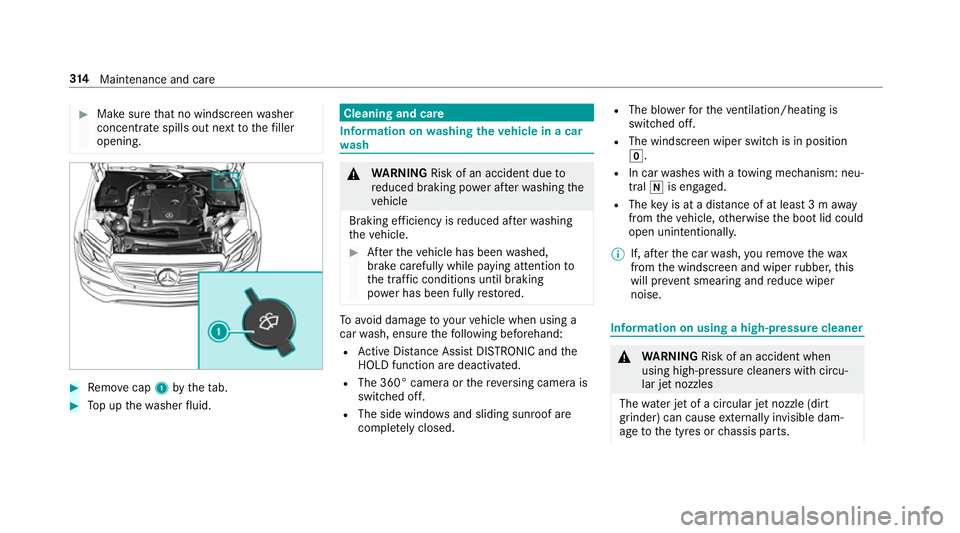
#
Make sure that no windsc reen washer
concentrate spills out next tothefiller
opening. #
Remo vecap 1bytheta b. #
Top up thewa sher fluid. Cleaning and care
Information on
washing theve hicle in a car
wa sh &
WARNING Risk of an accident due to
re duced braking po wer af terwa shing the
ve hicle
Braking ef ficiency is reduced af terwa shing
th eve hicle. #
Afterth eve hicle has been washed,
brake carefully while paying attention to
th e traf fic conditions until braking
po we r has been fully restored. To
avo id damage to yourvehicle when using a
car wash, ensure thefo llowing beforehand:
R Active Dis tance Assi stDISTRONIC and the
HOLD function are deactivated.
R The 360° came raor there ve rsing camera is
switched off.
R The side windo wsand sliding sun roof are
comple tely closed. R
The bl owerforth eve ntilation/heating is
switched off.
R The windsc reen wiper switch is in position
g.
R In car washes with a towing mechanism: neu‐
tral iis engaged.
R The key is at a dis tance of at least 3 m away
from theve hicle, otherwise the boot lid could
open unintentionally.
% If, af terth e car wash, youre mo vethewax
from the windscreen and wiper rubber, this
will pr event smearing and reduce wiper
noise. Information on using a high-p
ressure cleaner &
WARNING Risk of an accident when
using high-pressure cleane rswith circu‐
lar jet nozzles
The wate r jet of a circular jet nozzle (dirt
grinder) can cause extern ally invisible dam‐
age tothe tyres or chassis parts. 314
Maintenance and care
Page 424 of 497

Display messages
Possible causes/consequences and M
MSolutions
Tyre(s) overheated Reduce
speed *A
t least one tyre is overheating. &
WARNING Risk of an accident from driving wi thove rheated tyres
Overheated tyres may bur st, particularly at high speeds. #
Reduce speed so that the tyres cool down. #
Reduce speed so that the tyres cool down. Key
Display messages
Possible causes/consequences and M MSolutions
 Replace key *T
hekey needs tobe replaced. #
Consult a qualified specialist workshop.
, Replace key See Owner's
Manual *
Ve hicles with a digital vehicle key:only a few or no authorisations remain forst arting the engine. #
Make sure that the internet connection is not limited bycer tain mobile phone settings. #
Open the Mercedes me connect web app http://www.mercedes.me. and call up the digital vehicle key service. #
Deactivate the service firs t and then activate it again. #
Ifth e display message still appears, con tact the Mercedes-Benz Cus tomer Assis tance Center (C AC). Display messages and
warning/indicator lamps 421
Page 425 of 497

Display messages
Possible causes/consequences and M
MSolutions
 Change key batteries *T
hekey bat tery is dischar ged. #
Replace the battery .
Â
Key not detected (white
display message) *T
hekey is cur rently und etected. #
Change the location of theke y in theve hicle. #
Ifth eke y is still not recognised, start the engine with theke y in thestow age compartment .
 Key not detected (red dis‐
play message) *T
hekey cannot be de tected and may no longer be in theve hicle.
The key is no lon ger in theve hicle and you swit choff the engine:
R you can no lon gerst art the engine.
R you cannot centrally lock theve hicle. #
Ensure that theke y is in theve hicle.
If th eke y de tection function has a malfunction due toast ro ng radio signal source: #
Pull over and stop theve hicle safely as soon as possible, paying attention toroad and traf fic conditions. #
Place theke y in thestow age compartment forst arting the engine with theke y . 422
Display messages and warning/indicator lamps
Page 426 of 497
Display messages
Possible causes/consequences and M
MSolutions
 Place the key in the
marked space See Owner's
Manual *T
hekey de tection function is malfunctioning. #
Change the location of theke y in theve hicle. #
Start theve hicle with theke y in thestow age compartment . Ve
hicle Display messages
Possible causes/consequences and M MSolutions
j Trailer coupling extending… *R
etra ct or extend the ball nec k.
Do not attem pttospeed up, slow down or initiate there tracting or extending process using your hand, foot or other
aids. During there tracting or extending process, do not couple a traile r.
When the ball neck has reached an operational position, the display message disappears. Display messages and
warning/indicator lamps 423
Page 464 of 497
Ending a call ........................................ 282
Incoming call du
ring an existing call .... 283
Making ................................................ 282
Vi ath eove rhead control panel
(Mercedes me connect) ......................2 88
Camera see 360° Camera
see Reversing camera
Car key
see Key
Car wash
see Care
Car wash (care) ........................................3 14
Care .......................................................... .319
AIR PANEL ............................................ 317
Car wash ..............................................3 14
Carpet .................................................. 319
Displ ay................................................. 319
EAS Y-PA CK boot box ............................ 319
Exhaust pipes ...................................... 317
Exterior lighting .................................... 317
Genuine wood/trim elements .............. 319
High-pressu recleaner .......................... 314
Matt finish ........................................... 316Pa
int wo rk ............................................. 316
Plastic trim ...........................................3 19
Re versing camera/360° Camera ........ .317
Ro of lining ............................................ 319
Seat belt .............................................. 319
Seat co ver ............................................ 319
Senso rs................................................ 317
Tr ailer tow hit ch................................... 317
Wa shing byhand ..................................3 15
Wheels/rims ........................................3 17
Wi ndo ws .............................................. 317
Wi per blades ........................................ 317
Carpet (Care) ............................................ 319
Changing bulbs ........................................ 137
Dipped beam ....................................... 13 8
Fitting/removing co ver (front wheel
ar ch ) .................................................... 13 8
Main beam ...........................................1 38
No tes ................................................... 137
Opening/closing the side trim pan‐
els .......................................................1 39
Overview .............................................. 137
Re versing light .................................... .139
Tu rn signal light (front) ........................ 13 8
Tu rn signal light (rear) .......................... 13 9Changing hub caps
.................................. 357
Changing the lights
Driving abroad (symm etrical dipped
beam) .................................................. 127
Channel tracking Setting ................................................ .303
Charging Battery (vehicle) .................................. 332
Mobile phone (wi reless) ...................... .124
USB port ..............................................1 24
Chassis le vel (AIR BODY CONT ROL)
Setting ................................................ .215
Child saf ety lock
Re ar side wind ows................................. 65
Child seat Attach ing (no tes) ................................... 54
Fr ont passenger seat (no tes) ................. 52
Fr ont passenger seat (rear ward-
fa cing/for ward-facing) .......................... 54
Fr ont passenger seat (without airbag
shutoff) .................................................. 53
ISOFIX/i-Size (fitting) ............................50
No tes ..................................................... 46
Re commended child restra int sy stems .. 61 Index
461
Page 466 of 497
Overview ............................................. 295
Controller Operating ............................................ 266
Con venience closing ................................. 85
Con venience opening ................................ 84
Coolant (engine) Levelch eck .......................................... 312
No tes ................................................... 375
Cooling see Climate control
Copyright .................................................. .30
Cornering light ........................................ .131
Co ver........................................................... 81
Cross Traf fic Alert .................................. .237
Crosswind Assist Function/no tes ................................... 19 5
Cruise control Activating ............................................ 203
Calling up a speed ............................... 203
Deactivating ........................................ 203
Le ver ................................................... 203
Re quirements ...................................... 203 Selecting ............................................
.203
Setting a speed ................................... 203
St oring a speed ................................... 203
Cruise control: ......................................... 201
Fu nction .............................................. 201
Sy stem limitations ...............................2 01
Cup holder Rear .................................................... .120
Cup holder in the centre console
In stalling/removing .............................. 11 9
ins talling/ removing (auto matic
transmission) ....................................... 11 8 D
Damage de tection (pa rked vehicle) .......189
Dashboard see Cockpit
Dashboard lighting see Instrument lighting
Data acquisition Vehicle .................................................. 28
Data import/export Importing/exporting ............................2 75PIN pr
otection for data export .............2 76
Deactivating the ala rm(ATA ).................... 92
Declaration of conformity Electromagn etic compatibility .............. .24
Jack ...................................................... .24
TIREFIT kit ............................................. 25
Wi reless vehicle components ................24
Designs Menu (on-board co mputer) .................. 262
Diagnostics connection ............................ 26
Diesel Low outside temp eratures ...................3 71
No tes ................................................... 371
Digital Car Keyst icker
Locking theve hicle ................................ 72
St arting theve hicle .............................. 161
Un locking theve hicle ............................72
Digital Owner's Manual ............................ 20
Digital speedome ter ................................ 257
Dipped beam Activating/deactivating ...................... .127
Changing bulbs .................................... 13 8
Setting ................................................. 13 5 Index
463