2017 MERCEDES-BENZ CLS light
[x] Cancel search: lightPage 150 of 334

thought out system – for the safety of the vehi-
cle occupants and that of other road users.
Further information on driving safety systems
( Y
page 64).
Cruise control
General notes Cruise control maintains a constant road speed
for you. It brakes automatically in order to avoid
exceeding the set speed. On long and steep
downhill gradients, especially if the vehicle is
laden, you must shift to a lower gear in time. By
doing so, you will make use of the braking effect
of the engine. This relieves the load on the brake
system and prevents the brakes from overheat-
ing and wearing too quickly.
Use cruise control only if road and traffic con-
ditions make it appropriate to maintain a steady
speed for a prolonged period. You can store any
road speed above 20 mph (30 km/h).
Important safety notes If you fail to adapt your driving style, cruise con-
trol can neither reduce the risk of an accident
nor override the laws of physics. Cruise control
cannot take into account the road, traffic and
weather conditions. Cruise control is only an
aid. You are responsible for maintaining a safe
distance to the vehicle in front, for vehicle
speed, for braking in good time and for staying in
lane.
Do not use cruise control: R
in road and traffic conditions which do not
allow you to maintain a constant speed, e.g. in
heavy traffic or on winding roads R
on slippery road surfaces. Braking or accel-
erating could cause the drive wheels to lose
traction and the vehicle could then skid R
when there is poor visibility, e.g. due to fog,
heavy rain or snow
If there is a change of drivers, advise the new
driver of the speed stored.
i The speed indicated in the speedometer
may differ slightly from the speed stored. Cruise control lever
C
Activates or increases speed D
Activates or reduces speed
Page 157 of 334

Deactivating DISTRONI C PLUS
There are severa l ways to deactivat e
DISTRONIC PLUS: X
Briefly push th e cruise contro l lever for-
ward s C .
or X
Brake, unless th e vehicle is stationary
If you deactivat e DISTRONIC PLUS, th e
DISTRONIC PLU S Off messag e appears in th e
multifunction display fo r approximately fiv e sec -
onds.
i The last speed stored remain s stored until
you switch of f th e engine.
i DISTRONIC PLU S is no t deactivated if you
depress th e accelerator pedal.
DISTRONIC PLU S is automatically deactivated
if: R
you engage th e parking brakeR
ES P ®
intervenes or you deactivat e ES P ®
R
th e transmissio n is in th e P , R or N positionR
you pull th e cruise contro l lever toward s you
in order to pull away and th e front-passenger
doo r or on e of th e rea r doors is ope nR
th e vehicle is skiddingR
you activat e Active Parking Assis t
If DISTRONIC PLU S is deactivated, you will hear
a tone . The DISTRONIC PLU S Off messag e
appears in th e multifunction display fo r approx -
imately fiv e seconds. Tips for drivin g wit h DISTRONI C PLUSGeneral notes Pay particular attention in th e followin g traffic
situations: R
Cornering, enterin g and exitin g a bend: th e
ability of DISTRONIC PLU S to detec t vehicles
when cornering is limited. Your vehicle may
brake unexpectedly or late. R
Driving on a differen t line: DISTRONIC PLU S
may no t detec t vehicles whic h are no t drivin g
in th e middle of their lane. The distanc e to th e
vehicle in fron t will be to o short .R
Other vehicles changin g lane: DISTRONIC
PLU S has no t detecte d th e vehicle cutting in
yet . The distanc e to this vehicle will be to o
short . R
Narro w vehicles : DISTRONIC PLU S doe s no t
detec t th e vehicle in fron t on th e edg e of th e
road because of it s narro w width. The dis -
tanc e to th e vehicle in fron t will be to o short .R
Obstacles and stationary vehicles :
DISTRONIC PLU S doe s no t brake fo r obsta -
cles or stationary vehicles . If , fo r example, th e
detecte d vehicle turn s a corner and reveals an
obstacl e or stationary vehicle, DISTRONIC
PLU S will no t brake fo r these .R
Crossing vehicles : DISTRONIC PLU S may mis -
takenl y detec t ve hicles that are crossin g y our
lane. Activatin g DISTRONIC PLU S at traffic
lights wit h crossin g traffic , fo r example, could
cause your vehicle to pull away unintention -
ally.
In suc h situations, brake if necessary.
DISTRONIC PLU S is then deactivated.
DISTRONI C PLUS wit h Steering Assis t
an d Stop&Go Pilo t
General notes Driving systems 15 5
Driving an d parking Z
Page 158 of 334

DISTRONIC PLUS with Steering Assist and
Stop&Go Pilot aids you in keeping the vehicle in
the center of the driving lane by means of mod-
erate steering interventions in a speed range
from 0 - 125 mph (0 - 200 km/h).
It monitors the area in front of your vehicle by
means of multifunction camera C , at the top of
the windshield.
At speeds of 0 - 37 mph (0 - 60 km/h), Stop&Go
Pilot focuses on the vehicle in front, taking into
account lane markings, e.g. when following vehi-
cles in a traffic jam.
At speeds of more than 37 mph (60 km/h)
Steering Assist focuses on detected lane mark-
ings (left and right), and only on the vehicle in
front if lane markings are missing.
If these conditions are not present, Steering
Assist and Stop&Go Pilot cannot provide assis-
tance.
DISTRONIC PLUS must be active in order for the
function to be available.
Important safety notes If you fail to adapt your driving style, DISTRONIC
PLUS with Steering Assist and Stop&Go Pilot
can neither reduce the risk of an accident nor
override the laws of physics. It cannot take
account of road, weather and traffic conditions.
DISTRONIC PLUS with Steering Assist and
Stop&Go Pilot is only an aid. Yo u a re responsible
fo
r the distance to the vehicle in front, for vehi-
cle speed, for braking in good time and for stay-
ing in your lane.
DISTRONIC PLUS with Steering Assist and
Stop&Go Pilot does not detect road and traffic
conditions and does not detect all road users. If
you are following a vehicle which is driving
towards the edge of the road, your vehicle could
come into contact with the curb or other road
boundaries. Be particularly aware of other road
users, e.g. cyclists, that are directly next to your
vehicle.
Obstacles such as building site huts on the lane
or projecting out into the lane are not detected.
An inappropriate steering intervention, e.g. after
intentionally driving over a lane marking, can be
corrected at any time if you steer slightly in the
opposite direction.
DISTRONIC PLUS with Steering Assist and
Stop&Go Pilot cannot continuously keep your
vehicle in lane. In some cases, the steering
intervention is not sufficient to bring the vehicle
back to the lane. In such cases, you must steer the vehicle yourself to ensure that it does not
leave the lane.
The support provided by the system can be
impaired if: R
there is poor visibility, e.g. due to insufficient
i llumination of the road, or due to snow, rain,
fog or spray R
there is glare, e.g. from oncoming traffic, the
sun or reflection from other vehicles (e.g. if
the road surface is wet) R
the windshield is dirty, fogged up, damaged or
covered, for instance by a sticker, in the vicin-
ity of the camera R
no, or several, unclear lane markings are pres-
ent for one lane, e.g. in a construction area R
the lane markings are worn away, dark or cov-
ered up, e.g. by dirt or snow R
the distance to the vehicle in front is too small
and the lane markings thus cannot be detec-
ted R
the lane markings change quickly, e.g. lanes
branch off, cross one another or merge R
the road is narrow and winding R
there are strong shadows cast on the road
The system is switched to passive and no longer
assists you by performing steering interventions
if: R
you actively change lanes R
you switch on the turn signal R
take your hands off the steering wheel or do
not steer for a prolonged period of time
i After you have finished changing lanes,
Steering Assist and Stop&Go Pilot are auto-
matically active again.
DISTRONIC PLUS Stee ring As sist does not pro-
vi
de assistance: R
on very sharp corners R
when a loss of tire pressure or a defective tire
has been detected and displayed
Pay attention also to the important safety notes
for DISTRONIC PLUS ( Y
page 150).
The steering interventions are carried out with a
limited steering moment. The system requires
the driver to keep his hands on the steering
wheel and to steer himself.
If you do not steer yourself or if you take your
hands off the steering wheel for a prolonged
period of time, the system will first alert you with
a visual warning. A steering wheel symbol
appears in the multifunction display. If you have156
Driving system s
Dr ivi ng an d parking
Page 161 of 334

Activating RACE START X
Depress th e brak e pedal wit h your lef t foo t
and keep it depressed. X
Turn th e drive program selector clockwise
( Y
page 134) until th e RS lamp lights up.
The RAC E START Confirm: Paddle UP
Cancel : Paddle DOW N message appear s in
th e multifunction display.
i If th e activation condition s are no longer ful-
filled, RACE START is canceled. The RAC E
START Canceled message appear s in th e
multifunction display. X
To cancel: pull th e lef t steering whee l paddl e
shifte r ( Y
page 135).
or X
To confirm : pull th e right steering whee l pad-
dle shifte r ( Y
page 135).
The RAC E START available Depres s
accelerator message appear s in th e multi-
function display.
i If you do no t depress th e accelerato r pedal
fully within two seconds, RACE START is can -
celed. The RAC E START Not Possible See
Operator' s Manual message appear s in th e
multifunction display. X
Full y depress th e accelerato r pedal .
The engin e spee d rises to approximately
3,500 rpm.
The RAC E START Releas e brake to start
message appear s in th e multifunction display.
i If you do no t release th e brak e pedal within
fiv e seconds, RACE START is canceled. The
RAC E START Canceled message appear s in
th e multifunction display.X
Tak e your foo t off th e brake, but keep th e
accelerato r pedal depressed.
The vehicl e pulls away at maximum acceler -
ation .
The RAC E START active message appear s in
th e multifunction display.
RACE START is deactivated when th e vehicl e
reaches a spee d of approximately 30 mph (Can -
ada: 50 km/h). Drive program S+ is activated.
SPORT handlin g mod e remain s switched on .
RACE START is deactivated immediately if you
release th e accelerato r pedal during RACE
START or if any of th e activation condition s are
no longer fulfilled . The RAC E START Not Pos ‐
sible See Operator' s Manual message
appear s in th e multifunction display. i If RACE START is used repeatedly within a
short period of time, it is only available again
after th e vehicl e has been driven a certain
distance.
AIRMATIC
Vehicle level Important safety notes
G WARNIN G
When th e vehicl e is bein g lowered, people
could become trapped if their limb s are
between th e vehicl e body and th e wheels or
underneat h th e vehicle. There is a ris k of
injury.
Mak e sur e no on e is underneat h th e vehicl e or
in th e immediat e vicinity of th e whee l arches
when th e vehicl e is bein g lowered.
Your vehicl e regulates it s height automatically.
All-roun d level control ensures th e best possibl e
suspension and constan t ground clearance ,
eve n wit h a laden vehicle. When you drive fast,
th e vehicl e is lowered automatically to improve
drivin g safet y and to reduce fuel consumption .
The followin g vehicl e levels are possible:R
Normal R
Raised : th e vehicl e is raised by approximately
0.80 in (20 mm ) when compared with the nor-
mal level R
Lowered: the vehicle is raised by approx-
imately 0.40 in (10 mm ) when compared with
the normal level
i These changes in level are so slight that you
are hardly aware of them.
The "Normal" and "Raised" vehicle levels can be
set manually.
The "Lowered” vehicle level is set automatically: R
at speeds above 70 mph (113 km/h) R
if you have selected "Sports tuning"
( Y
page 160)
Setting the vehicle level
Select the "Normal" setting for normal road sur-
faces and "Raised" for driving with snow chains
or on particularly poor road surfaces. YourDriving systems 159
Driving and parking Z
Page 162 of 334

selection remains stored even if you remove the
SmartKey from the ignition lock.
Setting raised level X
Start the engine.
If indicator lamp D is not lit:X
Press the C button.
Indicator lamp D lights up. The vehicle height
is adjusted to raised level.
The Vehicle
Rising message appears in the
display.
The "Raised level" setting is canceled if you: R
drive at a speed over approximately 75 mph
(120 km/h) R
drive for approximately three minutes at a
speed over 50 mph (80 km/h)
The "Raised level" remains active when you are
not driving within these speed ranges.
Setting the normal level X
Start the engine.
If indicator lamp D is lit:X
Press button C .
Indicator lamp D goes out. The vehicle is
adjusted to normal level.
Suspension tuning
General notes
The electronically controlled damping system
works continuously. This improves driving
safety and ride comfort. The damping is tuned individually to each wheel
and depends on: R
your driving style, e.g. sporty R
the road surface condition, e.g. bumps R
your individual selection, i.e. sports or com-
fort
Your selection remains stored even if you
remove the SmartKey from the ignition lock.
Sports tuning
The firmer suspension tuning in Sport mode
ensures even better contact with the road.
Select this mode when employing a sporty driv-
ing style, e.g. on winding country roads. X
Press button C .
Indicator lamp D lights up. Sports suspen-
sion tuning is selected.
The AIRMATIC
SPORT message appears in the
multifunction display.
Comfort tuning
In comfort mode, the driving characteristics of
your vehicle are more comfortable. Therefore,
select this mode if you favor a more comfortable
driving style. Select comfort mode also when
driving fast on straight roads, e.g. on straight
stretches of highway.160
Driving systems
Driving and parking
Page 167 of 334
This indicates that you have now reached the
minimum distance.
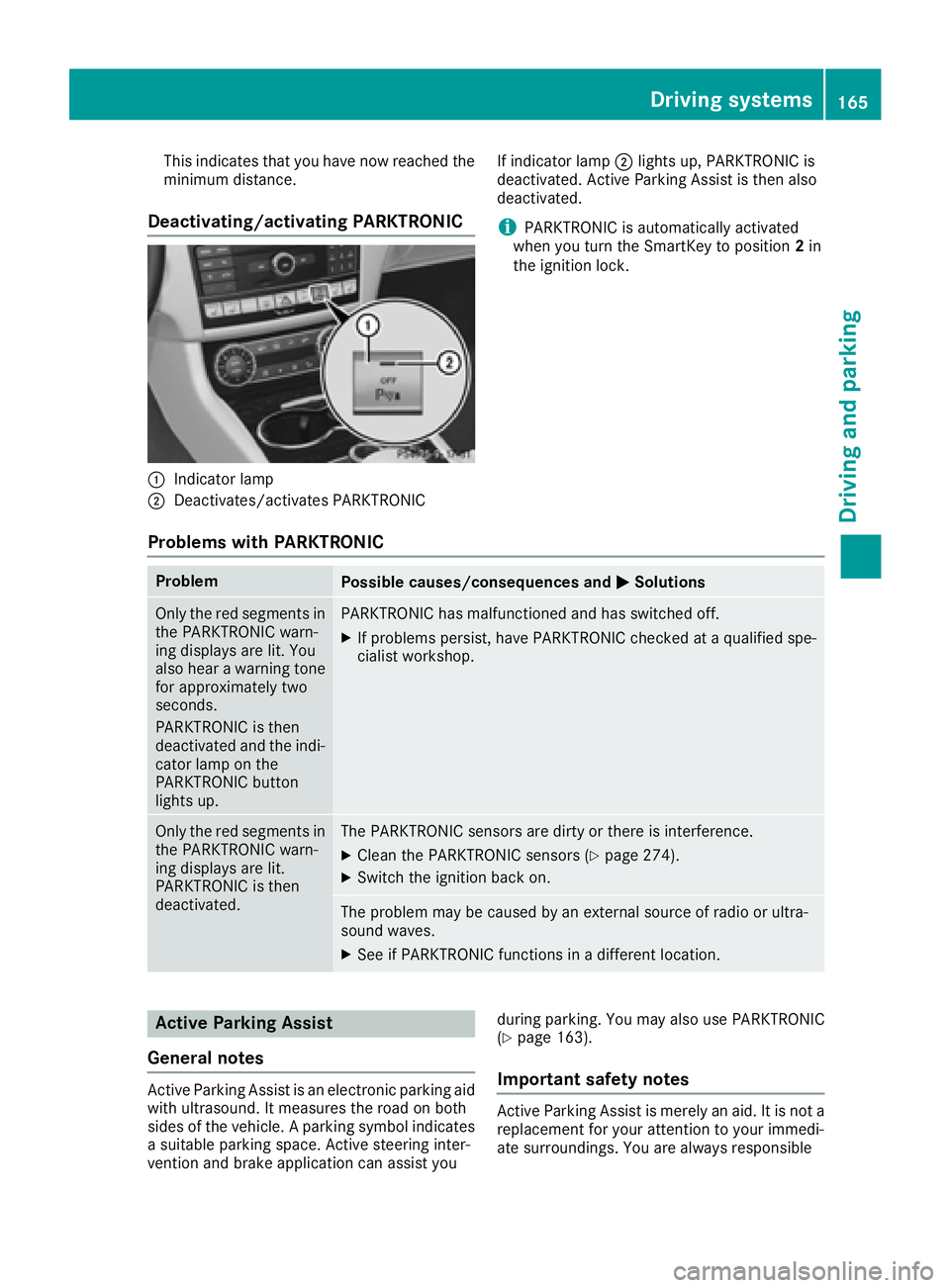
Deactivating/activating PARKTRONIC
C
Indicator lampD
Deactivates/activates PARKTRONIC If indicator lamp D lights up, PARKTRONIC is
deactivated. Active Parking Assist is then also
deactivated.
i PARKTRONIC is automatically activated
when you turn the SmartKey to position 2 in
the ignition lock.
Problems with PARKTRONIC Problem
Possible causes/consequences and P Solutions
Only the red segments in
the PARKTRONIC warn-
ing displays are lit. You
also hear a warning tone
for approximately two
seconds.
PARKTRONIC is then
deactivated and the indi-
cator lamp on the
PARKTRONIC button
lights up. PARKTRONIC has malfunctioned and has switched off. X
If problems persist, have PARKTRONIC checked at a qualified spe-
cialist workshop.
Only the red segments in
the PARKTRONIC warn-
ing displays are lit.
PARKTRONIC is then
deactivated. The PARKTRONIC sensors are dirty or there is interference. X
Clean the PARKTRONIC sensors ( Y
page 274).X
Switch the ignition back on.
The problem may be caused by an external source of radio or ultra-
sound waves. X
See if PARKTRONIC functions in a different location.
Active Parking Assist
General notes
Active Parking Assist is an electronic parking aid
with ultrasound. It measures the road on both
sides of the vehicle. A parking symbol indicates
a suitable parking space. Active steering inter-
vention and brake application can assist you during parking. You may also use PARKTRONIC
( Y
page 163).
Important safety notes
Active Parking Assist is merely an aid. It is not a
replacement for your attention to your immedi-
ate surroundings. You are always responsibleDriving systems 165
Driving and parking Z
Page 172 of 334

i The text shown in the multimedia system
depends on the language setting. The follow-
ing are examples of rear view camera displays
in the multimedia system.
Important safety notes The rear view camera is only an aid. It is not a
replacement for your attention to your immedi-
ate surroundings. You are always responsible
for safe maneuvering and parking. When maneu-
vering or parking, make sure that there are no
persons, animals or objects in the area in which
you are maneuvering.
Under the following circumstances, the rear
view camera will not function, or will function in
a limited manner: R
if the trunk lid is open R
in heavy rain, snow or fog R
at night or in very dark places R
if the camera is exposed to very bright light R
if the area is lit by fluorescent bulbs or LED
lighting (the display may flicker) R
if there is a sudden change in temperature,
e.g. when driving into a heated garage in win-
ter R
if the camera lens is dirty or obstructed
Observe the notes on cleaning
( Y
page 274)R
if the rear of your vehicle is damaged. In this
event, have the camera position and setting
checked at a qualified specialist workshop
The field of vision and other functions of the rear
view camera may be restricted due to additional
accessories on the rear of the vehicle (e.g.
license plate holder, bicycle rack).
On vehicles with height-adjustable chassis,
leaving the standard height can result in inac-
curacies in the guide lines, depending on tech-
nical conditions.
i The rear view camera is protected from rain-
drops and dust by means of a flap. When the
rear view camera is activated, this flap opens.
The flap closes again when: R
you have finished the maneuvering process R
you switch off the engine R
you open the trunk
Observe the notes on cleaning ( Y
page 274).
For technical reasons, the flap may remain
open briefly after the rear view camera has
been deactivated. Switching the rear view camera on/off X
To switch on: make sure that the Activa‐
tion by R gear function is selected in the
multimedia system (see Digital Operator's
Manual). X
Engage reverse gear.
The rear view camera flap opens. The multi-
media system shows the area behind the vehi-
cle with guide lines.
The image from the rear view camera is avail-
able throughout the maneuvering process. X
To switch off: shift the transmission to posi-
tion P .
or X
Drive forwards a short distance.
Displays in the multimedia system The rear view camera may show a distorted view
of obstacles, show them incorrectly or not at all.
The rear view camera does not show objects in
the following positions: R
very close to the rear bumper R
under the rear bumper R
in the area immediately above the tailgate
handle
! Objects not at ground level may appear to
be further away than they actually are, e.g.: R
the bumper of a parked vehicle R
the drawbar of a trailer R
the ball coupling of a trailer tow hitch R
the rear section of an HGV R
a slanted post
Use the guidelines only for orientation.
Approach objects no further than the bottom-
most guideline.170
Driving systems
Driving and parking
Page 176 of 334

R
yello w brackets wit h thin lines: PARKTRONI C
is active R
yello w brackets wit h normal lines: an objec t is
presen t in close range of th e vehicl eR
red line: an objec t is presen t in th e immediat e
close range of th e vehicl e
Impor tant safety notesThe 360°camera is only an aid and may sho w a
distorted vie w of obstacles, sho w them incor-
rectl y or no t at all. The 360°camera is no t a
substitut e for attentive driving.
You are always responsibl e for saf e maneuver-
in g and parking. Whe n maneuverin g or parking,
mak e sur e that there are no persons, animals or
objects in th e area in whic h you are maneuver-
ing.
You are always responsibl e for safety, and mus t
always pay attention to your surroundings when
parkin g and maneuvering. This applies to th e
area s behind , in fron t of and beside th e vehicle.
You could otherwise endanger yourself and oth-
ers .
The 360° camera will no t function or will func-
tion in a limite d manner:R
if th e doors are openR
if th e exterio r mirror s are folded inR
if th e trunk lid is openR
in heav y rain , snow or fogR
at night or in ver y dark placesR
if th e cameras are exposed to ver y bright ligh tR
if th e area is lit by fluorescent bulbs or LE D
lighting (the display may flicker) R
if there is a sudden chang e in temperature,
e.g. when drivin g into a heated garage in win -
te r R
if th e camera lenses are dirty or coveredR
if th e vehicl e component s in whic h th e cam -
eras are installed are damaged. In this event ,
h a v e th e camera position and setting checke d
at a qualified specialist workshop
Do no t use th e 360° camera in this case. You
can otherwise injur e other s or caus e damage to
objects or th e vehicle.
Guide lines are always shown at roa d level.
The field of vision and other function s of th e
camera system may be restricted due to addi-
tional attachments (e.g. license plat e holder,
rear bicycle carrier). On vehicles wit h height-adjustable chassis,
dependin g on technical conditions, leavin g th e
standard height can result in :R
inaccuracies in th e guide linesR
inaccuracies in th e display of generated
images (top view)
Activati on conditionsThe imag e from th e 360° camera appears if:R
th e multimedia system is switched on R
th e 360 ° Camera function is switched on
Switching on the 360° camera X
Press th e