2017 MERCEDES-BENZ B-Class warning light
[x] Cancel search: warning lightPage 200 of 290

Warning/
indicator
lamp
0051
0051 Signal type
Possible causes/consequences and 0050 0050Solutions 00E500BB
00C6004D
0051
00C6 (USA only), 004D(Canada only): the yellow ESP ®
, ESP ®
OFF and RBS/
brake system warning lamps are lit while the drive system is running.
ESP ®
, BAS, the HOLD function and hill start assist are temporarily unavailable.
Adaptive Brake Assist may also have failed.
ATTENTION ASSIST is deactivated.
Self-diagnosis is not yet complete.
G WARNING
The braking performance of the electric motor using recuperative braking may be
either reduced or not effective. If you do not make an additional effort to apply the brake yourself, the braking effect may not be sufficient. If necessary, counteract
the reduced regenerative braking effect by applying the brake yourself.
The brake system continues to function normally, but without the functions listed
above.
The braking distance in an emergency braking situation can thus increase.
If ESP ®
is not operational, ESP ®
is unable to stabilize the vehicle.
There is an increased risk of skidding and an accident.
X Carefully drive a suitable distance, making slight steering movements at a speed
above 12 mph (20 km/h).
The functions mentioned above are available again when the warning lamp goes
out.
If the warning lamp is still on: X Observe the additional display messages in the multifunction display.
X Drive on carefully.
X Visit a qualified specialist workshop immediately. 00240049
0051
0049 (USA only), 0024(Canada only): the red indicator lamp for the electric
parking brake flashes or lights up and/or the yellow warning lamp for the electric
parking brake lights up.
X Observe the additional display messages in the multifunction display. 0075
0051
The red restraint system warning lamp is lit while the drive system is running.
The restraint system is malfunctioning.
G WARNING
The air bags or Emergency Tensioning Devices may either be triggered uninten-
tionally or, in the event of an accident, may not be triggered.
There is an increased risk of injury.
X Observe the additional display messages in the multifunction display.
X Drive on carefully.
X Contact a qualified specialist workshop and have the restraint system checked.
For further information about the restraint system, see (Y page 38).198
Warning and indicator lamps in the instrument clusterOn-board computer and displays
Page 201 of 290

Drive system
Warning/
indicator
lamp
0051 0051
Signal type
Possible causes/consequences and 0050
0050Solutions 00D9
0051
The yellow battery charge warning lamp is on.
The condition of charge of the high-voltage battery has dropped into the reserve
range.
X Charge the high-voltage battery. Driving systems
Warning/
indicator
lamp 0051 0051
Signal type
Possible causes/consequences and 0050
0050Solutions 00BA
0051
The red distance warning lamp lights up while the vehicle is in motion. A warning
tone also sounds.
You are approaching a vehicle or a stationary obstacle in your line of travel at too high a speed.
X Be prepared to brake immediately.
X Pay careful attention to the traffic situation. You may have to brake or take
evasive action.
Further information on the distance warning function of Active Brake Assist
(Y page 60). Wa
rning and indi cator lamps in the instrument cluster
199On-board computer and displays Z
Page 203 of 290
General notes
The multimedia system section in this Opera-
tor's Manual describes the basic principles for
operation. More information can be found in the Digital Operator's Manual. Important safety notes
G
WARNING
If you operate information systems and com-
munication equipment integrated in the vehi- cle while driving, you will be distracted from
traffic conditions. You could also lose control of the vehicle. There is a risk of an accident.
Only operate the equipment when the traffic
situation permits. If you are not sure that this
is possible, park the vehicle paying attention
to traffic conditions and operate the equip-
ment when the vehicle is stationary.
You must observe the legal requirements for the country in which you are currently driving whenoperating the multimedia system.
The multimedia system calculates the route to
the destination without taking the following into
account, for example:
R traffic lights
R stop and yield signs
R parking or stopping restrictions
R road narrowing
R other road and traffic rules and regulations
The multimedia system may give incorrect nav-
igation recommendations if the actual street/
traffic situation does not correspond with the
digital map's data.
For example:
R a diverted route
R the road layout or the direction of a one-way
street has been changed
For this reason, you must always observe road
and traffic rules and regulations during your
journey. Road and traffic rules and regulations
always have priority over multimedia system
driving recommendations.
Navigation announcements are intended to
direct you while driving without diverting your
attention from the road and driving. Please always use this feature instead of con-
sulting the map display for directions. Looking
at the icons or map display can distract you from traffic conditions and driving, and increase the
risk of an accident.
This equipment complies with FCC radiation
exposure limits set forth for uncontrolled equip-
ment and meets the FCC radio frequency (RF)
Exposure Guidelines in Supplement C to OET65.
This equipment has very low levels of RF energy that is deemed to comply without maximum
permissive exposure evaluation (MPE). How-
ever, it is recommended to install it at a distance
of at least 8 inches (approx. 20 cm) between the
radiation source and a person's body (not
including limbs such as hands, wrists, feet and
legs). G
WARNING
Modifications to electronic components, their software as well as wiring can impair their
function and/or the function of other net-
worked components. In particular, systems
relevant to safety could also be affected. As a
result, these may no longer function as inten-
ded and/or jeopardize the operating safety of
the vehicle. There is an increased risk of an
accident and injury.
Never tamper with the wiring as well as elec-
tronic components or their software. You
should have all work to electrical and elec-
tronic equipment carried out at a qualified
specialist workshop.
If you make any changes to the vehicle elec-
tronics, the general operating permit is ren-
dered invalid. Function restrictions
For safety reasons, some functions are restric-
ted or unavailable while the vehicle is in motion. You will notice this, for example, because either
you will not be able to select certain menu items or a message will appear to this effect. Function restrictions
201Multimedia system Z
Page 214 of 290

X
Adjust the head restraints if necessary
(Y page 81).
X Move the driver's or front-passenger seat
back if necessary. Securing loads
Cargo tie-down rings General notes
Observe the following notes on securing loads:
R Observe the loading guidelines (Y page 207).
R Secure the load using the cargo tie-down
rings.
R Distribute the load on the cargo tie-down
rings evenly.
R Do not use elastic straps or nets to secure a
load, as these are only intended as an anti-slip protection for light loads.
R Do not route tie-downs across sharp edges or
corners.
R Pad sharp edges for protection.
Cargo compartment 0043
Cargo tie-down rings
Bag hook G
WARNING
The bag hooks cannot restrain heavy objects
or items of luggage. Objects or items of lug-
gage could be flung around and thereby hit
vehicle occupants when braking or abruptly
changing directions. There is a risk of injury.
Only hang light objects on the bag hooks.
Never hang hard, sharp-edged or fragile
objects on the bag hooks. !
The bag hook can bear a maximum load of
6.6lbs (3kg) and should not be used to secure
a load. 0043
Bag hook Cargo compartment cover
Important safety notes G
WARNING
On its own, the cargo compartment cover
cannot secure or restrain heavy objects,
items of luggage and heavy loads. You could
be hit by an unsecured load during sudden
changes in direction, braking or in the event of an accident. There is an increased risk of
injury or even fatal injury.
Always store objects so that they cannot be
flung around. Secure objects, luggage or
loads against slipping or tipping over, e.g. by
using tie downs, even if you are using the
cargo compartment cover.
! When loading the vehicle, make sure that
you do not stack the load in the cargo com-
partment higher than the lower edge of the
side windows. Do not place heavy objects on top of the cargo compartment cover.
! When removing and installing the cargo
compartment cover, ensure that its end caps do not scrape the light-colored parts of the
vehicle.
The cargo compartment cover is located behind the rear bench seat backrest. 212
Stowage areasSto
wage an d features
Page 217 of 290

X
Attach hook 0087to the cargo compartment's
upper seal 0085.
X To close: detach hook 0087from upper seal 0085.
X Fasten hook 0087to the bracket on the under-
side of the cargo compartment floor.
X Fold the cargo compartment floor down.
X Press the cargo compartment floor down until
it engages.
Setting the height of the cargo compart- ment floor The stowage well under the cargo compartment
floor can be increased or decreased in size as
necessary. To do this, you can lock the floor at
two different heights. The upper catch gives a
flat load surface when the rear bench seat is
folded forward. X
To raise: using handle 0043, lift up cargo com-
partment floor 0044in the direction of arrow 0087
and pull it upwards.
X Lower cargo compartment floor 0044again. To
do this, push the cargo compartment floor
away so that it engages in the guide on the
upper level.
Cargo compartment floor 0044engages in the
upper position. i
Carry out this step using both hands.
X To lower: raise cargo compartment floor 0044
slightly using handle 0043and pull it towards
you.
X Lower cargo compartment floor 0044again
slowly. Whilst doing so, press the cargo com-
partment floor into the lower level.
Cargo compartment floor 0044engages in the
lower position. Roof carrier
Important safety notes G
WARNING
When you load the roof, the center of gravity
of the vehicle rises and the driving character- istics change. If you exceed the maximum roof
load, the driving characteristics, as well as
steering and braking, will be greatly impaired.There is a risk of an accident.
Never exceed the maximum roof load and
adjust your driving style.
You will find information on the maximum roof
load in the "Technical data" section
(Y page 286).
An incorrectly secured roof carrier or roof load
may become detached from the vehicle. You
must therefore ensure that you observe the roof
carrier manufacturer's installation instructions.
Attaching the roof carrier Stowage areas
215Stowage an d features Z
Page 219 of 290

X
To install: insert cup holder into lateral
curved sections 0044in the stowage compart-
ment. Insert the cup holder so that the wedge of the upper section of cup holder 0043faces
forwards.
X Press the cup holder downwards until it
engages on the right and left-hand sides.
Cup holder in the rear seat armrest !
Do not sit on or support your body weight on
the rear seat armrest when it is folded down,
as you could otherwise damage it.
! Close the cup holder before folding the rear
seat armrest up. Otherwise, the cup holder
could be damaged. X
Fold down the rear seat armrest.
X To open: press the front of cup holder 0043
or 0044.
Cup holder 0043or0044 extends automatically.
X To close: slide cup holder 0043or0044 back until
it engages. Sun visors
Overview G
WARNING
If the mirror cover of the vanity mirror is folded up when the vehicle is in motion, you could be
blinded by incident light. There is a risk of an
accident.
Always keep the mirror cover folded down
while driving. 0043
Mirror light
0044 Bracket
0087 Retaining clip, e.g. for a car park ticket
0085 Vanity mirror
0083 Mirror cover
Vanity mirror in the sun visor Mirror light
0043only functions if the sun visor is
clipped into bracket 0044and mirror cover 0083has
been folded up.
Glare from the side X
Fold down the sun visor.
X Pull the sun visor out of retainer 0044.
X Swing the sun visor to the side. Ashtray
Front ashtray !
The stowage space under the ashtray is not
heat resistant. Before placing lit cigarettes in the ashtray, make sure that the ashtray is
properly engaged. Otherwise, the stowage
space could be damaged. Features
217Stowage an d features Z
Page 220 of 290
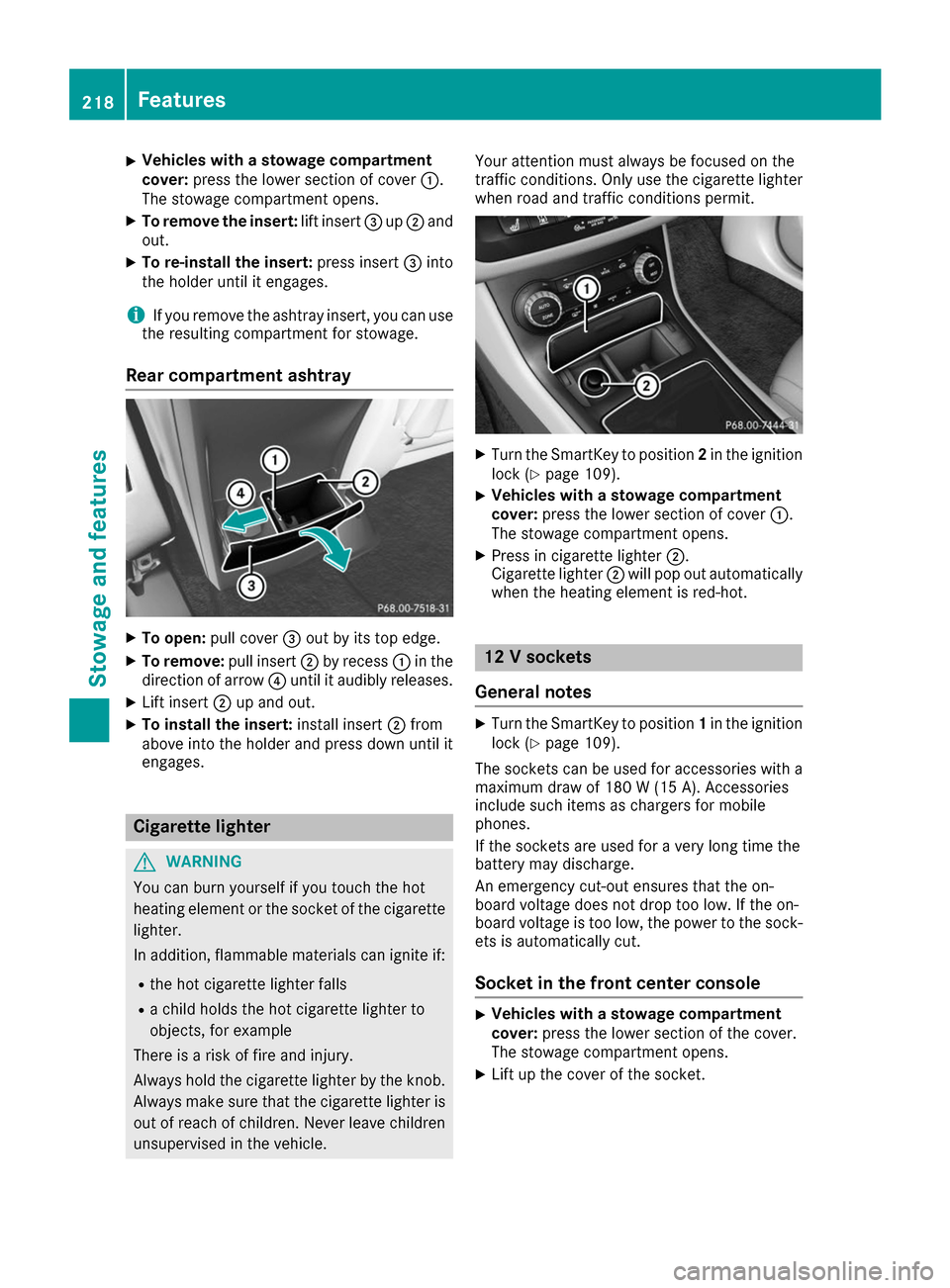
X
Vehicles with a stowage compartment
cover:
press the lower section of cover 0043.
The stowage compartment opens.
X To remove the insert: lift insert0087up0044 and
out.
X To re-install the insert: press insert0087into
the holder until it engages.
i If you remove the ashtray insert, you can use
the resulting compartment for stowage.
Rear compartment ashtray X
To open: pull cover 0087out by its top edge.
X To remove: pull insert0044by recess 0043in the
direction of arrow 0085until it audibly releases.
X Lift insert 0044up and out.
X To install the insert: install insert0044from
above into the holder and press down until it
engages. Cigarette lighter
G
WARNING
You can burn yourself if you touch the hot
heating element or the socket of the cigarette lighter.
In addition, flammable materials can ignite if:
R the hot cigarette lighter falls
R a child holds the hot cigarette lighter to
objects, for example
There is a risk of fire and injury.
Always hold the cigarette lighter by the knob.
Always make sure that the cigarette lighter is
out of reach of children. Never leave children unsupervised in the vehicle. Your attention must always be focused on the
traffic conditions. Only use the cigarette lighter when road and traffic conditions permit. X
Turn the SmartKey to position 2in the ignition
lock (Y page 109).
X Vehicles with a stowage compartment
cover: press the lower section of cover 0043.
The stowage compartment opens.
X Press in cigarette lighter 0044.
Cigarette lighter 0044will pop out automatically
when the heating element is red-hot. 12 V sockets
General notes X
Turn the SmartKey to position 1in the ignition
lock (Y page 109).
The sockets can be used for accessories with a maximum draw of 180 W (15 A). Accessories
include such items as chargers for mobile
phones.
If the sockets are used for a very long time the
battery may discharge.
An emergency cut-out ensures that the on-
board voltage does not drop too low. If the on-
board voltage is too low, the power to the sock-
ets is automatically cut.
Socket in the front center console X
Vehicles with a stowage compartment
cover:
press the lower section of the cover.
The stowage compartment opens.
X Lift up the cover of the socket. 218
FeaturesStowage and features
Page 228 of 290
Currently inactive areas can be activated by text
message.
Triggering the vehicle alarm With this function, you can trigger the vehicle's
panic alarm via text message. An alarm sounds
and the exterior lighting flashes. Depending on
the setting, the panic alarm lasts five or ten sec-
onds. Afterwards, the alarm switches off. Garage door opener
General notes The HomeLink
®
garage door opener integrated
in the rear-view mirror allows you to operate up to three different door and gate systems.
Use the integrated garage door opener only on
garage doors that:
R have safety stop and reverse features and
R meet current U.S. federal safety standards
Once programed, the integrated garage door
opener in the rear-view mirror will assume the
function of the garage door system's remote
control. Please also read the operating instruc-
tions for the garage door system.
When programming a garage door opener, park
the vehicle outside the garage. Do not leave the engine running while programming.
Certain garage door drives are incompatible
with the integrated garage door opener. If you
have difficulty programing the integrated garage
door opener, contact a Mercedes-Benz Service
Center.
Alternatively, you can call the following tele-
phone assistance services:
R USA: Mercedes-Benz Customer Assistance
Center at 1-800-FOR-MERCedes
R Canada: Customer Service at
1-800-387-0100
R HomeLink ®
hotline 1-800-355-3515 (free of
charge)
More information on HomeLink ®
and/or com-
patible products is also available online at
http://www.homelink.co m.
Notes on the declaration of conformity
(Y page 26).
USA: FCC ID: CB2HMIHL4
Canada: IC: 279B-HMIHL4 Important safety notes G
WARNING
When you operate or program the garage door with the integrated garage door opener, per-
sons in the range of movement of the garage
door can become trapped or struck by the
garage door. There is a risk of injury.
When using the integrated garage door
opener, always make sure that nobody is
within the range of movement of the garage
door.
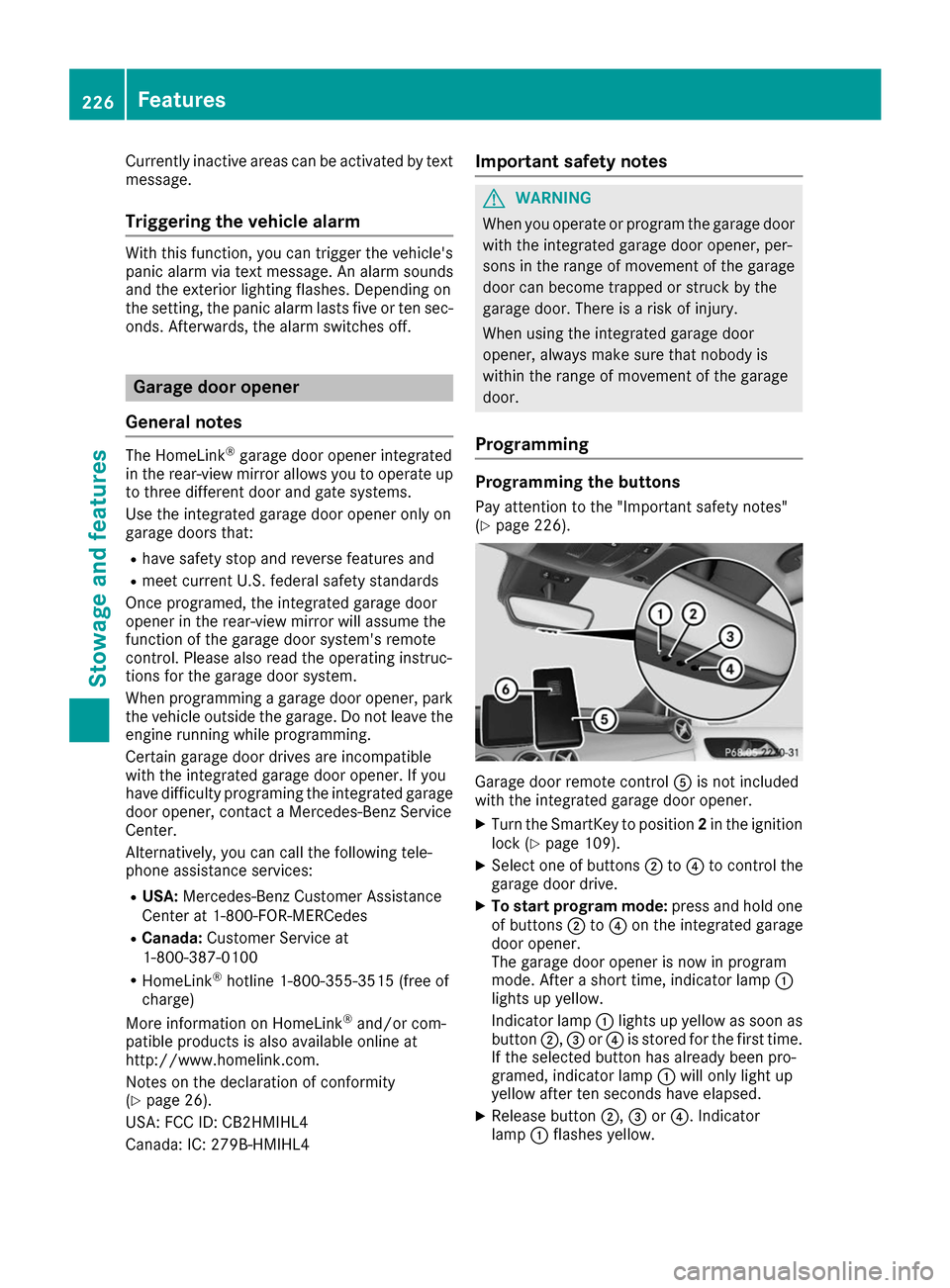
Programming Programming the buttons
Pay attention to the "Important safety notes"
(Y page 226). Garage door remote control
0083is not included
with the integrated garage door opener.
X Turn the SmartKey to position 2in the ignition
lock (Y page 109).
X Select one of buttons 0044to0085 to control the
garage door drive.
X To start program mode: press and hold one
of buttons 0044to0085 on the integrated garage
door opener.
The garage door opener is now in program
mode. After a short time, indicator lamp 0043
lights up yellow.
Indicator lamp 0043lights up yellow as soon as
button 0044,0087or0085 is stored for the first time.
If the selected button has already been pro-
gramed, indicator lamp 0043will only light up
yellow after ten seconds have elapsed.
X Release button 0044,0087or0085. Indicator
lamp 0043flashes yellow. 226
FeaturesStowage and features