2017 MERCEDES-BENZ B-Class Light
[x] Cancel search: LightPage 103 of 290

not be dehumidified. The windows can fog up
more quickly. Therefore, only deactivate the
"Cooling with air-dehumidification" function
briefly.
The "Cooling with air-dehumidification" function is operational when the vehicle is ready to drive.
The air inside the vehicle is cooled and dehu-
midified according to the temperature selected.
Condensation may drip from the underside of
the vehicle when it is in cooling mode. This is
normal and not a sign that there is a malfunc-
tion. Activating/deactivating X
Press the 005Abutton.
The indicator lamp in the 005Abutton lights
up or goes out.
The indicator lamp in the button indicates that the respective function is activated. The
"Cooling with air dehumidification" function
has a delayed switch-off feature.
Problems with the "Cooling with air dehumidification" function Problem
Possible causes/consequences and
0050 0050Solutions The indicator lamp in the
005A button flashes
three times or remains
off. The "Cooling with air
dehumidification" func-
tion cannot be switched
on. Cooling with air dehumidification has been deactivated due to a mal-
function.
X Visit a qualified specialist workshop. Setting climate control to automatic
General notes In automatic mode, the set temperature is main-
tained automatically at a constant level. The
system automatically regulates the temperature of the dispensed air, the airflow and the air dis- tribution.
The "Cooling with air dehumidification" function
is activated automatically in automatic mode.
Setting climate control to automatic X
Turn the SmartKey to position 2in the ignition
lock (Y page 109).
X Set the desired temperature.
X To activate: press the0058button.
The indicator lamp in the 0058button lights
up. Automatic air distribution and airflow are
activated. X
To switch to manual mode:press the 004F
or 004A button.
or
X Press the 0097or0095 button.
The indicator lamp in the 0058button goes
out. Automatic air distribution and airflow are deactivated. Setting the temperature
Different temperatures can be set for the driv-
er's and front-passenger sides. The set temper-
ature is automatically maintained at a constant
level.
X Turn the SmartKey to position 2in the ignition
lock (Y page 109).
X To increase or decrease: turn control0043or
006D counter-clockwise or clockwise. Only
change the temperature setting in small
increments. Start at 72 ‡ (22 †). Operating the climate control systems
101Climate control
Page 104 of 290

Setting the air distribution
Air distribution settings 0061
Directs air through the defroster vents
009C Directs air through the center and side air
vents
009B Directs air through the footwell air vents
009F Directs air through the center, side and
footwell vents
0087 Directs air through the defroster, center
and side air vents
0086 Directs air through the defroster and
footwell vents
008F Directs air through the defroster, center,
side and footwell vents
i Regardless of the air distribution setting,
airflow is always directed through the side air
vents. The side air vents can only be closed if the adjusters are turned clockwise until they
engage.
Setting the air distribution X
Turn the SmartKey to position 2in the ignition
lock (Y page 109).
X Press the 004For004A button repeatedly
until the desired symbol appears in the dis-
play. Setting the airflow
X Turn the SmartKey to position 2in the ignition
lock (Y page 109).
X To increase or reduce:press the 0097or
0095 button. Switching the ZONE function on/off
X To activate: press the00D6button.
The indicator lamp in the 00D6button lights
up.
The temperature setting for the driver's side
is not adopted for the front-passenger side.
X To deactivate: press the00D6button.
The indicator lamp in the 00D6button goes
out.
The temperature setting for the driver's side
is adopted for the front-passenger side. Defrosting the windshield
General notes You can use this function to defrost the wind-
shield or to clear a fogged up windshield and
side windows.
i You should only select the "Windshield
defrosting" function until the windshield is
clear again.
Switching the "Windshield defrosting"
function on or off X
Turn the SmartKey to position 2in the ignition
lock (Y page 109).
X To activate: press the0064button.
The indicator lamp in the 0064button lights
up.
The climate control system switches to the
following functions:
R high airflow
R high temperature
R air distribution to the windshield and front
side windows
R air-recirculation mode off
Vehicles with windshield heating: the
windshield heating is switched on automati-
cally using the "Windshield defrosting" func-
tion.
i The "Windshield defrosting" function auto-
matically sets the blower output to the opti-
mum defrosting effect. As a result, the airflow
may increase or decrease automatically after
the 0064 button is pressed.
i You can adjust the blower output manually
while the "Windshield defrosting" function is
in operation:
Press the 00F2or00F3 button.
X To deactivate: press the0064button.
The indicator lamp in the 0064button goes
out. The previously selected settings are
restored. Air-recirculation mode remains
deactivated.
or X Press the 0058button.
The indicator lamp in the 0064button goes
out. Airflow and air distribution are set to
automatic mode. 102
Operating the climate control systemsClimate control
Page 105 of 290

or
X Turn temperature control 0043or006D counter-
clockwise or clockwise (Y page 99).MAX COOL maximum cooling
The MAX COOL function is only available in vehi-
cles for the USA.
The MAX COOL function only works when the
vehicle is ready to drive.
X To activate: press the00C9button.
The indicator lamp in the button lights up.
X To deactivate: press the00C9button.
The indicator lamp goes out. The previously
selected settings are restored.
When you activate MAX COOL, climate control
switches to the following functions:
R maximum cooling
R maximum airflow
R air-recirculation mode on Defrosting the windows
Windows fogged up on the inside X
Activate the 005A"Cooling with air dehumid-
ification" function.
X Activate automatic mode 0058.
X If the windows continue to fog up, activate the
0064 "Windshield defrosting" function. i
You should only select this setting until the
windshield is clear again.
Windows fogged up on the outside X
Activate the windshield wipers.
X Set the air distribution to 009Cor009B.
i You should only select this setting until the
windshield is clear again. Rear window defroster
General notes The rear window defroster has a high current
draw. You should therefore switch it off as soon
as the rear window is clear. Otherwise, the rear window defroster switches off automatically
after several minutes.
If the battery voltage is too low, the rear window
defroster may switch off.
Activating/deactivating X
Turn the SmartKey to position 2in the ignition
lock (Y page 109).
X Press the 006Cbutton.
The indicator lamp in the 006Cbutton lights
up or goes out.
Problems with the rear window defroster Problem
Possible causes/consequences and
0050 0050Solutions The rear window
defroster has deactiva-
ted prematurely or can-
not be activated. The battery has not been sufficiently charged.
X Switch off any consumers that are not required, e.g. reading lamps,
interior lighting or the seat heating.
When the battery is sufficiently charged, the rear window defroster can be activated again. Operating the climate control systems
103Climate control
Page 106 of 290

Switching air-recirculation mode
on/off
General notes You can deactivate the flow of fresh air if
unpleasant odors are entering the vehicle from
outside. The air already inside the vehicle will
then be recirculated.
If you switch on air-recirculation mode, the win-
dows can fog up more quickly, in particular at
low temperatures. Only use air-recirculation
mode briefly to prevent the windows from fog-
ging up.
Activating/deactivating X
Turn the SmartKey to position 2in the ignition
lock (Y page 109).
X To activate: press the008Abutton.
The indicator lamp in the 008Abutton lights
up.
Air-recirculation mode switches on automati-
cally:
R at high outside temperatures
R at high levels of pollution
When air-recirculation mode is activated auto-
matically, the indicator lamp in the 008Abutton
is not lit. Outside air is added after about
30 minutes.
X To deactivate: press the008Abutton.
The indicator lamp in the 008Abutton goes
out.
i Air-recirculation mode deactivates auto-
matically:
R after approximately five minutes at outside
temperatures below approximately 45 ‡
(7 †)
R after approximately five minutes if the
"Cooling with air dehumidification" func-
tion is deactivated
R after approximately 30 minutes at outside
temperatures above approximately 45 ‡
(7 †) if the cooling with air dehumidifica-
tion function is activated Convenience opening or closing using
the air-recirculation button G
WARNING
When using the convenience closing feature,
parts of the body could be trapped in the clos- ing area when a side window is being closed. There is a risk of injury.
Observe the complete closing procedure
when the convenience closing feature is oper-
ating. Make sure that no body parts are in
close proximity during the closing procedure. G
WARNING
During convenience opening parts of the body could be drawn in or become trapped
between the side window and window frame.
There is a risk of injury.
Make sure that nobody touches the side win-
dow during the opening procedure. If some-
one becomes trapped, immediately press
the 0062 switch in the door to stop the move-
ment of the side windows. To continue closing the side window, pull on the 0062switch.
X Convenience closing feature: press and
hold the 008Abutton until the side windows
start to close automatically.
The indicator lamp in the 008Abutton lights
up. Air-recirculation mode is activated.
If parts of the body are in the closing area during convenience closing, proceed as follows:
X Press the 0062button to stop the side win-
dows.
The side window stops.
X To then open the side window, press the 0062
button again.
or X Press and hold the 008Abutton again for at
least two seconds.
The side windows move in the opposite direc- tion.
X Convenience opening feature: press and
hold the 008Abutton until the side windows
start to open automatically.
The indicator lamp in the 008Abutton goes
out. Air-recirculation mode is deactivated. 104
Operating the climate control systemsClimate control
Page 108 of 290

R
Seat heating
R Windshield heating
R Rear window defroster
"Immediate pre-entry climate control" is auto-
matically switched off when operational readi-
ness mode is requested.
Setting the departure time You can set a departure time for the "Pre-entry
climate control at departure time". Your vehicle
will then be cooled or heated until the desired
temperature is reached in time for the set depar-
ture time. "Pre-entry climate control at depar-
ture time" will be activated a maximum of
35 minutes before departure. If the departure is delayed, the vehicle will be heated or cooled fora further five minutes.
You can set the desired departure time in the E-
E-
CELL
CELL submenu on the on-board computer
(Y page 163).
Activating immediate pre-entry climate
control You can activate "Immediate pre-entry climate
control" even if the vehicle interior is already at
the desired temperature. This means that the
vehicle interior continues to be cooled or
heated, e.g. if the journey is interrupted for up to
50 minutes, and the interior temperature is kept constant. You can only set the desired temper-
ature using the climate control unit. If you do not
pre-select a temperature, the last temperature
set will be automatically adopted. To activate/deactivate "Immediate pre-
entry climate control"
X Press button 0043in the center console.
The blue or red indicator lamp in the button
lights up or goes out. The colors of the indicator lamps in the button
have the following meanings:
Re
dH eating activated
Blue Cooling activated
Yellow Pre-entry climate control at departure is preselected Air vents
Important safety notes
G
WARNING
Very hot or very cold air can flow from the air vents. This could result in burns or frostbite in the immediate vicinity of the air vents. There
is a risk of injury.
Make sure that all vehicle occupants always
maintain a sufficient distance to the air out-
lets. If necessary, redirect the airflow to
another area of the vehicle interior.
In order to ensure the direct flow of fresh air
through the air vents into the vehicle interior,
please observe the following notes:
R keep the air inlet between the windshield and
the hood free of blockages, such as ice, snow or leaves.
R never cover the air vents or air intake grilles in
the vehicle interior.
i For optimal climate control in the vehicle,
open the air vents completely and set the
adjusters to the central position. Setting the air vents
0043
Side window defroster vent
0044 Side air vent 106
Air ventsClimate control
Page 111 of 290
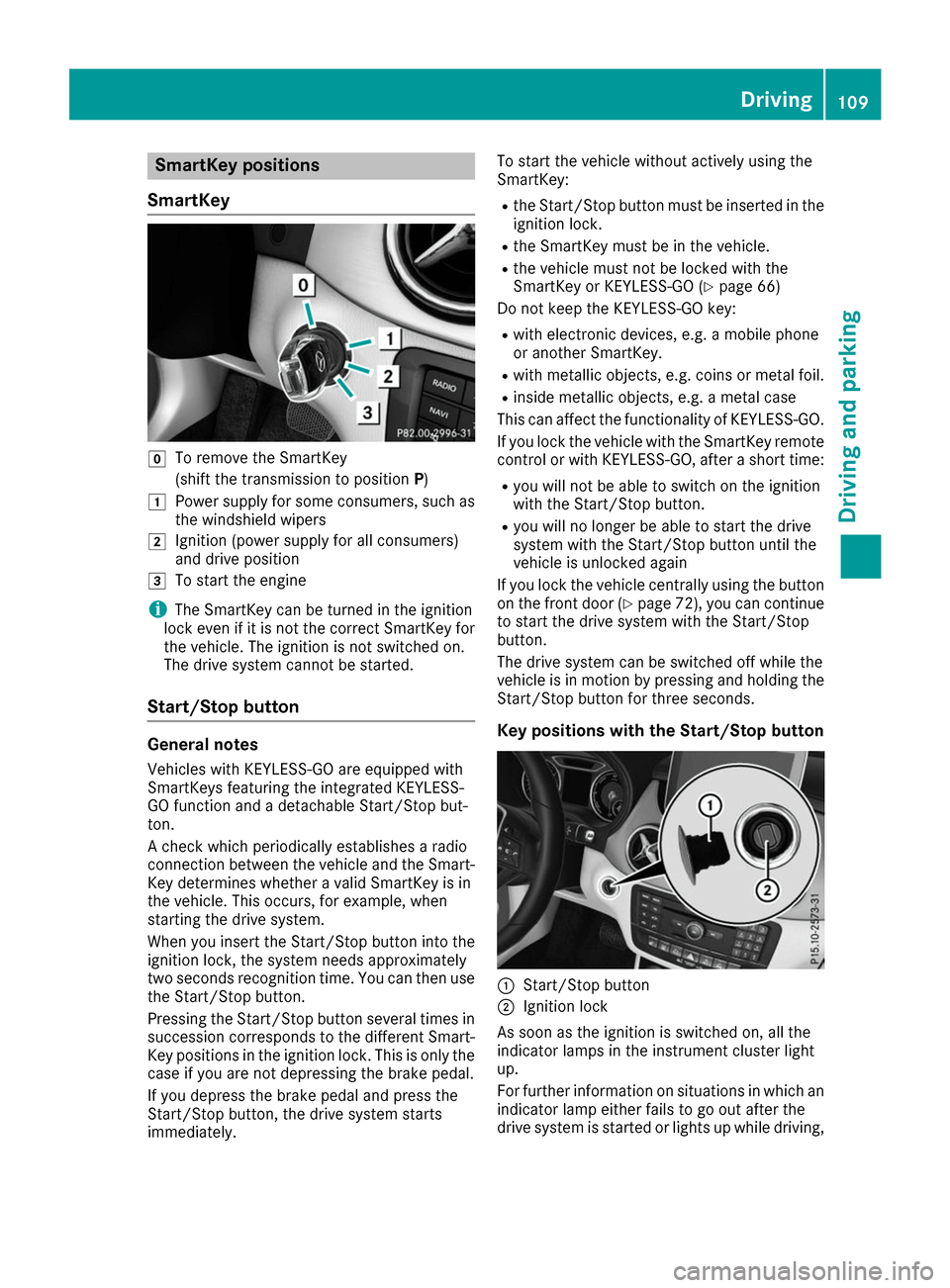
SmartKey positions
SmartKey 005A
To remove the SmartKey
(shift the transmission to position P)
0047 Power supply for some consumers, such as
the windshield wipers
0048 Ignition (power supply for all consumers)
and drive position
0049 To start the engine
i The SmartKey can be turned in the ignition
lock even if it is not the correct SmartKey for
the vehicle. The ignition is not switched on.
The drive system cannot be started.
Start/Stop button General notes
Vehicles with KEYLESS-GO are equipped with
SmartKeys featuring the integrated KEYLESS-
GO function and a detachable Start/Stop but-
ton.
A check which periodically establishes a radio
connection between the vehicle and the Smart-
Key determines whether a valid SmartKey is in
the vehicle. This occurs, for example, when
starting the drive system.
When you insert the Start/Stop button into the
ignition lock, the system needs approximately
two seconds recognition time. You can then use the Start/Stop button.
Pressing the Start/Stop button several times in
succession corresponds to the different Smart- Key positions in the ignition lock. This is only the
case if you are not depressing the brake pedal.
If you depress the brake pedal and press the
Start/Stop button, the drive system starts
immediately. To start the vehicle without actively using the
SmartKey:
R
the Start/Stop button must be inserted in the
ignition lock.
R the SmartKey must be in the vehicle.
R the vehicle must not be locked with the
SmartKey or KEYLESS-GO (Y page 66)
Do not keep the KEYLESS-GO key:
R with electronic devices, e.g. a mobile phone
or another SmartKey.
R with metallic objects, e.g. coins or metal foil.
R inside metallic objects, e.g. a metal case
This can affect the functionality of KEYLESS-GO.
If you lock the vehicle with the SmartKey remote
control or with KEYLESS-GO, after a short time:
R you will not be able to switch on the ignition
with the Start/Stop button.
R you will no longer be able to start the drive
system with the Start/Stop button until the
vehicle is unlocked again
If you lock the vehicle centrally using the button
on the front door (Y page 72), you can continue
to start the drive system with the Start/Stop
button.
The drive system can be switched off while the
vehicle is in motion by pressing and holding the Start/Stop button for three seconds.
Key positions with the Start/Stop button 0043
Start/Stop button
0044 Ignition lock
As soon as the ignition is switched on, all the
indicator lamps in the instrument cluster light
up.
For further information on situations in which an indicator lamp either fails to go out after the
drive system is started or lights up while driving, Driving
109Driving and parking Z
Page 118 of 290

The braking performance of the electric motor
using recuperative braking is, in some operating modes, either reduced or not effective:
R when the condition of charge of the high-volt-
age battery increases
R if the high-voltage battery is not yet at a nor-
mal operating temperature
R when driving close to the vehicle's maximum
design speed
R when the vehicle is almost stationary
R in transmission position N
R during and after ESP stability control
If you do not make an additional effort to apply
the brake yourself, the braking effect may not be sufficient. If necessary, counteract the reduced
regenerative braking effect by applying the
brake yourself.
Radar-based recuperation The vehicle uses the Active Brake Assist sensors
during radar-based recuperation ( DAUTO
). The
sensors detect the distance to the vehicle ahead
and its speed. The intensity of recuperation is
then automatically adjusted to the current traf-
fic situation.
The range can then be increased by storing
energy efficiently. Adjustment is infinitely vari-
able from overrun mode (no recuperation) to
maximum recuperation.
Maintain sufficient distance to the vehicle in
front. Mercedes-Benz recommends that you
activate Active Brake Assist as a visual and
acoustic aid.
Examples of radar-based recuperation:
R Approaching a slower vehicle, a decelerating
vehicle or when following a vehicle downhill.
Your vehicle decelerates slightly and increa-
ses recuperation.
R Driving when no vehicle is detected in front or
when a vehicle is detected in the far distance or an accelerating vehicle is detected. Your
vehicle switches to overrun mode at higher
speeds.
R Driving on a steep downhill slope. Accelera-
tion downhill is reduced and recuperation is
increased. This is comparable with shifting
down when driving downhill. X
To activate radar-based recuperation: pull
steering wheel paddle shifter 0043or0044
towards you and hold for about one second.
X To deactivate radar-based recuperation:
briefly pull steering wheel paddle shifter 0043
or 0044 towards you.
If you change between radar-based and manual
recuperation, the following levels are activated
depending on the selection via the steering
wheel paddle shifters: 0043
Steering wheel
paddle shifter - selects
D-
(maximum
recuperation) 0044
Steering wheel
paddle shifter + selects
D+
(overrun) In particular, the function of the radar sensors
can be impaired in the case of:
R there is dirt on the sensors or anything else
covering the sensors
R there is snow or heavy rain
R there is interference by other radar sources
R there are strong radar reflections, for exam-
ple in parking garages
R a narrow vehicle is traveling in front, e.g. a
motorbike
R a vehicle is traveling in front on a different line
relative to the center of your vehicle
Following damage to the front end of the vehicle,
have the radar sensor settings and operation
checked at a qualified specialist workshop
immediately. This also applies to collisions at
slow speeds where there is no visible damage to the front of the vehicle.
If the radar sensors are not available, the system switches automatically to level Dwith moderate
recuperation. Have the radar sensors checked
at a qualified specialist workshop immediately.
Automatic adjustment of recuperation
on downhill gradients The vehicle can detect steep downhill gradients.
To reduce acceleration downhill and to charge
the high-voltage battery, recuperation is
increased steplessly. This is comparable to the
engine brake in a combustion engine when you
downshift a gear on a downhill gradient.
Automatic adjustment of recuperation on down-
hill gradients is available in level DAUTO
or on 116
TransmissionDriving and parking
Page 121 of 290

Influences on the charging behavior
and the charge state of the high-volt-
age battery
Terms of use Observe the following notes:
R information on exceptions and limitations in
warranty documentation and in the related
Maintenance Booklet
R maintenance notes for the high-voltage bat-
tery in the Maintenance Booklet
Method of operation The vehicle is equipped with a high-voltage bat-
tery for driving. The high-voltage battery stores
the energy needed to operate the electric motor and releases it again.
The electric motor uses energy that has been
stored in the high-voltage battery when pulling
away, accelerating and during the journey.
In overrun mode (except D+), kinetic energy is
converted by means of energy recuperation into
electrical energy and stored in the high-voltage
battery.
The high-voltage battery can be charged as fol-
lows:
R through energy recuperation while the vehicle
is in motion
R with the charging cable at a mains socket
while the vehicle is stationary
R with the charging cable at a charging station
while the vehicle is stationary
The high-voltage battery can be charged using a
single-phase charging cable in a voltage range
from 100 V to 240 V.
If the condition of charge drops to less than 13%, the high-voltage battery reserve indicator lamp
lights up in the instrument cluster. Charge the
high-voltage battery as soon as possible.
Below a condition of charge of 5%, the perform-
ance of the vehicle is reduced. The vehicle's
high-voltage electrical system switches off at a
condition of charge of 0%.
Use of the pre-entry climate control function
may mean that the high-voltage battery is not
fully charged. High and low outside temperatures Low outside temperatures
The efficiency of the high-voltage battery is sig-
nificantly reduced at very low outside tempera-
tures. The high-voltage battery is then no longer able to provide the normal electrical power out-
put.
High outside temperatures
To prevent damage to the high-voltage battery
due to very high outside temperatures, the max- imum power output of the high-voltage battery
is reduced automatically.
The E-CELL display indicates the maximum
amount of power available (Y page 152).
Notes on battery care Avoid storing or transporting the vehicle in high
temperatures over a long period (e.g. container
transport).
If you park the vehicle and leave it stationary for
longer periods, connect it to a power supply.
Temperatures below 00F813 ‡ (00F825 †) and over
104 ‡ (40 †), which affect the vehicle for a
period of more than seven days, can cause irre- versible damage.
Discharged battery The vehicle's high-voltage electrical system
switches off if the high-voltage battery is com-
pletely discharged. 30 seconds prior to this, you
are informed of the switch-off by the Battery
Battery
Level Level Too
TooLow.
Low. Stop
Stopand
andCharge
Charge Immedi‐
Immedi‐
ately
ately message. This protects the battery from
exhaustive discharge.
It is not possible to restart the drive system until after charging.
Do not leave the vehicle parked for longer than
14 days with a high-voltage battery condition of
charge below 20%.
You can check the condition of charge in the
charge level display (Y page 153).
Further information on the "Energy flow display" can be found in the "Trip" menu (Y page 157). High-voltage battery
119Driving and parking Z