2017 MERCEDES-BENZ B-Class Open
[x] Cancel search: OpenPage 113 of 290

You can start the drive system if a valid key is in
the vehicle. Switch off the drive system and
always take the key with you when leaving the
vehicle, even if you only leave it for a short time. Pay attention to the important safety notes.
X Depress the brake pedal and keep it
depressed.
X Press the Start/Stop button once
(Y page 109).
The drive system is started. Once the vehicle
is ready to be driven, the Ready
Ready display
(Y page 152) appears in the lower part of the
multifunction display.
Starting procedure with the SmartKey To start the drive system using the key instead
of the Start/Stop button, pull the Start/Stop
button out of the ignition lock.
X Turn the SmartKey to position 3(Y page 109)
in the ignition lock and release it.
The drive system is started. Once the vehicle
is ready to be driven, the Ready Readydisplay
(Y page 152) appears in the lower part of the
multifunction display. Pulling away
The vehicle is equipped with a sound generator.
At low speeds, an electric vehicle makes less
noise than a vehicle with a combustion engine.
The sound generator is activated so that other
road users can hear your vehicle better. The
sound generator is activated at speeds of under
20 mph (30 km/h) and switches off automati-
cally at higher speeds.
X Depress the brake pedal and keep it
depressed.
X Move the DIRECT SELECT lever to position D
or R.
X Release the brake pedal.
X Carefully depress the accelerator pedal.
The electric parking brake is automatically
released (Y page 131).
The red 0049(USA only) or 0024(Canada
only) indicator lamp in the instrument cluster goes out.
The vehicle locks centrally once you have pulled
away. The locking knobs in the doors drop down. You can open the doors from the inside at any
time. It is only possible to move the DIRECT SELECT
selector lever from position
Pto the desired
selector lever position if you depress the brake
pedal. The parking lock is then deactivated and
the electrical parking brake is released auto-
matically. If the brake pedal is not depressed,
the DIRECT SELECT lever can still be moved but
the parking lock remains engaged.
Make sure that no charging cable is plugged in. The parking lock cannot be released if a charg-
ing cable is plugged in. Hill start assist
Hill start assist will aid you when pulling away on
a hill. It holds the vehicle for a short time after
you have removed your foot from the brake
pedal. This gives you enough time to move your foot from the brake pedal to the accelerator
pedal and depress it before the vehicle begins to
roll. G
WARNING
After a short time, hill start assist will no lon-
ger brake your vehicle and it could roll away.
There is a risk of an accident and injury.
Therefore, quickly move your foot from the
brake pedal to the accelerator pedal. Never
leave the vehicle when it is held by hill start
assist.
Hill start assist is not active if:
R you are pulling away on a level road or on a
downhill gradient.
R the DIRECT SELECT lever is in position N.
R the electric parking brake is applied.
R ESP ®
is malfunctioning.
Further information on holding the vehicle sta-
tionary on uphill gradients (Y page 114). Transmission
Important safety notes
Shift the DIRECT SELECT lever to position P
when the drive system is switched off and the
vehicle is stationary. Park position Pis engaged
and the electric parking brake is applied auto-
matically: Transmission
111Driving and parking Z
Page 114 of 290

If the DIRECT SELECT lever cannot be engaged
in park position P, the parking brake is engaged
automatically.
Observe the important safety notes on switch-
ing ESP ®
on and off (Y page 63). DIRECT SELECT lever
Overview of transmission positions 005D
Park position with parking lock
005E Reverse gear
005C Neutral
005B Drive
The DIRECT SELECT lever is on the right of the
steering column.
The DIRECT SELECT lever always returns to its
original position. The current transmission posi- tion P,R, Nor Dappears in the transmission
position display in the multifunction display
(Y page 112).
Transmission position and drive pro-
gram display The current transmission position and drive pro-
gram appear in the multifunction display. 0043
Transmission position display
0044 Drive program display The arrows in the transmission position display
show how and into which transmission positions
you can shift using the DIRECT SELECT lever.
If the transmission position display in the mul-
tifunction display is not working, you should pull
away carefully to check whether the desired
transmission position is engaged. Ideally, you
should select transmission position D.
Engaging park position P X
Push the DIRECT SELECT lever in the direction
of arrow P.
Transmission position display Pis shown in
the multifunction display.
When you have engaged park position P, make
sure that the transmission position display
shows Pin the multifunction display.
You can only engage park position Pwhen the
vehicle is stationary.
The transmission shifts into park position P
automatically if you open the driver's door when
the vehicle is stationary or when driving at very
low speed with the transmission in position Dor
R.
In addition, a warning tone sounds and a display
message is shown.
Depressing the brake and pushing the DIRECT
SELECT lever up or down disengages the park-
ing lock. The transmission is in Nneutral.
In order to shift from park position Pdirectly into
R or D:
R depress the brake pedal and
R push the DIRECT SELECT lever up or down
past the first point of resistance
Engaging reverse gear R !
Only shift into reverse gear
Rwhen the vehi-
cle is stationary. You could otherwise damage the drive system.
X Depress the brake and keep it pressed.
X Push the DIRECT SELECT lever up past the
first point of resistance. 112
TransmissionDriving and parking
Page 115 of 290

Shifting to neutral N
G
WARNING
If children are left unsupervised in the vehicle, they could:
R open the doors, thus endangering other
people or road users.
R get out and disrupt traffic.
R operate the vehicle's equipment.
Additionally, children could set the vehicle in
motion if, for example, they:
R release the parking brake.
R shift the transmission out of park position P
R start the vehicle's drive system.
There is a risk of an accident and injury.
When leaving the vehicle, always take the
SmartKey with you and lock the vehicle. Never leave children or animals unattended in the
vehicle. Always keep the SmartKey out of
reach of children.
X If the transmission is in position Dor R: push
the DIRECT SELECT lever up or down to the
first point of resistance.
X If the transmission is in position P: depress
the brake pedal and push the DIRECT SELECT
lever up or down to the first point of resist-
ance.
When the drive system is switched off, the trans-
mission shifts to Nautomatically.
With the SmartKey: if you then open the driv-
er's door or the front-passenger door or remove
the SmartKey from the ignition, the transmis-
sion automatically shifts to P.
With the Start/Stop button: if you then open
the driver's door or the front-passenger door,
the transmission automatically shifts to P.
If you want the transmission to remain in neutral N, e.g. when having the vehicle cleaned in an
automatic car wash with a towing system:
X Vehicles with the Start-Stop button:
remove the Start-Stop button from the igni-
tion lock.
X Insert the SmartKey into the ignition lock.
X All vehicles: switch the ignition on.
X Depress the brake pedal and keep it
depressed. X
Shift to neutral N.
X Release the brake pedal.
X Release the electric parking brake.
X Switch off the ignition and leave the SmartKey
in the ignition lock.
Engaging drive position D X
If the transmission is in position Ror N: push
the DIRECT SELECT lever down past the first
point of resistance.
X If the transmission is in position P: depress
the brake pedal and push the DIRECT SELECT lever down past the first point of resistance. Transmission positions
0045 Park position
This prevents the vehicle from rolling
away when stopped. Only move the
DIRECT SELECT lever to Pwhen the
vehicle is stationary.
The SmartKey can only be removed
when the DIRECT SELECT lever is in
position P. When there is no Smart-
Key in the ignition lock, the DIRECT
SELECT lever is locked in position P. 0046 Reverse gear
Only move the DIRECT SELECT lever
to Rwhen the vehicle is stationary. 0044 Neutral
No power is transmitted from the
drive system to the drive wheels.
Releasing the brakes will allow you to
move the vehicle freely.
If ESP ®
is faulty: only move the
DIRECT SELECT lever to Nif the vehi-
cle is in danger of skidding, e.g. on icy
roads. 003A Drive
For driving forwards Transmission
113Driving and parking Z
Page 124 of 290

Displaying the range and destination acces-
sibility via navigation mode:
X To switch to navigation mode: press the
00CB button.
The map shows the vehicle's current position.
or
X From one of the other main functions: slide
5 the controller (e. g. in radio mode).
The main function bar is displayed.
X To select Navi
Navi from the main function bar:
turn and press the controller.
The map shows the vehicle's current position.
X To call up e-Navigator: press the00CBbut-
ton.
X To select Range on Map
Range on Map in the navigation
menu: turn and press the controller.
The range and destination accessibility are
displayed on the navigation map.
Displaying the range and destination acces- sibility via Mercedes-Benz Apps:
X Switch on the multimedia system (see sepa-
rate operating instructions).
X Set access data and connect to the Internet
(see separate operating instructions)
X To call up the telephone menu: press the
002B button.
X To switch to the main function bar: slide 5
the controller.
X To select Tel/
Tel/00A7: press the controller.
X To select Internet
Internet: turn and press the con-
troller.
The menu with the Internet functions is dis-
played.
X To select Mercedes-Benz Apps
Mercedes-Benz Apps: turn and
press the controller.
The available Mercedes-Benz Apps
Mercedes-Benz Apps are dis-
played.
X To call up the e-Navigator App: turn and
press the controller.
The navigation map is displayed showing the
range and destination accessibility
Showing the view levels on the map:
X To display the menu: slide6and press
the controller when the map appears.
The menu of the view levels opens. You may
choose from the following view levels: R
available charging stations
R current route
R current vehicle position with vehicle direc-
tion
Exiting the map display:
X Press the 0038button on the controller.
or
X To select 0038: slide 6and press the con-
troller. Charging the high-voltage battery via
the electrical outlet
Charging cable Important safety notes
! Only use the charging cable to charge the
high-voltage battery. Do not use the charging
cable for other purposes. It may otherwise be damaged.
The vehicle is supplied with a single-phase 12 A charging cable. Only use the charging cable
included with the vehicle, which has been
approved for vehicle use.
Pay attention to the "Important safety notes"
(Y page 117).
If you use the supplied 12 A charging cable to
charge a high-voltage battery:
R the charge time increases considerably
R electrical consumption increases considera-
bly
Where possible, charge the high-voltage battery at a charging station (Y page 125). Only then
can certified electrical energy consumption lev- els be reached.
i The charging process can vary depending on
the charging station. Therefore, always
observe the local information.
Stowing the charging cable
The charging cable can be stowed in a bag in the trunk of the vehicle. To do so, the bag must be
secured to the cargo tie-down rings using the
retaining strap provided. 122
High-voltage batteryDriving and pa
rking
Page 126 of 290

relevant power socket checked by an electri-
cian.
X To adjust the setting: press button0085
repeatedly until the desired setting is selec-
ted in display 0087.
R Two LEDs are flashing: minimum setting
R All LEDs are flashing: maximum setting
Information about the charging time
(Y page 286)
If, after the charging process, the charging cable
is:
R left connected to the mains socket, the set
value will be used for the next charging proc-
ess.
R removed from the power socket, the values
will be reset to the minimum setting for the
next charging process. You may then need to
reset the values of the maximum charge cur-
rent.
If the charge current values that have been set
on the charging cable and the on-board com-
puter are different, the high-voltage battery is
charged using the lower value.
If the vehicle requires more time than usual to
charge the high-voltage battery, check:
R the settings of the maximum charge current
on the controls of the charging cable
R the settings of the maximum charge current in
the menu of the on-board computer Connecting the charging cable 0043
To open the charge socket flap
0044 Tire pressure table
0087 Socket cap
0085 Fastener
0083 Reference sticker (voltage range)
0084 Vehicle socket
006B Warning sticker (charging cable)
X Shift the DIRECT SELECT lever to position P.
X Switch the ignition off.
X Press the charge socket flap in the direction
of arrow 0043.
The charge socket flap swings up.
X Slide fastener 0085to the right.
Socket cap 0087is open.
X Insert the power supply plug into the electri-
cal outlet to the stop.
X Insert the charging cable connector into vehi-
cle socket 0084to the stop.
The high-voltage battery is being charged.
The vehicle must not be moved while the charg-
ing cable is connected or during charging.
i Depending on the temperature, the engine
cooling system and battery cooling system
may audibly switch on when the charging 124
High-voltage batteryDriving and parking
Page 127 of 290

cable is connected or during the charging
process.
Removing the charging cable !
Before driving away, you must ensure that,
for your own safety and to avoid damage, the charging cable has been removed from the
vehicle socket. Otherwise, you cannot shift
the transmission out of position P.
When the charge level display reaches 100%,
the battery is fully charged (Y page 153).When the battery is charged:
X Press and hold button 006Con the charging
cable connector and remove the charging
cable from vehicle socket 0084.
X Close socket cap 0087.
X Close the charge socket flap.
X Remove the charging cable from the electrical
outlet.
X Stow the charging cable safely in the vehicle
(Y page 122). Charging high-voltage battery at a
charging station/wallbox
General notes Only use charging cables that have been tested
and approved by the manufacturer for charging
the high-voltage battery in an electric vehicle.
Pay attention to the "Important safety notes"
(Y page 117).
Charging communication at a charging
station The charging station first has to be activated
before you can charge at a charging station. You can activate the charging station by using an
RFID card or via telephone activation. Observe
the on-site operator instructions for the charg-
ing station.
When the vehicle is connected to the charging
station, information and details on technical
parameters are exchanged. It can thus take up
to 30 seconds for the charging process to begin.
Connecting the charging cable 0043
To open the charge socket flap
0044 Tire pressure table
0087 Socket cap
0085 Fastener
0083 Reference sticker (voltage range)
0084 Vehicle socket
006B Warning sticker (charging cable)
X Shift the DIRECT SELECT lever to position P.
X Switch the ignition off.
X Press the charge socket flap in the direction
of arrow 0043.
The charge socket flap swings up.
X Slide fastener 0085to the right.
Socket cap 0087is open.
X Insert the charging cable connector into vehi-
cle socket 0084to the stop.
The high-voltage battery is being charged. High-voltage battery
125Driving and parking Z
Page 128 of 290
The vehicle must not be moved while the charg-
ing cable is connected or during charging.
i Depending on the temperature, the engine
cooling system and battery cooling system
may audibly switch on when the charging
cable is connected or during the charging
process.
Removing the charging cable !
Before driving away, you must ensure that,
for your own safety and to avoid damage, the
charging cable has been removed from the
vehicle socket. Otherwise, you cannot shift
the transmission out of position P.
When the charge level display reaches 100%,
the battery is fully charged (Y page 153). When the battery is charged:
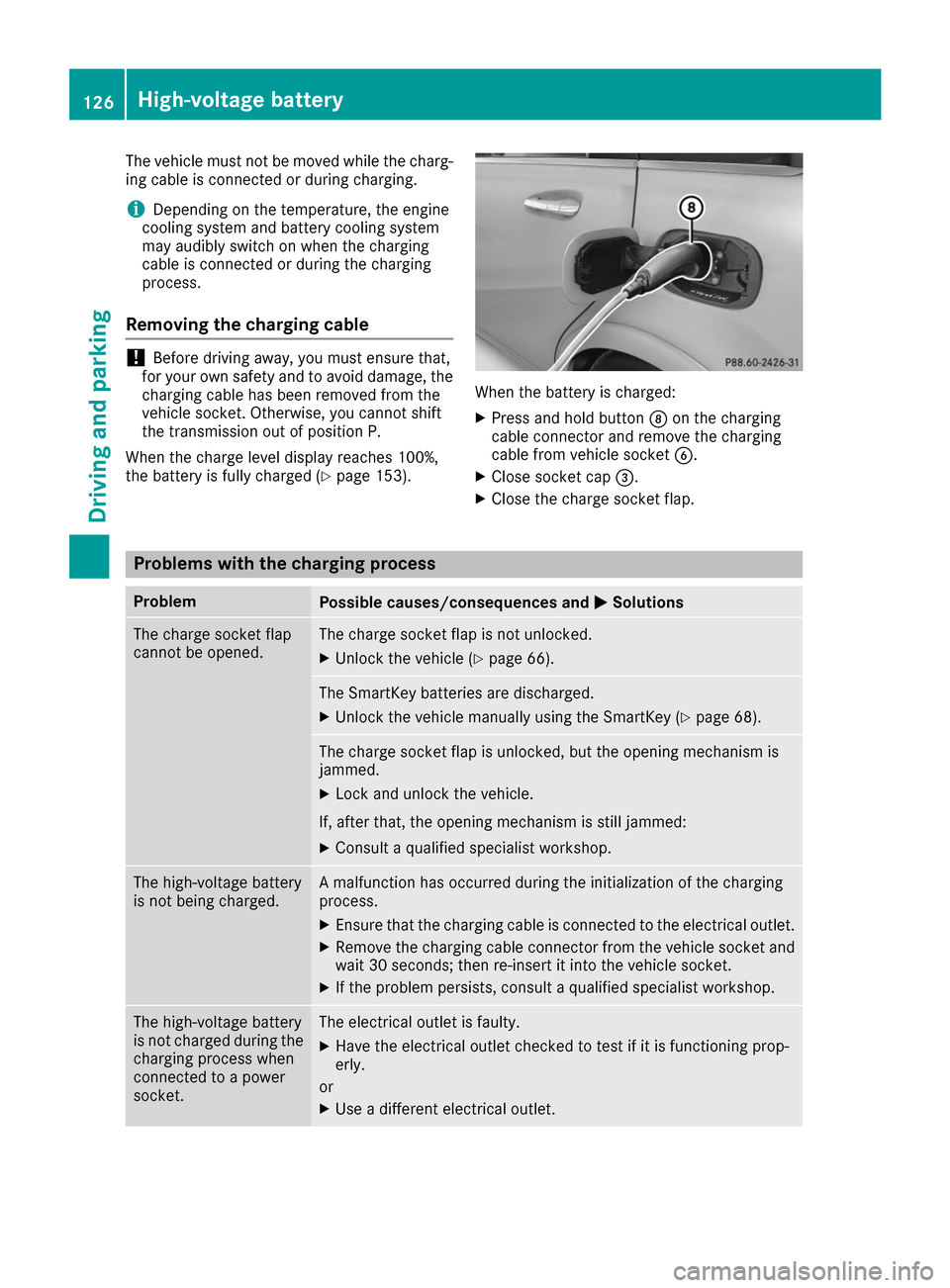
X Press and hold button 006Con the charging
cable connector and remove the charging
cable from vehicle socket 0084.
X Close socket cap 0087.
X Close the charge socket flap. Problems with the charging process
Problem
Possible causes/consequences and
0050 0050Solutions The charge socket flap
cannot be opened. The charge socket flap is not unlocked.
X Unlock the vehicle (Y page 66). The SmartKey batteries are discharged.
X Unlock the vehicle manually using the SmartKey (Y page 68).The charge socket flap is unlocked, but the opening mechanism is
jammed.
X Lock and unlock the vehicle.
If, after that, the opening mechanism is still jammed:
X Consult a qualified specialist workshop. The high-voltage battery
is not being charged. A malfunction has occurred during the initialization of the charging
process.
X Ensure that the charging cable is connected to the electrical outlet.
X Remove the charging cable connector from the vehicle socket and
wait 30 seconds; then re-insert it into the vehicle socket.
X If the problem persists, consult a qualified specialist workshop. The high-voltage battery
is not charged during the
charging process when
connected to a power
socket. The electrical outlet is faulty.
X Have the electrical outlet checked to test if it is functioning prop-
erly.
or X Use a different electrical outlet. 126
High-voltage batteryDriving and parking
Page 131 of 290
G
WARNING
If you leave children unsupervised in the vehi- cle, they could set it in motion by, for example:
R release the parking brake.
R shift the transmission out of park position
P.
R start the vehicle's drive system.
They could also operate the vehicle's equip-
ment. There is a risk of an accident and injury.
When leaving the vehicle, always take the
SmartKey with you and lock the vehicle. Never leave children unsupervised in the vehicle.
! While the vehicle is rolling, do not shift the
transmission directly from Dto R, from Rto D
or directly to P.
Do not open the driver's door while the vehi-
cle is in motion. Otherwise, at low speeds in
transmission position Dor R, park position P
is engaged automatically and the electrical
parking brake is applied.
The transmission could be damaged.
! Always secure the vehicle correctly against
rolling away. Otherwise, the vehicle or its driv-
etrain could be damaged.
To ensure that the vehicle is secured against
rolling away unintentionally:
R the electric parking brake must be applied.
R the transmission must be in position P.
R the SmartKey in the ignition lock must be
turned to position 0and removed from the
ignition lock.
R on uphill or downhill gradients, the front
wheels must be turned towards the curb. Switching off the drive system
G
WARNING
If you switch off the ignition while driving,
safety-relevant functions are only available
with limitations, or not at all. This can affect
the power steering and the brake boosting
effect, for example. You will require consider- ably more effort to steer and brake. There is a
risk of an accident.
Do not switch off the ignition while driving. X
Shift the DIRECT SELECT lever to position P.
X With the SmartKey: turn the SmartKey to
position 0in the ignition lock and remove it.
The immobilizer is activated.
X With the Start/Stop button: press the
Start/Stop button (Y page 109).
The drive system and all the indicator lamps in
the instrument cluster go out.
When the driver's door is closed, this corre-
sponds to SmartKey position 1. When the
driver's door is open, this corresponds to
SmartKey position 0: "Key removed".
If you switch the engine off with the transmis-
sion in position Ror D, the transmission auto-
matically shifts to N.
With the SmartKey: if you then open the driv-
er's door or the front-passenger door or remove
the SmartKey from the ignition, the transmis-
sion automatically shifts to P.
With the Start/Stop button: if you then open
the driver's door or the front-passenger door,
the transmission automatically shifts to P.
If you want the transmission to remain in neutral N, e.g. when having the vehicle cleaned in an
automatic car wash with a towing system:
X Vehicles with the Start-Stop button:
remove the Start-Stop button from the igni-
tion lock.
X Insert the SmartKey into the ignition lock.
X All vehicles: switch the ignition on.
X Depress the brake pedal and keep it
depressed.
X Shift to neutral N.
X Release the brake pedal.
X Release the electric parking brake.
X Switch off the ignition and leave the SmartKey
in the ignition lock. Parking
129Driving and parking Z