2017 MERCEDES-BENZ B-Class key battery
[x] Cancel search: key batteryPage 105 of 290

or
X Turn temperature control 0043or006D counter-
clockwise or clockwise (Y page 99).MAX COOL maximum cooling
The MAX COOL function is only available in vehi-
cles for the USA.
The MAX COOL function only works when the
vehicle is ready to drive.
X To activate: press the00C9button.
The indicator lamp in the button lights up.
X To deactivate: press the00C9button.
The indicator lamp goes out. The previously
selected settings are restored.
When you activate MAX COOL, climate control
switches to the following functions:
R maximum cooling
R maximum airflow
R air-recirculation mode on Defrosting the windows
Windows fogged up on the inside X
Activate the 005A"Cooling with air dehumid-
ification" function.
X Activate automatic mode 0058.
X If the windows continue to fog up, activate the
0064 "Windshield defrosting" function. i
You should only select this setting until the
windshield is clear again.
Windows fogged up on the outside X
Activate the windshield wipers.
X Set the air distribution to 009Cor009B.
i You should only select this setting until the
windshield is clear again. Rear window defroster
General notes The rear window defroster has a high current
draw. You should therefore switch it off as soon
as the rear window is clear. Otherwise, the rear window defroster switches off automatically
after several minutes.
If the battery voltage is too low, the rear window
defroster may switch off.
Activating/deactivating X
Turn the SmartKey to position 2in the ignition
lock (Y page 109).
X Press the 006Cbutton.
The indicator lamp in the 006Cbutton lights
up or goes out.
Problems with the rear window defroster Problem
Possible causes/consequences and
0050 0050Solutions The rear window
defroster has deactiva-
ted prematurely or can-
not be activated. The battery has not been sufficiently charged.
X Switch off any consumers that are not required, e.g. reading lamps,
interior lighting or the seat heating.
When the battery is sufficiently charged, the rear window defroster can be activated again. Operating the climate control systems
103Climate control
Page 107 of 290

Notes on the automatic reversing feature for the
side windows (Y page 75).
i If you open the side windows manually after
closing them with the convenience closing
feature, they will remain in this position when
opened using the convenience opening fea-
ture. Pre-entry climate control via Smart-
Key
General notes Before getting in, the vehicle interior can be
briefly warmed or ventilated in advance. In addi-
tion, the air from the air vent can be pre-cooled.
The high-voltage battery must be sufficiently
charged before the "Pre-entry climate control
via key" function can be activated.
Activating/deactivating When the vehicle is unlocked using the Smart-
Key or KEYLESS-GO, the climate control func-
tions are activated.
The pre-cooling and pre-heating climate control functions last 5 minutes.
When the vehicle is pre-cooled, the following
functions are activated as necessary:
R Climate control system
R Cooling with air dehumidification
R Blower
When the vehicle is pre-heated, the following
functions are activated as necessary:
R Climate control system
R Blower
R Seat heating
R Windshield heating
R Rear window defroster
Pre-entry climate control is automatically
switched off when operational readiness mode
is requested.
Activating or deactivating You can activate and deactivate the pre-entry
climate control (via SmartKey) function using
the on-board computer in the E-CELL
E-CELL submenu
(Y page 164). i
If the condition of charge of the high-voltage
battery is below the specified minimum con-
dition of charge, pre-entry climate control will not be activated even if it has been set. Pre-entry climate control at departure
time and immediate pre-entry climate
control
Important safety notes G
WARNING
If persons, particularly children are subjected to prolonged exposure to extreme heat or
cold, there is a risk of injury, possibly even
fatal. Never leave children unattended in the
vehicle.
General notes Using the "Pre-entry climate control at depar-
ture time" function, you can cool or heat the
vehicle interior prior to the desired departure
time.
When using the "Pre-entry climate control at
departure time" function, the condition of
charge of the high-voltage battery must be
higher than the specified minimum condition of charge.
The running time of the climate control may be
reduced if:
R the vehicle is not connected to an electric
power supply
R the high-voltage battery is not fully charged
With active "Pre-entry climate control at depar-
ture time" the condition of charge of the high-
voltage battery can be reduced, even if the
charge cable connector is connected.
In certain situations, the desired interior tem-
perature cannot be reached.
When the vehicle is cooled, the following func-
tions are activated as necessary:
R Climate control system
R Cooling with air dehumidification
R Blower
When the vehicle is heated, the following func-
tions are activated as necessary:
R Climate control system
R Blower Operating the climate control systems
105Climate control Z
Page 128 of 290
The vehicle must not be moved while the charg-
ing cable is connected or during charging.
i Depending on the temperature, the engine
cooling system and battery cooling system
may audibly switch on when the charging
cable is connected or during the charging
process.
Removing the charging cable !
Before driving away, you must ensure that,
for your own safety and to avoid damage, the
charging cable has been removed from the
vehicle socket. Otherwise, you cannot shift
the transmission out of position P.
When the charge level display reaches 100%,
the battery is fully charged (Y page 153). When the battery is charged:
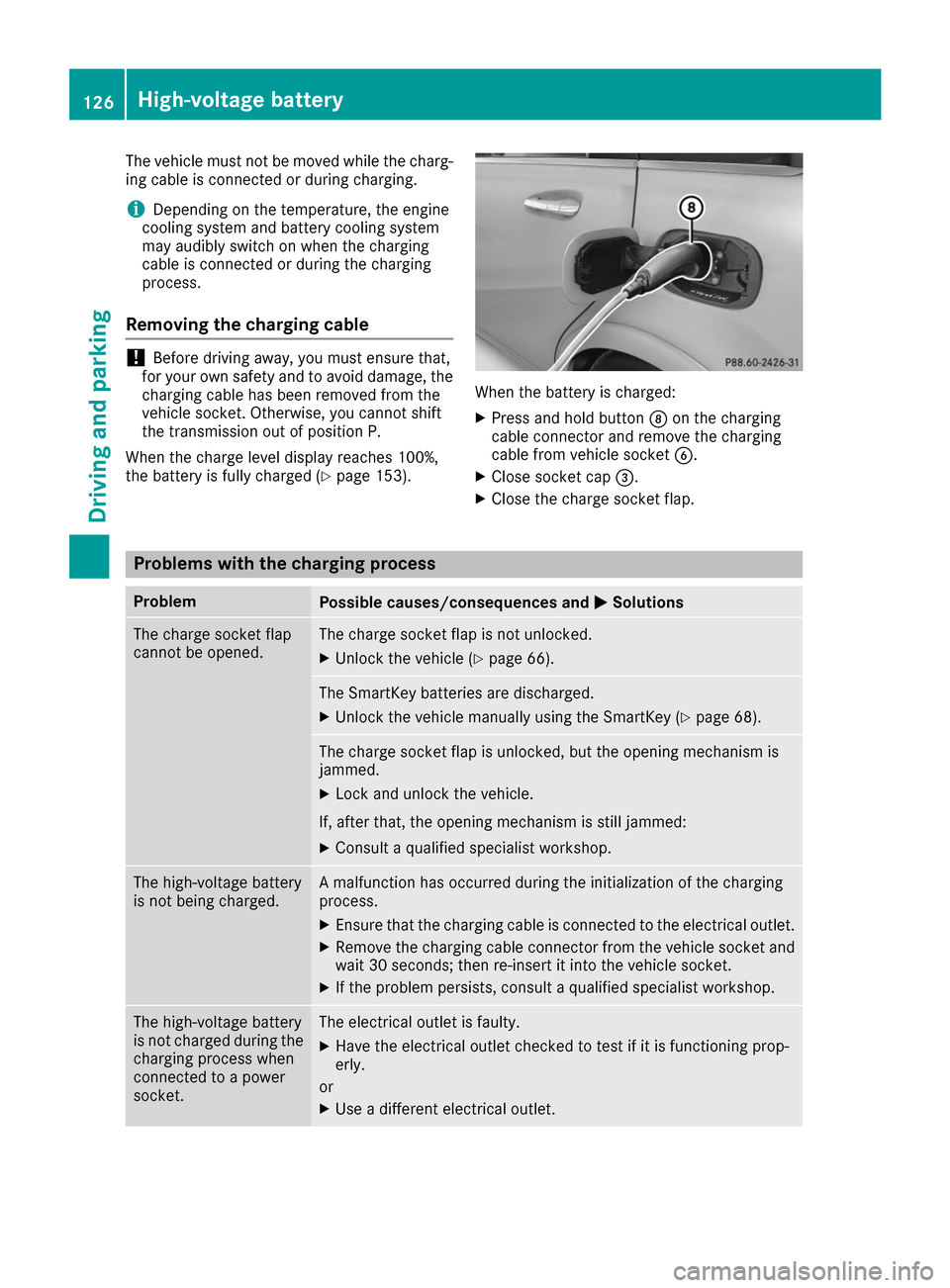
X Press and hold button 006Con the charging
cable connector and remove the charging
cable from vehicle socket 0084.
X Close socket cap 0087.
X Close the charge socket flap. Problems with the charging process
Problem
Possible causes/consequences and
0050 0050Solutions The charge socket flap
cannot be opened. The charge socket flap is not unlocked.
X Unlock the vehicle (Y page 66). The SmartKey batteries are discharged.
X Unlock the vehicle manually using the SmartKey (Y page 68).The charge socket flap is unlocked, but the opening mechanism is
jammed.
X Lock and unlock the vehicle.
If, after that, the opening mechanism is still jammed:
X Consult a qualified specialist workshop. The high-voltage battery
is not being charged. A malfunction has occurred during the initialization of the charging
process.
X Ensure that the charging cable is connected to the electrical outlet.
X Remove the charging cable connector from the vehicle socket and
wait 30 seconds; then re-insert it into the vehicle socket.
X If the problem persists, consult a qualified specialist workshop. The high-voltage battery
is not charged during the
charging process when
connected to a power
socket. The electrical outlet is faulty.
X Have the electrical outlet checked to test if it is functioning prop-
erly.
or X Use a different electrical outlet. 126
High-voltage batteryDriving and parking
Page 156 of 290

i
The
Energy Flow
Energy Flow menu can also be dis-
played in the COMAND/Audio display.
The condition of charge of the high-voltage bat- tery has dropped into the reserve range if the
drive system is running and:
R the Drive Battery Reserve Level
Drive Battery Reserve Level mes-
sage appears in the display
R the indicator lamp in the instrument cluster
lights up
Charge the high-voltage battery from a condi-
tion of charge of less than 20% at:
R an electrical outlet
R a charging station
The braking performance of the electric motor
using recuperative braking is, in some operating
modes, either reduced or not effective:
R when the condition of charge of the high-volt-
age battery increases
R if the high-voltage battery is not yet at a nor-
mal operating temperature
R when the vehicle is almost stationary
R in transmission position N
R during and after ESP stability control
If you do not make an additional effort to apply
the brake yourself, the braking effect may not be
sufficient. If necessary, counteract the reduced regenerative braking effect by applying the
brake yourself. Operating the on-board computer
Overview 0043
Multifunction display
0044 Vehicles with Audio 20: switches on voice-
operated control for navigation (see manu-
facturer's operating instructions)
Vehicles with COMAND: switches on the
Voice Control System (see the separate
operating instructions)
0087 Right control panel
0085 Left control panel
0083 Back button
X To activate the on-board computer: turn
the SmartKey to position 1in the ignition lock.
You can control the multifunction display and
the settings in the on-board computer using the buttons on the multifunction steering wheel. 154
Displays and operationOn-board computer and displays
Page 166 of 290

Selecting the departure time
X Press the 0059or0065 button on the steering
wheel to select the Settings
Settings menu.
X Press 0063or0064 on the steering wheel to
select the E‑CELL
E‑CELLmenu.
X Press 0063or0064 to select Depart.
Depart. Time
Time.
X Press 0076to confirm.
X Press the 0064or0063 button to select one
of the three departure times or Timer
TimerOff
Off(no
timer active).
X Press 0076to confirm.
Charging with RANGE PLUS
If you have engaged Pand the charging cable is
connected, the on-board computer displays:
R the expected charge time of the high-voltage
battery or
R the RANGE PLUS condition of charge for the
departure time set
RANGE PLUS charges when:
R you have activated RANGE PLUS via the cen-
ter console prior to charging and
R the high-voltage battery is fully charged
If charging is not complete by departure time,
the maximum range will notbe available. Example:
R Set departure time: 6:41 a.m.
R End time for standard high-voltage battery
charging: 6:00 a.m.
R RANGE PLUS condition of charge at
6:41 a.m.: half of the additional range
R The maximum additional range is decreased
by 50 percent.
Pre-entry climate control at time of depar- ture
If you activate the "Rem. Climate Control at
departure time" function, the vehicle interior is
heated or cooled prior to a desired departure
time. i
To heat or cool the vehicle interior for a
desired departure time, the high-voltage bat-
tery must be sufficiently charged. Activate the
climate control function primarily when the
high-voltage battery is being charged. You
must also set a departure time using the E-
E-
CELL
CELL submenu (Y page 163).
Switching "Pre-entry climate control at
departure time" on/off
X Press the 0059or0065 button on the steering
wheel to select the Sett. Sett.menu.
X Use 0063 or0064 to select the E-CELL
E-CELLsub-
menu.
X Press 0076to confirm.
X Press 0063or0064 to select Pre-Entry
Pre-Entry
Climate Ctrl. at Departure Time:
Climate Ctrl. at Departure Time:.
X Press 0076to activate or deactivate.
The vehicle interior will then be heated or
cooled prior to the predefined departure time.
If a departure time is selected, the yellow
indicator lamp lights up on the auxiliary heat-
ing button.
You can use the on-board computer to specify
up to three departure times in the E-CELL E-CELLsub-
menu. One of the specified departure times may
be preselected (Y page 163).
Pre-entry climate control (via SmartKey)
Pre-entry climate control via the key is switched on temporarily when the vehicle is unlocked
using the key. In order to switch on pre-entry
climate control via the SmartKey, the function
has to be activated using the on-board com-
puter.
Activating/deactivating pre-entry climate
control via the key
X Press the 0059or0065 button on the steering
wheel to select the Sett. Sett.menu.
X Use 0063 or0064 to select the E-CELL
E-CELL sub-
menu.
X Press 0076to confirm.
X Press 0063or0064 to select Pre-Entry
Pre-Entry
Climate Ctrl. (Via Key):
Climate Ctrl. (Via Key):.
X Press 0076to activate or deactivate.
If pre-entry climate control via key is activa-
ted, pre-entry climate control using the key is switched on temporarily when you unlock thevehicle. 164
Menus and submenusOn-board computer and displays
Page 191 of 290

SmartKey
Display messages
Possible causes/consequences and
0050
0050Solutions 00AF
Key Key
Does
Does Not
NotBelong
Belong
to Vehicle
to Vehicle You have put the wrong SmartKey in the ignition lock.
X Use the correct SmartKey. 00AF
Take Your Key from Take Your Key from
Ignition Ignition The SmartKey is in the ignition lock.
A warning tone sounds
X
Remove the SmartKey. 00AF
Obtain a New Key Obtain a New Key The SmartKey needs to be replaced.
X Visit a qualified specialist workshop. 00AF
Replace Key Battery Replace Key Battery The SmartKey battery is discharged.
X Change the battery (Y page 69).00AF
Don't Forget Your Don't Forget Your
Key Key The display message is shown for a maximum of 60 seconds and is
only a reminder.
You open the driver's door with the drive system switched off. The
SmartKey is not in the ignition lock. A warning tone sounds.
X Take the SmartKey with you when you leave the vehicle. 00AF
Key Not Detected Key Not Detected
(red display message) The SmartKey is not in the vehicle.
A warning tone also sounds.
If the drive system is switched off, you can no longer lock the vehicle
centrally or start the drive system.
X Pull over and stop the vehicle safely as soon as possible, paying
attention to road and traffic conditions.
X Secure the vehicle against rolling away (Y page 128).
X Locate the SmartKey. There is interference from a strong source of radio waves, and as a
result the SmartKey is not detected while the drive system is running.
A warning tone also sounds.
X Pull over and stop the vehicle safely as soon as possible, paying
attention to road and traffic conditions.
X Secure the vehicle against rolling away (Y page 128).
X Insert the SmartKey into the ignition lock and drive in SmartKey
mode. Display messages
189On-board computer and displays Z
Page 220 of 290
X
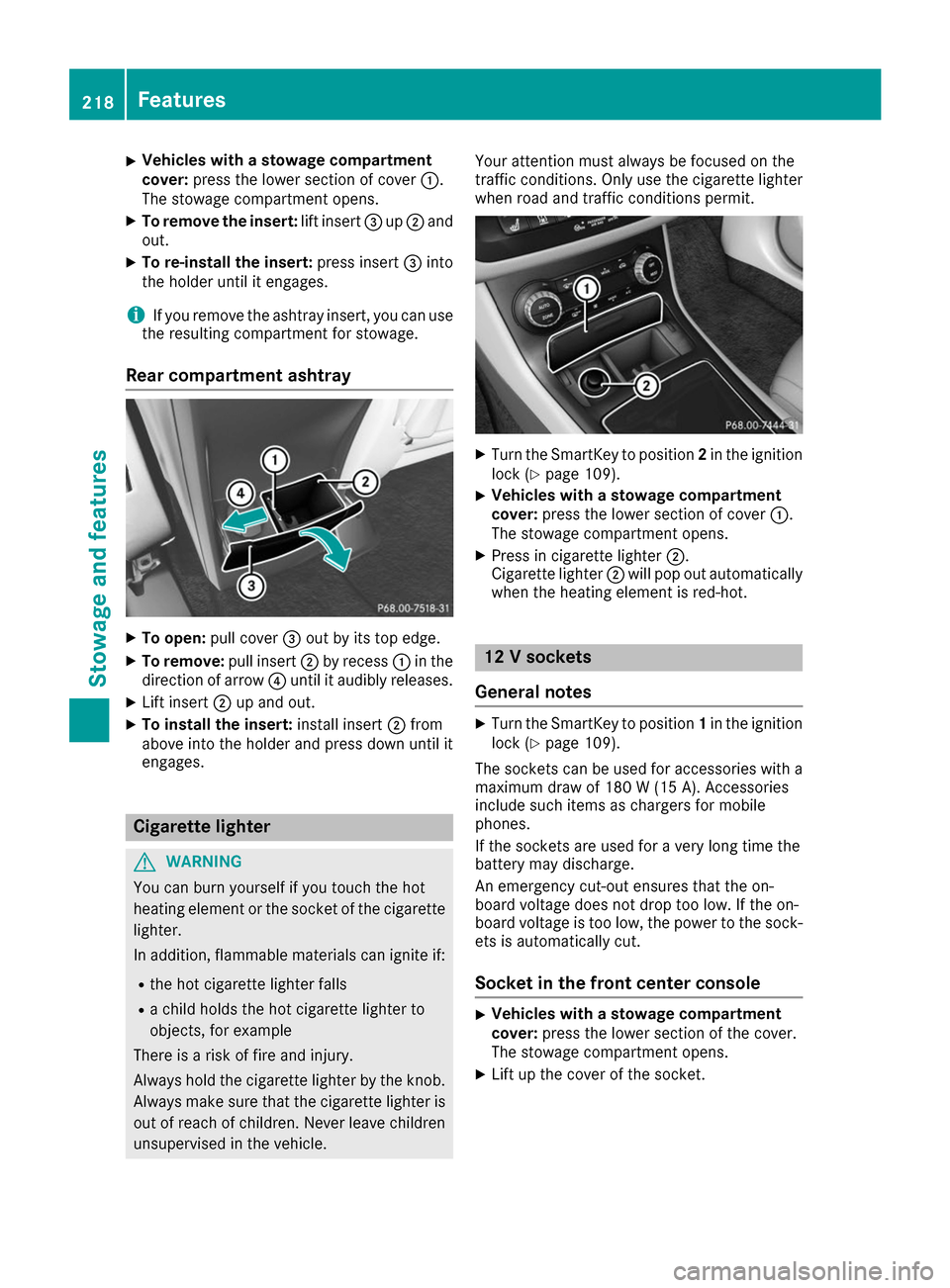
Vehicles with a stowage compartment
cover:
press the lower section of cover 0043.
The stowage compartment opens.
X To remove the insert: lift insert0087up0044 and
out.
X To re-install the insert: press insert0087into
the holder until it engages.
i If you remove the ashtray insert, you can use
the resulting compartment for stowage.
Rear compartment ashtray X
To open: pull cover 0087out by its top edge.
X To remove: pull insert0044by recess 0043in the
direction of arrow 0085until it audibly releases.
X Lift insert 0044up and out.
X To install the insert: install insert0044from
above into the holder and press down until it
engages. Cigarette lighter
G
WARNING
You can burn yourself if you touch the hot
heating element or the socket of the cigarette lighter.
In addition, flammable materials can ignite if:
R the hot cigarette lighter falls
R a child holds the hot cigarette lighter to
objects, for example
There is a risk of fire and injury.
Always hold the cigarette lighter by the knob.
Always make sure that the cigarette lighter is
out of reach of children. Never leave children unsupervised in the vehicle. Your attention must always be focused on the
traffic conditions. Only use the cigarette lighter when road and traffic conditions permit. X
Turn the SmartKey to position 2in the ignition
lock (Y page 109).
X Vehicles with a stowage compartment
cover: press the lower section of cover 0043.
The stowage compartment opens.
X Press in cigarette lighter 0044.
Cigarette lighter 0044will pop out automatically
when the heating element is red-hot. 12 V sockets
General notes X
Turn the SmartKey to position 1in the ignition
lock (Y page 109).
The sockets can be used for accessories with a maximum draw of 180 W (15 A). Accessories
include such items as chargers for mobile
phones.
If the sockets are used for a very long time the
battery may discharge.
An emergency cut-out ensures that the on-
board voltage does not drop too low. If the on-
board voltage is too low, the power to the sock-
ets is automatically cut.
Socket in the front center console X
Vehicles with a stowage compartment
cover:
press the lower section of the cover.
The stowage compartment opens.
X Lift up the cover of the socket. 218
FeaturesStowage and features
Page 249 of 290

R
It is particularly important to observe the
described order when connecting and dis-
connecting the jumper cables.
R Never connect or disconnect the battery
terminals while the engine is running. G
WARNING
Battery acid is caustic. There is a risk of injury. Avoid contact with skin, eyes or clothing. Do
not inhale any battery gases. Do not lean over
the battery. Keep children away from batter-
ies. Wash away battery acid immediately with
plenty of clean water and seek medical atten- tion. H
Environmental note Batteries contain dangerous
substances. It is against the
law to dispose of them with
the household rubbish. They
must be collected separately
and recycled to protect the
environment. Dispose of batteries in an
environmentally friendly
manner. Take discharged
batteries to a qualified spe-
cialist workshop or a special
collection point for used bat-
teries.
! Have the battery checked regularly at a
qualified specialist workshop.
Observe the service intervals in the Mainte-
nance Booklet or contact a qualified specialist workshop for more information.
Comply with safety precautions and take pro-
tective measures when handling batteries. Risk of explosion.
Fire, open flames and smoking are
prohibited when handling the bat-
tery. Avoid creating sparks. Battery acid is caustic. Avoid contact
with skin, eyes or clothing.
Wear suitable protective clothing,
especially gloves, apron and face-
guard.
Rinse any acid spills immediately
with clear water. Contact a physician if necessary. Wear eye protection.
Keep children away.
Observe this Operator's Manual.
For safety reasons, Mercedes-Benz recom-
mends that you only use batteries which have
been tested and approved for your vehicle by
Mercedes-Benz. These batteries provide
increased impact protection to prevent vehicle
occupants from suffering acid burns should the battery be damaged in the event of an accident.
In order for the battery to achieve the maximum possible service life, it must always be suffi-
ciently charged.
Like other batteries, the vehicle battery may
discharge over time if you do not use the vehicle.In this case, have the battery disconnected at a
qualified specialist workshop. You can also
charge the battery with a charger recommended by Mercedes-Benz. Contact a qualified special-
ist workshop for further information.
Have the battery condition of charge checked
more frequently if you use the vehicle mainly for
short trips or if you leave it standing idle for a
lengthy period. Consult a qualified specialist
workshop if you wish to leave your vehicle
parked for a long period of time.
Only replace a battery with a battery that has
been recommended by Mercedes-Benz.
Remove the SmartKey if you park the vehicle
and do not require any electrical consumers.
The vehicle will then use very little energy, thus conserving battery power.
After an interruption to the power supply, such
as due to a discharged battery, you must reset
the clock via the multimedia system. You can Batteries
247Breakdown assistance Z