2017 MERCEDES-BENZ AMG GT S tow
[x] Cancel search: towPage 131 of 290

Change into a lower gearingood time on long
and steep downhillgradients. This isespecially
impo rtant ifthe veh icle isladen. By doing so, you
will make use of the braking effect of the engine.
This relieves the load on the brake system and
prevents the brakes from overheating and wear-
ing too quickly.
If DI ST RONIC PLUS detects that there isa risk of
a co llisio n, you will be warned visually and
acoustically. DI STRONIC PLUS cannot prevent a
co llisio nwit hout your intervention. An intermit-
tent warning tone willthen sound and the dis-
tance warning lamp willlight up inthe instru-
ment cluster. Brake immediately inorder to
increase the distance to the veh icle infront or
take evasive action pro videdit is safe to doso.
DI ST RONIC PLUS operates inrange between
0 mph (0 km/h) and 120 mph (200 km/h).
Do not use DI STRONIC PLUS while driving on
roads with steep gradients.
As DI STRONIC PLUS transmits radar waves, it
can resemble the radar detectors of the respon-
sible authorities. You can refer to the relevant
chapter inthe Operator's Manual ifquestions
are asked about this.
iUSA only: This device has been approved by
the FCC as a "Vehicular Radar System". The
radar sensor isintended for use inan auto-
motive radar system only. Removal, tamper-
in
g, or altering of the device willvoid any war-
ranties, and isnot permitted bythe FCC. Do
not tamper with, alter, or use inany non-
approved way.
Any unauthorized mod ification to th isdevice
could void the user's authority to operate the
equipm ent.
iCanada only: This device co mplieswit h
RSS -210 of Industry Canada. Operation is
subject to the foll owing two conditions:
1. This device may not cause harmful inter-
ference, and
2. This device must accept any interference
receive d,inc ludin g interference that may
cause undesired operation of the device.
Removal, tampering, or altering of the device
will void any warranties, and isnot permitte d.
Do not tamper with, alter, or use inany non-
approved way.
Any unauthorized mod ification to th isdevice
could void the user's authority to operate the
equipm ent.
Important safety notes
GWARNING
DISTRONIC PLUS does not react to:
Rpeople or animals
Rstationary obstacles on the road, e.g. stop- ped or parked vehicles
Roncoming and crossing traffic
As a result, DI STRONIC PLUS may neither give
warnings nor intervene insuch situations.
There is a risk of an accident.
Alwa ys pay careful attention to the traff icsit-
uation and be ready to brake.
GWARNING
DISTRONIC PLUS cannot always clearly iden-
tify other road users and co mplex traffic sit-
uations.
In such cases, DI STRONIC PLUS may:
Rgive an unnecessary warning and then
brake the vehicle
Rneither givea warning nor intervene
Raccelerate or brake unexpect edly
There isa risk of an accident.
Continue to drive carefully and be ready to
brake, in particular when warned to do so by
DISTRONIC PLU S.
GWARNING
DISTRONIC PLUS brakes your vehicle with up to 50 %of the maximum possible deceleration.
If this braking force is insufficient, DISTRONIC
PLUS warns you visually and audibly. There is a risk of an accident.
In such cases, apply the brakes yourself and
try to take evasive action.
!If DISTRONIC PLUS or the HOLD function is
activated, the vehicle brakes automatically in
certain situations.
To prevent damage to the vehicle, deactivate
DISTRONIC PLUS and the HOLD function in
the following or other similar situations:
Rwhen towing the vehicle
Rin the car wash
Driving systems129
Driving and parking
Z
Page 133 of 290

Activating
XBrieflypull th ecruise control leve rtowards
you ;,up: or down =.
DISTRONI CPLU Sis selected.
XTo adjust th eset speed in 1mp hincre-
ments (1 km/h increments): briefly press
th ecruise control leve rup : to th epressur e
poin tfor ahigher speed, or down =for a
lower speed.
Every tim eth ecruise control leve ris presse d
up or down ,th elast spee dstore dis increased
or reduced.
or
XTo adjust th eset speed in 5mp hincre-
ments (10 km/h increments): briefly press
the cruise control lever up :past the pres-
sure point for a higher speed, or down =for
a lower speed.
Every time the cruise control lever is pressed
up or down, the last speed stored is increased
or reduced.
XRemove your foot from the accelerator pedal.
Your vehicle adapts its speed to that of the
vehicle in front, but only up to the desired
stored speed.
iIf you do not fully release the accelerator
pedal, the DISTRONIC PLUS Passivemes-
sage appears in the multifunction display. The
set distance to a slower-moving vehicle in
front will then not be maintained. You will be
driving at the speed you determine by the
position of the accelerator pedal.
You can also activate DISTRONIC PLUS when
stationary. The lowest speed that can be set is
20 mph (30 km/ h).
XBriefly pull the cruise control lever towards
you ;or press it up :or down =.
DISTRONIC PLUS is selected.
Activating at the current speed/last
stored speed
GWARNING
If you call up the stored speed and it differs
from the current speed, the vehicle acceler-
ates or decelerates. If you do not know the
stored speed, the vehicle could accelerate or brake unexpectedly. There is a risk of an acci-
dent.
Pay attention to the road and traffic condi-
tions before calling up the stored speed. If you
do not know the stored speed, store the
desired speed again.
XBriefly pull the cruise control lever towards
you :.
XRemove your foot from the accelerator pedal.
DISTRONIC PLUS is activated. The first time it
is activated, the current speed is stored. Oth-
erwise, it sets the vehicle cruise speed to the
previously stored value.
Driving with DISTRONIC PLUS
Pulling away and driving
Driving systems131
Driving and parking
Z
Page 134 of 290

XIf you want to pull away with DISTRONIC
PLUS:remove your foot from the brake pedal.
XBriefly pull the cruise control lever towards
you:.
or
XAccelerate briefly.
Your vehicle pulls away and adapts its speed
to that of the vehicle in front. If no vehicle is
detected in front, your vehicle accelerates to the set speed.
iThe vehicle can also pull away when it is
facing an unidentified obstacle or is driving on
a different line from another vehicle. The vehi-
cle then brakes automatically. There is a risk
of an accident. Be ready to brake at all times.
If there is no vehicle in front, DISTRONIC PLUS
operates in the same way as cruise control.
If DISTRONIC PLUS detects that the vehicle in
front has slowed down, it brakes your vehicle. In
this way, the distance you have selected is main-
tained.
If DISTRONIC PLUS detects a faster-moving
vehicle in front, it increases the driving speed.
However, the vehicle is only accelerated up to
the speed you have stored.
Selecting the drive program
DISTRONIC PLUS supports a sporty driving style
when you have selected the Sor S+ drive pro-
gram (see the vehicle Operator's Manual).
Acceleration behind the vehicle in front or to the set speed is then noticeably more dynamic.
When you select the Cdrive program, th e v
ehi-
cle accelerates more gently. This setting is rec-
ommended in stop-and-start traffic.
Changing lanes
If you change to the passing lane, DISTRONIC
PLUS supports you when:
Ryou are driving faster than 45 mph (70 km/h)
Ryou switch on th eappropriat etur nsignal
RDISTRONI CPLU Sdoes no tdetec t adanger of
collision
If these condition sare fulfilled ,your vehicl eis
accelerated. Acceleration will be interrupted if
changin glanes takes to olon gor if th edistanc e
between your vehicl eand th evehicl ein fron t
become sto osmall.
iWhe nyou chang elanes, DISTRONI CPLU S
monitors th elef tlan eon left-hand-drive vehi- cle
sor th eright lan eon right-hand-driv evehi-
cles.
Stopping
GWARNIN G
Whe nleavin gth evehicle, eve nif it is braked
only by DISTRONI CPLUS, it could rol laway if:
Rthere is amalfunction in th esystem or in
th evoltag esupply.
RDISTRONI CPLU Shas been deactivated
wit hth ecruise control lever, e.g. by avehi-
cle occupant or from outside th evehicle.
Rth eelectrica lsystem in th eengin ecom-
partment, th ebattery or th efuses hav e
been tampered with.
Rth ebattery is disconnected.
Rth eaccelerato rpedal has been depressed,
e.g. by avehicl eoccupant .
There is aris kof an accident.
If you wish to exit th evehicle, always tur noff
DISTRONI CPLU Sand secure th evehicl e
against rollin gaway.
Fo rfurther information on deactivatin g
DISTRONI CPLU S (
Ypage 133).
If DISTRONI CPLU Sdetects that th evehicl ein
fron tis stopping ,it brakes your vehicl euntil it is
stationary.
Once your vehicl eis stationary, it remain ssta-
tionary and you do no tneed to depress th e
brake.
iAfte r atime, th eelectric parkin gbrak e
secures th evehicl eand relieves th eservic e
brake.
iDependin gon th especified minimum dis-
tance ,your vehicl ewill come to astandstill at
a sufficien tdistanc ebehi nd th
eve
hicl ein
front. The specified minimum distanc eis set
usin gth econtrol on th ecruise control lever.
The electric parkin gbrak esecures th evehicl e
automatically if DISTRONI CPLU Sis activated
when th evehicl eis stationary and :
Rthedriver's seat belt is no tfastene dand th e
driver's doo ris open .
Rtheengin eis switched off ,unless it is auto-
matically switched off by th eECO start/sto p
function .
132Driving systems
Driving and parking
Page 136 of 290

DISTRONIC PLUS is automatically deactivated
if:
Ryou engage the electric parking brake or if thevehicle is automatically secured with the elec-
tric parking brake
RESP®intervenes or you deactivate ESP®
Rthe transmission is in the P,R or Nposition
Ryou pull the cruise control lever towards you
in order to pull away and the front-passenger
door or one of the rear doors is open
Rthe vehicle has skidded
Ryou activate Active Parking Assist
If DISTRONIC PLUS is deactivated, you will hear
a warning tone. You will see the DISTRONIC
PLUS Offmessage in the multifunction display
for approximately five seconds.
Displays in the instrument cluster
Displays in the speedometer
If DISTRONIC PLUS detects a vehicle in front,
segments between the speed of the vehicle in
front :and stored speed ;light up.
iFor design reasons, the speed displayed in
the speedometer may differ slightly from the
speed set for DISTRONIC PLUS.
Display when DISTRONIC PLUS is deacti-
vated
On the on-board computer, you can select the
assistance graphics display.
:Vehicle in front, if detected
;Distance indicator, current distance to the
vehicle in front
=Specified minimum distance to the vehicle
in front; adjustable
?Own vehicle
XSelect the Assistance Graphicfunction
using the on-board computer (Ypage 159).
Display when DISTRONIC PLUS is activa-
ted
:DISTRONIC PLUS active (text only appears
when the cruise control lever is actuated)
;Vehicle in front, if detected
=Specified minimum distance to the vehicle
in front; adjustable
?Own vehicle
XSelect the Assistance Graphicfunction
using the on-board computer (Ypage 159).
You will see the stored speed for about five sec-
onds when you activate DISTRONIC PLUS.
134Driving system s
Driving an d parking
Page 138 of 290
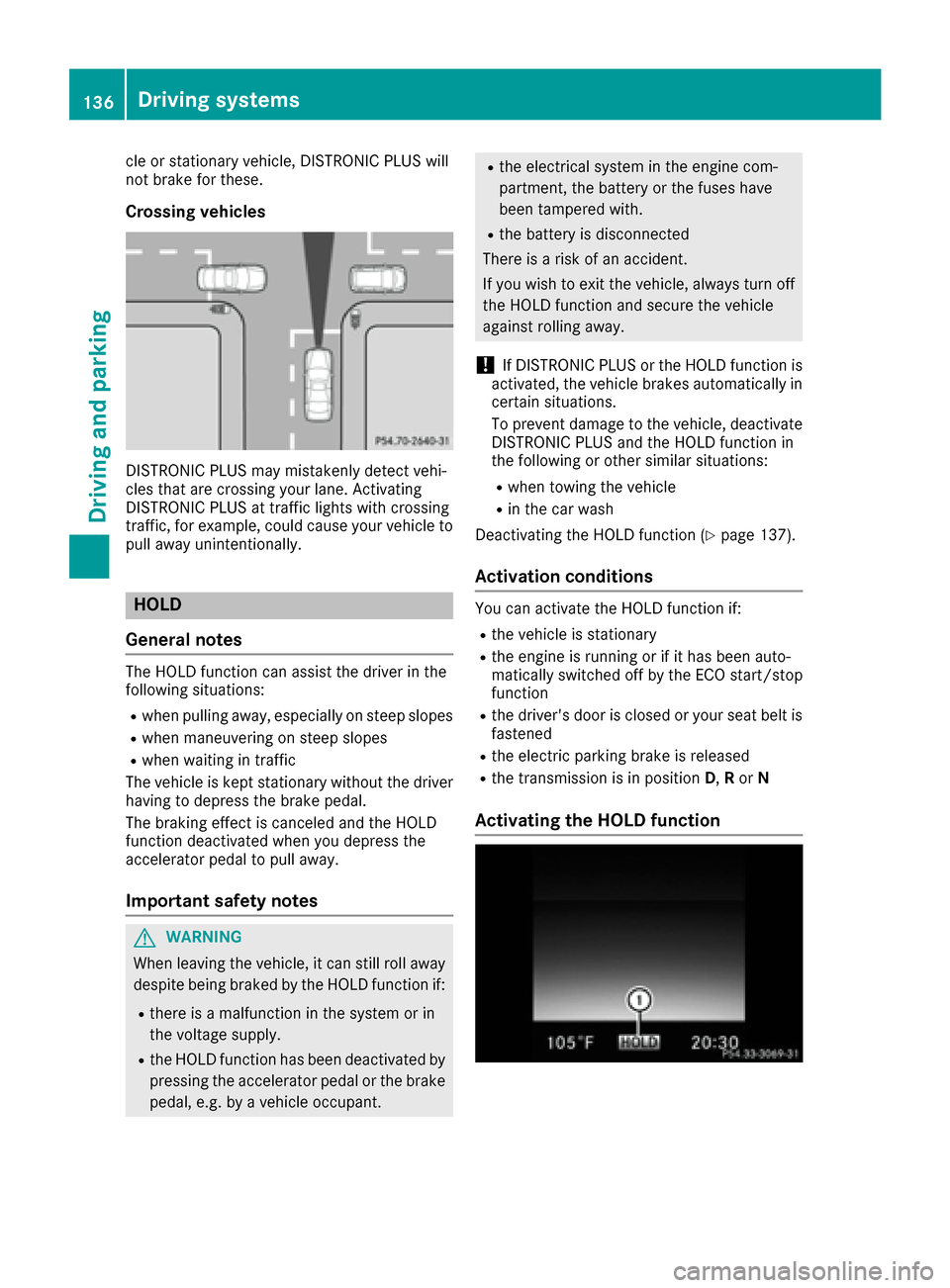
cle or stationary vehicle, DISTRONIC PLUS will
not brake for these.
Crossing vehicles
DISTRONIC PLUS may mistakenly detect vehi-
cles that are crossing your lane. Activating
DISTRONIC PLUS at traffic lights with crossing
traffic, for example, could cause your vehicle to
pull away unintentionally.
HOLD
General notes
The HOLD function can assist the driver in the
following situations:
Rwhen pulling away, especially on steep slopes
Rwhen maneuvering on steep slopes
Rwhen waiting in traffic
The vehicle is kept stationary without the driver having to depress the brake pedal.
The braking effect is canceled and the HOLD
function deactivated when you depress the
accelerator pedal to pull away.
Important safety notes
GWARNING
When leaving the vehicle, it can still roll away despite being braked by the HOLD function if:
Rthere is a malfunction in the system or in
the voltage supply.
Rthe HOLD function has been deactivated by
pressing the accelerator pedal or the brake
pedal, e.g. by a vehicle occupant.
Rthe electrical system in the engine com-
partment, the battery or the fuses have
been tampered with.
Rthe battery is disconnected
There is a risk of an accident.
If you wish to exit the vehicle, always turn off
the HOLD function and secure the vehicle
against rolling away.
!If DISTRONIC PLUS or the HOLD function is
activated, the vehicle brakes automatically in
certain situations.
To prevent damage to the vehicle, deactivate
DISTRONIC PLUS and the HOLD function in
the following or other similar situations:
Rwhen towing the vehicle
Rin the car wash
Deactivating the HOLD function (
Ypage 137).
Activation conditions
You can activate the HOLD function if:
Rthe vehicle is stationary
Rthe engine is running or if it has been auto-
matically switched off by the ECO start/stop
function
Rthe driver's door is closed or your seat belt is
fastened
Rthe electric parking brake is released
Rthe transmission is in position D,R or N
Activating the HOLD function
136Driving systems
Driving and parking
Page 145 of 290

The field of vision and other functions of the rear
view camera may be restricted due to additionalaccessories on the rear of the vehicle (e.g.
license plate holder, bicycle rack).
The guide lines in the multimedia system display
show the distances to your vehicle. The distan-
ces only apply to road level.
Activating/deactivating the rear view
camera
XTo activate: ensure that key position 2has
been selected with the Start/Stop button.
XMake sure that the Activation by R gearfunction is selected in the multimedia system
(see the Digital Operator's Manual).
XEngage reverse gear.
The area behind the vehicle is shown with
guide lines in the multimedia system display.
The image from the rear view camera is avail-
able throughout the maneuvering process.
To deactivate: the rear view camera deacti-
vates if you shift the transmission to Por after
driving forwards a short distance.
Messages in the multimedia system dis-
play
The rear view camera may show a distorted view
of obstacles, show them incorrectly or not at all.
The rear view camera does not show objects in
the following positions:
Rvery close to the rear bumper
Runder the rear bumper
!Objects not at ground level may appear to
be further away than they actually are, e.g.:
Rthe bumper of a parked vehicle
Rthe drawbar of a trailer
Rthe ball coupling of a trailer tow hitch
Rthe rear section of an HGV
Ra slanted post
Use the guidelines only for orientation.
Approach objects no further than the bottom-
most guideline.
:Yellow guide line at a distance of approx-
imately 13 ft (4.0 m) from the rear of the
vehicle
;White guide line without turning the steering
wheel, vehicle width including the exterior
mirrors (static)
=Yellow guide line for the vehicle width
including the exterior mirrors, for current
steering wheel angle (dynamic)
?Yellow lane marking tires at current steering
wheel angle (dynamic)
AYellow guide line at a distance of approx-
imately 3 ft (1.0 m) from the rear of the vehi-
cle
BVehicle center axle (marker assistance)
CBumper
DRed guide line at a distance of approximately
12 in (0.30 m) from the rear of the vehicle
The guide lines are shown when the transmis-
sion is in position R.
The distance specifications only apply to
objects that are at ground level.
Driving systems143
Driving and parking
Z
Page 158 of 290

Change of direction without lane recom-
mendation
:Road into which the change of direction
leads
;Distance to change of direction and visual
distance display
=Change-of-direction symbol
When a change of direction is to be made, you
will see symbol =for the change of direction
and distance graphic ;. The distance indicator
shortens towards the top of the display as you
approach the point of the announced change of
direction. The change of direction starts once
the distance display reaches zero.
Change of direction with lane recommen-
dation
:Road into which the change of direction
leads
;Distance to change of direction and visual
distance display
=Change-of-direction symbol
?Lane recommendation
Other status indicators of the naviga-
tion system
:Additional information
Other possible additional information:
RNew Route...or Calculating Route...
A new route is calculated.
RRoad Not Mapped
The vehicle position is inside the area of the
digital map but the road is not recognized, e.g.
newly built streets, car parks or private land.
RNo Route
No route could be calculated to the selected
destination.
RO
You have reached the destination or an inter-
mediate destination.
Radio menu
:Frequency range
;Station frequency with memory position
=Name of artist
?Name of track
The multifunction display shows station ;with
station frequency or station name. The preset
156Menus and submenus
On-board computer and displays
Page 172 of 290

Display messagesPossible causes/consequences andMSolutions
F(USA
only)
!( Canada
only)
Parkin gBrake See
Operator' sManual
The yellow !warning lamp lights up.
The electric parking brak eis malfunctioning .
To apply :
XSwitchth eignition off .
XPress theelectric parking brak ehandle for at least te nseconds.
XShift th etransmission to position P.
XConsultaqualified specialist workshop .
The yellow!warning lamp and th ered F (USAonly) or !
(Canada only) indicator lamp ligh tup.
The electric parking brak eis malfunctioning .
To release:
XSwitc hoff th eignition and tur nit bac kon .
XReleas eth eelectric parking brak emanually.
or
XReleas eth eelectric parking brak eautomatically (Ypage 121).
If th eelectric parking brak estill canno tbe released:
XDo no tdrive on .
XConsult aqualified specialist workshop .
The redF(USAonly) or !(Canada only) indicator lamp flashes
and th eyellow !warning lamp lights up.
The electric parking brak eis malfunctioning .
To release:
XSwitc hoff th eignition and tur nit bac kon .
XReleas eth eelectric parking brak emanually.
To apply :
XSwitchoff th eignition and tur nit bac kon .
XApply th eelectric parking brak emanually.
If th ered F (USAonly) or !(Canada only) indicator lamp con-
tinue sto flash:
XDo no tdrive on .
XSecureth evehicl eagainst rollin gaway (Ypage 273).
XShift th etransmission to position P.
XTurn thefron twheels toward sth ecurb.
XConsult aqualified specialist workshop .
170Display messages
On-board computer and displays