2017 MAZDA MX5 MIATA air condition
[x] Cancel search: air conditionPage 310 of 568

5 –88 Interior Features
Bluetooth ®
Close the windows and/or the
convertible top to reduce loud noises
from outside the vehicle, or turn down
the airflow of the air-conditioning
system while Bluetooth ®
Hands-Free is
being used.
Make sure the vents are not directing air
up towards the microphone.
NOTE
If the voice recognition performance is not
satisfactory.
Refer to Voice Recognition Learning
Function (Speaker Enrollment) (Type A)
on page 5-89 .
Refer to Troubleshooting on page 5-129 .
Security Setting (Type A)If a passcode is set, the system cannot be
activated unless the passcode is input.
NOTE
Do this function only when parked. It is
too distracting to attempt while driving
and you may make too many errors to be
effective.
Passcode setting
1. Press the pick-up button or talk button
with a short press.
2. Say: [Beep] “Setup”
3. Prompt: “Select one of the following:
Pairing options, confirmation prompts,
language, passcode, select phone or
select music player.”
4. Say: [Beep] “Passcode”
5. Prompt: “Passcode is disabled. Would
you like to enable it?”
6. Say: [Beep] “Yes”
7. Prompt: “Please say a 4-digit
passcode. Remember this passcode. It
will be required to use this system.” 8. Say: [Beep] “XXXX” (Say a desired
4-digit passcode, “PCode”.)
9. Prompt: “Passcode XXXX (Passcode,
PCode). Is this correct?”
10. Say: [Beep] “Yes”
11. Prompt: “Passcode is enabled.”
Using Bluetooth ®
Hands-Free with a
passcode
1. Press the pick-up button or talk button
with a short press.
2. Prompt: “Hands-Free system is
locked. State the passcode to continue.”
3. Say: [Beep] “XXXX” (Say the set
passcode “PCode”.)
4. If the correct passcode is input, voice
guidance “XXXXXX... (Ex. “Mary's
device”) (Device tag) is connected” is
announced.
If the passcode is incorrect, voice
guidance “XXXX (4-digit passcode,
Pcode) incorrect passcode, please try
again” is announced.
Canceling the passcode
NOTE
Do this function only when parked. It is
too distracting to attempt while driving
and you may make too many errors to be
effective.
1. Press the pick-up button or talk button
with a short press.
2. Say: [Beep] “Setup”
3. Prompt: “Select one of the following:
Pairing options, confirmation prompts,
language, passcode, select phone or
select music player.”
4. Say: [Beep] “Passcode”
5. Prompt: “Passcode is enabled. Would
you like to disable it?”
6. Say: [Beep] “Yes”
7. Prompt: “Passcode is disabled.”
MX-5_8FR4-EA-16J_Edition1.indb 88 2016/08/11 20:29:24
Page 313 of 568
![MAZDA MX5 MIATA 2017 Owners Manual 5 –91 Interior Features
Bluetooth ®
Voice recognition learning on/off
1. Press the pick-up button or talk button
with a short press.
2. Say: [Beep] “Voice training”
3. Prompt: “Enrol](/manual-img/28/59019/w960_59019-312.png "MAZDA MX5 MIATA 2017 Owners Manual 5 –91 Interior Features
Bluetooth ®
Voice recognition learning on/off
1. Press the pick-up button or talk button
with a short press.
2. Say: [Beep] “Voice training”
3. Prompt: “Enrol")
5 –91 Interior Features
Bluetooth ®
Voice recognition learning on/off
1. Press the pick-up button or talk button
with a short press.
2. Say: [Beep] “Voice training”
3. Prompt: “Enrollment is enabled/
disabled. Would you like to disable/
enable or retrain?”
4. Say: [Beep] “Disable” or “Enable”
5. When “Disable” is spoken, the voice
recognition learning is turned off.
When “Enable” is spoken, the voice
recognition learning is turned on.
6. Prompt: “Speaker Enrollment is
disabled/enabled.”
Bluetooth ®
Preparation (Type B)Device pairing
To use Bluetooth ®
audio and Hands-Free,
the device equipped with Bluetooth ®
has
to be paired to the unit using the following
procedure. A maximum of seven devices
including Bluetooth ®
audio devices and
hands-free mobile phones can be paired. NOTE
The Bluetooth ®
system may not operate
for 1 or 2 minutes after the ignition
is switched to ACC or ON. However,
this does not indicate a problem. If the
Bluetooth ®
system does not connect
automatically after 1 or 2 minutes have
elapsed, make sure that the Bluetooth ®
setting on the device is normal and
attempt to reconnect the Bluetooth ®
-
enabled device from the vehicle side.
If Bluetooth ®
-enabled devices are used
in the following locations or conditions,
connection via Bluetooth ®
may not be
possible.
The device is in a location hidden
from the center display such as
behind or under a seat, or inside the
glove compartment.
The device contacts or is covered by
a metal object or body.
The device is set to power-saving
mode.
Pairing Procedure
1. Select the icon on the home screen
to display the Settings screen.
2. Select the tab.
3. Select .
4. Turn the Bluetooth ®
setting on.
5. Select to display the
message and switch to the device
operation.
6. Using your device, perform a search
for the Bluetooth ®
device (Peripheral
device).
7. Select “Mazda” from the device list
searched by the device.
MX-5_8FR4-EA-16J_Edition1.indb 91 2016/08/11 20:29:25
Page 314 of 568

5 –92 Interior Features
Bluetooth ®
8. (Device with Bluetooth ®
version 2.0)
Input the displayed 4-digit pairing code
into the device.
(Device with Bluetooth ®
version 2.1
or higher)
Make sure the displayed 6-digit code
on the audio is also displayed on the
device, and touch the
.
Connection permission and phonebook
access permission for your mobile
device may be required depending on
the mobile device.
9. If pairing is successful, the functions of
the device connected to Bluetooth ®
are
displayed.
10. (Devices compatible with Mazda
Email / SMS function)
SMS (Short Message Service)
messages, and E-mail for the device are
downloaded automatically. A download
permission operation for your device
may be required depending on the
device.
NOTE
When Call history and messages are
downloaded automatically, each automatic
download setting must be on.
Refer to Communication Settings on page
5-112 .
After a device is registered, the system
automatically identifies the device. By
activating Bluetooth ®
Hands-Free again, or
by activating Bluetooth ®
Hands-Free first
after switching the ignition from OFF to
ACC, the device connection condition is
indicated in the center display. IMPORTANT note about pairing and
automatic reconnection:
If pairing is redone on the same
mobile phone device, first clear
“Mazda” displayed on the Bluetooth ®
setting screen of the mobile device.
When the OS of the device is updated,
the pairing information may be deleted.
If this happens, reprogram the pairing
information to the Bluetooth ®
unit.
Before you pair your device, make sure
that Bluetooth ®
is “ON”, both on your
phone and on the vehicle.
Device selection
If several devices have been paired, the
Bluetooth ®
unit links the device last
paired. If you would like to link a different
paired device, it is necessary to change the
link. The order of device priority after the
link has been changed is maintained even
when the ignition is switched off.
Connecting other devices
1. Select the icon on the home screen
to display the Settings screen.
2. Select the tab.
3. Select .
4. Turn the Bluetooth ®
setting on.
5. Select the name of the device you
would like to connect.
6. selection
Connects both devices as hands-free
and Bluetooth ®
audio.
selection
Connects as a hands-free device.
selection
Connects as Bluetooth ®
audio.
MX-5_8FR4-EA-16J_Edition1.indb 92 2016/08/11 20:29:25
Page 316 of 568

5 –94 Interior Features
Bluetooth ®
Voice Recognition (Type B)In this section, the basic operation of the
voice recognition is explained.
Activating Voice Recognition
Press the talk button.
Ending Voice Recognition
Use one of the following methods:
Press the hang-up button.
Say, “Cancel”.
Operate the commander switch or the
center display (only when vehicle is
stopped).
Skipping Voice Guidance (for faster
operation)
Press and release the talk button.
Troubleshooting for Voice Recognition
If you do not understand an operation
method while in the voice recognition
mode, say “Tutorial” or “Help”.
Commands useable anytime during
voice recognition
“Go Back” and “Cancel” are commands
which can be used at anytime during voice
recognition.
Returning to previous operation
To return to the previous operation, say,
“Go Back” while in voice recognition
mode.
Cancel
To put the Bluetooth ®
Hands-Free system
in standby mode, say, “Cancel” while in
voice recognition mode. To prevent a deterioration in the voice
recognition rate and voice quality, the
following points should be observed:
The voice recognition cannot be
performed while voice guidance or
the beep sound is operating. Wait
until the voice guidance or the beep
sound is finished before saying your
commands.
Phone related commands are available
only when your phone is connected via
Bluetooth ®
. Make sure your phone is
connected via Bluetooth ®
before you
operate phone related voice commands.
Music play commands, such as Play
Artist and Play Album can be used only
in USB audio mode.
Do not speak too slowly or loudly (no
loud voice).
Speak clearly, without pausing between
words or numbers.
Dialects or different wording other
than hands-free prompts cannot be
recognized by voice recognition. Speak
in the wording specified by the voice
commands.
It is not necessary to face the
microphone or approach it. Speak the
voice commands while maintaining a
safe driving position.
Close the windows and/or the
convertible top to reduce loud noises
from outside the vehicle, or turn down
the airflow of the air-conditioning
system while Bluetooth ®
Hands-Free is
being used.
Make sure the vents are not directing air
up towards the microphone.
NOTE
If the voice recognition performance is not
satisfactory.
Refer to Troubleshooting on page 5-129 .
MX-5_8FR4-EA-16J_Edition1.indb 94 2016/08/11 20:29:26
Page 352 of 568
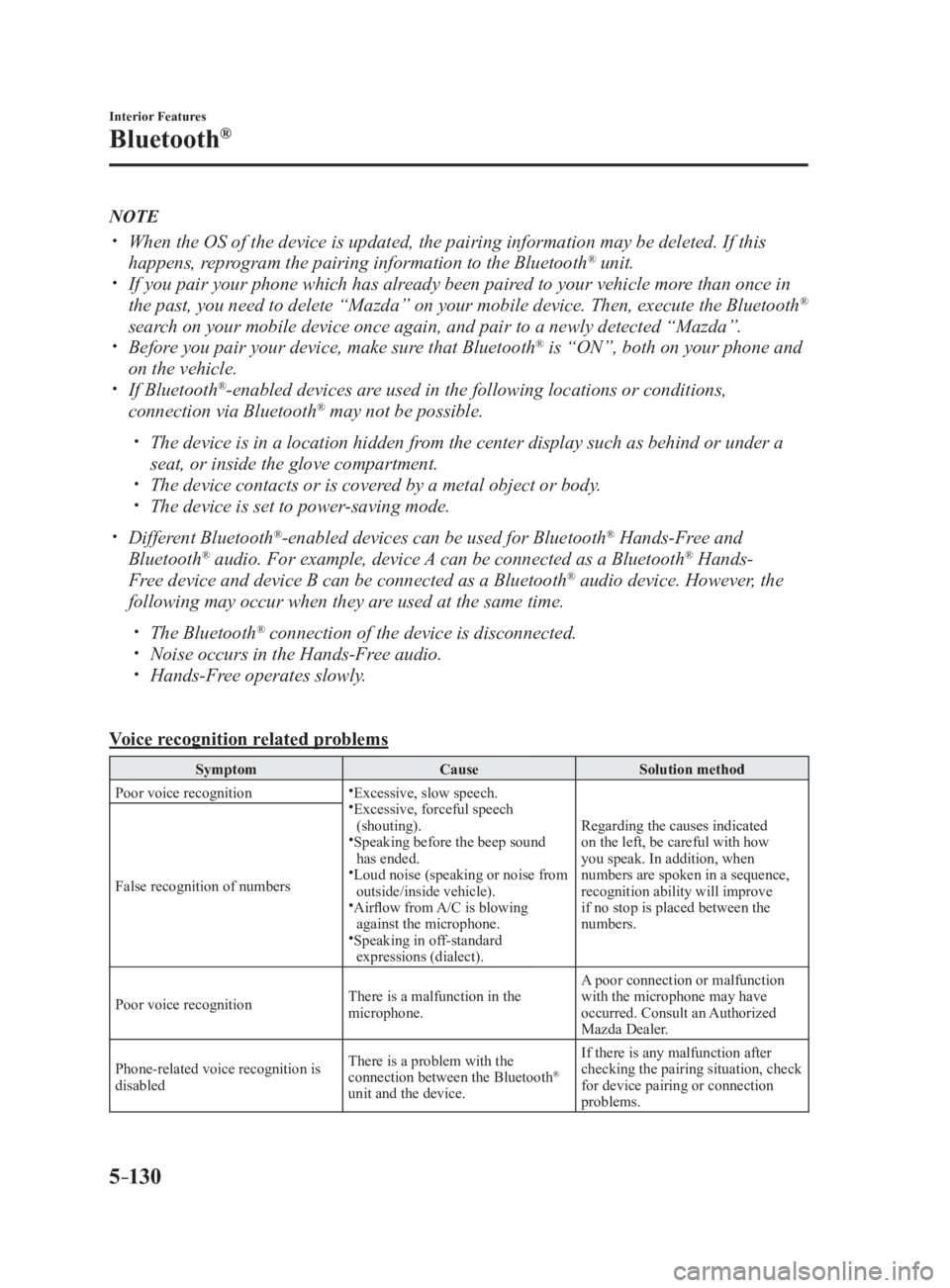
5 –130 Interior Features
Bluetooth ®
NOTE
When the OS of the device is updated, the pairing information may be deleted. If this
happens, reprogram the pairing information to the Bluetooth ®
unit.
If you pair your phone which has already been paired to your vehicle more than once in
the past, you need to delete “Mazda” on your mobile device. Then, execute the Bluetooth ®
search on your mobile device once again, and pair to a newly detected “Mazda”.
Before you pair your device, make sure that Bluetooth ®
is “ON”, both on your phone and
on the vehicle.
If Bluetooth ®
-enabled devices are used in the following locations or conditions,
connection via Bluetooth ®
may not be possible.
The device is in a location hidden from the center display such as behind or under a
seat, or inside the glove compartment.
The device contacts or is covered by a metal object or body.
The device is set to power-saving mode.
Different Bluetooth ®
-enabled devices can be used for Bluetooth ®
Hands-Free and
Bluetooth ®
audio. For example, device A can be connected as a Bluetooth ®
Hands-
Free device and device B can be connected as a Bluetooth ®
audio device. However, the
following may occur when they are used at the same time.
The Bluetooth ®
connection of the device is disconnected.
Noise occurs in the Hands-Free audio.
Hands-Free operates slowly.
Voice recognition related problems Symptom Cause Solution method
Poor voice recognition
Excessive, slow speech.
Excessive, forceful speech
(shouting).
Speaking before the beep sound
has ended.
Loud noise (speaking or noise from
outside/inside vehicle).
Airflow from A/C is blowing
against the microphone.
Speaking in off-standard
expressions (dialect). Regarding the causes indicated
on the left, be careful with how
you speak. In addition, when
numbers are spoken in a sequence,
recognition ability will improve
if no stop is placed between the
numbers.False recognition of numbers
Poor voice recognition There is a malfunction in the
microphone. A poor connection or malfunction
with the microphone may have
occurred. Consult an Authorized
Mazda Dealer.
Phone-related voice recognition is
disabled There is a problem with the
connection between the Bluetooth ®
unit and the device. If there is any malfunction after
checking the pairing situation, check
for device pairing or connection
problems.
MX-5_8FR4-EA-16J_Edition1.indb 130 2016/08/11 20:29:34
Page 371 of 568

6 –9 Maintenance and Care
Scheduled Maintenance Schedule 2U.S.A. and Puerto Rico residents - Severe driving conditions maintenance interval Maintenance Interval Number of months or kilometers (miles), whichever comes first.
Months 6 12 18 24 30 36 42 48 54 60 66 72
×1000 km 8 16 24 32 40 48 56 64 72 80 88 96
×1000 miles 5 10 15 20 25 30 35 40 45 50 55 60
ENGINE
Drive belts I I
Engine oil & filter Flexible *1
Replace when wrench indicator light is ON. (Max interval: 12
months/16,000 km (10,000 miles))
Fixed R R R R R R R R R R R R
COOLING SYSTEM
Engine coolant *2
Replace at first 192,000 km (120,000 miles) or 10 years; after
that, every 96,000 km (60,000 miles) or 5 years.
Engine coolant level I I I I I I I I I I I I
FUEL SYSTEM
Air filter *3
Replace when any equivalent timing of replacing engine oil.
(Max interval: 36 months or 60,000 km (37,500 miles))
Fuel lines and hoses *4
I I I
Hoses and tubes for emission *4
I
IGNITION SYSTEM
Spark plugs Replace every 120,000 km (75,000 miles).
ELECTRICAL SYSTEM
Function of all lights I I I I I I I I I I I I
CHASSIS and BODY
Brake lines, hoses and connections I I I
Brake and clutch fluid level I I I I I I I I I I I I
Disc brakes I I I I
I I
Manual transmission oil Replace every 48,000 km (30,000 miles) or 2 years.
Tire (Rotation) *5
Rotate when any equivalent timing of replacing engine oil.
(Max interval: 8,000 km (5,000 miles))
Tire inflation pressure and tire wear *5
I I I I I I I I I I I I
Steering operation and linkages I I I
Front and rear suspension, ball joints and wheel
bearing axial play I I I
Rear differential oil *6
Driveshaft dust boots I I I
Bolts and nuts on chassis and body T T T
Exhaust system and heat shields Inspect every 72,000 km (45,000 miles) or 5 years.
MX-5_8FR4-EA-16J_Edition1.indb 9 2016/08/11 20:29:38
Page 372 of 568

6 –10 Maintenance and Care
Scheduled Maintenance Maintenance Interval Number of months or kilometers (miles), whichever comes first.
Months 6 12 18 24 30 36 42 48 54 60 66 72
×1000 km 8 16 24 32 40 48 56 64 72 80 88 96
×1000 miles 5 10 15 20 25 30 35 40 45 50 55 60
All locks and hinges L L L L L L L L L L L L
Washer fluid level I I I I I I I I I I I I
Emergency flat tire repair kit (if installed) *7
Inspect annually.
Chart symbols:
I: Inspect: Inspect and clean, repair, adjust, fill up, or replace if necessary.
R: Replace
L: Lubricate
T: Tighten
Remarks:
*1 Engine oil flexible maintenance is available for U.S.A. and Puer to Rico residents whose vehicle is operated
mainly where none of the following conditions apply.
Extended periods of idling or low-speed operation such as polic e car, taxi or driving school car
Driving in dusty conditions
If any do apply, follow fixed maintenance.
The engine oil and filter must be changed at least once a year o r within 16,000 km (10,000 miles) since last
engine oil and filter change. Reset the engine oil data whenever replacing the engine oil regardless of the
message/wrench indicator light display.
*2 Use of FL-22 is recommended when replacing engine coolant. Usin g engine coolant other than FL-22 may
cause serious damage to the engine and cooling system.
*3 If the vehicle is operated in very dusty or sandy areas, clean and if necessary, replace the air filter more often
than the recommended intervals.
*4 According to state/provincial and federal regulations, failure to perform maintenance on these items will not
void your emissions warranties. However, Mazda recommends that all maintenance services be performed at the
recommended time or mileage/kilometer period to ensure long-term reliability.
*5 The Tire Pressure Monitoring System (TPMS) initialization must be performed so that the system operates
normally (if equipped).
*6 If this component has been submerged in water, the oil should be replaced.
*7 Check the tire repair fluid expiration date every year when perf orming the periodic maintenance. Replace the
tire repair fluid bottle with new one before the expiration date .
MX-5_8FR4-EA-16J_Edition1.indb 10 2016/08/11 20:29:38
Page 393 of 568

6 –31 Maintenance and Care
Owner Maintenance
Brake/Clutch Fluid Inspecting Brake/Clutch Fluid
Level
WARNING If the brake/clutch fluid level is low, have
the brakes inspected:
A low brake/clutch fluid level is
dangerous.
A low level could indicate brake lining
wear or a brake system leak which
could cause the brakes to fail and lead
to an accident.
The brakes and clutch draw fluid from the
same reservoir.
Inspect the fluid level in the reservoir
regularly. It should be kept between the
MAX and MIN lines.
The level normally drops with
accumulated distance, a condition
associated with wear of brake and clutch
linings. If it is excessively low, have
the brake/clutch system inspected by an
Authorized Mazda Dealer. Washer Fluid Inspecting Washer Fluid Level
WARNING Use only windshield washer fluid or
plain water in the reservoir:
Using radiator antifreeze as washer
fluid is dangerous. If sprayed on the
windshield, it will dirty the windshield,
affect your visibility, and could result in
an accident.
Using Washer Fluid Without Anti-freeze
Protection in Cold Weather:
Operating your vehicle in temperatures
below 4 degrees C (40 degrees F)
using washer fluid without anti-freeze
protection is dangerous as it could
cause impaired windshield vision and
result in an accident. In cold weather,
always use washer fluid with anti-
freeze protection.
NOTE
State or local regulations may restrict the
use of volatile organic compounds (VOCs),
which are commonly used as anti-freeze
agents in washer fluid. A washer fluid with
limited VOC content should be used only
if it provides adequate freeze resistance
for all regions and climates in which the
vehicle will be operated.
MX-5_8FR4-EA-16J_Edition1.indb 31 2016/08/11 20:29:44