Page 438 of 578
6–52
Maintenance and Care
Owner Maintenance
Brake lights, Taillights, High-mount
brake light, Side-turn signal lights,
Rear side-marker lights (With LED
headlights)
The LED bulb cannot be replaced as a
single unit because it is an integrated unit.
The LED bulb has to be replaced with the
unit. We recommend an Authorized Mazda
Dealer when the replacement is necessary.
Rear turn signal lights, Rear side-
marker lights (With halogen headlights)
1. Make sure the ignition is switched off,
and the turn signal switch is off.
2. Lift the trunk mat. 3.
(Left side)
Pull the center of each plastic retainer
and remove the retainers and the
pocket.
(Right side)
Remove the pocket.
(Left side)
Remova l
Installation
(Right side)
Mazda6_8FH2-EA-16F_Edition2.indb 522016/07/07 13:46:18
Page 439 of 578
6–53
Maintenance and Care
Owner Maintenance
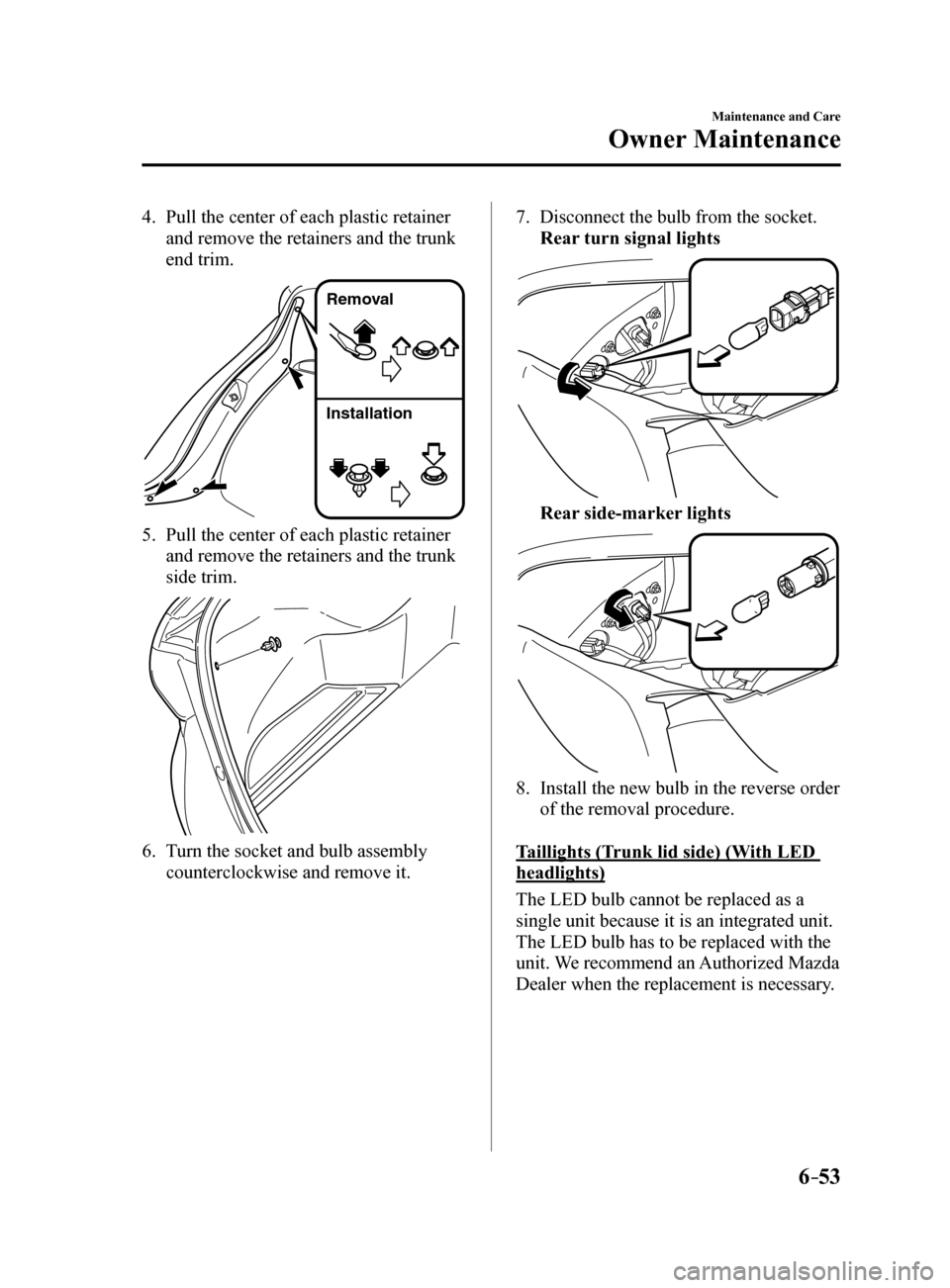
4. Pull the center of each plastic retainer
and remove the retainers and the trunk
end trim.
Remova l
Installation
5. Pull the center of each plastic retainer
and remove the retainers and the trunk
side trim.
6. Turn the socket and bulb assembly
counterclockwise and remove it.
7. Disconnect the bulb from the socket.
Rear turn signal lights
Rear side-marker lights
8. Install the new bulb in the reverse order
of the removal procedure.
Taillights (Trunk lid side) (With LED
headlights)
The LED bulb cannot be replaced as a
single unit because it is an integrated unit.
The LED bulb has to be replaced with the
unit. We recommend an Authorized Mazda
Dealer when the replacement is necessary.
Mazda6_8FH2-EA-16F_Edition2.indb 532016/07/07 13:46:19
Page 440 of 578
6–54
Maintenance and Care
Owner Maintenance
Taillights (Trunk lid side) (With halogen
headlights), Reverse lights
1. Make sure the ignition is switched off,
and the headlight switch is off.
2. Pull the center of each plastic retainer
and remove the retainers and the trunk
lid trim.
Remova l
Installation
3. (Reverse lights)
Disconnect the electrical connector
from the bulb by pressing the tab on the
connector with your finger and pulling
the connector.
4. Turn the socket and bulb assembly
counterclockwise and remove it. 5.
Disconnect the bulb from the socket.
Taillights (Trunk lid side)
Reverse lights
6. Install the new bulb in the reverse order
of the removal procedure.
Mazda6_8FH2-EA-16F_Edition2.indb 542016/07/07 13:46:20
Page 444 of 578

6–58
Maintenance and Care
Owner Maintenance
6. Reinstall the cover and make sure that
it is securely installed.
Replacing the fuses under the hood
If the headlights or other electrical
components do not work and the fuses
in the cabin are normal, inspect the fuse
block under the hood. If a fuse is blown, it
must be replaced. Follow these steps:
1. Make sure the ignition is switched off,
and other switches are off.
2. Remove the fuse block cover.
3. If any fuse but the MAIN fuse is
blown, replace it with a new one of the
same amperage rating.
Normal
Blown
WARNING
Do not replace the main fuse and
multiplex slow blow fuse by yourself.
Have an Authorized Mazda Dealer
perform the replacement:
Replacing these fuses by yourself is
dangerous because they are high
current fuses. Incorrect replacement
could cause an electrical shock or a
short circuit resulting in a fire.
4. Reinstall the cover and make sure that
it is securely installed.
Mazda6_8FH2-EA-16F_Edition2.indb 582016/07/07 13:46:21
Page 559 of 578

9–7
Specifications
Specifications
*Some models.
Light Bulbs
Exterior light
Light bulbCategory
Wattage UNECE*1 (SAE)
Headlights Halogen
High beam
60HB3 (9005)
Low beam 55H11 (H11)
LED High beam
LED
*2— (—)
Low beam LED*2— (—)
Daytime running lights With halogen
bulb headlights
60
HB3 (9005)
With LED
headlights LED
*2— (—)
Front turn signal lights/Parking lights (Front side-
marker lights) With halogen
bulb headlights
27/8
— (#7444NA)
Front turn signal lights/Front side-marker lights With LED
headlights27/8
— (#7444NA)
Fog lights
*
With halogen
bulb headlights 55
H11 (H11)
With LED
headlights LED
*2— (—)
Signature wing illumination
*LED*2— (—)
Side turn signal lights LED*2— (—)
High-mount brake light LED*2— (—)
Rear turn signal lights 21WY21W (7443NA)
Rear side-marker lights With halogen
bulb headlights
5
W5W (—)
With LED
headlights LED
*2— (—)
Brake lights/Taillights LED
*2— (—)
Taillights With halogen
bulb headlights
5
W5W (—)
With LED
headlights LED
*2— (—)
Reverse lights 21W21W (7440)
License plate lights 5W5W (—)
*1 UNECE stands for United Nations Economic Commission for Europe.
*2 LED is the abbreviation for Light Emitting Diode.
Mazda6_8FH2-EA-16F_Edition2.indb 72016/07/07 13:46:48
Page 565 of 578

9–13
Specifications
Personalization Features
ItemFeatureFactory
Setting Available
Settings Settings
Change
Method
Advanced keyless
entry system (page
3-10) Method for unlocking door using request
switch/transmitter
Once:
Driver's,
Twice: All Doors Touch Once:
All Doors/
Once: Driver's, Twice: All Doors A
E,
FTime for locking door automatically 60 seconds90 seconds/
60 seconds/
30 seconds A
—
Auto-lock function operation/non-
operational Off
On/OffA—
Beep volume when locking/unlocking MediumHigh/
Medium/ Low/Off A
E,
F
Illuminated entry
system (page
5-87) Time until interior lights turn off after
closing door
15 seconds60 seconds/
30 seconds/
15 seconds/
7.5 seconds A
—
Time until interior lights turn off
automatically when any door is not closed
completely 30 minutes60 minutes/
30 minutes/
10 minutes A
—
Auto-wiper control
(page 4-60) Operational/non-operational
OnOn/Off*4A—
Daytime running
lights (page 4-58) Operational/non-operational
OnOn/Off——
Auto headlight off*5
(page 4-53) Time until headlights turn off
30 seconds120 seconds/
90 seconds/
60 seconds/
30 seconds/ Off
*6
A —
Auto-light control
(page 4-53) Timing by which lights turn on
MediumLight/
Medium Light/ Medium/
Medium Dark/ Dark A
—
High Beam Control
System (HBC) (page
4-91) Operational/non-operational*1On
On/OffA—
Adaptive Front
Lighting System
(AFS) (page 4-90) Operational/non-operational*1On
On/OffA—
Lights-on reminder*7
(page 7-36) Warning beep volume
OffHigh/Low/Off A—
Mazda6_8FH2-EA-16F_Edition2.indb 132016/07/07 13:46:49
Page 566 of 578

9–14
Specifications
Personalization Features
ItemFeatureFactory
Setting Available
Settings Settings
Change
Method
Coming home light
(page 4-57) Time until headlights turn off
30 seconds120 seconds/
90 seconds/
60 seconds/
30 seconds/ Off A
—
Leaving home light
(page 4-57) Operational/non-operational
OnOn/OffA—
Turn signal indicator
(page 4-59) Beep volume
HighHigh/Low A—
Three-flash turn
signal (page 4-59) Operational/non-operational
OnOn/OffA—
Rear window
defogger (page
4-63) The operation time for the rear window
defogger can be changed.
15 minutes15 minutes/
Continuous
*8— —
Ambient lights
(page 5-85) Ambient lights brightness*9MediumBright/
Medium/ Dark/Off
*10
A —
System
Language Language indicated in display EnglishDepends on
market
*11A —
Temperature Temperature unit indicated in display °F or °C°F/°CA—
Distance Distance unit indicated in display mi or kmmi/kmA—
Fuel Economy Monitor (page 4-83)
Ending display Display/non-display OffOn/OffB—
Fuel economy
resetting procedure Linkage/non-linkage with fuel economy
reset and trip meter A reset
Off
On/OffB—
Mazda6_8FH2-EA-16F_Edition2.indb 142016/07/07 13:46:50
Page 567 of 578
9–15
Specifications
Personalization Features
ItemFeatureFactory
Setting Available
Settings Settings
Change
Method
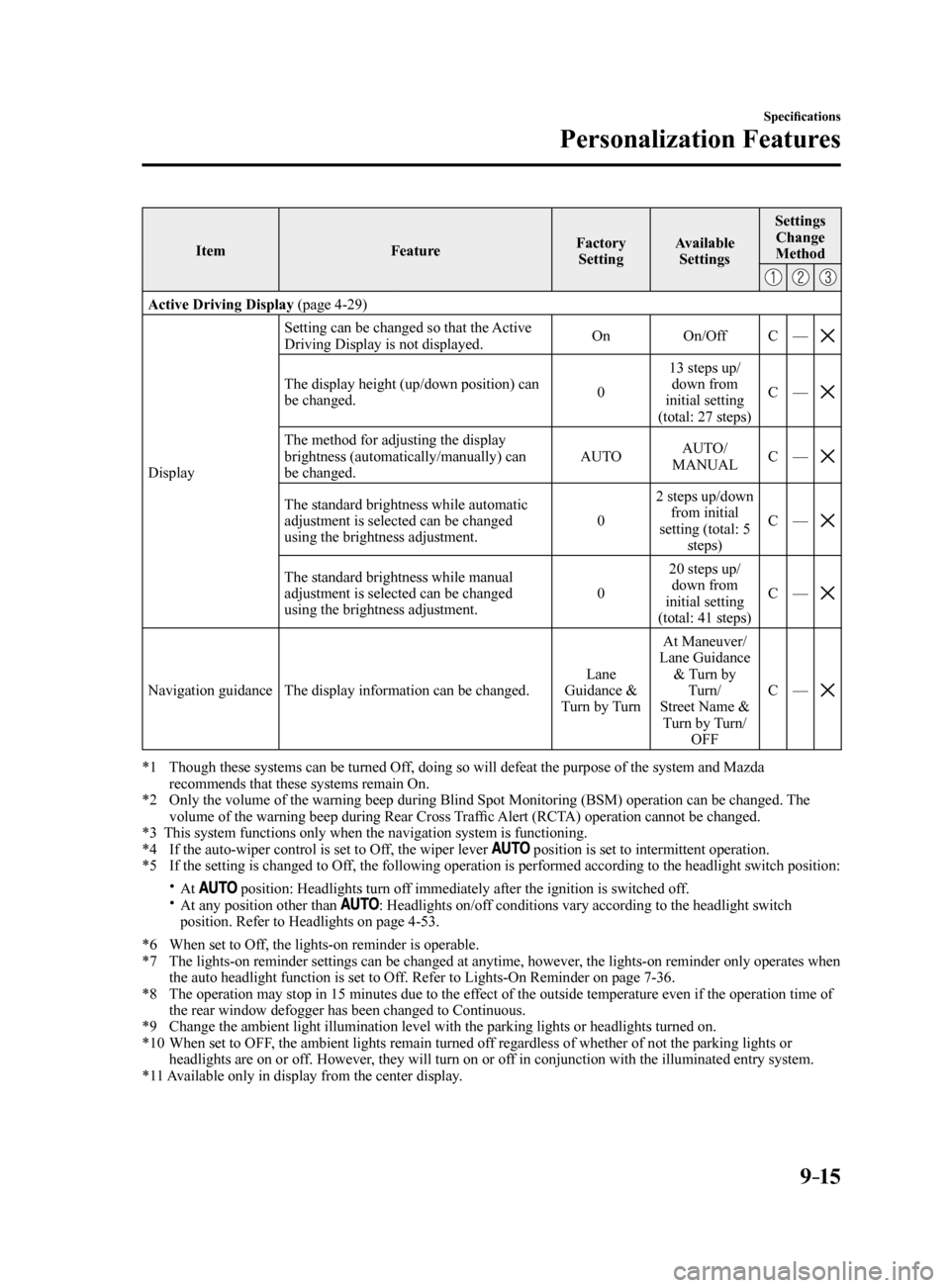
Active Driving Display (page 4-29)
Display Setting can be changed so that the Active
Driving Display is not displayed.
On
On/OffC—
The display height (up/down position) can
be changed. 013 steps up/
down from
initial setting
(total: 27 steps) C
—
The method for adjusting the display
brightness (automatically/manually) can
be changed. AUTO
AUTO/
MANUAL C
—
The standard brightness while automatic
adjustment is selected can be changed
using the brightness adjustment. 02 steps up/down
from initial
setting (total: 5 steps) C
—
The standard brightness while manual
adjustment is selected can be changed
using the brightness adjustment. 020 steps up/
down from
initial setting
(total: 41 steps) C
—
Navigation guidance The display information can be changed. Lane
Guidance &
Turn by Turn At Maneuver/
Lane Guidance & Turn by Turn/
Street Name & Turn by Turn/ OFF C
—
*1 Though these systems can be turned Off, doing so will defeat the purpose of the system and Mazda
recommends that these systems remain On.
*2 Only the volume of the warning beep during Blind Spot Monitoring (BSM) operation can be changed. The
volume of the warning beep during Rear Cross Traffic Alert (RCTA) operation cannot be changed.
*3 This system functions only when the navigation system is functioning.
*4 If the auto-wiper control is set to Off, the wiper lever
position is set to intermittent operation.
*5 If the setting is changed to Off, the following operation is performed according to the headlight switc\
h position:
At position: Headlights turn off immediately after the ignition is switched off. At any position other than : Headlights on/off conditions vary according to the headlight switch
position. Refer to Headlights on page 4-53.
*6 When set to Off, the lights-on reminder is operable.
*7 The lights-on reminder settings can be changed at anytime, however, the lights-on reminder only operates when
the auto headlight function is set to Off. Refer to Lights-On Reminder on page 7-36.
*8 The operation may stop in 15 minutes due to the effect of the outside temperature even if the operation time of
the rear window defogger has been changed to Continuous.
*9 Change the ambient light illumination level with the parking lights or h\
eadlights turned on.
*10 When set to OFF, the ambient lights remain turned off regardless of whether of not the parking lights or
headlights are on or off. However, they will turn on or off in conjunction with the illuminated entry system.
*11 Available only in display from the center display.
Mazda6_8FH2-EA-16F_Edition2.indb 152016/07/07 13:46:50