Page 279 of 532

Because your vehicle
’s engine is
electronically controlled by a computer, some
control conditions are maintained by power
from the battery. When the battery is
disconnected or a new battery is installed,
the engine must relearn its idle and fuel trim
strategy for optimum driveability and
performance. Flexible fuel vehicles (FFV)
must also relearn the ethanol content of the
fuel for optimum driveability and
performance.
To restore the settings, do the following:
1. Apply the parking brake.
2. Shift into park (P) or neutral (N).
3. Switch off all accessories.
4. Press the brake pedal and start your vehicle.
5. Run the engine until it reaches normal operating temperature. While the engine
is warming up, complete the following:
Reset the clock. See Audio System
(page 339). Reset the power windows
bounce-back feature. See Windows and
Mirrors (page 90). Reset the radio station
presets.
See Audio System (page 339). 6. Allow the engine to idle for at least one
minute.
7. Drive the vehicle at least 10 mi (16 km) to
completely relearn the idle trim and fuel
trim strategy.
Note: If you do not allow the engine to
relearn the idle and fuel trim strategy, the
idle quality of your vehicle may be adversely
affected until the engine computer
eventually relearns the idle trim and fuel trim
strategy.
Note: For flexible fuel vehicles, if you are
operating on E85, you may experience poor
starts or an inability to start the engine and
driveability problems until the fuel trim and
ethanol content have been relearned.
Make sure that you dispose of old batteries
in an environmentally friendly way. Seek
advice from your local authority about
recycling old batteries.
If storing your vehicle for more than 30 days
without recharging the battery, we
recommend that you disconnect the battery
cables to maintain battery charge for quick
starting. Battery Management System
(If Equipped)
The battery management system monitors
battery conditions and takes actions to
extend battery life. If excessive battery drain
is detected, the system temporarily disables
some electrical systems to protect the
battery.
Systems included are:
• Heated rear window.
• Heated seats.
• Climate control.
• Heated steering wheel.
• Audio unit.
• Navigation system.
A message may appear in the information
displays to alert you that battery protection
actions are active. These messages are only
for notification that an action is taking place,
and not intended to indicate an electrical
problem or that the battery requires
replacement.
276
Navigator (TB5) Canada/United States of America, enUSA, First Printing Maintenance
Page 280 of 532

After battery replacement, or in some cases
after charging the battery with an external
charger, the battery management system
requires eight hours of vehicle sleep time to
relearn the battery state of charge. During
this time your vehicle must remain fully
locked with the ignition switched off.
Note:
Prior to relearning the battery state of
charge, the battery management system
may temporarily disable some electrical
systems.
Electrical Accessory Installation
To make sure the battery management
system works correctly, do not connect an
electrical device ground connection directly
to the battery negative post. This can cause
inaccurate measurements of the battery
condition and potential incorrect system
operation.
Note: If you add electrical accessories or
components to the vehicle, it may adversely
affect battery performance and durability.
This may also affect the performance of
other electrical systems in the vehicle. CHECKING THE WIPER BLADES
Run the tip of your fingers over the edge of
the blade to check for roughness.
Clean the wiper blades with washer fluid or
water applied with a soft sponge or cloth.
CHANGING THE WIPER BLADES
Note:
Do not hold the wiper blade when
lifting the wiper arm. 1. Pull the wiper blade and arm away from
the glass.
277
Navigator (TB5) Canada/United States of America, enUSA, First Printing MaintenanceE142463 E165804
Page 281 of 532
2. Lift the wiper blade primary locking clip.
3.
Press the wiper blade secondary locking
clip.
4. Remove the wiper blade. Note:
Make sure that the wiper arm does
not spring back against the glass when the
wiper blade is not attached.
5. Install in the reverse order.
Note: Make sure that the wiper blade locks
into place.
ADJUSTING THE HEADLAMPS
Vertical Aim Adjustment
The headlamps on your vehicle are properly
aimed at the assembly plant. If your vehicle
has been in an accident, contact an
authorized dealer to check and realign your
headlamps. Headlamp Aiming Target 8 feet (2.4 meters).
A
Center height of lamp to ground.
B
25 feet (7.6 meters).
C
Horizontal reference line.
D
Vertical Aim Adjustment
1. Park your vehicle directly in front of a wall
or screen on a level surface,
approximately 25 feet (7.6 meters) away.
278
Navigator (TB5) Canada/United States of America, enUSA, First Printing MaintenanceE205141
2
3
4 E142592
Page 282 of 532

2. Measure the height from the center of
your headlamp (indicated by a 3.0
millimeter circle on the lens) to the
ground and mark an 8 foot (2.4 meter)
horizontal reference line on the vertical
wall or screen at this height (a piece of
masking tape works well).
Note: To see a clearer light pattern for
adjusting, you may want to block the light
from one headlamp while adjusting the
other.
3. Switch on the low beam headlamps to illuminate the wall or screen and open
the hood. Cover one of the headlamps
so no light hits the wall. 4.
For halogen or LED headlamps: On the
wall or screen you will observe a light
pattern with a distinct horizontal edge
toward the right. If this edge is not at the
horizontal reference line, you will need
to adjust the beam so the edge is at the
same height as the horizontal reference
line. 5. Locate the vertical adjuster on each
headlamp. Use a #2 Phillips screwdriver
to turn the adjuster either
counterclockwise or clockwise in order
to adjust the vertical aim of the
headlamp. 6. Repeat Steps 3 through 7 to adjust the
other headlamp.
7. Close the hood and turn off the lamps.
Horizontal Aim Adjustment
Horizontal aim is not required for this vehicle
and is not adjustable.
CHANGING A BULB WARNING
Bulbs can become hot. Let the bulb
cool down before removing it. Failure
to do so could result in personal injury. Note:
If the bulb is accidentally touched,
clean it with rubbing alcohol before installing
it.
HID Headlamp Bulbs
Your vehicle has high intensity discharge
lamps. These lamps operate at a high
voltage. Contact an authorized dealer.
279
Navigator (TB5) Canada/United States of America, enUSA, First Printing MaintenanceE167358 E163806
Page 283 of 532
LED Lamps
These lamps operate at a high voltage.
Contact an authorized dealer.
The following lamps are LED:
•
Front parking lamps.
• Front side marker lamps.
• Daytime running lamps.
• Front direction indicators.
• Rear direction indicators.
• Brake and rear lamps.
• Reversing lamps
Central High-mounted Brake Lamp
1. Switch all of the lamps and the ignition off. 2.
Remove the retaining bolts from the lamp
assembly. 3. Remove the lamp and unclip the bulb
holder.
4. Remove the bulb by pulling it straight out. License Plate Lamp Bulbs 1. Use a suitable tool, for example a
screwdriver, to carefully remove the
lamp.
2. Turn the bulb holder counterclockwise and remove it.
3. Remove the bulb by pulling it straight out.
280
Navigator (TB5) Canada/United States of America, enUSA, First Printing MaintenanceE205572 E205573 E205571
Page 284 of 532
BULB SPECIFICATION CHART
Replacement bulbs are specified in the chart
below. Headlamp bulbs must be marked with
an authorized “D.O.T.
” for North America and an “E” for Europe to ensure lamp
performance, light brightness and pattern
and safe visibility. The correct bulbs will not
damage the lamp assembly or void the lamp
assembly warranty and will provide quality
bulb illumination time.
Exterior Lamps Power (Watt)
Specification
Lamp
LED
LED
Front direction indicator.
LED
LED
Daytime running lamps.
HID
HID
Headlamp low beam.
HID
HID
Headlamp high beam.
LED
LED
Front side marker lamps.
LED
LED
Side direction indicator.
LED
LED
Welcome lighting lamps.
LED
LED
Rear lamp, brake lamp and rear direction indicator.
--
W5W
Central high mounted brake lamp.
281
Navigator (TB5) Canada/United States of America, enUSA, First Printing Maintenance
Page 285 of 532
Power (Watt)
Specification
Lamp
LED
LED
Reversing lamps.
--
168
License plate lamp.
HID and LED lamps are not serviceable. Contact an authorized dealer if they fail.
Interior Lamps Power (Watt)
Specification
Lamp
3.5
194
Glove compartment lamp.
--
A6224PF
Vanity mirror lamp.
6
1600XB
Map lamp.
6
1600XB
Second row lamp.
12
211-2XB
Rear dome lamp.
LED lamps are not serviceable. Contact an authorized dealer if they fail.
282
Navigator (TB5) Canada/United States of America, enUSA, First Printing Maintenance
Page 286 of 532
CHANGING THE ENGINE AIR
FILTER
WARNING
To reduce the risk of vehicle damage
and personal burn injuries, do not start
your engine with the air cleaner removed
and do not remove it while the engine is
running. Note:
Failure to use the correct air filter
element may result in severe engine
damage. Resulting component damage may
not be covered by the vehicle Warranty.
When changing the air filter element, use
only the air filter element listed. See
Motorcraft Parts (page 329).
Change the air filter element at the correct
interval. See Scheduled Maintenance (page
456
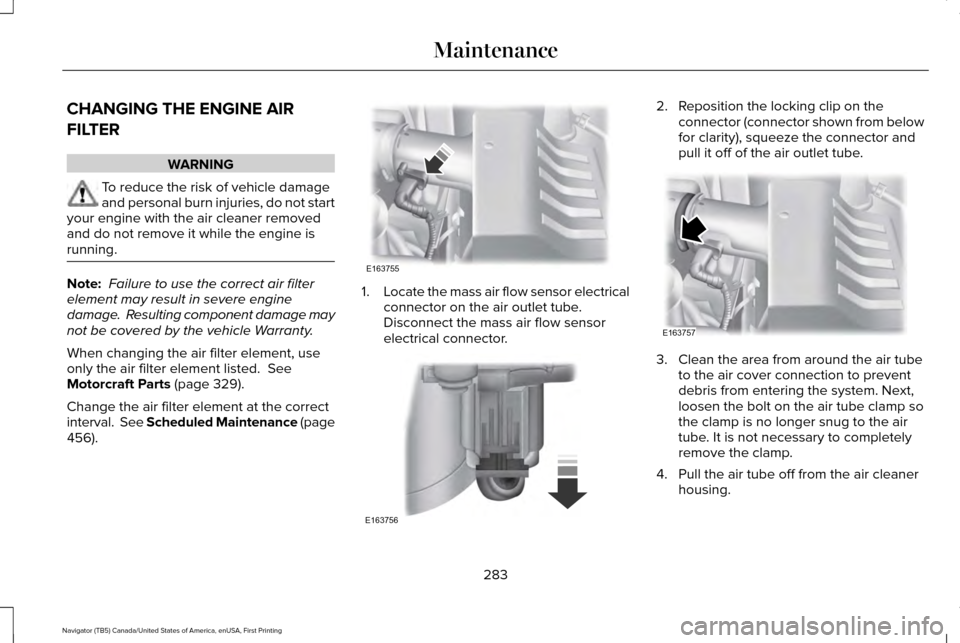
). 1.
Locate the mass air flow sensor electrical
connector on the air outlet tube.
Disconnect the mass air flow sensor
electrical connector. 2. Reposition the locking clip on the
connector (connector shown from below
for clarity), squeeze the connector and
pull it off of the air outlet tube. 3. Clean the area from around the air tube
to the air cover connection to prevent
debris from entering the system. Next,
loosen the bolt on the air tube clamp so
the clamp is no longer snug to the air
tube. It is not necessary to completely
remove the clamp.
4. Pull the air tube off from the air cleaner housing.
283
Navigator (TB5) Canada/United States of America, enUSA, First Printing MaintenanceE163755 E163756 E163757


