Page 84 of 564
HEATED STEERING WHEEL (If Equipped)
See your SYNC information.
81
MKZ (CC9) Canada/United States of America, enUSA, First Printing Steering Wheel
Page 92 of 564

The high beams will switch off if:
•
the system detects the headlamps of an
approaching vehicle or the tail lamps of
a preceding vehicle.
• vehicle speed falls below approximately
27 mph (44 km/h)
• the ambient light level is high enough
that high beams are not required
• the system detects severe rain, snow or
fog
• the camera is blocked.
Activating the System
Switch the system on using the information
display. See Information Displays (page
108). Switch the autolamps on. See
Autolamps (page 85). Manually Overriding the System When the automatic control has activated
the high beams, pushing or pulling the stalk
will provide a temporary override to low
beam.
Use the information display menu to
permanently deactivate the system, or turn
the lighting control switch from autolamps to
headlamps.
ADAPTIVE HEADLAMPS
The headlamp beams move in the same
direction as the steering wheel. This provides
more visibility when driving around curves.
A. Without adaptive headlamps
B. With adaptive headlamps
89
MKZ (CC9) Canada/United States of America, enUSA, First Printing LightingE142451 E169254
Page 111 of 564
GENERAL INFORMATION
WARNING
Driving while distracted can result in
loss of vehicle control, crash and injury.
We strongly recommend that you use
extreme caution when using any device that
may take your focus off the road. Your
primary responsibility is the safe operation
of your vehicle. We recommend against the
use of any hand-held device while driving
and encourage the use of voice-operated
systems when possible. Make sure you are
aware of all applicable local laws that may
affect the use of electronic devices while
driving. Various systems on your vehicle can be
controlled using the information display
controls on the steering wheel.
Corresponding information is displayed in
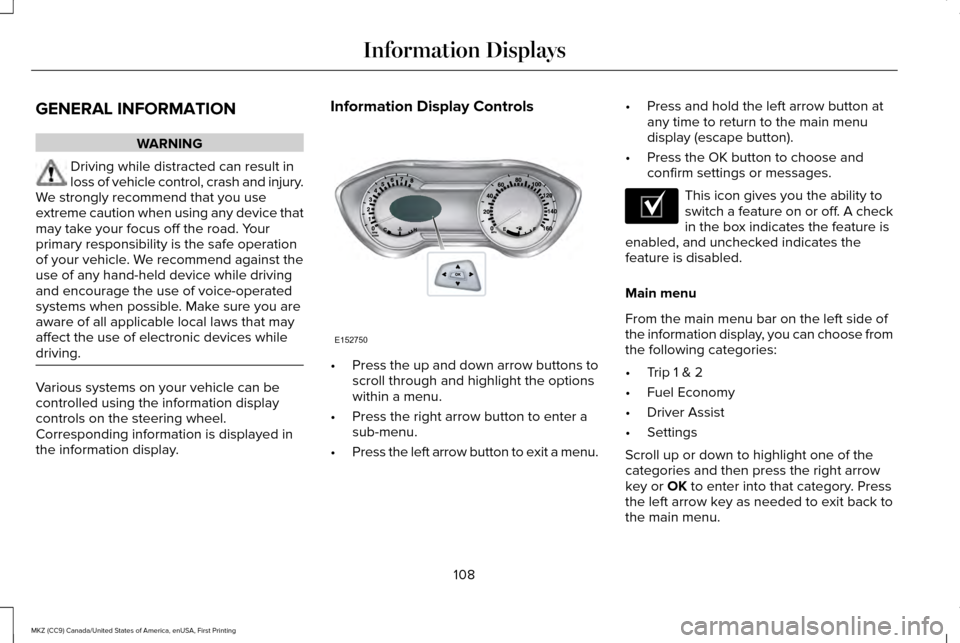
the information display. Information Display Controls
•
Press the up and down arrow buttons to
scroll through and highlight the options
within a menu.
• Press the right arrow button to enter a
sub-menu.
• Press the left arrow button to exit a menu. •
Press and hold the left arrow button at
any time to return to the main menu
display (escape button).
• Press the OK button to choose and
confirm settings or messages. This icon gives you the ability to
switch a feature on or off. A check
in the box indicates the feature is
enabled, and unchecked indicates the
feature is disabled.
Main menu
From the main menu bar on the left side of
the information display, you can choose from
the following categories:
• Trip 1 & 2
• Fuel Economy
• Driver Assist
• Settings
Scroll up or down to highlight one of the
categories and then press the right arrow
key or OK to enter into that category. Press
the left arrow key as needed to exit back to
the main menu.
108
MKZ (CC9) Canada/United States of America, enUSA, First Printing Information DisplaysE152750 E204495
Page 115 of 564
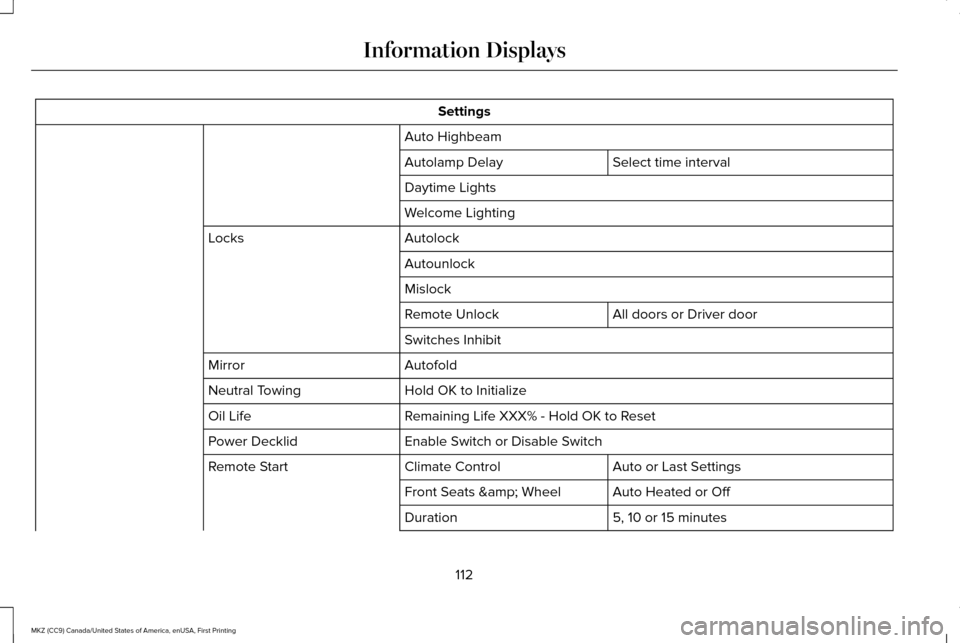
Settings
Auto Highbeam Select time interval
Autolamp Delay
Daytime Lights
Welcome Lighting
Autolock
Locks
Autounlock
Mislock All doors or Driver door
Remote Unlock
Switches Inhibit
Autofold
Mirror
Hold OK to Initialize
Neutral Towing
Remaining Life XXX% - Hold OK to Reset
Oil Life
Enable Switch or Disable Switch
Power Decklid
Auto or Last Settings
Climate Control
Remote Start
Auto Heated or Off
Front Seats & Wheel
5, 10 or 15 minutes
Duration
112
MKZ (CC9) Canada/United States of America, enUSA, First Printing Information Displays
Page 120 of 564
Alarm
Action
Message
Displays when the alarm has been triggered due to unauthorized entry. See Anti-Theft Alarm
(page 76).
Vehicle Alarm To Stop Alarm, Start Vehicle.
Automatic Engine Shutdown Action
Message
Displays when the engine is getting ready to shut off.
Engine Shuts Off In {seconds to shut off:#0}
Seconds
Displays when the engine has shut off to help increase fuel economy.
Engine Shut Off For Fuel Economy
Displays when the engine is getting ready to shut off. You can press OK on the left steeringwheel button to override the shut down.
Engine Shuts Off in {seconds to shut off:#0}
Seconds Press Ok to Override
117
MKZ (CC9) Canada/United States of America, enUSA, First Printing Information Displays
Page 126 of 564
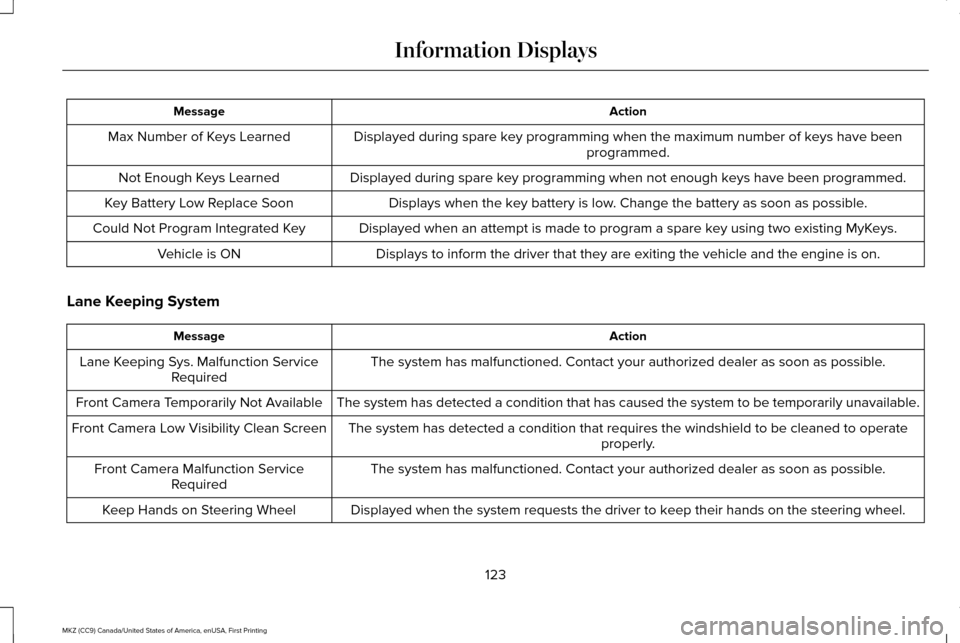
Action
Message
Displayed during spare key programming when the maximum number of keys have been programmed.
Max Number of Keys Learned
Displayed during spare key programming when not enough keys have been programmed.
Not Enough Keys Learned
Displays when the key battery is low. Change the battery as soon as possible.
Key Battery Low Replace Soon
Displayed when an attempt is made to program a spare key using two existing MyKeys.
Could Not Program Integrated Key
Displays to inform the driver that they are exiting the vehicle and the \
engine is on.
Vehicle is ON
Lane Keeping System Action
Message
The system has malfunctioned. Contact your authorized dealer as soon as \
possible.
Lane Keeping Sys. Malfunction Service
Required
The system has detected a condition that has caused the system to be tem\
porarily unavailable.
Front Camera Temporarily Not Available
The system has detected a condition that requires the windshield to be c\
leaned to operateproperly.
Front Camera Low Visibility Clean Screen
The system has malfunctioned. Contact your authorized dealer as soon as \
possible.
Front Camera Malfunction Service
Required
Displayed when the system requests the driver to keep their hands on the steering wheel.
Keep Hands on Steering Wheel
123
MKZ (CC9) Canada/United States of America, enUSA, First Printing Information Displays
Page 136 of 564

Action
Message
See your authorized dealer.
SHIFT SYS FAULT Drive Unavailable Select
S for Drive Service Required
See your authorized dealer.
SHIFT SYS FAULT Neutral Unavailable
Service Required
See your authorized dealer.
SHIFT SYS FAULT Sport Unavailable
Service Required
Displays when neutral tow is active and the ignition needs to be turned \
off. See Towing the
Vehicle on Four Wheels (page 254).
Neutral Tow Engaged Turn Ignition Off for
Towing
Displays while attempting to exit neutral tow. The brake pedal needs to be depressed and parkbutton selected to deactivate.
See Towing the Vehicle on Four Wheels (page 254).
Neutral Tow Engaged Depress Brake and
Select Park to Exit Neutral Tow
Displays when neutral tow is active and the park brake needs to be released.
See Towing the
Vehicle on Four Wheels (page 254).
Neutral Tow Remove Park Brake for
Towing
Displays when neutral tow has been deactivated.
Neutral Tow Disengaged
133
MKZ (CC9) Canada/United States of America, enUSA, First Printing Information Displays
Page 138 of 564

Power: Press to switch the system on and off. When the system is off, it prevents outside air from entering the vehicle.
A
Driver temperature control:
Adjust the temperature setting on the driver side.
B
MAX defrost:
Press to switch on defrost. Outside air flows through the windshield ve\
nts, air conditioning automatically turns on,
and fan automatically adjusts to the highest speed. You can also use this setting to defrost and clear the windshield of a th\
in covering
of ice. The heated rear window also automatically turns on when you select max\
imum defrost.
C
Air distribution control: Press to switch airflow from the windshield, instrument panel, or footw\
ell vents on or off. You can distribute
air through any combination of these vents.
D
MAX A/C:
Press to maximize cooling. Recirculated air flows through the instrument panel vents, air conditioni\
ng automatically turns
on, and the fan automatically adjusts to the highest speed.
E
Passenger temperature control:
Adjust the temperature setting on the passenger side.
F
Recirculated air: Press to switch between outside air and recirculated air. The air currently in the passenger compartment recirculates.
This can reduce the time needed to cool the interior and reduce unwanted\
odors from entering your vehicle.
G
Note:
Recirculated air may also turn on and off automatically in instrument pan\
el or instrument panel and floor airflow modes during
hot weather to improve cooling efficiency.
A/C:
Press to switch the air conditioning on or off. Air conditioning cools your vehicle using outside air. To improve the time to reach
a comfortable temperature in hot weather, drive with the windows open until you feel cold air through the air ve\
nts.
H
AUTO:
Press to switch on automatic operation. Adjust to select the desired te\
mperature. Fan speed, air distribution, air conditioning
operation, and outside or recirculated air are automatically adjusted to\
heat or cool the vehicle to maintain the desired temperature .
You can also switch off dual zone mode by pressing and holding for more t\
han two seconds.
I
Heated seats:
Press to switch the heated seats on and off. See Climate Controlled Seats (page 148).
J
Climate controlled seats:
Press to switch the cooled seats on and off. See Climate Controlled Seats (page 148).
K
Heated steering wheel:
Press to switch the heated steering wheel on and off.
L
135
MKZ (CC9) Canada/United States of America, enUSA, First Printing Climate Control