Page 366 of 564

Stowing the Flat Tire
You can temporarily stow the full-size road
wheel in the spare tire compartment.
1.
Lift the carpeted wheel cover at an angle
to access the spare tire compartment. 2.
Place the wheel in the spare tire well with
the valve stem facing down.
3. Install the shorter jack retainer bolt to the
jack bolt-down bracket through the
centre of the wheel. Finally, wind the
wheel retainer down to secure the wheel
in place.
4. Place the jack and tools back into the spare tire compartment.
5. Replace the carpeted wheel cover.
Stowing the Flat Tire Using the
Retainer Strap (If Equipped)
You can temporarily stow the full-size road
wheel in the spare tire compartment.
1. Find the flat tire retainer strap tucked inside the jack channel. 2.
Locate the jack bolt-down bracket. Push
the retainer strap through the jack
bolt-down bracket.
3. Put the jack and lug wrench away. Make
sure the jack is fastened so it does not
rattle when you drive.
4. Stow the flat tire on the floor in the cargo
area.
5. Weave the retainer strap through the wheel openings.
363
MKZ (CC9) Canada/United States of America, enUSA, First Printing Wheels and TiresE227869 E224480
Page 369 of 564
Wheel pilot bore
A
Inspect the wheel pilot hole and mounting
surface prior to installation. Remove any
visible corrosion or loose particles. The tire wheel assembly has already been balanced at the vehicle assembl\
y plant. There are
many factors during the vehicle usage that may lead to a tire wheel imba\
lance. These factors
may cause vehicle vibration and increased steering, suspension and tire \
wear. In this case,
the wheel and tire assembly may need to be re-balanced. The maximum dynamic static
imbalance per wheel balance plane needs to be less than 7g. The tire whe\
el assembly also
needs to be re-balanced after changing the wheel and the tire. Please contact an authorized
dealer for service.
Technical Specifications
366
MKZ (CC9) Canada/United States of America, enUSA, First Printing Wheels and TiresE145950
Page 372 of 564
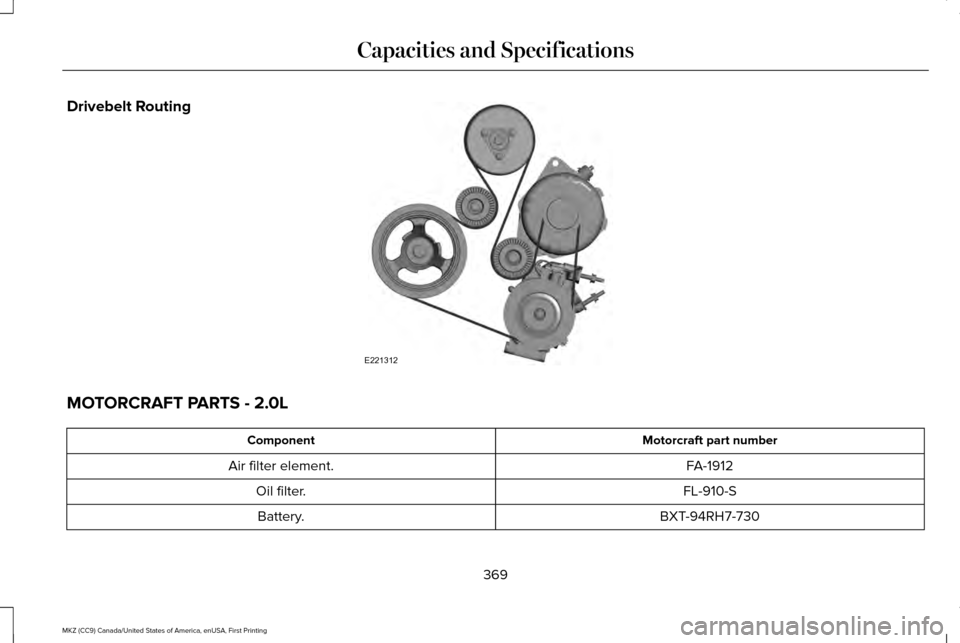
Drivebelt Routing
MOTORCRAFT PARTS - 2.0L
Motorcraft part number
Component
FA-1912
Air filter element.
FL-910-S
Oil filter.
BXT-94RH7-730
Battery.
369
MKZ (CC9) Canada/United States of America, enUSA, First Printing Capacities and SpecificationsE221312
Page 373 of 564
Motorcraft part number
Component
SP-537
Spark plugs.
FP-71
Cabin air filter.
WW-2200 (driver side)
Windshield wiper blade.
WW-1900 (passenger side)
We recommend Motorcraft® replacement parts available at your Lincoln d\
ealer or at fordparts.com for scheduled maintenance. These parts
meet or exceed Ford Motor Company’ s specifications and are engineered for your vehicle. Use of other parts may impact vehicle performance,
emissions and durability. Your warranty may be void for any damage related to use of other parts.
If a Motorcraft® oil filter is not available, use an oil filter that meets industry performance specification SAE/USCAR-36.
For spark plug replacement, contact an authorized dealer. Replace the spark plugs at the appropriate intervals. See Scheduled Maintenance
(page 495).
370
MKZ (CC9) Canada/United States of America, enUSA, First Printing Capacities and Specifications
Page 374 of 564
MOTORCRAFT PARTS - 3.0L
Motorcraft part number
Component
FA-1912
Air filter element
FL-2062
Oil filter
BXT-94RH7-730
Battery
SP-542
Spark plugs
FP-71
Cabin air filter
WW-2200 (driver side)
Windshield wiper blade
WW-1900 (passenger side)
We recommend Motorcraft replacement parts available at your Lincoln deale\
r or at fordparts.com for scheduled maintenance. These parts
meet or exceed Ford Motor Company’ s specifications and are engineered for your vehicle. Use of other parts may impact vehicle performance,
emissions and durability. Your warranty may be void for any damage related to use of other parts.
If a Motorcraft oil filter is not available, use an oil filter that meets industry performance specification SAE/USCAR-36.
For spark plug replacement, contact an authorized dealer. Replace the spark plugs at the appropriate intervals. See Scheduled Maintenance
(page 495).
371
MKZ (CC9) Canada/United States of America, enUSA, First Printing Capacities and Specifications
Page 405 of 564
911 Assist May Not Work If
•
Your cellular phone or 911 Assist
hardware sustains damage in a crash.
• The vehicle's battery or the SYNC system
has no power.
• The phone(s) thrown from your vehicle
are the ones paired and connected to
the system.
911 Assist Privacy Notice
When you switch on 911 Assist, it may
disclose to emergency services that your
vehicle has been in a crash involving the
deployment of an airbag or activation of the
fuel pump shut-off. Certain versions or
updates to 911 Assist may also be capable
of electronically or verbally disclosing to 911
operators your vehicle location or other
details about your vehicle or crash to assist
911 operators to provide the most appropriate
emergency services. If you do not want to
disclose this information, do not switch the
feature on. Safety Information WARNING
Driving while distracted can result in
loss of vehicle control, crash and injury.
We strongly recommend that you use
extreme caution when using any device that
may take your focus off the road. Your
primary responsibility is the safe operation
of your vehicle. We recommend against the
use of any hand-held device while driving
and encourage the use of voice-operated
systems when possible. Make sure you are
aware of all applicable local laws that may
affect the use of electronic devices while
driving. •
Do not attempt to service or repair the
system. Have an authorized dealer check
your vehicle.
• Do not operate playing devices if the
power cords or cables are broken, split
or damaged. Place cords and cables out
of the way, so they do not interfere with
the operation of pedals, seats,
compartments or safe driving abilities. •
Do not leave playing devices in your
vehicle during extreme conditions as it
could cause them damage. See your
device's user guide for further
information.
• For your safety, some SYNC 3 functions
are speed-dependent. Their use is limited
to when your vehicle is traveling at
speeds under 3 mph (5 km/h). Make sure
that you review your device's manual
before using it with SYNC 3.
Speed-restricted Features
Some features of this system may be too
difficult to use while your vehicle is moving
so they are restricted from use unless your
vehicle is stationary.
402
MKZ (CC9) Canada/United States of America, enUSA, First Printing SYNC™ 3
Page 409 of 564

download continues where it left off at the
next Wi-Fi connected opportunity. Upon
activation of an update, a banner displays
on the touchscreen indicating the system
update. Select the icon to see more detail.
This icon displays for two ignition cycles.
To switch this feature off:
Menu Item
Settings
General In this menu selection, you
can change the selection for
automatic updates to OFF.
Automatic
System
Updates
Support
The SYNC support team is available to help
you with any questions you are not able to
answer on your own.
Monday-Saturday, 8:30am-8:00pm EST. United States: 1-800-521-4140.
Canada: 1-800-387-9333.
Times are subject to change due to holidays.
Privacy Information
When you connect a cellular phone to SYNC
3, the system creates a profile within your
vehicle that links to that cellular phone. This
profile helps in offering you more cellular
features and operating more efficiently.
Among other things, this profile may contain
data about your cellular phone book, text
messages (read and unread), and call history,
including history of calls when your cell
phone was not connected to the system. In
addition, if you connect a media device, the
system creates and retains an index of
supported media content. The system also
records a short diagnostic log of
approximately 10 minutes of all recent system
activity. The log profile and other system data
may be used to improve the system and help
diagnose any problems that may occur.The cellular profile, media device index, and
diagnostic log remain in your vehicle unless
you delete them and are generally accessible
only in your vehicle when the cellular phone
or media player is connected.
If you no longer plan to use the system or
your vehicle, we recommend you perform a
Master Reset to erase all stored information.
You can find more information about the
Master Reset in General Settings. See
Settings (page 457). System data cannot be
accessed without special equipment and
access to your vehicle's SYNC 3 module. The
Lincoln Motor Company does not access the
system data for any purpose other than as
described absent consent, a court order, or
where required by law enforcement, other
government authorities, or other third parties
acting with lawful authority. Other parties
may seek to access the information
independently of The Lincoln Motor
Company.
406
MKZ (CC9) Canada/United States of America, enUSA, First Printing SYNC™ 3
Page 425 of 564

For more information on extended
subscription terms (a service fee is required),
the online media player and a list of SIRIUS
satellite radio channels, and other features,
please visit www.siriusxm.com in the United
States, www.siriusxm.ca in Canada, or call
SIRIUS at 1-888-539-7474.
Note:
SIRIUS reserves the unrestricted right
to change, rearrange, add or delete
programming. This includes canceling,
moving or adding particular channels, and
its prices, at any time, with or without notice
to you. Ford Motor Company shall not be
responsible for any such programming
changes. Note:
This receiver includes the eCos
real-time operating system. eCos is
published under the eCos License.
The following buttons are available for Sirius: Action and description
Menu item
Touch this button to see a list of available stations.
Browse
A pop-up appears, allowing you to type in the call numbers of a station.\
Direct Tune
Once you enter the stations call numbers, you can select:
The system tunes to the station you select.
Enter
You exit the pop-up and the current station continues to play.
Cancel
You can press the backspace button to delete the previous number.
422
MKZ (CC9) Canada/United States of America, enUSA, First Printing SYNC™ 3