2017 LINCOLN MKX Win
[x] Cancel search: WinPage 109 of 587

Opening and Closing the Moonroof
Moonroof open. Press and release
to open the moonroof. The
moonroof stops short of the fully
opened position. Press and release
the control again to open the
moonroof fully.
A
Moonroof vent. Press and release
to vent the moonroof.
B Sunshade open. Press and release
to open the sunshade. The
sunshade opens automatically with
the moonroof. You can also open
the sunshade with the moonroof
closed. Note: The sunshade stops
short of its fully opened position
for the comfort of rear passengers.
To open the sunshade fully, press
the control again.
C
Sunshade close. Press and release
to close the sunshade.
Note: The
sunshade does not fully close
unless the moonroof glass is fully
closed.
D
Moonroof close. Press and release
to close the moonroof from either
the open or vent positions.
E
Bounce-Back
The moonroof automatically reverses some
distance if an obstacle is detected while
closing. To override this feature, press and hold the
moonroof close
control within two seconds
after the roof comes to a stop following a
bounce-back reversal.
106
MKX (CD9) Canada/United States of America, enUSA, First Printing Windows and MirrorsE191272
Page 112 of 587

Low Fuel Reminder
A low fuel level reminder displays and
sounds when the distance to empty reaches
50 mi (80 km) to empty for MyKey, and at
35 mi (60 km), 25 mi (40 km), 10 mi (20 km)
and 0 mi (0 km) for all vehicle keys.
Variations:
Note: The low fuel reminder can appear at
different fuel gauge positions depending on
fuel economy conditions. This variation is
normal.
Engine Coolant Temperature Gauge
Indicates engine coolant temperature. At
normal operating temperature, the level
indicator will be in the normal range. If the
engine coolant temperature exceeds the
normal range, stop the vehicle as soon as
safely possible, switch off the engine and let
the engine cool. WARNING
Never remove the coolant reservoir
cap when the engine is running or hot. WARNING LAMPS AND
INDICATORS
The following warning lamps and indicators
alert you to a vehicle condition that may
become serious. Some lamps illuminate
when you start your vehicle to make sure
they work. If any lamps remain on after
starting your vehicle, refer to the respective
system warning lamp for further information.
Note:
Some warning indicators appear in
the information display and function the
same as a warning lamp, but do not display
when you start your vehicle.
Adaptive Cruise Control
(If Equipped) The speed control system indicator
light changes color to indicate
what mode the system is in.
See
Using Adaptive Cruise Control (page 225).
On (white light): Illuminates when you switch
on the adaptive cruise control system. Turns
off when you switch off the speed control
system. Engaged (green light): Illuminates when you
engage the adaptive cruise control system.
Turns off when you disengage the speed
control system.
Adaptive Steering
(If Equipped)
The adaptive steering system
indicator illuminates if the system
detects a fault during the
continuous diagnostic checks.
Adaptive Steering Initialization (yellow,
flashing): The adaptive steering system has
detected a difference between steering
wheel angle and the desired road wheel
angle. The steering wheel adjusts itself to
correct this difference. This adjustment is
part of normal system operation.
Adaptive Steering Off (yellow, solid): The
adaptive steering system is off. It is possible
that the steering wheel may not be straight
when the vehicle is driving straight ahead. If
this message persists, see an authorized
dealer.
109
MKX (CD9) Canada/United States of America, enUSA, First Printing Instrument ClusterE144524 E223375
Page 114 of 587

Direction Indicator
Illuminates when you switch on the
left or right direction indicator or
the hazard warning flasher. If the
indicators stay on or flash faster, check for a
burned out bulb. See Changing a Bulb
(page 326).
Door Ajar Displays when the ignition is on
and any door is not completely
closed.
Electric Park Brake It illuminates or flashes when the
electric parking brake has a
malfunction.
See Electric Parking
Brake (page 196). Engine Coolant Temperature Illuminates when the engine
coolant temperature is high. Stop
the vehicle as soon as possible,
switch off the engine and let cool.
See
Engine Coolant Check (page 314).
Engine Oil If it illuminates with the engine
running or when you are driving,
this indicates a malfunction. Stop
your vehicle as soon as it is safe to do so
and switch the engine off. Check the engine
oil level.
See Engine Oil Check (page 312).
Note: Do not resume your journey if it
illuminates despite the level being correct.
Have the system checked by an authorized
dealer immediately.
Fasten Seatbelt It illuminates and a chime sounds
to remind you to fasten your
seatbelt.
See Seatbelt Reminder
(page 40). Front Airbag If it fails to illuminate when you
start your vehicle, continues to
flash or remains on, it indicates a
malfunction. Have the system checked by
an authorized dealer.
Heads Up Display
(If Equipped) A red beam of lights illuminates on
the windshield in certain instances
when using adaptive cruise control
and/or the collision warning system. It also
illuminates momentarily when you start your
vehicle to make sure the display works.
High Beam It illuminates when you switch the
high beam headlamps on. It flashes
when you use the headlamp
flasher.
111
MKX (CD9) Canada/United States of America, enUSA, First Printing Instrument Cluster E146190 E71880 E67017 E156133
Page 115 of 587

Hood Ajar
Displays when the ignition is on
and the hood is not completely
closed.
Liftgate Ajar Illuminates when the liftgate is not
completely closed.
Low Beam Malfunction Warning It will illuminate when there is a
malfunction with the low beam
headlamp bulb.
Low Fuel Level It illuminates when the fuel level is
low or the fuel tank is nearly
empty. Refuel as soon as possible. Low Tire Pressure Warning It illuminates when your tire
pressure is low. If the lamp remains
on with the engine running or
when driving, check your tire pressure as
soon as possible.
It also illuminates momentarily when you
switch the ignition on to confirm the lamp is
functional. If it does not illuminate when you
switch the ignition on, or begins to flash at
any time, have the system checked by an
authorized dealer.
Low Washer Fluid It illuminates when the windshield
washer fluid is low.
Parking Lamps It illuminates when you switch the
parking lamps on.Powertrain Fault Illuminates when the system
detects a powertrain or an AWD
fault. Contact an authorized dealer
as soon as possible.
Service Engine Soon If the service engine soon indicator
light stays illuminated after you
start the engine, it indicates that
the On Board Diagnostics system (OBD) has
detected a malfunction of the vehicle
emissions control system. Refer to On board
diagnostics (OBD) in the Fuel and Refueling
chapter for more information about having
your vehicle serviced. See Emission Control
System (page 180).
If the light is blinking, engine misfire is
occurring which could damage your catalytic
converter. Drive in a moderate fashion (avoid
heavy acceleration and deceleration) and
have your vehicle serviced immediately.
112
MKX (CD9) Canada/United States of America, enUSA, First Printing Instrument ClusterE159324 E162453 E181350 E132353
Page 117 of 587

GENERAL INFORMATION
WARNING
Driving while distracted can result in
loss of vehicle control, crash and injury.
We strongly recommend that you use
extreme caution when using any device that
may take your focus off the road. Your
primary responsibility is the safe operation
of your vehicle. We recommend against the
use of any hand-held device while driving
and encourage the use of voice-operated
systems when possible. Make sure you are
aware of all applicable local laws that may
affect the use of electronic devices while
driving. You can control various systems on your
vehicle using the information display controls
on the steering wheel. Corresponding
information appears in the information
display. Information Display Controls
•
Press the up and down arrow buttons to
scroll through and highlight the options
within a menu.
• Press the right arrow button to enter a
sub-menu.
• Press the left arrow button to exit a menu. •
Press and hold the left arrow button at
any time to return to the main menu
display (escape button).
• Press the OK button to choose and
confirm settings or messages.
Main menu This icon gives you the ability to
switch a feature on or off. A check
in the box indicates the feature is
on, and unchecked indicates the feature is
off.
From the main menu bar on the left side of
the information display, you can choose from
the following categories:
• Trip 1 & 2
• Fuel Economy
• Driver Assist
• Settings
Scroll up or down to highlight one of the
categories and then press the right arrow
key or
OK to enter into that category. Press
the left arrow key as needed to exit back to
the main menu.
114
MKX (CD9) Canada/United States of America, enUSA, First Printing Information DisplaysE152750 E204495
Page 122 of 587

Settings
Mislock All Doors or Driver's Door
Remote Unlock
Switches Inhibit
Autofold
Mirror
Hold
OK to Initialize
Neutral Tow
Remaining Life XXX% - Hold
OK to Reset
Oil Life
Enable Switch or Disable Switch
Power Liftgate
Auto or Last Setting
Climate Control
Remote Start
Auto or Off
Front Seats & Wheel
5, 10 or 15 minutes
Duration
System
Seatbelts Remote
Windows
Courtesy Wipe
Wipers
Rain Sensing
MyKey Status
MyKey
119
MKX (CD9) Canada/United States of America, enUSA, First Printing Information Displays
Page 134 of 587

Action
Message
Displayed during spare key programming when the maximum number of keys have been programmed.
Max Number of Keys Learned
Displayed during spare key programming when not enough keys have been programmed.
Not Enough Keys Learned
Displays when the key battery is low. Change the battery as soon as possible.
Key Battery Low Replace Soon
Displayed when an attempt is made to program a spare key using two existing MyKeys.
Could Not Program Integrated Key
Displays to inform the driver that they are exiting the vehicle and the \
engine is on.
Engine ON
Lane Keeping System Action
Message
The system has malfunctioned. Contact an authorized dealer as soon as po\
ssible.
Lane Keeping Sys. Malfunction Service
Required
The system has detected a condition that has caused the system to be tem\
porarily unavailable.
Front Camera Temporarily Not Available
The system has detected a condition that requires the windshield to be c\
leaned to operateproperly.
Front Camera Low Visibility Clean Screen
The system has malfunctioned. Contact an authorized dealer as soon as po\
ssible.
Front Camera Malfunction Service
Required
Displayed when the system requests the driver to keep their hands on the steering wheel.
Keep Hands on Steering Wheel
131
MKX (CD9) Canada/United States of America, enUSA, First Printing Information Displays
Page 143 of 587
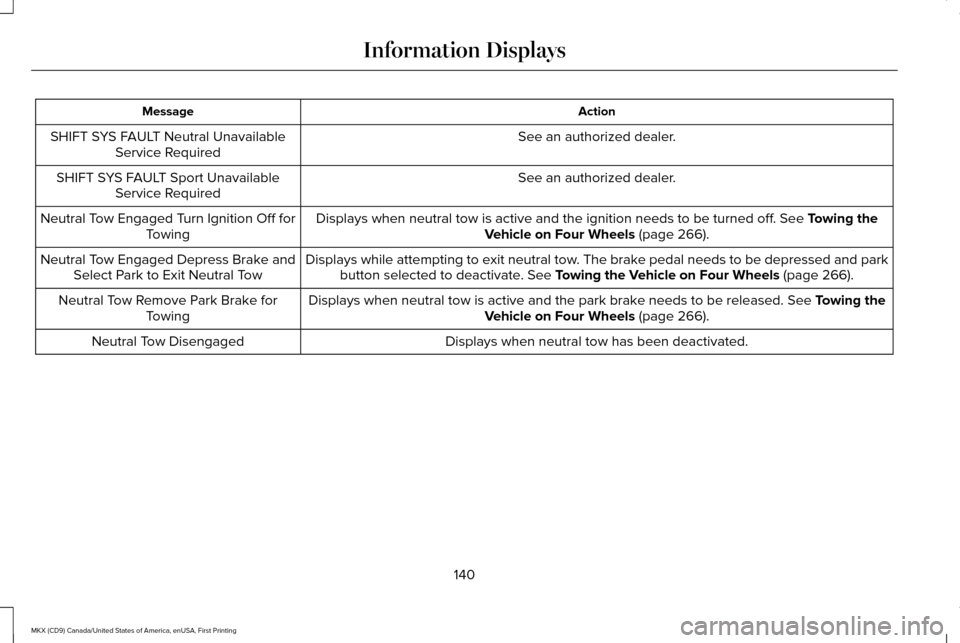
Action
Message
See an authorized dealer.
SHIFT SYS FAULT Neutral Unavailable
Service Required
See an authorized dealer.
SHIFT SYS FAULT Sport Unavailable
Service Required
Displays when neutral tow is active and the ignition needs to be turned \
off. See Towing the
Vehicle on Four Wheels (page 266).
Neutral Tow Engaged Turn Ignition Off for
Towing
Displays while attempting to exit neutral tow. The brake pedal needs to be depressed and parkbutton selected to deactivate.
See Towing the Vehicle on Four Wheels (page 266).
Neutral Tow Engaged Depress Brake and
Select Park to Exit Neutral Tow
Displays when neutral tow is active and the park brake needs to be released.
See Towing the
Vehicle on Four Wheels (page 266).
Neutral Tow Remove Park Brake for
Towing
Displays when neutral tow has been deactivated.
Neutral Tow Disengaged
140
MKX (CD9) Canada/United States of America, enUSA, First Printing Information Displays