2017 LINCOLN MKT fuel
[x] Cancel search: fuelPage 112 of 558

If the light is blinking, engine misfire is
occurring which could damage your catalytic
converter. Drive in a moderate fashion (avoid
heavy acceleration and deceleration) and
have your vehicle serviced immediately.
WARNING
Under engine misfire conditions,
excessive exhaust temperatures could
damage the catalytic converter, the fuel
system, interior floor coverings or other
vehicle components, possibly causing a fire.
Have an authorized dealer service your
vehicle immediately. The service engine soon indicator light
illuminates when the ignition is first turned
on prior to engine start to check the bulb and
to indicate whether the vehicle is ready for
Inspection/Maintenance (I/M) testing.
Normally, the service engine soon light will
stay on until the engine is cranked, then turn
itself off if no malfunctions are present.
However, if after 15 seconds the service
engine soon light blinks eight times, it means
that the vehicle is not ready for I/M testing.
See Emission Control System (page 177).Stability Control It will flash when the system is
active. If it remains illuminated or
does not illuminate when you
switch the ignition on, this indicates a
malfunction. During a malfunction the system
will switch off. Have the system checked by
your authorized dealer immediately.
See
Using Stability Control (page 197).
Stability Control Off It will illuminate when you switch
the system off. It will go out when
you switch the system back on or
when you switch the ignition off. See Using
Stability Control
(page 197). AUDIBLE WARNINGS AND
INDICATORS
Keyless Warning Alert
The horn will sound twice when you exit your
vehicle with the intelligent access key and
your vehicle is in RUN, indicating your vehicle
is still on.
Headlamps On Warning Chime
Sounds when you remove the key from the
ignition and open the driver's door and you
have left the headlamps or parking lamps
on.
Parking Brake On Warning Chime
Sounds when you have left the parking brake
on and drive your vehicle. If the warning
chime remains on after you have released
the parking brake, have the system checked
by your authorized dealer immediately.
109
MKT (TP4) , enUSA, First Printing Instrument ClusterE138639 E130458
Page 114 of 558

•
Press the up and down arrow buttons to
scroll through and highlight the options
within a menu.
• Press the right arrow button to enter a
sub-menu.
• Press the left arrow button to exit a menu.
• Press and hold the left arrow button at
any time to return to the main menu
display (escape button).
• Press the OK button to choose and
confirm settings or messages. Main menu
From the main menu bar on the left side of
the information display, you can choose from
the following categories:
Scroll up or down to highlight one of the
categories and then press the right arrow
key or
OK to enter into that category. Press
the left arrow key as needed to exit back to
the main menu. •
Display Mode
• Trip 1 & 2
• Fuel Economy
• Driver Assist
• Settings
Display Mode
Use the up or down arrow buttons to choose
between the following display options. Display Mode
XXX mi (km) to empty, Fuel gauge and Total odometer
Option 1
Round tachometer, Fuel gauge and Total odometer
Option 2
Round tachometer, Engine coolant temp gauge, Fuel gauge and Total odometer
Option 3
Digital speedometer, Fuel gauge and Total odometer
Option 4
Regardless of display mode chosen, when you use the SelectShift Automatic\
™ transmission (SST), the cluster will change to the round
tachometer if not already selected.
111
MKT (TP4) , enUSA, First Printing Information Displays
Page 115 of 558

XXX mi (km) to empty
Shows approximate fuel level before the fuel
tank reaches empty. The value is dynamic
and can change (raise or lower) depending
on driving style.
Fuel gauge
Switch the ignition on. The fuel gauge will
indicate approximately how much fuel is in
the fuel tank. The arrow next to the fuel
pump symbol shows the fuel filler door side
of your vehicle. When the fuel level becomes
low, the level indicator will change to amber.
When the fuel level becomes critically low,
the level indicator will change to red.
Note:
The fuel gauge level may vary slightly
when your vehicle is moving or when driving
on a slope.
Note: When a MyKey® is in use, low fuel
warnings will display earlier.
Round tachometer
Indicates the engine speed in revolutions
per minute. Driving with your tachometer
pointer continuously at the top of the scale
may damage the engine. During SelectShift
Automatic ™ transmission (SST) use, the
currently selected gear will appear in the
display. Engine coolant temperature gauge
Indicates engine coolant temperature. At
normal operating temperature, the level
indicator will be in the normal range. If the
engine coolant temperature exceeds the
normal range, stop your vehicle as soon as
safely possible, switch off the engine and let
the engine cool.
Trip 1 & 2
Choose between the following trip displays. Trip 1 & 2
Trip distance
Average fuel economy
Elapsed trip time
Hold OK to Reset
Note: Press and hold
OK to reset the
currently displayed trip information.
112
MKT (TP4) , enUSA, First Printing Information Displays
Page 116 of 558

Trip distance
Shows the accumulated trip distance.
Average fuel economy
Shows the average fuel economy for a given
trip.
Elapsed trip time
When you switch off your vehicle the timer
stops and restarts when you restart your
vehicle.
Fuel Economy
Use the left or right arrow buttons to choose
the desired fuel economy display. XX. Min Fuel History
Inst. Fuel Economy
Fuel Economy
X
Instantaneous fuel usage
X
Fuel usage over a 30 minute time span
Always Present
Average fuel economy
XXX mi (km) to empty Total odometer (lower left corner)
Press and hold the OK to reset the currently displayed fuel usage information.
Note: Press and hold
OK to reset the
currently displayed fuel usage information.
Inst Fuel Economy
This display shows a visual graph of your
instantaneous fuel economy. 30 Min Fuel History
This display shows a bar chart of your fuel
history.
Driver Assist
Use the up or down arrow buttons to choose
between the following display options.
Note:
Some items are optional and may not
appear.
113
MKT (TP4) , enUSA, First Printing Information Displays
Page 120 of 558

Settings
Miles & GAL, l/100km or km/l
Distance
Display Settings
Fuel Gauge or Fuel + Tach
Gauge Display
Choose your applicable setting - Hold OK to Set
Language
Fahrenheit (°F) or Celsius (°C)
Temperature
Note: Some MyKey items will only appear if
a MyKey is set.
INFORMATION MESSAGES
Note: Depending on the vehicle options
equipped with your vehicle, not all of the
messages will display or be available.
Certain messages may be abbreviated or
shortened depending upon which cluster
type you have. Press the
OK button to acknowledge and
remove some messages from the information
display. Other messages will be removed
automatically after a short time.
Certain messages need to be confirmed
before you can access the menus.
117
MKT (TP4) , enUSA, First Printing Information DisplaysE173229
Page 122 of 558

Alarm
Action
Message
Displayed when the perimeter alarm system is armed and the vehicle is en\
tered using the keyon the driver's side door. In order to prevent the perimeter alarm system from triggering, the
ignition must be turned to start or on before the 12 second chime expire\
s. See Anti-Theft Alarm (page 83).
Vehicle Alarm To Stop Alarm, Start Vehicle.
Automatic Engine Shutdown Action
Message
The engine is getting ready to shut off.
Engine Shuts Off In {seconds to shut off:#0}
Seconds
The engine has shut off to help increase fuel economy.
Engine Shut Off For Fuel Economy
The engine is getting ready to shut off. You can press OK on the left steering wheel button tooverride the shut down.
Engine Shuts Off in {seconds to shut off:#0}
Seconds Press Ok to Override
119
MKT (TP4) , enUSA, First Printing Information Displays
Page 127 of 558
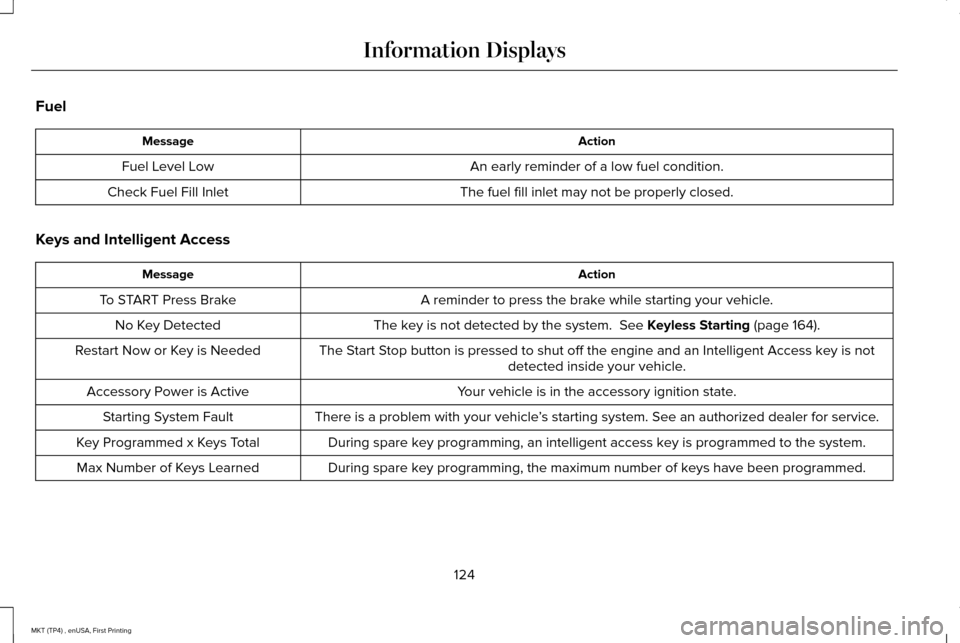
Fuel
Action
Message
An early reminder of a low fuel condition.
Fuel Level Low
The fuel fill inlet may not be properly closed.
Check Fuel Fill Inlet
Keys and Intelligent Access Action
Message
A reminder to press the brake while starting your vehicle.
To START Press Brake
The key is not detected by the system. See Keyless Starting (page 164).
No Key Detected
The Start Stop button is pressed to shut off the engine and an Intelligent Access k\
ey is notdetected inside your vehicle.
Restart Now or Key is Needed
Your vehicle is in the accessory ignition state.
Accessory Power is Active
There is a problem with your vehicle’s starting system. See an authorized dealer for service.
Starting System Fault
During spare key programming, an intelligent access key is programmed to the system.
Key Programmed x Keys Total
During spare key programming, the maximum number of keys have been programmed.
Max Number of Keys Learned
124
MKT (TP4) , enUSA, First Printing Information Displays
Page 137 of 558

Air distribution control: Adjust to turn airflow from the instrument panel or footwell vents on o\
r off. You can distribute air through
any combination of these vents.
C
Temperature control:
Control the temperature of the air circulated in your vehicle.
D
Climate controlled seats:
Press to switch the climate controlled seats on and off. See Seats (page 136).
E
AUTO:
Press to switch on automatic operation. Adjust to select the desired te\
mperature.
F
Fan speed control lock:
When illuminated, you can only operate the rear passenger settings thro\
ugh the front controls.
G
HEATED WINDOWS AND MIRRORS
Heated Rear Window
Note: Make sure the engine is running
before operating the heated windows. Press the button to clear the
heated rear window of thin ice and
fog. The heated rear window will
automatically turn off after a short period of
time. Start the engine before you switch the
heated rear window on.
Note: Do not use razor blades or other sharp
objects to clean or remove decals from the
inside of the heated rear window. The
vehicle warranty does not cover damage
caused to the heated rear window grid lines. Heated Exterior Mirror
(If Equipped)
When you switch the heated rear window
on, the heated exterior mirrors will
automatically turn on.
Note: Do not remove ice from the mirrors
with a scraper or adjust the mirror glass
when it is frozen in place.
Note: Do not clean the mirror housing or
glass with harsh abrasives, fuel or other
petroleum-based cleaning products. CABIN AIR FILTER
Your vehicle is equipped with a cabin air
filter, which gives you and your passengers
the following benefits:
•
It improves your driving comfort by
reducing particle concentration.
• It improves the interior compartment
cleanliness.
• It protects the climate control
components from particle deposits.
You can locate the cabin air filter behind the
glove box.
134
MKT (TP4) , enUSA, First Printing Climate ControlE184884