2017 LINCOLN MKC manual transmission
[x] Cancel search: manual transmissionPage 16 of 538

Collision Repairs
We hope that you never experience a
collision, but accidents do happen. Genuine
Ford replacement collision parts meet our
stringent requirements for fit, finish, structural
integrity, corrosion protection and dent
resistance. During vehicle development we
validate that these parts deliver the intended
level of protection as a whole system. A
great way to know for sure you are getting
this level of protection is to use genuine Ford
replacement collision parts.
Warranty on Replacement Parts
Genuine Ford and Motorcraft replacement
parts are the only replacement parts that
benefit from a Lincoln Warranty. Damage
caused to your vehicle as a result of the
failure of non-Ford parts may not be covered
by the Lincoln Warranty. For additional
information, refer to the terms and conditions
of the Lincoln Warranty.
SPECIAL NOTICES
New Vehicle Limited Warranty
For a detailed description of what is covered
and what is not covered by your vehicle
’s
New Vehicle Limited Warranty, refer to the
Warranty Manual that is provided to you
along with your Owner’ s Manual.
Special Instructions
For your added safety, your vehicle is fitted
with sophisticated electronic controls. WARNINGS
You risk death or serious injury to
yourself and others if you do not follow
the instruction highlighted by the warning
symbol. Failure to follow the specific
warnings and instructions could result in
personal injury. Never place front seat mounted
rear-facing child or infant seats in front
of an active passenger airbag. On Board Diagnostics Data Link
Connector
WARNING
Use of wireless plug-in devices in the
OBD Data Link Connector (DLC) may
allow unauthorized third parties to gain
access to vehicle systems and data which
could impair the function of various vehicle
systems, including safety-related systems.
The DLC should only be used by a repair
facility that operates in accordance with
Ford’ s service and repair instructions. Your vehicle has an OBD Data Link
Connector (DLC) that is used in conjunction
with a diagnostic scan tool for vehicle
diagnostics, repairs and reprogramming
services. Installing an aftermarket device that
uses the DLC during normal driving for
purposes such as remote insurance company
monitoring, transmission of vehicle data to
other devices or entities, or altering the
performance of the vehicle, may cause
13
MKC (TME) Canada/United States of America, enUSA, Edition date: 01/2016, First Printing Introduction
Page 92 of 538

HEADLAMP EXIT DELAY
After you switch the ignition off, you can
switch the headlamps on by pulling the
direction indicator lever toward you. You will
hear a short tone. The headlamps will switch
off automatically after three minutes with any
door open or 30 seconds after the last door
has been closed. You can cancel this feature
by pulling the direction indicator toward you
again or switching the ignition on.
DAYTIME RUNNING LAMPS (If
Equipped) WARNING
The daytime running lamps system
does not activate the rear lamps and
may not provide adequate lighting during
low visibility driving conditions. Also, the
autolamps switch position may not activate
the headlamps in all low visibility conditions,
such as daytime fog. Make sure the
headlamps are switched to auto or on, as
appropriate, during all low visibility
conditions. Failure to do so may result in a
crash. Type 1 - Conventional (Non-
Configurable)
The daytime running lamps turn on when:
1. The ignition is switched to the on
position.
2. The transmission is not in park (P) for vehicles with automatic transmissions or
the parking brake is released for vehicles
with manual transmissions. 3. The lighting control is in the off, parking
lamp or autolamps positions.
4. The headlamps are off.
Type 2 - Configurable
Switch the daytime running lamps on or off
using the information display controls.
See
Information Displays (page 108).
The daytime running lamps turn on when:
1. They are switched on in the information display. See Information Displays (page
108
).
2. The ignition is switched to the on position.
3. The transmission is not in park (P) for vehicles with automatic transmissions or
the parking brake is released for vehicles
with manual transmissions.
4. The lighting control is in the autolamps position.
5. The headlamps are off.
The other lighting control switch positions
do not activate the daytime running lamps,
and you can use them to temporarily override
autolamp control.
89
MKC (TME) Canada/United States of America, enUSA, Edition date: 01/2016, First Printing Lighting
Page 118 of 538
.
Adaptive Cruise Malfunction
A condi")
Adaptive Cruise Control
Action
Message
A radar malfunction is preventing the adaptive cruise control from engag\
ing. See Using Adaptive
Cruise Control (page 209).
Adaptive Cruise Malfunction
A condition exists such that the adaptive cruise cannot function properl\
y.
See Using Adaptive
Cruise Control (page 209).
Adaptive Cruise Not Available
You have a blocked sensor due to bad weather, ice, mud or water in front of the radar sensor.
You can typically clean the sensor to resolve.
See Using Adaptive Cruise Control (page 209).
Adaptive Cruise Not Available Sensor
Blocked See Manual
The system has disabled the automatic braking.
Normal Cruise Active Automatic Braking
Turned Off
A radar malfunction is preventing the adaptive cruise control from engag\
ing.
Front Sensor Not Aligned
The adaptive cruise has reinstated controls to the driver.
Adaptive Cruise - Driver Resume Control
The vehicle speed is too slow to activate the adaptive cruise.
Adaptive Cruise Speed Too Low to
Activate
The adaptive cruise is automatically adjusting the gap distance and the \
driver needs to shift the transmission into a lower gear.
Adaptive Cruise Shift Down
115
MKC (TME) Canada/United States of America, enUSA, Edition date: 01/2016, First Printing Information Displays
Page 133 of 538

Trailer
Action
Message
Displays when the trailer sway control has detected a trailer sway. See Trailer Sway Control
(page 242).
Trailer Sway Reduce Speed
Transmission Action
Message
See an authorized dealer.
Transmission Malfunction Service Now
The transmission is overheating and needs to cool. Stop in a safe place as soon as possible.
Transmission Overheating Stop Safely
See an authorized dealer.
Transmission Service Required
The transmission is overheating and needs to cool. Stop in a safe place as soon as possible.
Transmission Too Hot Press Brake
The transmission has limited functionality. See an authorized dealer.
Transmission Limited Function See Manual
The transmission is too cold. Wait for it to warm up before you drive.
Transmission Warming Up Please Wait
A reminder to shift into park. In addition, this message is typical afte\
r reconnecting or rechargingthe battery until you cycle the ignition to the on mode.
See Changing the 12V Battery (page
296).
Transmission Not in Park
The transmission has adjusted the shift strategy.
Transmission Adjusted
The transmission is adjusting the shift strategy.
Transmission AdaptMode
130
MKC (TME) Canada/United States of America, enUSA, Edition date: 01/2016, First Printing Information Displays
Page 134 of 538
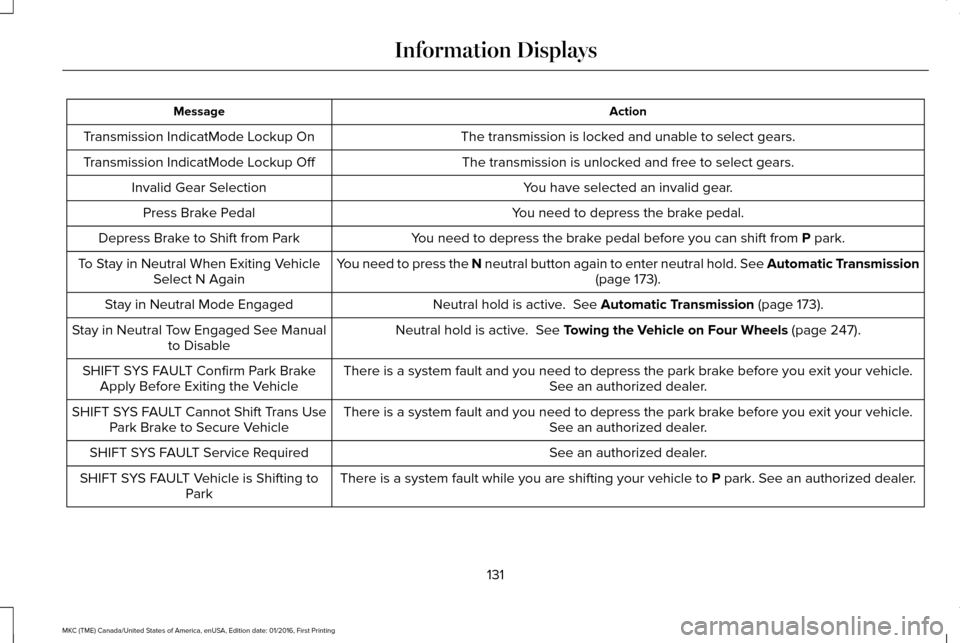
Action
Message
The transmission is locked and unable to select gears.
Transmission IndicatMode Lockup On
The transmission is unlocked and free to select gears.
Transmission IndicatMode Lockup Off
You have selected an invalid gear.
Invalid Gear Selection
You need to depress the brake pedal.
Press Brake Pedal
You need to depress the brake pedal before you can shift from P park.
Depress Brake to Shift from Park
You need to press the N neutral button again to enter neutral hold. See Automatic Transmission (page
173).
To Stay in Neutral When Exiting Vehicle
Select N Again
Neutral hold is active.
See Automatic Transmission (page 173).
Stay in Neutral Mode Engaged
Neutral hold is active.
See Towing the Vehicle on Four Wheels (page 247).
Stay in Neutral Tow Engaged See Manual
to Disable
There is a system fault and you need to depress the park brake before you exit your vehicle. See an authorized dealer.
SHIFT SYS FAULT Confirm Park Brake
Apply Before Exiting the Vehicle
There is a system fault and you need to depress the park brake before you exit your vehicle.See an authorized dealer.
SHIFT SYS FAULT Cannot Shift Trans Use
Park Brake to Secure Vehicle
See an authorized dealer.
SHIFT SYS FAULT Service Required
There is a system fault while you are shifting your vehicle to
P park. See an authorized dealer.
SHIFT SYS FAULT Vehicle is Shifting to
Park
131
MKC (TME) Canada/United States of America, enUSA, Edition date: 01/2016, First Printing Information Displays
Page 166 of 538

If your vehicle is in an Auto StartStop state
and you shift the transmission to reverse
while the brake is not depressed, a message
telling you to press the brake will appear.
You must press the brake pedal within 10
seconds, or a shift to park and a manual
restart will be required.
Note:
If the Shift to P, Restart Engine
message appears and the amber Auto
StartStop indicator light is flashing, automatic
restart is not available. The vehicle must be
restarted manually. See Information
Displays (page 108).
163
MKC (TME) Canada/United States of America, enUSA, Edition date: 01/2016, First Printing Unique Driving Characteristics
Page 178 of 538

Stay in Neutral mode
Stay in Neutral mode allows your vehicle to
stay in neutral (N) when you exit the vehicle.
Your vehicle must be stationary to enter this
mode.
To enter Stay in Neutral mode:
1. Press the neutral (N) button on your
shifter assembly.
2. A message will appear in your information display.
3. Press the neutral (N) button again to enter Stay in Neutral mode.
A message will appear in your information
display screen when your vehicle has
entered Stay in Neutral mode.
Note: During this mode the N button will
flash continuously and your instrument
cluster will display
N as the selected gear.
Exiting Stay in Neutral mode
To disable Stay in Neutral mode select
another gear. See the
Putting the Vehicle
in Gear for instructions on how to do this. Entering a Carwash
Note:
Always put your vehicle in Stay in
Neutral mode when entering an automatic
car wash. Failure to do this could result in
vehicle damage not covered by warranty.
Drive (D)
The normal driving position for the best fuel
economy.
Sport (S)
Putting the vehicle in sport (S):
• Provides additional engine braking and
extends lower gear operation to enhance
performance for uphill climbs, hilly terrain
or mountainous areas. This will increase
engine RPM during engine braking
• Provides additional lower gear operation
through the automatic transmission shift
strategy
• Provides gear selection more quickly and
at higher engine speeds SelectShift Automatic
™ Transmission
Your SelectShift Automatic transmission
gives you the ability to change gears
manually.
Paddle Shifters
With your vehicle in drive (D), the paddle
shifters provide temporary manual control.
They allow you the ability to shift gears
quickly, without taking your hands off the
steering wheel.
You can achieve extensive manual control
by pressing the sport (S) button.
• Pull the right paddle (
+) to upshift.
• Pull the left paddle (
–) to downshift. Upshift to the recommended shift speeds
according to the following chart:
175
MKC (TME) Canada/United States of America, enUSA, Edition date: 01/2016, First Printing TransmissionE144821
Page 179 of 538

Upshifts when accelerating (recommended for best fuel economy)
mph (km/h)
Gear Upshift
To
From
15 mph (24 km/h)
2
1
25 mph (40 km/h)
3
2
40 mph (64 km/h)
4
3
45 mph (72 km/h)
5
4
50 mph (80 km/h)
6
5
The instrument cluster will display your
currently selected gear. The transmission will automatically upshift if
your engine speed is too high or downshift
if your engine speed is too low.
Note:
The system will stay in manual control
until you make another shift button selection.
For example, drive (D).
Brake-Shift Interlock Override WARNINGS
Do not drive your vehicle until you
verify that the brake lamps are working.
176
MKC (TME) Canada/United States of America, enUSA, Edition date: 01/2016, First Printing TransmissionE155990