2017 LINCOLN MKC instrument panel
[x] Cancel search: instrument panelPage 412 of 538
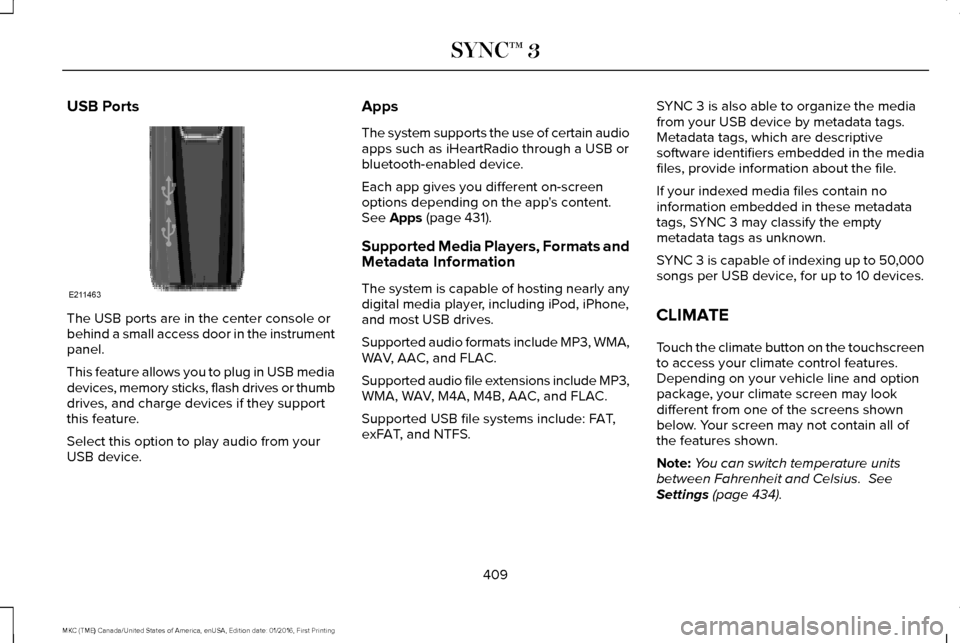
USB Ports
The USB ports are in the center console or
behind a small access door in the instrument
panel.
This feature allows you to plug in USB media
devices, memory sticks, flash drives or thumb
drives, and charge devices if they support
this feature.
Select this option to play audio from your
USB device. Apps
The system supports the use of certain audio
apps such as iHeartRadio through a USB or
bluetooth-enabled device.
Each app gives you different on-screen
options depending on the app's content.
See Apps (page 431).
Supported Media Players, Formats and
Metadata Information
The system is capable of hosting nearly any
digital media player, including iPod, iPhone,
and most USB drives.
Supported audio formats include MP3, WMA,
WAV, AAC, and FLAC.
Supported audio file extensions include MP3,
WMA, WAV, M4A, M4B, AAC, and FLAC.
Supported USB file systems include: FAT,
exFAT, and NTFS. SYNC 3 is also able to organize the media
from your USB device by metadata tags.
Metadata tags, which are descriptive
software identifiers embedded in the media
files, provide information about the file.
If your indexed media files contain no
information embedded in these metadata
tags, SYNC 3 may classify the empty
metadata tags as unknown.
SYNC 3 is capable of indexing up to 50,000
songs per USB device, for up to 10 devices.
CLIMATE
Touch the climate button on the touchscreen
to access your climate control features.
Depending on your vehicle line and option
package, your climate screen may look
different from one of the screens shown
below. Your screen may not contain all of
the features shown.
Note:
You can switch temperature units
between Fahrenheit and Celsius.
See
Settings (page 434).
409
MKC (TME) Canada/United States of America, enUSA, Edition date: 01/2016, First Printing SYNC™ 3E211463
Page 415 of 538

Passenger temperature: Touch up or down to adjust the temperature.
G
Fan speed:
Touch up or down to increase or decrease the volume of air that circulate\
s in your vehicle.
H
Note:
You cannot adjust the fan speed when the system is set to AUTO or MAX A/C.
A/C:
A pop-up appears on the screen to display the air conditioning options.\
I
MAX A/C:
Touch the button to activate and maximize cooling. The driver and passeng\
er temperatures are set to LO, recirculated
air flows through the instrument panel vents, air conditioning automatic\
ally turns on and the fan automatically adjusts to the highest
speed.
A/C:
Touch to switch the air conditioning on or off. Use A/C with recirculated air to improve cooling performance and effic\
iency.
Note:
In certain conditions (for example, Max Defrost), the air conditioning compressor may continue to operate\
even when you
switch the air conditioning A/C button off.
Recirculated air:
Touch to switch the recirculated air on or off. When recirculated air is on, it may reduce the amount of time needed
to cool down the interior (when used with A/C) and help reduce odors f\
rom reaching the interior.
Note:
Recirculatied air may turn off automatically (or the system may preventi\
t from turning on) in all airflow modes except MAX A/C
to reduce risk of fogging. It may also turn on and off automatically in \
Panel or Panel/Floor airflow modes during hot weather in order
to improve cooling efficiency.
Manual airflow distribution controls:
Select these controls individually, together, or with Defrost to direct the air flow to the area
you desire.
J
Panel:
Distributes air through the instrument panel vents.
Floor:
Distributes air through the demister vents, floor vents and rear seat f\
loor vents.
412
MKC (TME) Canada/United States of America, enUSA, Edition date: 01/2016, First Printing SYNC™ 3
Page 529 of 538

AWD
See: All-Wheel Drive...........................................179
B
Battery See: Changing the 12V Battery......................296
Blind Spot Information System.................223
Switching the System Off and On..................225
System Errors......................................................225
Using the System...............................................223
Bonnet Lock See: Opening and Closing the Hood............286
Booster Seats..................................................25 Types of Booster Seats.......................................26
Brake Fluid Check.......................................295
Brakes..............................................................184 General Information............................................184
Breaking-In.....................................................249
Bulb Specification Chart
..............................301
C
Cabin Air Filter................................................137
California Proposition 65................................11
Capacities and Specifications - 2.0L EcoBoost™...................................................350
Specifications.......................................................351 Capacities and Specifications - 2.3L
EcoBoost™....................................................356
Specifications......................................................357
Capacities and Specifications
...................344
Car Wash See: Cleaning the Exterior...............................306
Center Console.............................................155
Changing a Bulb...........................................300 Front Direction Indicator...................................301
High Intensity Discharge Headlamp.............300
LED Lamps............................................................301
License Plate Lamp.............................................301
Changing a Fuse..........................................283 Fuses.....................................................................283
Changing a Road Wheel.............................336 Dissimilar Spare Wheel and Tire Assembly
Information.......................................................337
Tire Change Procedure....................................
338
Changing the 12V Battery..........................296
Changing the Engine Air Filter.................303
Changing the Wiper Blades......................298 Front Wiper Blades............................................298
Rear Window Wiper Blade...............................299
Checking MyKey System Status.................60 MyKey Distance....................................................60
Number of Admin Keys........................................61
Number of MyKeys...............................................60
Checking the Wiper Blades.......................298 Child Restraint and Seatbelt
Maintenance..................................................38
Child Restraint Positioning
...........................28
Child Safety.......................................................17
General Information...............................................17
Child Safety Locks..........................................29 Left-Hand Side.......................................................30
Right-Hand Side....................................................30
Cleaning Leather Seats................................311
Cleaning Products
.......................................305
Cleaning the Alloy Wheels.........................312
Cleaning the Engine
....................................307
Cleaning the Exterior..................................306 Exterior Chrome Parts.......................................306
Exterior Plastic Parts..........................................307
Stripes or Graphics.............................................307
Underbody...........................................................307
Under Hood.........................................................307
Cleaning the Instrument Panel and Instrument Cluster Lens............................310
Cleaning the Interior....................................308 Cleaning Black Label or Presidential
Interior..............................................................309
Cleaning the Windows and Wiper Blades...........................................................308
Clearing All MyKeys.......................................60
Climate............................................................409
Climate Control..............................................133
526
MKC (TME) Canada/United States of America, enUSA, Edition date: 01/2016, First Printing Index