2017 LINCOLN MKC key battery
[x] Cancel search: key batteryPage 160 of 538

Note:
You may have to press the push
button ignition switch twice to switch the
ignition on.
Start: Starts the engine.
• Press the brake pedal, and then press
the button for any length of time. An
indicator light on the button illuminates
when then ignition is on and when the
engine starts.
STARTING A GASOLINE ENGINE
When you start the engine, the idle speed
increases, this helps to warm up the engine.
If the engine idle speed does not slow down
automatically, have your vehicle checked by
an authorized dealer.
Note: If your vehicle is equipped with remote
start, you can start your vehicle with the
remote, and then drive away by pressing the
brake pedal and pushing a button on the
transmission. This allows you to drive away
without pressing the engine start button. Before starting the engine, check the
following:
•
Make sure all occupants have fastened
their safety belts.
• Make sure the headlamps and electrical
accessories are off.
• Make sure the parking brake is on.
• Put the transmission in
P.
Note: Do not touch the accelerator pedal.
1. Fully press the brake pedal.
2. Press the button.
The system does not function if:
• The key frequencies are jammed.
• The key battery has no charge.
If you are unable to start the engine, do the
following: 1. Open the center console lid.
2. Slide the remote into the back-up slot.
3. With the key in this position, press the
brake pedal, then the START button to
switch the ignition on and start your
vehicle.
Fast Restart
The fast restart feature allows you to restart
the engine within 20 seconds of switching it
off, even if a valid key is not present.
157
MKC (TME) Canada/United States of America, enUSA, Edition date: 01/2016, First Printing Starting and Stopping the EngineE170454
Page 161 of 538

Within 20 seconds of switching the engine
off, press the brake pedal and press the
button. After 20 seconds have expired, you
can no longer restart the engine without the
key present inside your vehicle.
Once the engine has started, it remains
running until you press the button, even if
the system does not detect a valid key. If you
open and close a door while the engine is
running, the system searches for a valid key.
You cannot restart the engine if the system
does not detect a valid key within 20
seconds.
Failure to Start
If you cannot start the engine after three
attempts, wait 10 seconds and follow this
procedure:
1. Fully press the brake pedal.
2. Fully press the accelerator pedal and
hold it there.
3. Start the engine. Note:
You can crank the engine for a total
of 60 seconds (without the engine starting)
before the starting system temporarily
disables. The 60 seconds does not have to
be all at once. For example, if you crank the
engine three times for 20 seconds each time,
without the engine starting, you reached the
60-second time limit. A message appears in
the information display alerting you that you
exceeded the cranking time. You cannot
attempt to start the engine for at least 15
minutes. After 15 minutes, you are limited to
a 15-second engine cranking time. You need
to wait 60 minutes before you can crank the
engine for 60 seconds again.
Automatic Engine Shutdown
If your vehicle is equipped with a keyless
ignition, it has a feature that automatically
shuts down the engine if it has been idling
for an extended period. The ignition also
turns off in order to save battery power.
Before the engine shuts down, a message
appears in the information display showing
a timer counting down from 30 seconds. If you do not intervene within 30 seconds, the
engine shuts down. Another message
appears in the information display to inform
you that the engine has shut down in order
to save fuel. Start your vehicle as you
normally do.
Automatic Engine Shutdown Override
Note:
You cannot permanently switch off the
automatic engine shutdown feature. When
you switch it off temporarily, it turns on at
the next ignition cycle.
You can stop the engine shutdown, or reset
the timer, at any point before the 30-second
countdown has expired by doing any of the
following:
158
MKC (TME) Canada/United States of America, enUSA, Edition date: 01/2016, First Printing Starting and Stopping the Engine
Page 175 of 538

Readiness for Inspection/Maintenance
(I/M) Testing
Some state/provincial and local governments
may have Inspection/Maintenance (I/M)
programs to inspect the emission control
equipment on your vehicle. Failure to pass
this inspection could prevent you from
getting a vehicle registration.
If the service engine soon indicator
is on or the bulb does not work,
you may need to have the vehicle
serviced. See On-Board Diagnostics (OBD-II).
Your vehicle may not pass the I/M test if the
service engine soon indicator is on or not
working properly (bulb is burned out), or if
the OBD-II system has determined that some
of the emission control systems have not
been properly checked. In this case, your
vehicle is not ready for I/M testing.
If the vehicle ’s engine or transmission has
just been serviced, or the battery has
recently run down or been replaced, the
OBD-II system may indicate that the vehicle
is not ready for I/M testing. To determine if
the vehicle is ready for I/M testing, turn the ignition key to the on position for 15 seconds
without cranking the engine. If the service
engine soon indicator blinks eight times, it
means that the vehicle is not ready for I/M
testing; if the service engine soon indicator
stays on solid, it means that the vehicle is
ready for I/M testing.
The OBD-II system monitors the emission
control system during normal driving. A
complete check may take several days. If the
vehicle is not ready for I/M testing, you may
need to perform the following driving cycle
consisting of mixed city and highway driving:
Drive on an expressway or highway for a
steady 15 minutes, followed by 20 minutes
of stop-and-go driving with at least four
30-second idle periods.
Allow the vehicle to sit for at least eight hours
without starting the engine. Then, start the
engine and complete the above driving
cycle. The engine must warm up to its normal
operating temperature. Once started, do not
turn off the engine until the above driving
cycle is complete. If the vehicle is still not
ready for I/M testing, you will have to repeat
the above driving cycle.
172
MKC (TME) Canada/United States of America, enUSA, Edition date: 01/2016, First Printing Fuel and Refueling
Page 255 of 538

ROADSIDE ASSISTANCE
Vehicles Sold in the United States:
Getting Roadside Assistance
If you ever need help on the road, the Lincoln
Motor Company is there for you with
nationwide, 24-hours-a-day,
seven-days-a-week assistance.
The service is available:
•
Throughout the life of the vehicle for
original owners.
• For six years or 68,351 mi (110,000 km)
(whichever comes first) within the
extended powertrain warranty coverage
period for subsequent owners.
• For the coverage period listed on the
Roadside Assistance Card included in
your Owner's Manual portfolio.
This complimentary Roadside Assistance
program is separate from the New Vehicle
Limited Warranty, and includes:
• A flat tire change with a good spare
(except vehicles supplied with a tire
inflation kit).
• Battery jump start. •
Lock-out assistance (key replacement
cost is the client's responsibility).
• Fuel delivery — independent service
contractors, if not prohibited by state,
local or municipal law shall deliver up to
2 gal (8 L)
of gasoline or 5 gal (20 L) of
diesel fuel to a disabled vehicle.
Roadside Assistance limits fuel delivery
service to two no-charge occurrences
within a 12-month period.
• Winch out — available within 98 ft (30 m)
of a paved or county maintained road,
no recoveries.
• Towing — independent service
contractors, if not prohibited by state,
local or municipal law shall tow Lincoln
eligible vehicles to the client's selling or
preferred dealer within 99 mi (160 km) of
the disablement location or to the nearest
Lincoln dealer. If a client requests a tow
to a selling or preferred dealer that is
more than
99 mi (160 km) from the
disablement location, the client shall be
responsible for any mileage costs in
excess of
99 mi (160 km). Roadside Assistance includes up to $200
coverage for a towed trailer if the disabled
eligible vehicle requires service at the
nearest authorized dealer. If the towing
vehicle is operational but the trailer is not,
then the trailer does not qualify for any
roadside services.
Vehicles Sold in the United States:
Using Roadside Assistance
United States Lincoln vehicle clients who
require Roadside Assistance, call
1-800-521-4140.
If you need to arrange roadside assistance
for yourself, Lincoln Motor Company will
reimburse a reasonable amount for towing
to the nearest Lincoln dealership within 99 mi
(160 km)
. To obtain reimbursement
information, United States Lincoln vehicle
clients, call 1-800-521-4140. Lincoln Motor
Company will ask you to submit your original
receipts.
252
MKC (TME) Canada/United States of America, enUSA, Edition date: 01/2016, First Printing Roadside Emergencies
Page 257 of 538

Should your vehicle shut off after a collision,
you may restart your vehicle. For vehicles
equipped with a key system:
1. Switch off the ignition.
2. Switch on the ignition.
3. Repeat Steps 1 and 2 to re-enable the
fuel pump.
For vehicles equipped with a push button
start system:
1. Press the START/STOP button to switch
off the ignition.
2. Press the brake pedal and press the START/STOP button to switch on the
ignition.
3. Remove your foot from the brake pedal and press the
START/STOP button to
switch off the ignition.
4. You can either attempt to start the engine
by pressing the brake pedal and the
START/STOP
button, or switch on the
ignition only by pressing the
START/STOP
button without pressing
the brake pedal. Both ways re-enable the
fuel system. Note:
When you try to restart your vehicle
after a fuel shutoff, the vehicle makes sure
that various systems are safe to restart.
Once your vehicle determines that the
systems are safe, then the vehicle will allow
you to restart.
Note: In the event that your vehicle does not
restart after your third attempt, contact an
authorized dealer.
JUMP STARTING THE VEHICLE WARNINGS
The gases around the battery can
explode if exposed to flames, sparks,
or lit cigarettes. An explosion could result in
personal injury or vehicle damage. Batteries contain sulfuric acid which
can burn skin, eyes and clothing, if
contacted. Use only an adequate-sized cable with
insulated clamps. Preparing Your Vehicle
Note:
Do not attempt to push-start your
automatic transmission vehicle. Automatic
transmissions do not have push-start
capability. Attempting to push-start a vehicle
with an automatic transmission may cause
transmission damage.
Note: Use only a 12-volt supply to start your
vehicle.
Note: Do not disconnect the battery of the
disabled vehicle as this could damage the
vehicle's electrical system.
Park the booster vehicle close to the hood
of the disabled vehicle, making sure the two
vehicles do not touch. Turn all accessories
off.
254
MKC (TME) Canada/United States of America, enUSA, Edition date: 01/2016, First Printing Roadside Emergencies
Page 421 of 538
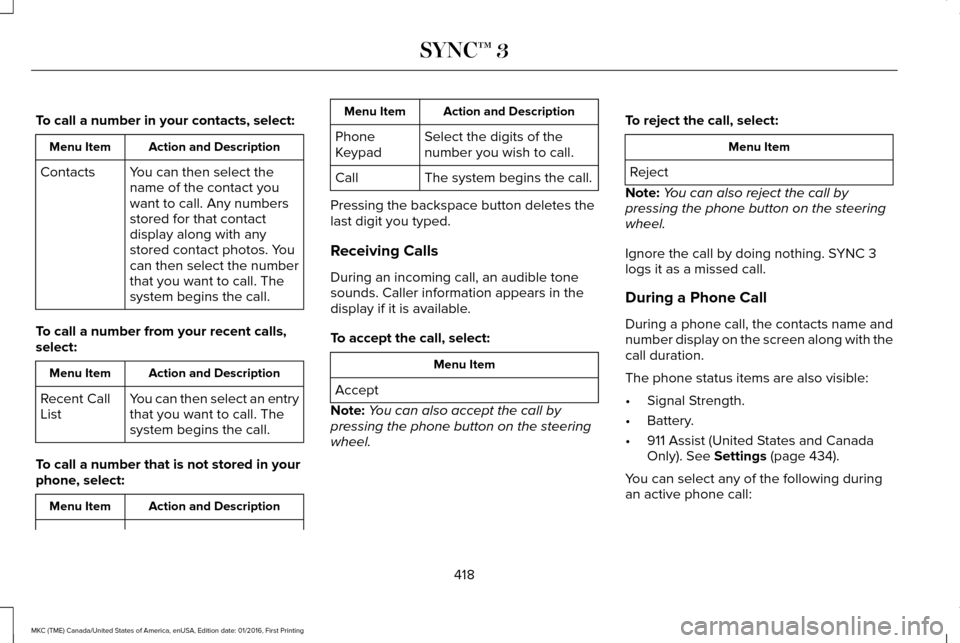
To call a number in your contacts, select:
Action and Description
Menu Item
You can then select the
name of the contact you
want to call. Any numbers
stored for that contact
display along with any
stored contact photos. You
can then select the number
that you want to call. The
system begins the call.
Contacts
To call a number from your recent calls,
select: Action and Description
Menu Item
You can then select an entry
that you want to call. The
system begins the call.
Recent Call
List
To call a number that is not stored in your
phone, select: Action and Description
Menu Item Action and Description
Menu Item
Select the digits of the
number you wish to call.
Phone
Keypad
The system begins the call.
Call
Pressing the backspace button deletes the
last digit you typed.
Receiving Calls
During an incoming call, an audible tone
sounds. Caller information appears in the
display if it is available.
To accept the call, select: Menu Item
Accept
Note: You can also accept the call by
pressing the phone button on the steering
wheel. To reject the call, select: Menu Item
Reject
Note: You can also reject the call by
pressing the phone button on the steering
wheel.
Ignore the call by doing nothing. SYNC 3
logs it as a missed call.
During a Phone Call
During a phone call, the contacts name and
number display on the screen along with the
call duration.
The phone status items are also visible:
• Signal Strength.
• Battery.
• 911 Assist (United States and Canada
Only). See Settings (page 434).
You can select any of the following during
an active phone call:
418
MKC (TME) Canada/United States of America, enUSA, Edition date: 01/2016, First Printing SYNC™ 3
Page 529 of 538

AWD
See: All-Wheel Drive...........................................179
B
Battery See: Changing the 12V Battery......................296
Blind Spot Information System.................223
Switching the System Off and On..................225
System Errors......................................................225
Using the System...............................................223
Bonnet Lock See: Opening and Closing the Hood............286
Booster Seats..................................................25 Types of Booster Seats.......................................26
Brake Fluid Check.......................................295
Brakes..............................................................184 General Information............................................184
Breaking-In.....................................................249
Bulb Specification Chart
..............................301
C
Cabin Air Filter................................................137
California Proposition 65................................11
Capacities and Specifications - 2.0L EcoBoost™...................................................350
Specifications.......................................................351 Capacities and Specifications - 2.3L
EcoBoost™....................................................356
Specifications......................................................357
Capacities and Specifications
...................344
Car Wash See: Cleaning the Exterior...............................306
Center Console.............................................155
Changing a Bulb...........................................300 Front Direction Indicator...................................301
High Intensity Discharge Headlamp.............300
LED Lamps............................................................301
License Plate Lamp.............................................301
Changing a Fuse..........................................283 Fuses.....................................................................283
Changing a Road Wheel.............................336 Dissimilar Spare Wheel and Tire Assembly
Information.......................................................337
Tire Change Procedure....................................
338
Changing the 12V Battery..........................296
Changing the Engine Air Filter.................303
Changing the Wiper Blades......................298 Front Wiper Blades............................................298
Rear Window Wiper Blade...............................299
Checking MyKey System Status.................60 MyKey Distance....................................................60
Number of Admin Keys........................................61
Number of MyKeys...............................................60
Checking the Wiper Blades.......................298 Child Restraint and Seatbelt
Maintenance..................................................38
Child Restraint Positioning
...........................28
Child Safety.......................................................17
General Information...............................................17
Child Safety Locks..........................................29 Left-Hand Side.......................................................30
Right-Hand Side....................................................30
Cleaning Leather Seats................................311
Cleaning Products
.......................................305
Cleaning the Alloy Wheels.........................312
Cleaning the Engine
....................................307
Cleaning the Exterior..................................306 Exterior Chrome Parts.......................................306
Exterior Plastic Parts..........................................307
Stripes or Graphics.............................................307
Underbody...........................................................307
Under Hood.........................................................307
Cleaning the Instrument Panel and Instrument Cluster Lens............................310
Cleaning the Interior....................................308 Cleaning Black Label or Presidential
Interior..............................................................309
Cleaning the Windows and Wiper Blades...........................................................308
Clearing All MyKeys.......................................60
Climate............................................................409
Climate Control..............................................133
526
MKC (TME) Canada/United States of America, enUSA, Edition date: 01/2016, First Printing Index
Page 530 of 538

Climate Controlled Seats............................146
Cooled Seats........................................................147
Collision Warning System..........................230 Principle Of Operation......................................230
Coolant Check See: Engine Coolant Check.............................291
Crash Sensors and Airbag Indicator
..........49
Creating a MyKey...........................................59 Programming or Changing Configurable
Settings...............................................................60
Cross Traffic Alert
.........................................225
False Alerts..........................................................229
Switching the System Off and On..................229
System Errors......................................................229
System Lights, Messages and Audible
Alerts.................................................................228
System Limitations.............................................228
Using the System...............................................225
Cruise Control
.................................................80
Principle of Operation.......................................208
Type 1.......................................................................80
Type 2......................................................................80
Cruise control See: Using Cruise Control...............................208
Customer Assistance
..................................259 D
Data Recording
..................................................9
Event Data Recording...........................................10
Service Data Recording.........................................9
Daytime Running Lamps...............................89 Type 1 - Conventional
(Non-Configurable)..........................................89
Type 2 - Configurable..........................................89
Direction Indicators.........................................91
Drive Control
.................................................233
LINCOLN DRIVE CONTROL............................233
Driver Alert
......................................................217
Using Driver Alert................................................217
Driver and Passenger Airbags
....................42
Children and Airbags...........................................43
Proper Driver and Front Passenger Seating
Adjustment.........................................................43
Driver Knee Airbag.........................................48
Driving Aids.....................................................217
Driving Hints
..................................................249
Driving Through Water...............................250
DRL See: Daytime Running Lamps...........................89
E
Economical Driving......................................249 Electric Parking Brake..................................185
Applying the electric parking brake...............185
Applying the electric parking brake when the
vehicle is moving............................................186
Battery With No Charge.....................................187
Releasing the electric parking brake.............186
Emission Control System
.............................170
On-Board Diagnostics (OBD-II).........................171
Readiness for Inspection/Maintenance (I/M)
Testing................................................................172
End User License Agreement
...................504
VEHICLE SOFTWARE END USER LICENSE
AGREEMENT (EULA) ....................................504
Engine Block Heater....................................160 Using the Engine Block Heater.......................160
Engine Coolant Check.................................291 Adding Engine Coolant....................................293
Checking the Engine Coolant..........................
291
Recycled Engine Coolant.................................293
Severe Climates.................................................293
What You Should Know About Fail-Safe Cooling.............................................................294
Engine Immobilizer See: Passive Anti-Theft System........................75
Engine Oil Check.........................................290 Adding Engine Oil..............................................290
Engine Oil Dipstick......................................290
527
MKC (TME) Canada/United States of America, enUSA, Edition date: 01/2016, First Printing Index