Page 177 of 640
1773-2. Opening, closing and locking the doors and trunk
3
Operation of each component
RC300h_EE(OM24740E)
WARNING
■Caution regarding interference with electronic devices
●People with implantable cardiac pacemakers, cardiac resynchronization therapy- pacemakers or implantable cardioverter de fibrillators should maintain a reasonable
distance between themselves and the smart entry & start system antennas. ( P. 155) The radio waves may affect the operation of such devices. If necessary, the entryfunction can be disabled. Ask any authoriz ed Lexus dealer or repairer, or another
duly qualified and equipped professional for details, such as the frequency of radio waves and timing of the emitted radio waves. Then, consult your doctor to see if you should disable the entry function.
●Users of any electrical medical device other than implantable cardiac pacemakers,cardiac resynchronization therapy-pacemakers or implantable cardioverterdefibrillators should consult the manufacturer of the device for information about its
operation under the influence of radio waves. Radio waves could have unexpected effects on the operation of such medicaldevices.
Ask any authorized Lexus dealer or repairer, or another duly qualified and equipped professional for details on disabling the entry function.
Page 179 of 640
1793-3. Adjusting the seats
3
Operation of each component
RC300h_EE(OM24740E)
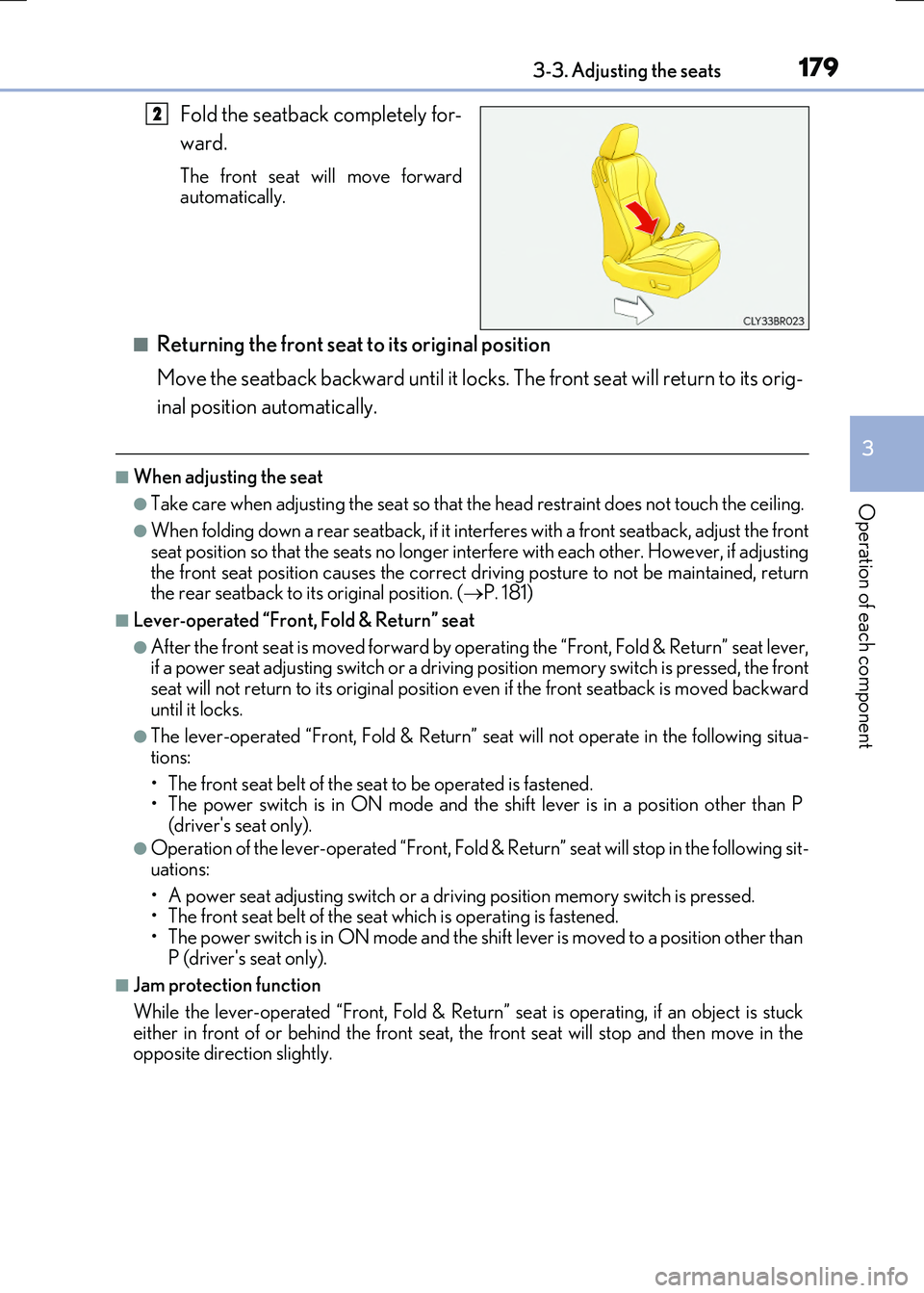
Fold the seatback completely for-
ward.
The front seat will move forward automatically.
■Returning the front seat to its original position
Move the seatback backward until it locks. The front seat will return to its orig-
inal position automatically.
■When adjusting the seat
●Take care when adjusting the seat so that the head restraint does not touch the ceiling.
●When folding down a rear seatback, if it interferes with a front seatback, adjust the front
seat position so that the seats no longer interfere with each other. However, if adjusting the front seat position causes the correct dr iving posture to not be maintained, return the rear seatback to its original position. ( P. 181)
■Lever-operated “Front, Fold & Return” seat
●After the front seat is moved forward by operating the “Front, Fold & Return” seat lever, if a power seat adjustin g switch or a driving position memory switch is pressed, the front
seat will not return to its original position even if the front seatback is moved backward until it locks.
●The lever-operated “Front, Fold & Return” se at will not operate in the following situa-
tions:
• The front seat belt of the seat to be operated is fastened. • The power switch is in ON mode and the sh ift lever is in a position other than P
(driver's seat only).
●Operation of the lever-operated “Front, Fold & Return” seat will stop in the following sit-
uations:
• A power seat adjusting switch or a driv ing position memory switch is pressed. • The front seat belt of the seat which is operating is fastened.
• The power switch is in ON mode and the sh ift lever is moved to a position other than P (driver's seat only).
■Jam protection function
While the lever-operated “Front, Fold & Return” seat is operating, if an object is stuck either in front of or behind the front seat, the front seat will stop and then move in the opposite direction slightly.
2
Page 180 of 640
1803-3. Adjusting the seats
RC300h_EE(OM24740E)
WARNING
■When adjusting the seat position
●Take care when adjusting the seat position to ensure that other passengers are not injured by the moving seat.
●Do not put your hands under the seat or near the moving parts to avoid injury.Fingers or hands may become jammed in the seat mechanism.
●Make sure to leave enough space around the feet so they do not get stuck.
■Seat adjustment
To reduce the risk of sliding under the lap be lt during a collision, do not recline the seat more than necessary.
If the seat is too reclined, th e lap belt may slide past the hips and apply restraint forces directly to the abdomen, or your neck may contact the shoulder belt, increasing the riskof death or serious injury in the event of an accident.
Adjustments should not be made while driving as the seat may unexpectedly move and cause the driver to lose control of the vehicle.
■Lever-operated “Front , Fold & Return” seat
●Before operating the lever-operated “Front, Fold & Return” seat, ensure that any sur- rounding passengers or objects will not contact the seat.
●Make sure the seatback is locked securely before driving.
●Never operate the lever-operated “Front, Fold & Return” seat while the vehicle ismoving.
■Jam protection function
Do not use a hand, foot, or any other part of your body to intentionally activate the jam protection function.
Page 181 of 640
1813-3. Adjusting the seats
3
Operation of each component
RC300h_EE(OM24740E)
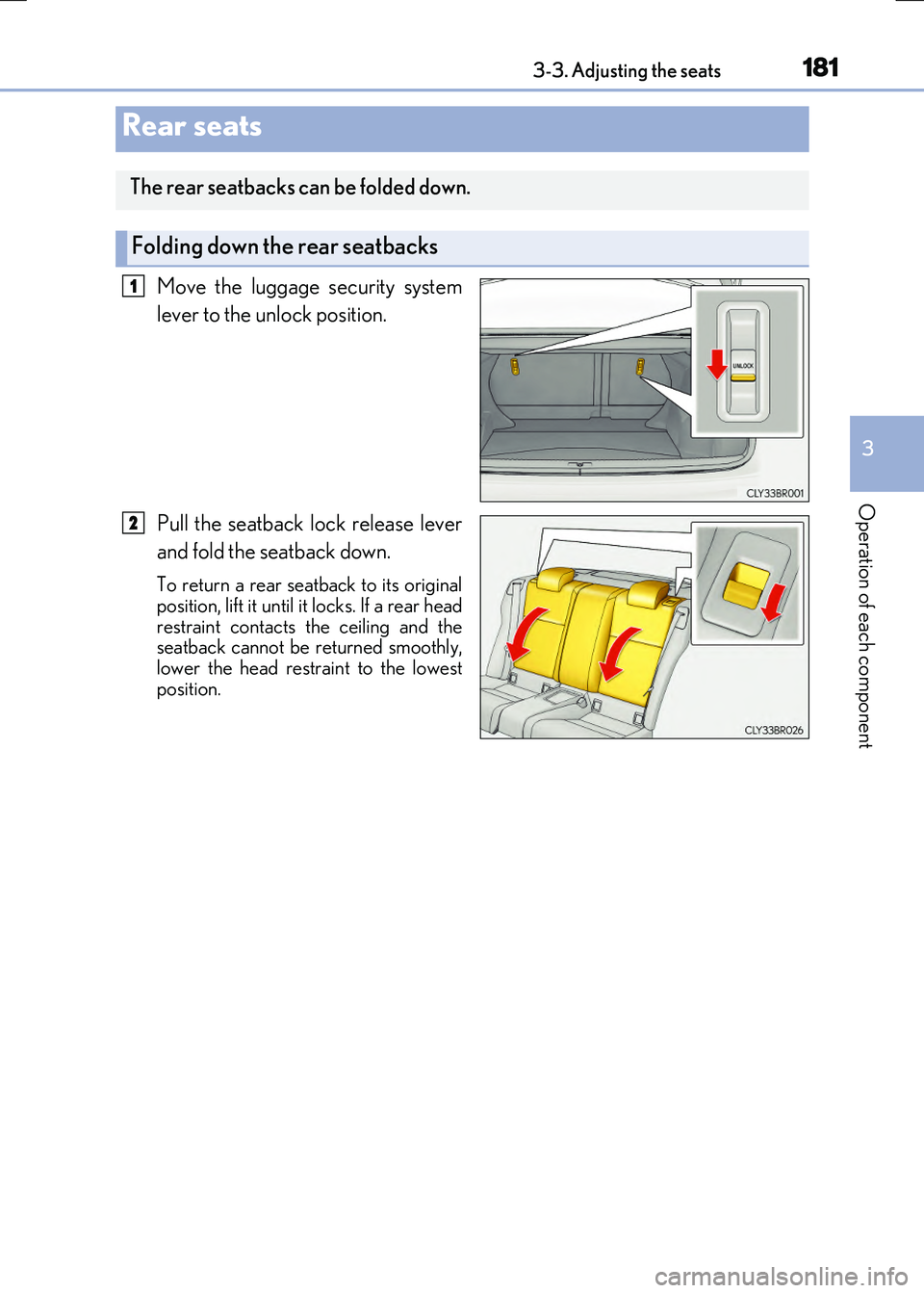
Move the luggage security system
lever to the unlock position.
Pull the seatback lock release lever
and fold the seatback down.
To return a rear seatback to its original
position, lift it until it locks. If a rear head restraint contacts the ceiling and theseatback cannot be returned smoothly,
lower the head restraint to the lowest position.
Rear seats
The rear seatbacks can be folded down.
Folding down the rear seatbacks
1
2
Page 182 of 640
1823-3. Adjusting the seats
RC300h_EE(OM24740E)
P. 151
Luggage security system
WARNING
Observe the following precautions. Failure to do so may result in death or serious injury.
■When folding the rear seatbacks down
●Do not fold the seatbacks down while driving.
●Stop the vehicle on level ground, set the parking brake and shift the shift lever to P.
●Do not allow anyone to sit on a folded seatback or in the trunk while driving.
●Do not allow children to enter the trunk.
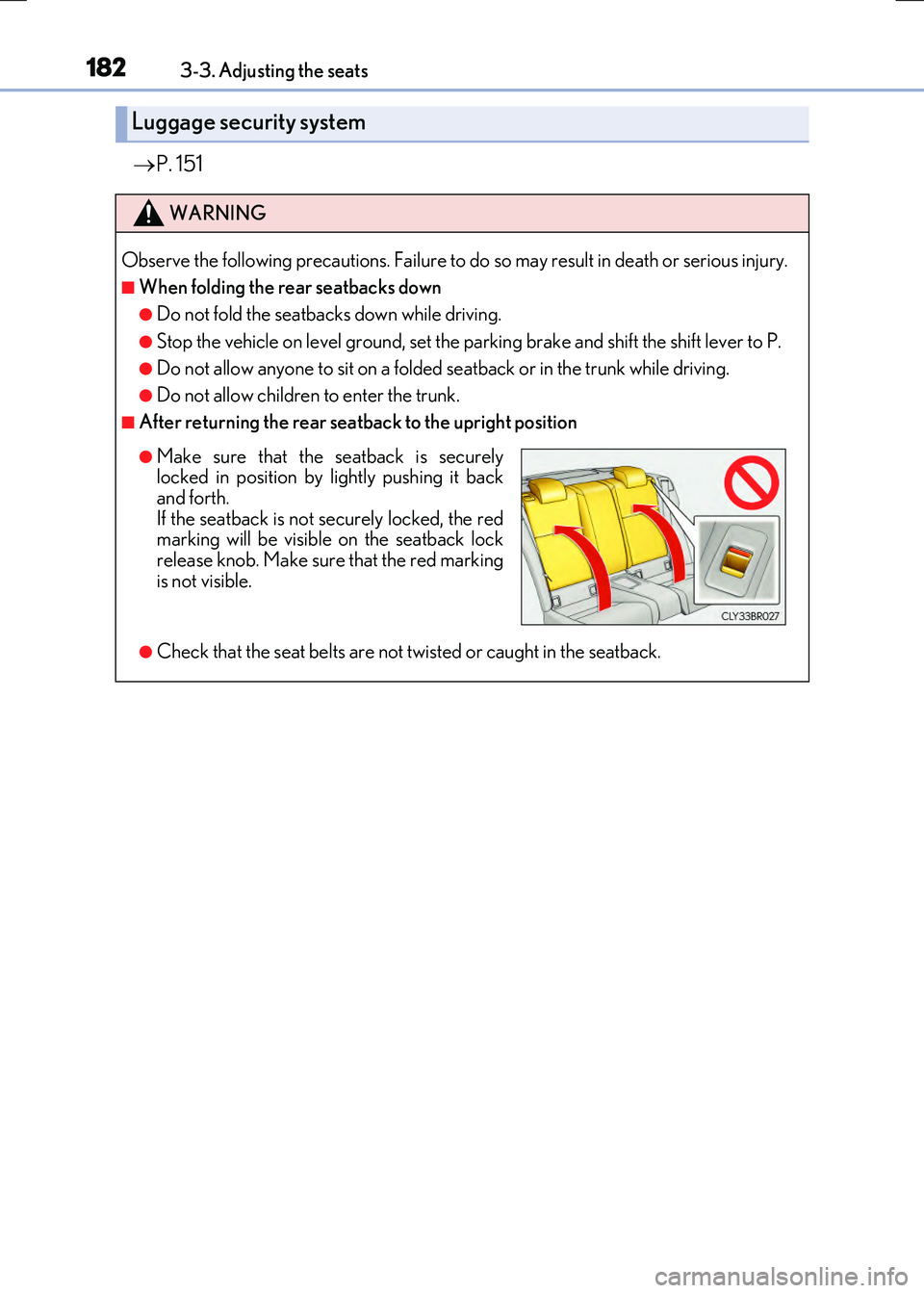
■After returning the rear seatback to the upright position
●Check that the seat belts are not twisted or caught in the seatback.
●Make sure that the seatback is securely locked in position by lightly pushing it backand forth.
If the seatback is not securely locked, the red marking will be visible on the seatback lockrelease knob. Make sure that the red marking
is not visible.
Page 184 of 640

1843-3. Adjusting the seats
RC300h_EE(OM24740E)
■To stop the position recall operation part-way through
Perform any of the following:
●Press the “SET” button.
●Press button “1”, “2” or “3”.
●Operate any of the seat adjustment switches (only cancels seat position recall).
●Operate the tilt and telescopic steering control switch (only cancels steering wheel position recall).
■Seat positions that can be memorized ( P. 178)
The adjusted positions other than the position adjusted by lumbar support switch can be recorded.
■Operating the driving position memory after turning the power switch off
Recorded seat positions can be activated up to 180 seconds after the driver's door is opened and another 60 seconds after it is closed again.
■In order to correctly use the driving position memory function
If a seat position is already in the furthest possible position and the seat is operated in the same direction, the recorded position may be slightly different when it is recalled.
Each electronic key (including a card key) can be registered to recall your pre-
ferred driving position.
■Registering procedure
Record your driving position to button “1”, “2” or “3” before performing the
following:
Carry only the key you want to register, and then close the driver’s door.
If 2 or more keys are in the vehicle, the driving position cannot be recorded
properly.
Check that the shift lever is in P.
Turn the power switch to ON mode.
Recall the driving position that you want to record.
While pressing the recalled but-
ton, press and hold the door lock
switch (either lock or unlock) until
the buzzer sounds.
If the button could not be registered,
the buzzer sounds continuously for approximately 3 seconds.
Memory recall function
1
2
3
4
Page 185 of 640

1853-3. Adjusting the seats
3
Operation of each component
RC300h_EE(OM24740E)
■Recall procedure
Carry the electronic key that has been registered to the driving position,
and then unlock and open the driver’s door using the smart entry & start
system or wireless remote control.
The driving position will move to the recorded position (not including the steering wheel).
If the driving position is in a position that has already been recorded, the seat and
outside rear view mirrors will not move.
Turn the power switch to ACCESSORY mode or ON mode.
The steering wheel will move to the recorded position.
■Cancelation procedure
Carry only the key you want to cancel and then close the driver’s door.
If 2 or more keys are in the vehicle, the driving position cannot be canceled
properly.
Turn the power switch to ON mode.
While pressing the “SET” button, press and hold the door lock switch
(either lock or unlock) until the buzzer sounds twice.
If the button could not be canceled, the buzzer sounds continuously for approxi-
mately 3 seconds.
■Recalling the driving position us ing the memory recall function
●Different driving positions can be registered for each electronic key. Therefore, the driving position that is recalled may be different depending on the key being carried.
●If a door other than the driver’s door is unlocked with the smart entry & start system, the
driving position cannot be reca lled. In this case, press the driving position button which has been set.
■Customization
The unlock door settings of the memory recall function can be changed. (Customizable features: P. 607)
WARNING
■Seat adjustment caution
Take care during seat adjustment so that the seat does not strike the rear passenger or
squeeze your body against the steering wheel.
1
2
1
2
Page 186 of 640
1863-3. Adjusting the seats
RC300h_EE(OM24740E)
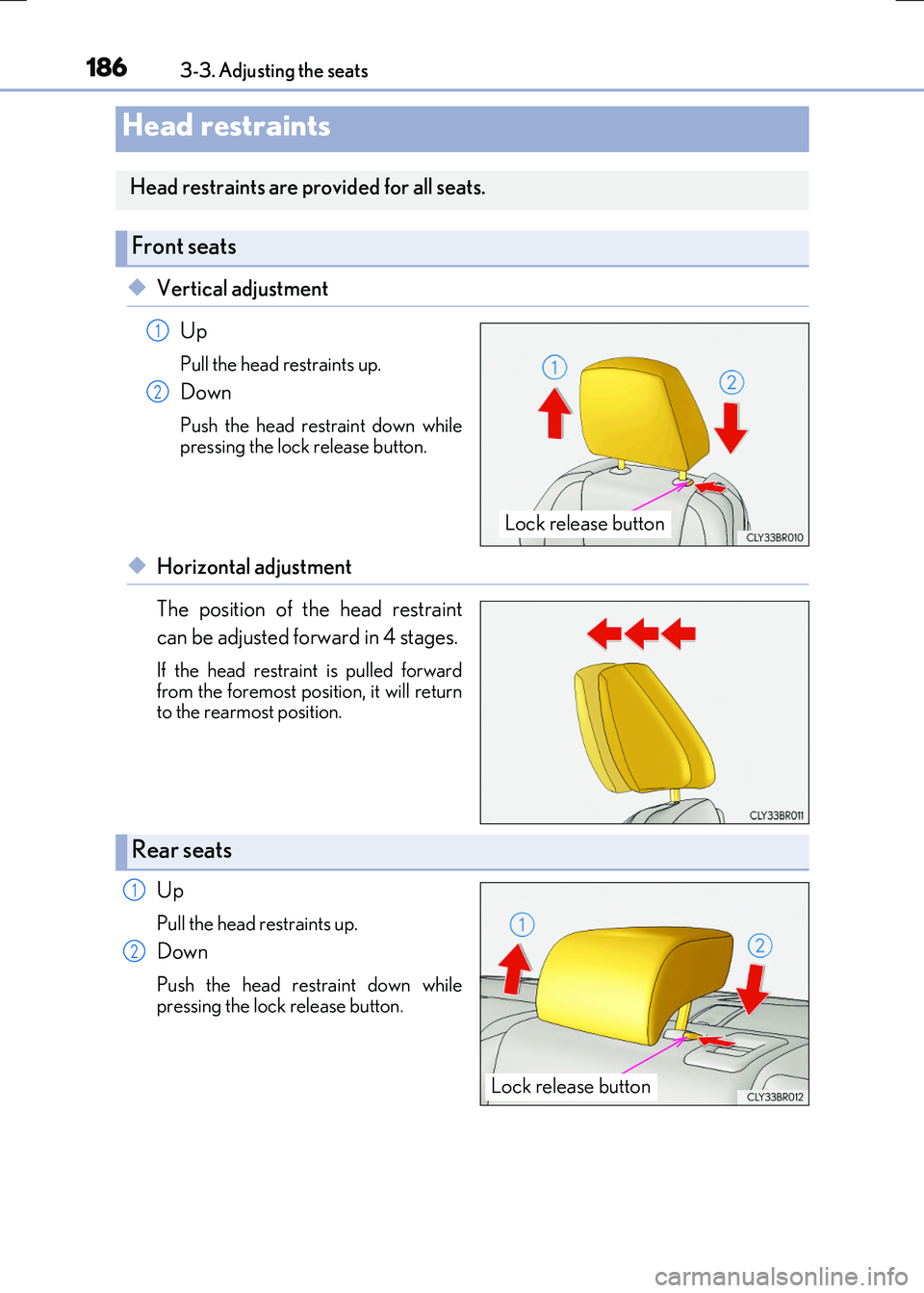
◆Vertical adjustment
Up
Pull the head restraints up.
Down
Push the head restraint down while pressing the lock release button.
◆Horizontal adjustment
The position of the head restraint
can be adjusted forward in 4 stages.
If the head restraint is pulled forward
from the foremost position, it will return to the rearmost position.
Up
Pull the head restraints up.
Down
Push the head restraint down whilepressing the lock release button.
Head restraints
Head restraints are provided for all seats.
Front seats
Lock release button
1
2
Rear seats
Lock release button
1
2