Page 338 of 640
3384-6. Driving tips
RC300h_EE(OM24740E)
Accelerate the vehicle slowly, keep a safe distance between you and the vehicle
ahead, and drive at a reduced speed suitable to road conditions.
●Park the vehicle and move the shift lever to P without setting the parking
brake. The parking brake may freeze up, preventing it from being released. If
the vehicle is parked without setting the parking brake, make sure to block the
wheels.
Failure to do so may be dangerous because it may cause the vehicle to move
unexpectedly, possibly leading to an accident.
●If the vehicle is parked without setting the parking brake, confirm that the shift
lever cannot be moved out of P*.
*: The shift lever will be locked if it is attempted to be shifted from P to any other posi-
tion without depressing the brake pedal. If the shift lever can be shifted from P,
there may be a problem with the shift lock system. Have the vehicle inspected by
your authorized Lexus retailer or Lexu s authorized repairer, or any reliable
repairer immediately.
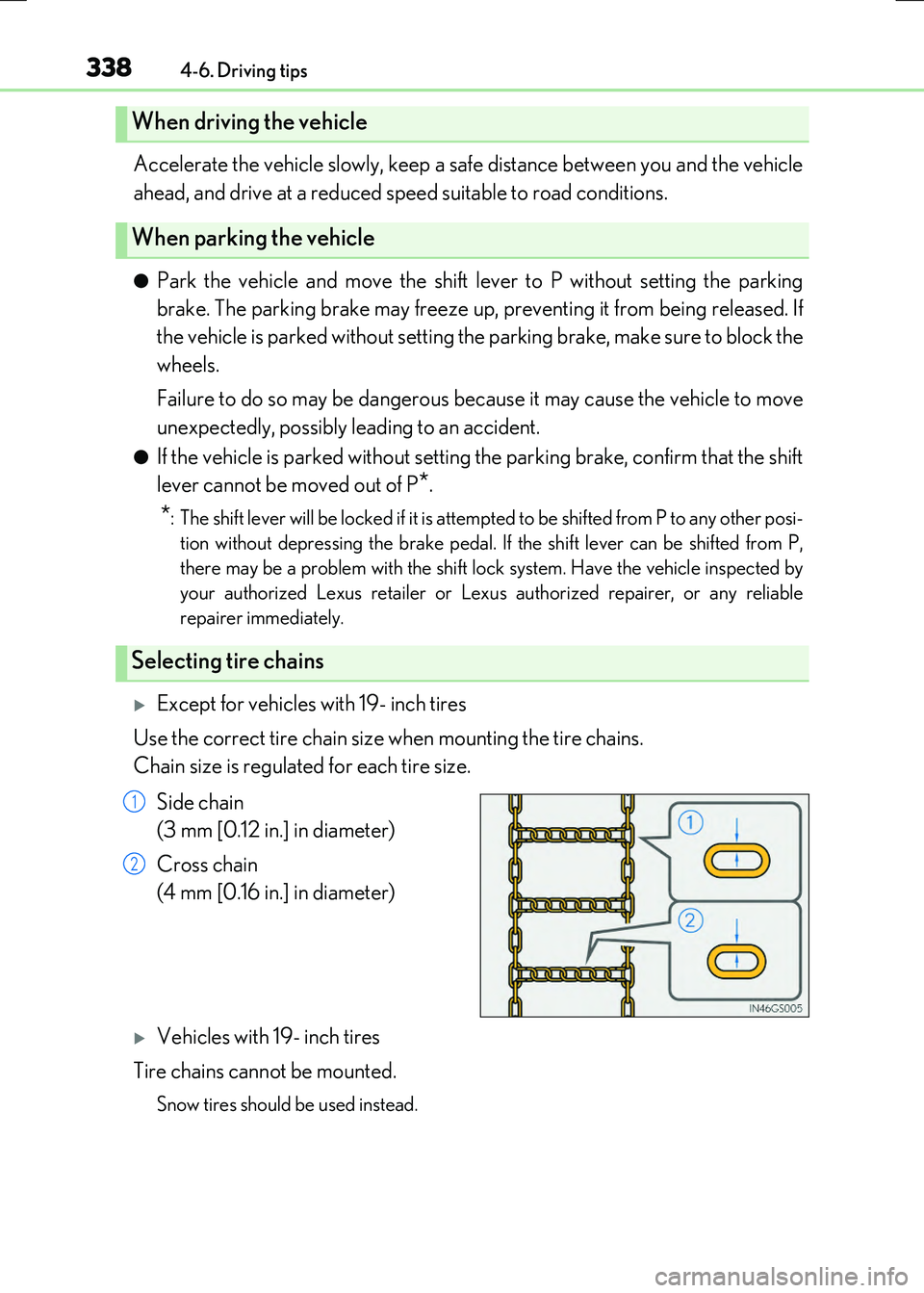
Except for vehicles with 19- inch tires
Use the correct tire chain size when mounting the tire chains.
Chain size is regulated for each tire size.
Side chain
(3 mm [0.12 in.] in diameter)
Cross chain
(4 mm [0.16 in.] in diameter)
Vehicles with 19- inch tires
Tire chains cannot be mounted.
Snow tires should be used instead.
When driving the vehicle
When parking the vehicle
Selecting tire chains
1
2
Page 339 of 640

3394-6. Driving tips
4
Driving
RC300h_EE(OM24740E)
Regulations regarding the use of tire chains vary depending on location and type
of road. Always check local regulations before installing chains.
■Tire chain installation
Observe the following precautions wh en installing and removing chains:
●Install and remove tire chains in a safe location.
●Install tire chains on the rear tires. Do not install tire chains on the front tires.
●Install tire chains on rear tires as tightly as possible. Retighten chains after driving 0.5
1.0 km (1/4 1/2 mile).
●Install tire chains following the instructions provided with the tire chains.
Regulations on the use of tire chains
WARNING
■Driving with snow tires
Observe the following precautions to reduce the risk of accidents.
Failure to do so may result in a loss of vehicle control and cause death or serious injury.
●Use tires of the specified size.
●Maintain the recommended level of air pressure.
●Do not drive at speeds in excess of the speed limit or the speed limit specified for the snow tires being used.
●Use snow tires on all, not just some wheels.
■Driving with tire chains
Observe the following precautions to reduce the risk of accidents. Failure to do so may result in the vehicle being unable to be driven safely, and may
cause death or serious injury.
●Do not drive in excess of the speed limit spec ified for the tire chains being used, or 50 km/h (30 mph), whichever is lower.
●Avoid driving on bumpy road surfaces or over potholes.
●Avoid sudden acceleration, abrupt steering, sudden braking and shifting operations that cause sudden engine braking.
●Slow down sufficiently before entering a curve to ensure that vehicle control is main-tained.
●Vehicles with LDA (Lane Departure Alert): Do not use the LDA system.
Page 342 of 640
342
RC300h_EE(OM24740E)
5-1. Basic Operations
Lexus Display Audio
System ......................................... 344
Steering wheel audio
switches.......................................350
USB/AUX ports ......................... 351
5-2. Setup
Setup menu ..................................353
General settings......................... 354
Voice settings.............................. 357
Display settings ...........................358
5-3. Using the audio system
Selecting the audio
source ..........................................360
Optimal use of the audio
system ........................................... 361
Audio settings ............................. 362
Audio menu screen
operation .................................... 366
5-4. Using the radio
Radio operation.......................... 369
5-5. Playing an audio CD and
MP3/WMA/AAC discs
CD player operation ..................371
Page 343 of 640

343
5
Lexus Display
Audio system
RC300h_EE(OM24740E)
5-6. Using an external device
Listening to an iPod................... 377
Using USB memory
device............................................ 381
Using the AUX port ................ 386
5-7. Connecting Bluetooth®
Steps for using Bluetooth®
devices.........................................387
Registering a Bluetooth®
device.......................................... 389
Selecting a Bluetooth®
device.......................................... 390
Connecting a Bluetooth®
audio player ................................ 391
Connecting a Bluetooth®
phone ...........................................392
Displaying a Bluetooth®
device details ............................393
Detailed Bluetooth®
settings.........................................394
5-8. Bluetooth® Audio
Listening to Bluetooth®
Audio............................................395
5-9. Bluetooth® Phone
Using a Bluetooth®
Phone........................................... 397
Making a call................................ 399
Receiving a call ........................... 402
Speaking on the phone ...........403
Using a Bluetooth®
phone messages .....................405
Using the steering wheel
switches.......................................408
Bluetooth® phone
settings ........................................409
5-10. Phonebook
Contact settings ............................ 411
Messaging setting .......................414
5-11. Bluetooth®
What to do if...
(Troubleshooting).................... 415
Bluetooth®.................................... 418
5-12. Other function
“Information” screen................. 423
MirrorLink ................................ 424
USB photo .................................... 427
Speech command
system .......................................... 429
Some of the functions cannot be operated while driving.
Page 350 of 640

3505-1. Basic Operations
RC300h_EE(OM24740E)
Volume switch
• Increases/decreases volume
• Press and hold: Continuously
increases/decreases volume
Radio mode:
• Press (except manual mode):
Select a radio station
• Press (manual mode): Seek up/
down
• Press and hold (manual mode): Continuously seek up/down
CD, MP3/WMA/AAC disc, Bluetooth®, iPod or USB mode:
• Press: Select a track/file/song/video
• Press and hold: Select a folder/album (MP3/WMA/AAC disc or USB)
“MODE” switch
• Turns the power on, selects audio source
• Press and hold this switch to mute or pause the current operation. To can-
cel the mute or pause, press and hold.
Steering wheel audio switches
Some audio features can be controlled using the switches on the steering
wheel.
Operation may differ depending on the type of audio system or navigation
system. For details, refer to the manual provided with the audio system or nav-
igation system.
Operating the audio system us ing the steering wheel switches
1
2
WARNING
■To reduce the risk of an accident
Exercise care when operating the audio switches on the steering wheel.
3
Page 360 of 640
360
RC300h_EE(OM24740E)
5-3. Using the audio system
Press the button to display the “Source” screen.
If the “Source” screen is not displayed, press the button again.
Select the desired audio source.
The audio source can be selected by pressing the “RADIO” or “MEDIA” button.
Press the “MODE” switch when the audio system is turned on. The audio source
changes each time the “MODE” switch is pressed.
■Rearranging the list
The listing order of the source list can be rearranged.
Move the controller to the left while on the “Source” screen.
Select “Audio source select”.
Select an item you wish to move and then select where to move the item to.
Selecting the audio source
Switching between audio sources such as radio and CD are explained in this
section.
Changing audio source
Using the steering wheel switches to change audio sources
1
2
1
2
3
Page 397 of 640
397
5
Lexus Display Audio system
RC300h_EE(OM24740E)
5-9. Bluetooth® Phone
Before making a phone call, check the connection status, battery charge, call
area and signal strength. (P. 398)
If a Bluetooth® device cannot be connected, check the connection status. If the
device is not connected, either register or reconnect it. (P. 390, 392)
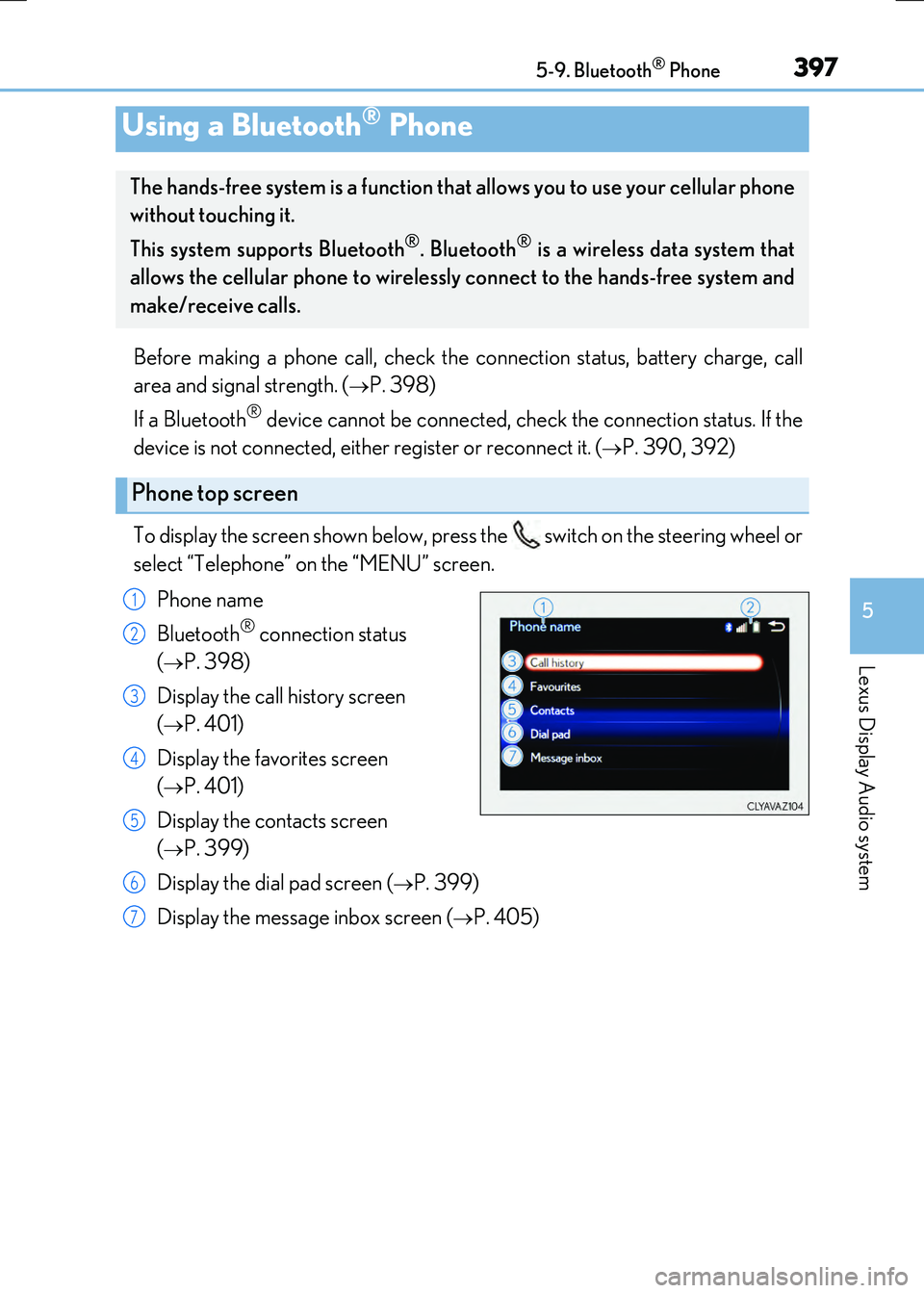
To display the screen shown below, press the switch on the steering wheel or
select “Telephone” on the “MENU” screen.
Phone name
Bluetooth® connection status
(P. 398)
Display the call history screen
(P. 401)
Display the favorites screen
(P. 401)
Display the contacts screen
(P. 399)
Display the dial pad screen (P. 399)
Display the message inbox screen (P. 405)
Using a Bluetooth® Phone
The hands-free system is a function that allows you to use your cellular phone
without touching it.
This system supports Bluetooth®. Bluetooth® is a wireless data system that
allows the cellular phone to wirelessly connect to the hands-free system and
make/receive calls.
Phone top screen
1
2
3
4
5
6
7
Page 399 of 640
3995-9. Bluetooth® Phone
5
Lexus Display Audio system
RC300h_EE(OM24740E)
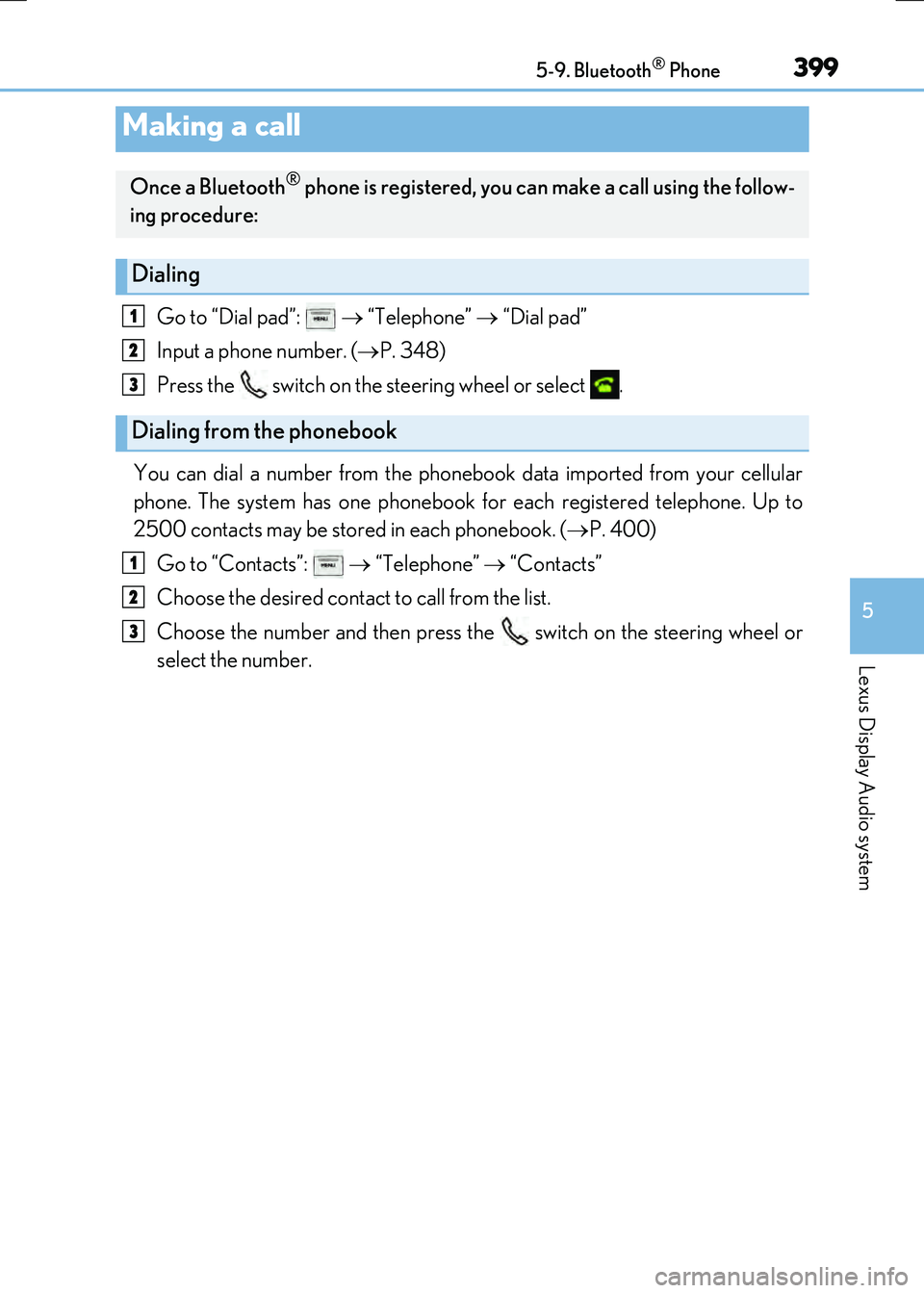
Go to “Dial pad”: “Telephone” “Dial pad”
Input a phone number. ( P. 348)
Press the switch on the steering wheel or select .
You can dial a number from the phonebook data imported from your cellular
phone. The system has one phonebook for each registered telephone. Up to
2500 contacts may be stored in each phonebook. ( P. 400)
Go to “Contacts”: “Telephone” “Contacts”
Choose the desired contact to call from the list.
Choose the number and then press the switch on the steering wheel or
select the number.
Making a call
Once a Bluetooth® phone is registered, you can make a call using the follow-
ing procedure:
Dialing
Dialing from the phonebook
1
2
3
1
2
3