2017 LEXUS RX300H instrument panel
[x] Cancel search: instrument panelPage 232 of 640
232
RC300h_EE(OM24740E)
4-3. Operating the lights and wipers
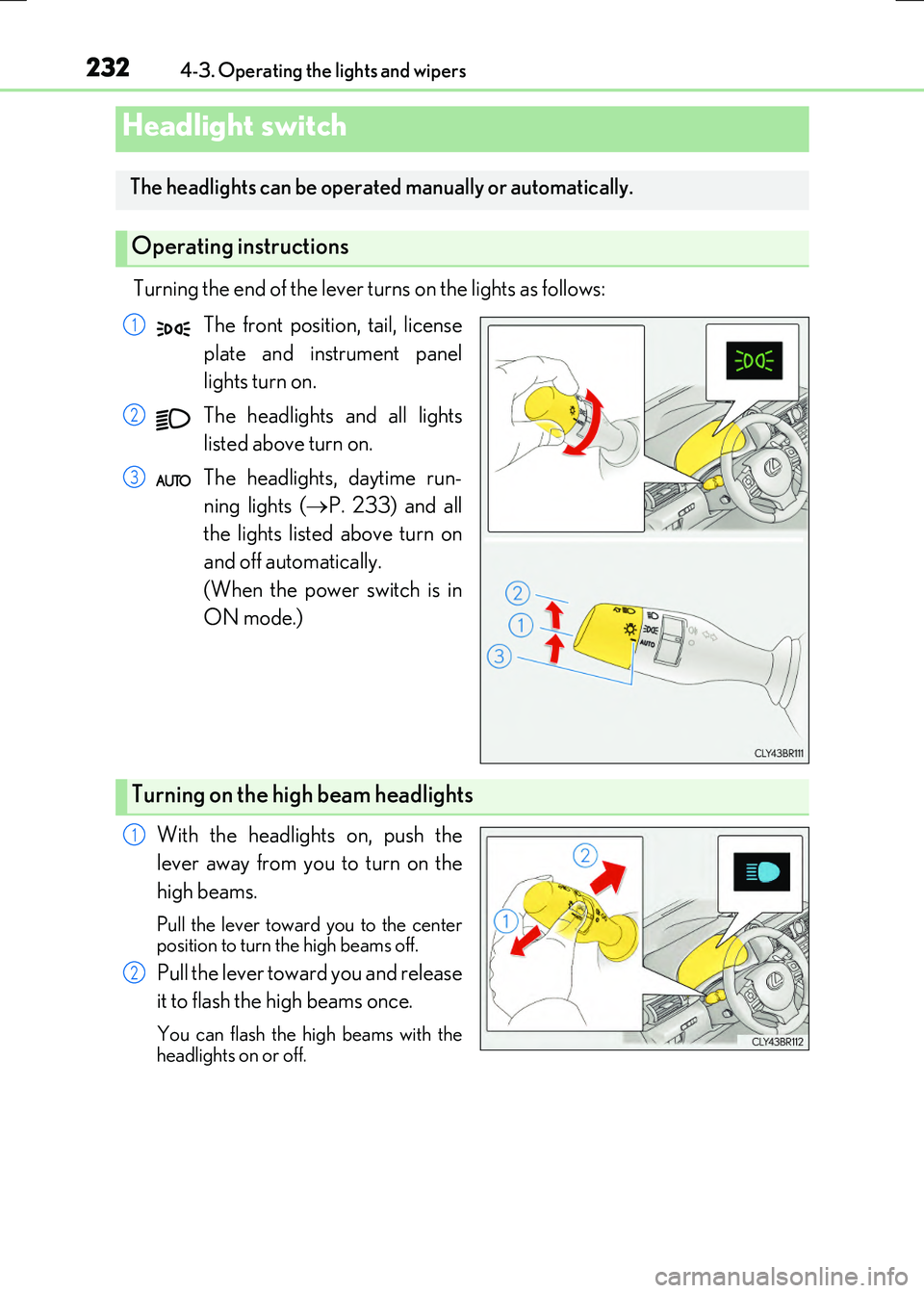
Turning the end of the lever turns on the lights as follows:
The front position, tail, license
plate and instrument panel
lights turn on.
The headlights and all lights
listed above turn on.
The headlights, daytime run-
ning lights ( P. 233) and all
the lights listed above turn on
and off automatically.
(When the power switch is in
ON mode.)
With the headlights on, push the
lever away from you to turn on the
high beams.
Pull the lever toward you to the center position to turn the high beams off.
Pull the lever toward you and release
it to flash the high beams once.
You can flash the high beams with the
headlights on or off.
Headlight switch
The headlights can be operated manually or automatically.
Operating instructions
1
2
3
Turning on the high beam headlights
1
2
Page 419 of 640

4195-11. Bluetooth®
5
Lexus Display Audio system
RC300h_EE(OM24740E)
■Bluetooth® antenna
The antenna is built into the instrument panel. If the portable audio player is behind the seat or in the glove box or console box, or is
touching or covered by me tal objects, the connection status may deteriorate. If the cellular phone is behind the seat or in the console box, or touching or covered by metal objects, the connecti on status may deteriorate.
■Battery charge/signal status
●This display may not correspond exactly with the portable audio player or cellular phone itself.
●This system does not have a charging function.
●The portable audio player or cellular phone battery will be depleted quickly when the device is connected to Bluetooth®.
■When using the Bluetooth® audio and hands-free system at the same time
The following problems may occur.
●The Bluetooth® audio connection may be interrupted.
●Noise may be heard during Bluetooth® audio playback.
■About the contact in this system
The following data is stored for every registered cellular phone. When another phone is
connecting, you cannot read the registered data.
●Contact data
●Call history
●Favorite
●Message
When removing a Bluetooth® phone from the system, the above-mentioned data is also deleted.
■About Bluetooth®
The Bluetooth® word mark and logos are regis-tered trademarks owned by Bluetooth SIG, Inc.
and any use of such marks by FUJITSU TEN LIMITED is under license. Other trademarksand trade names are those of their respective
owners.
Page 442 of 640
4426-1. Using the air conditioning system
RC300h_EE(OM24740E)
■When the outside temperature falls to nearly 0C (32F)
The dehumidification function may not operate even when is pressed or “A/C” is
selected.
■Ventilation and air conditioning odors
●To let fresh air in, set the air conditioning system to the outside air mode.
●During use, various odors from inside and outside the vehicle may enter into and accu- mulate in the air conditioning system. This may then cause odor to be emitted from the
vents.
●To reduce potential odors from occurring:
• It is recommended that the air conditioning system be set to outside air mode prior
to turning the vehicle off. • The start timing of the blower may be dela yed for a short period of time immediately after the air conditioning system is started in automatic mode.
■Air conditioning filter
P. 509
■Customization
Settings (e.g. A/C auto switch operation) can be changed. (Customizable features P. 614)
WARNING
■To prevent the windshield from fogging up
●Do not use during cool air operation in extremely humid weather. The differ-
ence between the temperature of the outside air and that of the windshield can cause the outer surface of the windshield to fog up, blocking your vision.
■To prevent burns
●Do not touch the rear view mirror surfaces when the outside rear view mirror defog-gers are on.
●Do not touch the glass at lower part of the windshield or to the side of the front pillarswhen the windshield wiper de-icer is on.
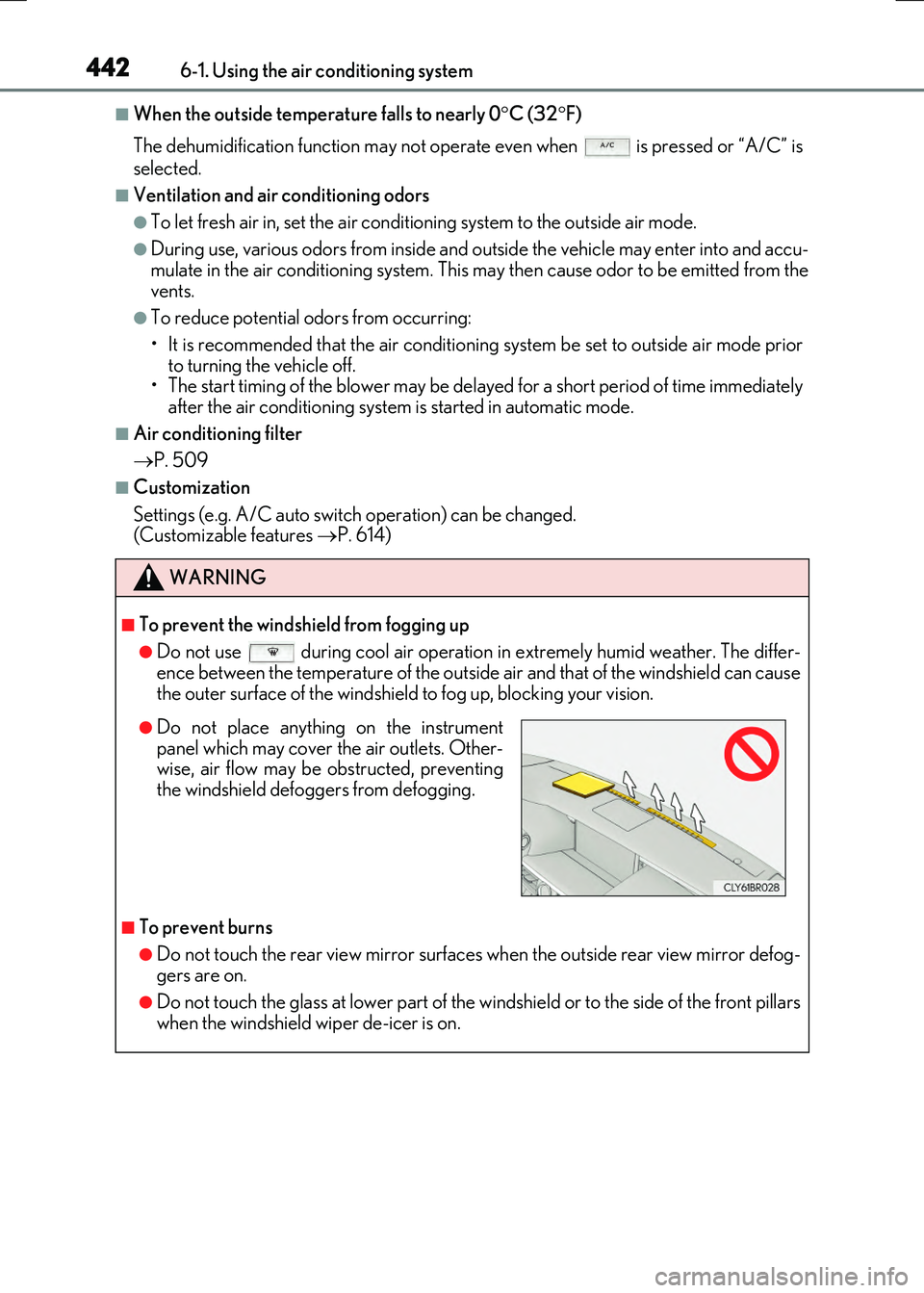
●Do not place anything on the instrumentpanel which may cover the air outlets. Other-wise, air flow may be obstructed, preventing
the windshield defoggers from defogging.
Page 465 of 640
4657-1. Maintenance and care
7
Maintenance and care
RC300h_EE(OM24740E)
■Caring for leather areas
Lexus recommends cleaning the in terior of the vehicle at least twice a year to maintain the quality of the vehicle’s interior.
■Shampooing the carpets
There are several commercial foaming-type cleaners available. Use a sponge or brush to apply the foam. Rub in overlapping circles. Do not use water. Wipe dirty surfaces and letthem dry. Excellent results are obtained by keeping the carpet as dry as possible.
■Seat belts
Clean with mild soap and lukewarm water us ing a cloth or sponge. Also check the belts periodically for excessive wear, fraying or cuts.
■When cleaning the carpeted portions of the glove box, console box, etc.
If a strong adhesive tape is used, there is a possibility that the surface of the carpet could be damaged.
WARNING
■Water in the vehicle
●Do not splash or spill liquid in the vehicle, such as on the floor, in the hybrid battery (traction battery) air vents, and in the trunk. Doing so may cause the hybrid battery, elec trical components, etc. to malfunction or
catch fire.
●Do not get any of the SRS components or wiring in the vehicle interior wet. ( P. 44)
An electrical malfunction may cause the airbags to deploy or not function properly, resulting in death or serious injury.
■Cleaning the interior (esp ecially instrument panel)
Do not use polish wax or polish cleaner. The instrument panel may reflect off the wind- shield, obstructing the driver’s view and leading to an accident, resulting in death or serious injury.
Page 466 of 640

4667-1. Maintenance and care
RC300h_EE(OM24740E)
NOTICE
■Cleaning detergents
●Do not use the following liquids, as they may discolor the vehicle interior or cause streaks or damage to painted surfaces:
• Audio system screen: Organic substances such as benzine or gasoline, alkaline solutions, and alcohol• Seats: Alkaline solutions, organic substances such as thinner or benzine, and alco-
hol • Other parts: Organic substances such as benzine or gasoline, alkaline or acidic solutions, dye, and bleach
●Do not use polish wax or polish cleaner. The instrument panel’s or other interior part’s painted surface may be damaged.
■Preventing damage to leather surfaces
Observe the following precautions to avoid damage to and deterioration of leather surfaces:
●Remove any dust or dirt from leather surfaces immediately.
●Do not expose the vehicle to direct sunlight for extended periods of time. Park the vehicle in the shade, especially during summer.
●Do not place items made of vinyl, plastic, or containing wax on the upholstery, as theymay stick to the leather surface if the vehicle interior heats up significantly.
■Water on the floor
Do not wash the vehicle floor with water. Vehicle systems such as the audio system may be damaged if water comes into contactwith electrical components such as the au dio system above or under the floor of the
vehicle. Water may also cause the body to rust.
■When cleaning the inside of the windshield (vehicles with LDA [Lane Departure Alert])
Be careful not to touch the camera sensor ( P. 273). If the camera is accidentally scratched or hit, LDA may not operate properly or maycause a malfunction.
■Cleaning the inside of the rear window
●Do not use glass cleaner to clean the rear window, as this may cause damage to therear window defogger heater wires or antenna. Use a cloth dampened with luke-
warm water to gently wipe the window clean. Wipe the window in strokes running parallel to the heater wires or antenna.
●Be careful not to scratch or damage the heater wires or antenna.
Page 515 of 640
5157-3. Do-it-yourself maintenance
7
Maintenance and care
RC300h_EE(OM24740E)
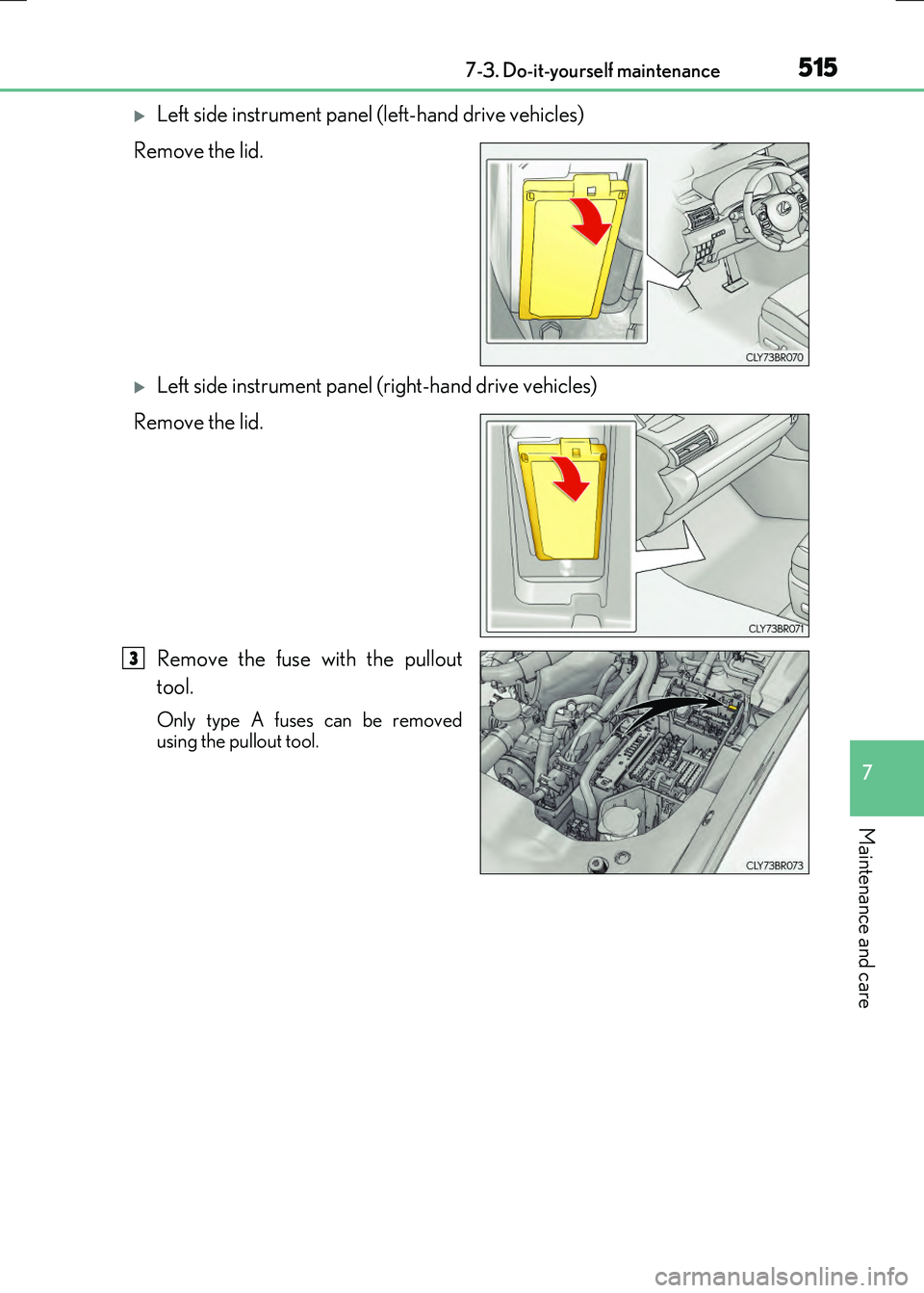
Left side instrument panel (left-hand drive vehicles)
Remove the lid.
Left side instrument panel (right-hand drive vehicles)
Remove the lid.
Remove the fuse with the pullout
tool.
Only type A fuses can be removed using the pullout tool.
3
Page 597 of 640

597
9
9-1. Specifications
Vehicle specifications
RC300h_EE(OM24740E)
■Vehicle identification number
The vehicle identification number (VIN) is the legal identifier for your vehicle.
This is the primary identification number for your Lexus. It is used in register-
ing the ownership of your vehicle.
This number is stamped on the top left of the instrument panel and in the
engine compartment.
This number is also on the manufac-
turer’s label.
■Engine number
The engine number is located as
shown.
Vehicle identification
Page 625 of 640

625Alphabetical index
RC300h_EE(OM24740E)
AUX port .................................................. 351
Average fuel economy........................ 124
Average vehicle speed ....................... 124
Back-up light
Replacing light bulb.......................... 524
Wattage................................................. 605
Battery (12-volt battery)...................... 481
If the 12-volt battery is
discharged.........................................582
Preparing and checking
before winter .................................... 337
Warning light ....................................... 537
Battery (traction battery) ......................89
Blind Spot Monitor (BSM) ................ 319
Blower customization ......................... 439
Bluetooth®
Audio system .......................................395
Hands-free system
(for cellular phone)........................ 397
Brake
Fluid ......................................................... 603
Parking brake ......................................230
Warning light ....................................... 537
Brake assist .............................................304
Break-in tips ........................................... 207
Brightness control
Instrument panel li ght control......... 118
BSM (Blind Spot Monitor) ................. 319
Card key ................................................... 138
Care ................................................460, 464
Aluminum wheels................................ 461
Exterior ................................................... 460
Interior..................................................... 464
Seat belts ............................................... 465
Cargo hooks .......................................... 452
Caution label ............................................. 89
CD player .................................................. 371
Chains ....................................................... 338
Child restraint system............................ 60
Child seats definition .......................... 60
Child seats installation .............. 68, 75
Installing a CRS to the
passenger seat ................................... 65
Installing a CRS to the
rear seat ..................................................67
Installing CRS with ISOFIX
rigid anchors ....................................... 80
Installing CRS with seat belts .......... 72
Installing CRS with top strap .......... 82
Child safety ................................................ 59
12-volt battery
precautions .......................... 483, 585
Airbag precautions ............................. 45
Child restraint system ........................ 60
How your child should
wear the seat belt.............................. 40
Installing child restraints .................... 60
Moon roof precautions .................. 203
Power window lock switch ............ 196
Power window precautions........... 199
Removed electronic key
battery precautions......................... 513
Seat belt precautions........................... 42
B
C