Page 288 of 776
2884-4. Refueling
RX350/RX200t_EE_OM48F32E
WARNING
■When refueling the vehicle
Observe the following precautions while refueling the vehicle. Failure to do so may result in death or serious injury.
●After exiting the vehicle and before opening the fuel door, touch an unpainted metalsurface to discharge any static electricity. It is important to discharge static electricity before refueling because sparks resulting fr om static electricity can cause fuel vapors
to ignite while refueling.
●Always hold the grips on the fuel tank cap and turn it slowly to remove it. A whooshing sound may be heard when the fuel tank cap is loosened. Wait until the
sound cannot be heard before fully removing the cap. In hot weather, pressurized fuel may spray out of the filler neck and cause injury.
●Do not allow anyone that has not discharged static electricity from their body to come
close to an open fuel tank.
●Do not inhale vaporized fuel. Fuel contains substances that are harmful if inhaled.
●Do not smoke while refueling the vehicle.Doing so may cause the fuel to ignite and cause a fire.
●Do not return to the vehicle or touch any person or object that is statically charged.
This may cause static electricity to build up, resulting in a possible ignition hazard.
■When refueling
Observe the following precautions to prevent fuel overflowing from the fuel tank:
●Securely insert the fuel nozzle into the fuel filler neck.
●Stop filling the tank after the fuel nozzle automatically clicks off.
●Do not top off the fuel tank.
NOTICE
■Refueling
Do not spill fuel during refueling. Doing so may damage the vehicle, such as causing the emission control system tooperate abnormally or damaging fuel system components or the vehicle’s painted sur-
face.
Page 364 of 776

3644-5. Using the driving support systems
RX350/RX200t_EE_OM48F32E
■Conditions under which the BSM function may not function correctly
●The BSM function may not detect vehicles correctly in the following situations:
• When the sensor is misaligned due to a strong impact to the sensor or its surround-
ing area • When mud, snow, ice, a sticker, etc. is covering the sensor or surrounding area onthe rear bumper
• When driving on a road surface that is wet with standing water during bad weather, such as heavy rain, snow, or fog• When multiple vehicles are approaching wi th only a small gap between each vehicle
• When the distance between your vehicle and a following vehicle is short • When there is a significant difference in speed between your vehicle and the vehiclethat enters the detection area
• When the difference in speed between your vehicle and another vehicle is changing • When a vehicle enters a detection area traveling at about the same speed as yourvehicle
• As your vehicle starts from a stop, a vehicle remains in the detection area • When driving up and down consecutive steep inclines, such as hills, dips in the road, etc.
• When driving on roads with sharp bends, consecutive curves, or uneven surfaces • When vehicle lanes are wide, or when driving on the edge of a lane, and the vehiclein an adjacent lane is far away from your vehicle
• When towing a trailer (vehicles with towing package) • When items such as a bicycle carrier are installed on the rear of the vehicle• When there is a significant difference in height between your vehicle and the vehicle
that enters the detection area • Immediately after the BSM function is turned on
●Instances of the BSM function unnecessarily detecting a vehicle and/or object mayincrease in the following situations:
• When the sensor is misaligned due to a strong impact to the sensor or its surround- ing area• When the distance between your vehicle and a guardrail, wall, etc. that enters the
detection area is short • When driving up and down consecutive steep inclines, such as hills, dips in the road, etc.
• When vehicle lanes are narrow, or when driving on the edge of a lane, and a vehicle traveling in a lane other than the adjacent lanes enters the detection area• When driving on roads with sharp bends, consecutive curves, or uneven surfaces
• When the tires are slipping or spinning • When the distance between your vehicle and a following vehicle is short• When a bicycle carrier or other accessory is installed to the rear of the vehicle
• When towing a trailer (vehicles with towing package)
Page 484 of 776

4845-7. Connecting Bluetooth®
RX350/RX200t_EE_OM48F32E
Turn the Bluetooth® connection setting of your device set to on.
Go to “Bluetooth* setup”: “MENU” button “Setup” “Bluetooth*”
Move the controller to the left and then select “Add device”
When this screen is displayed,
search for the device name dis-
played on this screen on your
Bluetooth® device.
For operation of the Bluetooth® device, see the manual that comes with your
Bluetooth® device.
Register the Bluetooth® device
using your Bluetooth® device.
A PIN code are not required for SSP (Secur e Simple Pairing) compatible Bluetooth®
devices. Depending on the device, you may need to select “Yes” to register, or “No” to
cancel on the device.
If an error message is displayed, follow the guidance on the screen to try again.
*: Bluetooth is a registered trademark of Bluetooth SIG, Inc.
Go to “Bluetooth* setup”: “MENU” button “Setup” “Bluetooth*”
Move the controller to the left and then select “Remove device”.
Select the device to remove.
*: Bluetooth is a registered trademark of Bluetooth SIG, Inc.
Registering a Bluetooth® device
Bluetooth® compatible phones (HFP) and po rtable audio players (AVP) can
be registered simultaneously. You can register up to 5 Bluetooth® devices.
How to register a Bluetooth® device
1
2
3
4
5
Removing a Bluetooth® device
1
2
3
Page 512 of 776
5125-11. Bluetooth®
RX350/RX200t_EE_OM48F32E
In other situations
Even though all conceivable measures have been taken, the symptom status does not change.
The cellular phone is not close enough to this system. Bring the cellular phone closer to this system.
The cellular phone is the most likely cause of the symptom.
Turn the cellular phone off, remove and reinstall the battery pack, and then restart the cellular phone. Enable the cellular phone’s Bluetooth® connection.
Stop the cellular phone’s security software and close all applications. Before using an application installed on the cellular phone, carefully check its source and how its operation might affect this system.
Page 562 of 776
5626-4. Using the storage features
RX350/RX200t_EE_OM48F32E
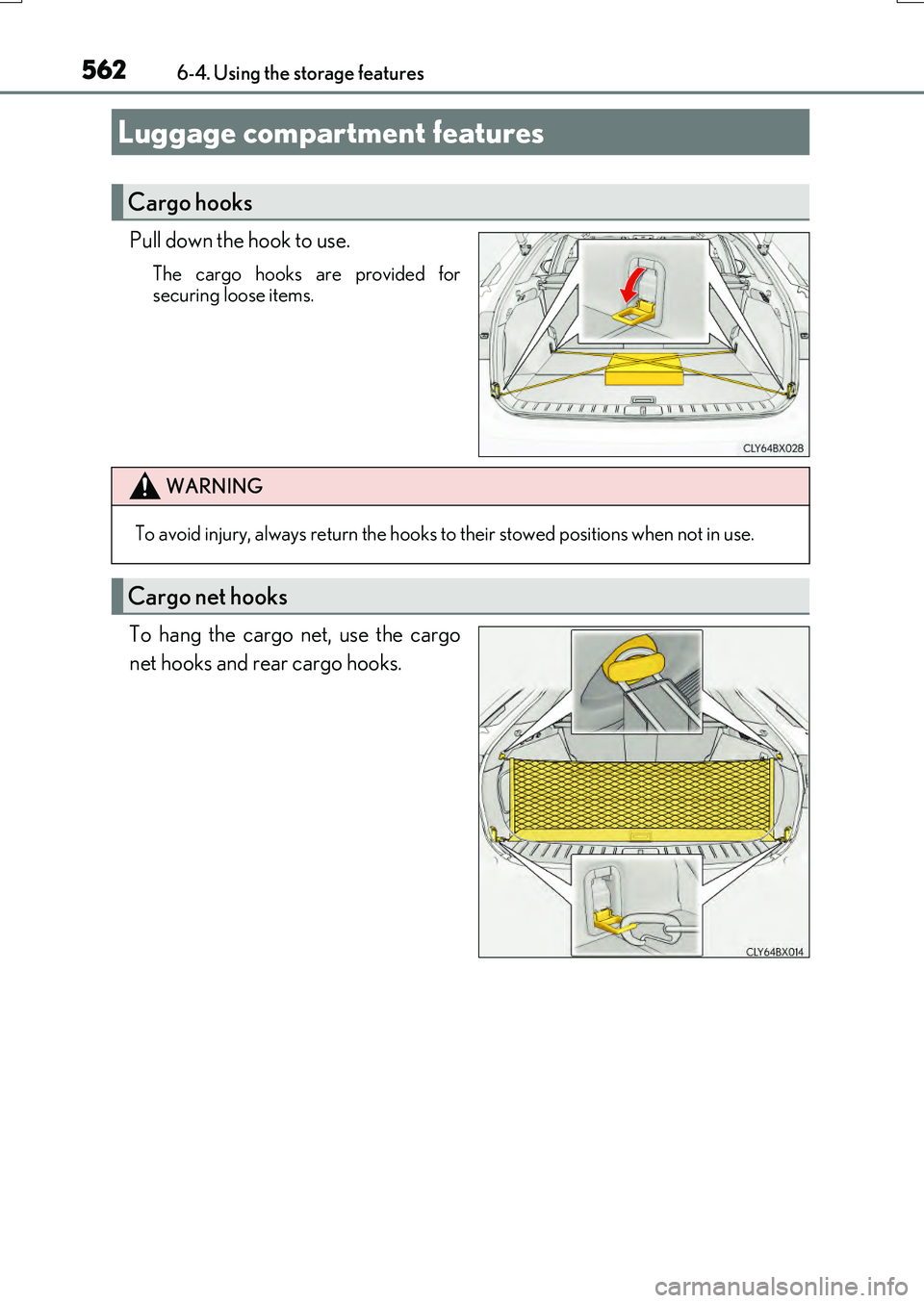
Pull down the hook to use.
The cargo hooks are provided for securing loose items.
To hang the cargo net, use the cargo
net hooks and rear cargo hooks.
Luggage compartment features
Cargo hooks
WARNING
To avoid injury, always return the hooks to their stowed positions when not in use.
Cargo net hooks
Page 608 of 776
6087-3. Do-it-yourself maintenance
RX350/RX200t_EE_OM48F32E
■Checking battery fluid
Check that the level is between the “UPPER LEVEL” and “LOWER LEVEL”
lines.
“UPPER LEVEL” line
“LOWER LEVEL” line
If the fluid level is at or below the “LOWER LEVEL” line, add distilledwater.
■Adding distilled water
Remove the vent plug.
Add distilled water.
If the “UPPER LEVEL” line cannot be seen, check the fluid level by looking
directly at the cell.
Put the vent plug back on and close it securely.
1
2
1
2
3
Page 636 of 776

6367-3. Do-it-yourself maintenance
RX350/RX200t_EE_OM48F32E
Change the rest position of the windshield wipers to the service position using
the wiper lever and then lift a windshield wiper. ( P. 283)
While pressing and holding the
wiper blade lock release button,
remove the wiper blade.
When performing this operation, make sure to hold the hook portion of thewiper arm securely.
While disengaging the cap lock,
using a tool such as a flathead
screwdriver if necessary, remove the
wiper insert.
Hold the cap on the end of the wiper insert when removing the wiper insert.
(The cap is integrated into the wiper insert.)
If using a screwdriver, make sure to wrap
its tip with tape to protect the wiper blade.
Install a new wiper insert.
Make sure to push the wiper insert firmly until the cap lock is engaged.
After installation, check that th e cap lock is locked securely.
Install the wiper blade to the wiper arm.
Make sure to push the wiper blade until it is locked.
When performing this operation, make sure to hold the hook portion of the wiper arm
securely.
After installation, check that the wiper blade is locked securely.
Windshield wiper inserts
Replacing a windshield wiper insert
1
Hook portion
12
Cap lock
3
14
5
Page 647 of 776
6477-3. Do-it-yourself maintenance
7
Maintenance and care
RX350/RX200t_EE_OM48F32E
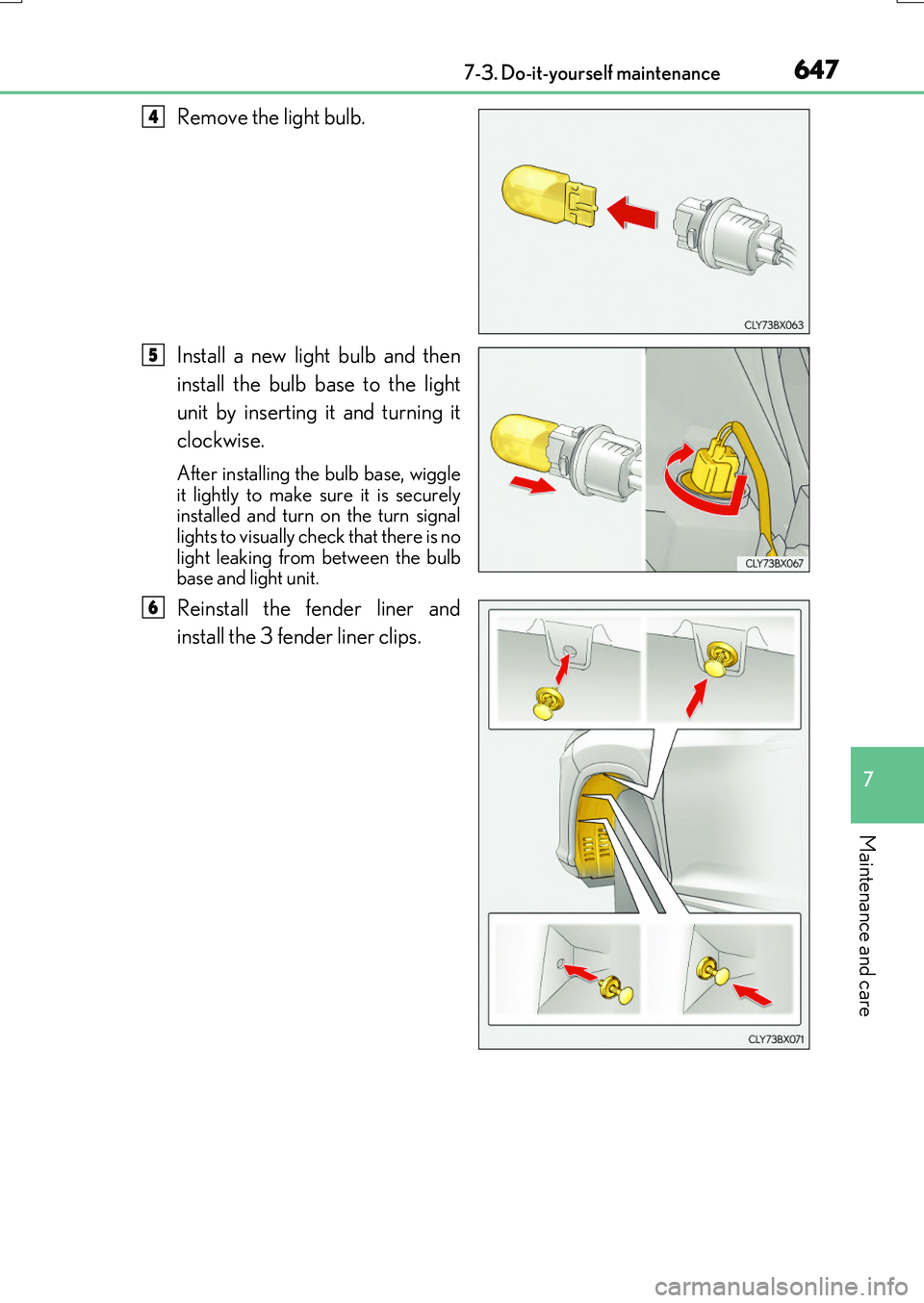
Remove the light bulb.
Install a new light bulb and then
install the bulb base to the light
unit by inserting it and turning it
clockwise.
After installing the bulb base, wiggle it lightly to make sure it is securelyinstalled and turn on the turn signal
lights to visually check that there is no light leaking from between the bulbbase and light unit.
Reinstall the fender liner and
install the 3 fender liner clips.
4
5
6