Page 428 of 776

4284-5. Using the driving support systems
RX350/RX200t_EE_OM48F32E
WARNING
■Handling of tires and the suspension
Using tires with any kind of problem or modif ying the suspension will affect the driving assist systems, and may cause a system to malfunction.
■Trailer Sway Control precaution
The Trailer Sway Control system is not able to reduce trailer sway in all situations. Depending on many factors such as the conditions of the vehicle, trailer, road surface,
and driving environment, the Trailer Sway Control system may not be effective. Refer to your trailer owner’s manual for informatio n on how to tow your trailer properly.
■If trailer sway occurs
Observe the following precautions. Failing to do so may cause death or serious injury.
●Firmly grip the steering wheel. Steer straight ahead.
Do not try to control trailer swaying by turning the steering wheel.
●Begin releasing the accelerator pedal immediately but very gradually to reduce speed.
Do not increase speed. Do not apply vehicle brakes.
If you make no extreme correction with the steering or brakes, your vehicle and trailer
should stabilize. ( P. 238)
Page 559 of 776
5596-4. Using the storage features
6
Interior features
RX350/RX200t_EE_OM48F32E
NOTICE
To prevent damage to the rear cup holder, stow the cup holder before stowing the arm- rest.
Door pockets
FrontRear
The door pockets can be opened and
closed.
WARNING
Front door pockets: Keep the door pockets closed while driving. Injuries may result in the event of an accident or sudden braking.
Page 562 of 776
5626-4. Using the storage features
RX350/RX200t_EE_OM48F32E
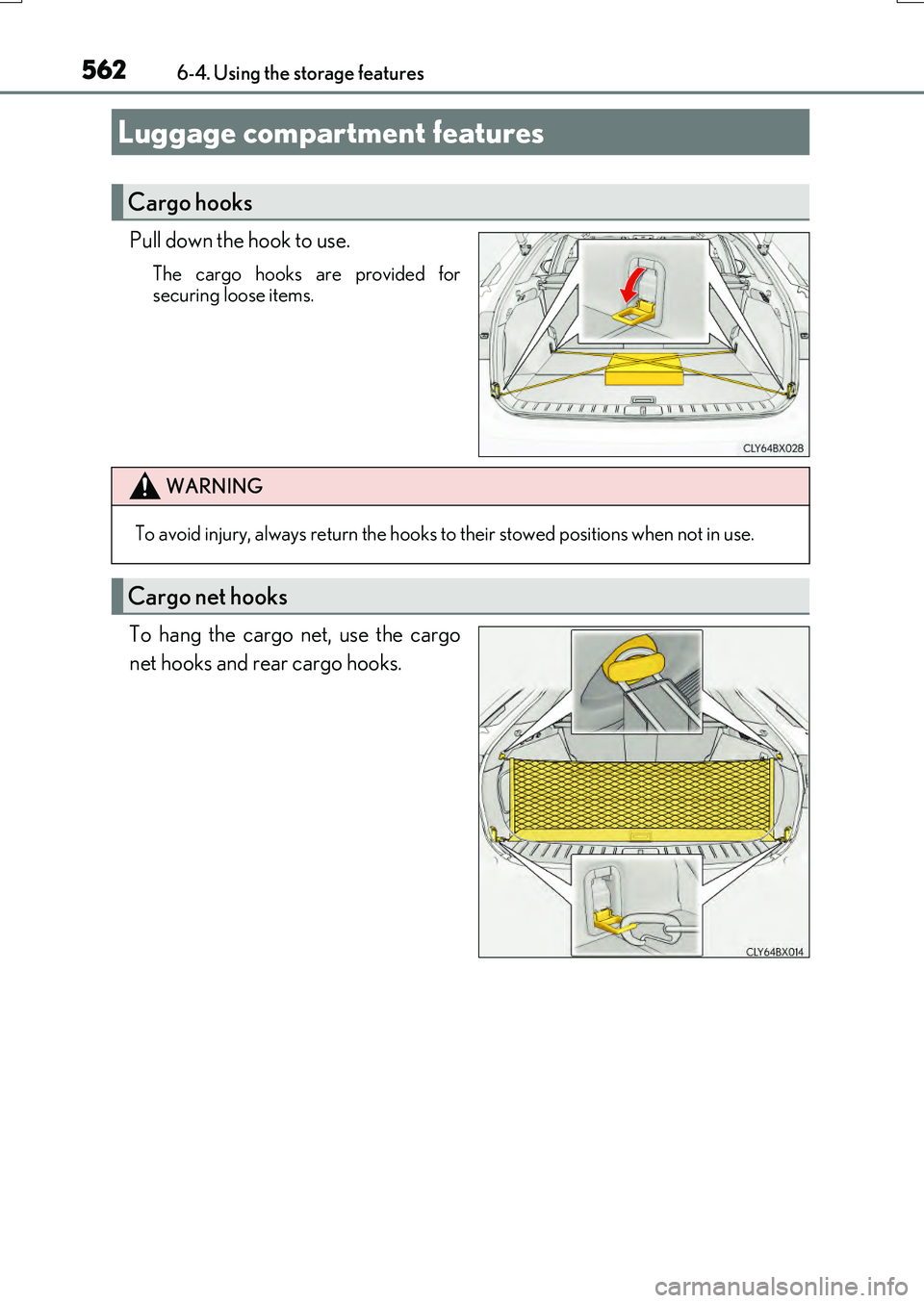
Pull down the hook to use.
The cargo hooks are provided for securing loose items.
To hang the cargo net, use the cargo
net hooks and rear cargo hooks.
Luggage compartment features
Cargo hooks
WARNING
To avoid injury, always return the hooks to their stowed positions when not in use.
Cargo net hooks
Page 570 of 776

5706-5. Using the other interior features
RX350/RX200t_EE_OM48F32E
■Operation indicator light status
*: Depending on the portable device, the operation indicator light may stay illuminated
(orange) after charging has completed.
●If the operation indicator light blinks
If an error is detected, the operation indicator light will blink (orange). Take the
appropriate measures according to the table below.
■The wireless charger can be operated when
The engine switch is in ACCESSORY or IGNITION ON mode.
■Portable devices that can be charged
●Portable devices compatible with the Qi wireless charging standard can be charged by the wireless charger. However, compatibility with all devices which meet the Qi wire- less charging standard is not guaranteed.
●The wireless charger is designed to supply low power electricity (5 W or less) to a cel-lular phone, smartphone, or other portable device.
Operation indicator lightState
OffThe Wireless charger is off
Green (illuminated)Standby (charging is possible)
Charging is complete*
Orange (illuminated)
A portable device has been placed on the charging
area (identifying the portable device)
Charging in progress
Operation indicator lightSuspected causesMeasure
Blinks (orange) at a one second interval continu-ously
Vehicle to charger com-
munication failure.
Contact any authorized Lexus dealer or repairer,
or another duly qualified and equipped professional.
Blinks (orange) 3 times
repeatedly
A foreign object exists
between the portable device and charging area. Remove the foreign object.
Portable device is not posi- tioned properly on the
charging area.
Move the portable device toward the center of the
charging area.
Blinks (orange) 4 times
repeatedly
The temperature of the wireless charger is exces-sively high.
Stop charging immediately and continue chargingafter a while.
Page 573 of 776

5736-5. Using the other interior features
6
Interior features
RX350/RX200t_EE_OM48F32E
NOTICE
■Conditions in which the wireless charger may not operate correctly
In the following situations, the wireless charger may not operate correctly:
●When a portable device is fully charged
●When there is a foreign object between the charging area and portable device
●When a portable device becomes hot while charging
●When a portable device is placed on the wireless area with its charging surface fac-
ing up
●When a portable device is not centered on the charging area
●When the vehicle is near a TV tower, electric power plant, gas station, radio station,
large display, airport or othe r facility that generates strong radio waves or electrical noise
●When the portable device is in contact wi th, or is covered by any of the following
metallic objects
• Cards to which aluminum foil is attached • Cigarette boxes that ha ve aluminum foil inside
• Metallic wallets or bags •Coins• Metal hand warmers
• Media such as CDs and DVDs
●When wireless keys (that emit radio waves) other than those of your vehicle are being
used nearby.
If in situations other than above the wireless charger does not operate properly or the operation indicator light is blinking, the wireless charger may be malfunctioning. Con-
tact any authorized Lexus dealer or repair er, or another duly qualified and equipped professional.
■To prevent failure or damage to data
●Do not bring magnetic cards, such as a credit card, or magnetic recording media,close to the wireless charger while chargi ng. Otherwise, data may be erased due to the influence of magnetism.
Additionally, do not bring precision instruments such as wrist watches, close to the wireless charger, as such objects may malfunction.
●Do not leave portable devices in the cabin. The temperature inside the cabin may
become high when parked in the su n, and cause damage to the device.
■To prevent battery discharge
Do not use the wireless charger for a long period of time with the engine is stopped.
Page 595 of 776

595
7
Maintenance and care
RX350/RX200t_EE_OM48F32E
7-3. Do-it-yourself maintenance
Do-it-yourself service precautions
If you perform maintenance by yourself, be sure to follow the correct proce-
dure as given in these sections.
ItemsParts and tools
Battery condition ( P. 607)
• Warm water • Baking soda • Grease
• Conventional wrench (for terminal clamp bolts)
Engine/intercooler coolant level ( P. 605)
• “Toyota Super Long Life Coolant” or a similar high quality ethylene glycol-based non-silicate, non-amine, non-nitriteand non-borate coolant with long-life hybrid organic acid
technology “Toyota Super Long Life Coolant” is pre-mixed with 50%coolant and 50% deionized water.
• Funnel (used only for adding coolant)
Engine oil level ( P. 601)
• “Toyota Genuine Motor Oil” or equivalent
•Rag or paper towel
• Funnel (used only for adding engine oil)
Fuses (P. 640)• Fuse with same amperage rating as original
Light bulbs ( P. 643)
• Bulb with same number and wattage rating as original
• Flathead screwdriver
•Wrench
Radiator, condenser and intercooler radi-ator ( P. 607)
Tire inflation pres-
sure ( P. 629)• Tire pressure gauge• Compressed air source
Washer fluid ( P. 611)
• Water or washer fluid containing antifreeze (for winter use)
• Funnel (used only for adding water or washer fluid)
Page 603 of 776

6037-3. Do-it-yourself maintenance
7
Maintenance and care
RX350/RX200t_EE_OM48F32E
■Adding engine oil
If the oil level is below or near the low level mark, add engine oil of the same
type as that already in the engine.
Make sure to check the oil type and prepare the items needed before adding
oil.
Remove the oil filler cap by turning it counterclockwise.
Add engine oil slowly, checking the dipstick.
Install the oil filler cap by turning it clockwise.
■Engine oil consumption
A certain amount of engine oil will be consum ed while driving. In the following situations, oil consumption may increase, and engine o il may need to be refilled in between oil maintenance intervals.
●When the engine is new, for example directly after purchasing the vehicle or afterreplacing the engine
●If low quality oil or oil of an inappropriate viscosity is used
●When driving at high engine speeds or with a heavy load, when towing, or when driving while accelerating or decelerating frequently
●When leaving the engine idling for a long time, or when driving frequently through
heavy traffic
RX350RX200t
Engine oil selection P. 730
Oil quantity (Low Full)
RX350
1.8 L (1.9 qt., 1.6 lmp. qt.)
RX200t
1.5 L (1.6 qt., 1.3 Imp. qt.)
ItemsClean funnel
1
2
3
Page 618 of 776

6187-3. Do-it-yourself maintenance
RX350/RX200t_EE_OM48F32E
■Situations in which the tire pressure warning system may not operate properly
●In the following cases, the tire pressure warning system may not operate properly.
• If non-genuine Lexus wheels are used.
• A tire has been replaced with a tire that is not an OE (Original Equipment) tire. • A tire has been replaced with a tire that is not of the specified size.• Tire chains, etc., are equipped.
• If a window tint that affects the radio wave signals is installed. • If there is a lot of snow or ice on the vehi cle, particularly around the wheels or wheel housings.
• If the tire inflation pressure is extr emely higher than the specified level. • If wheel without the tire pressure warning valve and transmitter is used.• If the ID code on the tire pressure warning valves and transmitters is not registered
in the tire pressure warning computer.
●Performance may be affected in the following situations.
• Near a TV tower, electric power plant, gas station, radio station, large display, air- port or other facility that generates st rong radio waves or electrical noise. • When carrying a portable radio, cellular phone, cordless phone or other wireless
communication device. If tire position information is not correctly displayed due to the radio wave conditions, the display may be corrected by driving and changing the radio wave conditions.
●When the vehicle is parked, the time taken for the warning to start or go off could beextended.
●When tire inflation pressure declines rapi dly for example when a tire has burst, the
warning may not function.
■The initialization operation
●Make sure to carry out initialization af ter adjusting the tire inflation pressure.
Also, make sure the tires are cold before carry ing out initialization or tire inflation pres- sure adjustment.
●If you have accidentally turned the engine swit ch off during initialization, it is not neces- sary to restart the initialization again as in itialization will restart automatically when the engine switch has been turned to IGNITION ON mode for the next time.
●If you accidentally restart the initialization when initialization is not necessary, adjust the tire inflation pressure to the specified leve l when the tires are cold, and conduct initial- ization again.
●While the position of each tire is being de termined and the inflation pressures are not being displayed on the multi-information display, if the inflation pressure of a tire drops, the tire pressure warning light will come on.