Page 583 of 776
583
7Maintenance and care
RX350/RX200t_EE_OM48F32E
7-1. Maintenance and care
Cleaning and protecting
the vehicle exterior ................584
Cleaning and protecting
the vehicle interior..................589
7-2. Maintenance
Maintenance
requirements ............................ 592
7-3. Do-it-yourself
maintenance
Do-it-yourself service
precautions................................595
Hood ............................................... 597
Positioning a floor jack ............598
Engine compartment ............... 599
Tires ...................................................612
Tire inflation pressure .............. 629
Wheels ............................................ 631
Air conditioning filter ............... 633
Windshield wiper inserts ........ 636
Electronic key battery..............638
Checking and
replacing fuses .........................640
Light bulbs..................................... 643
Page 585 of 776

5857-1. Maintenance and care
7
Maintenance and care
RX350/RX200t_EE_OM48F32E
■Note for a smart entry & start system
●If the door handle becomes wet while the electronic key is within the effective range, the door may lock and unlock repeatedly. Place the key in a position 2 m (6 ft.) or more
separate from the vehicle while the vehicle is being washed. (Take care to ensure that the key is not stolen.)
●If the electronic key is inside the vehicle and a door handle becomes wet during a car
wash, a buzzer will sound outside the vehicle. To turn off the alarm, lock all the doors.
●Set the electronic key to battery-saving mode to disable the smart entry & start system. ( P. 169)
■Aluminum wheels
●Remove any dirt immediately by using a neutral detergent. Do not use hard brushes or abrasive cleaners. Do not use strong or harsh chemical cleaners.
Use the same mild detergent as used on the paint.
●Do not use detergent on the wheels when th ey are hot, for example after driving for long distance in the hot weather.
●Wash detergent from the wheels immediately after use.
■Bumpers
Do not scrub with abrasive cleaners.
■Front side windows water-repellent coating
●The following precautions can extend the effectiveness of the water-repellent coating.
• Remove any dirt, etc., from the front side windows regularly.
• Do not allow dirt and dust to accumulate on the windows for a long period. Clean the windows with a soft, damp cloth as soon as possible.• Do not use wax or glass cleaners that co ntain abrasives when cleaning the windows.
• Do not use any metallic objects to remove condensation build up.
●When the water-repellent performance has become insufficient, the coating can be repaired. Contact any authorized Lexus dealer or repairer, or another duly qualified and equipped professional.
Page 609 of 776

6097-3. Do-it-yourself maintenance
7
Maintenance and care
RX350/RX200t_EE_OM48F32E
■Before recharging
When recharging, the battery produces hydr ogen gas which is flammable and explosive. Therefore, observe the following precautions before recharging:
●If recharging with the battery installed on the vehicle, be sure to disconnect the ground
cable.
●Make sure the power switch on the charger is off when connecting and disconnecting the charger cables to the battery.
■After recharging/reconnecting the battery
●The engine may not start. Follow the pr ocedure below to initialize the system.
Shift the shift lever to P.
Open and close any of the doors.
Restart the engine.
●Unlocking the doors using the smart entry & start system may not be possible immedi-
ately after reconnecting the battery. If this happens, use the wireless remote control or the mechanical key to lock/unlock the doors.
●Start the engine with the engine switch in ACCESSORY mode. The engine may not
start with the engine switch turned off. However, the engine will operate normally from the second attempt.
●The engine switch mode is recorded by the vehicle. If the battery is disconnected and
reconnected, the vehicle will return the engi ne switch mode to the status it was in before the battery was disconnected. Make sure to turn off the engine switch beforedisconnecting the battery. Take extra care when connecting the battery if the engine
switch mode prior to the battery being disconnected is unknown.
If the system will not start even after multip le attempts at all the methods above, contact any authorized Lexus dealer or repairer, or another duly qualified and equipped profes-
sional.
1
2
3
Page 638 of 776
6387-3. Do-it-yourself maintenance
RX350/RX200t_EE_OM48F32E
●Flathead screwdriver
●Lithium battery CR2032
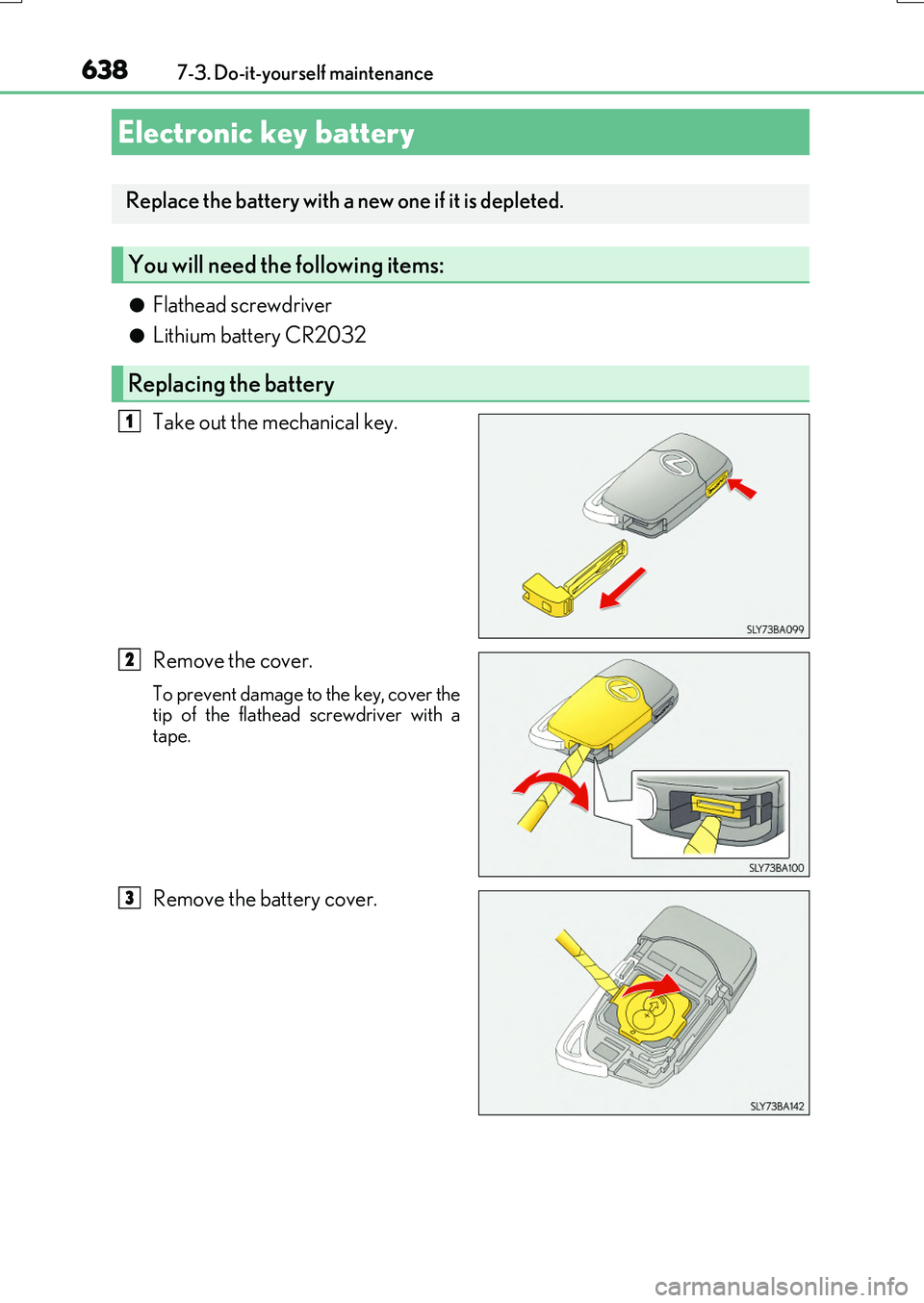
Take out the mechanical key.
Remove the cover.
To prevent damage to the key, cover the tip of the flathead screwdriver with atape.
Remove the battery cover.
Electronic key battery
Replace the battery with a new one if it is depleted.
You will need the following items:
Replacing the battery
1
2
3
Page 639 of 776

6397-3. Do-it-yourself maintenance
7
Maintenance and care
RX350/RX200t_EE_OM48F32E
Remove the depleted battery.
Insert a new battery with the “+” termi-
nal facing up.
■Use a CR2032 lithium battery
●Batteries can be purchased at any authorized Lexus dealer or repairer, or another duly qualified and equipped professional, local electrical appliance shops or camera stores.
●Replace only with the same or equivalent type recommended by the manufacturer.
●Dispose of used batteries according to the local laws.
■When the card key battery needs to be replaced (if equipped)
The battery for the card key is available only at your Lexus dealer. Your Lexus dealer can replace the battery for you.
■If the electronic key battery is depleted
The following symptoms may occur:
●The smart entry & start system and wireless remote control will not function properly.
●The operational range will be reduced.
4
WARNING
■Removed battery and other parts
These parts are small and if swallowed by a child, they can cause choking. Keep away from children. Failure to do so could result in death or serious injury.
■Certification for the smart entry & start system
CAUTION RISK OF EXPLOSION IF BATTERY IS REPLACED BY AN INCORRECT TYPE.DISPOSE OF USED BATTERIES ACCORDING TO THE INSTRUCTIONS
NOTICE
■For normal operation after replacing the battery
Observe the following precautions to prevent accidents:
●Always work with dry hands. Moisture may cause the battery to rust.
●Do not touch or move any other component inside the remote control.
●Do not bend either of the battery terminals.
Page 655 of 776

655
8When trouble arises
RX350/RX200t_EE_OM48F32E
8-1. Essential information
Emergency flashers ..................656
If your vehicle has
to be stopped
in an emergency ...................... 657
8-2. Steps to take
in an emergency
If your vehicle needs
to be towed................................658
If you think something
is wrong....................................... 664
Fuel pump shut off system ...... 665
If a warning light turns
on or a warning buzzer
sounds.......................................... 666
If a warning message
is displayed ................................ 673
If you have a flat tire
(vehicles with
a spare tire)................................ 679
If you have a flat tire
(vehicles without
a spare tire)................................ 693
If the engine will not start ........708
If the electronic key does
not operate properly ...............710
If the vehicle battery
is discharged............................... 714
If your vehicle overheats .......... 718
If the vehicle becomes
stuck ............................................. 722
Page 676 of 776

6768-2. Steps to take in an emergency
RX350/RX200t_EE_OM48F32E
Take the appropriate actions as instructed in the message displayed.
If any of the following messages are displayed, also refer to this Owner’s Manual.
■If “Shift to P Before Exiting Vehicle” is shown
Message is displayed when the driver’s door is opened without turning the
engine switch off with the shift lever in any position other than P.
Shift the shift lever to P.
■If “Power Turned Off to Save Battery” is displayed
This message is displayed when the po wer was cut off due to the automatic
power off function.
The next time the engine is started, increase the engine speed slightly and
maintain it at that speed for approximately 5 minutes to recharge the battery.
■If “AWD System Overheated Switch ing to 2WD Mode” or “AWD System
Overheated 2WD Mode Engaged” is displayed (AWD models)
This message may be displayed when dr iving under extremely high load con-
ditions.
Drive the vehicle at low speeds or stop the vehicle in a safe place with the
engine running until the message is cleared.
If the message is not cleared, have the vehicle inspected by any authorized
Lexus dealer or repairer, or another duly qualified and equipped professional.
■If “A New Key has been Registered Cont act Your Dealer for Details” is dis-
played
This message will be displayed each time the driver’s door is opened when the
doors are unlocked from the outside for approximately one week after a new
electronic key has been registered.
If this message is displayed but you have not had a new electronic key regis-
tered, ask any authorized Lexus dealer or repairer, or another duly qualified
and equipped professional. to check if an unknown electronic key (other than
those in your possession) has been registered.
Other messages displayed on the multi-information display
Page 708 of 776

7088-2. Steps to take in an emergency
RX350/RX200t_EE_OM48F32E
One of the following may be the cause of the problem:
●There may not be sufficient fuel in the vehicle’s tank.
Refuel the vehicle.
●The engine may be flooded.
Try to restart the engine again following correct starting procedures.
( P. 246)
●There may be a malfunction in the engine immobilizer system. (P. 77)
One of the following may be the cause of the problem:
●The battery terminal connections may be loose or corroded.
●The battery may be discharged. ( P. 714)
The engine starting system may be malfunctioning due to an electrical problem
such as electronic key battery depletion or a blown fuse. However, an interim
measure is available to start the engine. ( P. 709)
If the engine will not start
If the engine will not start even though correct starting procedures are being
followed ( P. 246), consider each of the following points:
The engine will not start even though the starter motor operates nor-
mally
The starter motor turns over slowly, the interior lights and headlights
are dim, or the horn does not so und or sounds at a low volume.
The starter motor does not turn over