Page 554 of 776
5546-3. Using the interior lights
RX350/RX200t_EE_OM48F32E
Front
Turns the lights on/off (touch the lights)
Rear
Turns the lights on/off
Personal lights
Page 555 of 776

5556-3. Using the interior lights
6
Interior features
RX350/RX200t_EE_OM48F32E
●Illuminated entry system: The lights automatically turn on/off according to engine switch mode, the presence of the electronic key, whether the doors are locked/unlocked, and whether the doors are opened/closed.
●If the interior lights remain on when the engine switch is turned off, the lights will go off automatically after 20 minutes.
●In the following cases, the interior lights and front personal lights may not respond as
normal.
• When water, dirt, etc., have adhered to the lens surface • When operated with a wet hand
• When wearing gloves, etc.
●Some functions can be customized. ( P. 740)
NOTICE
●Never remove the lens for the front interior light and front personal lights. Otherwise,
the lights will be damaged. If the lens ne ed to remove, contact any authorized Lexus dealer or repairer, or another duly qualified and equipped professional.
●To prevent battery discharge, do not leave the lights on longer than necessary when
the engine is off.
Page 557 of 776
5576-4. Using the storage features
6
Interior features
RX350/RX200t_EE_OM48F32E
Open (press the button)
Unlock with the mechanical key
Lock with the mechanical key
The glove box light turns on when the tail lights are on.
Push the knob.
Lift by hand to fully open the console box.
●The console box light turns on when the tail lights are on.
Glove box
1
2
3
Console box
●A pen can be stored in the pen holder on theunderside of the lid.
●Remove the tray to access a storage space
under the tray.
Page 567 of 776
567
RX350/RX200t_EE_OM48F32E
6
Interior features
6-5. Using the other interior features
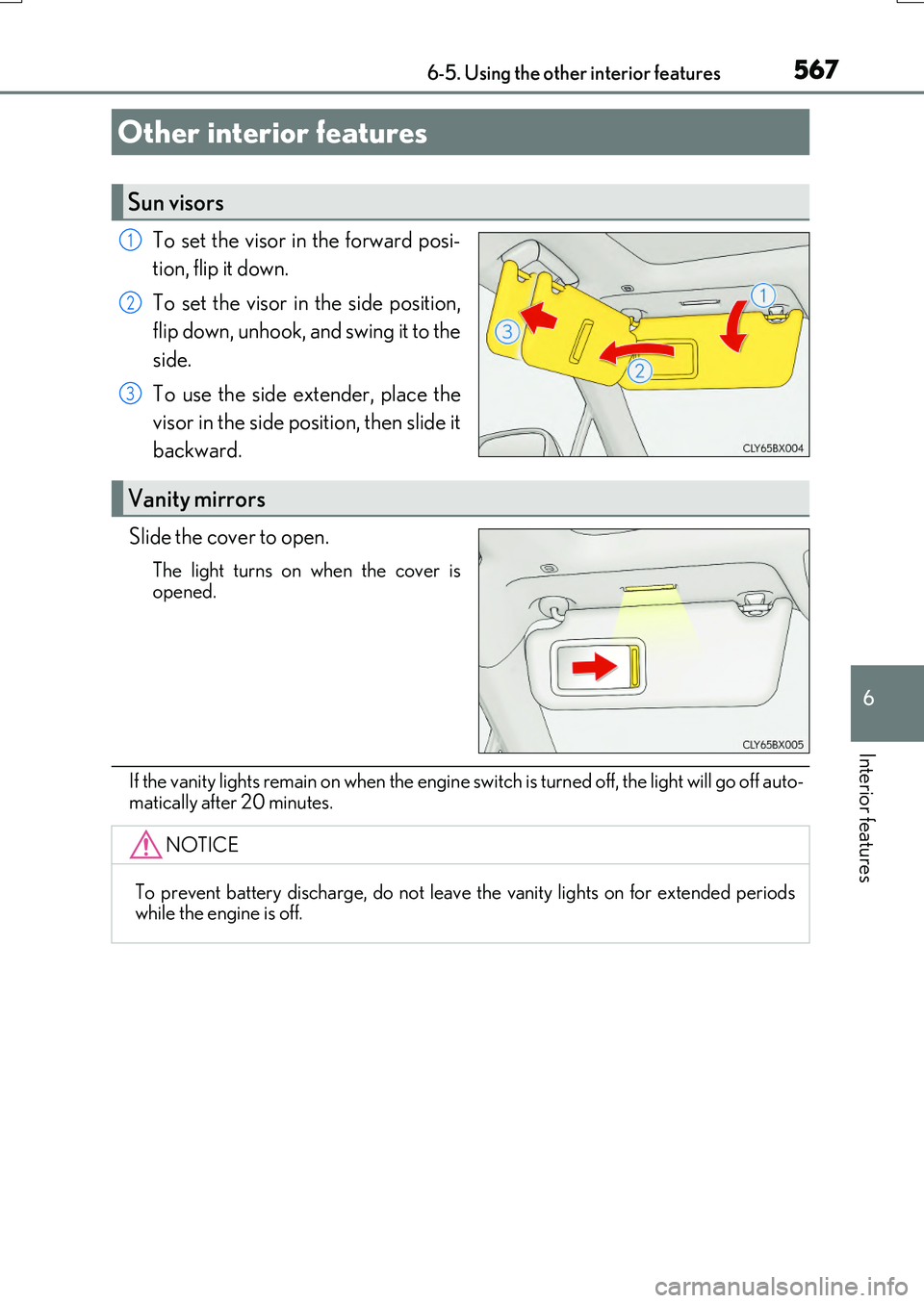
To set the visor in the forward posi-
tion, flip it down.
To set the visor in the side position,
flip down, unhook, and swing it to the
side.
To use the side extender, place the
visor in the side position, then slide it
backward.
Slide the cover to open.
The light turns on when the cover is
opened.
If the vanity lights remain on when the engine sw itch is turned off, the light will go off auto-
matically after 20 minutes.
Other interior features
Sun visors
1
2
3
Vanity mirrors
NOTICE
To prevent battery discharge, do not leave the vanity lights on for extended periods while the engine is off.
Page 570 of 776

5706-5. Using the other interior features
RX350/RX200t_EE_OM48F32E
■Operation indicator light status
*: Depending on the portable device, the operation indicator light may stay illuminated
(orange) after charging has completed.
●If the operation indicator light blinks
If an error is detected, the operation indicator light will blink (orange). Take the
appropriate measures according to the table below.
■The wireless charger can be operated when
The engine switch is in ACCESSORY or IGNITION ON mode.
■Portable devices that can be charged
●Portable devices compatible with the Qi wireless charging standard can be charged by the wireless charger. However, compatibility with all devices which meet the Qi wire- less charging standard is not guaranteed.
●The wireless charger is designed to supply low power electricity (5 W or less) to a cel-lular phone, smartphone, or other portable device.
Operation indicator lightState
OffThe Wireless charger is off
Green (illuminated)Standby (charging is possible)
Charging is complete*
Orange (illuminated)
A portable device has been placed on the charging
area (identifying the portable device)
Charging in progress
Operation indicator lightSuspected causesMeasure
Blinks (orange) at a one second interval continu-ously
Vehicle to charger com-
munication failure.
Contact any authorized Lexus dealer or repairer,
or another duly qualified and equipped professional.
Blinks (orange) 3 times
repeatedly
A foreign object exists
between the portable device and charging area. Remove the foreign object.
Portable device is not posi- tioned properly on the
charging area.
Move the portable device toward the center of the
charging area.
Blinks (orange) 4 times
repeatedly
The temperature of the wireless charger is exces-sively high.
Stop charging immediately and continue chargingafter a while.
Page 578 of 776
5786-5. Using the other interior features
RX350/RX200t_EE_OM48F32E
“SOS” button
Indicator lights
Microphone
ERA-GLONASS
: If equipped
ERA-GLONASS is a telematics service that uses Global Navigation Satellite
System (GLONASS) data and embedded cellular technology to enable the
following emergency calls to be made: Automatic emergency calls (Auto-
matic Collision Notification) and manual emergency calls (by pressing the
“SOS” button). This service is require d by Eurasian Customs Union Regula-
tions.
System components
1
2
3
Page 579 of 776

5796-5. Using the other interior features
6
Interior features
RX350/RX200t_EE_OM48F32E
■Automatic Collision Notification
If any airbag deploys, the system is designed to automatically call the Public
Safety Answering Point (PSAP).* The responding agent receives the vehicle’s
location and attempts to speak with the vehicle occupants to assess the level
of emergency. If the occupants are unable to communicate, the agent auto-
matically treats the call as an emer gency, contacts the nearest emergency
services provider to describe the situation, and requests that assistance be
sent to the location.
*: In some cases, the call cannot be made.( P. 580)
■Emergency Assistance Button (“SOS”)
In the event of an emergency, push the “SOS” button to reach the Public
Safety Answering Point (PSAP). The answering agent will determine your
vehicle’s location, assess the emergency, and dispatch the necessary assis-
tance required.
If you accidentally press the “SOS” button, tell the agent that you are not experi-
encing an emergency.
When the engine switch is turned to IGNITION ON mode, the red indicator
light will illuminate for 10 seconds and then the green indicator light will illumi-
nate for 2 seconds, indicating that the syst em is enabled. The indicator lights indi-
cate the following:
●If the green indicator light illuminates and stays on, the system is enabled.
●If the green indicator light flashes, an emergency call is being made (either
automatically or manually).
●If no indicator lights illuminate, the system is not enabled.
●If the red indicator light illuminates any time other than immediately after the
engine switch is turned to IGNITION ON mode, the system may be malfunc-
tioning or the backup battery may be depleted. Contact any authorized Lexus
dealer or repairer, or another duly qualified and equipped professional.
The service life of the backup battery is 3 years or more.
Emergency Notification Services
Indicator lights
Page 580 of 776

5806-5. Using the other interior features
RX350/RX200t_EE_OM48F32E
WARNING
■When the Emergency Call may not be made
●Any of the followings may occur. In such cases, report to the Public Safety Answering Point (PSAP) by other means such as nearby public phones.
• It may sometimes be difficult to connect to the public Safety Answering Point (PSAP) even in the reception area of the cellular phone due to the reception level,or if the line is busy. In such cases, you may not be able to connect to the Public
Safety Answering Point (PSAP) and thus w ill not be able to make emergency calls and report to the emergency departments even though the system tries to con-nect to the Public Safety Answering Point (PSAP).
• When the vehicle is out of the cellular phone service area, the Emergency Call cannot be made.• When any related equipment (such as th e “SOS” button panel, indicator lights,
microphone, speaker, DCM, antenna, or any wires connecting the equipment.) has an abnormality, is damaged or broken, the Emergency Call cannot be made.• During the Emergency Call, the system makes repeated attempts to connect to
the Public Safety Answering Point (PSAP). However, if it cannot connect to the Public Safety Answering Point (PSAP) due to poor radio wave reception, the sys- tem may not be able to connect to the cellular network and the call may finish with-
out connecting. The red indicator light w ill blink for approximately 30 seconds to indicate this disconnection.• This device may not function if a shock is applied to it.
●If the battery’s voltage decreases or there is a disconnection, the system may not be able to access the Public Safety Answering Point (PSAP).
■When replacing DCM to a new one
ERA-GLONASS have to be activated. Contact any authorized Lexus dealer or repairer, or another duly qualified and equipped professional.