Page 438 of 724

4385-7. Connecting Bluetooth®
RC200t_RC F_EE(OM24728E)
When you register a phone, auto connection will be activated. Always set it to
this mode and leave the Bluetooth® phone in a place where a connection can be
established.
When the engine switch is turned to ACCESSORY or IGNITION ON mode,
the system will search for a nearby cellular phone you have registered.
Next, the system automatically connects with the most recent phone that was
connected. The connected result is displayed.
When auto connection has failed or “Bluetooth
* power” is turned off, you must
connect the Bluetooth® device manually.
Go to “Bluetooth
* setup”: “Setup” “Bluetooth*”
Select the device to connect.
Select “Connect all”, “Connect as a telephone” or “Connect as audio player”.
If the desired Bluetooth
® device is not displayed, register the device.
( P. 435)
*: Bluetooth is a registered trademark of Bluetooth SIG, Inc.
■Reconnecting a Bluetooth® phone
If the system cannot connect due to poor signal strength with the engine switch in
ACCESSORY or IGNITION ON mode, the syst em will automatically attempt to recon-
nect.
If the phone is turned off, the system will no t attempt to reconnect. In this case, the con-
nection must be made manually, or the phone must be reselected.
■Connecting a phone while Bluetooth® audio is playing
●Bluetooth® audio will stop temporarily.
●It may take time to connect.
Connecting a Bluetooth® phone
There are two connecting methods available: automatic and manual.
Auto connection
Manual connection
1
2
3
Page 439 of 724
4395-7. Connecting Bluetooth®
5
Lexus Display Audio system
RC200t_RC F_EE(OM24728E)
Go to “Bluetooth* setup”: “Setup” “Bluetooth*”
Select the desired device and then select “Device Info”.
Change the name of the device
Change the connection method
“Vehicle”: Connect the audio system
to the portable audio player.
“Device”: Connect the portable
audio player to the audio system
Device address
Compatibility profile of the
device
*: Bluetooth is a registered trademark of Bluetooth SIG, Inc.
■Restoring the default settings
Move the controller to the left and select “D efaults” on the “Device information” screen.
Displaying a Bluetooth® device details
You can confirm and change the registered device details.
Bluetooth® device registration status
1
2
1
2
3
4
Page 440 of 724

4405-7. Connecting Bluetooth®
RC200t_RC F_EE(OM24728E)
Go to “Bluetooth* setup”: “Setup” “Bluetooth*”
Move the controller to the left and then select “System settings”.
Select to set the Bluetooth
® func-
tion on/off
Change the name of the device
Change the PIN-code
You can change the PIN-code that is
used to register your Bluetooth®
devices in the system.
Device address
Select to set the display of the
telephone status on/off
You can set the system to show the
status confirmation display when
connecting a telephone.
Select to set the display of the audio player status on/off
You can set the system to show the status confirmation display when connecting an
audio player.
Compatibility profile of the system
*: Bluetooth is a registered trademark of Bluetooth SIG, Inc.
■Restoring the default settings
Move the controller to the left and select “Defaults” on the “System settings” screen.
Detailed Bluetooth® settings
You can confirm and change the detailed Bluetooth® settings.
How to check and change detailed Bluetooth® settings
1
2
1
2
3
4
5
6
7
Page 441 of 724
441
5
Lexus Display Audio system
RC200t_RC F_EE(OM24728E)
5-8. Bluetooth® Audio
When a Bluetooth® device cannot be connected, check the connection status
on the “Bluetooth* audio” screen. If the device is not connected, either register
or reconnect the device. ( P. 436, 437)
*: Bluetooth is a registered trademark of Bluetooth SIG, Inc.
You can check indicators, such as signal strength and battery charge, on the
screen.
Connection status
Battery charge
Depending on the type of portable
audio player used, some titles may not
be displayed.
Listening to Bluetooth® Audio
The Bluetooth® audio system enables the user to enjoy music played on a por-
table player from the vehicle speakers via wireless communication.
Status display
1
2
IndicatorsConditions
Connection statusGood Not connected
Battery chargeFull Empty
Page 442 of 724
4425-8. Bluetooth® Audio
RC200t_RC F_EE(OM24728E)
Pressing the “MEDIA” button displays the Bluetooth® audio top screen from any
screen of the selected source.
■Menu screen
P. 412
■Selecting a song
Press the “ ” or “” button, turn the right side knob (left-hand drive vehicle) or
left side knob (right-hand drive vehicle) on the audio panel to select the
desired song number.
To fast-forward or rewind, press and hold the “ ” or “” button.
■Selecting a play mode
Move the controller to the right and then select “Browse”.
Select the desired play mode, and th en select a song to begin using the
selected play mode.
■Displaying the now playing list
Move the controller to the right and then select “Now playing list”.
Bluetooth® audio top screen
1
2
Page 443 of 724

443
5
Lexus Display Audio system
RC200t_RC F_EE(OM24728E)
5-9. Bluetooth® Phone
Before making a phone call, check the connection status, battery charge, call
area and signal strength. (P. 444)
If a Bluetooth® device cannot be connected, check the connection status. If the
device is not connected, either register or reconnect it. (P. 436, 438)
To display the screen shown below, press the switch on the steering wheel or
select “Telephone” on the “MENU” screen.
Phone name
Bluetooth® connection status
(P. 444)
Display the call history screen
(P. 447)
Display the favorites screen
(P. 447)
Display the contacts screen
(P. 445)
Display the dial pad screen (P. 445)
Display the message inbox screen (P. 451)
Using a Bluetooth® Phone
The hands-free system is a function that allows you to use your cellular phone
without touching it.
This system supports Bluetooth®. Bluetooth® is a wireless data system that
allows the cellular phone to wirelessly connect to the hands-free system and
make/receive calls.
Phone top screen
1
2
3
4
5
6
7
Page 444 of 724
4445-9. Bluetooth® Phone
RC200t_RC F_EE(OM24728E)
◆Telephone switch (P. 454)
◆Microphone
The vehicle’s built-in microphone is
used when talking on the phone.
The person you are speaking to can
be heard from the front speakers.
To use the hands-free system, you must register your Bluetooth® phone in the
system. ( P. 435)
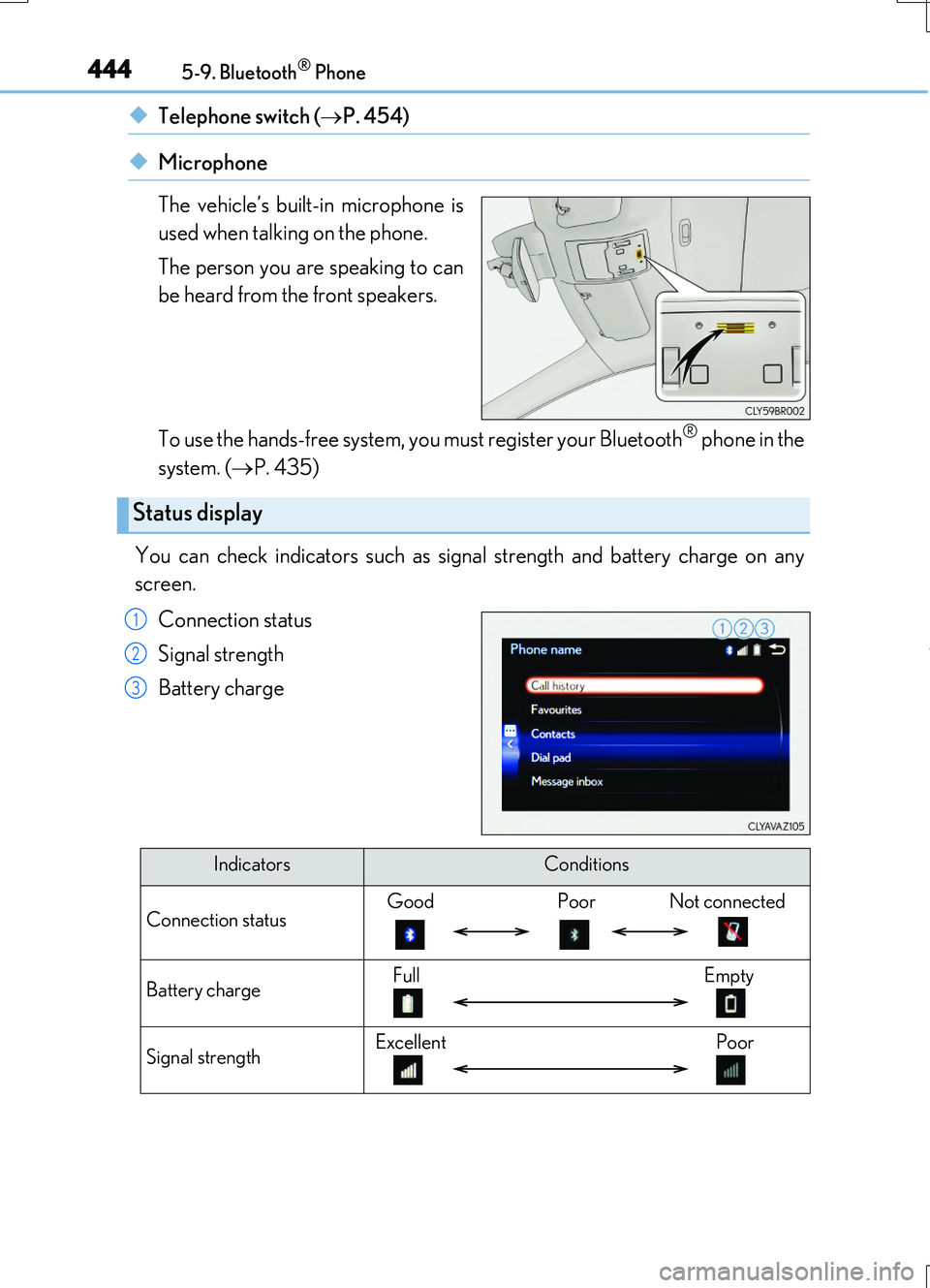
You can check indicators such as signal strength and battery charge on any
screen.
Connection status
Signal strength
Battery charge
Status display
1
2
3
IndicatorsConditions
Connection statusGood Poor Not connected
Battery chargeFull Empty
Signal strengthExcellent Poor
Page 445 of 724
4455-9. Bluetooth® Phone
5
Lexus Display Audio system
RC200t_RC F_EE(OM24728E)
Go to “Dial pad”: “Telephone” “Dial pad”
Input a phone number. ( P. 394)
Press the switch on the steering wheel or select .
You can dial a number from the phonebook data imported from your cellular
phone. The system has one phonebook for each registered telephone. Up to
2500 contacts may be stored in each phonebook. ( P. 446)
Go to “Contacts”: “Telephone” “Contacts”
Choose the desired contact to call from the list.
Choose the number and then press the switch on the steering wheel or
select the number.
Making a call
Once a Bluetooth® phone is registered, you can make a call using the follow-
ing procedure:
Dialing
Dialing from the phonebook
1
2
3
1
2
3