Page 144 of 692
144
IS300h_EE(OM53D89E)
3-2. Opening, closing and locking the doors and trunk
The vehicle can be locked and unlock ed using the entry function, wireless
remote control or door lock switches.
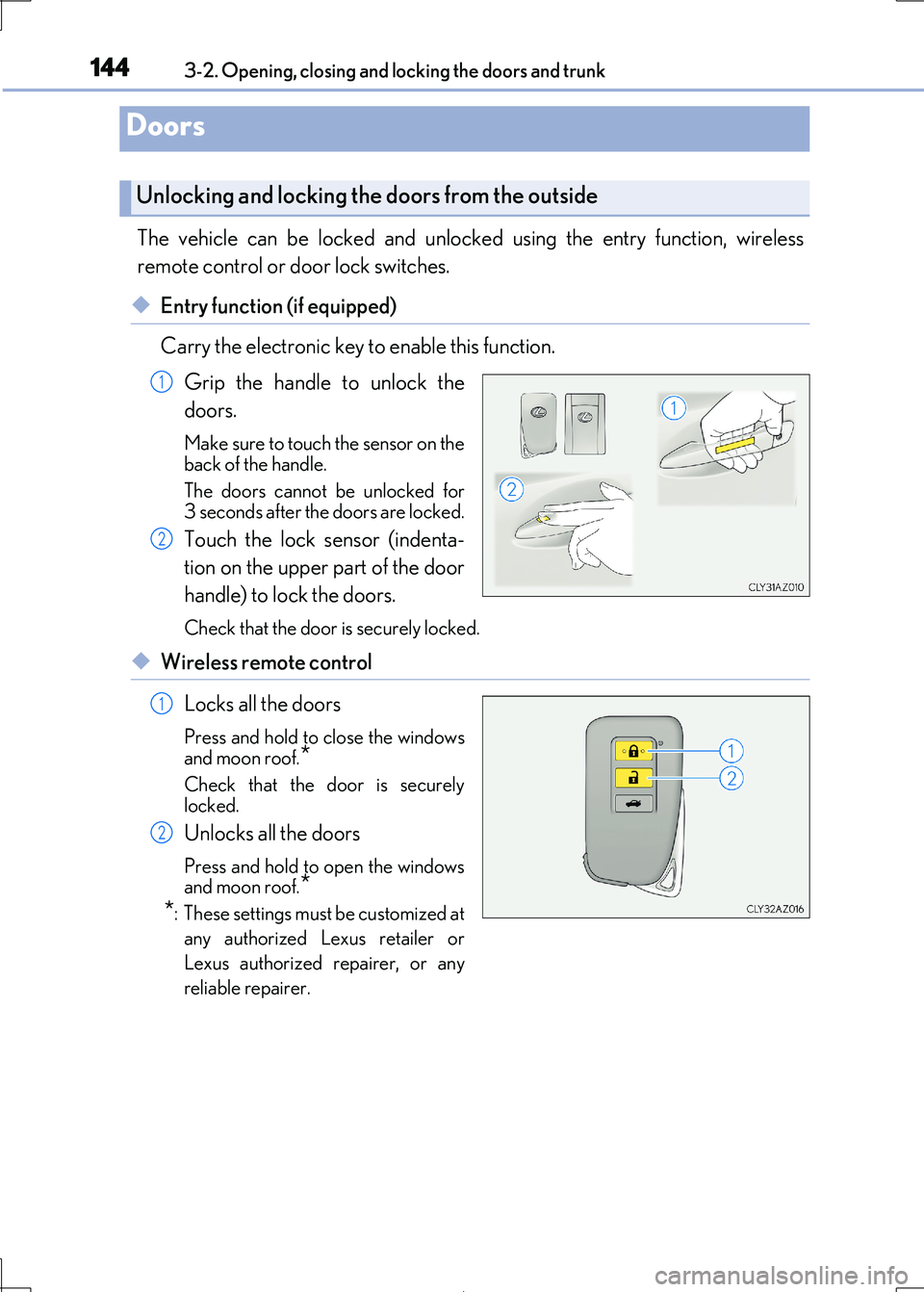
◆Entry function (if equipped)
Carry the electronic key to enable this function.
Grip the handle to unlock the
doors.
Make sure to touch the sensor on the
back of the handle.
The doors cannot be unlocked for
3 seconds after the doors are locked.
Touch the lock sensor (indenta-
tion on the upper part of the door
handle) to lock the doors.
Check that the door is securely locked.
◆Wireless remote control
Locks all the doors
Press and hold to close the windows
and moon roof.*
Check that the door is securely locked.
Unlocks all the doors
Press and hold to open the windows
and moon roof.*
*: These settings must be customized at
any authorized Lexus retailer or
Lexus authorized repairer, or any
reliable repairer.
Doors
Unlocking and locking the doors from the outside
1
2
1
2
Page 145 of 692

1453-2. Opening, closing and locking the doors and trunk
3
Operation of each component
IS300h_EE(OM53D89E)
■Operation signals
The emergency flashers flash to indicate that the doors have been locked/unlocked.
(Locked: once; Unlocked: twice)
A buzzer sounds to indicate that th e windows and moon roof are operating.
■Security feature
If a door is not opened within approximately 30 seconds after the vehicle is unlocked, the security feature automatically locks the vehicle again.
■Welcome light illumination control
The front position, tail and license plate light s automatically turn on at night when the doors are unlocked using the entry function or wireless remote control if the light switch
is in the “AUTO” position.
■When the door cannot be locked by the lock sensor on the upper part of the door han- dle (vehicles with entry function)
■Door lock buzzer
If an attempt to lock the doors is made wh en a door is not fully closed, a buzzer sounds continuously for 5 seconds. Fully close the d oor to stop the buzzer, and lock the vehicle
once more.
■Setting the alarm (if equipped)
Locking the doors will set the alarm system. ( P. 92)
■If the smart entry & start system or the wireless remote control does not operate prop-
erly
Use the mechanical key to lock and unlock the doors. ( P. 628)
Replace the key battery with a new one if it is depleted. (P. 549)
If the door will not lock even when the topside sensor area is touched, try touching both the
topside and underside sensor areas at the same
time.
Page 146 of 692
1463-2. Opening, closing and locking the doors and trunk
IS300h_EE(OM53D89E)
WARNING
Observe the following precautions. Failing to do so may result in death or serious injury.
■When using the wireless remote control and operating the power window or moon
roof
Operate the power window or moon roof after checking to make sure that there is no
possibility of any passenger having any of their body parts caught in the window or
moon roof. Also, do not allow children to oper ate the wireless remote control. It is pos- sible for children and other passengers to get caught in the power window or moon
roof.
■Jam protection function
●Never try jamming any part of your body to activate the jam protection function
intentionally.
●The jam protection function may not work if something gets caught just before the window or moon roof fully closes.
Page 193 of 692
193
3
Operation of each component
IS300h_EE(OM53D89E)
3-5. Opening, closing th e windows and moon roof
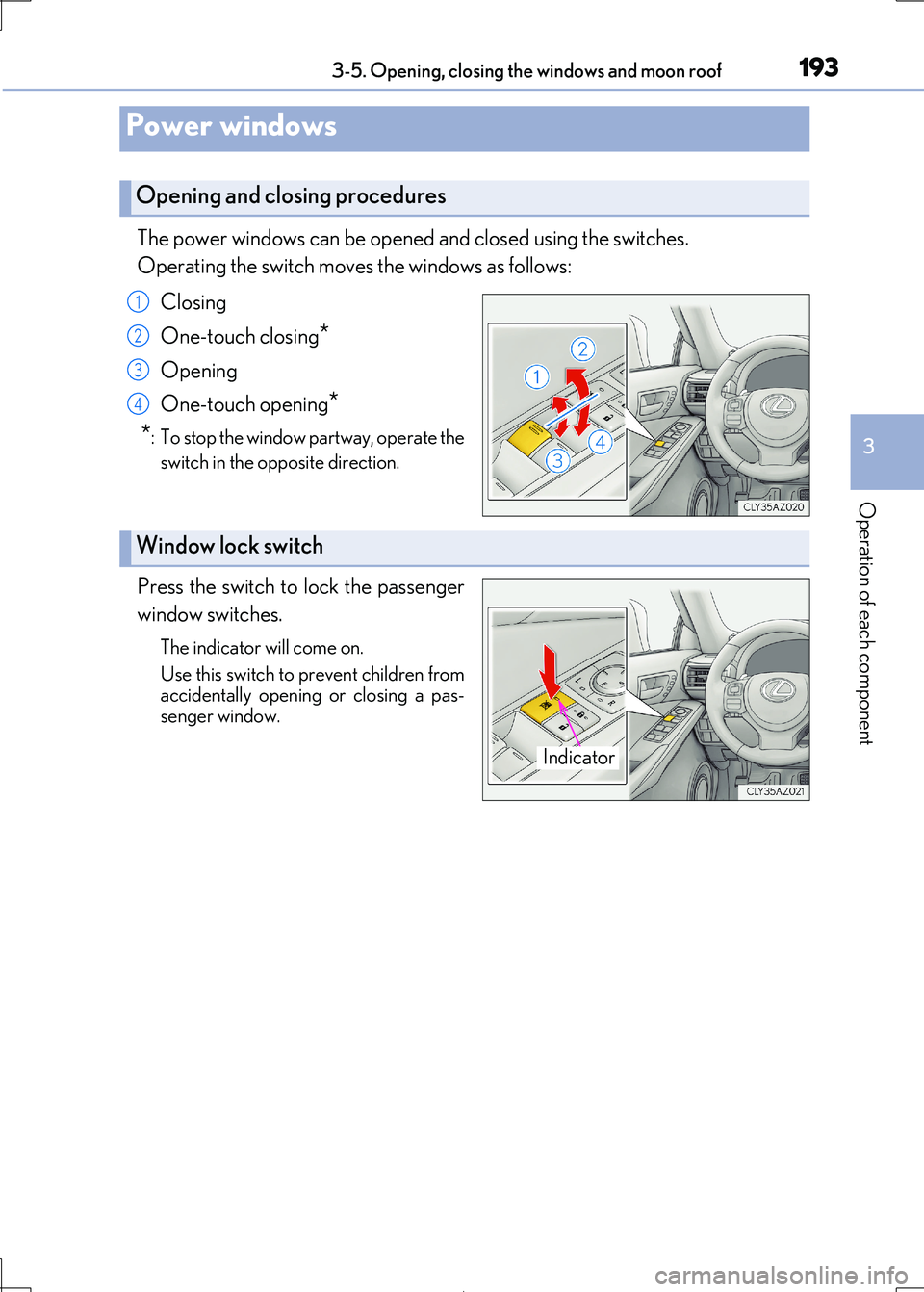
The power windows can be opened and closed using the switches.
Operating the switch move s the windows as follows:
Closing
One-touch closing*
Opening
One-touch opening*
*: To stop the window partway, operate the
switch in the op posite direction.
Press the switch to lock the passenger
window switches.
The indicator will come on.
Use this switch to prevent children from accidentally opening or closing a pas-
senger window.
Power windows
Opening and closing procedures
1
2
3
4
Window lock switch
Indicator
Page 194 of 692

1943-5. Opening, closing the windows and moon roof
IS300h_EE(OM53D89E)
■The power windows can be operated when
The power switch is in ON mode.
■Operating the power windows after turning the hybrid system off
The power windows can be operated for ap proximately 45 seconds after the power
switch is turned to ACCESSORY mode or turned off. They cannot, however, be oper-
ated once either front door is opened.
■Jam protection function
If an object becomes jammed between the window and the window frame while the win-
dow is closing, window movement is stop ped and the window is opened slightly.
■Catch protection function
If an object becomes caught between the door and window while the window is opening,
window movement is stopped.
■When the window cannot be opened or closed
When the jam protection functi on or catch protection function operates unusually and
the door window cannot be opened or closed , perform the following operations with the power window switch of that door.
●Stop the vehicle. With the power switch in ON mode, within 4 seconds of the jam pro-
tection function or catch protection function activating, continuously operate the power window switch in the one-touch clos ing direction or one-touch opening direc-
tion so that the door window can be opened and closed.
●If the door window cannot be opened and closed even when performing the above operations, perform the following pr ocedure for function initialization.
Turn the power switch to ON mode.
Pull and hold the power window switch in the one-touch closing direction and com- pletely close the door window.
Release the power window sw itch for a moment, resume pulling the switch in the
one-touch closing direction, and hold it there for approximately 6 seconds or more.
Press and hold the power window switch in the one-touch opening direction. After
the door window is completely opened, cont inue holding the switch for an additional
1 second or more.
Release the power window switch for a mo ment, resume pushing the switch in the
one-touch opening direction, and hold it there for approximately 4 seconds or
more.
Pull and hold the power window switch in the one-touch closing direction again.
After the door window is completely clos ed, continue holding the switch for a fur-
ther 1 second or more.
If you release the switch wh ile the window is moving, start again from the beginning.
If the window reverses and cannot be fully cl osed or opened, have the vehicle inspected
by any authorized Lexus retailer or Lexus au thorized repairer, or any reliable repairer.
1
2
3
4
5
6
Page 195 of 692
1953-5. Opening, closing the windows and moon roof
3
Operation of each component
IS300h_EE(OM53D89E)
■Door lock linked window operation
●The power windows can be opened and closed using the mechanical key.* ( P. 628)
●The power windows can be opened and closed using the wireless remote control.*
(P. 144)
*: These settings must be customized at any authorized Lexus retailer or Lexus autho-
rized repairer, or any reliable repairer.
■When the 12-volt battery is disconnected
The window lock switch is disabled. If nece ssary, press the window lock switch after
reconnecting the 12-volt battery.
■Power windows open warning buzzer
The buzzer sounds and a message is shown on the multi-information display in the instru-
ment cluster when the power switch is turned off and the driver’s door is opened with the power windows open.
■Customization
Settings (e.g. linked door lock operation) can be changed. (Customizable features: P. 657)
Page 196 of 692

1963-5. Opening, closing the windows and moon roof
IS300h_EE(OM53D89E)
WARNING
Observe the following precautions. Failure to do so may result in death or serious injury.
■Closing the windows
●The driver is responsible for all the power window operations, including the operation for the passengers. In order to prevent acci dental operation, especially by a child, do
not let a child operate the power windows. It is possible for children and other passen-
gers to have body parts caught in the powe r window. Also, when riding with a child, it is recommended to use the window lock switch. ( P. 193)
●Check to make sure that all passengers do not have any part of their body in a posi-
tion where it could be caught wh en a window is being operated.
●When using the wireless remote control or mechanical key and operating the power
windows, operate the power window after checking to make sure that there is no pos-
sibility of any passenger having any of thei r body parts caught in the window. Also do not let a child operate window by the wirele ss remote control or mechanical key. It is
possible for children and other passengers to get caught in the power window.
●When exiting the vehicle, turn the power swit ch off, carry the key and exit the vehicle along with the child. There may be accidental operation, due to mischief, etc., that
may possibly lead to an accident.
■Jam protection function
●Never use any part of your body to intentio nally activate the jam protection function.
●The jam protection function may not work if something gets jammed just before the
window is fully closed. Be careful not to get any part of your body jammed in the win- dow.
■Catch protection function
●Never use any part of your body or clothing to intentionally activate the catch protec-tion function.
●The catch protection function may not work if something gets caught just before the
window is fully opened. Be ca reful not to get any part of your body or clothing caught in the window.
Page 197 of 692
1973-5. Opening, closing the windows and moon roof
3
Operation of each component
IS300h_EE(OM53D89E)
Opens the moon roof*
The moon roof stops slightly before the
fully open position to reduce wind noise.
Press the switch again to fully open the moon roof.
Closes the moon roof*
*: Lightly press either way of the moon
roof switch to stop the moon roof part-
way.
Tilts the moon roof up*
Tilts the moon roof down*
*: Lightly press either way of the moon
roof switch to stop the moon roof part-
way.
Moon roof
: If equipped
Use the overhead switches to open and close the moon roof and tilt it up and
down.
Opening and closing
1
2
Tilting up and down
1
2