Page 378 of 692
378
IS300h_EE(OM53D89E)
5-2. Setup
Go to “Setup”: “MENU” button “Setup”
Change the settings for operation
sounds, screen animation, etc.
( P. 379)
Adjust the settings for voice guid-
ance volume. ( P. 382)
Change the settings for registering,
removing, connecting and discon-
necting Bluetooth® devices.
( P. 413)
Change the settings for FM radio,
iPod, etc. ( P. 387)
Change the settings for vehicle cus-
tomization. ( P. 657)
Change the settings for phone
sound, phonebook, etc. ( P. 433)
Setup menu
The Lexus Display Audio system can be adjusted to the desired settings.
Display “Setup” screen
1
2
3
4
5
6
Page 385 of 692
385
5
Lexus Display Audio system
IS300h_EE(OM53D89E)
5-3. Using the audio system
Press the “AUDIO” button to display the “Source” screen.
If the “Source” screen is not displayed, press the button again.
Select the desired audio source.
The audio source can be selected by pressing the “RADIO” or “MEDIA” button.
Press the “MODE” switch when the audio system is turned on. The audio source
changes each time the “MODE” switch is pressed.
■Rearranging the list
The listing order of the sour ce list can be rearranged.
Move the controller to the left while on the “Source” screen.
Select “Audio source select”.
Select an item you wish to move and th en select where to move the item to.
Selecting the audio source
Switching between audio sources, such as the radio and CD, is explained in
this section.
Changing audio source
Using the steering wheel switches to change audio sources
1
2
1
2
3
Page 387 of 692
3875-3. Using the audio system
5
Lexus Display Audio system
IS300h_EE(OM53D89E)
Go to “Audio settings”: “MENU” button “Setup” “Audio”
Change sound settings ( P. 386)
Change FM radio settings
( P. 388)
Change DAB settings (if equipped)
( P. 388)
Change iPod settings ( P. 389)
Change USB settings ( P. 389)
Change external video settings
( P. 390)
Change the cover art settings
( P. 390)
Audio settings
Screen for audio settings
1
2
3
4
5
6
7
Page 388 of 692
3885-3. Using the audio system
IS300h_EE(OM53D89E)
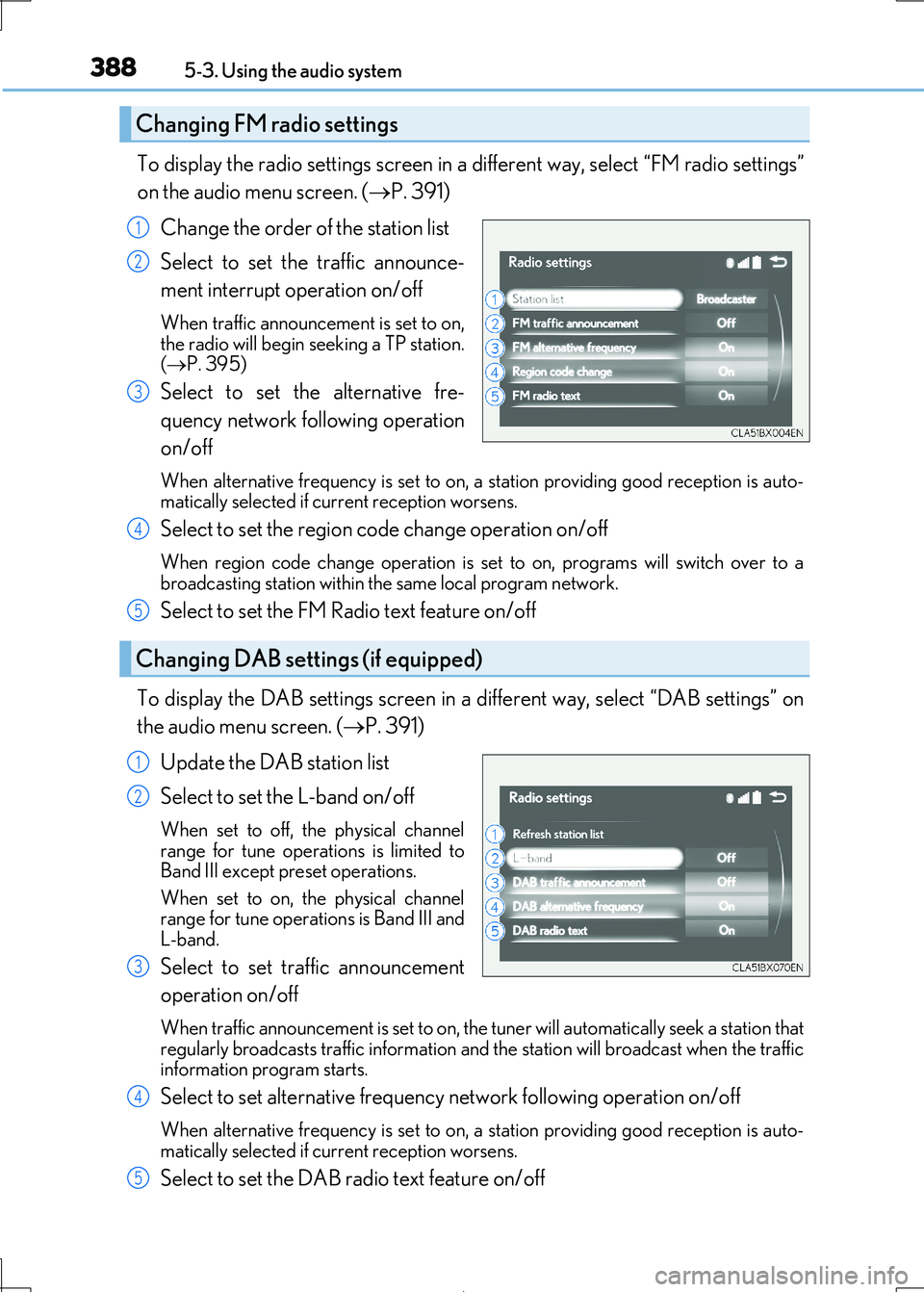
To display the radio settings screen in a different way, select “FM radio settings”
on the audio menu screen. ( P. 391)
Change the order of the station list
Select to set the traffic announce-
ment interrupt operation on/off
When traffic announcement is set to on, the radio will begin seeking a TP station.
( P. 395)
Select to set the alternative fre-
quency network fo llowing operation
on/off
When alternative frequency is set to on, a station providing good reception is auto- matically selected if current reception worsens.
Select to set the region co de change operation on/off
When region code change operation is set to on, programs will switch over to a
broadcasting station within th e same local program network.
Select to set the FM Radio text feature on/off
To display the DAB settings screen in a different way, select “DAB settings” on
the audio menu screen. ( P. 391)
Update the DAB station list
Select to set the L-band on/off
When set to off, the physical channel range for tune operations is limited to
Band III except preset operations.
When set to on, the physical channel range for tune operations is Band III and
L-band.
Select to set traffic announcement
operation on/off
When traffic announcement is set to on, the tuner will automatically seek a station that regularly broadcasts traffic information and the station will broadcast when the traffic
information program starts.
Select to set alternative frequenc y network following operation on/off
When alternative frequency is set to on, a station providing good reception is auto- matically selected if current reception worsens.
Select to set the DAB radio text feature on/off
Changing FM radio settings
1
2
3
Changing DAB settings (if equipped)
4
5
1
2
3
4
5
Page 391 of 692
3915-3. Using the audio system
5
Lexus Display Audio system
IS300h_EE(OM53D89E)
Go to audio menu screen: Move the controller to the left on the audio top screen
Radio mode
Audio menu screen operation
You can change the settings and control functions for each audio source.
Audio menu screen
ButtonFunctionTarget radio mode
“Seek up”Seeks a station of the nearest frequency (stops
when a station is found) (manual mode)AM, FM“Seek down”
“Rewind”Adjusts the playback offset time on time shift modeDAB“Forward”
“Time shift off”Cancels time shift operationDAB
“Next ensemble”Selects an ensemble (manual mode)DAB“Prev. ensemble”
“Next station”Selects a service (manual mode)DAB“Prev. station”
“FM radio settings”Changes FM radio settings (P. 388)All mode
“DAB settings”Changes DAB settings (P. 388)All mode
Page 394 of 692
394
IS300h_EE(OM53D89E)
5-4. Using the radio
Pressing the “RADIO” button displays th e radio top screen from any screen of
the selected source.
■Menu screen
P. 391
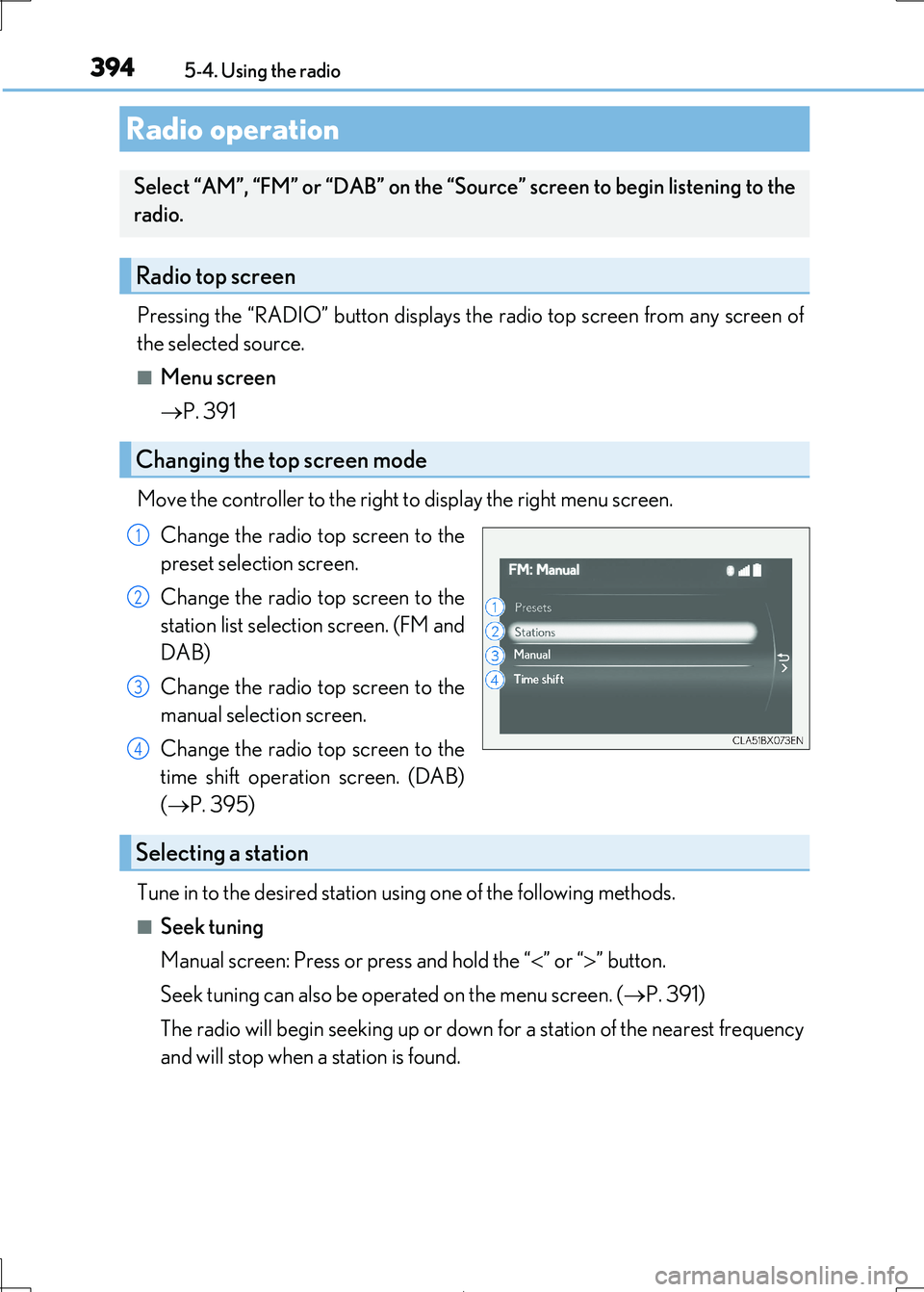
Move the controller to the right to display the right menu screen.
Change the radio top screen to the
preset selection screen.
Change the radio top screen to the
station list selection screen. (FM and
DAB)
Change the radio top screen to the
manual selection screen.
Change the radio top screen to the
time shift operation screen. (DAB)
( P. 395)
Tune in to the desired station us ing one of the following methods.
■Seek tuning
Manual screen: Press or press and hold the “ ” or “” button.
Seek tuning can also be operated on the menu screen. ( P. 391)
The radio will begin seeking up or down for a station of the nearest frequency
and will stop when a station is found.
Radio operation
Select “AM”, “FM” or “DAB” on the “Sourc e” screen to begin listening to the
radio.
Radio top screen
Changing the top screen mode
1
2
3
4
Selecting a station
Page 395 of 692
3955-4. Using the radio
5
Lexus Display Audio system
IS300h_EE(OM53D89E)
■Manual tuning (manual screen)
Turn the “TUNE•SCROLL” knob or turn the controller.
■Station list (preset or station list screen)
Select the desired station by pressi ng the “<” or “>” button, turn the
“TUNE•SCROLL” knob, or turnin g and pressing the controller.
Radio stations can be preset.
Search for desired stations.
Turn the controller to sele ct one of the stations and then press the controller
until you hear a beep while on the preset selection screen.
The broadcast you are currently listening to can be re-listened to at any time.
Move the controller to the righ t and then select “Time shift”.
Turn the “TUNE•SCROLL” knob to set the desired offset.
An offset playback time can also be set on the menu screen. (P. 391)
To cancel the time shift operation while in time shift mode, move the controller to the
left and select “Time shift off” . If the time shift display is left showing “-0’ 00”” for 6
seconds without any operation, the ti me shift operation will be canceled.
■Reception sensitivity
●Maintaining perfect radio reception at all times is difficult due to the continually chang- ing position of the antenna, di fferences in signal strength and surrounding objects, such
as trains, transmitters, etc.
●The radio antenna is mounted inside the rear window. To maintain clear radio reception, do not attach metallic window tinting or other metallic objects to the antenna wire
mounted inside the rear window.
■Traffic announcement operation
When traffic announcement is set to on, “TP” will appear on the screen and the radio will
begin seeking a TP station. If the radio seek s out a TP station, a pop-up massage is dis-
played. To listen the program, select “Continue”. When the program ends, the initial
operation will resume.
Setting station presets (preset screen)
Time shift operation (DAB) (if equipped)
1
2
1
2
Page 449 of 692

4495-11. Bluetooth®
5
Lexus Display Audio system
IS300h_EE(OM53D89E)
WARNING
■While driving
Do not operate the portable audio player, ce llular phone or connect a device to the
Bluetooth® system.
■Caution regarding interference with electronic devices
●Your audio unit is fitted with Bluetooth® antennas. People with implantable cardiac
pacemakers, cardiac resynchronization ther apy-pacemakers or implantable cardio-
verter defibrillators should maintain a re asonable distance between themselves and the Bluetooth® antennas. The radio waves may affe ct the operation of such devices.
●Before using Bluetooth® devices, users of any electrical medical device other than
implantable cardiac pacemakers, cardiac resynchronization therapy-pacemakers or implantable cardioverter defi brillators should consult the manufacturer of the device
for information about its operation under the influence of radio waves. Radio waves
could have unexpected effects on the operation of such medical devices.
NOTICE
■When leaving the vehicle
Do not leave your portable audio player or cellular phone in the vehicle. The inside of the vehicle may become hot, causing damage to the portable audio player or cellular
phone.


