2017 Lexus IS300h Fog
[x] Cancel search: FogPage 278 of 692
2784-5. Using the driving support systems
IS300h_EE(OM53D89E)
■If the PCS warning light flashes and a warning message is displayed on the multi-infor-
mation display
The pre-collision system may be temporarily unavailable or there may be a malfunction
in the system.
●In the following situations, the warning light will turn off, the message will disappear and the system will become operational when normal operating conditions return:
• When the radar sensor or camera sensor or the area around either sensor is hot,
such as in the sun • When the radar sensor or came ra sensor or the area around either sensor is cold,
such as in an extremely cold environment
• When the radar sensor or front grille embl em is dirty or covered with snow, etc. • When the part of the windshield in front of the camera sensor is fogged up or cov-
ered with condensation or ic e (Defogging the windshield: P. 474)
• If the camera sensor is obstructed, such as when the hood is open or a sticker is attached to the windshield near the camera sensor
●If the PCS warning light continues to flash or the warning message does not disappear, the system may be malfunctioning. Have the vehicle inspected by any authorized Lexus
retailer or Lexus authoriz ed repairer, or any reliable repairer immediately.
■If VSC is disabled
●If VSC is disabled (P. 354), the pre-collision brake assist and pre-collision braking
functions are also disabled.
●The PCS warning light will turn on and “VSC Turned Off Pre-Collision Brake System Unavailable” will be displayed on the multi-information display.
Page 281 of 692

2814-5. Using the driving support systems
4
Driving
IS300h_EE(OM53D89E)
WARNING
■Before using LDA system
Do not rely solely upon the LDA system. The LDA system does not automatically drive
the vehicle or reduce the amount of attention that must be paid to the area in front of
the vehicle. The driver must always assume full responsibility for driving safely by pay- ing careful attention to the surrounding cond itions and operating the steering wheel to
correct the path of the vehicle. Also, th e driver must take adequate breaks when
fatigued, such as from driving for a long period of time. Failure to perform appropriate driving operat ions and pay careful attention may lead to
an accident, resulting in death or serious injury.
■To avoid operating LDA system by mistake
When not using the LDA system, use the LDA switch to turn the system off.
■Situations unsuitable for LDA system
Do not use the LDA system in the following situations. The system may not operate properly and le ad to an accident, resulting in death or
serious injury.
●A spare tire, tire chains, etc. are equipped.
●When the tires have been excessively worn, or when the tire inflation pressure is low.
●Tires which differ by structure, manufacturer, brand or tread pattern are used.
●Objects or patterns that could be mistaken for white (yellow) lines are present on the side of the road (guardrails, cu rbs, reflective poles, etc.).
●Vehicle is driven on a snow-covered road.
●White (yellow) lines are difficult to see due to rain, snow, fog, dust, etc.
●Asphalt repair marks, white (yellow) line marks, etc. are present due to road repair.
●Vehicle is driven in a temporary lane or restricted lane due to construction work.
●Vehicle is driven on a road surface which is slippery due to rainy weather, fallen snow, freezing, etc.
●Vehicle is driven in traffic lanes ot her than on highways and freeways.
●Vehicle is driven in a construction zone.
●When your vehicle is towing a trailer or during emergency towing
■Preventing LDA system malfunctions and operations performed by mistake
●Do not modify the headlights or place stickers, etc. on the surface of the lights.
●Do not modify the suspension etc. If the suspension etc. needs to be replaced, con-
tact your authorized Lexus retailer or Lexus authorized repairer, or any reliable
repairer.
●Do not install or place anything on the hood or grille. Also, do not install a grille guard
(bull bars, kangaroo bar, etc.).
●If your windshield needs repairs, contact your authorized Lexus retailer or Lexus
authorized repairer, or any reliable repairer.
Page 291 of 692
2914-5. Using the driving support systems
4
Driving
IS300h_EE(OM53D89E)
*1: If the turn signal indicator is not operated when changing lanes, the mark does not dis-
play.
*2: Vehicles with a navigation system
In the following situations, the RSA system alerts the driver using a warning dis-
play.
●When the vehicle speed exceeds the sp eed warning threshold applied to the
speed limit of the sign displayed on the multi-information display, the sign
color becomes inverted.
●If it is detected that your vehicle is overtaking when a no overtaking sign is dis-
played on the multi-information display, the sign flashes.
●Vehicles with a navigation system: When the RSA system recognizes a no-
entry sign and detects that the vehicl e has entered a no-entry area based on
the map information of the navigation system, the no-entry sign flashes.
Depending on the situation, traffic envi ronment (traffic direction, speed, unit)
may be detected incorrectly and a warn ing display may not operate properly.
■Automatic turn-off of RSA sign display
One or more signs automatically turn off in the following situations.
●A new sign is not recognized for a certain distance.
●The road changes due to a left or right turn, etc.
■Conditions in which the function may not operate or detect correctly
In the following situations, RSA does not op erate normally and may not recognize signs,
display the incorrect sign, etc. However, this does not indicate a malfunction.
●The camera sensor is misaligned due to a strong impact being applied to the sensor, etc.
●Dirt, snow, stickers, etc. are on th e windshield near the camera sensor.
●In inclement weather such as heavy rain, fog, snow or sand storms
●Light from an oncoming vehicle, the sun, etc. enters the camera sensor.
●The sign is dirty, faded, tilted or bent, and if an electronic sign, the contrast is poor.
●All or part of the sign is hidden by the leaves of a tree, a pole, etc.
●The sign is only visible to the camera sensor for a short amount of time.
●The driving scene (turning, lane change, etc.) is judged incorrectly.
●Even if it is a sign not appropriate for the currently traveled lane, such a sign exists
directly after a freeway branches, or in an adjacent lane just before merging.
●Stickers are attached to the rear of the preceding vehicle.
●A sign resembling a system compatible sign is recognized.
●The vehicle is driven in a country with a different direction of traffic.
Warning display
Page 295 of 692

2954-5. Using the driving support systems
4
Driving
IS300h_EE(OM53D89E)
WARNING
■Situations unsuitable for dynamic radar cruise control
Do not use dynamic radar cruise contro l in any of the following situations.
Doing so may result in inappropriate speed control and could cause an accident result-
ing in death or serious injury.
●Roads where there are pede strians, cyclists, etc.
●In heavy traffic
●On roads with sharp bends
●On winding roads
●On slippery roads, such as those covered with rain, ice or snow
●On steep downhills, or where there are sudden changes between sharp up and down gradients
Vehicle speed may exceed the set speed when driving down a steep hill.
●At entrances to freeways and highways
●When weather conditions are bad enough that they may prevent the sensors from
detecting correctly (fog, snow, sandstorm, heavy rain, etc.)
●When there is rain, snow, etc. on the front surface of the radar sensor or camera sen- sor
●In traffic conditions that require frequent repeated acceleration and deceleration
●When your vehicle is towing a trailer or during emergency towing
●When an approach warning buzzer is heard often
Page 342 of 692

3424-5. Using the driving support systems
IS300h_EE(OM53D89E)
■Conditions under which the BSM function may not function correctly
●The BSM function may not detect vehicles correctly in the following situations:
• When the sensor is misaligned due to a stro ng impact to the sensor or its surround-
ing area
• When mud, snow, ice, a sticker, etc. is covering the sensor or surrounding area on the rear bumper
• When driving on a road surface that is wet with standing water during bad weather,
such as heavy rain, snow, or fog • When multiple vehicles are approaching wi th only a small gap between each vehicle
• When the distance between your vehicle and a following vehicle is short
• When there is a significant difference in speed between your vehicle and the vehicle that enters the detection area
• When the difference in speed between your vehicle and another vehicle is changing
• When a vehicle enters a detection area traveling at about the same speed as your vehicle
• As your vehicle starts from a stop, a vehicle remains in the detection area
• When driving up and down consecutive steep inclines, such as hills, dips in the road, etc.
• When driving on roads with sharp bends, consecutive curves, or uneven surfaces
• When vehicle lanes are wide, or when drivin g on the edge of a lane, and the vehicle in an adjacent lane is fa r away from your vehicle
• When towing a trailer (vehicles with towing package)
• When items such as a bicycle carrier are installed on the rear of the vehicle • When there is a significant difference in height between your vehicle and the vehicle
that enters the detection area
• Immediately after the BSM function is turned on
●Instances of the BSM function unnecessarily detecting a vehicle and/or object may
increase in the following situations:
• When the sensor is misaligned due to a stro ng impact to the sensor or its surround- ing area
• When the distance between your vehicle and a guardrail, wall, etc. that enters the
detection area is short • When driving up and down consecutive steep inclines, such as hills, dips in the road,
etc.
• When vehicle lanes are narrow, or when driv ing on the edge of a lane, and a vehicle traveling in a lane other than the ad jacent lanes enters the detection area
• When driving on roads with sharp bends, consecutive curves, or uneven surfaces
• When the tires are slipping or spinning • When the distance between your vehicle and a following vehicle is short
• When a bicycle carrier or other accessory is installed to the rear of the vehicle
• When towing a trailer (vehicles with towing package)
Page 346 of 692

3464-5. Using the driving support systems
IS300h_EE(OM53D89E)
■Conditions under which the RCTA function will not detect a vehicle
The RCTA function is not designed to dete ct the following types of vehicles and/or objects:
●Vehicles approaching from directly behind
●Vehicles backing up in a parking space next to your vehicle
●Guardrails, walls, signs, parked vehi cles and similar stationary objects*
●Small motorcycles, bicycles, pedestrians, etc.*
●Vehicles moving away from your vehicle
●Vehicles approaching from the parking spaces next to your vehicle*
*: Depending on the conditions, detection of a vehicle and/or object may occur.
■Conditions under which the RCTA function may not function correctly
●The RCTA function may not detect vehicles correctly in the following situations:
• When the sensor is misaligned due to a stro ng impact to the sensor or its surround-
ing area • When mud, snow, ice, a sticker, etc. is covering the sensor or surrounding area on
the rear bumper
• When driving on a road surface that is wet with standing water during bad weather,
such as heavy rain, snow, or fog • When multiple vehicles are approaching wi th only a small gap between each vehicle
• When a vehicle is approaching at high speed
• When towing a trailer (vehicles with towing package)
●Vehicles that the sensors cannot detect due to
obstructions
• When backing up on a slope with a sharp
change in grade
Page 468 of 692
4686-2. Using the air conditioning system
IS300h_EE(OM53D89E)
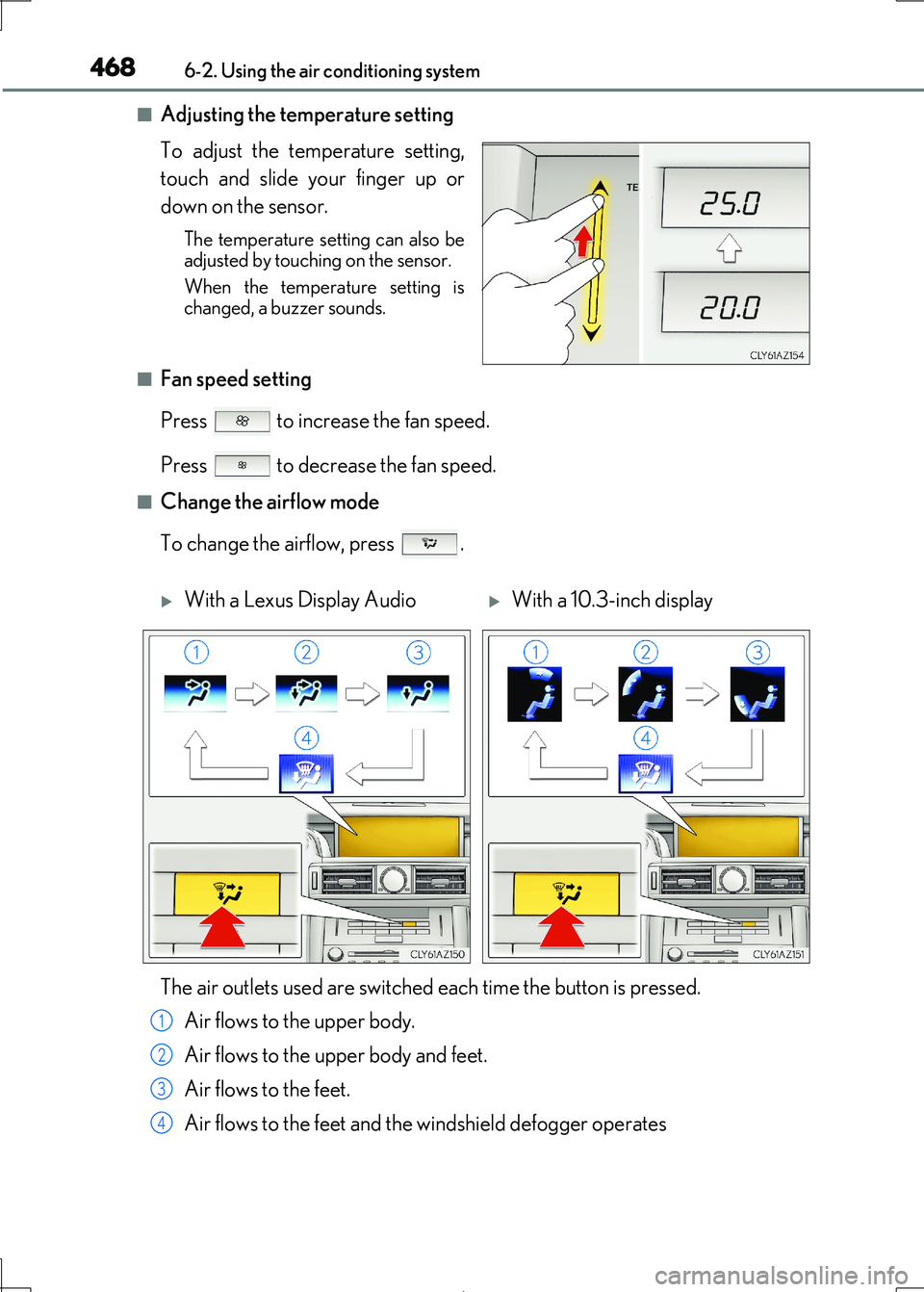
■Adjusting the temperature setting
To adjust the temperature setting,
touch and slide your finger up or
down on the sensor.
The temperature setting can also be adjusted by touching on the sensor.
When the temperature setting is
changed, a buzzer sounds.
■Fan speed setting
Press to increase the fan speed.
Press to decrease the fan speed.
■Change the airflow mode
To change the airflow, press .
With a Lexus Display AudioWith a 10.3-inch display
The air outlets used are switched each time the button is pressed.
Air flows to the upper body.
Air flows to the upper body and feet.
Air flows to the feet.
Air flows to the feet and the windshield defogger operates
1
2
3
4
Page 469 of 692

4696-2. Using the air conditioning system
6
Interior features
IS300h_EE(OM53D89E)
■S-FLOW mode (if equipped)
When there are no passengers in the rear seats, airflow can be directed to the
front seats only to reduce the air co nditioning effect on the rear seats.
However, depending on both the temperature inside and outside the vehicle, air-
flow may be directed to the rear seats even though S-FLOW mode is on to main- tain comfort insi de the vehicle.
Press .
The indicator comes on when S-FLOW mode is on.
Press again to resume airflow to the rear seats.
■Other functions
●Switching between outside air and recirculated air modes ( P. 474)
●Defogging the windshield (P. 474)
●Defogging the rear window and outside rear view mirrors (P. 474)