2017 Lexus IS300h service
[x] Cancel search: servicePage 424 of 692

4245-9. Bluetooth® Phone
IS300h_EE(OM53D89E)
You can transfer the phone numbers in a Bluetooth® phone to the system.
Operation methods differ between PBAP (Phone Book Access Profile) compat-
ible and PBAP incompatible Bluetooth® phones. If the cellular phone does not
support either PBAP or OPP (Object Pu sh Profile) service, you cannot transfer
contacts.
Press the off-hook switch on the steering wheel.
If the phonebook is empty, a message will be displayed.
For a PBAP compatible Bluetooth® phone and “Automatic transfer” is off
To enable automatic transfer of new contacts from a cellular phone every time
it is connected, select “Always”. ( P. 435)
Select “Once” if you want to transf er new contacts from a cellular phone.
For a PBAP incompatible and OPP compatible Bluetooth® phone
Select “Transfer” and operate your ce llular phone to transfer new contacts
from a cellular phone.
Select “Add” if you want to add a new contact manually.
When the phonebook is empty
1
2
2
Page 427 of 692
4275-9. Bluetooth® Phone
5
Lexus Display Audio system
IS300h_EE(OM53D89E)
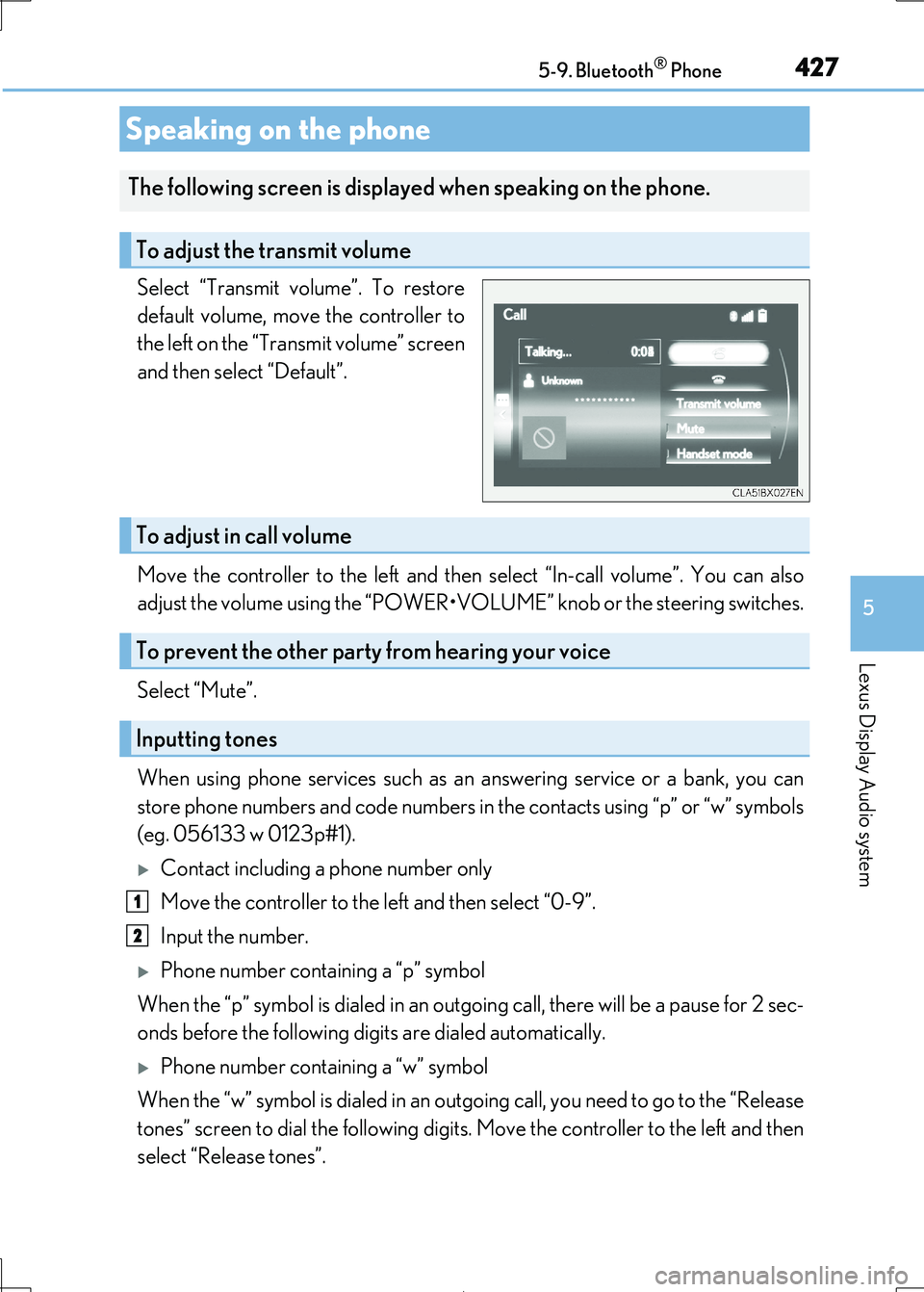
Select “Transmit volume”. To restore
default volume, move the controller to
the left on the “Transmit volume” screen
and then select “Default”.
Move the controller to the left and then select “In-call volume”. You can also
adjust the volume using the “POWER•VOL UME” knob or the steering switches.
Select “Mute”.
When using phone services such as an answering service or a bank, you can
store phone numbers and code numbers in the contacts using “p” or “w” symbols
(eg. 056133 w 0123p#1).
Contact including a phone number only
Move the controller to the left and then select “0-9”.
Input the number.
Phone number containing a “p” symbol
When the “p” symbol is dial ed in an outgoing call, there will be a pause for 2 sec-
onds before the following digits are dialed automatically.
Phone number containing a “w” symbol
When the “w” symbol is dialed in an outgoing call, you need to go to the “Release
tones” screen to dial the following digits. Move the controller to the left and then
select “Release tones”.
Speaking on the phone
The following screen is displa yed when speaking on the phone.
To adjust the transmit volume
To adjust in call volume
To prevent the other party from hearing your voice
Inputting tones
1
2
Page 436 of 692

4365-10. Phonebook
IS300h_EE(OM53D89E)
Edit a contact (PBAP incompatible Bluetooth® phones, or compatible
phones with “Automatic transfer” off)
Select the desired contact to edit.
Delete contacts ( P. 437) (PBAP incompatible Bluetooth® phones, or com-
patible phones with “Automatic transfer” off)
Edit a voice tag ( P. 457)
■Return to the default settings
Move the controller to the le ft and select “Defaults”.
You can transfer the phone numbers in your Bluetooth® phone to the system.
Operation methods differ between PBAP compatible and PBAP incompatible
Bluetooth® phones. If your cellular phone does not support either PBAP or
OPP services, you cannot transfer contacts.
Go to “Transfer contacts”: “MENU” button “Setup” “Telephone” “Con-
tact/call history settings” “Update contacts from telephone”
For PBAP compatible Bluetooth® phones when “Automatic transfer” is set to
on
Start the update automatically.
For PBAP compatible Bluetooth® phones when “Automatic transfer” is set to
off and PBAP incompatible Bluetooth® phones
Select to transfer the contact from
the connected cellular phone and
replace the current one.
Select to transfer the desired con-
tact data from the connected cellu-
lar phone to add to the current one.
Transferring a phone number
9
10
11
1
2
Page 437 of 692
4375-10. Phonebook
5
Lexus Display Audio system
IS300h_EE(OM53D89E)
You can register the desired contact from the phonebook. Up to 15 contacts per
phone can be registered.
Go to “Add favourit e”: “MENU” button “Setup” “Telephone” “Con-
tact/call history settings” “Add favourite”
Choose the contact to register.
Go to “Remove favourite”: “MENU” button “Setup” “Telephone”
“Contact/call history settings” “Remove favourite”
Select the desired contacts.
You can select all contacts by selecting “Select all”.
Move the controller to the left and select “Remove”.
Go to “Delete contacts”: “MENU” button “Setup” “Telephone”
“Contact/call history settings” “Delete contacts”
Select the desired contacts.
You can select all contacts by selecting “Select all”.
Move the controller to the left and select “Delete”.
■Phonebook data
Phonebook data is managed separately for every registered phone. When one phone is
connected, you cannot read the registered data of the other phones.
■When transferring contacts
Transfer contacts while the hybrid system is operating.
If the cellular phone is OPP or PBAP compatible, you may need to input “1234” on the
cellular phone for OB EX certification.
■When you have selected “Replace contacts” or “Add contact” to transfer contacts
If the cellular phone does not support OPP service, you cannot use these functions. You
can transfer the phonebook data only by operating your phone.
■Transferring contacts while Bluetooth® audio is playing
Bluetooth® audio will disconnect. It will reconnect automatically when data transfer fin-
ishes. It may not reconn ect depending on the phone which is connected.
Registering favorites
Removing favorites
Deleting the contacts data
1
2
1
2
3
1
2
3
Page 440 of 692

4405-11. Bluetooth®
IS300h_EE(OM53D89E)
When making/receiving a call
When using the phonebook
When using the Bluetooth® message function
A call cannot be made/received.
Your vehicle is in a “No service” area.
Move to where “No service” no longer appears on the display.
Phonebook data cannot be transferred manually/automatically.
Automatic phonebook transfer function on this system is set to off. Set automatic phonebook transfer function on this system to on. (P. 435)
Passcode has not been entered on the cellular phone.
Enter the passcode on the cellular phone if requested (default passcode: 1234).
Transfer operation on the cellular phone has not completed.
Complete transfer operation on the cellular phone (approve transfer operation on the phone).
Phonebook data cannot be edited.
Automatic phonebook transfer function on this system is set to on.
Set automatic phonebook transfer function on this system to off. (P. 435)
Messages cannot be viewed.
Message transfer is not enabled on the cellular phone.
Enable message transfer on the cellular phone (approve message transfer on the
phone).
Automatic transfer function on this system is set to off. Set automatic transfer function on this system to on. (P. 438)
New message notifications are not displayed.
Notification of SMS/MMS/E-mail reception on this system is set to off.
Set notification of SMS/MMS/E-mail reception on this system to on. (P. 438)
Automatic message transfer function is not enabled on the cellular phone.
Enable automatic transfer function on the cellular phone.
Page 442 of 692

4425-11. Bluetooth®
IS300h_EE(OM53D89E)
■When using the Bluetooth® audio system
●In the following situations, the system may not function.
• If the portable audio player is turned off • If the portable audio player is not connected
• If the portable audio player’s battery is low
●There may be a delay if a cellular phon e connection is made during Bluetooth® audio
play.
●Depending on the type of portable audio play er that is connected to the system, opera- tion may differ slightly and cert ain functions may not be available.
■When using the hands-free system
●The audio system is muted when making a call.
●If both parties speak at the same time, it may be difficult to hear.
●If the received call volume is overly loud, an echo may be heard.
If the Bluetooth® phone is too close to the system, quality of the sound may deteriorate and connection stat us may deteriorate.
●In the following situations, it may be difficult to hear the other party:
• When driving on unpaved roads • When driving at high speeds
• If a window is open
• If the air conditioning is blow ing directly on the microphone • If there is interference from the network of the cellular phone
●Depending on the type of phone, certain functions may not be available.
■Conditions under which the system will not operate
●If using a cellular phone that does not support Bluetooth®
●If the cellular phone is turned off
●If you are outside of cellular phone service coverage
●If the cellular phone is not connected
●If the cellular phone’s battery is low
●When outgoing calls are controlled, due to heavy traffic on phone lines, etc.
●When the cellular phone itself cannot be used
●When transferring phonebook data from the cellular phone
Bluetooth®
Page 444 of 692

4445-11. Bluetooth®
IS300h_EE(OM53D89E)
■Compatible models
The Bluetooth® audio system supports portable audi o players with the following specifi- cations
●Bluetooth® specifications:
Ver. 2.0, or higher (Recommend ed: Ver. 3.0 +EDR or higher)
●Profiles:
• A2DP (Advanced Audio Distribution Profile) Ver. 1.0, or higher
(Recommended: Ver. 1.2 or higher) This is a profile to transmit stereo audio or high quality sound to the audio system.
• AVRCP (Audio/Video Remote Cont rol Profile) Ver. 1.0 or higher
(Recommended: Ver. 1.4 or higher) This is a profile to allow remote control the A/V equipment.
However, please note that some functions may be limited depending on the type of por-
table audio player connected.
The hands-free system supports cellular ph ones with the following specifications.
●Bluetooth® specification:
Ver. 2.0 or higher (Recommended : Ver. 3.0 +EDR or higher)
●Profiles:
• HFP (Hands Free Profile) Ver. 1.0 or hi gher (Recommended: Ver. 1.6 or higher)
This is a profile to allow hands-free phone calls using a cellular phone or head set. It has outgoing and incoming call functions.
• OPP (Object Push Profile) Ver. 1.1 or higher (Recommended: Ver. 1.2)
This is a profile to transfer phonebook data. When a Bluetooth® compatible cellular phone has both PBAP and OPP, OPP cannot be used.
• PBAP (Phone Book Access Profile) Ver. 1. 0 or higher (Recommended: Ver. 1.1)
This is a profile to transfer phonebook data.
• MAP (Message Access Profile) Ver.1.0 or higher This is a profile to using phone message.
If the cellular phone does not support HFP, yo u cannot register it with the hands-free sys-
tem. OPP, PBAP or MAP services must be selected individually.
■Reconnecting the portable audio player
If the portable audio player is disconnected due to poor reception when the power
switch is in ACCESSORY or ON mode, the system automatically reconnects the porta- ble audio player.
If you have switched off the portable audio pl ayer yourself, follow the instructions below
to reconnect:
●Select the portable audio player again
●Enter the portable audio player
■When you sell your car
Be sure to delete your personal data. ( P. 381)
Page 496 of 692

4966-5. Using the other interior features
IS300h_EE(OM53D89E)
“SOS” button
Indicator lights
Microphone
■Automatic Collision Notification
If any airbag deploys, the system is designed to automatically call the Public
Safety Answering Point (PSAP).* The responding agent receives the vehicle's
location and attempts to speak with the vehicle occupants to assess the level
of emergency. If the o ccupants are unable to communicate, the agent auto-
matically treats the call as an emergency, contacts the nearest emergency
services provider to describe the situ ation, and requests that assistance be
sent to the location.
*: In some cases, the call cannot be made.( P. 498)
ERA-GLONASS
: If equipped
ERA-GLONASS is a telematics service th at uses Global Navigation Satellite
System (GLONASS) data and embedded cellular technology to enable the
following emergency calls to be ma de: Automatic emergency calls (Auto-
matic Collision Notificati on) and manual emergency calls (by pressing the
“SOS” button). This service is required by Eurasian Customs Union Regula-
tions.
System components
1
2
3
Emergency Notification Services