Page 93 of 692
931-3. Theft deterrent system
1
For safety and security
IS300h_EE(OM53D89E)
Do one of the following to deactivate or stop the alarm:
●Unlock the doors or open the trunk using the entry function or wireless
remote control.
●Start the hybrid system. (The alarm will be deactivated or stopped after a few
seconds.)
■System maintenance
The vehicle has a maintenance-free type alarm system.
■Items to check before locking the vehicle
To prevent unexpected triggering of the alarm and vehicle theft, make sure of the follow-
ing:
●Nobody is in the vehicle.
●The windows and moon roof (if equipped ) are closed before the alarm is set.
●No valuables or other personal items are left in the vehicle.
Deactivating or stopping the alarm
Page 94 of 692

941-3. Theft deterrent system
IS300h_EE(OM53D89E)
■Triggering of the alarm
The alarm may be triggered in the following situations: (Stopping the alarm deactivates the alarm system.)
■Alarm-operated door lock
In the following cases, depending on the situ ation, the door may automatically lock to
prevent improper entry into the vehicle:
●The doors are unlocked manually without the mechanical key and the alarm is trig- gered.
●While the alarm is operating, the doors ar e unlocked manually without the mechanical
key.
●When recharging or replacing the 12-volt battery
●The doors or trunk are unlocked using the mechanical key.
●A person inside the vehicle opens a door, the
trunk or hood, or unlocks the vehicle using a
inside lock button.
●The 12-volt battery is recharged or replaced
when the vehicle is locked. ( P. 633)
NOTICE
■To ensure the system operates correctly
Do not modify or remove the system. If mo dified or removed, the proper operation of
the system cannot be guaranteed.
Page 96 of 692

961-3. Theft deterrent system
IS300h_EE(OM53D89E)
■Canceling and automatic re-enabling of the intrusion sensor and tilt sensor
●The alarm will still be set even when the intrusion sensor and tilt sensor are canceled.
●After the intrusion sensor and tilt sensor are canceled, pressing the power switch or unlocking the doors using the entry function or wireless remote control will re-enable
the intrusion sensor and tilt sensor.
●The intrusion sensor and tilt sensor will au tomatically be re-enabled when the alarm system is deactivated.
■Intrusion sensor detection considerations
The sensor may trigger the alar m in the following situations:
●Places with extreme vibrations or noises, or situations in which the vehicle is subject to
repeated impacts or vibrations:
• When parked in a parking garage
• When the vehicle is transported on a ferry, trailer, train, etc.
• When ice adhering to the vehicle is removed • When the vehicle is in an auto matic or high-pressure car wash
• When in a hail or lightning storm
●A window or the moon roof is open.
In this case, the sensor may detect the follow- ing:
• Wind or the movement of objects such as
leaves and insects inside the vehicle • Ultrasonic waves emitted from devices
such as the intrusion sensors of other vehi-
cles • The movement of peop le outside the vehi-
cle
●Unstable items, such as dangling accessories
or clothes hanging on the coat hooks, are in the vehicle.
Page 137 of 692
137
3
Operation of
each component
IS300h_EE(OM53D89E)
3-1. Key information
Keys .................................................. 138
3-2. Opening, closing and
locking the doors and
trunk
Doors ................................................144
Trunk .................................................. 151
Smart entry & start system .......157
3-3. Adjusting the seats
Front seats.......................................173
Rear seats (folding type) ...........175
Driving position memory .......... 177
Head restraints ............................ 182
3-4. Adjusting the steering
wheel and mirrors
Steering wheel ............................. 185
Inside rear view mirror ............. 187
Outside rear view mirrors....... 189
3-5. Opening, closing the
windows and moon roof
Power windows ........................... 193
Moon roof .......................................197
Page 138 of 692
138
IS300h_EE(OM53D89E)
3-1. Key information
The following keys are provided with the vehicle.
Electronic keys
• Operating the smart entry & start system ( P. 157)
• Operating the wireless remote con-
trol function
Mechanical keys
Key number plate
Card key (electronic key)
(if equipped)
Operating the smart entry & start sys-
tem ( P. 157)
Locks the doors (P. 144)
Closes the windows and moon roof*
( P. 144)
Unlocks the doors ( P. 144)
Opens the windows and moon roof*
( P. 144)
Opens the trunk ( P. 152)
*: These settings must be customized at any authorized Lexus retailer or Lexus autho-
rized repairer, or an y reliable repairer.
Keys
The keys
1
2
3
4
Wireless remote control
1
2
3
4
5
Page 144 of 692
144
IS300h_EE(OM53D89E)
3-2. Opening, closing and locking the doors and trunk
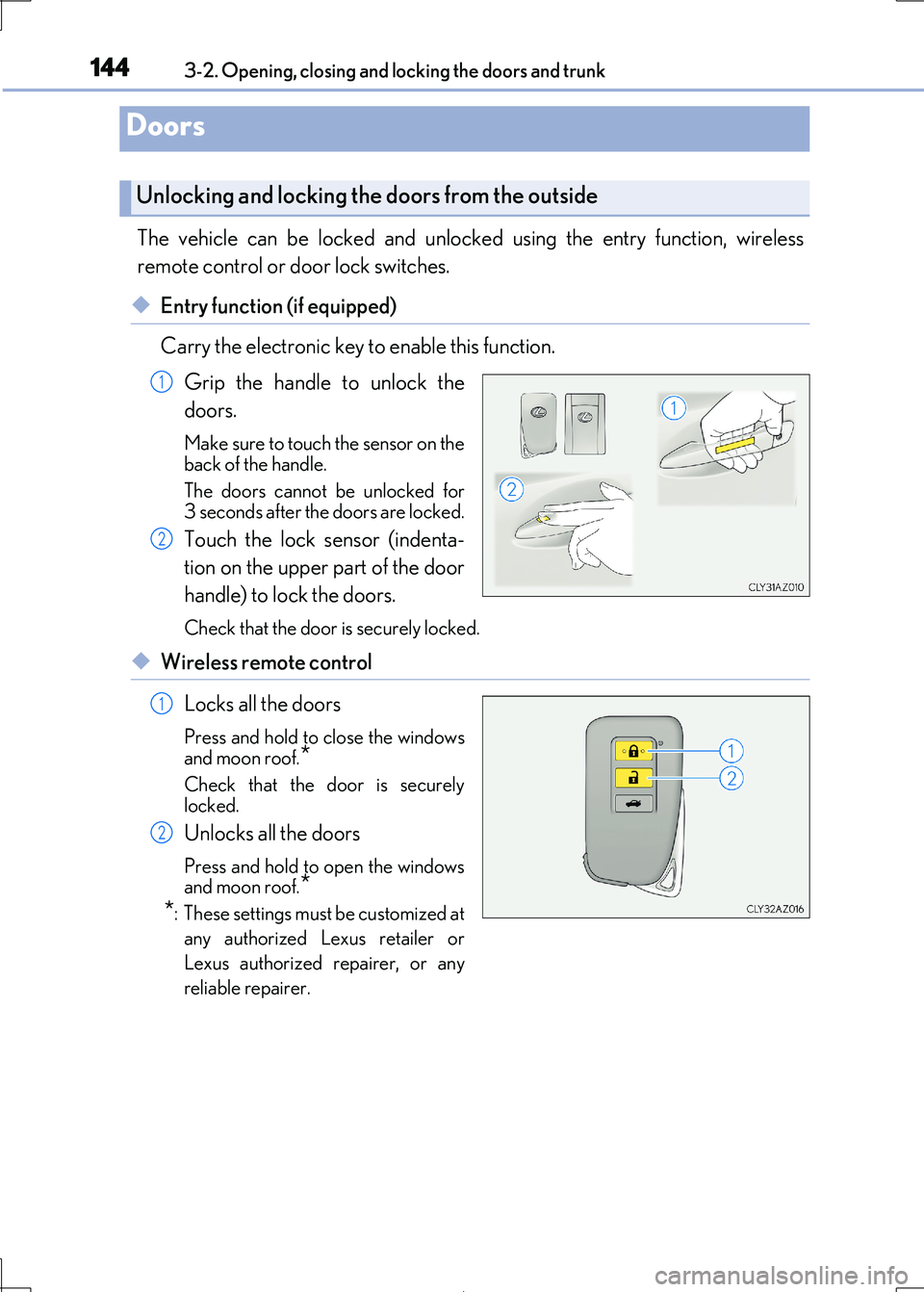
The vehicle can be locked and unlock ed using the entry function, wireless
remote control or door lock switches.
◆Entry function (if equipped)
Carry the electronic key to enable this function.
Grip the handle to unlock the
doors.
Make sure to touch the sensor on the
back of the handle.
The doors cannot be unlocked for
3 seconds after the doors are locked.
Touch the lock sensor (indenta-
tion on the upper part of the door
handle) to lock the doors.
Check that the door is securely locked.
◆Wireless remote control
Locks all the doors
Press and hold to close the windows
and moon roof.*
Check that the door is securely locked.
Unlocks all the doors
Press and hold to open the windows
and moon roof.*
*: These settings must be customized at
any authorized Lexus retailer or
Lexus authorized repairer, or any
reliable repairer.
Doors
Unlocking and locking the doors from the outside
1
2
1
2
Page 145 of 692

1453-2. Opening, closing and locking the doors and trunk
3
Operation of each component
IS300h_EE(OM53D89E)
■Operation signals
The emergency flashers flash to indicate that the doors have been locked/unlocked.
(Locked: once; Unlocked: twice)
A buzzer sounds to indicate that th e windows and moon roof are operating.
■Security feature
If a door is not opened within approximately 30 seconds after the vehicle is unlocked, the security feature automatically locks the vehicle again.
■Welcome light illumination control
The front position, tail and license plate light s automatically turn on at night when the doors are unlocked using the entry function or wireless remote control if the light switch
is in the “AUTO” position.
■When the door cannot be locked by the lock sensor on the upper part of the door han- dle (vehicles with entry function)
■Door lock buzzer
If an attempt to lock the doors is made wh en a door is not fully closed, a buzzer sounds continuously for 5 seconds. Fully close the d oor to stop the buzzer, and lock the vehicle
once more.
■Setting the alarm (if equipped)
Locking the doors will set the alarm system. ( P. 92)
■If the smart entry & start system or the wireless remote control does not operate prop-
erly
Use the mechanical key to lock and unlock the doors. ( P. 628)
Replace the key battery with a new one if it is depleted. (P. 549)
If the door will not lock even when the topside sensor area is touched, try touching both the
topside and underside sensor areas at the same
time.
Page 146 of 692
1463-2. Opening, closing and locking the doors and trunk
IS300h_EE(OM53D89E)
WARNING
Observe the following precautions. Failing to do so may result in death or serious injury.
■When using the wireless remote control and operating the power window or moon
roof
Operate the power window or moon roof after checking to make sure that there is no
possibility of any passenger having any of their body parts caught in the window or
moon roof. Also, do not allow children to oper ate the wireless remote control. It is pos- sible for children and other passengers to get caught in the power window or moon
roof.
■Jam protection function
●Never try jamming any part of your body to activate the jam protection function
intentionally.
●The jam protection function may not work if something gets caught just before the window or moon roof fully closes.