Page 451 of 692
4515-12. Other function
5
Lexus Display Audio system
IS300h_EE(OM53D89E)
P. 375
MirrorLink™
The MirrorLink™ function enables operations of some smartphone content
via the Lexus Display Audio system.
Depending on differences between mode ls or software version etc., some
models might be incompatible with this system.
Connect a smartphone to USB port using a USB cable.
For safety reasons, the safe driving sc reen is displayed while driving depend-
ing on the application.
Connecting a smartphone
Page 452 of 692
4525-12. Other function
IS300h_EE(OM53D89E)
Go to “MirrorLink”: “MENU” button “Info” “MirrorLink”
Select the desired application on the application list screen.
■MirrorLink™ screen
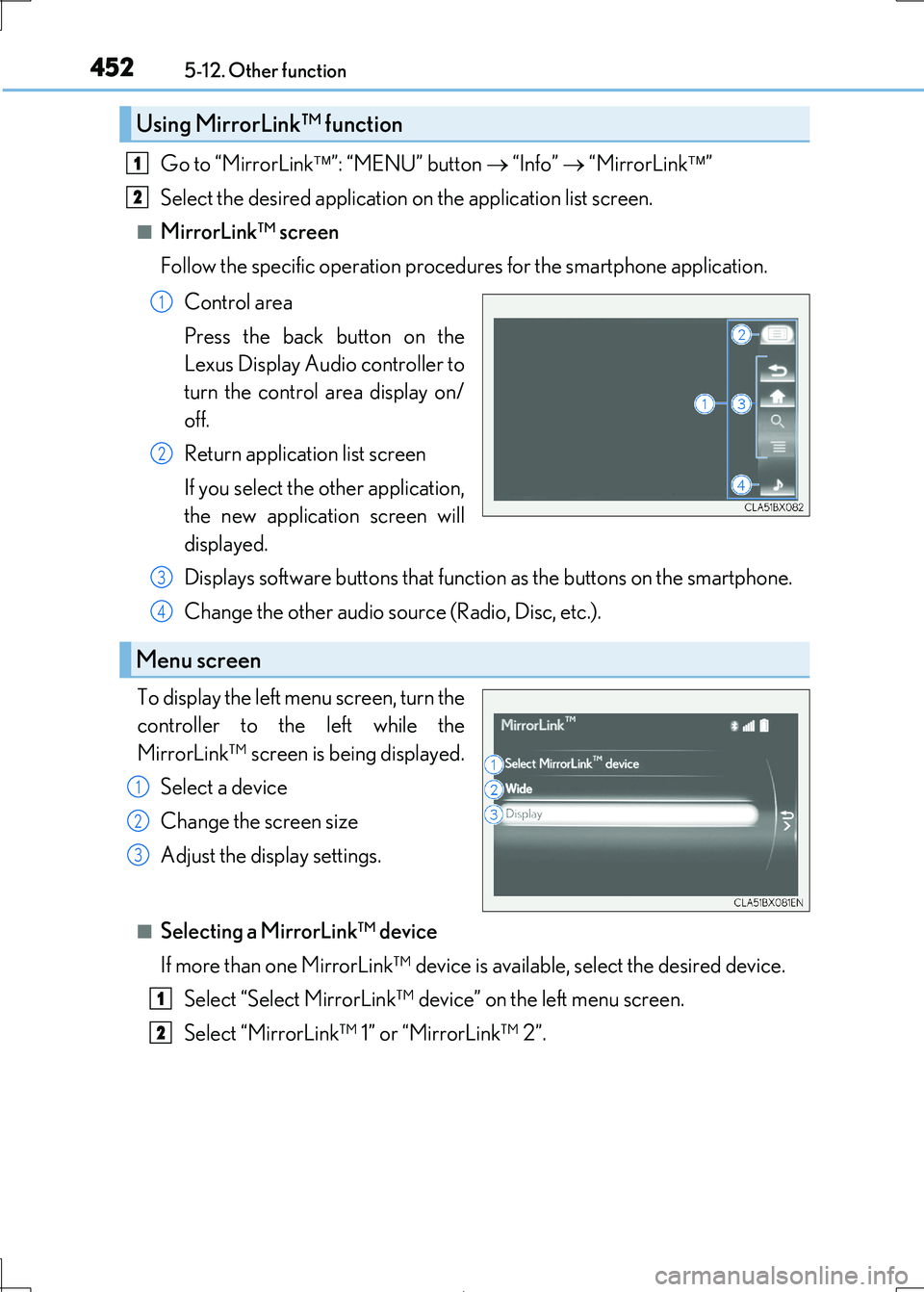
Follow the specific operation procedur es for the smartphone application.
Control area
Press the back button on the
Lexus Display Audio controller to
turn the control area display on/
off.
Return application list screen
If you select the other application,
the new application screen will
displayed.
Displays software buttons that functi on as the buttons on the smartphone.
Change the other audio source (Radio, Disc, etc.).
To display the left menu screen, turn the
controller to the left while the
MirrorLink™ screen is being displayed.
Select a device
Change the screen size
Adjust the display settings.
■Selecting a MirrorLink™ device
If more than one MirrorLink™ device is available, select the desired device.
Select “Select MirrorLink™ device” on the left menu screen.
Select “MirrorLink™ 1” or “MirrorLink™ 2”.
Using MirrorLink™ function
1
2
1
2
Menu screen
3
4
1
2
3
1
2
Page 453 of 692
4535-12. Other function
5
Lexus Display Audio system
IS300h_EE(OM53D89E)
■Operational conditions
●When MirrorLink™ is activated, previous applications, run with a USB, are closed, and
vice versa.
●Compatible devices
Smartphones, which passed the Car Connect ivity Consortium certification program
ver1.1 or later. Confirm with the smartphone manufacture or the distributor for the MirrorLink™ compatibility.
●Compatible applications
Applications, which are cert ified by Car Connectivity Consortium as MirrorLink™Base-Certified or Drive-Certified applications.
■About MirrorLink™
MirrorLink is a registered trademar k of Car Connectivity Consortium, Inc.
■When using MirrorLink™
●Check that the smartphone screen is unlocked. Unlock the smartphone screen before
connecting it to the Lexus Display Audio system. (Some smartphones may not be able to be connected via MirrorLink™ if the screen is locked.)
●Make sure that the smartphone has been connected via Bluetooth®. (Some smart-
phones may not be able to perform hands-free calls using the MirrorLink™ function if it has not been connected to the vehicle via Bluetooth®.)
●If a MirrorLink™ application cannot be starte d, check that the MirrorLink™ applica-
tion certificate has not expired. The certificates of MirrorLink™ applications have an expiration date. (An internet connection is required to automatically update the certifi-
cate.) If a MirrorLink™ application becomes un available, it may be due to the certifi-
cate expiring. In this case, the certificate must be updated manually. Check with the smartphone manufacturer or application de veloper for how to update the certificate.
●Make sure the volume of the smartphone is set to an appropriate level. If the Mirror-
Link™ application volume is ex cessively low even when the volume of the Lexus Dis- play Audio system is increased, check the vo lume of the smartphone and increase it as
necessary.
WARNING
■While driving
Do not connect smartphone or operate the controls.
Page 455 of 692
4555-12. Other function
5
Lexus Display Audio system
IS300h_EE(OM53D89E)
Go to “USB photo”: “MENU” button “Info” “USB 1 photo” or “USB 2
photo”
P. 375
Move the controller to the left to display the menu screen.
Change the full screen mode.
Select to set the slide show display
on/off.
Start the slide show at a selected folder.
Change the play speed.
Change the play mode.
Move the controller to the right and select “Browse”.
Select the desired folder, and then sele ct a desired file to begin using the
selected folder.
USB photo
Connecting a USB memory device enable s you to enjoy photo on the Lexus
Display Audio display.
USB photo screen
Connecting a USB memory device
Menu screen
1
2
3
4
Selecting a folder and a file
1
2
Page 457 of 692
4575-12. Other function
5
Lexus Display Audio system
IS300h_EE(OM53D89E)
You can register desired contacts to enable the speech command system. Up to
50 contacts per phone can be registered.
Go to “Voice tags”: “MENU” button “Setup” “Telephone” “Contact/
call history settings” “Voice tag” “New” or “Edit”
Select the desired contact.
Move the controller to the left and then select “REC”.
Say the registered voice tag.
To play the registered voice, select “Play”.
■Deleting a voice tag
Display the “Voice tags” screen.
Select “Delete” and then the desired contact.
Move the controller to the left and then select “Delete”.
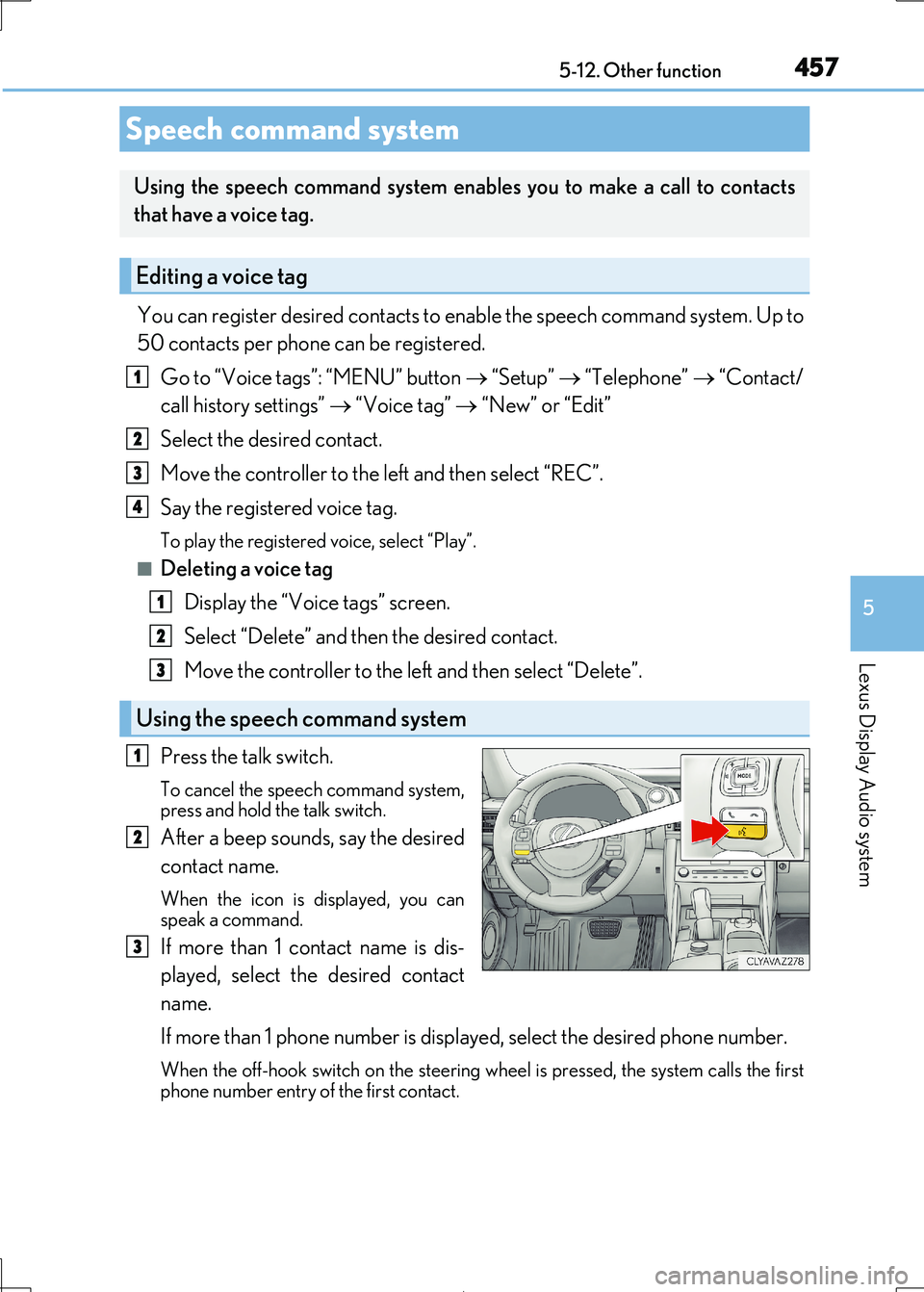
Press the talk switch.
To cancel the speech command system, press and hold the talk switch.
After a beep sounds, say the desired
contact name.
When the icon is displayed, you can
speak a command.
If more than 1 contact name is dis-
played, select the desired contact
name.
If more than 1 phone number is displayed, select the desired phone number.
When the off-hook switch on the steering wheel is pressed, the system calls the first
phone number entry of the first contact.
Speech command system
Using the speech command system enables you to make a call to contacts
that have a voice tag.
Editing a voice tag
Using the speech command system
1
2
3
4
1
2
3
1
2
3
Page 464 of 692
4646-1. Basic operation of the Remote Touch screen
IS300h_EE(OM53D89E)
■Full screen display
The following functions can be displayed full screen:
• Initial screen
• “Menu” screen ( P. 463)
• Map screen*
•Audio screen*
• Energy monitor or fuel consumption screen ( P. 127)
• Air conditioning control screen ( P. 466)
*: Refer to the “NAVIGATION AND MULTIMEDIA SYSTEM OWNER’S MAN-
UAL”.
■Split-screen display
Different information can be displayed on the left and right of the screen. For
example, audio screen can be displa yed and operated while the fuel con-
sumption information screen is being disp layed. The large screen on the left of
the display is called the main display, and the small screen to the right is called
the side display.
10.3-inch display
: If equipped
10.3-inch display overview
Page 465 of 692

4656-1. Basic operation of the Remote Touch screen
6
Interior features
IS300h_EE(OM53D89E)
■Selecting the operation screen
When selecting the main display, move the Remote Touch knob to the left.
When selecting the side display, move the Remote Touch knob to the right.
■ Main display
For details about the functions and operat ion of the main display, refer to the
respective section and “NAVIGATION AND MULTIMEDIA SYSTEM
OWNER’S MANUAL”.
■Side display
Basic screens
To change the screen displayed on the side display, use the screen buttons on
the right side of the display.
Navigation system*
Audio*
Phone*
Vehicle information ( P. 134)
Air conditioning system
( P. 472)
Select to hide the side display. If
the item displayed on the main
display is full screen display com-
patible ( P. 464), it will be dis-
played full screen.
Interruption screens
Each of the following screens is displayed automatically in accordance with
conditions.
• Lexus parking assist-sensor ( P. 310)
•Phone*
•Driving mode ( P. 348)
*: Refer to the “NAVIGATION AND MULTIMEDIA SYSTEM OWNER’S MAN-
UAL”.
Split-screen display operation
1
2
3
4
5
6
Page 466 of 692
466
IS300h_EE(OM53D89E)
6-2. Using the air conditioning system
Automatic air conditioning system
Air outlets and fan speed are automati cally adjusted according to the tem-
perature setting.
Vehicles with a Lexus Disp lay Audio system: Press the “MENU” button on the
Lexus Display Audio controller, then sele ct “Climate” to display the air condi-
tioning operation screen.
For details on the Lexus Display Audio controller, refer to “Lexus Display
Audio controller” on P. 370.
Vehicles with a 10.3-inch display: Pr ess the “MENU” button on the Remote
Touch, then select to display the ai r conditioning control screen. The air
conditioning system can be displayed and operated on the side display.
( P. 465)
The illustrations below are f or left-hand drive vehicles.
The button positions and shapes will differ for right-hand drive vehicles.
Also, the display and button positions will differ depending on the type of the
system.


