2017 Lexus GS350 ECO
[x] Cancel search: ECOPage 2 of 100

GS350_200t_QG_OM30G01U_(U)
1
The Quick Guide is not intended as a substitute for your Owner’s
Manual. We strongly encourage you to review the Owner’s
Manual and supplementary manuals so you will have a better
understanding of your vehicle’ s capabilities and limitations.
12.3-inch Display............................................................................................................................... .. 51
Audio System Audio control screen ........................................................................................................... ........60
Side Display (vehicles with navigation system) .................................................................60
Remote control (steering wheel switches) .......................................................................... 61
Basic operation ................................................................................................................ ................ 61
Radio ................................................................................................................................................... 62
DVD player/CD player ........................................................................................................... ... 62
Operating an iPod.............................................................................................................. ........... 64
Automatic High Beam ......................................................................................................................28
Brake Hold .............................................................................................................................................. 21
BSM (Blind Spot Monitor) .............................................................................................................. 46
Cruise Control ............................................................................................................................... ......40
Driving Mode Select Switch ..........................................................................................................43
Driving Position Memory ................................................................................................................. 14
Dynamic Radar Cruise Control with Full-Speed Range .................................................35
Eco Driving Indicator ........................................................................................................................25
Engine (Ignition) Switch .................................................................................................................... 16
Floor mat installation ............................................................................................................................11
Front Automatic Air Conditioning System
Control panel .................................................................................................................. ................65
Control screen................................................................................................................. ............... 66
Option control screen .......................................................................................................... ....... 67
Side display (vehicles with 12.3-inch display) .................................................................... 67
Using the automatic mode....................................................................................................... ..68
Adjusting the temperature for the driver’s and front passenger’s seats separately (DUAL mode)
(vehicles without rear air conditioning system) ..........................................................68
Adjusting the temperature for the driver’s, front passenger’s and rear se ats separately (3-ZONE mode)
(vehicles with rear air conditioning system) .................................................................68
Using the S-FLOW mode.......................................................................................................... 68
Front Seats .............................................................................................................................................. 13
Fuel Tank Cap ............................................................................................................................... ........87
Page 13 of 100

12
GS350_200t_QG_OM30G01U_(U)
Smart Access System with Push-button Start
■Entering and exiting the vehicle
Grip the driver’s door handle to unlock
the door. Grip the passenger’s door
handle to unlock all the doors.
*
Make sure to touch the sensor on the
back of the handle.
The doors cannot be unlocked for
3 seconds after the doors are locked.
*: The door unlock settings can be
changed.
Touch the lock sensor (the indentation
on the upper part of the door handle)
to lock all the doors.Check that the door is securely
locked.
■ Opening the trunk
While carrying the electronic key, press the
button.
When all the doors are unlocked with
the power door lock system, the trunk
can be opened without carrying the
electronic key.
If the vehicle is equipped with a power
trunk opener and closer, the trunk lid
automatically opens fully.
The following operations can be performed si mply by carrying the electronic key on your
person, for example in your pocket. The driver should always carry the electronic key.
For details on starting the engine, see page 16.
1
2
For details on what to do when the electronic key does not operate properly, see page 92.
Page 15 of 100

14
GS350_200t_QG_OM30G01U_(U)
Driving Position Memory
■Driving position memory
■
Recording procedure
Check that the shift lever is in P.
Turn the engine switch to IGNITION ON mode.
Adjust the driver’s seat, steering wheel, outside rear view mirrors and HUD (head-up
display) (if equipped) to the desired positions. While pressing the “SET” button, or within
3 seconds after the “SET” button is pressed,
press button “1”, “2” or “3” until the buzzer
sounds.If the selected button has already been
preset, the previously recorded position
will be overwritten.
■Recall procedure
Check that the shift lever is in P.
Turn the engine switch to IGNITION ON mode.
Press one of the buttons for the driving
position you want to recall until the buzzer
sounds.
This feature automatically adjusts the front seats, steering wheel and outside rear view
mirrors to make entering and exiting the vehicle easier or to suit your preferences.
1
2
3
4
1
2
3
Page 16 of 100

15
GS350_200t_QG_OM30G01U_(U)
■Memory recall function (driver’s side only)
Each electronic key can be registered to recall your preferred driving position.
■Registering procedure
Check that the shift lever is in P.
Turn the engine switch to IGNITION ON mode.
Recall the driving position that you want to record.
While pressing the recalled button, press
and hold the door lock switch (either lock
or unlock) until the buzzer sounds. If the button could not be registered, the
buzzer sounds continuously for approxi-
mately 3 seconds.1
2
3
4
Page 17 of 100
16
GS350_200t_QG_OM30G01U_(U)
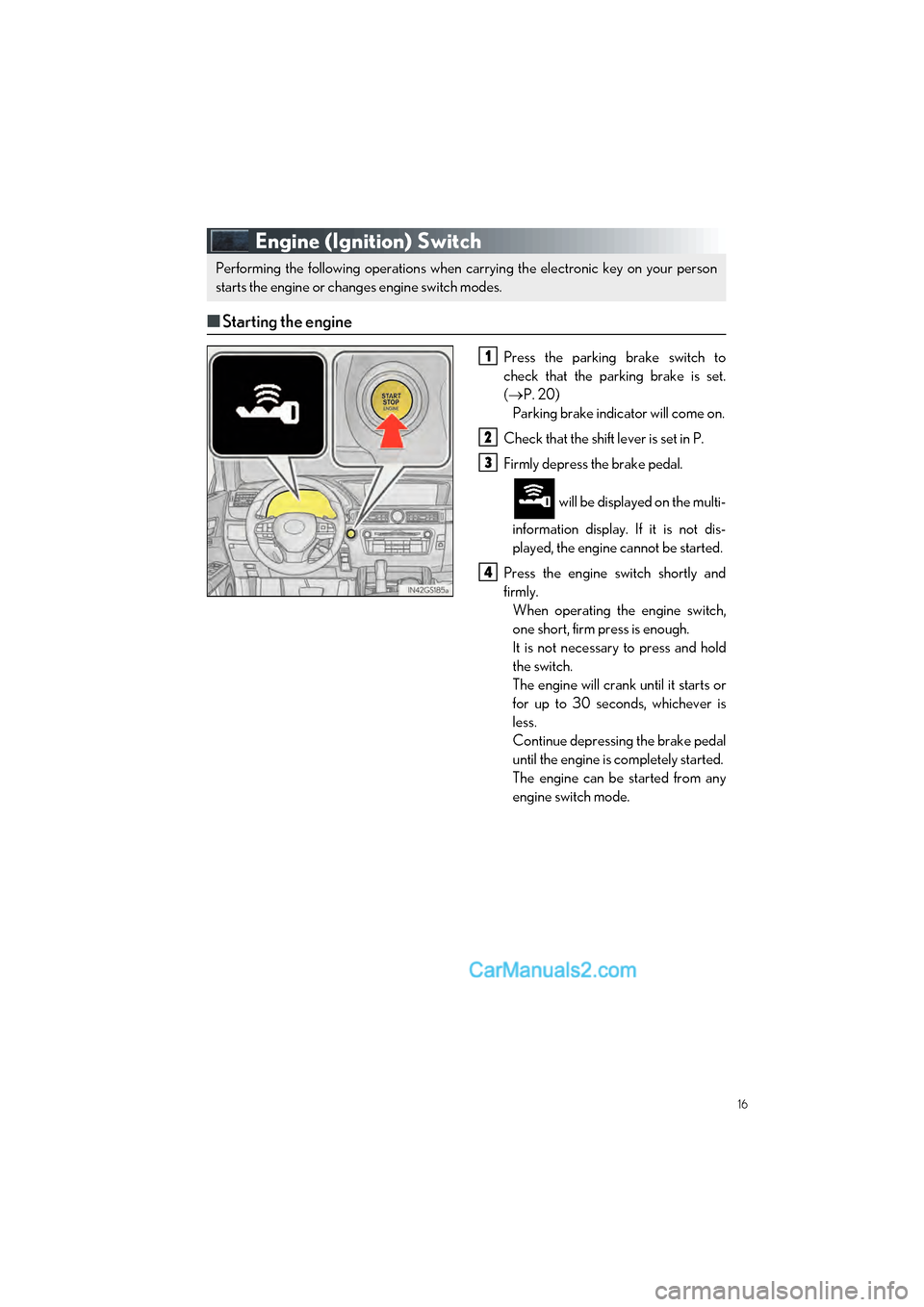
Engine (Ignition) Switch
■Starting the engine
Press the parking brake switch to
check that the parking brake is set.
( P. 20)
Parking brake indicator will come on.
Check that the shift lever is set in P.
Firmly depress the brake pedal.
will be displayed on the multi-
information display. If it is not dis-
played, the engine cannot be started.
Press the engine switch shortly and
firmly. When operating the engine switch,
one short, firm press is enough.
It is not necessary to press and hold
the switch.
The engine will crank until it starts or
for up to 30 seconds, whichever is
less.
Continue depressing the brake pedal
until the engine is completely started.
The engine can be started from any
engine switch mode.
Performing the following operations when carrying the electronic key on your person
starts the engine or changes engine switch modes.
1
2
3
4
Page 19 of 100

18
GS350_200t_QG_OM30G01U_(U)
■If your vehicle has to be stopped in an emergency
Only in an emergency, such as if it becomes impossible to stop the vehicle in the normal way,
stop the vehicle using the following procedure:
Steadily step on the brake pedal with both feet and firmly depress it.
Do not pump the brake pedal repeatedly as th is will increase the effort required to slow
the vehicle.
Shift the shift lever to N.
If the shift lever is shifted to N
After slowing down, stop the vehicle in a safe place by the road.
Stop the engine.
If the shift lever cannot be shifted to N
Keep depressing the brake pedal with both feet to reduce vehicle speed as much as
possible.
To stop the engine, press and hold the
engine switch for 2 consecutive seconds or
more, or press it briefly 3 times or more in
succession.
Stop the vehicle in a safe place by the road.
1
2
3
4
3
Press and hold for 2 seconds or more
or press briefly 3 times or more
4
5
Page 25 of 100

24
GS350_200t_QG_OM30G01U_(U)
Head-up Display (if equipped)
Head-up display
“HUD” button
Display brightness adjustment switch
Display position adjustment switch
“DISP” button
■Head-up display contents
● Vehicle speed
● Tachometer
● Shift position and shift range
● Eco Driving Indicator
● Audio display
*
●Route guidance display (vehic les with navigation system)
● Lexus Enform (if equipped)
● Lane departure warning display (LKA [Lane-Keeping Assist]) (if equipped)
● Approach warning display (dynamic radar cr uise control with full-speed range) (if
equipped)
● Pre-collision warning message (PCS [Pre-Collision System]) (if equipped)
● Speed limit display (vehicles with navigation system)
*: The default setting is off
The head-up display can be used to project vehicle speed and other information onto the
windshield.
1
2
3
4
5
Page 26 of 100

25
GS350_200t_QG_OM30G01U_(U)
Eco Driving Indicator
Eco Driving Indicator Light
During Eco-friendly acceleration (Eco
driving), the Eco Driving Indicator
Light will turn on. When the accelera-
tion exceeds the Zone of Eco driving,
or when the vehicle is stopped, the light
turns off.
Eco Driving Indicator Zone Display
Suggests the Zone of Eco driving with
current Eco driving ratio based on
acceleration.
Eco driving ratio based on accelera-
tion
If the acceleration exceeds the Zone of
Eco driving, the right side of the Eco
Driving Indicator Zone Display will illu-
minate.
Zone of Eco driving
Eco Driving Indicator will not operate
under the following conditions:
● The shift lever is in any position other
than D.
● A paddle shift switch is operated.
● Neither normal mode nor Eco drive
mode is selected. ( P. 43)
● The vehicle speed is approximately
80 mph (130 km/h) or higher.1
2
3
4