Page 218 of 600
2184-2. Driving procedures
GS450h_300h_OM_OM30F92E_(EE) Stop the vehicle completely.
Set the parking brake (
P. 232), and shift the shift lever to P.
Press the power switch.
Release the brake pedal and check that “POWER ON” on the multi-informa-
tion display is off.
Modes can be changed by pressing the power switch with brake pedal released.
(The mode changes each time the switch is pressed.) Off *
The emergency flashers can be used.
“POWER ON” will not be displayed on
the multi-information display.
ACCESSORY mode
Some electrical components such as the
audio system can be used.
“POWER ON” will be displayed on the
multi-information display.
ON mode
All electrical components can be used.
“POWER ON” will be displayed on the
multi-information display.
* : If the shift lever is in a position other than P when turning off the hybrid system, the
power switch will be turned to ACCESSORY mode, not to off.
Stopping the hybrid system
Changing power switch modes
1
2
3
4
Page 315 of 600

315
4-5. Using the driving support systems
4
Driving
GS450h_300h_OM_OM30F92E_(EE)
■The outside rear view mirror indicators visibility
When under strong sunlight, the outside rear view mirror indicator may be difficult to
see.
■Rear Crossing Traffic Alert buzzer hearing
Rear Crossing Traffic Alert function may be difficult to hear over loud noises such as high
audio volume.
■When there is a malfunction in the Blind Spot Monitor
If a system malfunction is detected due to any of the following reasons, warning mes-
sages will be displayed: ( P. 466)
●There is a malfunction with the sensors
●The sensors have become dirty
●The outside temperature is extremely high or low
●The sensor voltage has become abnormal
■Switching the Blind Spot Monitor function and Rear Crossing Traffic Alert function on
and off
Settings can be changed from on the multi-information display (P. 111).
Press or on the meter control switch and select “BSM”.
Each time on the meter control switch is pressed, the function switches between
“On” and “Off”.
■Certification for the Blind Spot Monitor
1
2
Page 344 of 600
3445-1. Remote Touch screen
GS450h_300h_OM_OM30F92E_(EE) *
1
: Refer to the “NAVIGATION AND MULTIMEDIA SYSTEM OWNER’S MANUAL”.
* 2
: If equipped
■Full screen display
The following functions can be displayed full screen:
* : Refer to the “NAVIGATION AND MULTIMEDIA SYSTEM OWNER’S MAN-
UAL”.
■Split-screen display
Different information can be displayed on the left and right of the screen. For
example, air conditioning system screen can be displayed and operated while
the fuel consumption information screen is being displayed. The large screen
on the left of the display is called the main display, and the small screen to the
right is called the side display.
“Display”Select to adjust the contrast and brightness of the screens, turn the
screen off, etc. *1
12.3-inch display operation
SwitchFunction
●
Initial screen *
● “Menu” screen ( P. 343)
● Map screen *
● Audio screen * ●
Energy monitor/fuel consumption
screen ( P. 126)
● Air conditioning control screen ( P. 346)
Page 345 of 600
345
5-1. Remote Touch screen
5
Interior features
GS450h_300h_OM_OM30F92E_(EE) For details of the functions and operation of the main display, refer to the respec-
tive section.
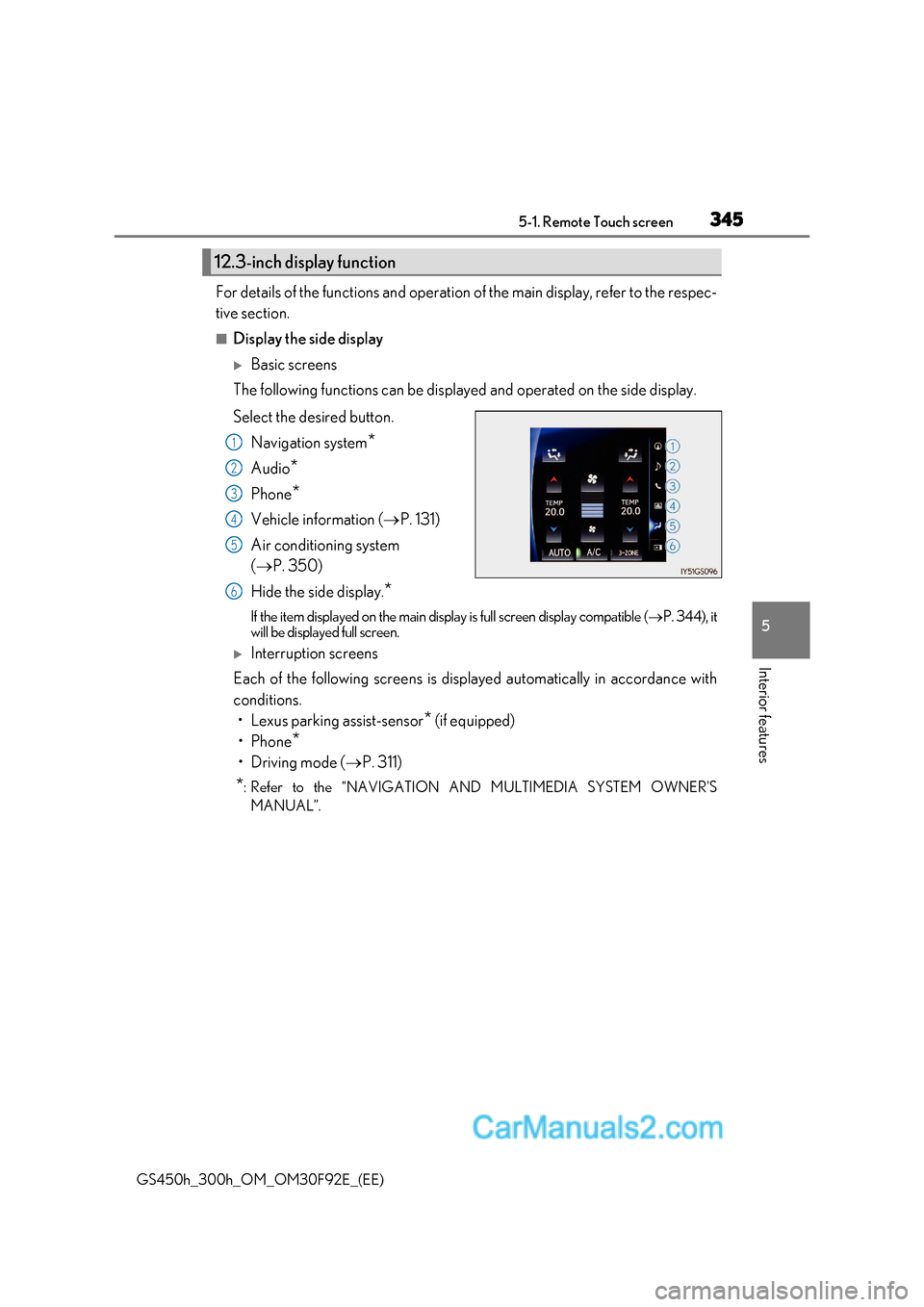
■Display the side display
Basic screens
The following functions can be displayed and operated on the side display.
Select the desired button.
Navigation system *
Audio *
Phone *
Vehicle information ( P. 131)
Air conditioning system ( P. 350)
Hide the side display. *
If the item displayed on the main display is full screen display compatible ( P. 344), it
will be displayed full screen.
Interruption screens
Each of the following screens is displayed automatically in accordance with
conditions.
Page 464 of 600

4647-2. Steps to take in an emergency
GS450h_300h_OM_OM30F92E_(EE)
■When the tire pressure warning light comes on (if equipped)
Carry out the following procedure after the tire temperature has lowered sufficiently.
●Check the tire inflation pressure and adjust to the appropriate level.
●If the warning light does not go out even afte r several minutes, check that the tire infla-
tion pressure is at the specifie d level and carry out initialization.
The warning light may come on again if the above operations are conducted without first
allowing the tire temperature to lower sufficiently.
■The tire pressure warning light may come on due to natural causes
The tire pressure warning light may come on due to natural causes such as natural air
leaks and tire inflation pressure changes caused by temperature. In this case, adjusting
the tire inflation pressure will turn off the warning light (after a few minutes).
■When a tire is replaced with a spare tire
The compact spare tire is not equipped with a tire pressure warning valve and transmit-
ter. If a tire goes flat, the tire pressure warning light will not turn off even thoug h the flat
tire has been replaced with the spare tire.
■Conditions that the tire pressure warning system may not function properly P. 420
■If the tire pressure warning light frequently comes on after blinking for 1 minute
If the tire pressure warning light frequently comes on after blinking for 1 minute when the
power switch is turned to ON mode, have it checked by any authorized Lexus retailer or
Lexus authorized repairer, or any reliable repairer.
■Warning buzzer
In some cases, the buzzer may not be heard because of noisy place or an audio sound.
Page 492 of 600

4927-2. Steps to take in an emergency
GS450h_300h_OM_OM30F92E_(EE)
■Warning message in radar cruise mode (if equipped)
In the following cases, the warn ing message may not be displayed even if vehicle-to-vehi-
cle distance decreases:
●When your vehicle and the vehicle ahead are traveling at the same speed or the vehicle
ahead is traveling more quickly than your vehicle
●When the vehicle ahead is traveling at a very low speed
●Immediately after cruise control speed is set
●At the instant the accelerator pedal is depressed
■Open door warning message
The open door warning message continues to display until a door or the trunk is fully
closed, even if the power switch is turned off. However, approximately 20 minutes after a
door or the trunk is not fully closed, the 12-volt battery-saving function operates and the
display turns off even though a door or the trunk is not fully closed.
■Warning buzzer
In some cases, the buzzer may not be heard because of noisy place or an audio sound.
Page 497 of 600
497
7-2. Steps to take in an emergency
7
When trouble arises
GS450h_300h_OM_OM30F92E_(EE)
■Warning buzzer
In some cases, the buzzer may not be heard because of noisy place or an audio sound.
Once
The power switch has been turned
off with the shift lever in a position
other than P or N. Shift the shift lever to P.
Once
After the power switch has been
turned off with the shift lever in a
position other than P, the shift lever
has been shifted to P.Turn the power switch off.
Interior
buzzerExteriorbuzzerWarning messageDetails/Actions
(Flashes)
(Flashes)
Page 533 of 600

533
7-2. Steps to take in an emergency
7
When trouble arises
GS450h_300h_OM_OM30F92E_(EE)
■Starting the hybrid system when the 12-volt battery is discharged
The hybrid system cannot be started by push-starting.
■To prevent 12-volt battery discharge
●Turn off the headlights and the audio system while the hybrid system is off.
●Turn off any unnecessary electrical componen ts when the vehicle is running at a low
speed for an extended period, such as in heavy traffic.
■Charging the 12-volt battery
The electricity stored in the 12-volt battery will discharge gradually even when the vehicle
is not in use, due to natural discharge and the draining effects of certain electrical appli-
ances. If the vehicle is left for a long time, the 12-volt battery may discharge, and the
hybrid system may be unable to start. (The 12-volt battery recharges automatically while
the hybrid system is operating.)
■When recharging or replacing the 12-volt battery
●In some cases, it may not be possible to unlock the doors using the smart entry & start
system when the 12-volt battery is discharged. Use the wireless remote control or the
mechanical key to lock or unlock the doors.
●The hybrid system may not start on the first attempt after the 12-volt battery has
recharged but will start normally after the second attempt. This is not a malfunction.
●The power switch mode is memorized by the vehicle. When the 12-volt battery is
reconnected, the system will return to the mode it was in before the 12-volt battery was
discharged. Before disconnecting the 12-v olt battery, turn the power switch off.
If you are unsure what mode the power switch was in before the 12-volt battery dis-
charged, be especially careful when reconnecting the 12-volt battery.
WARNING
■Avoiding 12-volt battery fires or explosions
Observe the following precautions to prevent accidentally igniting the flammable gas
that may be emitted from the 12-volt battery:
●Make sure each jumper cable is connected to the correct terminal and that it is not
unintentionally in contact with any other than the intended terminal.
●Do not allow the other end of the jumper cable connected to the “+” terminal to come
into contact with any other parts or metal surfaces in the area, such as brackets or
unpainted metal.
●Do not allow the + and - clamps of the jumper cables to come into contact with each
other.
●Do not smoke, use matches, cigarette lighters or allow open flame near the 12-volt
battery.