Page 2 of 104

1
ES350_QG_OM33C84U_(U)
The Quick Guide is not intended as a substitute for your Owner’s
Manual. We strongly encourage you to review the Owner’s
Manual and supplementary manuals so you will have a better
understanding of your vehicle’ s capabilities and limitations.
Air Conditioning System.................................................................................................................. 70
Audio System (with Lexus Display Audio System) Lexus Display Audio operation buttons ............................................................................... 66
Using the steering switches to change audio sources ................................................... 66
Audio menu screen.............................................................................................................. ......... 67
Operating the audio system using the steering wheel switches ................................ 69
Audio System (with navigation system)
*
Audio control screen........................................................................................................... ......... 57
Remote control (steering wheel switches).......................................................................... 57
Basic operation ................................................................................................................ .............. 58
Radio .......................................................................................................................... ........................ 58
DVD player/CD player ........................................................................................................... ....59
Operating an iPod .............................................................................................................. ...........60
Automatic High Beam ....................................................................................................................... 32
Automatic Transmission ....................................................................................................................25
BSM (Blind Spot Monitor) ............................................................................................................... 45
Cruise Control ...................................................................................................................................... 37
Door Locks ............................................................................................................................................ 88
Driving Mode Select Switch ............................................................................................................ 46
Driving Position Memory ................................................................................................................... 19
Dynamic Radar Cruise Control .....................................................................................................39
Eco Driving Indicator .........................................................................................................................30
Engine (Ignition) Switch .................................................................................................................... 22
Contents
*: These features may be operated by Voice Command (See P.73)
Page 8 of 104
7
ES350_QG_OM33C84U_(U)
OverviewInstrument Panel
Odometer/trip meter and trip meter reset button*
Instrument panel light control switches*
Outside rear view mirror switches P.21
Intuitive parking assist switch∗
P.44
BSM (Blind Spot Monitor) main switch∗
P.45
Automatic High Beam switch∗ P.32
Page 27 of 104
26
ES350_QG_OM33C84U_(U)
■Selecting gears in the S position
When the shift lever is in the S position, the shift lever can be operated as follows:
Upshifting
Downshifting
The selected shift range, from 1 to 6,
will be displayed in the meter.
The initial shift range in S mode is set
automatically to 5 or 4 according to
vehicle speed. But, the initial shift range
may be set to 3 if AI-SHIFT has oper-
ated while the shift lever was in the D
position.
1
2
■Shift ranges and their functions
• Automatically selecting gears between 1 and 6 according to vehicle speed and driving
conditions. But, the gear is limited according to selected shift range.
• You can choose from 6 levels of engine braking force.
• A lower shift range will provide greater engine braking force than a higher shift range,
and the engine speed will also increase.
Page 31 of 104

30
ES350_QG_OM33C84U_(U)
Eco Driving Indicator
Eco Driving Indicator Light
During Eco-friendly acceleration (Eco
driving), the Eco Driving Indicator
Light will turn on. When the accelera-
tion exceeds the Zone of Eco driving,
or when the vehicle is stopped, the light
turns off.
Eco Driving Indicator Zone Display
Suggests the Zone of Eco driving with
current Eco driving ratio based on
acceleration.
Eco driving ratio based on accelera-
tion
If the acceleration exceeds the Zone of
Eco driving, the right side of the Eco
Driving Indicator Zone Display will illu-
minate.
When this happens, the Eco Driving
Indicator Light will turn off.
Zone of Eco driving
Eco Driving Indicator will not operate
under the following conditions:
● The engine is not running.
● The shift lever is in any position other
than D.
● Neither normal mode nor Eco drive
mode is selected. ( →P. 4 6 )
● The vehicle speed is approximately
80 mph (130 km/h) or higher.
Settings of the display and non-display of
the Eco Driving Indicator Light can be
changed.1
2
3
4
Page 32 of 104

31
ES350_QG_OM33C84U_(U)
Headlights
The side marker, parking, day-
time running, tail, license plate
and instrument panel lights turn
on.
The headlights, parking and all
lights listed above (except day-
time running lights) turn on.
The headlights, daytime
running lights and all the lights
listed above turn on and off
automatically. (When the
engine switch is in IGNITION
ON mode.)
Off
The daytime running lights turn
on.
■Turning on the high beam headlights
With the headlights on, push the lever
away from you to turn on the high
beams.
Pull the lever toward you to the center
position to turn the high beams off.
Pull the lever toward you and release it
to flash the high beams once.
You can flash the high beams with the
headlights on or off.
■AFS (Adaptive Front-lighting System) (if equipped)
AFS (Adaptive Front-lighting Syst em) improves visibility at intersections and on curves by
automatically adjusting the lateral angle of the headlights according to vehicle speed and
the degree of the tire angle that are controlled by steering input.
Operates at speed of 6 mph (10 km/h) or higher.
■Deactivating AFS
Select “AFS” on (settings display) of the multi-information display.
Press the meter control switch.
(Canada)
(U.S.A.)
1
2
3
4
(U.S.A.)
(Canada)
1
2
1
2
Page 33 of 104
32
ES350_QG_OM33C84U_(U)
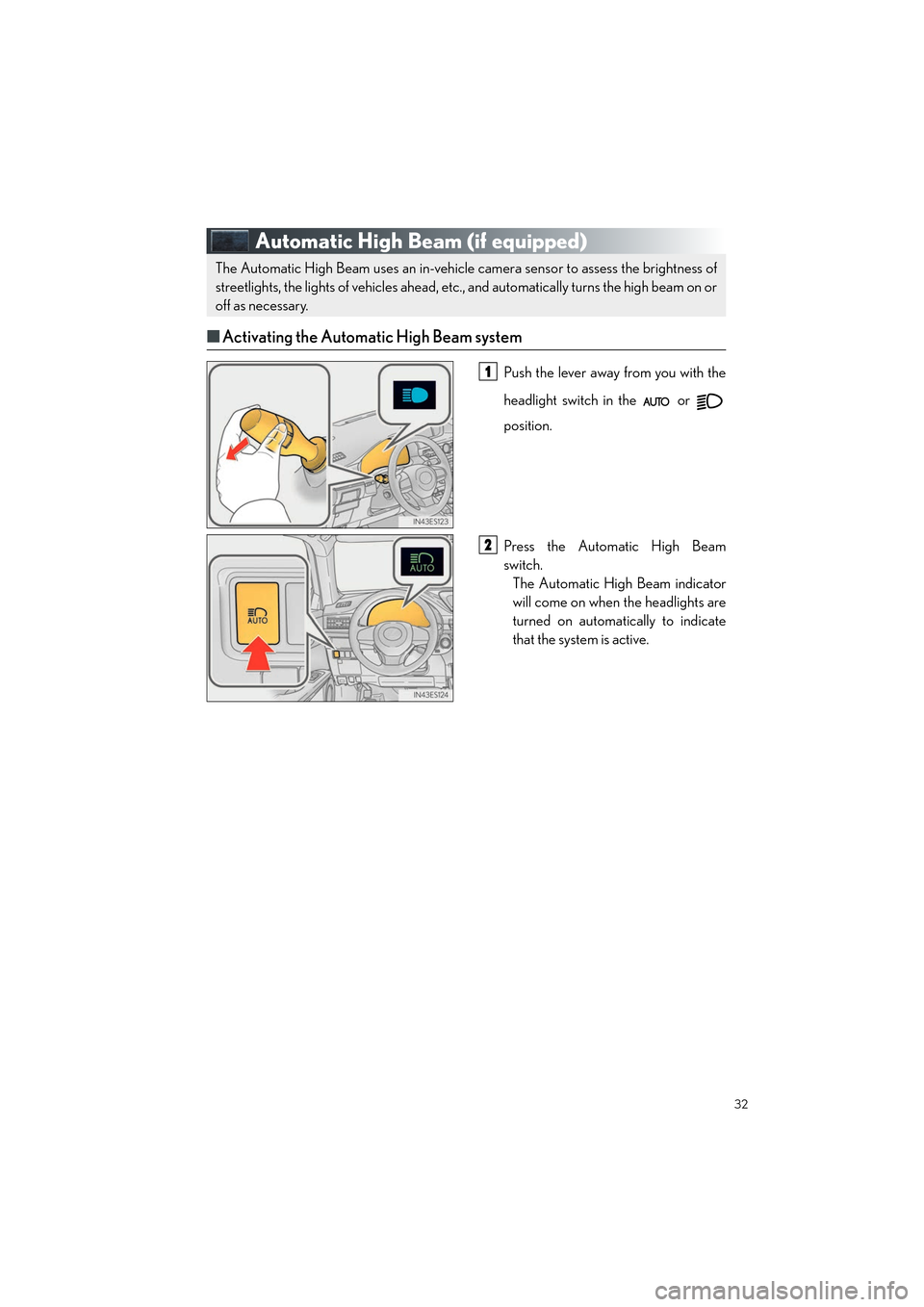
Automatic High Beam (if equipped)
■Activating the Automatic High Beam system
Push the lever away from you with the
headlight switch in the or
position.
Press the Automatic High Beam
switch.
The Automatic High Beam indicator
will come on when the headlights are
turned on automatically to indicate
that the system is active.
The Automatic High Beam uses an in-vehicle camera sensor to assess the brightness of
streetlights, the lights of vehicles ahead, etc., and automatically turns the high beam on or
off as necessary.
1
2
Page 34 of 104
33
ES350_QG_OM33C84U_(U)
■Turning the high beam on/off manually
● Switching to low beam
Pull the lever to the original position.The Automatic High Beam indicator will
turn off.
Push the lever away from you to activate
the Automatic High Beam system again.
● Switching to high beam
Press the Automatic High Beam switch.The Automatic High Beam indicator will
turn off and the high beam indicator will
turn on.
Press the switch to activate the Auto-
matic High Beam system again.
Page 35 of 104
34
ES350_QG_OM33C84U_(U)
Windshield Wipers and Washer
■Intermittent windshield wipers with interval adjuster
Temporary operation
Intermittent operation
Low speed operation
High speed operation
Wiper intervals can be adjusted when inter-
mittent operation is selected. Increases the intermittent windshield
wiper frequency
Decreases the intermittent windshield
wiper frequency
Washer/wiper dual operation
Wipers will automatically operate a
couple of times after the washer
squirts.1
2
3
4
5
6
7