Page 30 of 104
29
ES350_QG_OM33C84U_(U)
■Operating the meter control switches
The multi-information display is operated
using the meter control switches.
Select an item/change pages
Enter/Set
Return to the previous screen
Press:
Displays the screen registered to
When no screen has been registered,
the drive information screen will be dis-
played.
Press and hold:
Registers the currently displayed
screen to
The registration confirmation screen is
displayed. If the selected screen can-
not be registered, a registration failure
message will be shown.
1
2
3
4
If a problem is detected in any of the vehicle’s systems, a warning message is shown on the
multi-information display.
Page 31 of 104

30
ES350_QG_OM33C84U_(U)
Eco Driving Indicator
Eco Driving Indicator Light
During Eco-friendly acceleration (Eco
driving), the Eco Driving Indicator
Light will turn on. When the accelera-
tion exceeds the Zone of Eco driving,
or when the vehicle is stopped, the light
turns off.
Eco Driving Indicator Zone Display
Suggests the Zone of Eco driving with
current Eco driving ratio based on
acceleration.
Eco driving ratio based on accelera-
tion
If the acceleration exceeds the Zone of
Eco driving, the right side of the Eco
Driving Indicator Zone Display will illu-
minate.
When this happens, the Eco Driving
Indicator Light will turn off.
Zone of Eco driving
Eco Driving Indicator will not operate
under the following conditions:
● The engine is not running.
● The shift lever is in any position other
than D.
● Neither normal mode nor Eco drive
mode is selected. ( →P. 4 6 )
● The vehicle speed is approximately
80 mph (130 km/h) or higher.
Settings of the display and non-display of
the Eco Driving Indicator Light can be
changed.1
2
3
4
Page 40 of 104
39
ES350_QG_OM33C84U_(U)
Dynamic Radar Cruise Control (if equipped)
Display
Set speed
Indicators
Vehicle-to-vehicle distance button
Cruise control switch
In vehicle-to-vehicle distance control mode, the vehicle automatically accelerates and
decelerates to match the speed changes of the preceding vehicle even if the accelerator
pedal is not depressed. In constant speed control mode, the vehicle runs at a fixed speed.
Use the dynamic radar cruise control on freeways and highways.
1
2
3
4
5
Page 42 of 104
41
ES350_QG_OM33C84U_(U)
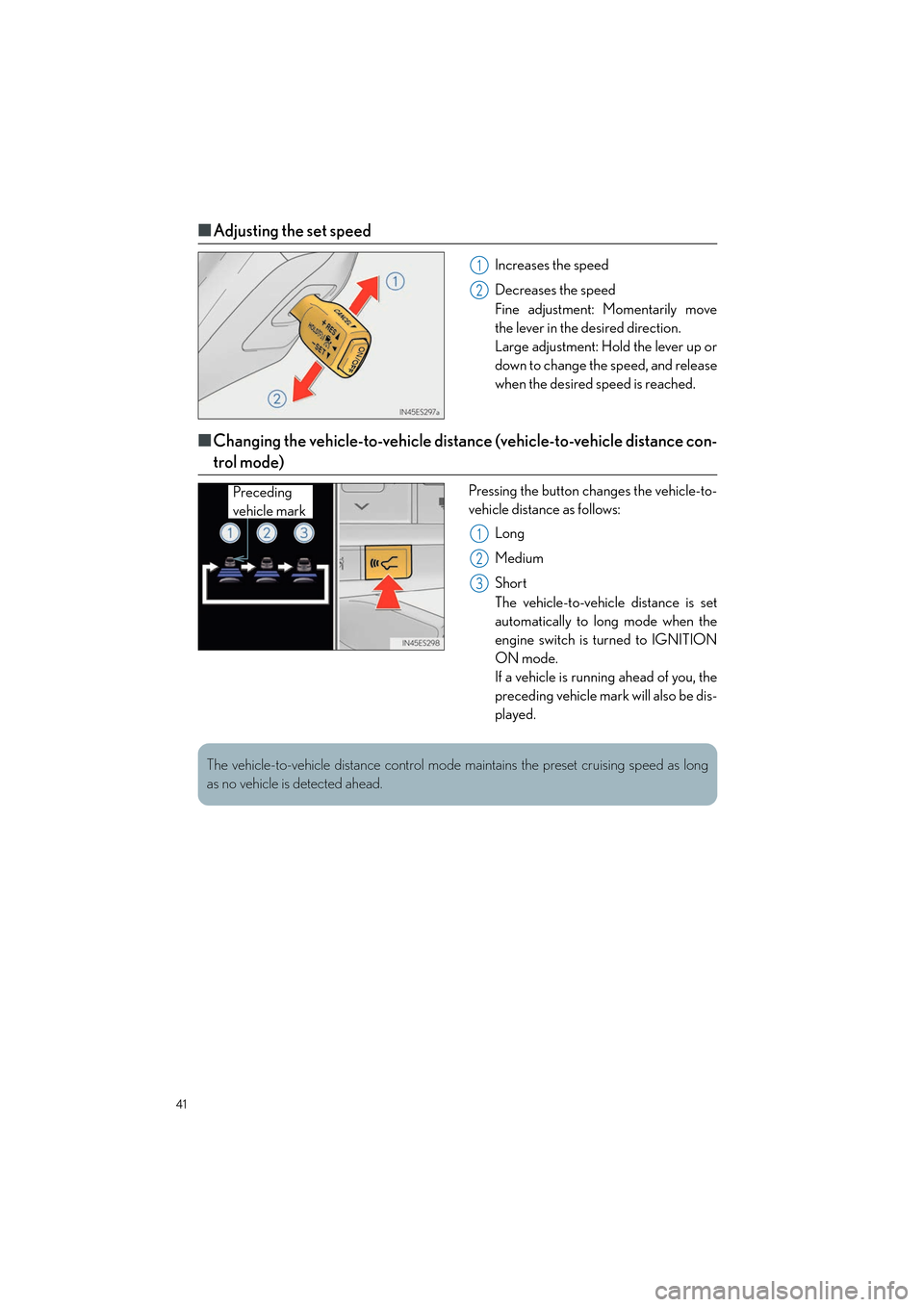
■Adjusting the set speed
Increases the speed
Decreases the speed
Fine adjustment: Momentarily move
the lever in the desired direction.
Large adjustment: Hold the lever up or
down to change the speed, and release
when the desired speed is reached.
■Changing the vehicle-to-vehicle distance (vehicle-to-vehicle distance con-
trol mode)
Pressing the button changes the vehicle-to-
vehicle distance as follows:
Long
Medium
Short
The vehicle-to-vehicle distance is set
automatically to long mode when the
engine switch is turned to IGNITION
ON mode.
If a vehicle is running ahead of you, the
preceding vehicle mark will also be dis-
played.
1
2
Preceding
vehicle mark
1
2
3
The vehicle-to-vehicle distance control mode maintains the preset cruising speed as long
as no vehicle is detected ahead.
Page 47 of 104
46
ES350_QG_OM33C84U_(U)
Driving Mode Select Switch
Normal mode
For normal driving.
Press the switch to change the driving mode to normal mode when selected to Eco
drive mode or sport mode.
Eco drive mode
Use Eco drive mode to help achieve low fuel consumption during trips that involve fre-
quent accelerating.
When not in Eco drive mode and the driving mode select switch is turned to the left, the
“ECO” indicator comes on in the multi-information display.
Sport mode
Assists acceleration response by controlling the steering and transmission. Suitable for
when precise handling is desirable, for example when driving on mountain roads.
When not in Sport mode and the driving mode select switch is turned to the right, the
“SPORT” indicator comes on in the multi-information display.
The driving modes can be select ed to suit driving condition.
1
2
3
Page 49 of 104
48
ES350_QG_OM33C84U_(U)
Remote Touch (with navigation system)
■Basic operation
“HOME” button
Press to display the home screen.
“∧ •∨ ” button
Press to scroll the list screen and to change the scale of the map.
Back button
Press to display the previous screen.
“MENU” button
Press to display the “Menu” screen.
Remote Touch knob
Move in the desired direction to select a function, letter and screen button.
Press to enter the selected function, letter or screen button.
“ENTER” button
Press to enter the selected function, letter or screen button.
The Remote Touch can be used to operate the Remote Touch screens.
1
2
3
4
5
6
Page 52 of 104
51
ES350_QG_OM33C84U_(U)
■Setting a route
While route guidance is operating, you can change the route using the following method.
Press the “MENU” button on the
Remote Touch, then select “Nav.”.
Select .
Select “Edit Route”.
The following settings can be
accessed.Adding destinations
Deleting destinations
Reordering destinations
Route preferences
Route type
Detour setting
Starting from adjacent road
21
2
3
44
1
2
3
4
5
6
7
Some functions are unavailable while the vehi cle is in motion. Refer to the “NAVIGATION
SYSTEM OWNER’S MANUAL”.
Page 63 of 104
62
ES350_QG_OM33C84U_(U)
■“Menu” screen
To display the “Menu” screen, press the “MENU” button on the Lexus Display Audio con-
troller.
*: Available in the 48 states, D.C. and Alaska
■Screen for display settings
Go to “Display”: “MENU” button → “Display”
Tu r n o f f s c r e e n .
Adjust screen quality.
Adjust screen quality of the rear view
monitor camera.
Change to day mode.
ButtonFunction
“Radio”Display the radio top screen ( →P. 6 7 )
“Media”Display the media top screen ( →P. 6 8 )
“Climate”Display the air conditioning control screen ( →P. 7 0 )
“Phone”Display the phone top screen
“Connected
Navi”
*
If a turn-by-turn navigation app lication has been downloaded to a
connected phone, the application will be displayed and can be used.
“Info”Display the “Information” screen
“Setup”Display the “Setup” screen
“Display”Display the display settings screen
1
2
3
4