2017 Lexus ES350 ad blue
[x] Cancel search: ad bluePage 6 of 584

TABLE OF CONTENTS4
ES350_OM_OM33C68U_(U)
5-1. Basic OperationsLexus Display Audio system ...........................................270
Steering wheel audio switches ....................................... 276
Mobile Assistant..........................277
USB/AUX ports ..........................279
5-2. Setup Setup menu .................................. 282
General settings......................... 283
Voice settings .............................. 286
Display settings........................... 287
5-3. Using the audio system Selecting the audio source .......................................... 288
Optimal use of the audio system .......................................... 289
Audio settings ............................. 290
Audio menu screen operation .................................... 293
5-4. Using the radio Radio operation.......................... 296
5-5. Playing an audio CD and MP3/WMA/AAC discs
CD player operation ................ 302
5-6. Using an external device Listening to an iPod................... 309
Using USB memory device ............................................313
Using the AUX port ................... 317 5-7. Connecting Bluetooth
®
Steps for using Bluetooth®
devices ......................................... 318
Registering a Bluetooth
®
device .......................................... 320
Selecting a Bluetooth
®
device ............................................321
Connecting a Bluetooth
®
audio player .............................. 322
Connecting a Bluetooth
®
phone ........................................... 323
Displaying a Bluetooth
®
device details ............................ 324
Detailed Bluetooth
®
settings ........................................ 325
5-8. Bluetooth
® Audio
Listening to Bluetooth
®
Audio ........................................... 328
5-9. Bluetooth
® Phone
Using a Bluetooth
®
Phone........................................... 329
Making a call..................................331
Receiving a call ........................... 334
Speaking on the phone ........... 335
Using a Bluetooth
®
phone message ........................337
Using the steering wheel switches ...................................... 339
Bluetooth
® phone
settings ........................................ 340
5Lexus Display Audio system
Page 7 of 584

5
ES350_OM_OM33C68U_(U)
1
9 8
7 4 3
2
10
5
6
5-10. PhonebookContact settings ......................... 342
Messaging setting ..................... 345
5-11. Bluetooth
®
What to do if... (Troubleshooting) ................... 346
Bluetooth
®................................... 350
5-12. Other function “Information” screen................. 356
USB photo ....................................358
Weather information ................ 360
Voice command system ............ 361
6-1. Using the air conditioning system and defogger
Automatic air conditioning system .......................................... 368
Heated steering wheel/ seat heaters/seat
ventilators....................................377
6-2. Using the interior lights Interior lights list ..........................379• Interior lights..........................380
• Personal lights .......................380 6-3. Using the storage features
List of storage features ............ 382• Glove box ............................... 383
• Console box .......................... 383
• Cup holders ........................... 384
• Auxiliary box..........................385
Trunk features .............................. 386
6-4. Using the other interior features
Other interior features ............388 • Sun visors ................................388
• Vanity mirrors ........................388
• Clock ........................................ 389
• Power outlets ......................... 389
• Armrest.................................... 390
• Rear sunshade/rear door sunshades ................................ 391
• Trunk storage extension ................................. 393
• Coat hooks............................. 394
• Assist grips ............................. 394
Garage door opener ............... 395
Compass ....................................... 402
LEXUS Enform Safety Connect...................................... 406
LEXUS Enform Remote ............ 411
LEXUS Enform Service Connect........................................ 412
6Interior features
Page 79 of 584

ES350_OM_OM33C68U_(U)
772. Instrument cluster
2
Instrument cluster
Odometer, trip meter and maintenance required information display
Odometer:
Displays the total distance the vehicle has been driven
Tr i p m e t e r :
Displays the distance the vehicle has been driven since the meter was last reset.
Trip meters “A” and “B” can be used to record and display different distances indepen-
dently.
Maintenance required information:• Displays the maintenance required information when the engine switch is in IGNITION ON mode.
• It can be reset from (settings display) of the multi-information display. (→ P. 8 0 )
Background color of drive mode
Background color changes according to the drive mode. ( →P. 2 4 8 )
•Sport mode: Red
•Eco drive mode: Blue
When in Normal mode, the background color is Black.
Switches between odometer, trip meter
and maintenance required information
displays. When the trip meter is dis-
played, pressing and holding the button
will reset the trip meter.
The brightness of the instrument panel lights can be adjusted.
Darker
Brighter
Changing the display
9
10
Instrument panel light control
1
2
Page 237 of 584
ES350_OM_OM33C68U_(U)
2354-5. Using the driving support systems
4
Driving
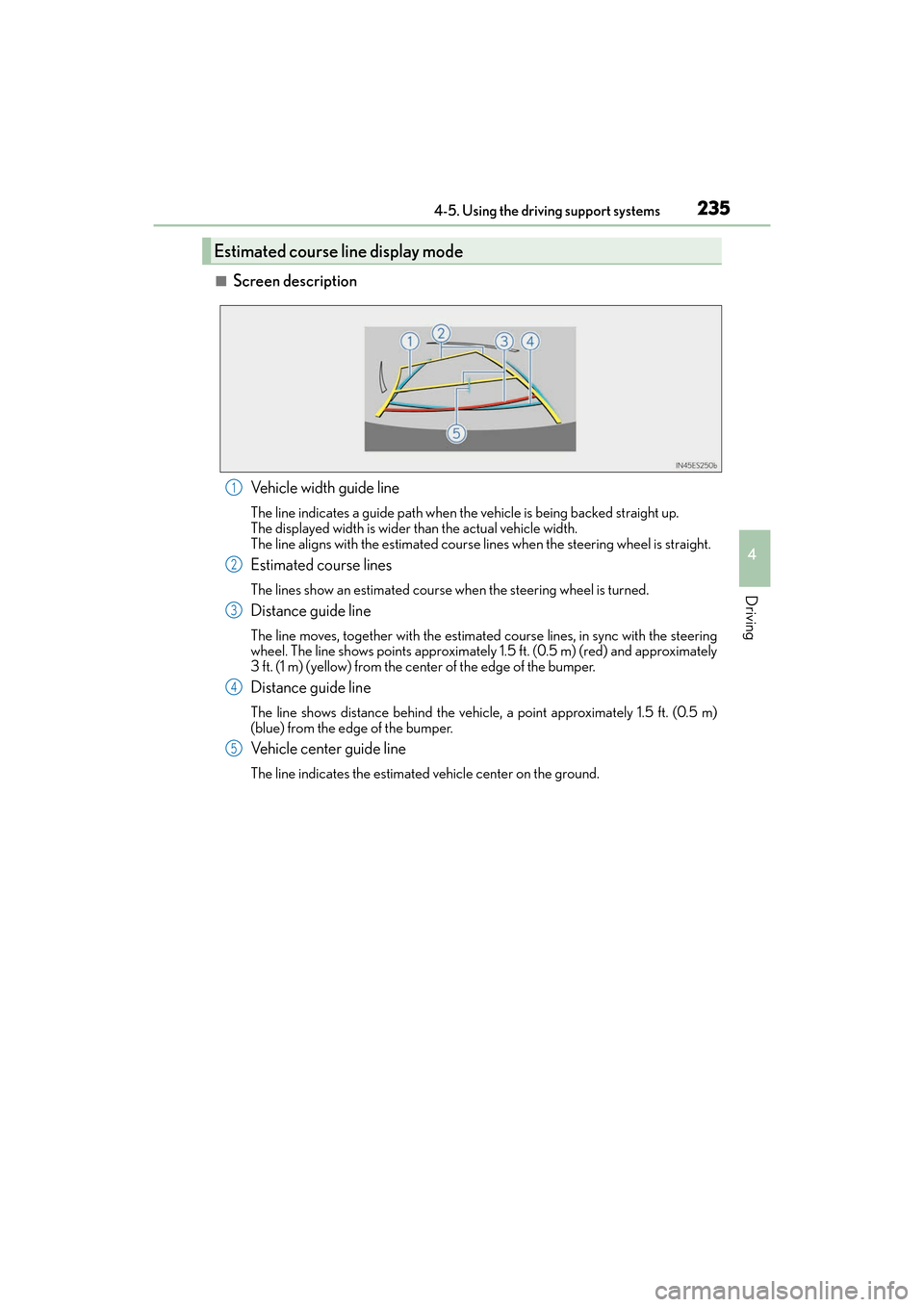
■Screen descriptionVehicle width guide line
The line indicates a guide path when the vehicle is being backed straight up.
The displayed width is wider than the actual vehicle width.
The line aligns with the estimated course lines when the steering wheel is straight.
Estimated course lines
The lines show an estimated course when the steering wheel is turned.
Distance guide line
The line moves, together with the estimated course lines, in sync with the steering
wheel. The line shows points approximately 1.5 ft. (0.5 m) (red) and approximately
3 ft. (1 m) (yellow) from the center of the edge of the bumper.
Distance guide line
The line shows distance behind the vehicle, a point approximately 1.5 ft. (0.5 m)
(blue) from the edge of the bumper.
Vehicle center guide line
The line indicates the estimated vehicle center on the ground.
Estimated course line display mode
1
2
3
4
5
Page 271 of 584

269
ES350_OM_OM33C68U_(U)
Lexus Display Audiosystem
5
5-7. Connecting Bluetooth®
Steps for using Bluetooth®
devices ..........................................318
Registering a Bluetooth
®
device .......................................... 320
Selecting a Bluetooth
®
device ............................................ 321
Connecting a Bluetooth
®
audio player ...............................322
Connecting a Bluetooth
®
phone ...........................................323
Displaying a Bluetooth
®
device details ............................ 324
Detailed Bluetooth
®
settings.........................................325
5-8. Bluetooth
® Audio
Listening to Bluetooth
®
Audio ............................................328
5-9. Bluetooth
® Phone
Using a Bluetooth
®
Phone ...........................................329
Making a call ................................. 331
Receiving a call ...........................334
Speaking on the phone ............335
Using a Bluetooth
®
phone message ........................ 337
Using the steering wheel switches .......................................339
Bluetooth
® phone
settings........................................ 340 5-10. Phonebook
Contact settings ......................... 342
Messaging setting...................... 345
5-11. Bluetooth
®
What to do if... (Troubleshooting).................... 346
Bluetooth
®...................................350
5-12. Other function “Information” screen ................. 356
USB photo ....................................358
Weather information ................360
Voice command system ............361
Page 278 of 584

276
ES350_OM_OM33C68U_(U)5-1. Basic Operations
Steering wheel audio switches
Volume switch
• Increases/decreases volume
• Press and hold: Continuously increases/decreases volume
Radio mode: • Press: Select a radio station
• Press and hold: Seek up/down
CD, MP3/WMA/AAC disc, Bluetooth
®, iPod or USB mode:
• Press: Select a track/file/video
• Press and hold (except iPod): Quickly move up/down through tracks/files/ videos.
“MODE” switch • Turns the power on, selects audio source
• Press and hold this switch to mute or pause the current operation. To can- cel the mute or pause, press and hold.
Some audio features can be controlle d using the switches on the steering
wheel.
Operation may differ depending on the type of audio system or navigation
system. For details, refer to the manual provided with the audio system or nav-
igation system.
Operating the audio system us ing the steering wheel switches
1
2
WA R N I N G
■To reduce the risk of an accident
Exercise care when operating the audio switches on the steering wheel.
3
Page 279 of 584

277
ES350_OM_OM33C68U_(U)5-1. Basic Operations
5
Lexus Display Audio system
Mobile Assistant
Press and hold the off hook switch
until you hear the beeps that indicate
the system is listening.
The Mobile Assistant can be used
only when the neighboring screen is
displayed.
To cancel the Mobile Assistant, select
“Cancel”, or press and hold the off hook
switch.
To restart the Mobile Assistant for addi-
tional commands, press the off hook
switch. Mobile Assistant can only be
restarted after the system responds to a
voice command. After some phone and
music commands, the Mobile Assistant
feature will automatically end to com-
plete the requested action.
The Mobile Assistant feature will activate Apple’s Siri Eyes Free mode via
the steering wheel switches. To operate the Mobile Assistant, a compatible
cellular phone must be registered and connected to this system via
Bluetooth
. ( → P. 3 1 8 )
1
2
Page 280 of 584

2785-1. Basic Operations
ES350_OM_OM33C68U_(U)
■Adjusting the volume
The volume of the Mobile Assistant can be adjusted using the
“PWR·VOL” knob or
steering wheel volume switches. The Mobile Assistant and phone call volumes are syn-
chronized.
■Microphone
It is not necessary to speak directly into the microphone when using the Mobile Assis-
tant.
●Wait for the listening beeps before using the Mobile Assistant.
●The Mobile Assistant may not recognize commands in the following situations:
• When spoken too quickly.
• When spoken at a low or high volume.
• When the roof or windows are open.
• When passengers are talking while th e Mobile Assistant is being used.
• When the air conditioning system’s fan speed is set high.
• When the air conditioning vents are turned toward the microphone.
■Mobile Assistant precautions
●The available features and functions may vary based on the iOS version installed on the
connected device.
●Some Siri features are limited in Eyes Free mode. If you attempt to use an unavailable
function, Siri will inform you that the function is not available.
●If Siri is not enabled on the ce llular phone connected via Bluetooth, an error message
will be displayed on the screen.
●While a phone call is active, the Mobile Assistant cannot be used.
●If using the navigation feature of the cellular phone, ensure the active audio source is
Bluetooth audio or iPod in order to hear turn by turn direction prompts.