361
ES350_OM_OM33C68U_(U)5-12. Other function
5
Lexus Display Audio system
Voice command system
Press the talk switch.
To cancel the voice command system,
press and hold the talk switch.
After a beep sounds, say the desired
command.
On the list screen, you can select the
desired command.
■Menu screen
To display the menu screen, move the controller to the left.
The voice command system enables the audio and hands-free systems to be
operated using voice commands.
Operations of the voice command system
can be performed by selecting the
menu corresponding to each function on the right part of the screen. Even if
any menu is selected, commands displayed on all menus can be operated.
Using the voice command system
1
2
X“Hints” screenXExcept “Hints” screen
Offer examples of commands and operation methods
Adjust the settings for voice guidance volume and voice recognition
prompts. Select to train voice recognition. (“Hints” screen) ( →P. 2 8 6 )
Start over voice recognition (except “Hints” screen)
Cancel voice recognition
1
2
3
4
Page 365 of 584
ES350_OM_OM33C68U_(U)
3635-12. Other function
5
Lexus Display Audio system
■Expression examples for each function
*: Say the desired artist name or album name in the place of the “<>”.
Some recognizable voice commands and their actions are shown below as
examples.
XBasic
CommandExpression examples
“Call ”Get me .
I need to call at right away.
“Dial ”Please dial the number <3334445555>.
Ring <3334445555>.
“Play Artist ”Play the artist .
I’d like to hear the band .*
“Play Album ”Play album .
Music from album .
*
Command list
CommandAction
“Help”Prompts voice guidance to offer examples of com-
mands or operation methods
“Go Back”Returns to the previous screen
“Go to ”Displays the command list of the selected tab
Page 366 of 584
3645-12. Other function
ES350_OM_OM33C68U_(U)
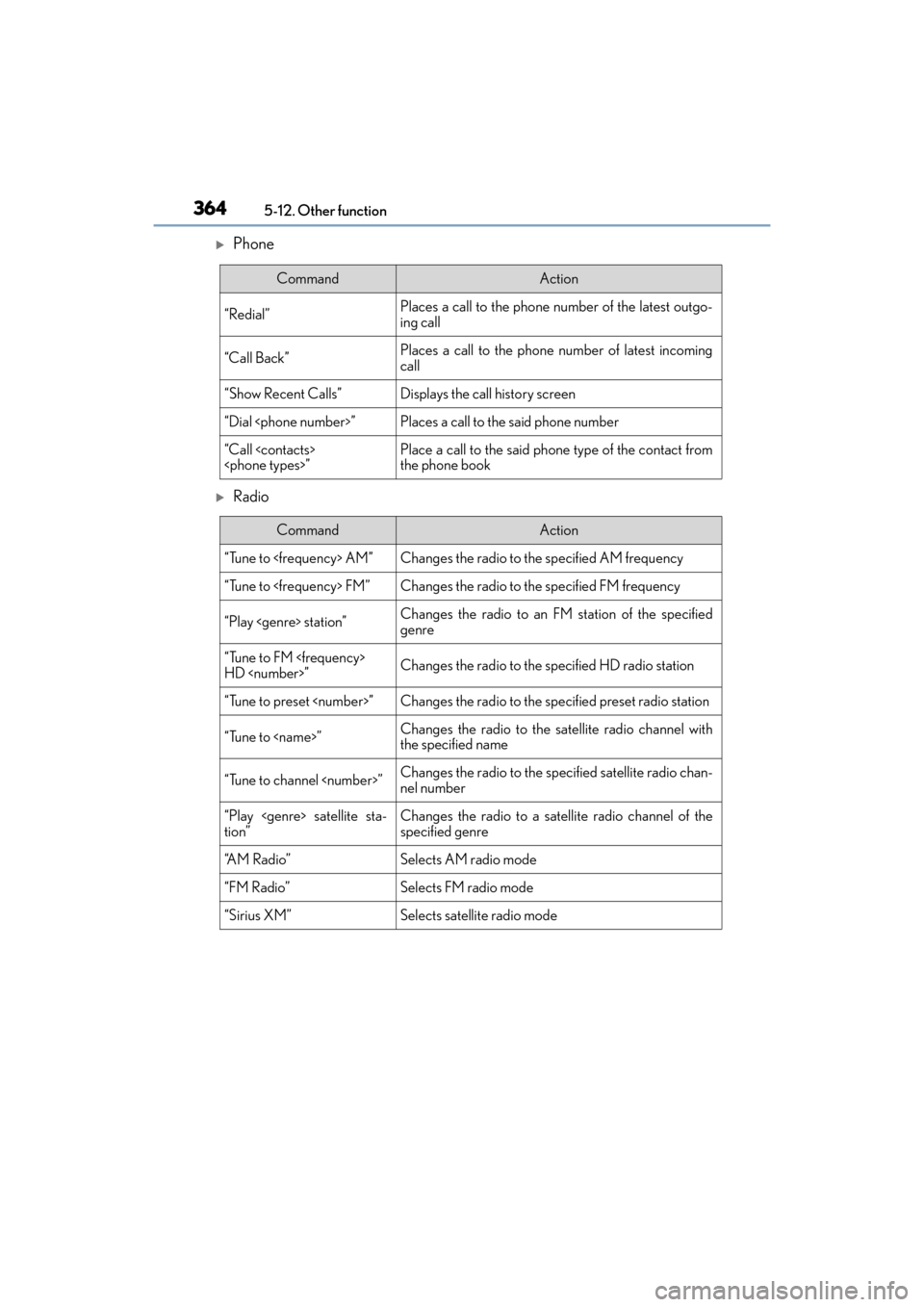
XPhone
XRadio
CommandAction
“Redial”Places a call to the phone number of the latest outgo-
ing call
“Call Back”Places a call to the phone number of latest incoming
call
“Show Recent Calls”Displays the call history screen
“Dial ”Places a call to the said phone number
“Call ”Place a call to the said phone type of the contact from
the phone book
CommandAction
“Tune to AM”Changes the radio to the specified AM frequency
“Tune to FM”Changes the radio to the specified FM frequency
“Play station”Changes the radio to an FM station of the specified
genre
“Tune to FM
HD ”Changes the radio to the specified HD radio station
“Tune to preset ”Changes the radio to the specified preset radio station
“Tune to ”Changes the radio to the satellite radio channel with
the specified name
“Tune to channel ”Changes the radio to the sp ecified satellite radio chan-
nel number
“Play satellite sta-
tion”Changes the radio to a sate llite radio channel of the
specified genre
“A M R a d i o ”Selects AM radio mode
“FM Radio”Selects FM radio mode
“Sirius XM”Selects satellite radio mode
Page 367 of 584
ES350_OM_OM33C68U_(U)
3655-12. Other function
5
Lexus Display Audio system
XAudio
XInfo
CommandAction
“Play Playlist ”Plays tracks from the selected playlist
“Play Artist ”Plays tracks from the selected artist
“Play Song ”Plays the selected track
“Play Album ”Plays tracks from the selected album
“Turn Music On/Off”Turns the audio system on/off
“Play the
Page 370 of 584
368
ES350_OM_OM33C68U_(U)6-1. Using the air conditio
ning system and defogger
Automatic air conditioning system
Air outlets and fan speed are automatically adjusted according to the temper-
ature setting.
Vehicles with Lexus Display Audio system: Press the “MENU” button on the
Lexus Display Audio controller, then select “Climate” to display the air condi-
tioning operation screen.
For details on the Lexus Display Audio controller, refer to “Lexus Display
Audio controller” on P. 272.
Vehicles with navigation system: Press the “MENU” button on the Remote
Touch, then select to display the air conditioning control screen.
For details on the Remote Touch, refer to the “NAVIGATION SYSTEM
OW N ER’S M A NUA L”.
Page 371 of 584
ES350_OM_OM33C68U_(U)
3696-1. Using the air conditioning system and defogger
6
Interior features
■Adjusting the temperature setting
Press to increase the temperature and to decrease the temperature.
■Adjusting the fan speed setting
Press to increase the fan speed and to decrease the fan speed.
Press the “OFF” button to turn the fan off.
■Change the airflow mode
To change the air outlets, press .
The air outlets used are switched each time the button is pressed.
Air flows to the upper body.
Air flows to the upper body and feet.
Air flows to the feet.
Air flows to the feet and the windshield defogger operates.
Control panel
XLexus Display Audio screenXNavigation system screen
1
2
3
4
Page 372 of 584
3706-1. Using the air conditioning system and defogger
ES350_OM_OM33C68U_(U)
XLexus Display Audio screen
Adjust the left-hand side tempera-
ture setting
Adjust the fan speed setting
Select to set auto mode on/off
Select to set cooling and dehumidifi-
cation function on/off
Adjust the temperature for driver
and passenger seats separately
(“DUAL” mode) ( →P. 3 7 2 )
Display the option control screen ( →P. 3 7 1 )
Select the air flow mode
Adjust the right-hand side temperature setting
XNavigation system screen
Adjust the left-hand side tempera-
ture setting
Adjust the fan speed setting
Select the air flow mode
Adjust the right-hand side tempera-
ture setting
Display the option control screen
( → P. 3 7 1 )
Select to set automatic mode on/off
Select to set cooling and dehu midification function on/off
Adjust the temperature for driver and passenger seats separately (“DUAL”
mode) (→ P. 3 7 2 )
Control screen
1
2
3
4
5
6
7
8
1
2
3
4
5
6
7
8
Page 373 of 584
ES350_OM_OM33C68U_(U)
3716-1. Using the air conditioning system and defogger
6
Interior features
■Option control screen
Select on the air conditioning control screen to display the option
control screen. The functions can be switched on and off.
Prevent ice from building up on the windshield and wiper blades (if
equipped) ( →P. 3 7 3 )
Remove pollen from the air (micro dust and pollen filter) ( →P. 3 7 3 )
■Using the automatic mode
Press the “AUTO” button.
Adjust the temperature setting.
To stop the operation, press the “OFF” button.
■Automatic mode indicator
If the fan speed setting or air flow modes are operated, the automatic mode
indicator goes off. However, automatic mode for functions other than that
operated is maintained.
XLexus Display Audio screenXNavigation system screen
Air conditioning controls
1
2
1
2
3