Page 74 of 612
721-2. Hybrid system
ES300h_OM_OM33C75U_(U)
There is an air intake vent beside the
rear left seat for the purpose of cooling
the hybrid battery (traction battery). If
the vent becomes blocked, the hybrid
battery may overheat, leading to a
reduction in hybrid battery output.
When a certain level of impact is detected by the impact sensor, the emergency
shut off system blocks the high voltage current and stops the fuel pump to mini-
mize the risk of electrocution and fuel leakage. If the emergency shut off system
activates, your vehicle will not restart. To restart the hybrid system, contact your
Lexus dealer.
A message is automatically displayed when a malfunction occurs in the hybrid
system or an improper operation is attempted.
If a warning message is shown on the
multi-information display, read the
message and follow the instructions.
Hybrid battery (traction battery) air intake vent
Emergency shut off system
Hybrid warning message
Page 77 of 612
751-2. Hybrid system
ES300h_OM_OM33C75U_(U)
1
For safety and security
NOTICE
■Hybrid battery (traction battery) air intake vent
●Do not place objects that will block the air intake vent. The hybrid battery (traction
battery) may overheat and be damaged.
●Clean the air intake vent regularly to prevent the hybrid battery (traction battery)
from overheating.
●Do not get water or foreign materials in the air intake vent as this may cause a short
circuit and damage the hybrid battery (traction battery).
●Do not carry large amounts of water such as water cooler bottles in the vehicle. If
water spills onto the hybrid battery (traction battery), the battery may be damaged.
Have the vehicle inspected by your Lexus dealer.
Page 80 of 612

781-3. Theft deterrent system
ES300h_OM_OM33C75U_(U)
Alarm
The alarm uses light and sound to give an alert when an intrusion is detected.
The alarm is triggered in the following situations when the alarm is set:
●A locked door is unlocked or opened in any way other than using the entry
function, wireless remote control or mechanical key. (The doors will lock again
automatically.)
●A locked trunk is unlocked or opened in any way other than using the entry
function or wireless remote control.
●The hood is opened.
Close the doors, trunk and hood, and
lock all the doors. The system will be set
automatically after 30 seconds.
The indicator light changes from being
on to flashing when the system is set.
Do one of the following to deactivate or stop the alarms:
●Unlock the doors or open the trunk using the entry function or wireless
remote control.
●Turn the power switch to ACCESSORY or ON mode, or start the hybrid sys-
tem. (The alarm will be deactivated or stopped after a few seconds.)
The alarm
Setting the alarm system
Deactivating or stopping the alarm
Page 81 of 612

791-3. Theft deterrent system
ES300h_OM_OM33C75U_(U)
1
For safety and security
■System maintenance
The vehicle has a maintenance-free type alarm system.
■Items to check before locking the vehicle
To prevent unexpected triggering of the alarm and vehicle theft, make sure of the follow-
ing:
●Nobody is in the vehicle.
●The windows and moon roof are closed before the alarm is set.
●No valuables or other personal items are left in the vehicle.
■Triggering of the alarm
The alarm may be triggered in the following situations:
(Stopping the alarm deactivates the alarm system.)
■Alarm-operated door lock
In the following cases, the door may automatically lock:
●When a person remaining in the vehicle unlocks the door and the alarm is activated.
●While the alarm is activated, a person remaining in the vehicle unlocks the door.
●When recharging or replacing the 12-volt battery.
●The trunk is unlocked using the mechanical
key.
●A person inside the vehicle opens a door, the
trunk or hood, or unlocks the vehicle using an
inside lock button.
●The 12-volt battery is recharged or replaced
when the vehicle is locked. (→P. 5 3 1 )
Page 88 of 612

86
ES300h_OM_OM33C75U_(U)2. Instrument cluster
Gauges and meters
The units used on the speedometer may differ depending on the target region.
Engine coolant temperature gauge
Displays the engine coolant temperature
Tachometer/Hybrid System Indicator
Tachometer:
Displays the engine speed in revolutions per minute.
Hybrid System Indicator:
Displays hybrid system output or regeneration level. (→
P. 8 8 )
Outside temperature
Displays the outside temperature within the range of -40 °F (-40 °C) to 122 °F
(50 °C). Low outside temperature indicator comes on when the ambient temperature
is 37 °F (3 °C) or lower.
Clock
Time can be adjusted or a clock format can be set from (settings display) of
the multi-information display. ( →P. 9 1 )
Multi-information display
Presents the driver with a variety of vehicle data ( →P. 9 1 )
Displays warning messages in case of a malfunction ( →P. 5 1 1 )
Speedometer
Displays the vehicle speed
Fuel gauge
Displays the quantity of fuel remaining in the tank
Shift position and shift range
Displays the selected shift position or selected shift range ( →P. 1 7 5 )
1
2
3
4
5
6
7
8
Page 96 of 612

94
ES300h_OM_OM33C75U_(U)2. Instrument cluster
The settings of the following items can be changed, refer to P. 562
For functions that can be enabled or disabled, the function switches between on and
off each time is pressed.
●(Lane Departure Alert with steering control) (if
equipped) (
→P. 2 1 7 )
●(Pre-Collision System) (if equipped) ( →P. 2 0 5 )
●AFS (Adaptive Front-lighting System) (if equipped) ( →P. 1 8 3 )
●Clock
Adjusts the hour and minute of the clock on the multi-information display.
●Ambient illumin.
Select to turn the ornament lights on and off.
●Ve h i c l e S e t t i n g s
• Scheduled Maintenance ( →P. 441)
• Oil Maintenance ( →P. 4 5 5 )
●Meter Settings
•Language
Select to change the language on the display.
•Units
Select to change the unit of measure.
• EV indicator
Select to activate/deactivate the EV indicator.
• switch
Displays a procedure to register a desired screen to .
You can register 1 screen as a shortcut , which can be displayed by pressing .
• Drive information 1 /2 /3
Select to select up to 2 items that will be displayed on a Drive information
screen, up to 3 Drive information screens can be set.
•Pop-up display
Select to set the pop-up displays, which may appear in some situations, on/off.
• Accent color
Select to change the accent colors on the screen, such as the cursor color.
• Tachometer
Select to set the tachometer display.
• Default settings
Registered or changed meter settings will be deleted or returned to their
default setting.
Settings display
Page 105 of 612
103
ES300h_OM_OM33C75U_(U)
3
Operation of
each component
3-1. Key information
Keys .................................................. 104
3-2. Opening, closing and locking the doors and trunk
Doors ............................................... 108
Trunk ................................................... 114
Smart access system with push-button start .............. 121
3-3. Adjusting the seats Front seats.......................................129
Driving position memory ......... 130
Head restraints ............................ 135
3-4. Adjusting the steering wheel and mirrors
Steering wheel ............................. 138
Inside rear view mirror.............. 140
Outside rear view mirrors ........142
3-5. Opening, closing the windows and moon roof
Power windows .............................145
Moon roof ...................................... 148
Page 106 of 612
104
ES300h_OM_OM33C75U_(U)3-1. Key information
Keys
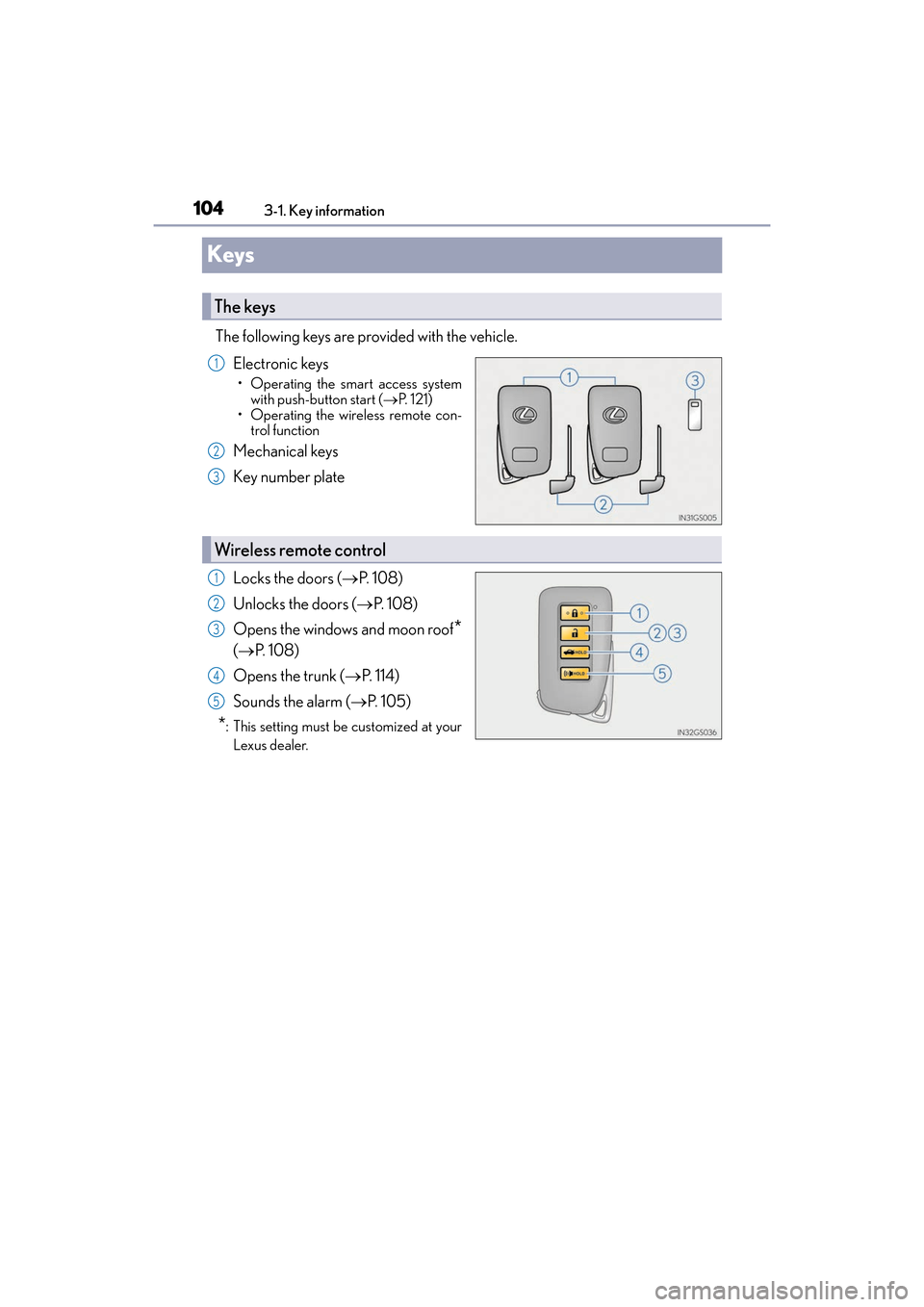
The following keys are provided with the vehicle.
Electronic keys
• Operating the smart access systemwith push-button start ( →P. 121)
• Operating the wireless remote con- trol function
Mechanical keys
Key number plate
Locks the doors ( →P. 1 0 8 )
Unlocks the doors ( →P. 1 0 8 )
Opens the windows and moon roof
*
( → P. 1 0 8 )
Opens the trunk ( →P. 114)
Sounds the alarm ( →P. 1 0 5 )
*: This setting must be customized at your
Lexus dealer.
The keys
1
2
3
Wireless remote control
1
2
3
4
5