Page 307 of 595
Audio system
545
✽ ✽NOTICE
• Up to 1,000 contacts saved in your
Bluetooth®Wireless Technology
phone can be downloaded into the
car contacts. Contacts that have
been downloaded to the car cannot
be edited or deleted on the phone.
• Mobile phone contacts are man- aged separately for each paired
Bluetooth
®Wireless Technology
device (max 5 devices x 1,000 con-
tacts each). Previously down-
loaded data is maintained even if
the Bluetooth
®Wireless
Technology device has been dis-
connected. (However, the contacts
and call history saved to the phone
will be deleted if a paired phone is
deleted.)
• It is possible to download contacts during Bluetooth
®streaming
audio.
• When downloading contacts, the icon will be displayed within the
status bar. (Continued)(Continued)
• It is not possible to begin down-
loading a contact list when the
contact download feature has been
turned off within the Bluetooth
®
Wireless Technology device. In
addition, some devices may
require device authorization upon
attempting to download contacts.
If downloading does not normally
occur, check the Bluetooth
®
Wireless Technology device set-
tings or the screen state.
• The contacts download feature may not be supported in some
mobile phones. For more informa-
tion of supported Bluetooth
®
devices and function support,
refer to your phone’s user manual.
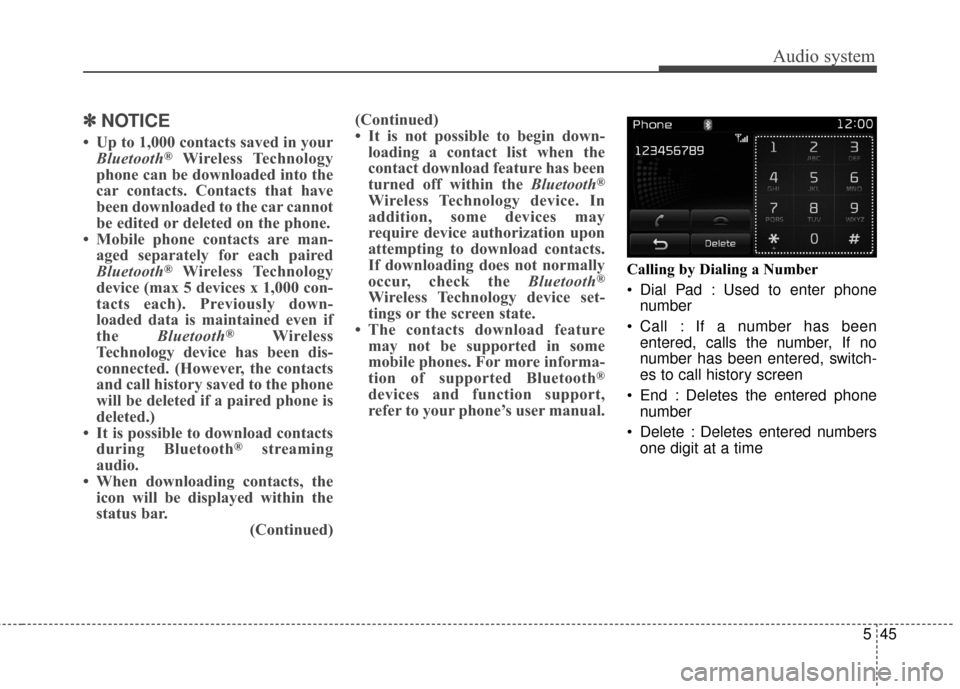
Calling by Dialing a Number
Dial Pad : Used to enter phone
number
Call : If a number has been entered, calls the number, If no
number has been entered, switch-
es to call history screen
End : Deletes the entered phone number
Delete : Deletes entered numbers one digit at a time
Page 308 of 595
Audio system
46
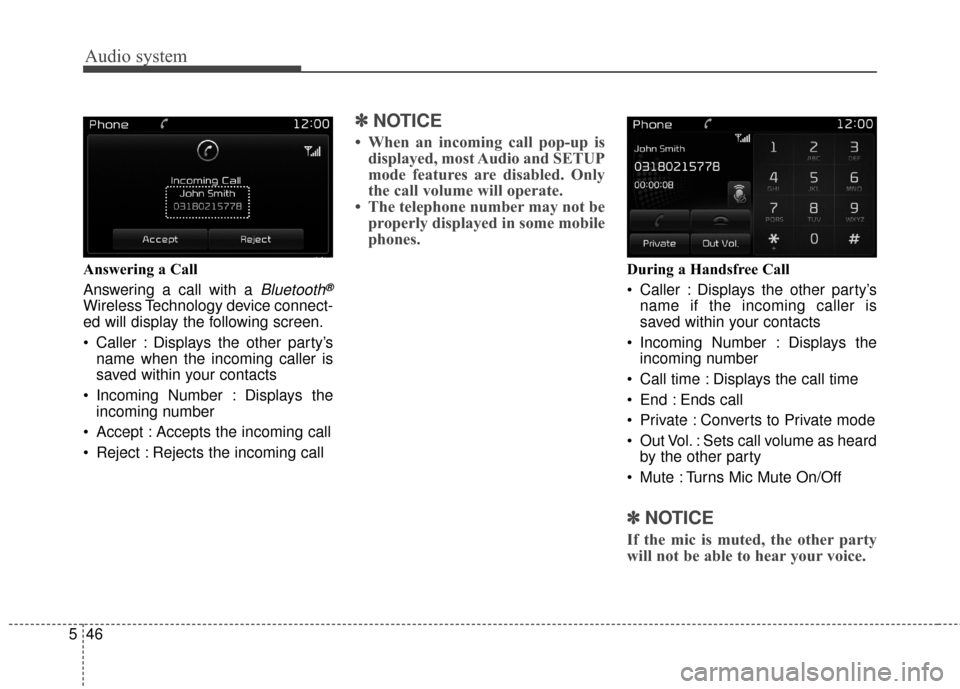
5 Answering a Call
Answering a call with a
Bluetooth®
Wireless Technology device connect-
ed will display the following screen.
Caller : Displays the other party’s
name when the incoming caller is
saved within your contacts
Incoming Number : Displays the incoming number
Accept : Accepts the incoming call
Reject : Rejects the incoming call
✽ ✽ NOTICE
• When an incoming call pop-up is
displayed, most Audio and SETUP
mode features are disabled. Only
the call volume will operate.
• The telephone number may not be properly displayed in some mobile
phones.
During a Handsfree Call
Caller : Displays the other party’s
name if the incoming caller is
saved within your contacts
Incoming Number : Displays the incoming number
Call time : Displays the call time
End : Ends call
Private : Converts to Private mode
Out Vol. : Sets call volume as heard by the other party
Mute : Turns Mic Mute On/Off
✽ ✽ NOTICE
If the mic is muted, the other party
will not be able to hear your voice.
Page 309 of 595
![KIA Sportage 2017 QL / 4.G Owners Manual Audio system
547
Voice Recognition Mode
Using Voice Recognition
Starting Voice Recognition
Shortly press the button on the
steering wheel controls. Say a com-
mand.
If prompt feedback is in [ON], th](/manual-img/2/2985/w960_2985-308.png "KIA Sportage 2017 QL / 4.G Owners Manual Audio system
547
Voice Recognition Mode
Using Voice Recognition
Starting Voice Recognition
Shortly press the button on the
steering wheel controls. Say a com-
mand.
If prompt feedback is in [ON], th")
Audio system
547
Voice Recognition Mode
Using Voice Recognition
Starting Voice Recognition
Shortly press the button on the
steering wheel controls. Say a com-
mand.
If prompt feedback is in [ON], then
the system will say “Please say a
command after the beep (BEEP)”
If prompt feedback is in [ON]mode, then the system will only
say “(BEEP)”
To change Prompt Feedback [ON]/[OFF], go to [SETUP] �
[System] �[Prompt Feedback]
For proper recognition, say the com-
mand after the voice instruction and
beep tone.
✽ ✽ NOTICE
Contact List Best Practices
1) Do not store single-name entries
(e.g., “Bob”, “Mom”, “Kim” etc.).
Instead, always use full names
(including first and last names)
for all contacts (e.g., use “Jacob
Stevenson” instead of “Dad”).
2) Do not use abbreviations (i.e., use “Lieutenant” instead of “Lt.” or
“Sergeant” instead of “Sgt.”).
3) Do not use acronyms (i.e., use “County Finance Department”
instead of “CFD”).
4) Do not use special characters (e.g., “@”, “hyphen -”, “aster-
isk*”, “ampersand &”).
5) If a name is not recognized from the contact list, change it to a
more descriptive name (e.g., use
“Grandpa Joseph” instead of “Pa
Joe”).
Skipping Prompt Messages
While prompt message is being stat-
ed �Shortly press the button on
the steering wheel controls.
The prompt message is immediately
ended and the beep tone will sound.
After the “Beep”, say the voice com-
mand.
Re-starting Voice Recognition
While system waits for a command
� Shortly press the button on the
steering wheel controls.
The command wait state is immedi-
ately ended and the beep tone will
sound. After the “Beep”, say the
voice command.
Page 310 of 595
Audio system
48
5
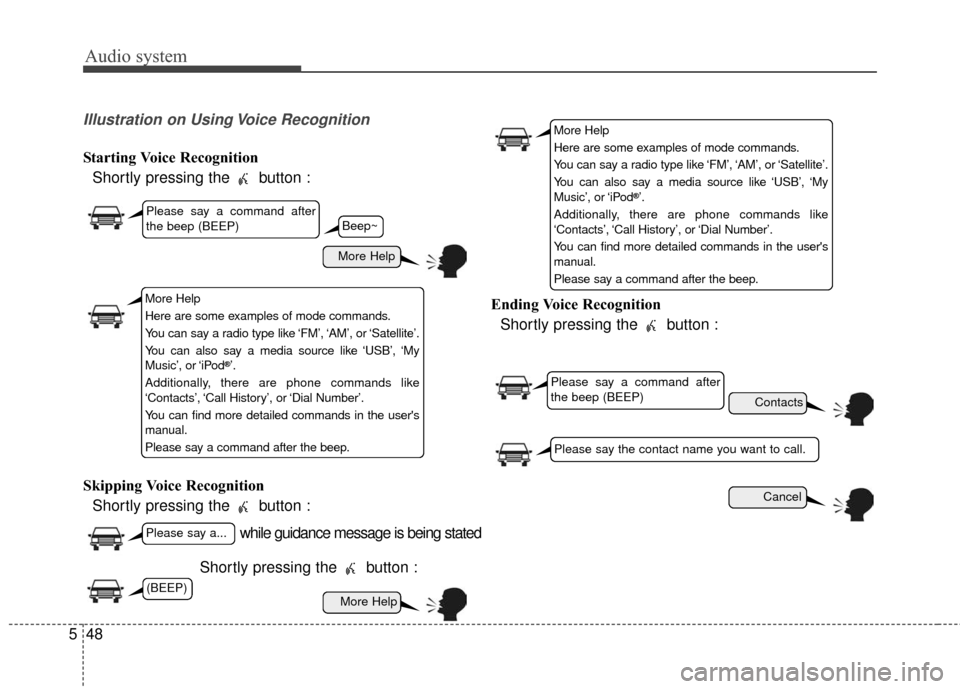
Illustration on Using Voice Recognition
Starting Voice Recognition
Shortly pressing the button :
Skipping Voice Recognition Shortly pressing the button :
Shortly pressing the button : Ending Voice Recognition
Shortly pressing the button :
while guidance message is being stated
More Help
Contacts
Cancel
More Help
Please say a command after
the beep (BEEP)
Please say a...
Please say the contact name you want to call.
Beep~
More Help
Here are some examples of mode commands.
You can say a radio type like ‘FM’, ‘AM’, or ‘Satellite’.
You can also say a media source like ‘USB’, ‘My
Music’, or ‘iPod
®’.
Additionally, there are phone commands like
‘Contacts’, ‘Call History’, or ‘Dial Number’.
You can find more detailed commands in the user's
manual.
Please say a command after the beep.
More Help
Here are some examples of mode commands.
You can say a radio type like ‘FM’, ‘AM’, or ‘Satellite’.
You can also say a media source like ‘USB’, ‘My
Music’, or ‘iPod
®’.
Additionally, there are phone commands like
‘Contacts’, ‘Call History’, or ‘Dial Number’.
You can find more detailed commands in the user's
manual.
Please say a command after the beep.
Please say a command after
the beep (BEEP)
(BEEP)
Page 311 of 595
Audio system
549
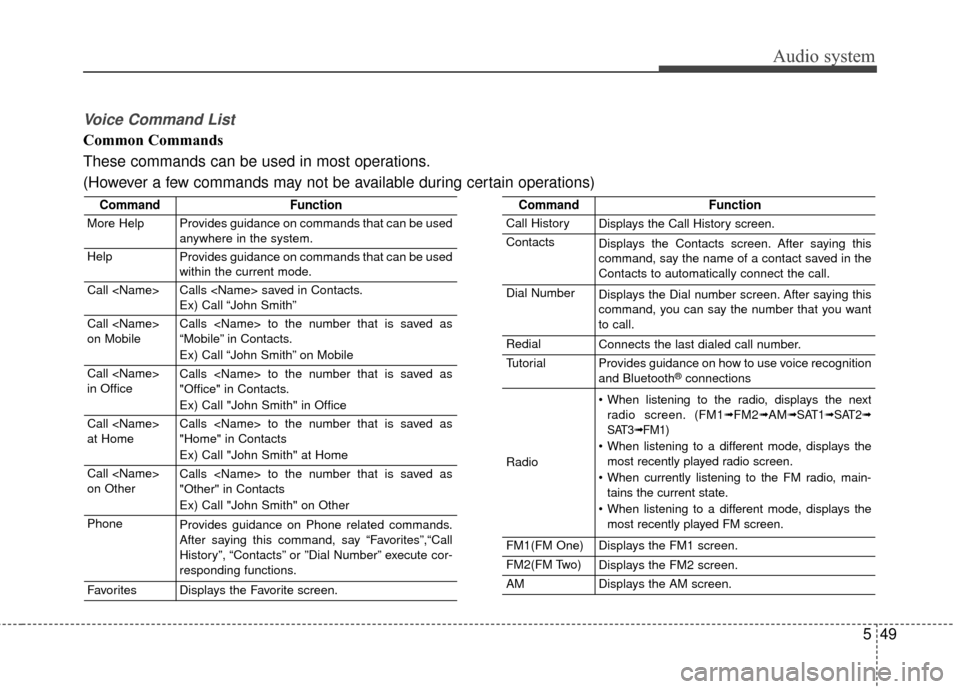
Voice Command List
Common Commands
These commands can be used in most operations.
(However a few commands may not be available during certain operations)
CommandFunction
More HelpProvides guidance on commands that can be used
anywhere in the system.
HelpProvides guidance on commands that can be used
within the current mode.
Call Calls saved in Contacts.
Ex) Call “John Smith”
Call
on MobileCalls to the number that is saved as
“Mobile” in Contacts.
Ex) Call “John Smith” on Mobile
Call
in OfficeCalls to the number that is saved as
"Office" in Contacts.
Ex) Call "John Smith" in Office
Call
at HomeCalls to the number that is saved as
"Home" in Contacts
Ex) Call "John Smith" at Home
Call
on OtherCalls to the number that is saved as
"Other" in Contacts
Ex) Call "John Smith" on Other
PhoneProvides guidance on Phone related commands.
After saying this command, say “Favorites”,“Call
History”, “Contacts” or ”Dial Number” execute cor-
responding functions.
FavoritesDisplays the Favorite screen.
CommandFunction
Call HistoryDisplays the Call History screen.
ContactsDisplays the Contacts screen. After saying this
command, say the name of a contact saved in the
Contacts to automatically connect the call.
Dial NumberDisplays the Dial number screen. After saying this
command, you can say the number that you want
to call.
RedialConnects the last dialed call number.
TutorialProvides guidance on how to use voice recognition
and Bluetooth®connections
Radio
When listening to the radio, displays the nextradio screen. (FM1➟FM2➟AM➟ SAT1➟ SAT2➟
SAT3➟ FM1)
When listening to a different mode, displays the most recently played radio screen.
When currently listening to the FM radio, main- tains the current state.
When listening to a different mode, displays the most recently played FM screen.
FM1(FM One)Displays the FM1 screen.
FM2(FM Two)Displays the FM2 screen.
AMDisplays the AM screen.
Page 312 of 595
Audio system
50
5
CommandFunction
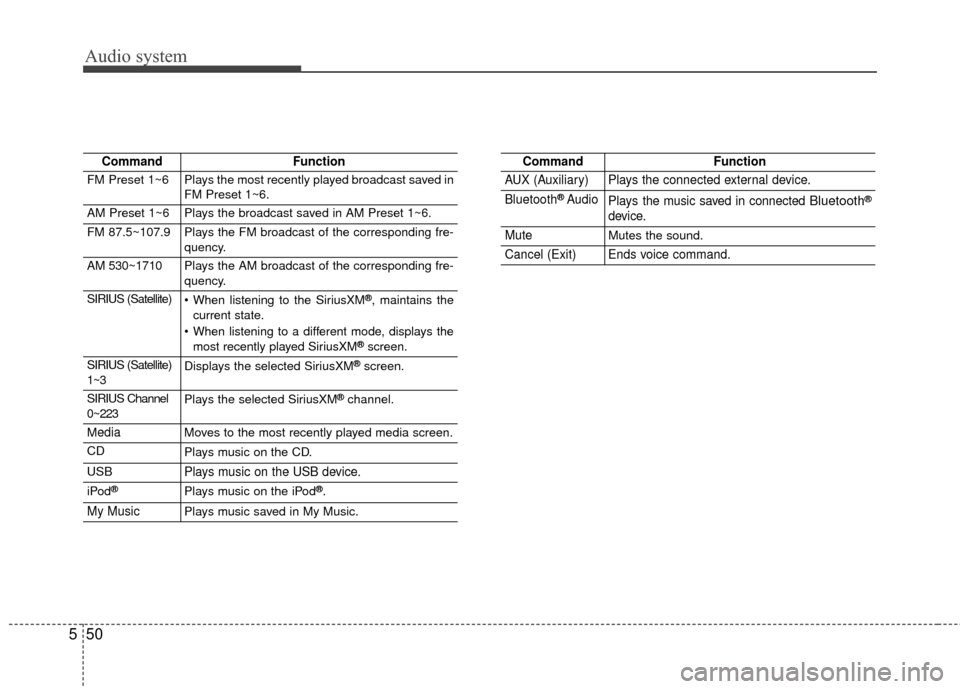
FM Preset 1~6Plays the most recently played broadcast saved in
FM Preset 1~6.
AM Preset 1~6Plays the broadcast saved in AM Preset 1~6.
FM 87.5~107.9Plays the FM broadcast of the corresponding fre-
quency.
AM 530~1710Plays the AM broadcast of the corresponding fre-
quency.
SIRIUS (Satellite) When listening to the SiriusXM®, maintains the
current state.
When listening to a different mode, displays the most recently played SiriusXM
®screen.
SIRIUS (Satellite)
1~3Displays the selected SiriusXM®screen.
SIRIUS Channel
0~223Plays the selected SiriusXM®channel.
MediaMoves to the most recently played media screen.
CDPlays music on the CD.
USBPlays music on the USB device.
iPod®Plays music on the iPod®.
My MusicPlays music saved in My Music.
CommandFunction
AUX (Auxiliary)Plays the connected external device.
Bluetooth®AudioPlays the music saved in connected Bluetooth®
device.
MuteMutes the sound.
Cancel (Exit)Ends voice command.
Page 313 of 595
Audio system
551
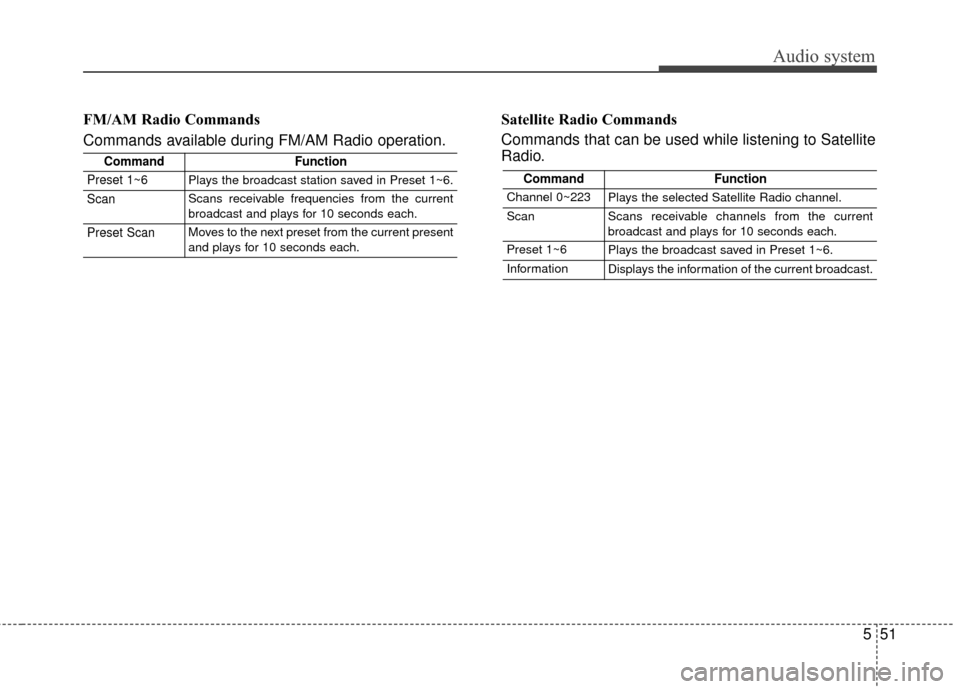
FM/AM Radio Commands
Commands available during FM/AM Radio operation.Satellite Radio Commands
Commands that can be used while listening to Satellite
Radio.
CommandFunction
Preset 1~6Plays the broadcast station saved in Preset 1~6.
ScanScans receivable frequencies from the current
broadcast and plays for 10 seconds each.
Preset ScanMoves to the next preset from the current present
and plays for 10 seconds each.
CommandFunction
Channel 0~223Plays the selected Satellite Radio channel.
ScanScans receivable channels from the current
broadcast and plays for 10 seconds each.
Preset 1~6Plays the broadcast saved in Preset 1~6.
InformationDisplays the information of the current broadcast.
Page 314 of 595
Audio system
52
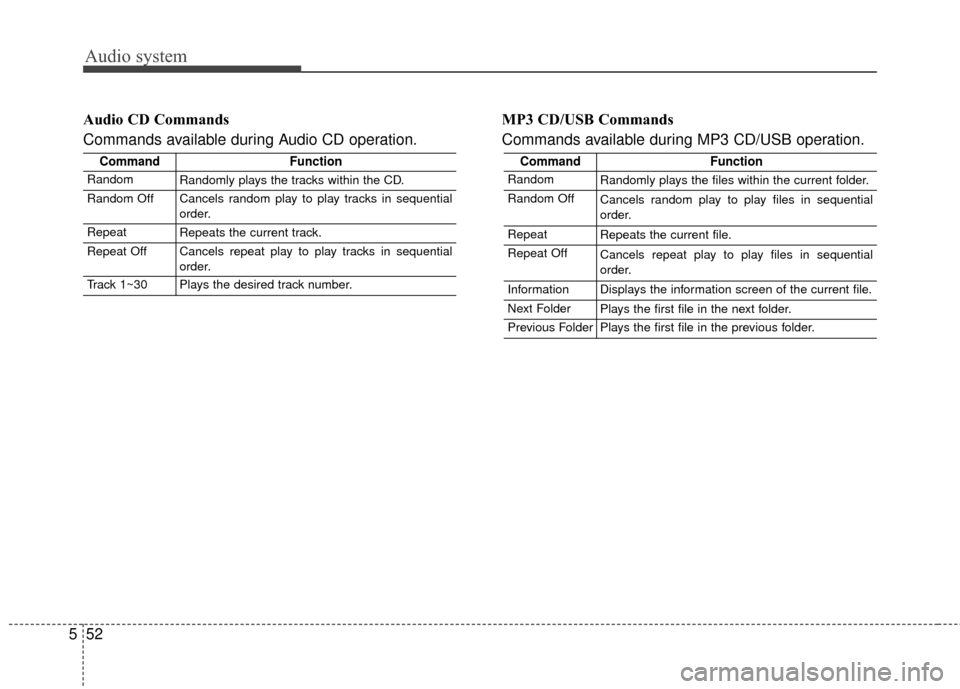
5 Audio CD Commands
Commands available during Audio CD operation.
MP3 CD/USB Commands
Commands available during MP3 CD/USB operation.
CommandFunction
RandomRandomly plays the files within the current folder.
Random OffCancels random play to play files in sequential
order.
RepeatRepeats the current file.
Repeat OffCancels repeat play to play files in sequential
order.
InformationDisplays the information screen of the current file.
Next FolderPlays the first file in the next folder.
Previous FolderPlays the first file in the previous folder.
CommandFunction
RandomRandomly plays the tracks within the CD.
Random OffCancels random play to play tracks in sequential
order.
RepeatRepeats the current track.
Repeat OffCancels repeat play to play tracks in sequential
order.
Track 1~30Plays the desired track number.